
Bedrock AgentCore - Equip Your AI Agent With Short/Long-Term Memory Leveraging AgentCore Memory With a Few Lines of Code
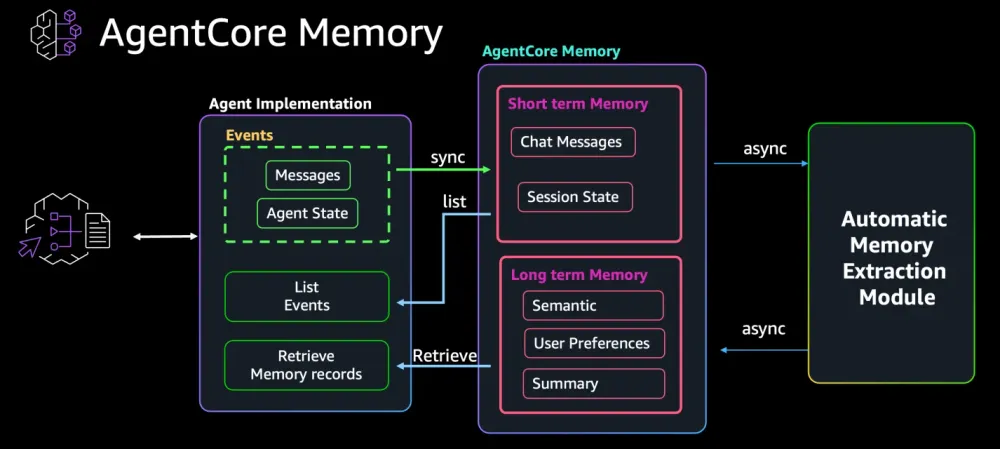
AI Agents are a lot more powerful when they can keep track of conversational turns (short-term memory) and semantic fasts, user-preferences, and conversation summaries using (long-term memory). In this blog post you will get to learn how to add short-term and long-term memory to our AI Agent leveraging Bedrock AgentCore Memory

Introduction
An AI Agent without memory is like a Godfish, every interaction is a new conversation. In this blog we will work to make our agent lose its Goldfish status and start having some memory, even better a memory that dynamically track
session_id , user_id . There are two main memory types you would want your AI Agent to have, short-term memory, and long-term memory. We will discuss the difference and why you need them both here before we get building.Short-term memory: It tracks the user
session_id and stores conversational turns in raw format. The objective is to make our agent aware of the conversational flow and what has been discussed of context. Long-term memory: It tracks the
actor_id , in most cases aligned with the user_id but could also be a team_id or a topic_id , etc., as needed. Long term memory intends to keep track of long term actor_id related elements, could be factual elements, preferences, summaries, or custom elements. This constitutes processed information extracted from the conversation using a LLM, either by a standard template to address a specific element, preference for example, or can be a custom extraction module. The extracted output is stored for each specific actor_id in an embeddings database. During future conversations those long term memory elements can be extracted through vector search and added to the context as needed.
AgentCore Memory aims to simplify the implementation of agent memory through a managed offering where you can add memory to your agent with a few lines of code without having to build or maintain a memory store, or even have to create an extraction module. All what you need to do is say I need memory, what memory strategy you want to use, what actor_id you would like to track, and there you have it. Just like magic!
Agent Core supports both shorty-term and long-term memory. As for long term memory you get to choose from multiple per-configured available strategies, or even create your own custom strategy if you wish. Here are the different strategy options available with some hints of when to use them
- Preferences: Predefined prompts that extract
actor_idpreferences. This can be used in use cases where tracking user preference to personalize their experience is the goal
- Semantic: Predefined strategy aimed at extracting factual information. This can be used in use cases where you care about tracking orders, invoices, bookings, etc
- Summarization: Predefined strategy aimed at extracting conversational summaries for a specific actor_id. Use this when tracking the overall context over a number of conversations is your goal. Example is customer support cases in call centers
- Custom: When your needs are specialized and you would like to craft your own extraction prompt
To use the short-term memory, you can directly interact with the memory using CreateEvent, GetEvent, ListEvent, and DeletEvent referenced in the documentation here . For Long-term memory you can use RetrieveMemoryRecords, ListMemoryRecords, and DeleteMemoryRecords found in the documentation reference here
In our build setup, and since we are using Strands Agent, we will leverage
AgentCoreMemoryToolProvider . It will significantly simplify the setup for us. It basically brings the long_term memory in as a tool for your agent to use. Here is a doc reference for details Let's get building!
Adding Memory to our agent
In my first blog, Bedrock AgentCore - Understand AgentCore and Build Your First AgentCore AI Agent in Under an Hour we prepared an environment "myenv" and launched our first agent into runtime. Then in my second blog, Bedrock AgentCore - MCPfy Your Existing Lambdas/APIs by Equipping Your AI Agent With an AgentCore Gateway we added an AgentCore Gateway and tools to our agent. Here we are going to use the same project environment that we have created and add memory to our agent.
1- Creating an AgentCore Memory
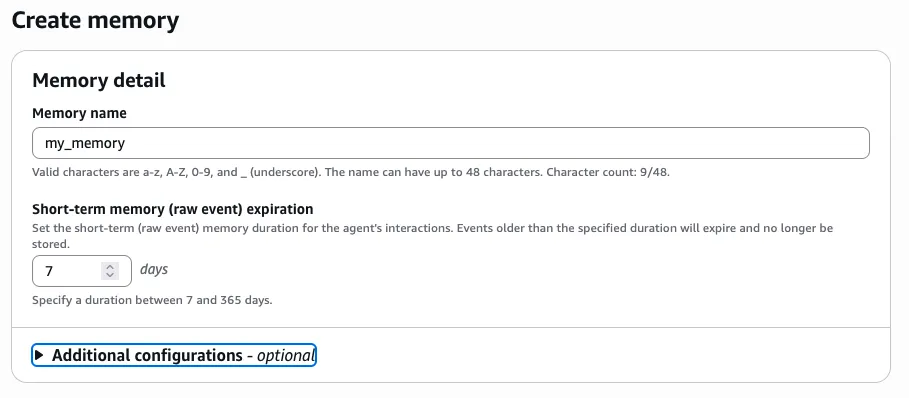
First we star by creating a memory. We will use the Bedrock AgentCore Console to do that .
Staring with a short-term memory:
Then we add a long_term memory:

We have selected a user preferences strategy that will capture preference for each
actorid and will story the preferences in a location that is aligned with the memoryStrategyId and actorid, at memory location /strategies/{memoryStrategyId}/actors/{actorId} 2- Get memory parameters
Here we will import
AgentCoreMemoryToolProvider from strands_tools.agent_core_memory and get the memory related parameters we need from the memory we just created, then add the memory definition to our code plaintext
# Import AgentCoreMemoryToolProviderfrom strands_tools.agent_core_memory import AgentCoreMemoryToolProvider# Memory parametersmemory_id_configuration = "your-memory_id"memory_strategy_id = "your-memory_strategy_id"
3- Add our memory to the run_agent function
Update our run_agent function to include session_id and user_id as required inputs, add a memory provider definition, then add the memory to our agent. Here is a sample updated code for run-agent
plaintext
# Parameters for memory providermemory_id = memory_id_configurationmemoryStrategyId = memory_strategy_id# run_agent to include our memory definition and add memory to our agentdef run_agent(mcp_url: str, access_token: str, user_id: str, session_id: str, user_message: str):try:mcp_client = MCPClient(lambda: create_streamable_http_transport(mcp_url, access_token))actorId=user_idstrands_provider = AgentCoreMemoryToolProvider(memory_id=memory_id,actor_id=user_id,session_id=session_id,namespace=f"/strategies/{memoryStrategyId}/actors/{actorId}",region="us-west-2")with mcp_client:tools = get_full_tools_list(mcp_client)tools = tools + strands_provider.toolsprint(f"Found the following tools: {[tool.tool_name for tool in tools]}")agent = Agent(model=bedrockmodel,tools=tools, callback_handler=None)print("\nThinking...\n")result = agent(user_message)return resultexcept Exception as e:print(f"Error in run_agent: {e}")return {"message": f"Error processing request: {str(e)}"}
4- Update our app decoration
Here we need to update our app decoration to fetch the user_id and session_id at run time. We will need to extract them at invocation time to use when we call our run_agent
plaintext
@app.entrypointdef invoke(payload):try:"""Process user input and return a response"""user_message = payload.get("prompt", "Hello")payload_user_id = payload.get("user_id", "default_user")payload_session_id = payload.get("session_id", "default_session")"""Parameters for memory provider """user_id = payload_user_idsession_id = payload_session_idresult = run_agent(mcp_url, access_token, user_id, session_id, user_message)return {"result": result.message}except Exception as e:return {"result": f"Error: {str(e)}"}if __name__ == "__main__":app.run()
5- Updating our repo and agent hosting
We are ready with our agent code, we can update our original repo we have created in our first blog of these series and update agent hosting, once we do we are good to go.
6- Testing our agent memory
We will need to modify our invoke.py file. Our invoke call needs to include
session_id and user_id . Our code pulls the session_id and user_id from the payload itself , we will need to add them to the payload as well as the header. The header session_id controlls the microVM that runs the agent code in AgentCore Runtime plaintext
import boto3import jsonagent_core_client = boto3.client('bedrock-agentcore', region_name='us-west-2')payload = json.dumps({"prompt":"I like apples?", "user_id":"your-user-id-156", "session_id":"your-session-id-123ljldkfjljfghgjslkfjslfk798789797979879"})response = agent_core_client.invoke_agent_runtime(agentRuntimeArn='arn:aws:bedrock-agentcore:us-west-2:409945352356:runtime/agent_memory_gateway_1-D2vX2I4LhM',runtimeSessionId='your-session-id-123ljldkfjljfghgjslkfjslfk798789797979879', # Must be 33+ charsruntimeUserId= 'your-user-id-156',payload=payload,qualifier="DEFAULT")response_body = response['response'].read()response_data = json.loads(response_body)print("Agent Response:", response_data)
Next we will change the session_id in the prompt yet use the same user_id. Long-term memory with user preference should track the user_id across sessions , let's try this new invoke call
plaintext
import boto3import jsonagent_core_client = boto3.client('bedrock-agentcore', region_name='us-west-2')payload = json.dumps({"prompt":"I like oranges?", "user_id":"your-user-id-156", "session_id":"your-session-id-123ljldkfjljfghgjslkfjslfk798789797979880"})response = agent_core_client.invoke_agent_runtime(agentRuntimeArn='arn:aws:bedrock-agentcore:us-west-2:409945352356:runtime/agent_memory_gateway_1-D2vX2I4LhM',runtimeSessionId='your-session-id-123ljldkfjljfghgjslkfjslfk798789797979880', # Must be 33+ charsruntimeUserId= 'your-user-id-156',payload=payload,qualifier="DEFAULT")response_body = response['response'].read()response_data = json.loads(response_body)print("Agent Response:", response_data)
Let's wait a few minutes then change the session_id again, and for the same user_id check if the agent captured and remembers our preference
plaintext
import boto3import jsonagent_core_client = boto3.client('bedrock-agentcore', region_name='us-west-2')payload = json.dumps({"prompt":"Do you rememeber what fruits I like? also, tell me how you found and if you used any tool", "user_id":"your-user-id-156", "session_id":"your-session-id-123ljldkfjljfghgjslkfjslfk798789797979881"})response = agent_core_client.invoke_agent_runtime(agentRuntimeArn='arn:aws:bedrock-agentcore:us-west-2:409945352356:runtime/agent_memory_gateway_1-D2vX2I4LhM',runtimeSessionId='your-session-id-123ljldkfjljfghgjslkfjslfk798789797979881', # Must be 33+ charsruntimeUserId= 'your-user-id-156',payload=payload,qualifier="DEFAULT")response_body = response['response'].read()response_data = json.loads(response_body)print("Agent Response:", response_data)
Congratulations! Your agent now have access to memory. You have helped it lose its Goldfish status :)
Ready to take this up a notch higher?
Enjoyed reading this content? Let the author know!
Your likes, comments, shares, and saves help creators reach more builders.

Loading recommendations
Loading article