
Bedrock AgentCore - MCPfy Your Existing Lambdas/APIs by Equipping Your AI Agent With an AgentCore Gateway
In this blog post you will get to learn how to leverage AgentCore Gateway to MCPfy your existing Lambdas/APIs and introduce them as tools to your AI agent, all through a standard and MCP friendly interface.

Introduction
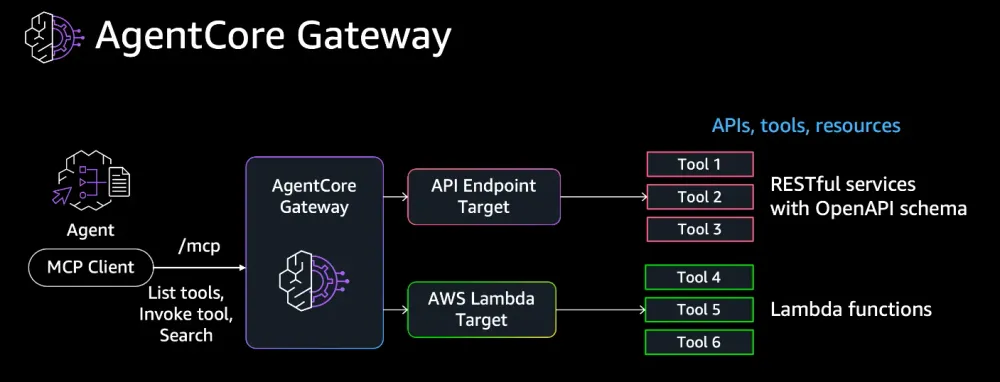
This blog is the second in a series that I am writing on Bedrock AgentCore. In the first blog " Bedrock AgentCore - Understand AgentCore and Build Your First AgentCore AI Agent in Under an Hour" we have prepared our build environment and launched our first AI Agent into AgentCore Runtime. In this blog we will start equipping our agent with tools through an AgentCore Gateway. The Gateway will acts as an MCP server that can serve access to tools backed by Lambda functions, and/or OpenAPI/Smithy APIs. For the sake of simplicity, we will use a dummy Lambda to demonstrate the concept.
Here we will also learn about AgenCore Gateway tools semantic search capabilities. In a nutshell, instead of passing all tools and their description to your agent to reason through, you can simply use the tools semantic search tool to pick the top matching tools for the ask, and only pass those to your agent. This should improve your system performance significantly, specially if you have hundreds of tools to choose from. Passing 5 tools to the agent instead of a couple of hundreds means you consume less tokens, have lower latency, a better chance to reason accurately avoiding a needle in the haystack problem, and finally you can use a much lighter LLM to do the reasoning which saves in cost as well as latency.
To summarize, an AgentCore Gateway is an easy way to MCPfy your Lambdas and APIs and expose them to your AI Agents through a standard MCP interface simplifying and scaling your ability to introduce tools to your agents. This indeed is a fast and scalable way to transform your legacy infrastructure (Lambdas and APIs) into GenAI friendly MCP accessible tools. The tools semantic search capability is the cherry on top!
Ready to have fun? Let's get building!
Attaching your first AgentCore Gateway to your AI Agent
We are going to use the same build environment "myenv" that we have created for our first agent that we launched using AgentCore Runtime in the first blog of this series here . We also have to make a choice whether we update our existing agent code and push a new version to the same repo or create a new repo for our updated agent. It is totally up to you how you do it. As our agent is evolving we can use the same repo, push a new code version, and point our AgentCore Runtime Agent to to the latest version including our Gateway.
For adding tools to our agent, we are going to go mainstream. We will leverage Stands Agent MCP client, where the AgentCore Gateway acting as an MCP server. Now our mission becomes much simpler. All what we need to do is "MCPfy" our Lambdas and APIs by connecting them to the Gateway. Once we do, they are available behind our MCP Sever Gateway and ready for our agent to access through an MCP Client.
We are going to test this concept using a Lambda function with a couple of tools, get_time and get_weather tools. Two elements are at play for this connection to work:
a- Access credentials: For our Gateway to be able to access our Lambda fucntion, we will need to add permissions to the role assumed by the AgentCore Gateway. As to OpenAPI APIs, or Smithy APIs, we can simply use an API key and leverage AgentCore Identity to exchange that key to a token.
b- Schema: This is how we tell our MCP Sever (AgentCore Gateway) what tools are available to use as we bring in an integration, include their descriptions, and highlight their required input parameters.

Let's start by creating our gateway
1- Creating an AgentCore Gateway
Let's create our first Gateway using this Python code and the Python SDK.
plaintext
# Let's first ensure we have our alias setup as before and activate our environmentsource ~/.bashrcsource ~/myenv/bin/activate# Ensure Python 3.11 what our python alias is pointing topython --versionShould show you are running python 3.11# Start python runtime to execute our comandspython# Once you are done with running your Python SDK commands you can exit usingexit (then enter)or Ctrl+D
plaintext
from bedrock_agentcore_starter_toolkit.operations.gateway.client import GatewayClientimport loggingclient = GatewayClient(region_name="us-west-2")client.logger.setLevel(logging.DEBUG)# Creating a cognito OAuth authorizercognito_response = client.create_oauth_authorizer_with_cognito("my-gateway-1")# Creating a gatweay using the cognito authorizer for its accessgateway = client.create_mcp_gateway(authorizer_config=cognito_response["authorizer_config"])# Creating a dummy lambda targetlambda_target = client.create_mcp_gateway_target(gateway=gateway, target_type="lambda")
The SDK simplifies the creation quite a bit.
- First, we are using
GatewayClient.create_oauth_authorizer_with_cognitoto create a Cognito Authorizer. Behind the scenes, this creates a user_pool, a Cognito app, and an app_client. This app_client is what our agent will use to access our gateway.
- Second, we create our Gateway using
GatewayClient.create_mcp_gatewayspecifying our Cognito Authorizer app_client as our authentication provider
- Third, we create a Lambda using
GatewayClient.create_mcp_gateway_target. Behind the scenes this creates our dummy lambda with a predetermined schema as an example schema, grants the Gateway IAM role access to this Lambda, and adds the Lambda function created to our AgentCore Gateway
- Last, this default configuration also enables tools semantic search by default. Behind the scenes this is done through the creation of an internal AgentCore Gateway tools search tool called
x_amz_bedrock_agentcore_search. This tool is**** powerd by a vector embeddings database that stores all the Gateway tools available along with their descriptions. The tool then runs a semantic vector search when a tool search is required. Then the internal search tool is made available to your agent, the agent can leverage this search tool to search for the most relevant tools for a specific task/ask.
This is how the default schema created for the dummy Lambda looks like. It basically defines out the
get_time and get_weather tools coded with static parameters for simplicity and demo perposesplaintext
{"lambdaArn": "<insert your lambda arn>","toolSchema": {"inlinePayload": [{"name": "get_weather","description": "Get weather for a location","inputSchema": {"type": "object","properties": {"location": {"type": "string","description": "the location e.g. seattle, wa"}},"required": ["location"]}},{"name": "get_time","description": "Get time for a timezone","inputSchema": {"type": "object","properties": {"timezone": {"type": "string"}},"required": ["timezone"]}}]}}
Obviously this a simplified way to see a working system and how its elements are interlinked. Should you wish to create a custom Gateway with your own authorizer you add your custom parameter, here is an example
plaintext
# create the gateway.gateway = client.create_mcp_gateway(name=None, # the name of the Gateway - if you don't set one, one will be generated.role_arn=None, # the role arn that the Gateway will use - if you don't set one, one will be created.authorizer_config=cognito_response["authorizer_config"], # the OAuth authorizer details for authorizing callers to your Gateway (MCP only supports OAuth).enable_semantic_search=True, # enable semantic search.)
You can also customize your target Lambda by adding a target_payload parameter. Here is an example of how a custom Lambda target can be created
plaintext
# create a lambda target.lambda_target = client.create_mcp_gateway_target(gateway=gateway,name=None, # the name of the Target - if you don't set one, one will be generated.target_type="lambda", # the type of the Target - you will see other target types later in the tutorial.target_payload=None, # the target details - set this to define your own lambda if you pre-created one. Otherwise leave this None and one will be created for you.credentials=None, # you will see later in the tutorial how to use this to connect to APIs using API keys and OAuth credentials.)
2- Keeping record of important parameters
Now, we need to collect some of the parameters that we will need to use when adding our AgentCore Gateway to our agent. You can get these parameters using the Cognito console and the AgentCore console
plaintext
# GateWay URL:mcp_url ="https://<YourGateway-ID>.gateway.bedrock-agentcore.us-west-2.amazonaws.com/mcp"# Cognito parameters:user_pool_id = "your_cognito_user_pool"# To get your client_id and Cleinet secret. Navidate to your user pool, use the left side bar to select App Client, then select the app client listed. Oce you do you should be able to see the client_id and client_secretclient_id = "your_cognito_user_pool_client_id"client_secret = "your_cogneto_client_secret"scopeString = "my-gateway-1/invoke"# To get your_userpool_domain, navigage to your userpool in the console and on the left side bar look for Branding/Domaintoken_endpoint = "https://<your_userpool_domain>.auth.us-west-2.amazoncognito.com/oauth2/token"
3- Adding our Gateway configuration to our Agent
We are going to start with our original agent_1.py file and add the new elements that we need for our gateway to function.
a- Add a few additional imports
plaintext
from bedrock_agentcore.runtime import BedrockAgentCoreAppfrom datetime import datetimefrom strands import Agent, toolimport loggingfrom strands.models import BedrockModelfrom strands.tools import mcpfrom strands.tools.mcp.mcp_client import MCPClientfrom mcp.client.streamable_http import streamablehttp_clientfrom bedrock_agentcore_starter_toolkit.operations.gateway.client import GatewayClientimport osimport timeimport functoolsimport asyncioimport json
b- Bring in the parameters stack, region, model_id, and model parameters
plaintext
# GateWay URL:mcp_url ="https://<YourGateway-ID>.gateway.bedrock-agentcore.us-west-2.amazonaws.com/mcp"# Cognito parameters:user_pool_id = "your_cognito_user_pool"client_id = "your_cognito_user_pool_client_id"client_secret = "your_cogneto_client_secret"scopeString = "my-gateway-1/invoke"token_endpoint = "https://<your_userpool_domain>.auth.us-west-2.amazoncognito.com/oauth2/token"region = "us-west-2"model_id = "us.anthropic.claude-sonnet-4-20250514-v1:0"bedrockmodel = BedrockModel(inference_profile_id= model_id,temperature=0,streaming=True,)
c- Define our GatewayClient, the client configuration that we will use to get authorization token, and go get access_token from Cognito
plaintext
# Defining client as our GatewayClientclient = GatewayClient(region_name=region)client.logger.setLevel(logging.DEBUG)# Get tokenclient_config = {"user_pool_id": user_pool_id,"client_id": client_id,"client_secret": client_secret,"scope": scopeString,"region": region,"token_endpoint": token_endpoint}token_response = client.get_access_token_for_cognito(client_config)access_token = token_responseprint(access_token)
d- Define a get Gateway tools function
plaintext
# Get Gateway toolsdef create_streamable_http_transport(mcp_url: str, access_token: str):return streamablehttp_client(mcp_url, headers={"Authorization": f"Bearer {access_token}"})def get_full_tools_list(client):more_tools = Truetools = []pagination_token = Nonewhile more_tools:tmp_tools = client.list_tools_sync(pagination_token=pagination_token)tools.extend(tmp_tools)if tmp_tools.pagination_token is None:more_tools = Falseelse:more_tools = Truepagination_token = tmp_tools.pagination_tokenreturn tools
e- Define run_agent. The function takes in the our Gateway mcp_url, access_token, and user_message. It then establishes an MCP connection to our Gateway using MCPClient, leverage this connection to list tools, defines our agent and adds the discovered tools to it.
Later on we will use the run_agent function at invocation time
plaintext
def run_agent(mcp_url: str, access_token: str, user_message: str):try:mcp_client = MCPClient(lambda: create_streamable_http_transport(mcp_url, access_token))with mcp_client:tools = get_full_tools_list(mcp_client)print(f"Found the following tools: {[tool.tool_name for tool in tools]}")agent = Agent(model=bedrockmodel,tools=tools, callback_handler=None)print("\nThinking...\n")result = agent(user_message)return resultexcept Exception as e:print(f"Error in run_agent: {e}")return {"message": f"Error processing request: {str(e)}"}
f) Last, we define and decorate our app to make it ready for AgentCore Runtime invocation
plaintext
# Define our app referencing the pre-built BedrockAgentCoreAppapp = BedrockAgentCoreApp()@app.entrypointdef invoke(payload):try:"""Process user input and return a response"""user_message = payload.get("prompt", "Hello")result = run_agent(mcp_url, access_token, user_message)return {"result": result.message}except Exception as e:return {"result": f"Error: {str(e)}"}if __name__ == "__main__":app.run()
4- Putting it all together
Here is a full code sample when we put it all together
plaintext
from bedrock_agentcore.runtime import BedrockAgentCoreAppfrom datetime import datetimefrom strands import Agent, toolimport loggingfrom strands.models import BedrockModelfrom strands.tools import mcpfrom strands.tools.mcp.mcp_client import MCPClientfrom mcp.client.streamable_http import streamablehttp_clientfrom bedrock_agentcore_starter_toolkit.operations.gateway.client import GatewayClientimport osimport timeimport functoolsimport asyncioimport json# GateWay URL:mcp_url ="https://<YourGateway-ID>.gateway.bedrock-agentcore.us-west-2.amazonaws.com/mcp"# Cognito parameters:user_pool_id = "your_cognito_user_pool"client_id = "your_cognito_user_pool_client_id"client_secret = "your_cogneto_client_secret"scopeString = "my-gateway-1/invoke"token_endpoint = "https://<your_userpool_domain>.auth.us-west-2.amazoncognito.com/oauth2/token"region = "us-west-2"model_id = "us.anthropic.claude-sonnet-4-20250514-v1:0"bedrockmodel = BedrockModel(inference_profile_id= model_id,temperature=0,streaming=True,)# Defining client as our GatewayClientclient = GatewayClient(region_name=region)client.logger.setLevel(logging.DEBUG)# Get tokenclient_config = {"user_pool_id": user_pool_id,"client_id": client_id,"client_secret": client_secret,"scope": scopeString,"region": region,"token_endpoint": token_endpoint}token_response = client.get_access_token_for_cognito(client_config)access_token = token_responseprint(access_token)# Get Gateway toolsdef create_streamable_http_transport(mcp_url: str, access_token: str):return streamablehttp_client(mcp_url, headers={"Authorization": f"Bearer {access_token}"})def get_full_tools_list(client):more_tools = Truetools = []pagination_token = Nonewhile more_tools:tmp_tools = client.list_tools_sync(pagination_token=pagination_token)tools.extend(tmp_tools)if tmp_tools.pagination_token is None:more_tools = Falseelse:more_tools = Truepagination_token = tmp_tools.pagination_tokenreturn toolsdef run_agent(mcp_url: str, access_token: str, user_message: str):try:mcp_client = MCPClient(lambda: create_streamable_http_transport(mcp_url, access_token))region="us-west-2"with mcp_client:tools = get_full_tools_list(mcp_client)print(f"Found the following tools: {[tool.tool_name for tool in tools]}")agent = Agent(model=bedrockmodel,tools=tools, callback_handler=None)print("\nThinking...\n")result = agent(user_message)return resultexcept Exception as e:print(f"Error in run_agent: {e}")return {"message": f"Error processing request: {str(e)}"}# Define our app referencing the pre-built BedrockAgentCoreAppapp = BedrockAgentCoreApp()@app.entrypointdef invoke(payload):try:"""Process user input and return a response"""user_message = payload.get("prompt", "Hello")result = run_agent(mcp_url, access_token, user_message)return {"result": result.message}except Exception as e:return {"result": f"Error: {str(e)}"}if __name__ == "__main__":app.run()
5- Pushing our updated agent image to ECR and updating agent hosting
Our agent is now ready to be deployed, we can test it locally and then build and push a container to ECR as we have done in our original blog here
Once we are done we should be ready to update our agent hosting to point to the latest Repo version and we we are good to go.
6- Updating our Agent's IAM role
In our first blog when we created our first agent and launched it into AgentCore Runtime we gave it an IAM role to use to access resources and perform basic functions. Those resources included ERC to pull images and access to post logs to CloudWatch, etc. . Now that we need our agent to access additional resources, in this blog we look to access to our AgentCore Gateway and our next blog will add memory, the one after will leverage AgentCore Code Interpreter, this brings the need to expand the agent's IAM role to cover these other AgentCore elements. For the simplicity and flexibility of this POC exercise , we can add the managed permission policy BedrockAgentCoreFullAccess to the IAM role. It production cases you would want to narrow that down to only the specific resources and permissions you need for least privilege access
7- Testing our agent
Now that we have everything ready lets run a few tests:
a- Try asking the agent to list its tools, this verifies we are able to connect to the AgentCore gateway and list our tools
plaintext
import boto3import jsonagent_core_client = boto3.client('bedrock-agentcore', region_name='us-west-2')payload = '{"prompt": "What tools do you have?"}'response = agent_core_client.invoke_agent_runtime(agentRuntimeArn='arn:aws:bedrock-agentcore:us-west-2:<account-id>:runtime/<myStrandsAgent-suffix>',runtimeSessionId='dfmeoagmreaklgmrkleafremoigrmtesogmtrskhmtkrlshmt', # Must be 33+ charspayload=payload,qualifier="DEFAULT")response_body = response['response'].read()response_data = json.loads(response_body)print("Agent Response:", response_data)
This should list all tools. In our case you should see our get_time and get_weather tools. You should also see the internal tools semantic search tool, fun stuff, right! :)
It is worth noting, in this example we have listed all tools and added them to our agent. This is just to demonstrate the concept. In real life where we have a large number of tools we would just add the tools semantic search tool and it would take care of the rest
b- Let's try to change the prompt to ask about the weather or time. We just need to modify the payload
payload = '{"prompt": "What is the weather in Toronto?, I also what to know what tool you used to get the weather"}' This should yield the statically coded value in our Lambda
Congratulations! You have your fist AgentCore Gateway up and running with a Lambda behind, and is accessible to your agent through an MCP connection
Ready for the next level?
Enjoyed reading this content? Let the author know!
Your likes, comments, shares, and saves help creators reach more builders.

Loading recommendations
Loading article