
Penetration testing a private application with AWS Security Agent — Part 3: zero internet, from the first second
Series: Penetration testing private applications with AWS Security Agent (now part of AWS Continuum) — Part 3 of 3


The strictest posture
Part 1 tested a private target with internet egress in place. Part 2 removed that egress after deployment, migrating to AWS PrivateLink. This post builds the same application in a VPC that has no internet egress at any point — no Internet Gateway and no NAT Gateway are ever created. This is the posture for regulated and air-gapped environments, and it is the furthest extension of the official
aws-samples/sample-security-agent-demo , which keeps the ALB public and the egress open.Everything the agent and the application need must be reachable from inside the VPC, over endpoints.
The Terraform for this series is in the companion repository (srcsakthivel/security-agent-private-demo); this posture is underpaths/3-true-private/.
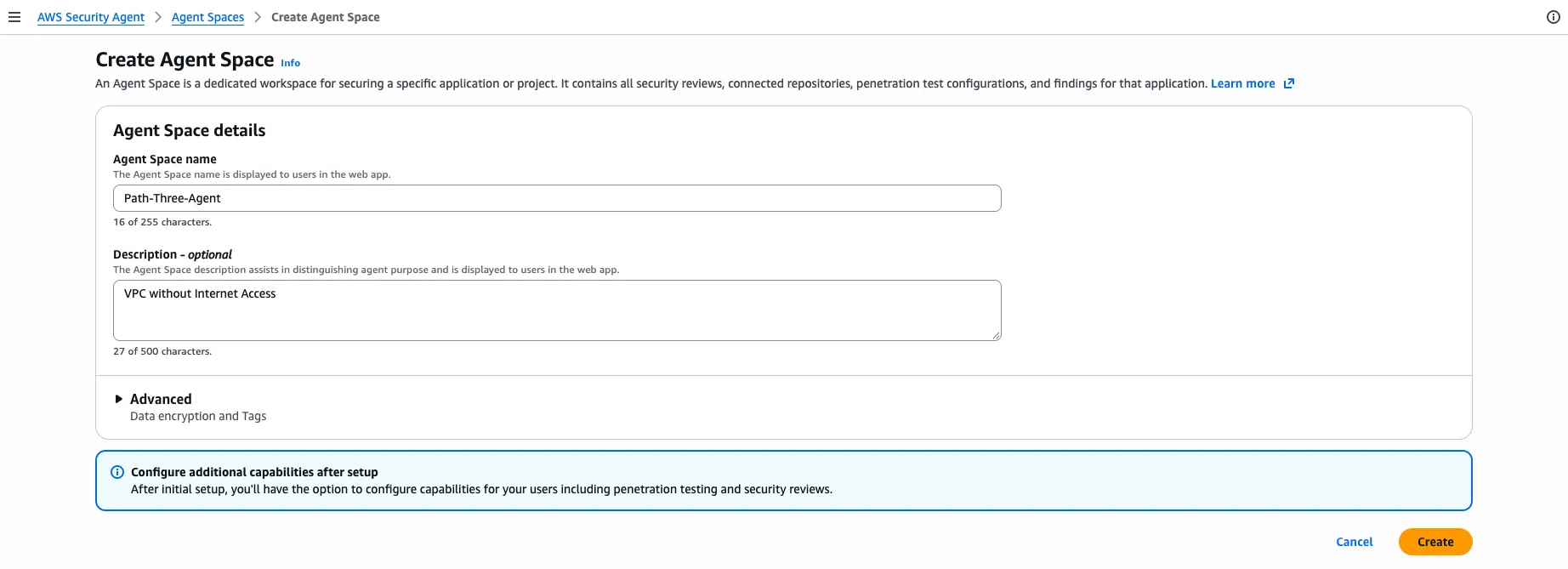
The Agent Space is created for a VPC that has never had internet access:
Architecture: private subnets only
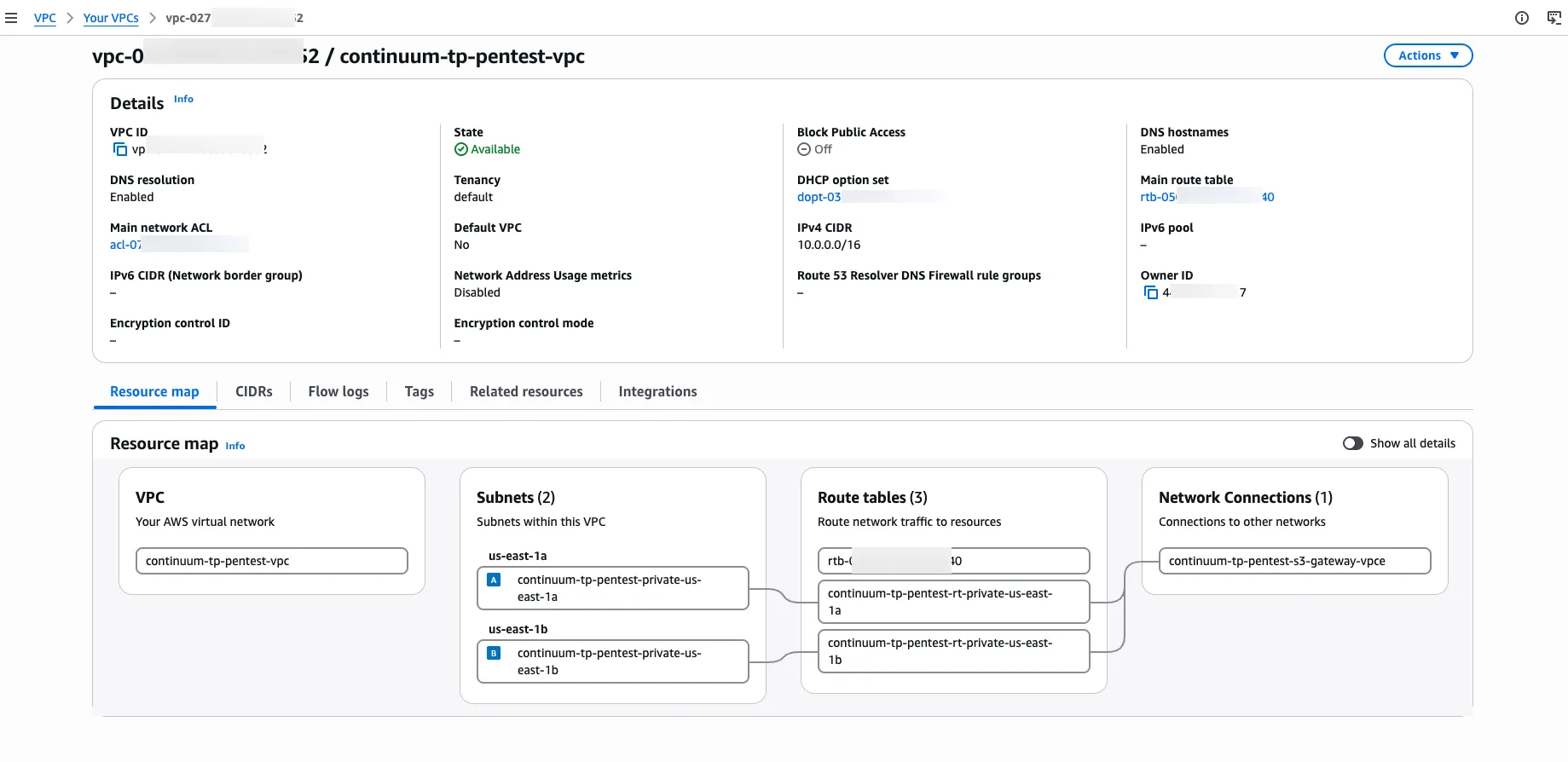
The VPC has only private subnets. Their route tables have no default route. The only paths off a subnet are the VPC interface and gateway endpoints, and the local route to the target application.
The VPC resource map makes the posture explicit — two private subnets, their route tables, and a single network connection, which is the S3 gateway endpoint. There is no Internet Gateway and no NAT Gateway.
The Security Agent and SSM interface endpoints are the agent's only path to AWS, and they are created up front rather than added later:
- Security Agent:
securityagent,bedrock-runtime,logs
- Instance management (SSM):
ssm,ssmmessages,ec2messages
- S3 gateway endpoint: for the instance's package and dependency installs (below)
The same all-or-nothing rule from Part 2 applies: a partial Security Agent endpoint set causes the agent to authenticate and then stall at reasoning or logging, and missing SSM endpoints remove Session Manager access. (See Part 2 for the full operational detail; it is identical here.)
The dependency problem no one expects
With no internet egress, the agent is not the only thing that cannot reach the internet — the application instance cannot reach PyPI either. A standard
pip install flask pymysql has nowhere to go. Two specific obstacles have to be solved for the instance to boot successfully.1. Vendor the Python wheels into S3
Download the dependency wheels on an internet-connected machine, store them in a private S3 bucket, and have the instance install them with
pip --no-index over the S3 gateway endpoint. The wheels must be built for the instance, not the machine that downloads them — Amazon Linux 2023 runs Python 3.9 on manylinux x86_64, which is often not the architecture of the machine running the download:Bash
cd paths/3-true-privatecp terraform.tfvars.example terraform.tfvars # set db_password# on an internet-connected machine (the VPC never gets internet)terraform init./vendor-wheels.sh # downloads py3.9 / manylinux x86_64 wheels into ./wheelsterraform apply # uploads ./wheels/* to the private S3 bucket, boots the instance
The
vendor-wheels.sh script pins --platform manylinux2014_x86_64 --python-version 3.9 --only-binary=:all: so pip download fetches the target's wheels rather than the host's, and it explicitly requests the environment-marker dependencies ( importlib-metadata , zipp ) that a newer host interpreter would otherwise skip. The Terraform fails fast with a clear message if the wheels were never vendored, rather than booting an instance that would then fail its offline install.2. Force IPv4 for Amazon Linux 2023 package installs
This is the non-obvious trap. On first boot the instance still needs
dnf install python3-pip from the AL2023 repositories, which are served from regional Amazon S3 and reachable over the S3 gateway endpoint. But AL2023's dnf resolves the dual-stack S3 hostname to IPv6-only addresses. The instance has no IPv6 route, and the S3 gateway endpoint's managed prefix list covers only IPv4 S3 ranges, so dnf hangs on IPv6 and times out — stalling the entire first boot.The fix is to force
dnf (and libcurl) to IPv4 before the first dnf call:Bash
echo "ip_resolve=4" >> /etc/dnf/dnf.conf
With that one line, the same hostname resolves to an IPv4 S3 address the gateway endpoint routes, and the install completes. This single line is the difference between a working and a hanging first boot in a zero-internet AL2023 VPC.
You do not need to add either fix yourself: both the
ip_resolve=4 line and the offline pip install --no-index --find-links /opt/wheels step are already in the shared boot script, modules/pentest-target/user_data.sh.tftpl , and run only in this posture's offline install mode.
Configure and run
Enable penetration testing in the Agent Space exactly as in Part 1: add
app.internal.pentest-demo.local with Private VPC verification, accept the expected Unreachable status, then in Configure resources and access select this posture's private VPC, both private subnets, the agent security group, and the service role from terraform output .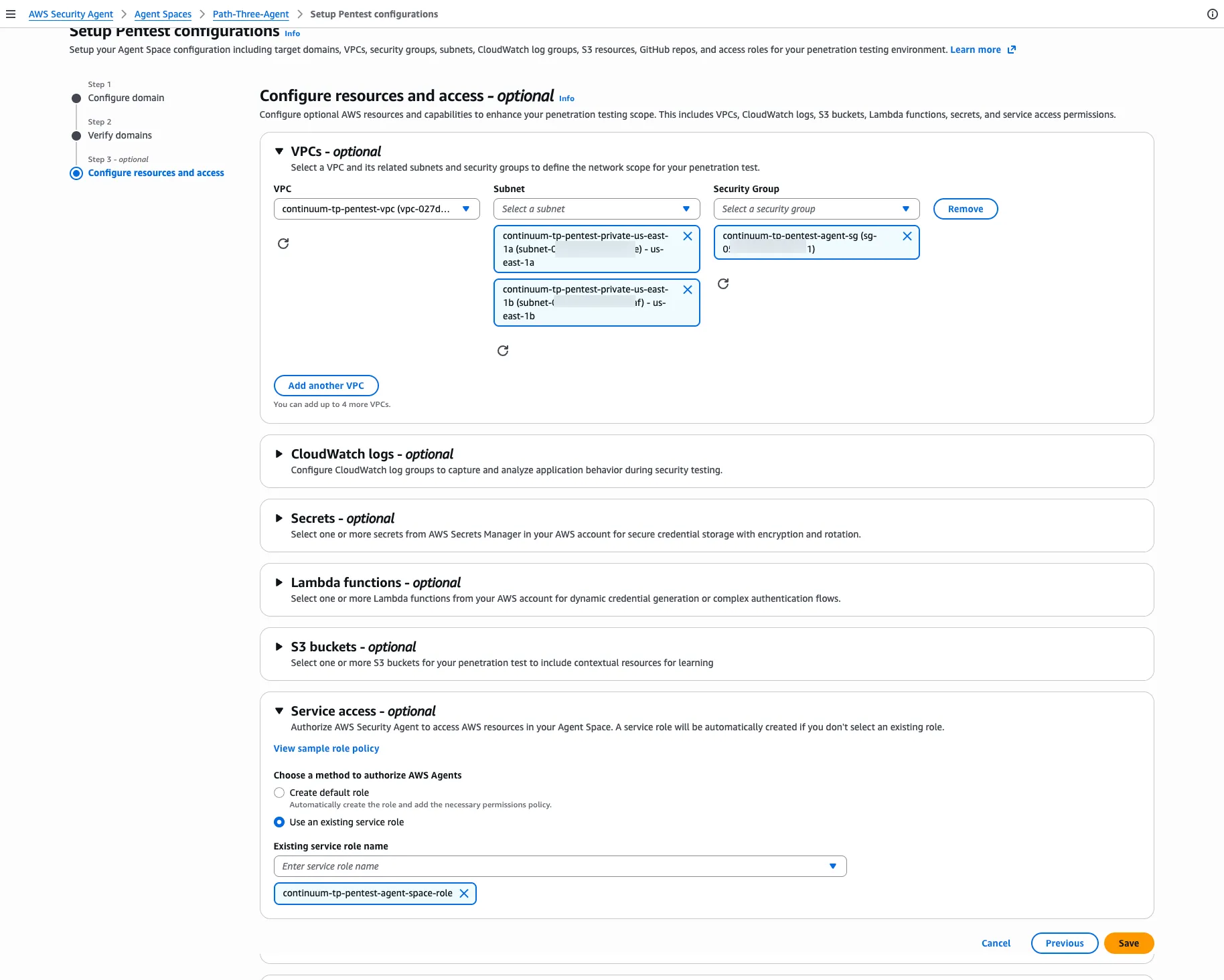
Before starting the run, use the same readiness check as Part 2: the SSM agent reports
Online , the ALB target is healthy , and every endpoint is available . In this posture, a failed check usually points to the first boot — if the target is unhealthy, open a Session Manager session and check /var/log/cloud-init-output.log for a stalled dnf or a failed offline pip install .The run starts and moves to In progress, with no internet path anywhere in the VPC:
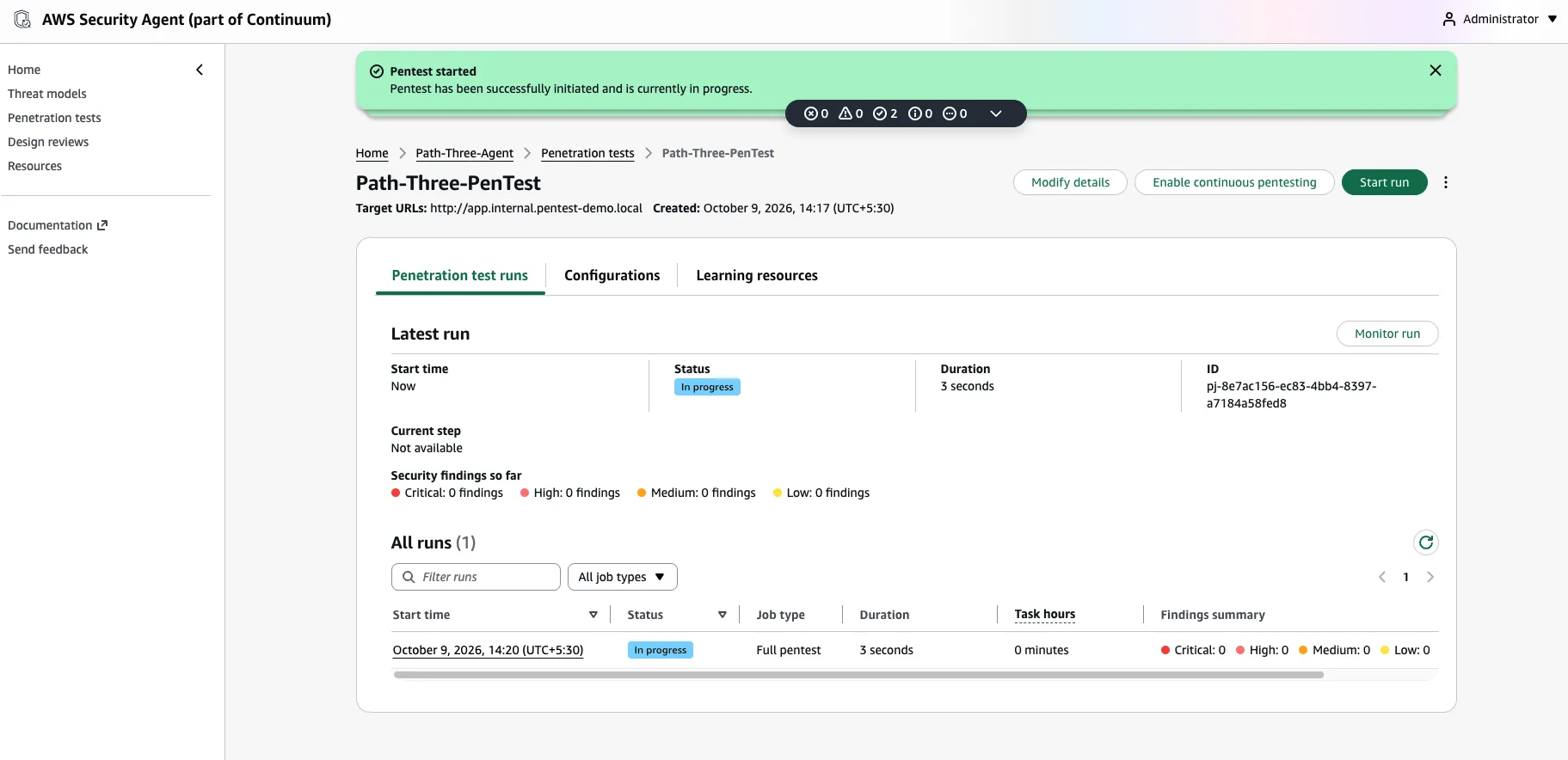
As in the earlier posts, specific findings are a property of the demo application and are not reproduced here. The result that matters is the one this series set out to demonstrate: Security Agent performed a validated, exploit-backed penetration test of a private application in a VPC with zero internet egress at any point, reaching its control plane, inference, and logging exclusively over PrivateLink.
Cross-region inference
As in Part 2: Cross-region inference does not change the endpoint set. Requests go to bedrock-runtime in the source Region, and Bedrock routes them to destination Regions over its own network, so the single bedrock-runtime endpoint above is sufficient. What can break is authorization: if your organization restricts Regions with SCPs, or you attach a custom endpoint policy, make sure neither denies the destination Regions or model ARNs that the inference profile routes to.
Cleanup and cost
Interface endpoints (hourly per endpoint per Availability Zone, plus data processing) dominate the cost. The vendored-wheels S3 bucket is configured for
force_destroy so it empties itself on teardown. Destroy the environment when the exercise is complete:Bash
terraform destroy
Series recap: pick your posture
Posture | Internet egress | Verification | Extra setup |
|---|---|---|---|
| Part 1
— Public internet | Yes (NAT), throughout | DNS-TXT / HTTP-route or Private VPC | none |
| Part 2
— Deploy, then private | Yes at first apply → removed | Private VPC after the flip | two applies |
Part 3 — True private | None, ever | Private VPC | vendor wheels first |
Across all three, the target is never publicly exposed, and the finding that holds regardless of posture is the one that answers the opening objection: a private application with no public domain can be penetration tested, because AWS Security Agent tests from inside the VPC and proves control rather than public ownership.
Learn more:
Enjoyed reading this content? Let the author know!
Your likes, comments, shares, and saves help creators reach more builders.

Loading recommendations
Loading article