
Penetration testing a private application with AWS Security Agent — Part 1: the simple path
Penetration testing private applications with AWS Security Agent (now part of AWS Continuum) — Part 1 of 3


The problem: sensitive applications are not on the internet
The applications an enterprise most wants to penetration test are frequently the ones it has deliberately kept off the public internet: internal line-of-business systems, pre-production environments handling real data, and back-office APIs reachable only from inside a VPC. These are the workloads where a validated, exploit-backed assessment matters most, and the ones a traditional external scanner cannot reach.
This raises a common question when teams first evaluate AWS Security Agent (now part of AWS Continuum) on-demand penetration testing:
"The target has no public endpoint and no registered domain. How does AWS reach it, and does testing it require exposing it?"
Testing does not require exposing the target. Security Agent runs the penetration test from inside the VPC and proves control of the target without any public ownership. This three-part series builds the same intentionally-vulnerable application in three progressively more restricted network postures and tests each one:
- This post: the simplest posture — a VPC with internet egress and the lowest-friction setup, deployed with a single
terraform apply.
- Part 2: deploy with internet egress, then remove it and continue testing over AWS PrivateLink — the migration path, and the operational constraints it introduces.
- Part 3: no internet egress at any point — a fully isolated VPC, including the offline dependency installation it requires.
Part 1 is self-contained: it produces a complete, reproducible penetration test of a private target.
Starting point: the official sample, taken fully private
AWS publishes an official sample,
aws-samples/sample-security-agent-demo , that deploys an intentionally-vulnerable Flask application with private EC2 and RDS behind a public Application Load Balancer, verified with DNS-TXT or HTTP-route. It is the right on-ramp for a first penetration test, and this series builds on the same application.This series picks up where that sample stops. It takes the application fully private — an internal ALB with no public ingress — which the public-ALB sample does not cover. Removing that last public element has two consequences that drive everything below: verification can no longer use DNS-TXT or HTTP-route against a public endpoint, so it uses Private VPC verification; and the agent can no longer rely on the target being reachable from outside, which surfaces the question the public-ALB sample never has to answer — how does the agent itself reach AWS when the target is private? The three postures in this series answer that question three ways.
Two mechanics make this work
Two mechanics underpin private-target testing.
The agent runs inside the VPC. Security Agent is given a VPC, subnets, and a security group. It provisions an elastic network interface (ENI) in those subnets with no public IP and reaches the application over local VPC routing — the same path any other resource in the VPC uses. The application never needs an internet-facing listener.
Ownership is proven by control, not by a public domain. For a private target, Security Agent uses Private VPC domain verification, which confirms the target's fully qualified domain name resolves to an address inside a private CIDR range (
10.0.0.0/8 , 172.16.0.0/12 , or 192.168.0.0/16 ). Two behaviors are worth stating explicitly:- The console reports the domain as
UNREACHABLE. This is expected: the endpoint is not resolvable from outside the VPC. Security Agent re-verifies from inside the VPC at the start of each run.
- Private VPC verification is exact-match. Unlike the DNS-TXT or HTTP-route methods, verifying a parent domain does not cover sub-domains; each private hostname is configured individually.
A registered public domain, registrar access, and DNS-TXT records are therefore unnecessary. A private hostname that resolves to a private IP — for example, through a Route 53 private hosted zone associated with the VPC — is sufficient.
The requirement that drives the network design
One requirement determines the architecture across all three postures:
A private target does not remove the agent's own need for outbound access. The Security Agent agent must reach its control plane, its model-inference backend (Amazon Bedrock), and its logging destination (Amazon CloudWatch Logs). The agent ENI has no public IP and cannot use an internet gateway directly. The method used to provide the agent's egress is the only element that changes across this series.
In the simplest posture, that egress is a NAT Gateway. (Part 2 replaces it with PrivateLink; Part 3 omits it entirely.) The target remains fully private in every case — the public subnets exist only to host the NAT Gateway the agent uses for its own outbound traffic.
Reference architecture
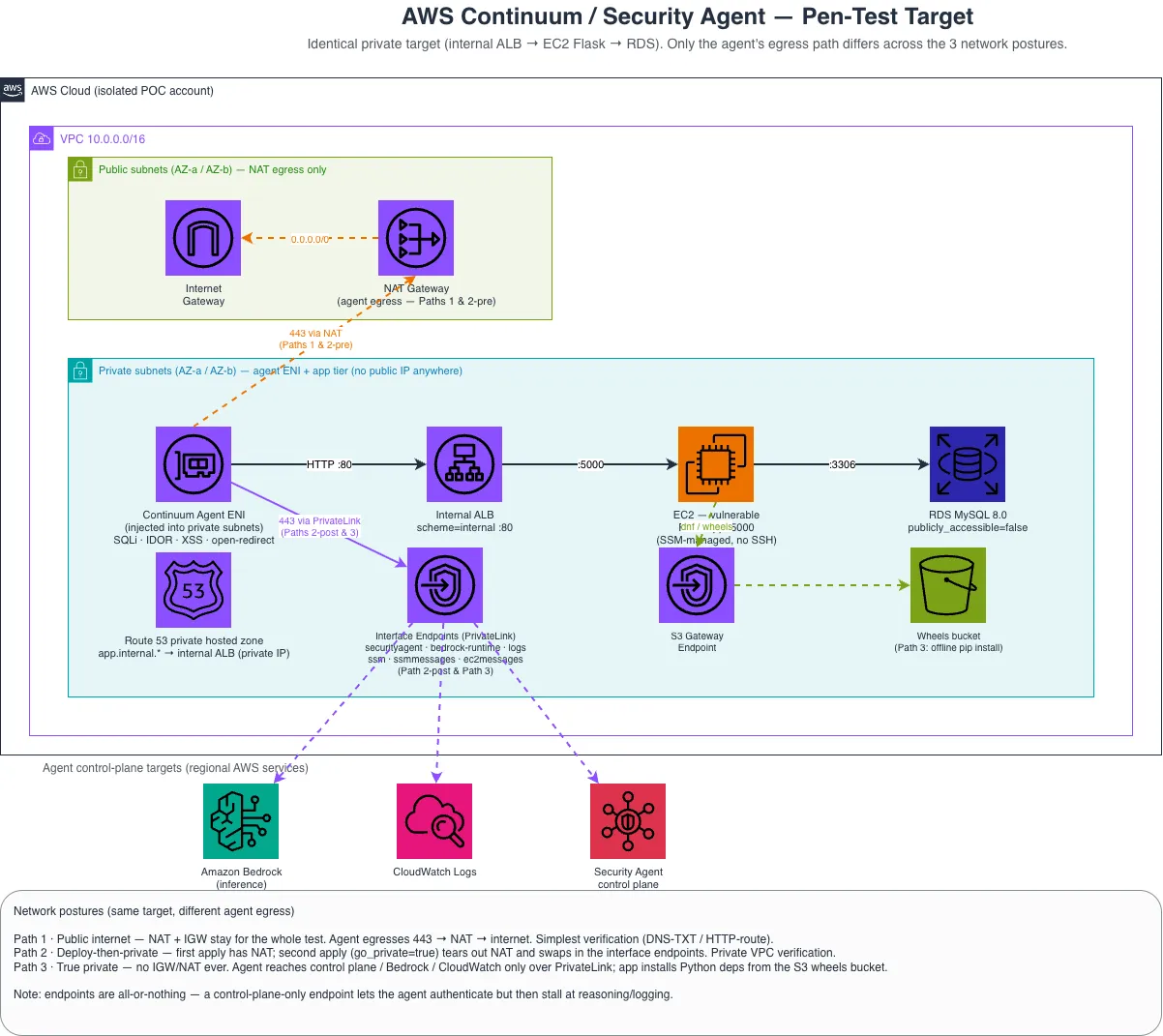
The target tier is entirely private: an internal Application Load Balancer in front of an application instance in a private subnet, backed by a private database. A Route 53 private hosted zone resolves
app.internal.pentest-demo.local to the internal ALB. The agent ENI is placed in the same private subnets and egresses to AWS services through the NAT Gateway.The Terraform for this posture is in the companion repository (srcsakthivel/security-agent-private-demo) underpaths/1-public-internet/, which calls a sharedmodules/pentest-target/module.
Deploy the target
The deployment is a single apply with no prerequisites:
Bash
cd paths/1-public-internetcp terraform.tfvars.example terraform.tfvars# edit terraform.tfvars — set db_passwordterraform initterraform apply
Retrieve the outputs required by the console wizard:
Bash
terraform output# pentest_target_fqdn = "app.internal.pentest-demo.local"# vpc_id = "vpc-…"# agent_private_subnet_ids = ["subnet-…", "subnet-…"]# agent_security_group_id = "sg-…"# agent_space_service_role_arn = "arn:aws:iam::…:role/…-agent-space-role"
The application runs on a private instance with no SSH key and no bastion; access is through AWS Systems Manager Session Manager. Verify the application from inside the VPC:
Bash
aws ssm start-session --target $(terraform output -raw app_instance_id)# on the instance:curl "http://localhost:5000/profile?id=2"# {"user":[2,"bob","bob@corp.local"]}
A returned row confirms the application and its database seed are healthy.
Configure the penetration test
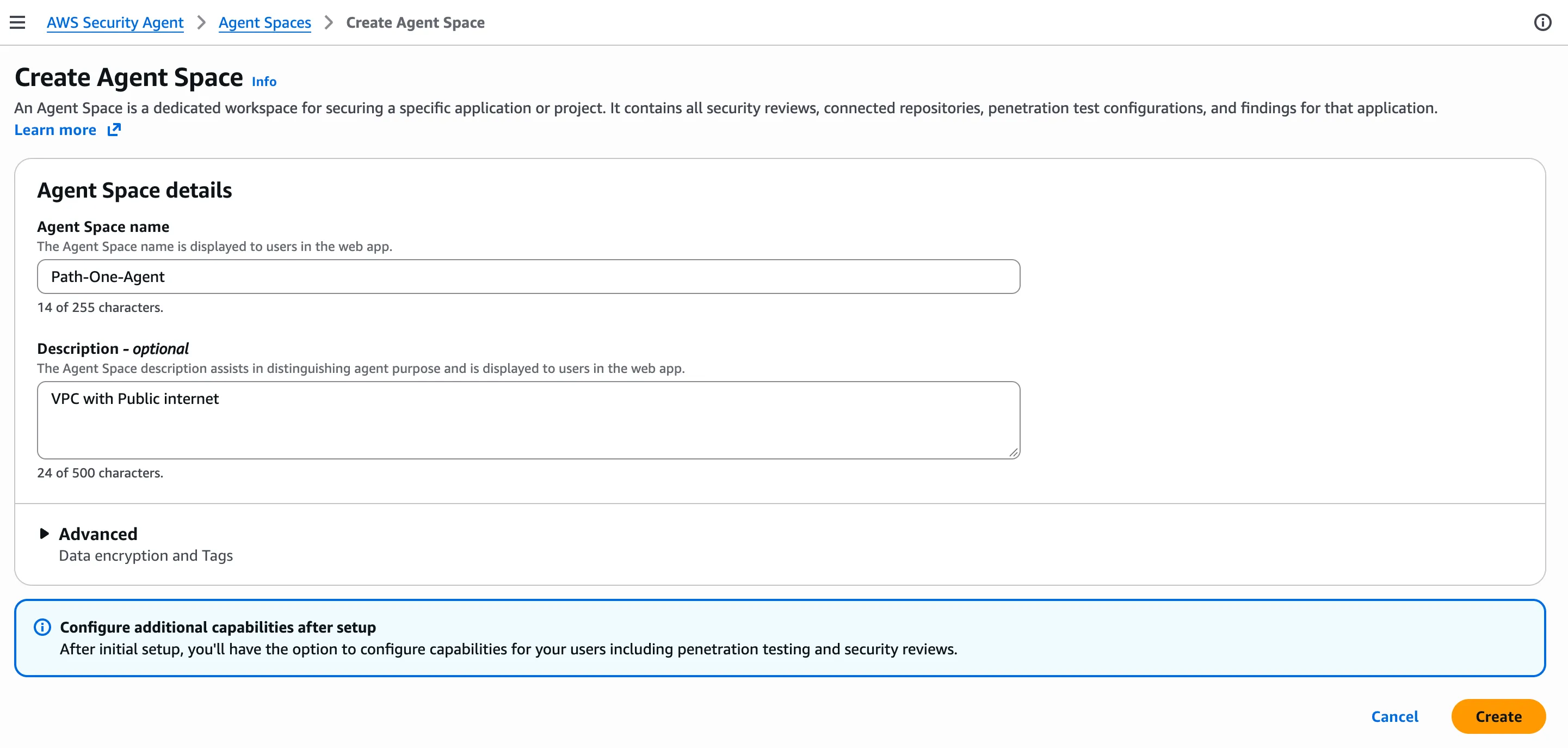
1. Create an Agent Space. An Agent Space is the workspace that holds the penetration-test configuration and findings for one application. Name it and describe the network posture — here, a VPC with public internet.
2. Enable penetration testing in the Agent Space. This one-time setup is where the target domain, its verification, and the VPC the agent runs in are defined. The penetration test you create later simply selects from what is configured here.
Open the Agent Space. Penetration testing shows Needs setup; choose Enable penetration test.

Step 1 — Configure domain. Enter the target FQDN
app.internal.pentest-demo.local and choose Private VPC as the verification method. Private VPC verification is per domain: sub-domains are not covered automatically, so each private hostname is added individually.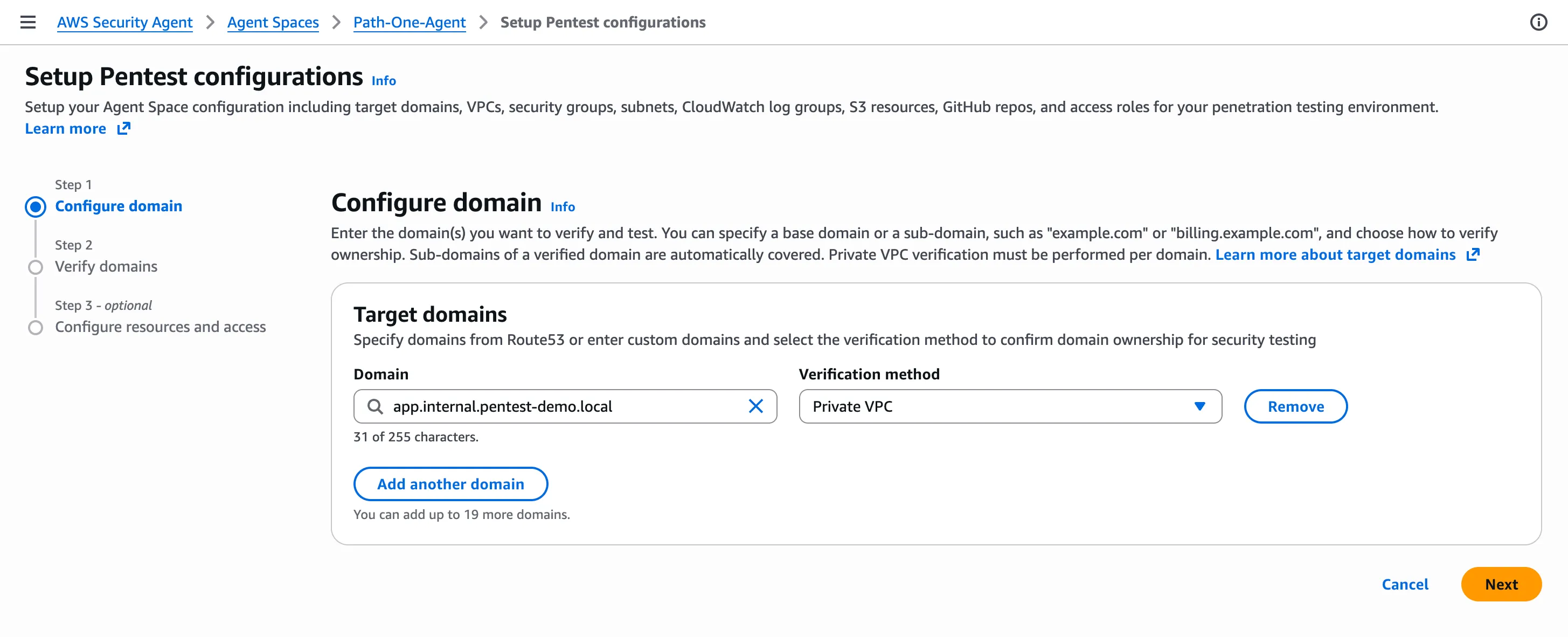
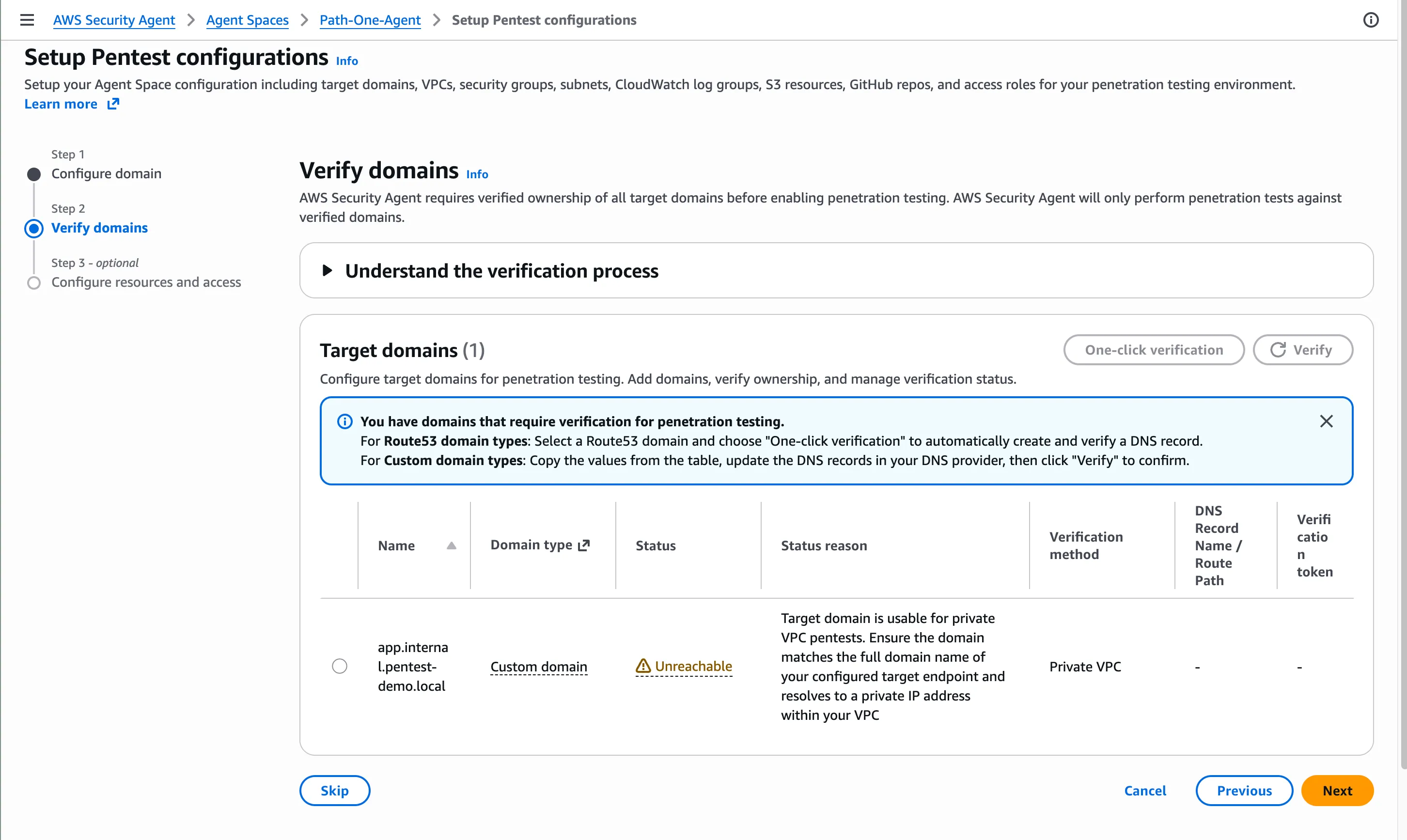
Step 2 — Verify domains. The domain shows Unreachable. This is expected for a private target: the hostname cannot be resolved from outside the VPC. The status reason confirms the domain can still be used for private VPC penetration tests as long as it matches the full target FQDN and resolves to a private IP. Choose Next.
Step 3 — Configure resources and access. Select the VPC, both private subnets (multiple Availability Zones for resilience), the agent security group, and the service role that carries the ENI permissions Security Agent requires — all from
terraform output . This is where the Agent Space learns which network to place the agent's ENI in. Security Agent can create a default role, or an existing role can be selected.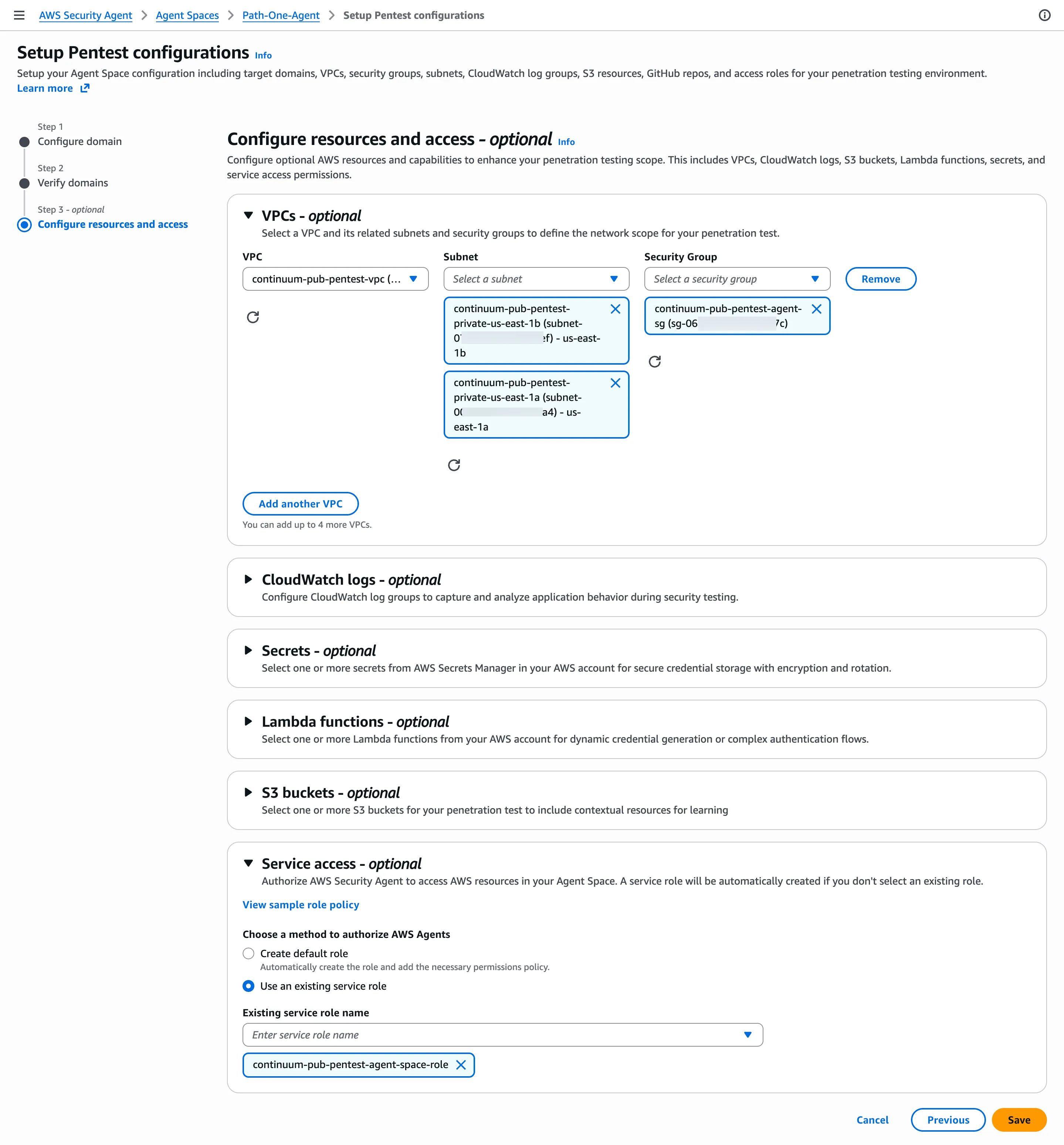
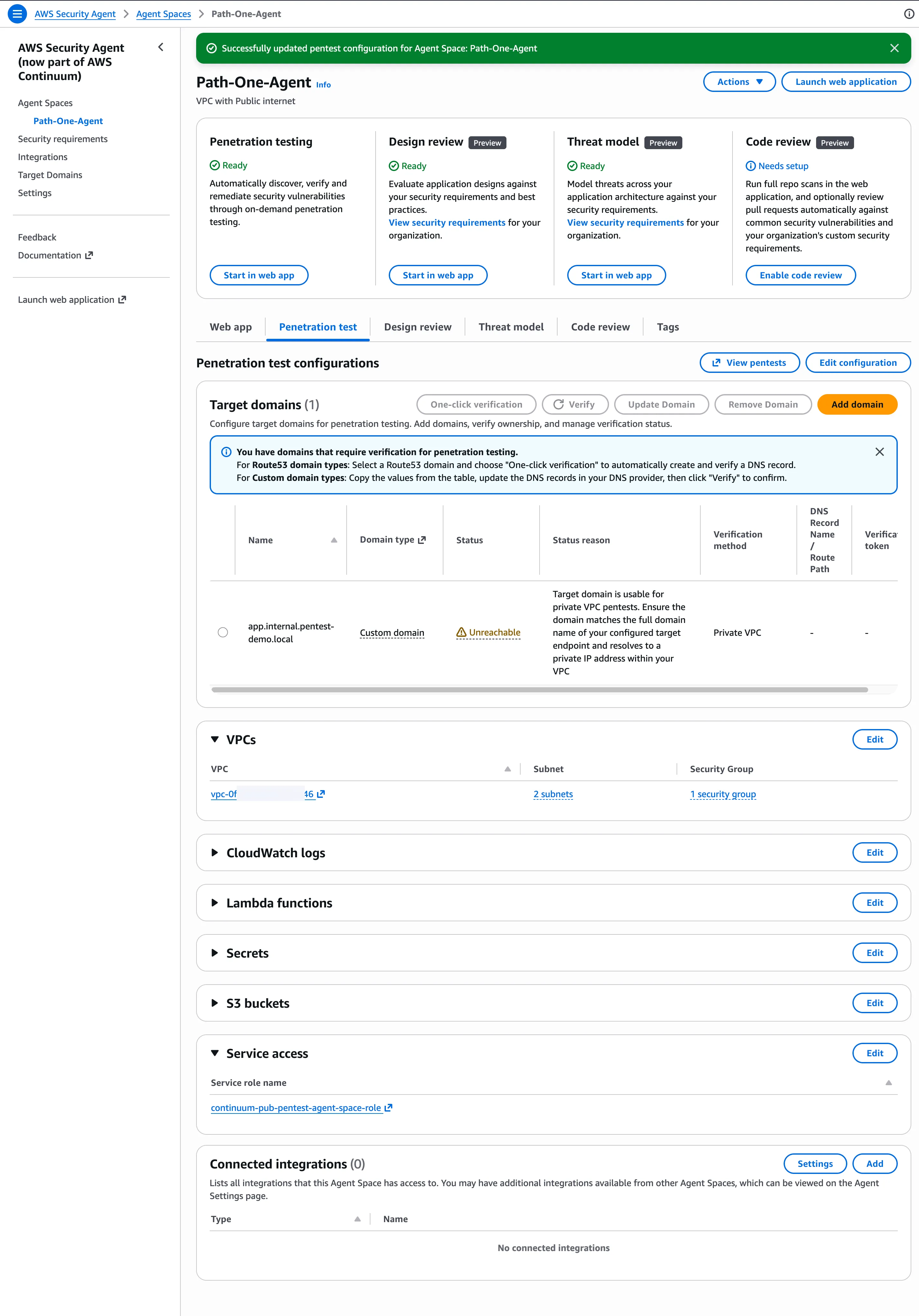
When setup completes, the Agent Space lists the domain under Target domains as Private VPC / Unreachable, ready to use. Security Agent re-verifies it from inside the VPC at the start of each run.
3. Create the penetration test. Enter a name and select the target URL
http://app.internal.pentest-demo.local configured above. The network configuration step shows the scope exactly: only the target URL is in scope, and the console lists derived examples, such as subdomain.app.internal.pentest-demo.local , that the agent will not reach. This is the exact-match behaviour in practice.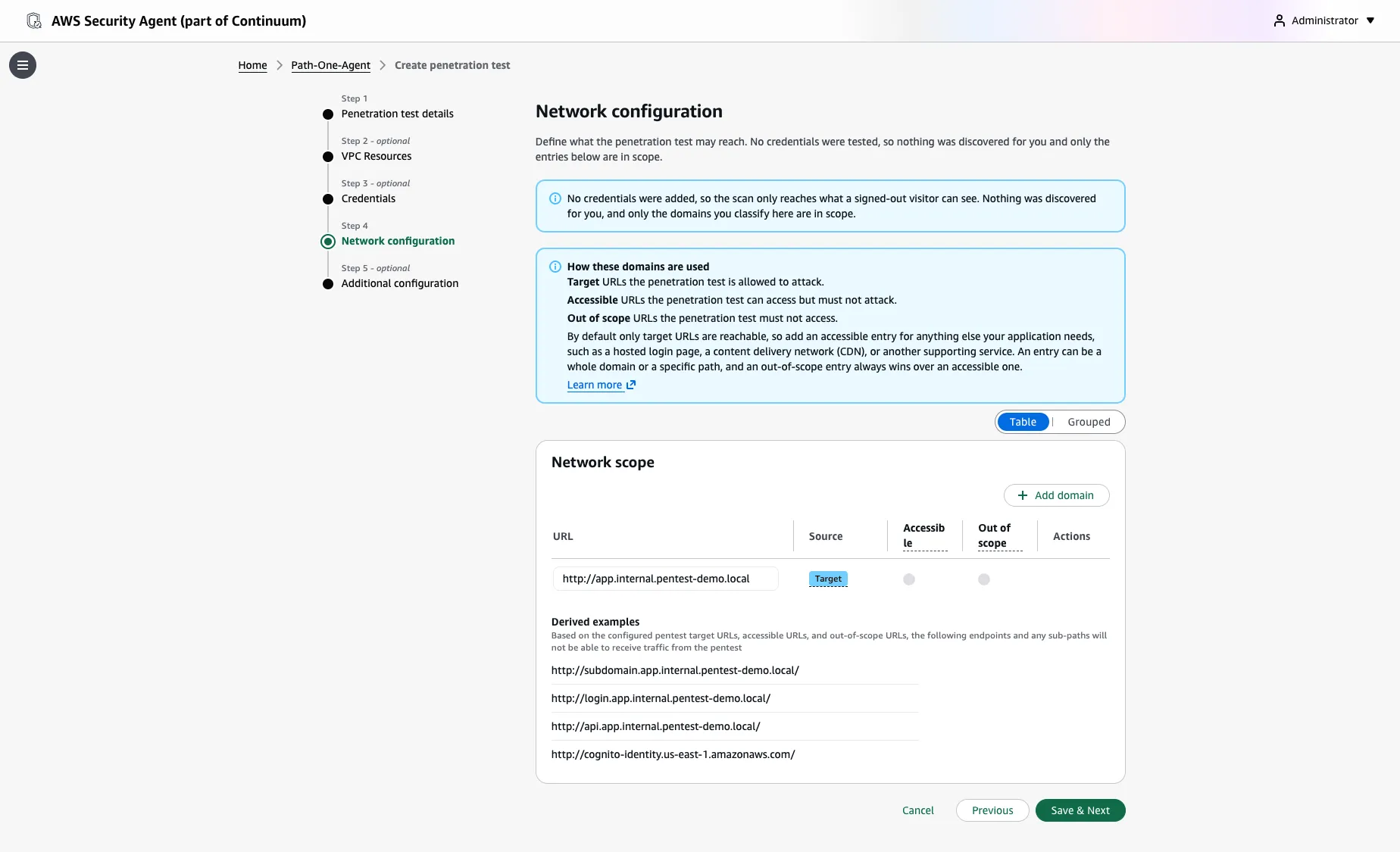
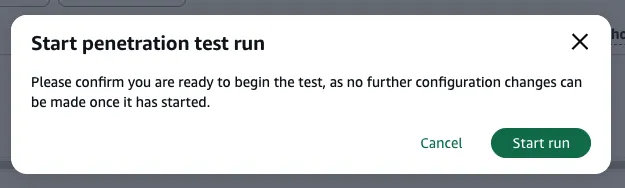
4. Start the run. Security Agent confirms that configuration is locked once a run begins.
What a run produces
The specific findings depend entirely on the target application, so they are not reproduced here — a run against a real workload reports different vulnerabilities than a deliberately-vulnerable demo. What is consistent, and what matters when evaluating the service, is how Security Agent reports:
- Validated, not just flagged. Security Agent attempts the exploit and confirms it, rather than pattern-matching a signature. It also rules categories out — if an injection point renders input literally, or no upload surface exists, those are discounted rather than reported as noise.
- Reproducible evidence. Each finding carries the request path and response that demonstrate it, so a developer can reproduce it without re-running the agent.
- Prioritized remediation. Findings include severity and a suggested fix.
For the private posture in this series, the result that matters is architectural: the agent reached an internal-only target over local VPC routing, verified ownership from inside the VPC, and tested it — with no public exposure at any point.
Cleanup and cost
NAT Gateways dominate the cost of a short-lived test environment, carrying an hourly charge plus data-processing charges. Destroy the environment when the exercise is complete:
Bash
terraform destroy
The vulnerable target is disposable and should never be left running.
Next in the series
This posture provides the agent's egress through a NAT Gateway. Many security teams operate VPCs with no internet path by design, where adding a NAT Gateway is not an acceptable option.
Part 2 deploys the same application with a NAT Gateway, confirms it is healthy, and then removes internet egress entirely — replacing the NAT with AWS PrivateLink interface endpoints — while keeping the penetration test operational. It covers the operational constraints that most affect a first run: the all-or-nothing endpoint set, preserving Session Manager access with no internet, and an instance-replacement condition to avoid during the transition.
Enjoyed reading this content? Let the author know!
Your likes, comments, shares, and saves help creators reach more builders.

Loading recommendations
Loading article