
Penetration testing a private application with AWS Security Agent — Part 2: removing internet egress without breaking the test (NAT to PrivateLink)
Series: Penetration testing private applications with AWS Security Agent (now part of AWS Continuum) — Part 2 of 3


Where Part 1 left off
Part 1 deployed an intentionally-vulnerable application behind an internal Application Load Balancer and tested it with AWS Security Agent. The target was private, but the VPC still had internet egress: a NAT Gateway carried the agent's own outbound traffic to its control plane, Amazon Bedrock, and Amazon CloudWatch Logs.
Many enterprises operate VPCs with no internet path by design. For those environments, "add a NAT Gateway" is not an acceptable answer. This post takes the Part 1 environment and removes internet egress entirely — replacing the NAT Gateway with AWS PrivateLink interface endpoints — while keeping the penetration test operational. This is the posture the official
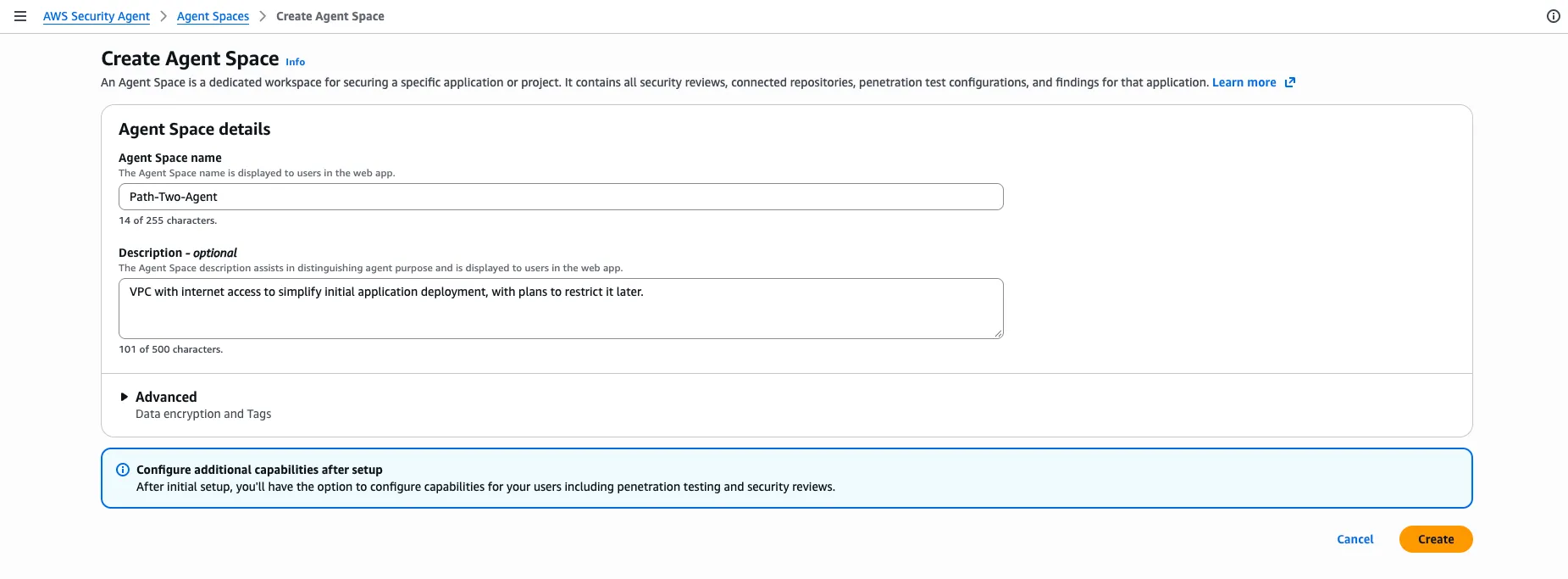
aws-samples/sample-security-agent-demo does not cover: it keeps the ALB public and the egress open.The Agent Space for this posture is created with that intent stated up front:
The approach: two applies, one switch
The transition is modeled as a single Terraform variable,
go_private , applied in two steps:The Terraform for this series is in the companion repository (srcsakthivel/security-agent-private-demo); this posture is underpaths/2-deploy-then-private/.
Bash
cd paths/2-deploy-then-privatecp terraform.tfvars.example terraform.tfvars # set db_passwordterraform initterraform apply # APPLY 1 — go_private = false (NAT present)# confirm the application is healthyterraform apply -var=go_private=true # APPLY 2 — remove NAT, add endpoints
Apply 1 builds the Part 1 posture: an Internet Gateway, NAT Gateways, public subnets, and a default route from the private subnets to the NAT. The application installs its dependencies from PyPI over that NAT.
Apply 2 flips the posture:
- The Internet Gateway, NAT Gateways, Elastic IPs, public subnets, and public route table are destroyed.
- The
0.0.0.0/0route is removed from the private route tables.
- PrivateLink interface endpoints (Security Agent + SSM) and an S3 gateway endpoint are created.
- The agent's security-group egress rule is swapped from internet-443 to the endpoint security group.
After Apply 2, the VPC resource map confirms the result: two private subnets and the S3 gateway endpoint, with no Internet Gateway and no NAT Gateway.

The application instance is not replaced between applies — it was provisioned on Apply 1 and keeps running. This is deliberate and important; see the instance-replacement note below.
You can confirm the current posture at any time:
Bash
terraform output mode# "public (NAT egress)" → "private (endpoints, no internet)"
The endpoint set: two groups, all-or-nothing
Once the NAT is gone, every outbound path the agent and the instance rely on must be provided by an endpoint. Two groups are required, and within each group it is all-or-nothing.
Group | Interface endpoints | Why it is required |
|---|---|---|
Security Agent | com.amazonaws.<region>.securityagent | Agent control plane |
| com.amazonaws.<region>.bedrock-runtime | Model inference (the agent's reasoning) |
| com.amazonaws.<region>.logs | CloudWatch Logs for the run |
Instance management (SSM) | com.amazonaws.<region>.ssm | Systems Manager management plane |
| com.amazonaws.<region>.ssmmessages | Session Manager data channel |
| com.amazonaws.<region>.ec2messages | SSM agent control channel |
After the flip, every endpoint in both groups (plus the S3 gateway) should show Available before you start a run:

Enable penetration testing in the Agent Space
Enable penetration testing exactly as in Part 1: add
app.internal.pentest-demo.local with Private VPC verification, accept the expected Unreachable status, then in Configure resources and access select this posture's VPC, both private subnets, the agent security group, and the service role from terraform output . The configuration has the same shape as Part 1 — the difference is entirely in the network beneath it.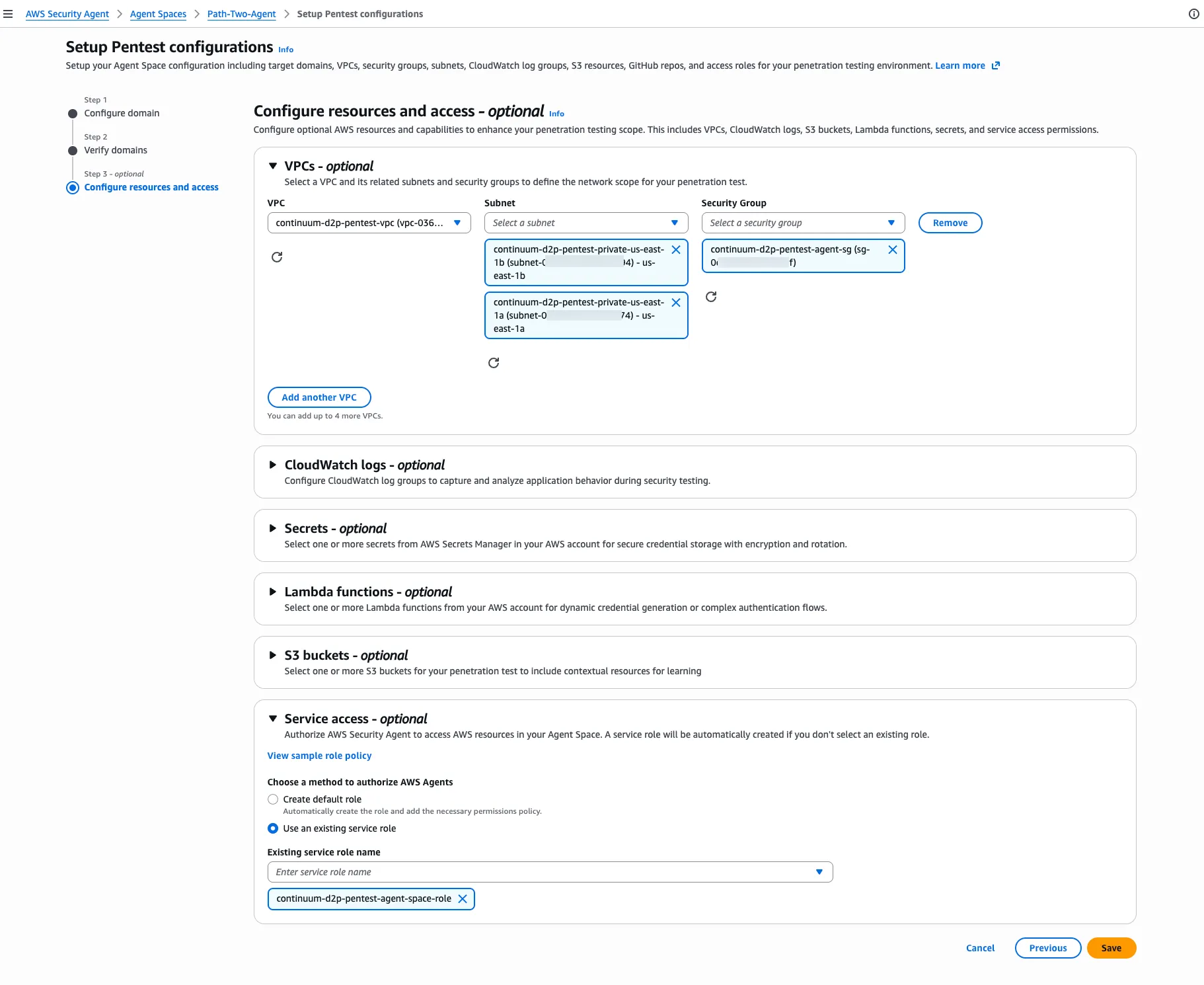
Operational constraints that affect a run
These constraints are not obvious from the documentation and are the main reason a first attempt at this posture fails.
A partial Security Agent endpoint set produces a stall, not an error. If only the control-plane endpoint exists, the agent authenticates successfully and then stops when it tries to reason (no
bedrock-runtime ) or write logs (no logs ). The symptom looks like a hang rather than a clean failure. Provision all three together.The SSM endpoints are what keep Session Manager reachable. Without them, the moment the NAT is removed you lose shell access to the instance you are testing. There is a specific, confusing intermediate state:
aws ssm describe-instance-information can report the instance Online (the ssm management plane is reachable) while aws ssm start-session still fails to open an interactive session until the ssmmessages data channel re-establishes.The SSM agent needs time to reconnect after egress changes. When Apply 2 removes the NAT, the SSM agent's existing connection — established through that NAT on Apply 1 — breaks. The agent then has to re-resolve the endpoint's private DNS and rebuild its data channel, which takes a few minutes. A
start-session attempt during that window issues a session ID and then hangs, because the control plane recovers before the data channel does. The reliable sequence is to poll until the agent reports Online , then connect:Bash
# wait until PingStatus is Online before starting a sessionaws ssm describe-instance-information --region <region> \--filters "Key=InstanceIds,Values=<instance-id>" \--query 'InstanceInformationList[].PingStatus' --output textaws ssm start-session --target <instance-id> --region <region>
Do not change the network while a run is in flight. Tearing egress out from under a running penetration test fails the finalizing target-validation with repeated timeouts. Apply the network change first, confirm readiness, and only then start the run.
Readiness check before every run
Run these three checks after Apply 2 and before starting a penetration test:
Bash
# 1. SSM agent reconnected over the endpointsaws ssm describe-instance-information --region <region> \--filters "Key=InstanceIds,Values=$(terraform output -raw app_instance_id)" \--query 'InstanceInformationList[].PingStatus' --output text# expect: Online# 2. ALB target healthy (the app survived the cutover)aws elbv2 describe-target-health --region <region> \--target-group-arn <target-group-arn> \--query 'TargetHealthDescriptions[].TargetHealth.State' --output text# expect: healthy# 3. All endpoints availableaws ec2 describe-vpc-endpoints --region <region> \--filters "Name=vpc-id,Values=$(terraform output -raw vpc_id)" \--query 'VpcEndpoints[].[ServiceName,State]' --output table# expect: every row "available"
If any check fails, fix it before running — a run started against an unhealthy target or a partial endpoint set fails late and slowly.
An instance-replacement condition to avoid
One failure mode is worth calling out because it defeats the entire premise of this posture.
The application instance is defined with a
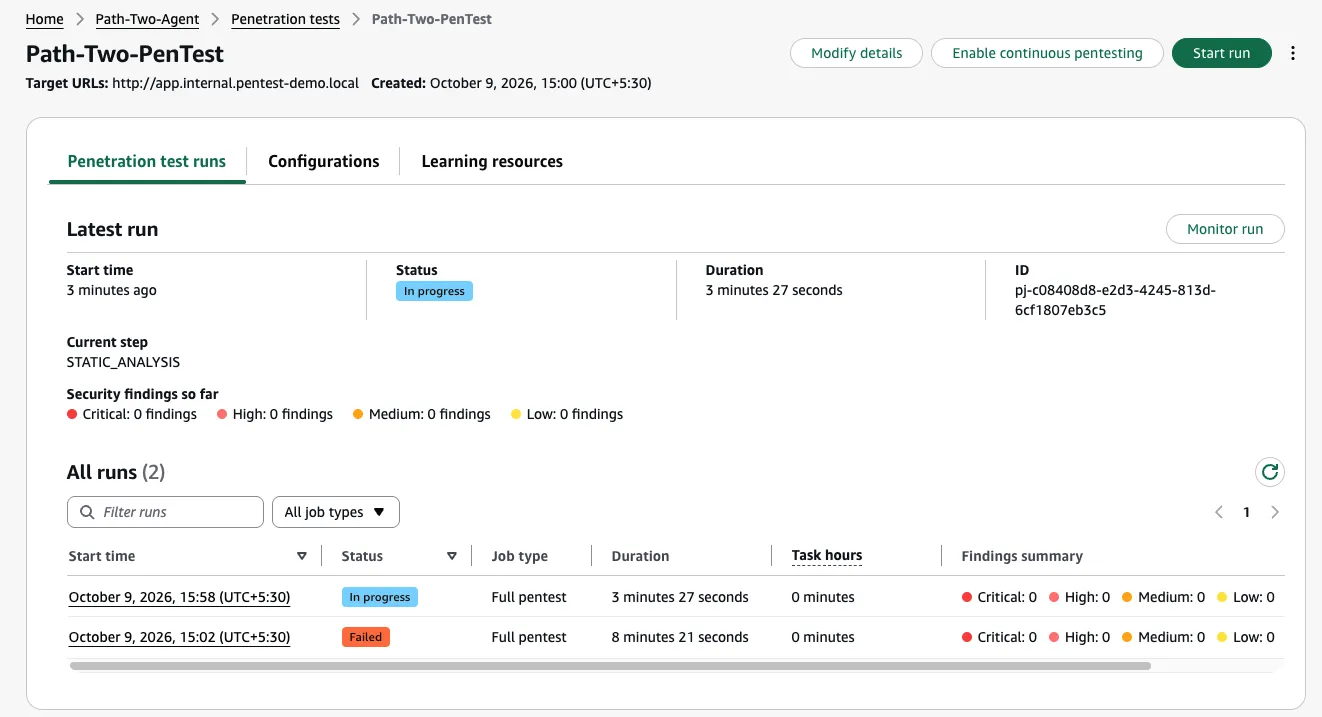
most_recent Amazon Linux 2023 AMI lookup. If a newer AL2023 AMI is published between Apply 1 and Apply 2, that lookup resolves to a new AMI ID, which forces the instance to be replaced on the go-private apply. The replacement instance boots into a VPC that no longer has internet egress, so its pip install from PyPI times out, the application never starts, and the ALB reports no healthy backend — surfacing as a 5xx when Security Agent validates the target.This is exactly what happened while building this demo. The failed run below was caused by this condition, captured before the AMI was pinned; the run after it, in progress, followed the fix.
The fix is to pin the AMI so the instance is not replaced on subsequent applies:
HCL
resource "aws_instance" "app" {# ...lifecycle {ignore_changes = [ami]}}
The generalizable rule: in a deploy-then-private model, the application instance must survive the cutover. Anything that reprovisions it after egress is removed must not depend on the internet. (If you need an instance that can be rebuilt with no internet at all, that is Part 3's posture, which installs dependencies entirely offline.)
Run it
With the posture flipped and readiness confirmed, start the run from the Agent Space. The target, the verification, and the findings behavior are identical to Part 1 — the agent reaches the same internal ALB over local VPC routing. What changed is that its own egress now travels over PrivateLink instead of a NAT.
As in Part 1, the specific findings are a property of the demo application and are not reproduced here. The result that matters for this posture is architectural: Security Agent tested a private target in a VPC with no internet egress, reaching its control plane, inference, and logging exclusively over interface endpoints.
Cross-region inference
Cross-region inference does not change the endpoint set. Requests go to bedrock-runtime in the source Region, and Bedrock routes them to destination Regions over its own network, so the single bedrock-runtime endpoint above is sufficient. What can break is authorization: if your organization restricts Regions with SCPs, or you attach a custom endpoint policy, make sure neither denies the destination Regions or model ARNs that the inference profile routes to.
Cleanup and cost
Interface endpoints carry an hourly charge per endpoint per Availability Zone, plus data processing. With six interface endpoints across two Availability Zones, this is the dominant cost of this posture. The S3 gateway endpoint has no hourly charge, so only six of the seven endpoints in the earlier screenshot are billed. Destroy the environment when the exercise is complete:
Bash
terraform destroy
Next in the series
This posture kept internet egress during initial deployment, used it to install dependencies, and then removed it. Part 3 builds the same application in a VPC that never has internet egress at all — which means the instance cannot install its dependencies from PyPI. It covers how to vendor the dependencies for an offline install over an S3 gateway endpoint, and a non-obvious Amazon Linux 2023 networking trap that otherwise stalls the instance's first boot.
Enjoyed reading this content? Let the author know!
Your likes, comments, shares, and saves help creators reach more builders.

Loading recommendations
Loading article