

Building highly available and resilient applications on Amazon EKS Auto Mode, Part 2: Zone failures
Part 2 of a two-part guide to high availability on Amazon EKS Auto Mode. When an Availability Zone degrades, detect it with per-zone alarms, take it out of traffic with ARC zonal shift, run the cluster while it is out, and rebalance pods afterward.

Why a zone failure is different
A pod or a node fails inside a zone that keeps serving, and Part 1 covers it. A zone failure exposes every workload in the zone at once, so the response moves up a level: stop sending traffic to the zone, run on the zones that remain, and bring it back when it recovers.
Three choices shape that response, and each one costs something: who decides when traffic moves, how strictly pods stay spread across zones, and how much spare capacity you pay for.
When a zone degrades
A zone can hurt without being down. AWS describes gray failures, such as latency that keeps rising or errors that come and go in specific zones, where the built-in Kubernetes protections are not enough. Zonal autoshift, an optional feature of Amazon Application Recovery Controller (ARC), moves traffic away from a zone on your behalf when AWS detects an impairment, but a problem that affects only your application can stay below that level.
Alarm on each zone from what your clients experience. Two tools help:
- Per-zone metrics. The Application Load Balancer publishes
HTTPCode_Target_5XX_Count,TargetResponseTime, andUnHealthyHostCountper Availability Zone .
- Anomaly detection. Amazon CloudWatch anomaly detection learns a band of expected values and alarms when a metric leaves it, so you do not have to guess a fixed threshold.
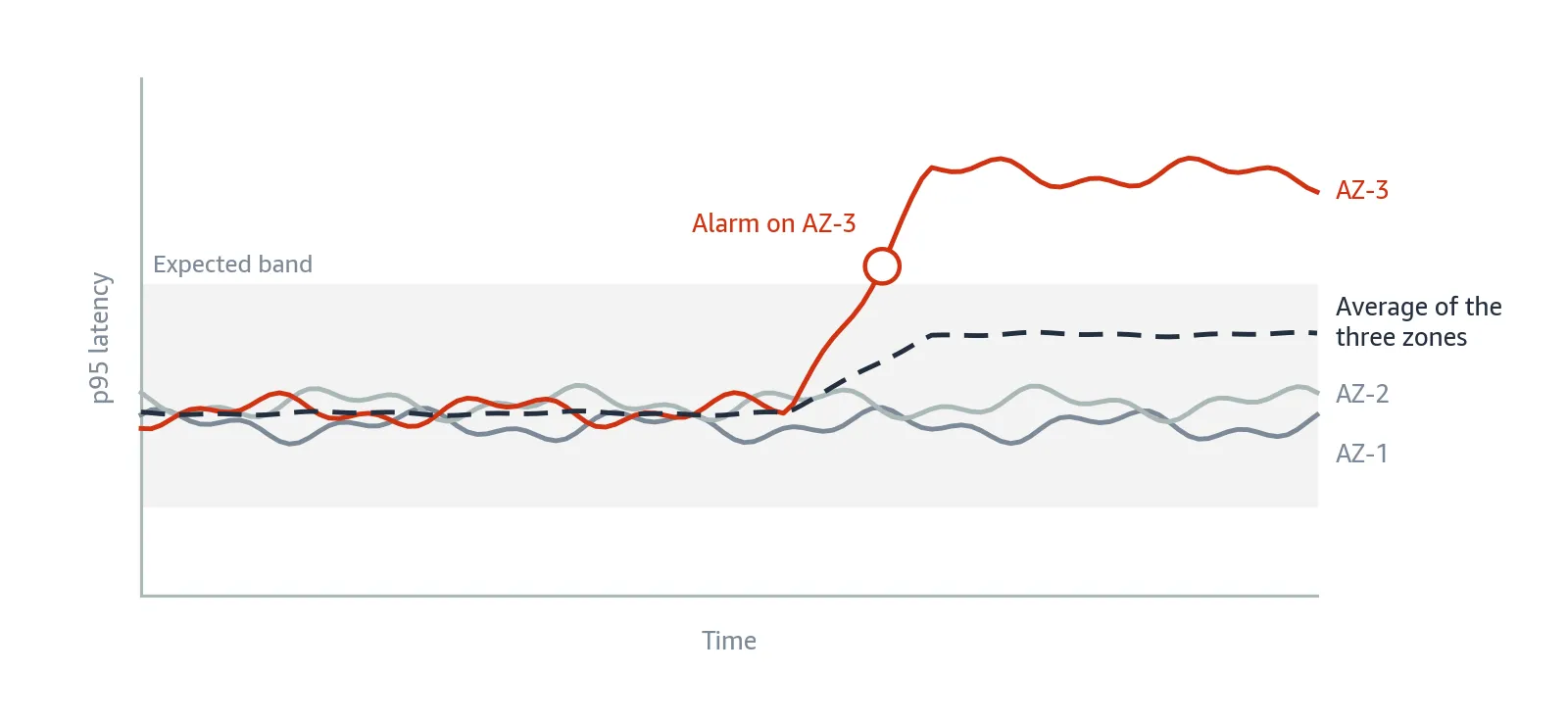
Figure 1: p95 latency by zone when one zone degrades. That zone leaves the expected band, while the average of three zones moves a third as much.
The alarm below fires when the p95 latency of one zone rises above its anomaly band. The p95 is the latency that 95 percent of requests stay under, and the
2 is the band width in standard deviations, also the default. The fields go in the input of aws cloudwatch put-metric-alarm --cli-input-json , one alarm per zone, as the CloudWatch documentation describes:JSON
"ComparisonOperator": "GreaterThanUpperThreshold","ThresholdMetricId": "ad1","Metrics": [{"Id": "m1","MetricStat": {"Stat": "p95", "Period": 60,"Metric": {"Namespace": "AWS/ApplicationELB","MetricName": "TargetResponseTime","Dimensions": [{"Name": "LoadBalancer","Value": "app/<alb-name>/<alb-id>"},{"Name": "AvailabilityZone","Value": "<zone-name>"}]}}},{"Id": "ad1","Expression": "ANOMALY_DETECTION_BAND(m1, 2)"}]
When an alarm shows one zone behaving worse and AWS has not acted, taking that zone out of traffic is your decision.
Moving traffic out of a zone
Taking a zone out of traffic is the job of ARC zonal shift . A shift stops sending a resource's traffic to one zone for one minute to 72 hours, and you can extend it. It also helps when a bad deployment hurts only one zone.
For EKS, the resource is the whole cluster. AWS added cluster-level zonal shift to EKS Auto Mode on July 10, 2026 , together with zonal autoshift.
Turn zonal shift on before you need it. You do it once per cluster , from the console, the AWS CLI, AWS CloudFormation, or eksctl:
Bash
aws eks update-cluster-config --name <cluster-name> \--zonal-shift-config enabled=true
A cluster shift carries no extra charge, does not apply to AWS Fargate, and does not affect the control plane .
The shift names the zone by its Availability Zone ID , such as
use1-az1 , and needs an expiration and a comment. aws ec2 describe-availability-zones maps zone names to IDs. To shift away from a zone for 30 minutes:Bash
aws arc-zonal-shift start-zonal-shift \--resource-identifier <cluster-arn> \--away-from <availability-zone-id> \--expires-in 30m --comment "<reason>"
While the shift lasts, EKS treats that zone as the impaired zone:
- Its nodes carry the taint
eks-arc-zonal-shift/impaired-zone, which keeps new pods from being placed there.
- Its pods leave the EndpointSlices, so east-west traffic stops reaching them.
- Pod IPs registered with an Application Load Balancer or a Network Load Balancer are deregistered , so ingress traffic stops reaching them too.
If all the pods of a workload are in that zone, EKS keeps sending traffic there rather than cause a complete availability outage, one more reason to spread them.

Figure 2: A cluster during a shift away from Availability Zone 3, as described in the EKS documentation .
The shift evicts no pods and terminates no nodes, so the zone comes back with its capacity intact. Meanwhile, node repair stands down . EKS Auto Mode also does not replace a node in a healthy zone when its pods could only be rescheduled in the impaired zone.
A shift takes time to apply and to clear after it ends:

Leave at least 60 seconds between shift operations. To confirm that a shift is in effect, and later that it is gone, check the taints on the nodes and the EndpointSlices of a Service:
Bash
kubectl get nodes -o custom-columns=\'NAME:.metadata.name,TAINTS:.spec.taints[*].key'kubectl get endpointslices \-l kubernetes.io/service-name=<service>
Choosing how traffic leaves a zone
Traffic can leave a zone in four ways. They differ in who decides and in how much traffic they move:
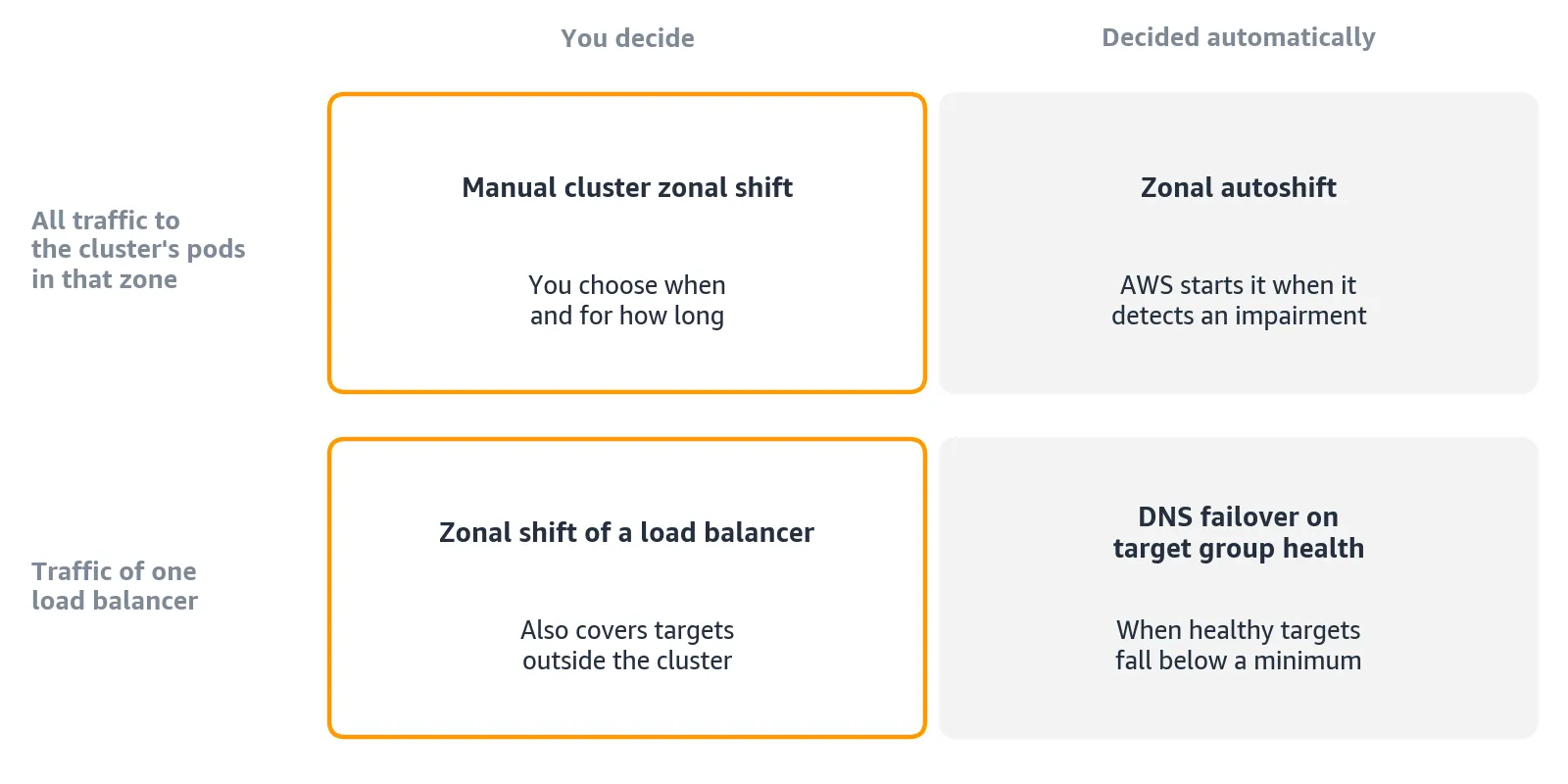
Figure 4: Four ways to take a zone out of traffic.
- Zonal autoshift leaves the decision to AWS. It requires practice runs , about once a week, in which ARC shifts traffic away from a zone and records the outcome. You turn it on separately in ARC .
- DNS failover on target group health leaves the decision to the load balancer. A zone whose healthy targets fall below a minimum you set leaves the DNS name of the load balancer. Each zone counts its healthy targets alone only with cross-zone load balancing turned off for the target group, which gives up sticky sessions. It has conditions and limits .
- A zonal shift of a load balancer moves only the traffic of that load balancer, which can include targets outside the cluster .
Only the two cluster options also move east-west traffic. Between them, autoshift fits when you accept weekly practice runs on real traffic, and otherwise you start shifts yourself from the per-zone alarms.
Shorten the client keepalive. Clients can keep a connection to the old zone after traffic moves. The client keepalive limits how long a connection lives, one hour by default. AWS gives 300 seconds as an example, at the cost of more reconnections.
It goes on the Ingress, as a load balancer attribute:
YAML
annotations:alb.ingress.kubernetes.io/load-balancer-attributes: >-client_keep_alive.seconds=300
None of these options moves the traffic from your pods to data stores, which stays with the design of each store. An Amazon EBS volume, for example, belongs to one zone , so during a shift a pod in a healthy zone cannot attach a volume from the impaired one.
Running the cluster while a zone is out
A shift can last minutes or hours, and autoscalers and pipelines keep working in the meantime. Scaling up is where the spread constraint shows its cost.
Scaling while a zone is out
The taint keeps new pods out of the impaired zone, and EKS Auto Mode launches no nodes there for pods whose strict scheduling rules target that zone. The
nodeTaintsPolicy field of the spread constraint decides whether the spread counts the pods on tainted nodes. Its default, Ignore , counts them, so no healthy zone can get more than one pod ( maxSkew: 1 ) ahead of the impaired zone.- With
DoNotSchedule, the extra pods stay Pending even though the healthy zones have room.
- With
ScheduleAnyway, they start wherever there is room, even if only one zone has it.
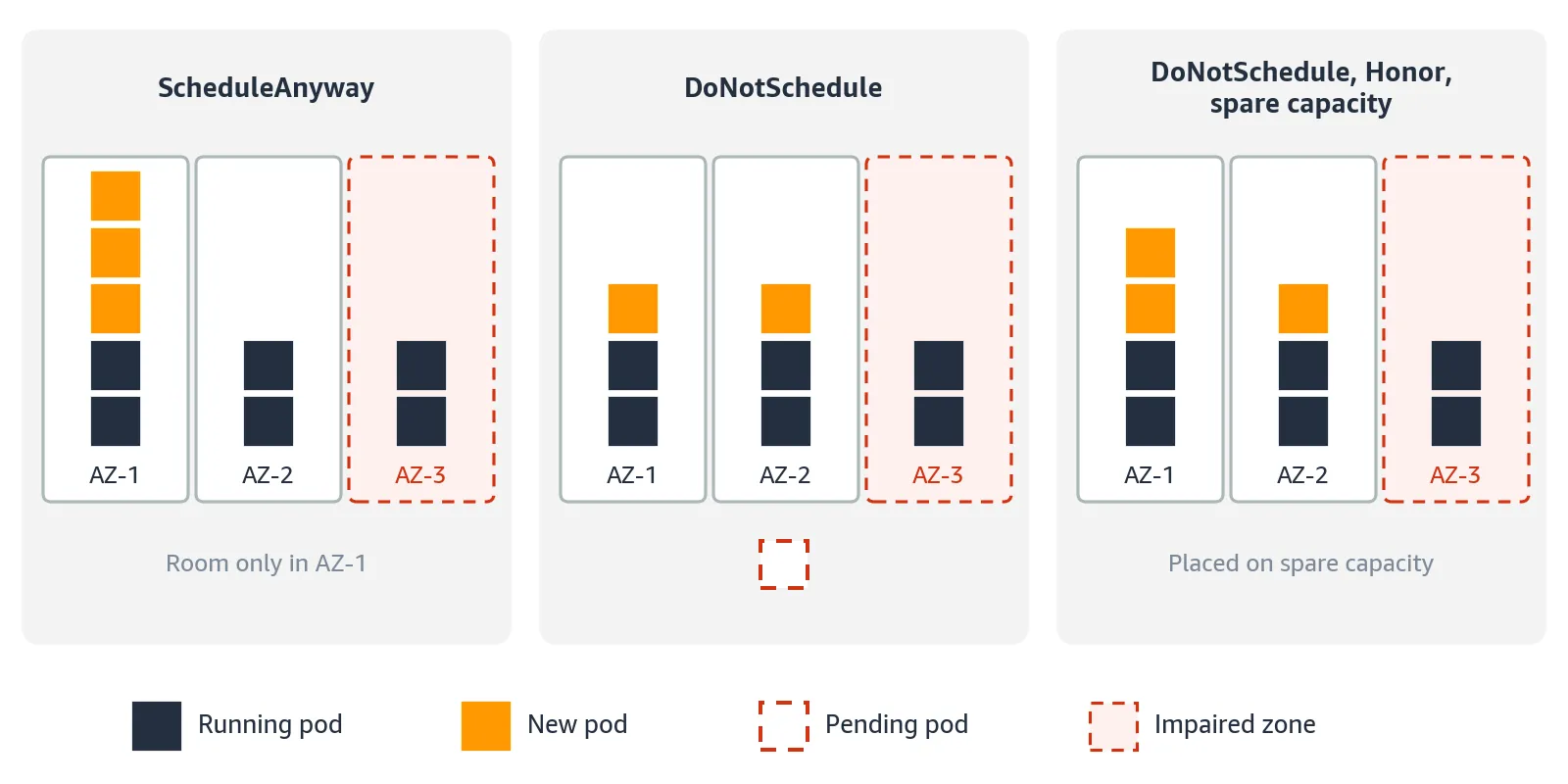
Option | What it costs | When it fits |
|---|---|---|
ScheduleAnyway | Zones stay uneven until you rebalance | Starting new pods matters more than an even spread |
DoNotSchedule | Pods can stay Pending, so pair it with an alarm on them | Losing a zone has to cost at most its share of replicas, and the Deployment rarely grows during an event |
DoNotSchedule , Honor , and spare capacity | The spare capacity is billed while idle | The same need, with an autoscaler that grows the Deployment during an event |
Keep
ScheduleAnyway unless the spread has to stay within maxSkew during the event. When you choose DoNotSchedule , pair it with an alarm on Pending pods, because they no longer start on their own.The third option sets
nodeTaintsPolicy: Honor , which leaves the tainted nodes out of the skew count so the healthy zones can grow evenly. Spare capacity, room held in each zone ahead of time, lets the new pods start there without waiting for new nodes.The field is stable from Kubernetes 1.33 . EKS does not document this combination, so try it in a non-production cluster first.
The zone constraint becomes:
YAML
- maxSkew: 1topologyKey: topology.kubernetes.io/zonewhenUnsatisfiable: DoNotSchedulenodeTaintsPolicy: Honor
Rolling out while a zone is out
Set the rollout strategy explicitly. During a shift, the new pods of a rollout can find no room. Kubernetes defaults both
maxUnavailable and maxSurge to 25 percent. With four replicas, one old pod can stop before its replacement is ready: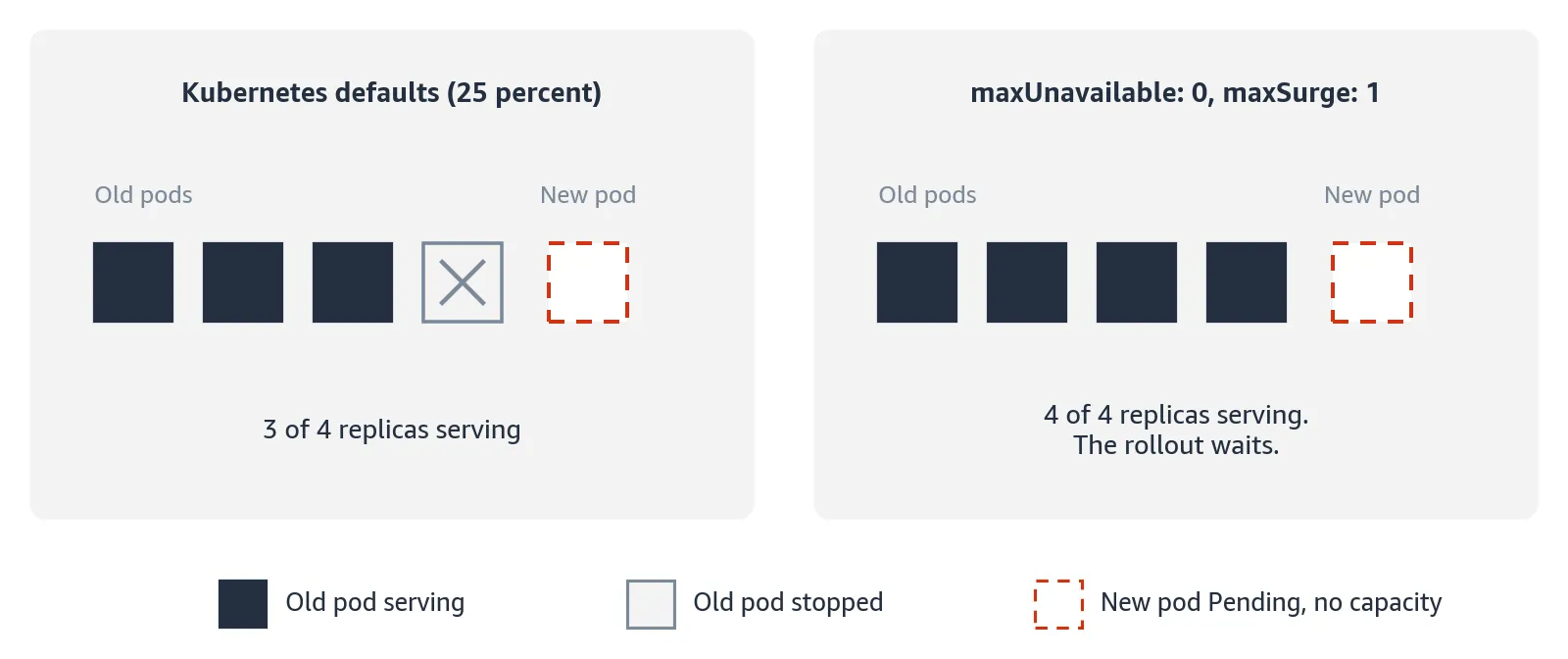
Figure 6: A rollout of four replicas with no free capacity.
With
maxUnavailable: 0 , old pods keep serving and a rollout without capacity waits instead of shrinking the service. In the spec of the Deployment:YAML
strategy:type: RollingUpdaterollingUpdate:maxUnavailable: 0maxSurge: 1
Judging capacity
Judge capacity by what gets traffic. Pods in the impaired zone stay Ready but get no traffic, including pods placed there while the shift was still being applied. Count endpoints or targets in the healthy zones, not Ready pods. When signals disagree, trust the one closest to the user:

Figure 7: Which signal to trust first.
When the zone comes back
Bash
aws arc-zonal-shift cancel-zonal-shift \--zonal-shift-id <zonal-shift-id>
Traffic returns to the zone, but the pods added in the healthy zones during the shift stay there, because the scheduler applies the spread constraint only when it places a pod. You have four ways to rebalance them:
Option | What you gain | What you give up |
|---|---|---|
Do nothing | No restarts | The skew stays until pods are recreated for another reason |
Delete pods one at a time, within the PodDisruptionBudget (PDB) | Control over timing | Manual work for each Deployment |
Kubernetes descheduler with only the topology plugin | Corrects the skew on a schedule, paced by PDBs | Each correction restarts a pod |
Your own automation | Fits your tooling | You maintain it, and it has to stay idle while a shift is active |
Rebalancing with the descheduler
Test and validate the descheduler on your EKS Auto Mode clusters before you adopt it. As of this writing, AWS does not document official support for running it on EKS Auto Mode.
The Kubernetes descheduler evicts pods that break their placement rules, so the scheduler places them again. It fits when many Deployments drift. Each eviction restarts a pod, and PDBs pace the evictions, so give every workload in scope a PDB before you enable it.
The AWS guidance on pod distribution drift describes the descheduler on a managed node group. It enables only the
RemovePodsViolatingTopologySpreadConstraint plugin. It advises against starting with LowNodeUtilization , which packs pods onto fewer nodes while the topology plugin spreads them, so together they can oscillate.These values for the
descheduler Helm chart enable only the topology plugin. Listing ScheduleAnyway makes it rebalance those constraints too, and topologyBalanceNodeFit: true , the default, evicts a pod only if it fits on a node in another zone:YAML
deschedulerPolicy:profiles:- name: rebalance-topologypluginConfig:- name: RemovePodsViolatingTopologySpreadConstraintargs:constraints: [DoNotSchedule, ScheduleAnyway]topologyBalanceNodeFit: trueplugins:balance:enabled:- RemovePodsViolatingTopologySpreadConstraint
Conclusion
EKS Auto Mode takes node management off your hands, but how your application behaves when a zone fails still depends on three decisions, and each has a cost you accept on purpose.
- Who decides when traffic moves. Zonal autoshift moves traffic without waiting for you, and its weekly practice runs move real traffic too.
- How strictly pods stay spread. Strict spreading keeps replicas balanced across zones, but pods wait when a zone has no room.
- How much spare capacity you pay for. Spare capacity lets the remaining zones absorb the load right away, and you pay for it every month.
Each choice fails in its own way, so decide on purpose and alarm on the failure you accepted. The Amazon EKS Best Practices Guide for reliability is a good next step.
Enjoyed reading this content? Let the author know!
Your likes, comments, shares, and saves help creators reach more builders.

Loading recommendations
Loading article