
ALB vs NLB vs GWLB: Which AWS Load Balancer to Use?
Not sure whether to use an ALB, NLB or GWLB? Learn the differences, see real application scenarios, and follow a simple decision guide.

DevOps Engineer
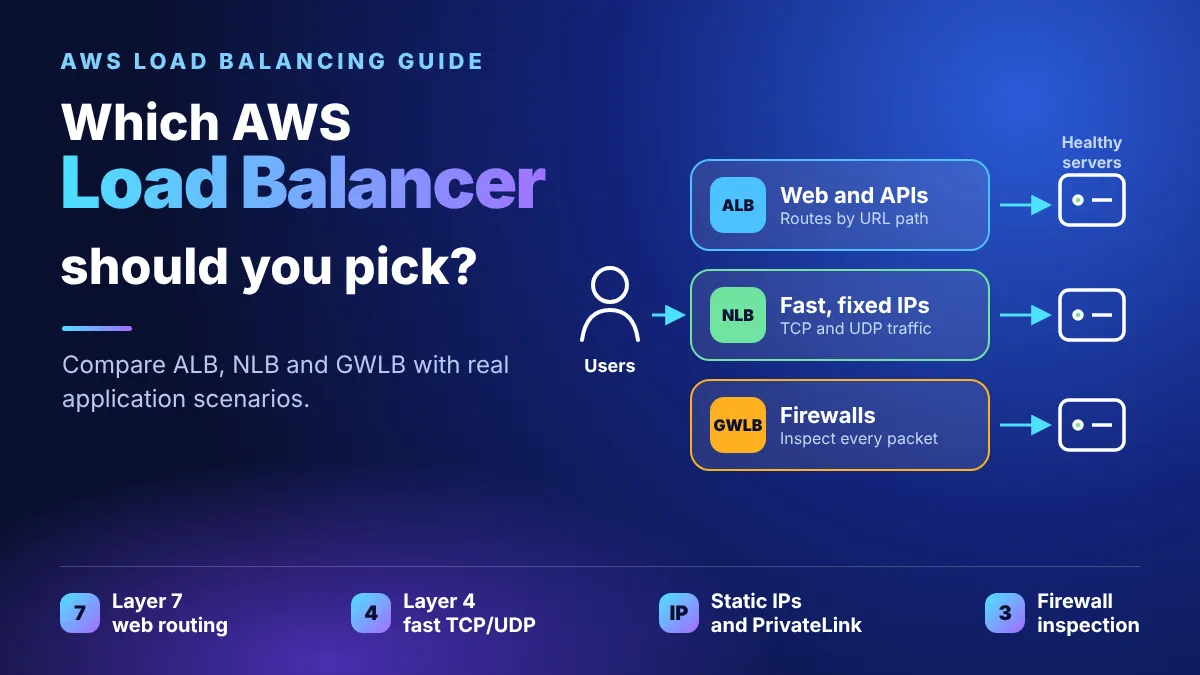
Pick an Application Load Balancer (ALB) for web apps and APIs, a Network Load Balancer (NLB) for raw TCP/UDP speed or fixed IP addresses, and a Gateway Load Balancer (GWLB) only when traffic must pass through a firewall or inspection appliance first.
The 30-second answer
- Is it HTTP or HTTPS traffic? Use an ALB. It reads the request, so it can route by URL path, host name or header.
- Is it TCP, UDP or TLS, or do you need a fixed IP? Use an NLB. It is the fastest and keeps the client's IP address.
- Do you need every packet checked by a third-party firewall? Use a GWLB.
- Still on a Classic Load Balancer? Plan to move to an ALB or NLB. AWS no longer recommends it for new apps.
What a load balancer does
A load balancer is one front door for your app: it receives every request and hands each one to a healthy server behind it.
This gives you three things. Traffic is spread across several servers, so one busy server does not slow everyone down. Unhealthy servers are skipped automatically, because the load balancer runs health checks. And you can add or remove servers without changing the address users visit.
AWS calls this service Elastic Load Balancing (ELB). It comes in several types, and the right one depends on what kind of traffic you serve.
The load balancer types side by side
ALB works at the application layer and understands web requests. NLB works at the connection layer and is built for speed. GWLB sits in front of security appliances. Classic is the older generation.
| Application (ALB) | Network (NLB) | Gateway (GWLB) | Classic (CLB) |
|---|---|---|---|---|
Layer | 7 (application) | 4 (transport) | 3 gateway + 4 load balancing | 4 and 7 |
Listener protocols | HTTP, HTTPS, gRPC | TCP, UDP, TLS | IP | TCP, SSL/TLS, HTTP, HTTPS |
Targets | Instances, IPs, Lambda | Instances, IPs, ALB | Instances, IPs | Instances |
Fixed (static/Elastic) IP | No | Yes | No (reached via route table) | No |
Keeps client source IP | Yes | Yes | Yes | No |
Built-in user login (OIDC, Cognito) | Yes | No | No | No |
Security groups | Yes | Yes | No | Yes |
Routes by URL path or header | Yes | No | No | No |
Best for | Websites, APIs, microservices | Games, IoT, very high traffic, fixed IPs | Firewalls and inspection tools | Only older EC2-Classic apps |
AWS recommends moving off Classic Load Balancers to a current-generation type. Use the Classic column only to understand what you may find in an older account.
Which one for which app? Real scenarios
Start from what your application does, not from the feature list. Here are the situations beginners meet most often.
Your application | Choose | Why |
|---|---|---|
Company website or blog on a few servers | ALB | It speaks HTTP/HTTPS, handles redirects (HTTP to HTTPS) and spreads web requests across servers |
Online shop with microservices: /cart, /orders, /search | ALB | One load balancer routes each URL path or host name to a different target group |
Serverless API where Lambda functions handle requests | ALB | ALB can send requests straight to Lambda functions as targets |
Internal app that must require a login first | ALB | ALB has built-in user authentication, so the app does not need its own login code |
Multiplayer game server using UDP | NLB | NLB supports UDP and TCP at the connection level, with very low delay |
IoT devices keeping long-lived TCP connections | NLB | NLB is built for long-lived connections and very high connection counts |
A partner or bank only allows traffic from fixed IP addresses | NLB | NLB gives you a static or Elastic IP per Availability Zone, which ALB does not |
Sharing a private service with other VPCs or AWS accounts | NLB | NLB works with AWS PrivateLink to publish a service privately |
All traffic must pass a third-party firewall or intrusion-detection appliance | GWLB | It forwards traffic to your appliances and returns it, without changing the packets |
Web app that also needs fixed IPs | NLB in front of ALB | NLB can use an ALB as a target, so you get static IPs plus path routing |
If two answers fit, take the simpler one. Most web apps need only an ALB.
When you need both: the hybrid setup
Some apps need an ALB and an NLB together. There are two common ways to combine them.
1. NLB in front of an ALB (one chain). The NLB receives traffic first and forwards it to the ALB, because an NLB can use an ALB as a target. Use this when you need web routing (URL paths, host names, login) and also need something only an NLB gives you:
- A fixed IP address that a partner or firewall can allow-list.
- AWS PrivateLink, to share the app privately with other VPCs or AWS accounts.
The path is: client, then NLB (fixed IP), then ALB (routing), then your servers. AWS Global Accelerator is another way to get fixed IPs in front of an ALB, without chaining a second load balancer.
2. Two load balancers side by side (separate jobs). One app can serve different traffic types, each through the best load balancer. For example, the website and REST API go through an ALB, while a game server or an MQTT broker for IoT devices uses an NLB, all in the same VPC.
The trade-offs are real. Each load balancer is billed by the hour, a chain adds one more hop, and you now have two health-check setups and two sets of security rules to keep in sync. Use a hybrid only when a single load balancer cannot meet the requirement.
Decision cheat sheet
Work down the questions in order and stop at the first yes.
- Is it web traffic (HTTP, HTTPS or gRPC)? Yes: use an ALB.
- Is it TCP, UDP or TLS traffic, or do you need a fixed IP address? Yes: use an NLB.
- Must every packet pass a firewall or inspection appliance? Yes: use a GWLB.
If your app is web traffic and also needs a fixed IP, put an NLB in front of the ALB.
Cost and common mistakes
A load balancer is billed by the hour while it exists, plus a usage charge, even when no traffic arrives. Check the current prices on the AWS pricing page before you leave one running.
- Using an NLB for a website. An NLB cannot route by URL path or header, so you lose the main reason to use a load balancer for web apps.
- Using an ALB when you need a fixed IP. An ALB has no static IP. Use an NLB, or put an NLB in front of the ALB.
- Using only one Availability Zone. Spread the load balancer and its targets across at least two zones, or one outage takes the app down.
- A wrong health check path. If the health check URL returns an error, the load balancer marks healthy servers as down and sends no traffic.
- Forgetting to delete test load balancers. Delete the load balancer, its target group and the servers when you finish a lab.
Try it yourself: a 15-minute ALB test
- Launch two small EC2 instances in two different Availability Zones. Install a web server on each and give each page different text, such as "Server A" and "Server B".
- Create a target group, choose the instance type, and register both instances. Set the health check path to
/.
- Create an Application Load Balancer, make it internet-facing, and pick both zones.
- Add an HTTP listener on port 80 that forwards to your target group.
- Open the load balancer's DNS name in a browser and refresh a few times. You should see both servers.
- Stop one instance and refresh again. Traffic should move to the healthy server.
- Clean up: delete the load balancer, the target group, and both instances.
More from me
Have feedback or a topic request? Leave a comment, I read every one.
Sources
Enjoyed reading this content? Let the author know!
Your likes, comments, shares, and saves help creators reach more builders.

Loading recommendations
Loading article