
AWS Tagging Best Practices: Find and Enforce Tags
Learn how to find, tag and enforce AWS tags with Tag Editor, SCPs, permissions boundaries, tag policies, AWS Config, and Terraform default tags.

Picture this: the bill jumps overnight. Which of your 400 resources caused it, which team owns it, and is it safe to delete? If your answer is "let me check CloudTrail", you don't have a billing problem, you have a tagging problem.
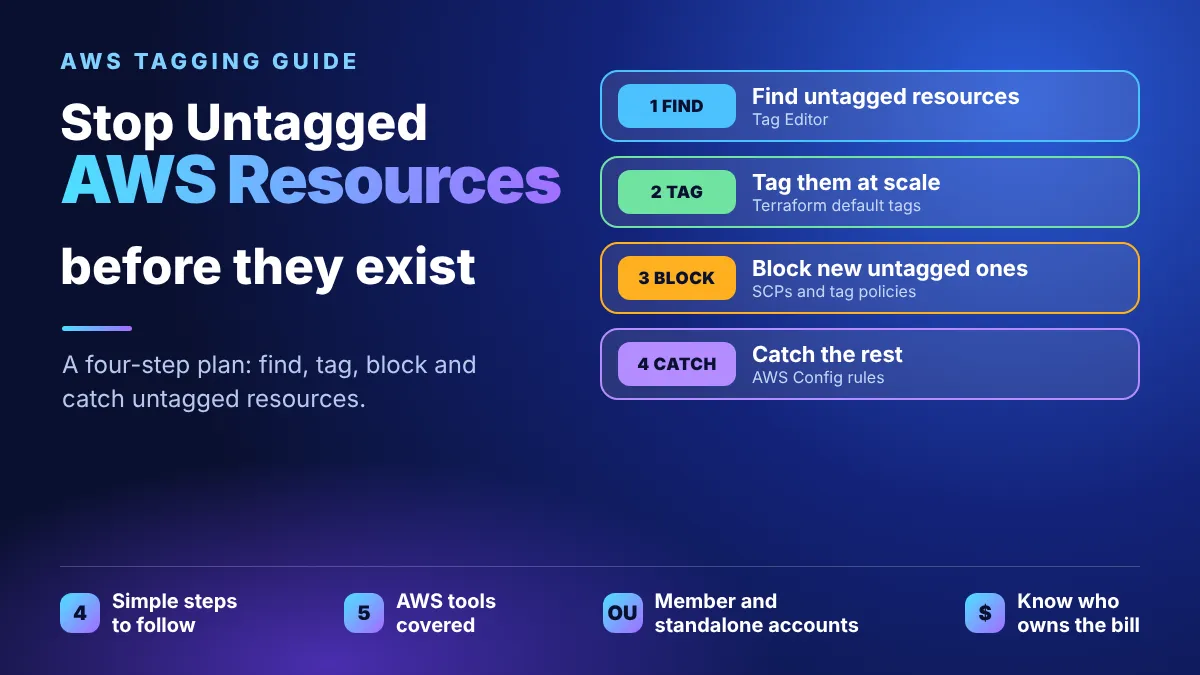
I audited my organization's AWS accounts for tagging compliance. This is the plan that came out of it: find what is untagged, tag it, block new untagged resources, and catch the rest. It works for accounts inside an Organization and for standalone ones, and it includes copy-paste policies.

The short version
- Find and tag what already exists in minutes with Tag Editor, which is free.
- Enforce tags on new resources: an SCP for member accounts, a permissions boundary for standalone accounts.
- Catch the rest with the AWS Config
required-tagsrule and an alert.
- Result: every resource has an Environment and an Owner, so cost and cleanup questions have answers.
Why tags go missing
Tagging by convention fails because nothing stops an untagged launch and nobody audits afterwards. Soon cost reports show "untagged" and cleanup becomes guesswork.
You cannot secure, optimize or delete what you cannot attribute. In this plan every resource must carry two tags, and optional ones make reporting richer:
Tag | Required? | Example values | Purpose |
|---|---|---|---|
Environment | Yes | prod , staging , dev | Separates risk and cost by lifecycle stage |
Owner | Yes | payments-team , a ticket queue | The accountable team, not whoever clicked create |
CostCenter | Optional | cc-1042 | Maps spend to a budget |
Application | Optional | checkout-api | Groups resources into one workload |
CreatedBy | Optional | an IAM role or user name | Who technically created it, which is not the same as who owns it |
Tag keys are case-sensitive, so Environment and
environment count as two different tags. Pick one spelling and one set of values ( prod , never sometimes Production ), and write them down. Keep the list short: every extra required tag is one more reason for a deployment to be denied.Check first: are your accounts already tagged by code?
First check whether each account is deployed with infrastructure as code (IaC). Hand-added tags drift or get overwritten on the next deploy, and a deny policy can break deployments that don't pass tags. Check each account separately.
Tool | How to tell it is in use | What to do if it is |
|---|---|---|
CloudFormation | Stacks are listed in the CloudFormation console (check every region). Their resources carry the system tag aws:cloudformation:stack-name , which Tag Editor can filter on. | Put Environment and Owner in the stack tags, which propagate to supported resources. Add Hooks or Guard checks to the pipeline. |
CDK | A CDKToolkit stack means the account was bootstrapped for CDK, which deploys through CloudFormation. | Tag the whole app with Tags.of(app).add(...) . |
Terraform | No tag marks it. Look for an S3 bucket or DynamoDB table holding state, CI/CD deploy roles (a GitHub Actions role, for example), and CloudTrail events whose user agent contains "Terraform". | Set default_tags in the AWS provider block so every resource gets both tags. |
None (console or CLI only) | No stacks, no CDKToolkit , no deploy roles. | Follow the manual steps below as written. |
Three rules follow from what you find:
- Fix IaC-managed resources in the code, not in Tag Editor. Bulk-tagging them by hand just creates drift.
- Test one deployment before enforcing. Run a normal pipeline deploy in a non-production account with the policy attached, and confirm the tags arrive with the create request. A deploy that tags resources after creating them will be denied.
- Mixed accounts are normal. Tag IaC resources in code and everything else with Tag Editor. The Config rule in step 4 checks both.
The approach: four layers
The plan has four steps, and only step 3 changes with the account type:
- Find untagged resources with Resource Groups & Tag Editor.
- Tag them in bulk with placeholder values.
- Enforce tags on new resources at creation time.
- Safety net with an AWS Config rule for everything enforcement can't reach.
Step | Member account (in an Organization) | Standalone account |
|---|---|---|
Find untagged | Tag Editor per account, or Config aggregator | Tag Editor |
Tag them | Tag Editor bulk "Manage tags" | Tag Editor bulk "Manage tags" |
Enforce on creation | SCP attached from the management account | IAM permissions boundary |
Safety net | Config required-tags , deployed with StackSets | Config required-tags |
SCPs never restrict the management account, so keep workloads out of it. If you must run resources there, use a permissions boundary as in a standalone account.
Step 1 and 2: find and tag what already exists
Resource Groups & Tag Editor is free, needs no setup and works per account:
- In the console, search for Resource Groups & Tag Editor and open Tag Editor.
- Under Regions choose All regions. Resources hide in regions you forgot about.
- Under Resource types choose All supported resource types, then Search resources.
- Sort by the tag column to find rows missing Environment or Owner.
- Select the rows, choose Manage tags, add the tags and Review and apply.
Tip: tag with placeholders first, such as
Environment = needs-review and Owner = unassigned , then ask owners to correct them. Guessing owners creates bad data. With five or more accounts, use a Config aggregator for one combined view.Shortcuts: Resource Explorer's
tag:none query lists resources with no tags at all, and the Tagging API ( aws resourcegroupstaggingapi tag-resources ) can apply the placeholders to a list of ARNs.Step 3: enforce tags on new resources
The idea is a deny policy: a create request without the required tag fails before the resource exists. Use one statement per tag. Conditions inside one statement are ANDed, so a single combined statement would only deny when both tags are missing.
JSON
{"Version": "2012-10-17","Statement": [{"Sid": "DenyCreateWithoutEnvironmentTag","Effect": "Deny","Action": ["ec2:RunInstances", "ec2:CreateVolume", "ec2:CreateSnapshot","ec2:CreateSecurityGroup", "ec2:CreateVpc", "ec2:CreateNatGateway","rds:CreateDBInstance", "rds:CreateDBCluster","lambda:CreateFunction", "dynamodb:CreateTable","sns:CreateTopic", "sqs:CreateQueue", "cloudformation:CreateStack"],"Resource": "*","Condition": { "Null": { "aws:RequestTag/Environment": "true" } }},{"Sid": "DenyCreateWithoutOwnerTag","Effect": "Deny","Action": ["ec2:RunInstances", "ec2:CreateVolume", "ec2:CreateSnapshot","ec2:CreateSecurityGroup", "ec2:CreateVpc", "ec2:CreateNatGateway","rds:CreateDBInstance", "rds:CreateDBCluster","lambda:CreateFunction", "dynamodb:CreateTable","sns:CreateTopic", "sqs:CreateQueue", "cloudformation:CreateStack"],"Resource": "*","Condition": { "Null": { "aws:RequestTag/Owner": "true" } }}]}
My full version lists about 30 actions; this one is shortened. Not every action supports
aws:RequestTag , so spot-check the rarer ones in the IAM Service Authorization Reference and drop any that don't behave.Member accounts: use an SCP. In the management account, create the policy in AWS Organizations (Policies, then Service control policies) and attach it to the OU that holds your member accounts. Then launch an untagged EC2 instance in a member account: it should fail with an explicit deny from a service control policy. If it succeeds, check the OU attachment.
If a launch is denied, the request did not carry both tags. Pass them at creation, for example with the CLI:
Bash
aws ec2 run-instances \--image-id ami-xxxxxxxx --instance-type t3.micro \--tag-specifications 'ResourceType=instance,Tags=[{Key=Environment,Value=dev},{Key=Owner,Value=my-team}]'
In CloudFormation, put the tags in the stack's tags. Adding tags after the resource exists is too late for this policy.
Standalone accounts: use a permissions boundary. With no Organization there is nothing to attach an SCP to, so scope the same deny to IAM identities. A boundary needs an allow statement too, so add this at the top of the Statement array and keep the two denies:
JSON
{ "Sid": "AllowAllWithinBoundary", "Effect": "Allow", "Action": "*", "Resource": "*" }
Create it as a customer-managed policy and set it as the Permissions boundary on every role or user that creates resources, including CI/CD deploy roles. It only restricts identities it is attached to.
Cautions: an SCP only affects future calls, so steps 1 and 2 come first. It can also break automation that tags after creating, so roll it out gradually: sandbox OU, then non-production, then the rest. To protect tags once they exist, also deny
CreateTags and DeleteTags calls that touch the Environment and Owner keys (use the aws:TagKeys condition) for everyone except an admin role.Step 4: the safety net with AWS Config
Creation-time policies can't cover everything: some actions don't support tag conditions, and SCPs are capped at 5,120 characters. S3 is a good example. Buckets can now be tagged at creation (it needs
s3:TagResource as well as s3:CreateBucket ), but the docs don't say how aws:RequestTag behaves for CreateBucket . Test it in a sandbox and keep S3 under Config too.The AWS Config managed rule
required-tags is the detective layer. It checks up to six tag keys (and optionally their values) on 30 resource types, such as EC2, EBS, RDS, DynamoDB, load balancers and S3. It runs when a resource changes and only detects; it never blocks.- Make sure AWS Config is recording in the account.
- Console, then AWS Config, Rules, Add rule, and pick the managed rule
required-tags.
- Set parameters
tag1Key = Environmentandtag2Key = Owner.
- Config marks every resource missing a tag as Non-compliant.
- Optionally attach auto-remediation. The AWS-managed runbook AWS-SetRequiredTags does not work with this rule, so you need a custom SSM Automation document that applies the placeholder values.
In an Organization, deploy the rule to every current and future member account with CloudFormation StackSets from the management account.
Tag policies keep the values clean. An Organizations tag policy defines the allowed keys and values, such as Environment must be
prod , staging or dev . It does not flag resources that have no tag at all, so use it together with the Config rule, not instead of it.Config is regional, so enable the recorder and rule in every region you use, or view them through an aggregator. Then send the "Config Rules Compliance Change" event to EventBridge and route NON_COMPLIANT results to SNS or team chat so someone actually sees them.
Optional: auto-tag the creator. An EventBridge rule on CloudTrail create events (such as
RunInstances ) can trigger a small Lambda that writes the caller to a CreatedBy tag. Keep Owner as the accountable team and don't copy one into the other.Limits and gaps I found
This approach is a strong baseline, not a complete answer. These are the gaps I would plan for:
Gap | Why it happens | What to do |
|---|---|---|
Management account is not covered by SCPs | SCPs never restrict the management account | Use the permissions boundary there, and keep workloads out of that account |
Auto Scaling and other service roles skip the SCP | SCPs don't affect service-linked roles, so instances launched by an Auto Scaling group are not denied | Set tags on the launch template or group, and let Config catch the rest |
A boundary only protects identities that carry it | A new role without the boundary, or removing the boundary, bypasses the deny | Require the boundary when creating roles and users, and deny changes to it |
Tags are checked only at creation | Someone can delete or edit a tag afterwards | Deny tag removal for required keys, and let Config flag the change |
Only the tag key is checked, not its value | The Null condition tests presence | Add allowed values to the Config rule, or use Organizations tag policies |
Config covers 30 resource types | Lambda, ECS, EKS, SNS, SQS, KMS, Secrets Manager and EFS are not on the managed rule's list | Audit those with Tag Editor, and add custom rules if they matter |
Config only detects | The managed rule can't block, and AWS-SetRequiredTags doesn't work with it | Write a custom SSM runbook, or fix the tags in your templates |
Cost reports stay empty | Tags must be activated as cost allocation tags in Billing, and they can take up to 24 hours to appear | Activate Environment and Owner on day one |
A deny can break pipelines | The effective SCP can't be viewed from the member account, and automation may not send tags | Test in a sandbox OU first, never attach to the root untested, and keep a break-glass exemption |
Roll it out in phases and measure it
Governance is a migration, not a switch. A sequence that keeps people unblocked:
- Audit: run Tag Editor or
tag:noneand record the percentage of resources with both required tags. That number is your baseline.
- Backfill: bulk-tag with placeholders, and fix IaC-managed resources in code.
- Detect: turn on the Config rule and the alert, and watch for a week without blocking anyone.
- Enforce: attach the deny policy to a sandbox OU, then widen it.
- Maintain: review the compliance percentage monthly and keep a documented exception path for the few resources that truly cannot be tagged.
Track three numbers: percent of resources compliant, number of denied create calls per week (a spike means a pipeline needs fixing), and share of spend visible by Environment or Owner in Cost Explorer.
What it costs
Honest note on cost: Tag Editor and SCPs are free. AWS Config is pay-per-use, with two parts: configuration items recorded, and rule evaluations. I modelled 100 resources that each change about 3 times a month, using the prices I found during my R&D (check the current AWS Config pricing page before you budget):
Recording mode | Config items per month | Item cost | Rule evaluations | Evaluation cost | Total per month |
|---|---|---|---|---|---|
Continuous | 300 | $0.90 (at $0.003 each) | 300 | $0.30 (at $0.001 each) | $1.20 |
Periodic (daily) | 3,000 | $36.00 (at $0.012 each) | 3,000 | $3.00 | $39.00 |
Continuous recording is cheaper unless your resources change dozens of times a month, because periodic items are priced about 10 times higher. At this scale you stay inside the first evaluation tier of 100,000 per month.
Final checklist
- Required tags and allowed values are written down (Environment, Owner).
- Each account is checked for IaC, and tags are fixed in code where it is used.
- All regions are audited, and existing resources carry placeholder tags.
- A deny policy (SCP or permissions boundary) is tested in a sandbox before wider rollout.
- The Config
required-tagsrule is on in every region you use, with alerts to a person.
- Cost allocation tags are activated in Billing.
- The compliance percentage is measured monthly, with an exception process for the rest.
Over to you
If you manage tagging today, which tag do you enforce first, and what do you do with legacy resources nobody claims? I would like to hear whether you use SCPs, boundaries, Config rules, or tag policies for this, and where you hit limits.
More from me
Have feedback or a topic request? Leave a comment, I read every one.
Sources
Enjoyed reading this content? Let the author know!
Your likes, comments, shares, and saves help creators reach more builders.

Loading recommendations
Loading article