
Find It, Patch It, Watch It: A Community Checklist for php2shell on AWS
php2shell is the nickname for two critical flaws in the PHP runtime itself, CVE-2026-109618 and CVE-2026-109619, both scored CVSS v4.0 9.2. They allow an unauthenticated attacker to run code on a PHP web server, and exploitation in the wild was reported on October 21, 2026, the same day PHP shipped fixes.
Series: AI Security (3 articles)
- 3Find It, Patch It, Watch It: A Community Checklist for php2shell on AWS This article

What is php2shell?
php2shell is a pair of memory-safety bugs in the PHP engine, fixed on October 21, 2026. PHP rates both CVSS v4.0 9.2; the Amazon Linux Security Center scores them CVSS v3 8.1 (Important).
| CVE | PHP's title | What goes wrong | Advisory |
|---|---|---|---|
| CVE-2026-109618 | RCE via OOM corruption | An out-of-memory error interrupts PHP while request data is only partly initialized. Request cleanup then treats that data as valid. | GHSA-w8hw-w9fx-j79w |
| CVE-2026-109619 | RCE via stale global state | Request-owned state survives after its memory is freed. The next request on the same worker can use it before it is reset. | GHSA-6wmf-4rv5-p3rp |
Who is at risk. Per the PHP security advisory , every PHP installation serving web requests: PHP-FPM, Apache with mod_php, php-cgi, FrankenPHP and LiteSpeed. PHP rates mod_php highest, with a demonstrated unauthenticated exploit that fires before any application code runs. Sansec traces the vulnerable code back to PHP 5.4, released in 2012.
| PHP branch | Fixed release | Notes |
|---|---|---|
| 8.5 | 8.5.12 | |
| 8.4 | 8.4.27 | |
| 8.3 | 8.3.36 | |
| 8.2 | 8.2.35 | Branch reaches end of life on December 31, 2026 |
| 8.1, 8.0, 7.4 | No official release | PHP published minimal source backports; otherwise use an LTS vendor or upgrade |
| 7.3 and older | No fix from PHP | Upgrade, or use a commercial LTS build |
How it went public. The bugs leaked a day before the coordinated release, and attacks started before the patch landed.
| When (UTC) | What happened |
|---|---|
| Oct 21, ~14:00 | PHP ships fixed releases; Calif, Wiz, OpenAI and Quarkslab publish details (Cloudflare ) |
| Oct 21, 09:18 | Aikido reports exploitation in the wild (Aikido ) |
| Oct 21, 07:43 | Cloudflare reports early attacks (Sansec ) |
| Oct 21, 03:02 | Cloudflare's WAF rules go live for all plans |
| Oct 20 | CVE IDs leak on Hacker News; PHP posts an advance notice |
| Aug 24 | Wiz Research reports the bugs to PHP |
| Aug 11 | Calif reports the first bug to PHP |
One detail worth sharing with your team: Wiz researchers said these flaws had existed for decades, and frontier AI models are what made a working exploit chain practical.
How it works
Both bugs are about what PHP does when a request goes wrong, not about anything in your code.

For CVE-2026-109618, PHP's advisory lists three ways to push a request out of memory while it still looks within limits. A multipart body without a usable
Content-Length can slip past post_max_size. A single part can carry unlimited headers that cost far more memory inside PHP than on the wire. Empty file fields with nested names multiply array work without counting toward max_file_uploads.Why mod_php is worst: Apache runs PHP's request cleanup even when request startup failed, so the corrupted state is processed before any application code runs. PHP-FPM kills the child when startup fails, which is why PHP calls FPM susceptible but has no complete FPM exploit for this CVE.
CVE-2026-109619 is about reuse. A worker serves many requests, and some global pointers that should reset between them don't. The confirmed paths run through session upload progress, which is on by default, and fatal error backtraces on PHP 8.5.

Am I affected? Using the Aikido checker responsibly
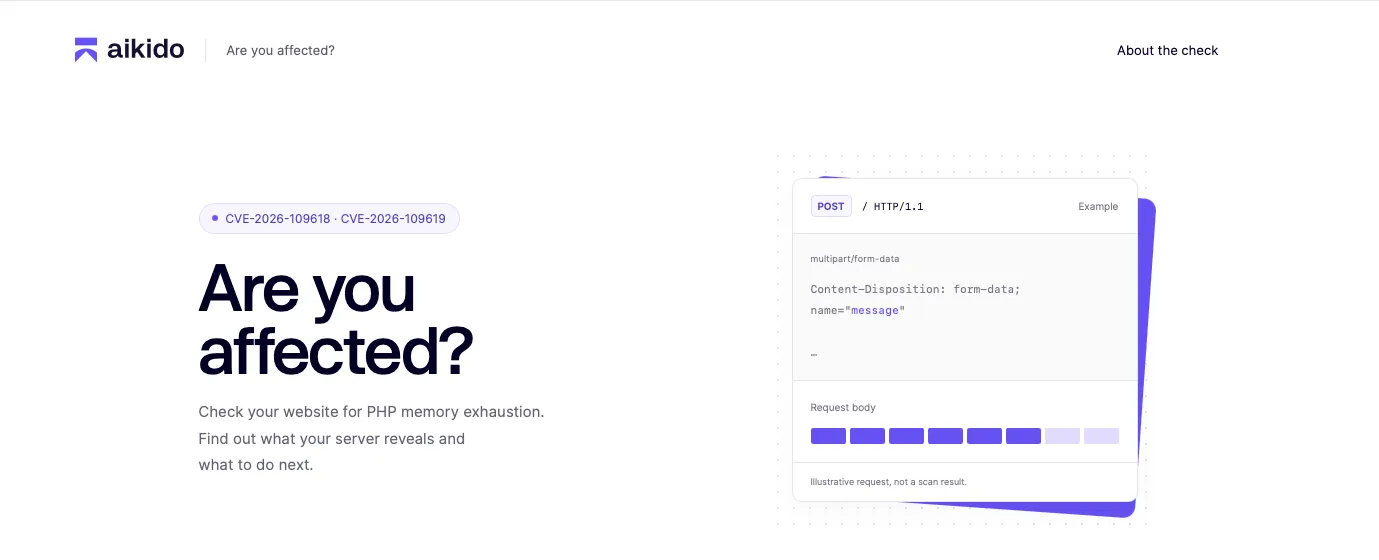
The fastest answer is still the version number on the host; php2shell.aikido.io is a useful outside-in second opinion, not a verdict. It is a free, owner-run check from Aikido that needs no signup and probes a public URL for the multipart memory-exhaustion behavior behind both CVEs.
| Mode | What it sends | Risk to your site | What a result means |
|---|---|---|---|
| Default check | Fingerprint requests plus repeated timing requests | Low. The probe assumes a 128 MB memory_limit, so a lower limit can still fail a request | Identifies PHP on that path; timing alone cannot tell patched from vulnerable PHP |
| Definitive check (opt-in) | A larger payload | Can crash a PHP worker and interrupt live requests | A crash points to vulnerable PHP; a clean result can mean patched PHP or a memory limit above the probe's reach |
A few rules before you run it:
- Only test what you own or are authorized to test. Run the definitive check outside peak hours, and tell whoever is on call first.
- Point it at a real PHP path, not a static page or a CDN-cached URL. Localhost and private networks are blocked.
- Inconclusive is common. PHP 7.4 to 8.0, a WAF block, a timeout or missing PHP signals all leave the result undetermined. A blocked request is not proof of safety.
- Mind what you submit. The service logs your IP and the tested URL (without its query string), so keep secrets out of the path.
Then confirm on the host itself. Remember that distributions backport fixes, so trust your vendor's advisory over the upstream version string:
1
2
3
4
php -v | head -n1
php -i | grep -E '^(memory_limit|post_max_size|session.upload_progress.enabled) '
# Amazon Linux 2023
rpm -qa 'php*' | sort
Find your PHP surface on AWS
You can't patch what you can't see, and PHP tends to hide in places nobody owns anymore: a marketing WordPress site on Lightsail, an old Beanstalk environment, a Lambda function someone built with a PHP layer. Start with a list.
| Where PHP runs | How to find it | What to check |
|---|---|---|
| EC2 and Auto Scaling groups | Systems Manager Inventory (AWS:Application) or Run Command | PHP package and version, plus the SAPI (mod_php vs PHP-FPM) |
| Elastic Beanstalk | describe-environments, filtered on PHP platforms | The platform version and the PHP release it bundles |
| ECS, EKS, Fargate, App Runner | ECR repositories, task definitions and pod specs | The PHP version inside the image, not just the tag |
| Lambda | Functions on provided.al2023 or provided.al2 with PHP layers | The layer ARN and version |
| Lightsail | Instances launched from WordPress or LAMP blueprints | php -v over SSH |
| Anything hosted for you | Your agency or managed host | Ask them for the PHP version and their patch date |
If Amazon Inspector is enabled, ask it first. Findings depend on vendor advisory data, so an empty result today is not a clean bill of health, and PHP compiled from source inside a container image may not appear as a package finding at all.
1
2
3
4
5
6
7
8
9
10
11
12
13
14
15
16
17
18
19
20
21
# Inspector: any findings for either CVE?
aws inspector2 list-findings \
  --filter-criteria '{"vulnerabilityId":[{"comparison":"EQUALS","value":"CVE-2026-109618"},{"comparison":"EQUALS","value":"CVE-2026-109619"}]}' \
  --query 'findings[].[resources[0].type,resources[0].id,severity]' --output table

# Elastic Beanstalk: which environments run a PHP platform?
aws elasticbeanstalk describe-environments \
  --query "Environments[?contains(SolutionStackName, 'PHP')].[EnvironmentName,SolutionStackName]" \
  --output table

# EC2 via Systems Manager: installed PHP packages on one instance
aws ssm list-inventory-entries --instance-id i-0123456789abcdef0 \
  --type-name AWS:Application --filters Key=Name,Values=php,Type=BeginWith

# EC2 fleet: ask every tagged instance directly
aws ssm send-command --document-name AWS-RunShellScript \
  --targets Key=tag:Runtime,Values=php \
  --parameters 'commands=["php -v | head -n1"]'

# Container images: check what is inside, not what the tag claims
docker run --rm --entrypoint php <account>.dkr.ecr.<region>.amazonaws.com/<repo>:<tag> -v
Adjust the tag filter to however you label workloads. If you run AWS Organizations, repeat the Inspector query from the delegated administrator account to cover every member account at once.
Fix it on AWS
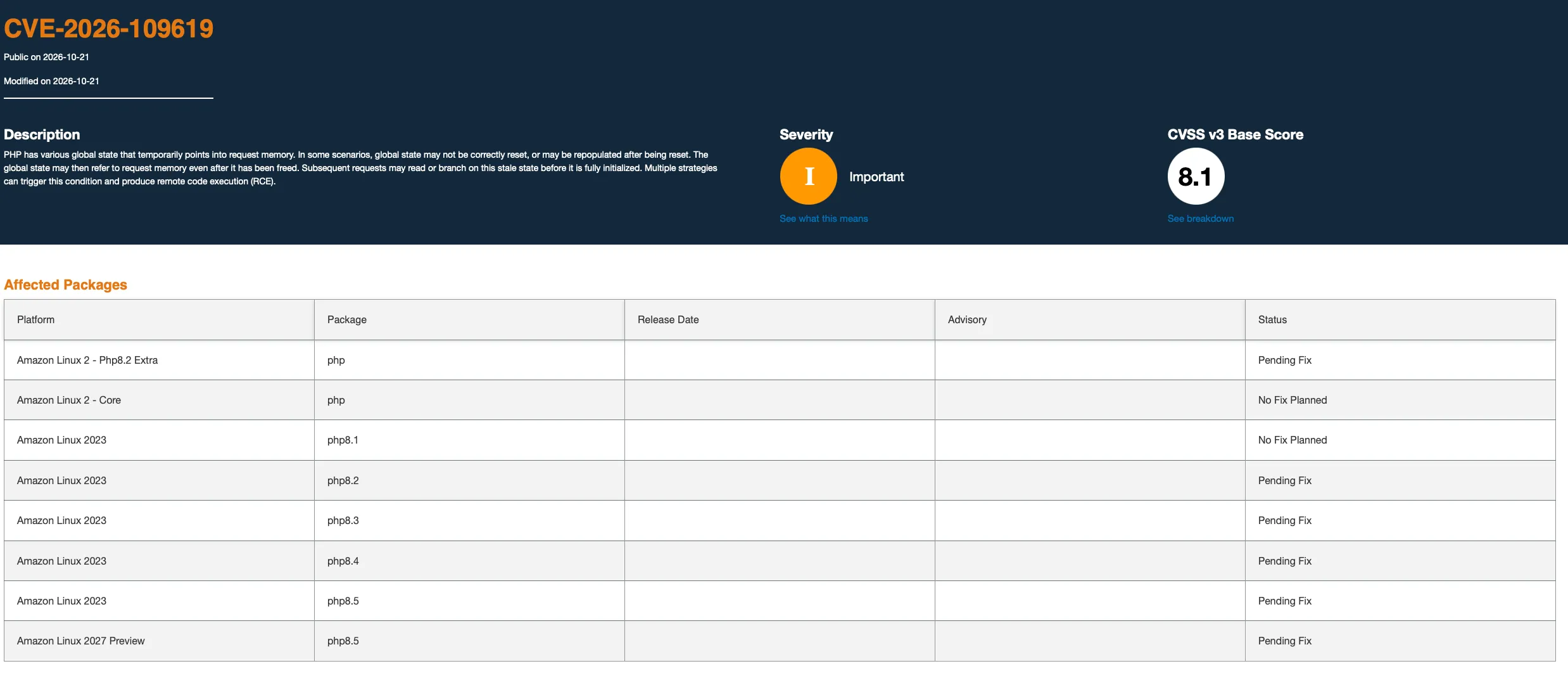
Patching is the only complete fix, and on AWS the path depends on who owns the PHP binary. As of October 21, 2026, several AWS-managed paths were still waiting on packages, so check the linked status pages before you plan around them.
| Where PHP runs | Path to the fix | Status on Oct 21, 2026 |
|---|---|---|
| Amazon Linux 2023 | Upgrade the php8.x packages once the ALAS advisory publishes, then restart PHP | php8.2 to php8.5: Pending Fix; php8.1: No Fix Planned (ALAS ) |
| Amazon Linux 2 | The core php package gets no fix. Move to AL2023 or a supported PHP build | Core php: No Fix Planned; php8.2 extra: Pending Fix |
| Elastic Beanstalk | Move each environment to the newest platform version instead of waiting for the maintenance window | AWS says the latest platform version carries the mitigation and running environments update through Managed Platform Updates. The Oct 20 platform release still shipped 8.5.11 and 8.4.26 |
| ECS, EKS, Fargate, App Runner | Rebuild on a base image with fixed PHP, push to ECR, roll the service | Aikido publishes free patched images for 8.2 to 8.5 on its public ECR |
| Lambda with a PHP layer (for example, Bref) | Move to a layer version built on a fixed PHP release and redeploy | Depends on your layer maintainer |
| Lightsail WordPress or LAMP (Bitnami) | No in-place PHP upgrade; launch a fresh blueprint and migrate, per the AWS Knowledge Center | Snapshot first; apply the interim settings below until then |
| PHP 8.1 or older, anywhere | Upgrade to 8.4 or 8.5, use a commercial LTS build, or build from PHP's source backports | No official PHP release |
The commands, once fixed builds are available to you:
1
2
3
4
5
6
7
8
9
10
11
12
13
14
# Amazon Linux 2023: pull the repo version that carries the fix, then restart
sudo dnf check-release-update
sudo dnf upgrade --releasever=latest 'php8.4*'
sudo systemctl restart php-fpm httpd

# Elastic Beanstalk: find the newest platform version for your branch...
aws elasticbeanstalk list-platform-versions \
  --filters '[{"Type":"PlatformBranchName","Operator":"=","Values":["PHP 8.4 running on 64bit Amazon Linux 2023"]}]' \
  --query 'PlatformSummaryList[0].PlatformArn'
# ...and apply it now
aws elasticbeanstalk update-environment --environment-name my-env --platform-arn <arn-from-above>

# ECS: rebuild the image (FROM php:8.4.27-fpm or newer), push, then roll tasks
aws ecs update-service --cluster prod --service web --force-new-deployment
Two things to plan for after the upgrade:
- Restart every worker. A package upgrade does nothing for PHP-FPM children or Apache processes already in memory.
- Expect a new memory behavior. Per PHP's advisory , patched PHP replaces the old out-of-memory jump with a soft limit plus a hard process exit at a higher threshold. A worker that blows its memory budget now dies immediately, so watch for it in load tests.
Then assume you may already have been hit. Aikido recommends checking for compromise back to at least June 2026: web shells, unexpected or modified PHP files, new admin users and unusual outbound connections. The next two sections cover how to do that on AWS.
Reduce exposure while you patch
None of this makes unpatched PHP safe. PHP says these measures only narrow specific attack paths, and Aikido warned early on that configuration changes alone did not stop the exploits. Use them to buy hours, not weeks.
PHP settings from the official advisory
| Setting | Targets | Where to set it | Trade-off |
|---|---|---|---|
memory_limit = -1 | CVE-2026-109618 | php_admin_value in the FPM pool or Apache config, so apps can't override it | An underlying allocation failure can still reach the bug; pair it with a container or cgroup memory limit, never RLIMIT_AS or RLIMIT_DATA |
post_max_size = 8M (no uploads) or 32M (uploads), with upload_max_filesize below it | CVE-2026-109618 | php.ini or FPM pool | Large forms and uploads fail |
Lower max_input_nesting_leveland bound input variables | CVE-2026-109618 | php.ini or FPM pool | Deeply nested forms may break |
session.upload_progress.enabled = 0 | CVE-2026-109619 | php.ini or FPM pool, then restart every worker. Not ini_set() or .user.ini | PHP-native upload progress bars stop |
fatal_error_backtraces = 0 (PHP 8.5 only) | CVE-2026-109619 | php.ini or FPM pool | Less detail in fatal error logs |
On Amazon Linux 2023 with PHP-FPM, that looks like this. On Elastic Beanstalk, ship the same values in an
.ini file under /etc/php.d/ through .ebextensions or a .platform hook.1
2
3
4
5
6
7
; /etc/php-fpm.d/www.conf
php_admin_value[memory_limit] = -1
php_admin_value[post_max_size] = 8M
php_admin_value[upload_max_filesize] = 6M
php_admin_flag[session.upload_progress.enabled] = off
; PHP 8.5 only
php_admin_flag[fatal_error_backtraces] = offAt the edge: AWS WAF, ALB and CloudFront
No complete WAF rule exists for php2shell, and I hadn't found an AWS-managed rule group update for it at the time of writing. Check the AWS WAF managed rules changelog, and meanwhile add your own rules in Count mode, read the logs, then switch to Block.
- Flag the upload-progress field. The confirmed CVE-2026-109619 path sends the
PHP_SESSION_UPLOAD_PROGRESSfield in a multipart body of roughly 450 bytes, well inside what AWS WAF inspects. - Block multipart where you don't need it. PHP's advisory says to block multipart requests at the frontend if your app doesn't use them. Match the header case-insensitively, because PHP also accepts
MULTIPART/FORM-DATA. - Know the body inspection limit. AWS WAF on an ALB sees only the first 8 KB of a body; CloudFront, API Gateway and App Runner default to 16 KB. Setting
OversizeHandlingtoMATCHon a size rule lets you block larger bodies on paths that never need them. - Rate-limit POSTs. A rate-based rule per IP, or per JA4 fingerprint behind an HTTPS listener, slows down repeated attempts. Classmethod published a CloudFormation sample you can learn from.
- Cap request size behind the ALB. Set
client_max_body_sizein nginx orLimitRequestBodyin Apache, including for requests without aContent-Length.
Two starter rules for the console's JSON rule editor. Replace
/uploads/ with the paths that legitimately accept files:1
2
3
4
5
6
7
8
9
10
11
12
13
14
15
16
17
18
19
20
21
22
23
24
25
26
27
28
29
30
31
32
33
34
35
36
37
38
[
{
"Name": "php2shell-upload-progress-field",
"Priority": 10,
"Statement": {
"ByteMatchStatement": {
"SearchString": "php_session_upload_progress",
"FieldToMatch": { "Body": { "OversizeHandling": "CONTINUE" } },
"TextTransformations": [{ "Priority": 0, "Type": "LOWERCASE" }],
"PositionalConstraint": "CONTAINS"
}
},
"Action": { "Count": {} },
"VisibilityConfig": { "SampledRequestsEnabled": true, "CloudWatchMetricsEnabled": true, "MetricName": "php2shell-upload-progress" }
},
{
"Name": "multipart-outside-upload-paths",
"Priority": 11,
"Statement": {
"AndStatement": {
"Statements": [
{ "ByteMatchStatement": {
"SearchString": "multipart/form-data",
"FieldToMatch": { "SingleHeader": { "Name": "content-type" } },
"TextTransformations": [{ "Priority": 0, "Type": "LOWERCASE" }],
"PositionalConstraint": "CONTAINS" } },
{ "NotStatement": { "Statement": { "ByteMatchStatement": {
"SearchString": "/uploads/",
"FieldToMatch": { "UriPath": {} },
"TextTransformations": [{ "Priority": 0, "Type": "LOWERCASE" }],
"PositionalConstraint": "STARTS_WITH" } } } }
]
}
},
"Action": { "Count": {} },
"VisibilityConfig": { "SampledRequestsEnabled": true, "CloudWatchMetricsEnabled": true, "MetricName": "php2shell-multipart-scope" }
}
]If you changed
session.upload_progress.name, match your own field name instead. And while you're in there, set expose_php = Off so you stop advertising PHP in every response header.Detect and monitor
Memory-corruption exploits usually crash workers several times before they succeed, so worker churn is your earliest warning. After that, look for what an attacker does with a shell: drop files, spawn processes and reach for the instance role.
| Signal | Where to see it on AWS |
|---|---|
| Multipart POSTs followed by memory-limit errors or bursts of HTTP 500 (Patchstack ) | ALB HTTPCode_Target_5XX_Count alarms, ALB access logs, AWS WAF logs |
| PHP workers crashing or restarting without a deploy | PHP-FPM and Apache error logs shipped by the CloudWatch agent |
Unusually large or malformed PHPSESSIDcookies in responses, a sign of memory disclosure | Reverse-proxy logs, if they record response headers |
| PHP or the web server spawning shells or new binaries | GuardDuty Runtime Monitoring on EC2, EKS and ECS on Fargate, for example Execution:Runtime/ReverseShell and Execution:Runtime/NewBinaryExecuted |
New or modified .php files in the web root | File integrity monitoring, such as Wazuh FIM |
| Instance role credentials used from somewhere else | GuardDuty UnauthorizedAccess:IAMUser/InstanceCredentialExfiltrationfindings, CloudTrail |
| Unexpected outbound connections from web tiers | VPC Flow Logs, GuardDuty |
A CloudWatch Logs Insights query for worker churn across your PHP log groups:
1
2
3
4
fields @timestamp, @logStream, @message
| filter @message like /Allowed memory size|exited on signal|SIGSEGV|SIGBUS|zend_mm_heap corrupted/
| stats count(*) as events by bin(5m), @logStream
| sort events desc
If you run Wazuh, two quick wins. Turn on real-time file integrity monitoring for the web root, and let the vulnerability detection module flag the PHP packages once vendor feeds carry these CVEs.
1
2
3
<syscheck>
  <directories realtime="yes" check_all="yes" report_changes="yes">/var/www/html</directories>
</syscheck>
For the look-back that Aikido recommends, start with PHP files changed since June 2026 and compare them against what you actually deployed. Container workloads make this easier: a running task should never hold PHP files that aren't in its image.
1
sudo find /var/www -name '*.php' -newermt '2026-06-01' -printf '%TY-%Tm-%Td %TH:%TM %p\n' | sort
Finally, assume a web shell runs with whatever the instance role allows. IMDSv2 protects against SSRF, not code running on the box, so the real control is a least-privilege role. If you find a compromise, rotate anything that role or the app could read.
Series: AI Security (3 articles)
- 3Find It, Patch It, Watch It: A Community Checklist for php2shell on AWS This article
Enjoyed reading this content? Let the author know!
Your likes, comments, shares, and saves help creators reach more builders.

Loading recommendations
Loading article