
Your Code Has an AI Attack Surface. Here's How to See It on AWS
Most teams have never mapped where AI actually lives in their code. I built a reusable AWS pipeline (CodePipeline + CodeBuild) around the open-source ai-surface scanner to analyze any GitHub repo and publish a secure, interactive AI attack-surface map to S3 behind CloudFront. I ran it on my community's code and found 43 AI surfaces. Here's how you can too.
Series: AI Security (2 articles)
- 1Your Code Has an AI Attack Surface. Here's How to See It on AWS This article

By the San Antonio AWS community lead and AWS Community Builder.
APIsec open-source project; the AWS pipeline described here is an independent integration.
ai-surface is anAPIsec open-source project; the AWS pipeline described here is an independent integration.
Every layer of a codebase already has a pre-merge check. Container images get Trivy.
Committed secrets get Gitleaks. Dependencies get an SCA. But the newest layer, the LLM
calls, agents, MCP servers, RAG pipelines, and the APIs that expose them, has mostly gone
unchecked. That's the gap APIsec's
fills: a free, open-source, fully offline static analyzer that maps the AI attack surface
in your source code.
Committed secrets get Gitleaks. Dependencies get an SCA. But the newest layer, the LLM
calls, agents, MCP servers, RAG pipelines, and the APIs that expose them, has mostly gone
unchecked. That's the gap APIsec's
ai-surface fills: a free, open-source, fully offline static analyzer that maps the AI attack surface
in your source code.
I wanted that scan to run automatically on AWS and publish a report that my community's
security-minded folks could actually open in a browser. So I built a reusable
CloudFormation stack around CodePipeline + CodeBuild that scans any GitHub repo you
point it at and publishes the interactive report to S3 behind CloudFront, locked down,
HTTPS-only, and password-protected.
security-minded folks could actually open in a browser. So I built a reusable
CloudFormation stack around CodePipeline + CodeBuild that scans any GitHub repo you
point it at and publishes the interactive report to S3 behind CloudFront, locked down,
HTTPS-only, and password-protected.
The whole thing lives here: https://github.com/danf22/Apisec-surface-AWS

This post walks through what it does, how it's wired, and how you can deploy it against
your own repositories. Everything is a single template.
your own repositories. Everything is a single template.
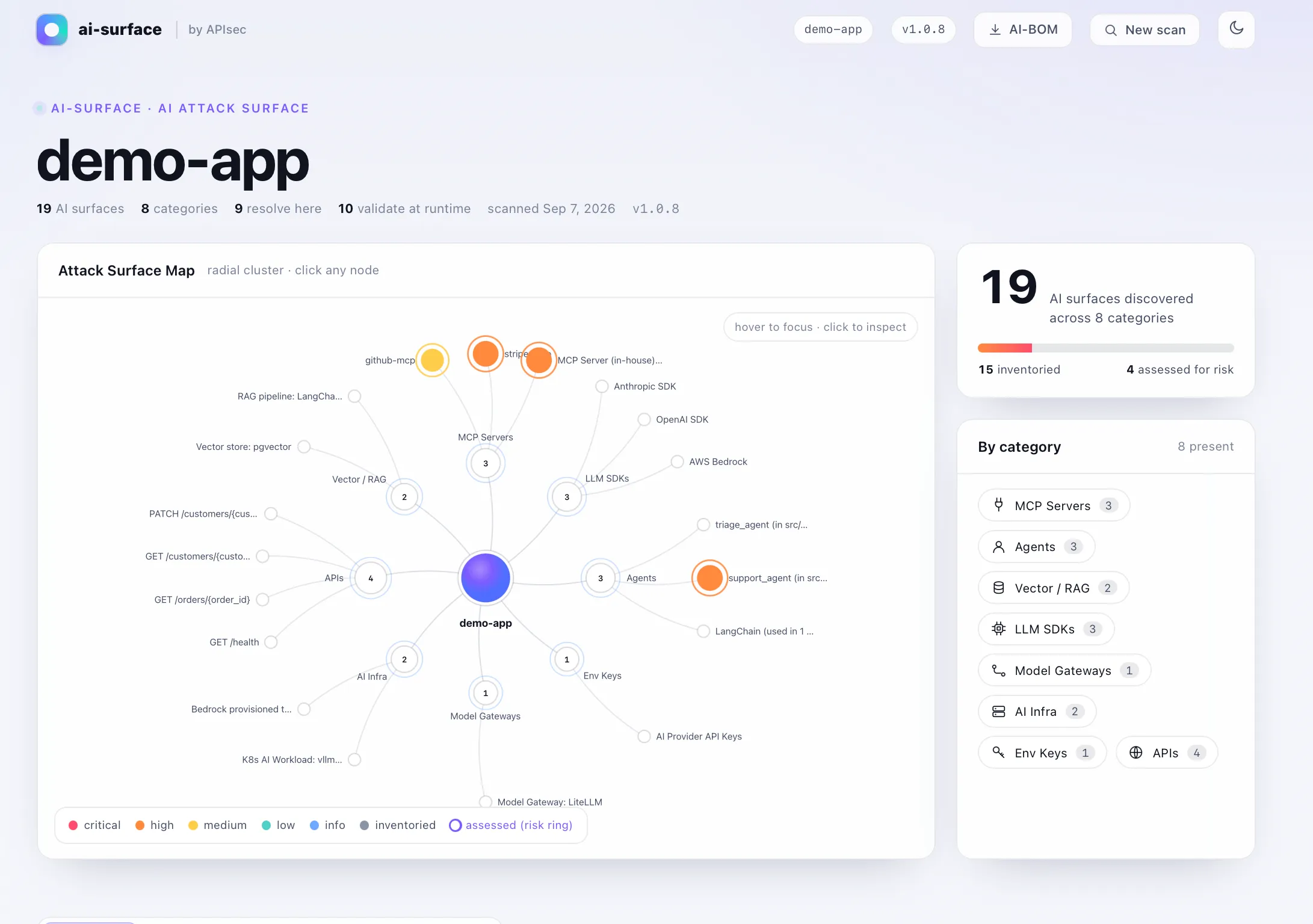
> A note on the screenshots:
> 8-category, 19-surface map, handy for seeing the full range of what the tool detects. My
> real scan of
> I'll say so, so the two don't read as inconsistent.
ai-surface ships a bundled demo app that shows a richer> 8-category, 19-surface map, handy for seeing the full range of what the tool detects. My
> real scan of
SanantonioAWS is smaller (2 categories). Where I use the demo-app view,> I'll say so, so the two don't read as inconsistent.
What ai-surface actually detects (and what it doesn't)
A common misconception up front:
written by an AI versus by your team. It doesn't detect authorship, and it never runs your
code or calls any model. It's a pure static-analysis pass, it reads source and
configuration, matches known patterns, and reports where AI enters your system:
ai-surface does not figure out which code waswritten by an AI versus by your team. It doesn't detect authorship, and it never runs your
code or calls any model. It's a pure static-analysis pass, it reads source and
configuration, matches known patterns, and reports where AI enters your system:
- LLM SDK call sites: OpenAI, Anthropic, AWS Bedrock, Azure OpenAI, and more
- Agent frameworks: LangChain, LangGraph, CrewAI, AWS Strands, and the tools/permissions each agent holds
- MCP servers: configured and in-house
- RAG / vector stores: Pinecone, pgvector, Chroma, and others
- Model gateways and AI provider keys (by name only, never the value)
- API endpoints that expose all of the above
Think of it like a secret scanner or a vulnerability scanner: it doesn't care who wrote the
line, it looks for a specific class of thing. Here, that thing is your AI surface.
line, it looks for a specific class of thing. Here, that thing is your AI surface.
It runs 100% locally no network calls, no telemetry, no credentials, so source never
leaves the host. Findings map to the OWASP LLM Top 10 and to EU AI Act, NIST AI RMF, and
ISO 42001 clauses, so the output doubles as governance evidence.
leaves the host. Findings map to the OWASP LLM Top 10 and to EU AI Act, NIST AI RMF, and
ISO 42001 clauses, so the output doubles as governance evidence.
The architecture
The whole thing is one CloudFormation stack. Point it at a GitHub repo, and on every run
it scans the code and republishes a report.
it scans the code and republishes a report.

Prefer to explore it? Open the interactive version .
A few deliberate design choices worth calling out:
CodePipeline + CodeBuild, not CodeDeploy. You might expect the classic
CodePipeline → CodeBuild → CodeDeploy trio. But
no application artifact to deploy to compute. The "deploy" step here is publishing the
report to S3, which CodeBuild handles directly. Forcing CodeDeploy in would only add a
no-op target, so I left it out and documented why.
CodePipeline → CodeBuild → CodeDeploy trio. But
ai-surface produces a report; there'sno application artifact to deploy to compute. The "deploy" step here is publishing the
report to S3, which CodeBuild handles directly. Forcing CodeDeploy in would only add a
no-op target, so I left it out and documented why.
The report is the real interactive map, not a flat page.
static files plus a
bundle using the tool's own packaging function and uploads it to S3, so what your team
opens in the browser is the same rich map you'd get locally, just hosted.
ai-surface ships a local--ui viewer an interactive node graph of your AI surface. That viewer is a set ofstatic files plus a
report.json, served over loopback. CodeBuild reproduces that exactbundle using the tool's own packaging function and uploads it to S3, so what your team
opens in the browser is the same rich map you'd get locally, just hosted.
Locked down by default. The reports contain a map of your org's AI attack surface
sensitive by nature. So:
sensitive by nature. So:
- The S3 bucket is private, with all public access blocked.
- It's reachable only through CloudFront via Origin Access Control (OAC).
- CloudFront serves HTTPS only and enforces HTTP Basic Auth in a CloudFront
Function, so viewers need a username and password before anything loads. - An optional AWS WAF adds an IP allowlist and rate limiting for teams that want to
restrict access to known networks.
Deploying it
Prerequisites: the AWS CLI configured, and a GitHub account with access to the repo you
want to scan.
want to scan.
1
2
3
4
5
6
7
8
aws cloudformation deploy \
  --template-file template.yaml \
  --stack-name apisec-ai-surface \
  --capabilities CAPABILITY_NAMED_IAM \
  --parameter-overrides \
      RepoOwner=your-org \
      RepoName=your-repo \
      BasicAuthPassword='choose-a-strong-password'
The stack derives the full repo id from
two. One one-time manual step: if you're creating a fresh GitHub connection, authorize it
in the console under Developer Tools → Settings → Connections (select the pending
connection and grant access to your repos). After that, the pipeline can pull the source.
RepoOwner/RepoName, so you only provide thosetwo. One one-time manual step: if you're creating a fresh GitHub connection, authorize it
in the console under Developer Tools → Settings → Connections (select the pending
connection and grant access to your repos). After that, the pipeline can pull the source.
> Tip: pick a Basic Auth password using letters, digits, and common punctuation. The
> password is embedded in the CloudFront Function at deploy time, so avoid double-quote,
> backslash, backtick, dollar sign, and curly braces.
> password is embedded in the CloudFront Function at deploy time, so avoid double-quote,
> backslash, backtick, dollar sign, and curly braces.
To run a scan on demand:
1
aws codepipeline start-pipeline-execution --name apisec-ai-surface-pipeline
When it finishes, the stack outputs a CloudFront URL. Open it, enter the Basic Auth
credentials, and you land on the interactive attack-surface map. Each report also ships its
raw
credentials, and you land on the interactive attack-surface map. Each report also ships its
raw
report.json, SARIF, and CycloneDX AI-BOM next to it for automation and evidence.Want IP-based restriction too?
Enable the optional WAF (note: CloudFront-scoped WAF is global, so deploy in
us-east-1):1
2
3
4
5
6
7
8
9
10
aws cloudformation deploy \
--template-file template.yaml \
--stack-name apisec-ai-surface \
--region us-east-1 \
--capabilities CAPABILITY_NAMED_IAM \
--parameter-overrides \
RepoOwner=your-org RepoName=your-repo \
BasicAuthPassword='choose-a-strong-password' \
EnableWaf=true \
AllowedCidrs='203.0.113.0/24'With an allowlist set, the web ACL defaults to block and only your listed source IPs
pass so a leaked password still can't be used from outside your network.
pass so a leaked password still can't be used from outside your network.
What I found on real code
I ran this against our San Antonio community project (
43 AI surfaces across 2 categories, laid out as an explorable node graph, you can click
into for per-finding detail.
SanantonioAWS). The scan surfaced43 AI surfaces across 2 categories, laid out as an explorable node graph, you can click
into for per-finding detail.

Worth being precise about that number: exactly one is an actual AI call (an AWS Bedrock
LLM SDK site); the other 42 are the REST API endpoints that expose it. That ratio is the
real insight, not the headline count. AI security at the periphery is largely API security,
the model is one node, but the attack surface is every endpoint that can reach it. Seeing
those 42 endpoints mapped next to the single AI call is exactly the context a reviewer needs.
LLM SDK site); the other 42 are the REST API endpoints that expose it. That ratio is the
real insight, not the headline count. AI security at the periphery is largely API security,
the model is one node, but the attack surface is every endpoint that can reach it. Seeing
those 42 endpoints mapped next to the single AI call is exactly the context a reviewer needs.
That's the point of the exercise. A number in a CI log is easy to ignore; a map that shows
where the AI touches your app, which endpoints expose it, and how it maps to governance
frameworks is something a reviewer can actually reason about. Discovery like this is a
floor, not a ceiling, but it's a floor most teams don't have yet.
where the AI touches your app, which endpoints expose it, and how it maps to governance
frameworks is something a reviewer can actually reason about. Discovery like this is a
floor, not a ceiling, but it's a floor most teams don't have yet.
About the findings you'll see
ai-surface (v1.0.8+) doesn't just inventory surfaces it tags each risky finding with averdict so the output isn't a black-box score:
- CONFIRMED RISK a fact of the code as written (for example, a financial-action tool
with no approval step, or a secret present in config). - LIKELY RISK inferred from patterns and flagged for a human to review.
The
that assigns verdicts fires on agent, MCP, and RAG surfaces, and this project is mostly plain
API endpoints, so nothing tripped it. On a richer target (the tool's bundled demo app, or a
repo with agents/MCP servers) you'd see CONFIRMED and LIKELY badges on the map, each with the
evidence and remediation behind it. That verdict model is the tool's answer to "don't make me
trust a number" and it fits the whole point of doing honest discovery in the first place.
SanantonioAWS scan above shows 0 findings assessed for risk the deep-dive auditthat assigns verdicts fires on agent, MCP, and RAG surfaces, and this project is mostly plain
API endpoints, so nothing tripped it. On a richer target (the tool's bundled demo app, or a
repo with agents/MCP servers) you'd see CONFIRMED and LIKELY badges on the map, each with the
evidence and remediation behind it. That verdict model is the tool's answer to "don't make me
trust a number" and it fits the whole point of doing honest discovery in the first place.
Why this matters for AWS builders
If your team is shipping anything with LLMs, agents, or RAG on AWS, you have an AI attack
surface whether you've mapped it or not. This stack gives you:
surface whether you've mapped it or not. This stack gives you:
- An automated, repeatable inventory of that surface, per repo, on your own AWS account.
- A secure, shareable report your security folks can open without cloning anything.
- Governance evidence (OWASP LLM Top 10, EU AI Act, NIST AI RMF, ISO 42001) generated
from source the same way you'd generate an SBOM. - Zero data egress the scanner is offline; nothing about your code leaves your account.
Try it
The scanner is open source at apisec-inc/AI-Surface .
You can try it locally in one command:
You can try it locally in one command:
1
uvx --from apisec-ai-surface ai-surface scan . --ui
And the AWS pipeline that wraps it in the CloudFormation template (build steps are inlined in
the CodeBuild project, no separate buildspec file), diagrams, and docs is at
danf22/Apisec-surface-AWS . Point it at a
repo, deploy, and you have a running AI attack-surface scanner on AWS in minutes.
the CodeBuild project, no separate buildspec file), diagrams, and docs is at
danf22/Apisec-surface-AWS . Point it at a
repo, deploy, and you have a running AI attack-surface scanner on AWS in minutes.
If you run it against your own projects, I'd love to hear what you find. Happy scanning.
Series: AI Security (2 articles)
- 1Your Code Has an AI Attack Surface. Here's How to See It on AWS This article
Enjoyed reading this content? Let the author know!
Your likes, comments, shares, and saves help creators reach more builders.

Loading recommendations
Loading article