
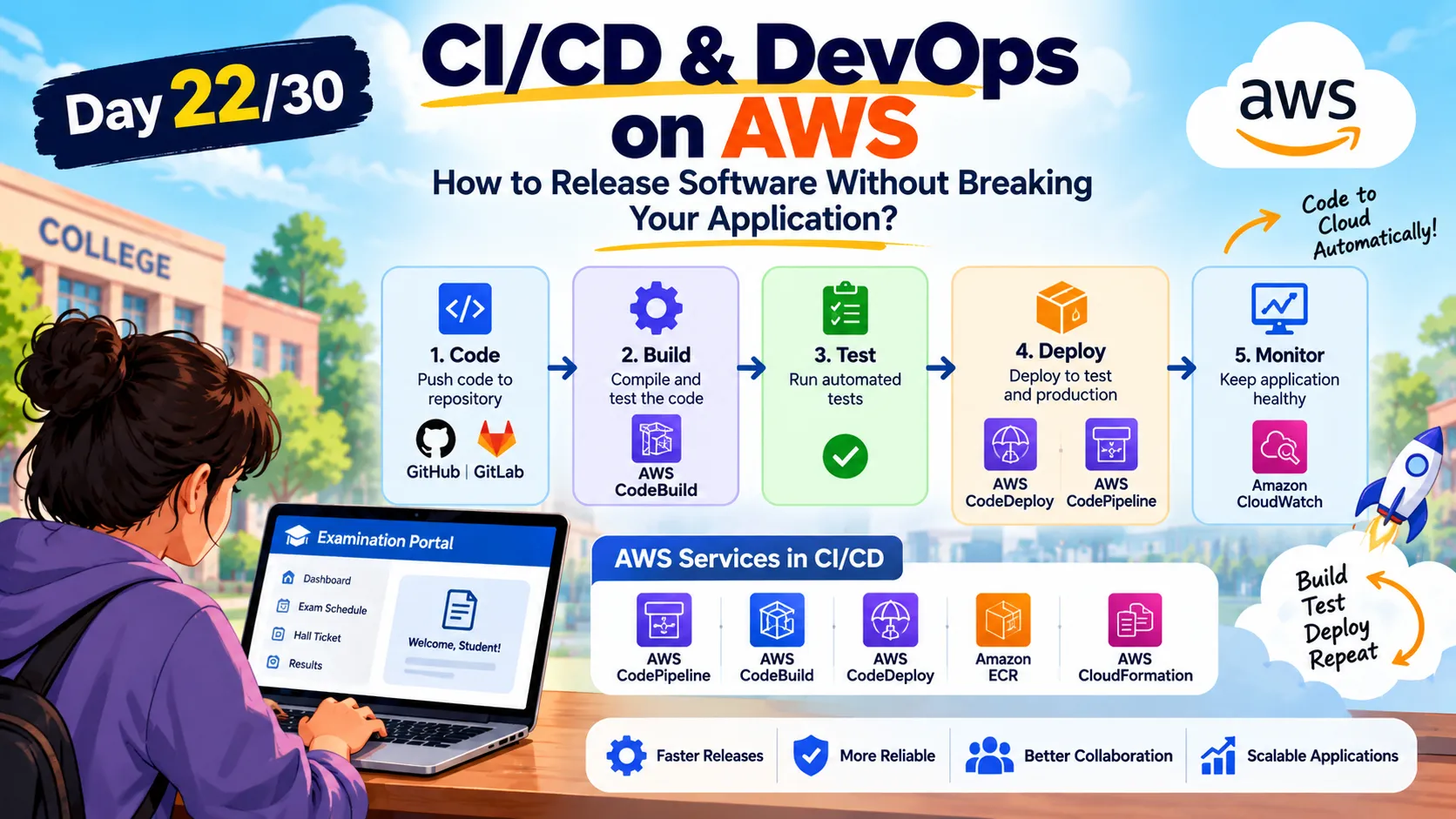
🚀 Day 22/30: CI/CD & DevOps on AWS — How to Release Software Without Breaking Your Application? ☁️
🚀 Welcome to Day 22 of the 30-Day Cloud Computing & Cloud Architecture Challenge! How do developers release new features without breaking an existing application? In this article, we'll explore **DevOps and CI/CD** using our college examination portal as a real-world example. #AWS #CloudComputing #DevOps #CICD #AWSBuilderCenter #CloudArchitecture #CloudEngineer #InfrastructureAsCode #30DayChallenge
Series: Cloud Computing (24 articles)
- …
- 23🚀 Day 22/30: CI/CD & DevOps on AWS — How to Release Software Without Breaking Your Application? ☁️ This article

🚀 Day 22/30: CI/CD & DevOps — How Do Developers Release Updates Without Breaking Their Applications? ☁️
Imagine your college has launched an online examination portal.
Students can log in, check their exam schedules, download hall tickets, and view their results.
Everything is working perfectly.
Suddenly, your college asks for a new feature: students should receive an email notification whenever their exam schedule changes.
Your development team starts working on it.
They write the code, test it on their computers, and prepare to release the update.
But there's a problem.
How can you release the new feature without breaking the existing application?
What if the login system stops working? What if students cannot download their hall tickets? What if the application crashes after the update?
This is where DevOps and CI/CD become important.
Welcome to Day 22 of our 30-Day Cloud Computing & Cloud Architecture Challenge!
Today, we'll learn how developers build, test, and release cloud applications more safely and efficiently. 🚀
1. What Is DevOps?
DevOps is a combination of two words:
- Dev: Development — the people who write and improve application code.
- Ops: Operations — the people who deploy, run, monitor, and maintain applications.
In traditional workflows, developers and operations teams sometimes work separately.
Developers write the code, while operations teams handle deployment and infrastructure. If communication is poor, deployment can become difficult.
For example, a developer might say, "The application works on my computer!" But when the operations team deploys it, the application fails because the server has different settings or dependencies.
DevOps encourages teams to work together, automate repeated tasks, and share responsibility for delivering reliable software.
A simple example
Imagine five students are building a college examination portal.
One works on login, another on exam schedules, another on results, and the remaining students work on other features.
If they never communicate or test their changes together, their work may not fit properly.
DevOps promotes better teamwork and a process that helps identify problems early.
In simple words: DevOps combines collaboration, automation, and good practices to help teams deliver and maintain software reliably.
2. What Is CI/CD?
CI/CD is one of the most important practices in modern DevOps.
It helps automate the process of moving code from development towards release.
CI/CD commonly refers to:
- CI — Continuous Integration
- CD — Continuous Delivery or Continuous Deployment
Let's understand each one.
Continuous Integration (CI)
Imagine several developers are working on the examination portal.
One developer updates the login feature, while another adds exam notifications.
If they combine all their work only at the end, they may discover conflicts and bugs that are difficult to fix.
Continuous Integration encourages developers to merge code changes frequently into a shared repository.
Automated workflows can then build the application and run tests to identify problems early.
For example, whenever a developer updates the login feature, the pipeline can check whether the application builds successfully and whether important tests pass.
This helps catch problems before the code reaches production.
Continuous Delivery
Continuous Delivery takes the process further.
After the code is built and tested, the application is kept ready for release.
The team can release the update when the required approval or release decision is made.
For example, the examination portal's new notification feature passes its tests and is ready for deployment. The team can review the release and approve it.
Continuous Deployment
Continuous Deployment goes one step further.
When code passes the required automated checks, it can be deployed to production automatically, without a separate manual approval for every change.
This approach requires suitable tests, security controls, monitoring, and recovery plans.
Remember the difference:
- CI checks changes frequently.
- Continuous Delivery keeps tested changes ready for release.
- Continuous Deployment automatically releases qualifying changes to production.
3. What Is a CI/CD Pipeline?
A CI/CD pipeline is an automated sequence of steps that takes code from a developer and moves it towards deployment.
Let's follow the journey of our examination portal.
1
2
3
4
5
6
7
8
9
10
11
12
13
14
15
16
17
18
19
20
21
22
23
Developer Writes Code
         |
         v
Code Pushed to Repository
         |
         v
Automated Build
         |
         v
Automated Tests
         |
         v
Security and Quality Checks
         |
         v
Deploy to Test Environment
         |
         v
Release Approval or
Automatic Production Deployment
         |
         v
Monitor the Application
Not every pipeline uses exactly the same stages. Some teams add performance tests, container image scans, manual approvals, or extra environments.
The main idea is that repeated software delivery tasks become automated and consistent.
Step 1: Write and push code
A developer improves the examination schedule feature and pushes the changes to a shared repository.
Step 2: Build the application
The pipeline checks whether the application can be built successfully.
If the build fails, the team can investigate before moving forward.
Step 3: Run automated tests
Tests check whether important features still work.
For example:
- Can students log in?
- Can they view their exam schedules?
- Can they download their hall tickets?
- Does the new notification feature work?
Step 4: Check security and code quality
Automated tools can check code quality and identify known vulnerabilities in dependencies.
These checks help, but they do not replace a complete security review.
Step 5: Deploy to a test environment
The application is deployed to a separate environment where the team can check its behaviour before production release.
Step 6: Release to production
After the required checks and approvals, the updated application is deployed to the live environment used by students.
Step 7: Monitor the application
The team checks logs, errors, response times, and other metrics to see whether the release is working as expected.
If a serious problem occurs, the team can follow its recovery or rollback plan.
4. What Is a Code Repository?
A code repository stores an application's source code and its change history.
Developers commonly use Git for version control and platforms such as GitHub, GitLab, or Bitbucket to host repositories and collaborate.
Suppose a developer changes the examination portal's login page and accidentally introduces a bug.
With version control, the team can inspect earlier changes, identify what changed, and restore a known-good version when appropriate.
Repositories also support branches and pull requests, which help teams review code before merging it.
Think of a repository as a shared workspace that remembers how your application has changed over time.
5. Which AWS Services Help With CI/CD?
AWS offers several services that can support software delivery workflows.
AWS CodeConnections
CodeConnections can connect supported source code providers to AWS developer tools and workflows.
AWS CodeBuild
CodeBuild is a managed build service.
It can compile code, run tests, and create build artifacts without requiring you to manage your own build servers.
AWS CodePipeline
CodePipeline helps coordinate stages in a software release workflow.
For example, it can connect source code, build steps, testing stages, approvals, and deployment actions.
AWS CodeDeploy
CodeDeploy helps automate application deployments to supported compute environments, including Amazon EC2 and AWS Lambda.
Amazon ECR
Amazon Elastic Container Registry stores container images.
If your application is packaged using Docker, ECR can store the images used by the deployment process.
Amazon ECS
Amazon Elastic Container Service runs and manages containerized applications.
A pipeline can build a new container image, push it to a registry, and trigger a deployment to ECS.
A simplified AWS workflow might look like this:
1
2
3
4
5
6
7
8
9
10
11
12
13
14
15
16
17
18
19
20
21
22
Developer
   |
   v
Source Code Repository
   |
   v
AWS CodePipeline
   |
   v
AWS CodeBuild
   |
   v
Automated Tests
   |
   v
Container Image Stored in ECR
   |
   v
Deploy to Amazon ECS
   |
   v
Monitor Application
The exact services depend on the architecture. Teams can also use GitHub Actions, Jenkins, or other CI/CD tools with AWS.
6. What Is Infrastructure as Code (IaC)?
Now imagine your examination portal runs on several cloud resources:
- Application servers
- A database
- Networking components
- Security rules
- Load balancers
Creating all these resources manually every time would take time and could lead to mistakes.
Infrastructure as Code, or IaC, allows teams to define and manage infrastructure using code or configuration files.
Instead of manually creating each resource, you describe what the infrastructure should look like and use a tool to provision it.
AWS CloudFormation is one example of an IaC service.
For example, a team can define a network, application resources, and other supported infrastructure in a CloudFormation template.
The template can be reviewed, stored in version control, and reused.
The benefit: Infrastructure becomes easier to reproduce, review, and manage consistently.
IaC also helps teams track infrastructure changes alongside application changes.
7. How Does DevOps Reduce Deployment Risk?
Let's return to our examination portal.
The team releases a new notification feature, but an unexpected bug causes some students to receive duplicate emails.
Without proper monitoring, the team might not notice the problem immediately.
With a well-designed delivery process, the team can:
- Run automated tests before release.
- Deploy to a test environment.
- Release gradually where the deployment strategy supports it.
- Monitor errors and application behaviour.
- Roll back or fix the release if necessary.
Deployment strategies such as rolling deployments, blue-green deployments, and canary releases can help reduce risk when configured appropriately.
However, automation cannot guarantee that every bug will be caught. Good tests, monitoring, security controls, and recovery plans remain essential.
8. What Happens If a Deployment Fails?
Suppose the latest version of the portal is deployed, but students suddenly cannot view their exam schedules.
The team needs to respond quickly.
A sensible recovery process could be:
1
2
3
4
5
6
7
8
9
10
11
12
13
14
15
16
17
18
19
Deployment Begins
       |
       v
Health Checks and Monitoring
       |
       v
Problem Detected
       |
       v
Stop Further Release Steps
       |
       v
Investigate and Recover
       |
       v
Rollback or Deploy a Fix
       |
       v
Verify Application Health
Depending on the system, the team may roll back to a known-good application version or deploy a fix.
Database changes require special care because rolling back application code may not safely reverse database changes.
This is why production deployments should have clear recovery plans.
9. How Does CI/CD Connect With Our Previous Topics?
During this 30-day challenge, we've explored several building blocks of cloud architecture.
Now, CI/CD connects development work with those cloud services.
- Containers and Docker: Package applications consistently.
- Amazon ECR: Store container images.
- Amazon ECS or EKS: Run containerized applications.
- Load balancing: Distribute application traffic.
- Auto Scaling: Adjust capacity with an appropriate configuration.
- Monitoring: Help teams detect errors and performance problems.
- CI/CD: Automate the steps used to test and release changes.
Together, these practices help teams maintain and improve cloud applications over time.
10. Mini Project: Build a Simple CI/CD Workflow
Ready to think like a cloud engineer?
Design a basic delivery workflow for our college examination portal.
Your workflow should:
- Store the application code in a repository.
- Trigger a workflow when code changes.
- Build the application.
- Run automated tests.
- Stop the release if required checks fail.
- Deploy a successful build to a test environment.
- Require approval before production deployment.
- Monitor the application after release.
You can explore a workflow using GitHub Actions or AWS CodePipeline with CodeBuild.
Start with a simple application and a test environment. Do not connect an experimental pipeline to a live production system until you have reviewed its permissions, security, costs, and recovery plan.
11. Quick Revision
Q1. What is DevOps?
DevOps is a culture and set of practices that bring development and operations closer together.
Q2. What is Continuous Integration?
It is the practice of frequently integrating code changes into a shared repository and checking them with automated builds and tests.
Q3. What is Continuous Delivery?
It keeps tested software ready for release, usually with a release decision or approval before production deployment.
Q4. What is Continuous Deployment?
It automatically deploys qualifying changes to production after the required checks pass.
Q5. What does AWS CodeBuild do?
It builds and tests code and can produce build artifacts.
Q6. What does AWS CodePipeline do?
It coordinates stages in a software release workflow.
Q7. What is Infrastructure as Code?
It is the practice of defining and managing infrastructure through code or configuration files.
Q8. Why is monitoring important after deployment?
It helps teams identify errors, performance issues, and unexpected behaviour after a release.
Final Thoughts
DevOps is not just about using tools. It is about helping people, processes, and technology work together.
CI/CD makes software delivery more repeatable. Automated tests help catch problems earlier. Infrastructure as Code helps teams manage cloud resources consistently. Monitoring helps teams understand what happens after a release.
For our college examination portal, this means developers can improve the application while following a controlled process to protect the student experience.
The big lesson: Building an application is only the beginning. A strong cloud engineer also needs to know how to test, release, monitor, and maintain it.
Tomorrow, we'll explore another important cloud skill:
Day 23 — Monitoring & Observability: How Do We Know When Our Cloud Application Is in Trouble? ☁️📊
Series: Cloud Computing (24 articles)
- …
- 23🚀 Day 22/30: CI/CD & DevOps on AWS — How to Release Software Without Breaking Your Application? ☁️ This article
Enjoyed reading this content? Let the author know!
Your likes, comments, shares, and saves help creators reach more builders.

Loading recommendations
Loading article