
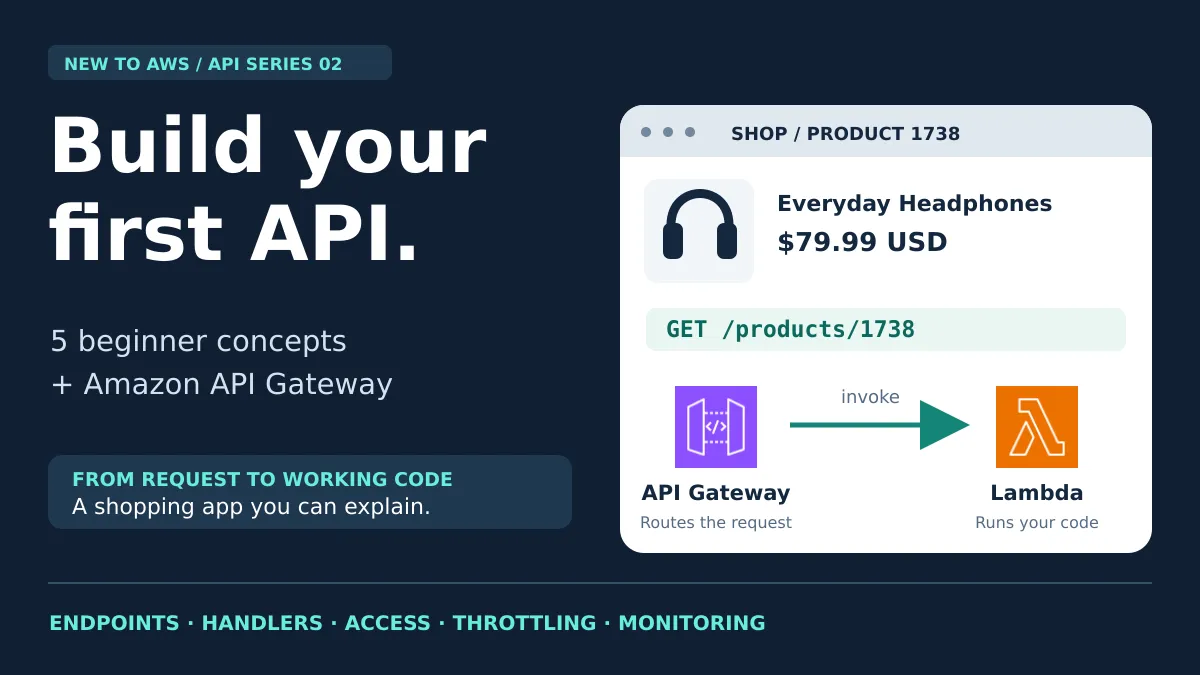
APIs Beginner to Advanced - How to Build an API and When to Use Amazon API Gateway
Learn endpoints, handlers, auth, throttling, and monitoring with a shopping app, then see what Amazon API Gateway handles for you and when to skip it.
Series: New To AWS Beginners Guide (11 articles)
- …
- 7APIs Beginner to Advanced - How to Build an API and When to Use Amazon API Gateway This article

New to AWS: API Fundamentals, Part 2
To build a web API, you define the operations clients can request, write the code that handles them, and give that code an address. Running it for real customers adds more jobs: controlling access, handling traffic, and figuring out what broke.
Amazon API Gateway manages the entry point and gives you configurable controls for those jobs. You still write the application behavior, such as finding a product or deciding whether a customer can view an order.
In Part 1, we followed a request and response. Now you switch seats. You're the developer building the API, which also makes you the person everyone looks at when the product page spins forever.
Our example is a fictional shopping app that sells headphones. You'll learn the concepts first, then see where AWS can save you work. This is a teaching example, not a description of Amazon.com's architecture.
What do you need to build an API?
You need five things: an endpoint, a request handler, access checks, throttling, and monitoring.
| Essential | Question it answers | Shopping-app example |
|---|---|---|
| Endpoint | Where does the client send a request? | Request the details for product 1738. |
| Request handler and integration | What code does the work, and how does the request reach it? | Connect a product operation to the code that retrieves its details. |
| Authentication and authorization | Who is calling, and what may they access? | Let a shopper read their own orders. |
| Throttling | How do we control incoming demand? | Help protect checkout during a sale. |
| Monitoring | How do we know whether the API is working? | Detect failed requests and investigate slow responses. |
These concepts apply on any cloud, in any programming language, and on most hosting platforms.
1. What is an API endpoint and route?
An endpoint is an address where a client can call an API. The request's HTTP method indicates the operation being requested.
Our frontend, the part of the store a shopper interacts with, might send:
1
GET https://api.example.com/products/1738
That example contains three useful pieces:
https://api.example.comis the API's base address./products/1738is the path identifying a particular product.GETasks to retrieve information.
A route matches a method and a path pattern to an operation. We could define
GET /products/{productId}, where {productId} is a placeholder. Requests for products 1738 and 2468 match the same route with different values.Our video follows two different shopper actions:
| Shopper action | Example request | Route pattern |
|---|---|---|
| Search for headphones | GET /products?q=headphones | GET /products |
| Open one product | GET /products/1738 | GET /products/{productId} |
The
q=headphones part is a query parameter, extra information passed with the request. Changing the search term does not require creating another route. The search handler uses that value to filter the catalog; the details handler uses the ID to find one product.
Search filters a collection. A product ID identifies one item. Both operations can share the same API base address.
The endpoint gives the frontend somewhere to send a request. It doesn't, by itself, know anything about headphones.
A route also isn't a database query. Naming a path
/products/1738 retrieves product 1738 about as well as labeling a box "snacks" fills it with snacks. Someone has to write that code.2. What are API request handlers and integrations?
A request handler is the code that processes a request and prepares a response. A router determines which operation was requested and directs the request to the appropriate handler.
For our product lookup, the handler needs to:
- Read the product ID from the request.
- Check that the ID has an acceptable format.
- Retrieve that product's information.
- Return the result, or a useful error if the product doesn't exist.
In plain terms, the code looks like this:
1
2
3
4
5
6
7
8
handleProductRequest(request):
    productId = read productId from the request path
    product = look up productId in the catalog

    if product does not exist:
        return 404 with an error message

    return 200 with the product details
This is pseudocode explaining the behavior, not a complete program.
A status code is a three-digit number describing how the request turned out. Here,
200 OK means the lookup succeeded; 404 Not Found means the requested product wasn't found.The successful response body might contain JSON, a text format that represents information using names and values:
1
2
3
4
5
6
{
  "productId": "1738",
  "name": "Everyday Headphones",
  "price": 79.99,
  "currency": "USD"
}
The frontend uses those values to display the product.
Where does API handler code run?
It needs a runtime: an environment that executes the code. Developers can run API handlers inside a web application on a server, in a container, or as functions on a managed platform.
A web framework supplies reusable tools for building that application, including ways to connect routes to handlers. You don't need a cloud gateway to do this.
An integration is a connection between components. Later, in API Gateway, we'll configure an integration that connects our route to the backend handling it.
Keep the responsibilities separate: the connection delivers the request; the handler implements the product lookup. Search and product details are different operations, although a single application can contain both handlers.

The route selects an operation; the handler performs its work. The catalog could be a database in a larger app. Our first lab uses fake data stored in code.
3. API authentication vs authorization: what's the difference?
Authentication checks who is calling. Authorization checks what that caller is allowed to do.
Public product details may not require sign-in. Personal orders are different.
Imagine a shopper requesting:
1
GET /orders/ORD-1001
Two checks matter:
| Check | Question | Expected behavior |
|---|---|---|
| Authentication | Can we establish the caller's identity? | Reject a protected request without valid credentials. |
| Authorization | Does this caller have permission to read ORD-1001? | Return the order only when the caller has access. |
Signing in must not let someone change the order ID in the URL and read another customer's shipping address.

Use the verified caller's identity when checking ownership. An owner ID supplied by the caller is not proof of ownership.
In a common token-based design, a sign-in service issues an access token, a credential the app presents with subsequent requests. The API validates that token before trusting its identity information. The backend then applies rules such as checking order ownership.
Hiding a button in the frontend is not an access control. Clients can send requests without touching your interface, and curl has never once admired your UI.
4. What is API throttling, and what happens without rate limits?
Throttling controls the rate of incoming requests. It helps keep demand within the capacity your application can handle.
Suppose our store launches a Black Friday sale. Product lookups and checkout requests arrive much faster than usual, and your traffic graph starts to look like a ski jump.
Without suitable traffic controls, requests may consume available processing capacity or overwhelm a dependency. Responses become slow, some requests fail, and shoppers may leave before completing checkout.
Throttling can reject excess requests so the backend has a better chance of handling the traffic it accepts. A common response is
429 Too Many Requests, telling the caller it has encountered a rate limit.The client should wait before retrying. Sending another burst right away is the API version of mashing the elevator button.

A rejected request needs a sensible retry strategy. The gateway does not save it in a queue for later.
Throttling and scaling solve related but different problems:
- Scaling increases the capacity available to do work.
- Throttling controls how quickly work is admitted.
You may need both. A backend with more processing capacity can still overwhelm a database or another service it calls.
5. What API metrics and logs should you monitor?
Monitoring tells you how the API is behaving over time and provides evidence when something goes wrong.
A customer reports, "Checkout keeps failing."
Without monitoring, that complaint might be your first signal. You also have little evidence about when the problem began or which requests it hit, and "keeps failing" is a hard phrase to search for in a log.
Start with three measurements:
- Request volume: How many requests are arriving?
- Errors: How many requests are unsuccessful?
- Latency: How long do responses take?
These measurements are metrics. They reveal patterns, such as errors rising after a deployment.
Logs record details about individual events. An access log can include the requested route, response status, and a request identifier. Application logs can describe what happened inside the handler.
An error chart tells you something changed. A request identifier helps you connect the relevant records and investigate.

Metrics help you notice a problem; correlated logs help you investigate it. The checkout example is conceptual; the starter project serves product lookups.
Monitoring won't fix the bug for you. It tells you where to start digging, which beats refreshing the checkout page and hoping. An alert based on a meaningful threshold can also help you notice trouble before customers report it.
What is Amazon API Gateway, and why use it to build APIs?
Amazon API Gateway is a managed AWS service for creating and operating API entry points, with configurable routing, access controls, traffic controls, and monitoring support.
Developers built APIs long before cloud computing. A framework, hosting platform, and supporting tools can provide the capabilities we just covered.
The reason to consider API Gateway is the work it can take off your team's plate. AWS operates the gateway infrastructure, while you configure how requests connect to your backend and which supported controls apply.
That gives our store a managed place to handle incoming requests while our application code implements product lookups, pricing, and order rules.

API Gateway's value is the gateway infrastructure AWS operates and the supported controls you can configure. The business logic is still yours.
What does API Gateway handle, and what do you still build?
| Responsibility | Without API Gateway | With API Gateway |
|---|---|---|
| Receiving and routing requests | Your framework and hosting setup provide the entry point. | Configure routes and backend integrations in a managed gateway. |
| Checking access | Use your application, middleware, or another service. | Configure supported authorizers, while retaining application-specific permission checks. |
| Controlling traffic | Select and operate suitable controls in your platform or application. | Configure gateway throttling targets appropriate for your backend. |
| Investigating requests | Instrument your stack and connect monitoring tools. | Use gateway metrics and configured access logs alongside application logs. |
| Implementing store behavior | Your code retrieves products and handles orders. | Your code still retrieves products and handles orders. |
"Without API Gateway" does not necessarily mean maintaining everything yourself. Your hosting platform may already manage much of this. Compare the work your current stack handles with the work you would otherwise need to add.
How does API Gateway work with AWS Lambda?
API Gateway receives and routes API calls. AWS Lambda runs the handler code in our example.
Here's the product lookup:
- The frontend requests
GET /products/1738. - API Gateway matches
GET /products/{productId}. - Its Lambda integration passes request information to our function.
- Our handler reads the ID and retrieves the product.
- The handler returns the result; API Gateway sends the HTTP response to the frontend.
Lambda is the service running the function. The handler is the code inside it. The integration is the configured connection between the route and the function.
API Gateway can also connect to HTTP backends and supported AWS service integrations. It doesn't require Lambda for every API. The available options depend on the API type. You also do not need a separate Lambda function for every route; that is an application design choice.
Does API Gateway handle authentication and sign-in?
It can enforce configured access checks, but you still need an identity solution for sign-in.
For example, an HTTP API can use a JWT authorizer, a configured check that validates JSON Web Tokens presented with requests. An identity provider, such as Amazon Cognito or another compatible provider, issues those tokens.
You configure which issuer and intended audience to trust. Your backend still enforces business rules, including whether the identified shopper may read a particular order. Configure appropriate route scopes when the provider supports them; a scope describes a permitted action, such as reading orders.
Amazon Cognito is optional. HTTP APIs also support Lambda authorizers for custom checks and IAM authorization for AWS-signed requests. REST APIs have Cognito user-pool and Lambda authorizers plus IAM, rather than the same native JWT authorizer option as HTTP APIs. An API key is not a replacement for authentication.
Does API Gateway make your whole app scalable?
It manages the gateway layer. Your application and its dependencies still have capacity limits.
Lambda scales separately and has concurrency limits, meaning limits on how many executions can be in progress at once. A database can become a bottleneck even when the gateway is healthy. A fast front door doesn't help much if checkout still has one cashier.
Choose traffic settings with the backend in mind. API Gateway throttling is best effort, not a guaranteed request ceiling or spending cap. It does not queue rejected requests for later processing.
How do you monitor API Gateway with CloudWatch?
API Gateway sends HTTP API metrics to Amazon CloudWatch, AWS's monitoring service. These include request counts, errors, overall API latency, and the time spent waiting for the backend integration.
Access logging requires configuration. You choose a CloudWatch Logs destination and the fields to record. Backend logs remain useful when you need to understand why your handler failed.
You can investigate whether an error arose around the gateway or inside your application instead of treating every failed checkout as the same problem.
When should you not use API Gateway?
If your existing application platform already provides the endpoint and controls you need, another gateway may add complexity you don't need.
API Gateway also introduces service charges and another component to configure. It is a choice about capabilities and operational responsibility, not a requirement for building an API.
HTTP API vs REST API vs WebSocket API: which should you choose?
Start with your application's behavior. HTTP API, REST API, and WebSocket API are different API Gateway products, with different features and configuration options.
| API type | When it fits | Shopping-app example |
|---|---|---|
| HTTP API | Request-response APIs with Lambda or HTTP backends and supported access controls. It offers fewer management features at lower pricing than REST APIs. | Search for headphones and retrieve product 1738. Our starter uses this type. |
| REST API | You need features such as usage plans, gateway caching, request validation, AWS WAF integration, or private API endpoints. | A partner API with usage plans or gateway request validation. |
| WebSocket API | You need an ongoing two-way connection and messages pushed from the backend to connected clients. | Live order-status updates. Your application still generates and sends those updates. |
"REST API" here is an AWS product name. HTTP APIs can also support REST-style designs. You don't need to learn every option before building your first route. Nobody memorizes the whole menu before ordering.
Can API Gateway connect to EC2, containers, or other AWS services?
Yes. Lambda is convenient for our exercise, but an integration can connect to other kinds of backends.
| Backend | How the request reaches it | What you still manage |
|---|---|---|
| Lambda function | A Lambda integration invokes the function. | Handler code and the function's permissions. |
| Public web application | An HTTP integration calls its public HTTP or HTTPS address. The app could run on EC2, in containers, or outside AWS. | The application and its hosting. |
| Private EC2 or container application | A VPC link connects the gateway to a supported target inside a private AWS network. | The application, private networking, and target configuration. |
| Supported AWS service action | A service integration calls a supported AWS action, such as sending a message to an SQS queue. | Request mapping, permissions, and whatever processes the queued work. |
You don't connect an arbitrary private EC2 instance by selecting it as if it were a Lambda function. For example, HTTP API private integrations support Application Load Balancers, Network Load Balancers, and AWS Cloud Map service discovery. REST APIs using VPC links V2 support Application and Network Load Balancers, but not Cloud Map integrations.
A load balancer distributes requests among application targets. A private integration makes the connection to the backend private; it does not automatically make the API's public-facing address private. These are options for later projects, not extra resources this first lab needs.
Beginner API and API Gateway interview questions
1. Does creating a route create the product lookup code?
No. A route matches an operation. A handler or connected service must implement it.
No. A route matches an operation. A handler or connected service must implement it.
2. Is a Lambda function the same thing as an API endpoint?
No. The function executes code. In our design, API Gateway exposes the address and connects the route to that function.
No. The function executes code. In our design, API Gateway exposes the address and connects the route to that function.
3. If a token is valid, can the shopper read any order?
No. The application must enforce authorization for the requested order.
No. The application must enforce authorization for the requested order.
4. Can throttling prevent every overload?
No. It helps control demand, but settings, backend capacity, and downstream dependencies still matter.
No. It helps control demand, but settings, backend capacity, and downstream dependencies still matter.
5. Why do we need logs if we have metrics?
Metrics show patterns. Logs provide detail useful for investigating particular requests.
Metrics show patterns. Logs provide detail useful for investigating particular requests.
6. Is API Gateway necessary to build a production API?
No. It is one way to reduce the work of managing the API entry point and supported controls.
No. It is one way to reduce the work of managing the API entry point and supported controls.
Tutorial: build a shopping API with API Gateway and Lambda in the new AWS experience
Turn the concepts into something you can inspect: a local shopping page that searches a small catalog, opens product details, and shows the actual API response.
You'll solve a common frontend problem: getting product data from a backend, handling missing products, and finding evidence when a request fails. The included starter provides two routes and one Lambda function. Begin with the product-details route, then try search.
Grab the code from the starter repo on GitHub . Clone it and you can run the offline tests on your laptop before you touch an AWS account. If you use an AI coding assistant, open the cloned folder in it and ask it to explain the SAM template, run the tests, and walk you through each deployment step. Your assistant reads YAML without sighing, which already puts it ahead of most of us. The prompt later in this post gives it a head start.

The gateway routes requests. Lambda runs the handlers. CloudWatch provides monitoring and logs. Your coding assistant helps you build these components.
What's included in the starter project?
| File | What you get |
|---|---|
| Project instructions | Prerequisites, deployment, testing, log investigation, and cleanup. |
| Python handler code | Search and product-detail handlers sharing one Lambda function. |
| AWS SAM template | Repeatable configuration for the API, function, permissions, and log groups. |
| Local shopping page | A small interface for searching and viewing API responses. |
| Offline tests | Checks for successful requests, missing products, invalid input, and logging. |
AWS SAM, short for Serverless Application Model, lets you describe serverless resources in a template. It deploys those resources through AWS CloudFormation. You can also use the configuration table below to understand the equivalent settings in the AWS console.
AWS currently lists API Gateway, Lambda, CloudWatch, and CloudWatch Logs among the services supported in the new signup experience. Availability is being rolled out. Check your account's assigned Region, available operations, and permissions before deploying. The template also uses CloudFormation, an IAM role, and a deployment artifact bucket.
For account setup, read my guide to the new AWS experience . A supported service is not a promise of unlimited free usage or a credit reward for this exercise. Review the usage controls and offers shown in your own account.
Step 1: Read the Python Lambda handler for product lookup
Here is a focused Python example for the product-detail route only, using HTTP API Lambda payload format
2.0. The complete starter adds search, route dispatch, and more input checks.1
2
3
4
5
6
7
8
9
10
11
12
13
14
15
16
17
18
19
20
21
22
23
24
25
26
27
28
29
30
31
32
33
34
35
36
37
38
39
import json
import re
PRODUCTS = {
"1738": {
"productId": "1738", "name": "Everyday Headphones",
"price": 79.99, "currency": "USD"
}
}
def handler(event, context):
product_id = (event.get("pathParameters") or {}).get("productId", "")
request_id = event["requestContext"]["requestId"]
if not re.fullmatch(r"[0-9]{1,12}", product_id):
status = 400
body = {"message": "Product ID must contain 1 to 12 digits."}
elif product_id not in PRODUCTS:
status = 404
body = {"message": "Product not found."}
else:
status = 200
body = PRODUCTS[product_id]
# Keep the request ID; omit tokens and personal data.
print(json.dumps({
"requestId": request_id,
"routeKey": event["routeKey"],
"status": status
}))
return {
"statusCode": status,
"headers": {
"content-type": "application/json",
"cache-control": "no-store"
},
"body": json.dumps(body)
}The event is the request information API Gateway supplies to Lambda. Notice the responsibilities:
pathParameterscontains the product ID extracted from the URL.- The handler validates that ID and looks up the product.
statusCodecommunicates the outcome:200for success,400for an invalid ID, or404for a missing product.json.dumpsturns Python data into JSON text for the response body.- The request ID lets you connect the function's log entry to the gateway's access log.
The fake catalog is an in-memory dictionary. No database is deployed. In a later version, replace the lookup with a database read without changing what the frontend asks for.
Step 2: Configure the HTTP API and its Lambda integration
These settings describe the bundled template. They are learning-project choices, not universal production defaults.
| Configuration area | Starter setting | Why it matters |
|---|---|---|
| API type | HTTP API | Fits this small request-response API. |
| Routes | GET /products and GET /products/{productId} | Select search or product details. The query string is not part of the route definition. |
| Integration | Both routes invoke one Lambda function; payload format 2.0 | Matches the event structure used by the Python code. |
| Authorization | No authorizer on these public catalog routes | Only fake, public product data is exposed. Personal orders are a later exercise. |
| Stage | $default, with automatic deployment | Publishes the API at its base URL, without an extra stage-name segment. |
| CORS | Origin http://localhost:3000; method GET | Lets this local browser page read API responses. |
| Throttling | Rate 5 requests/second; burst 10 | Illustrative per-route defaults, subject to service and account limits. |
| Access logging | CloudWatch Logs destination and JSON log format | Records request ID, route, status, and latency. |
| Lambda runtime | Python 3.12; five-second timeout | Runs the handler; its timeout is separate from gateway integration limits. |
| Log retention | Seven days for both project log groups | Limits how long this exercise keeps log records. |
A stage publishes an API configuration. A deployment is a snapshot of that configuration. The
$default stage is different from a $default route, which would catch unmatched requests; this project uses explicit routes.For throttling, rate is the steady refill of request tokens and burst is the bucket's capacity for a short surge. These targets are best effort. They are not a spending cap or a guarantee that the backend cannot overload.
The template also grants API Gateway permission to invoke the function and gives Lambda permission to write its logs. These service permissions are separate from shopper sign-in and from your own permission to deploy resources.
If configuring this manually, work through the API's Routes, Integrations, Authorization, CORS, and stage/logging settings. Console layouts can change; the table describes the configuration to achieve. With SAM, review the complete template before deployment and follow the commands in the project instructions.
Step 3: Call the endpoint and display its JSON response
After deployment, copy the stack's
ApiBaseUrl output. From a terminal, replace the placeholder with your actual URL:1
2
3
4
5
DEMO_API_BASE='https://your-api-id.execute-api.your-region.amazonaws.com'
curl -i "$DEMO_API_BASE/products/1738"
curl -i "$DEMO_API_BASE/products/9999"
curl -i "$DEMO_API_BASE/products/abc"
curl -i "$DEMO_API_BASE/products?q=headphones"Expect
200 for product 1738, 404 for the missing product, 400 for the malformed ID, and 200 with a list for search. Because this uses the $default stage, do not append /prod or /$default to the base URL.In a browser, the key JavaScript operation is:
1
2
3
4
5
6
7
8
9
async function fetchProduct(apiBaseUrl, productId) {
  const base = apiBaseUrl.replace(/\/$/, "");
  const response = await fetch(
    `${base}/products/${encodeURIComponent(productId)}`
  );
  const data = await response.json();
  if (!response.ok) throw new Error(data.message || "Product lookup failed.");
  return data;
}
fetch sends the request. response.json() reads the response body and parses the JSON into JavaScript data. The full frontend displays the result and errors; this excerpt focuses on the request itself. Note that fetch does not automatically throw just because the server returns 404, so the code checks response.ok.From the root of your cloned repo, run the included page locally:
1
python3 -m http.server 3000 --bind 127.0.0.1 --directory frontend
Open
http://localhost:3000, enter your API base URL, search for headphones, and open product 1738. Use localhost in the address bar: 127.0.0.1 is a different origin for CORS purposes.CORS, or Cross-Origin Resource Sharing, controls which cross-origin responses a browser lets page scripts read. An origin is the combination of scheme, hostname, and port. CORS is not authentication: a terminal client can still call the public API. When HTTP API CORS is configured, API Gateway handles preflight responses and applies its configured CORS headers.
Step 4: Trace one request through CloudWatch Logs
API Gateway sends metrics to CloudWatch. Access logging must be configured for the stage. The supplied template records fields like these:
1
2
3
4
5
6
{
  "requestId": "$context.requestId",
  "routeKey": "$context.routeKey",
  "status": "$context.status",
  "responseLatencyMs": "$context.responseLatency"
}
Those
$context values are placeholders API Gateway replaces when it writes each record. In the console, use a single-line version of the format.Request product
1738, then 9999. Open the log group named by the ApiAccessLogGroup stack output. Find the route and response status, copy the request ID, and search for the same ID in the FunctionLogGroup output's log group.You now have evidence of what the gateway received and what the handler returned. Keep access tokens, shipping addresses, and other personal information out of these logs.
Build it with your coding assistant and Agent Toolkit for AWS
Agent Toolkit for AWS gives a compatible coding assistant AWS knowledge and tools to help build and manage resources. It supports you during development; shopper requests do not pass through the assistant.
Start with my Agent Toolkit setup guide for Kiro, Codex, Claude Code, and Cursor , then open the starter project with your assistant and try this prompt:
1
2
3
4
5
6
7
8
9
10
11
12
13
14
15
16
17
Help me understand and build this beginner shopping API using
Agent Toolkit for AWS and my current AWS project.

Read README.md, template.yaml, and src/app.py.
Check my account experience, assigned Region, services, and permissions.
Explain the resources and expected sources of cost before deployment.
Use the public fake catalog, HTTP API, and one Lambda function.

Explain GET /products?q=headphones versus GET /products/1738.
Show how routeKey selects a handler and pathParameters contains the ID.
Run the offline tests and explain what they do and do not verify.
Help me deploy, test 200/400/404 responses, and connect the local page.
Check the CORS origin, stage, integration permission, and access logs.
Help me find a request ID in both gateway and handler logs.

Keep the initial scope small. Do not add a database or personal data yet.
List every created resource and show me how to clean it up.
How do you know your first API works?
- Search for
headphonesand receive the two matching fake products. - Open product
1738and display Everyday Headphones, USD 79.99. - Distinguish a malformed ID (
400) from a product that does not exist (404). - Identify the URL, method, status, and response in your browser's Network tab.
- Find matching request IDs in gateway access logs and handler logs.
- Explain which component matched the route and which produced the data.
The package's ten handler tests pass offline, and its infrastructure template passes a static check. These checks do not verify your AWS deployment, permissions, browser CORS behavior, or live log delivery; complete the steps above in your own project.
For the next milestone, replace the fake catalog with a database. Then add sign-in and a protected orders route. Test two users and verify that each can read only their own orders. That turns authentication and authorization from definitions into behavior you can prove.
When finished, follow the project's cleanup instructions. Remove the demo stack and check for remaining deployment artifacts or manually created resources. Log groups can outlive a function when managed separately, like leftovers in the office fridge.
Your goal is a request you can explain all the way from a shopper's click to your handler and back, with evidence in the logs. Open the starter project, get product 1738 working, and build from there. That box labeled "snacks" finally has something in it.
Series: New To AWS Beginners Guide (11 articles)
- …
- 7APIs Beginner to Advanced - How to Build an API and When to Use Amazon API Gateway This article
Enjoyed reading this content? Let the author know!
Your likes, comments, shares, and saves help creators reach more builders.

Loading recommendations
Loading article