
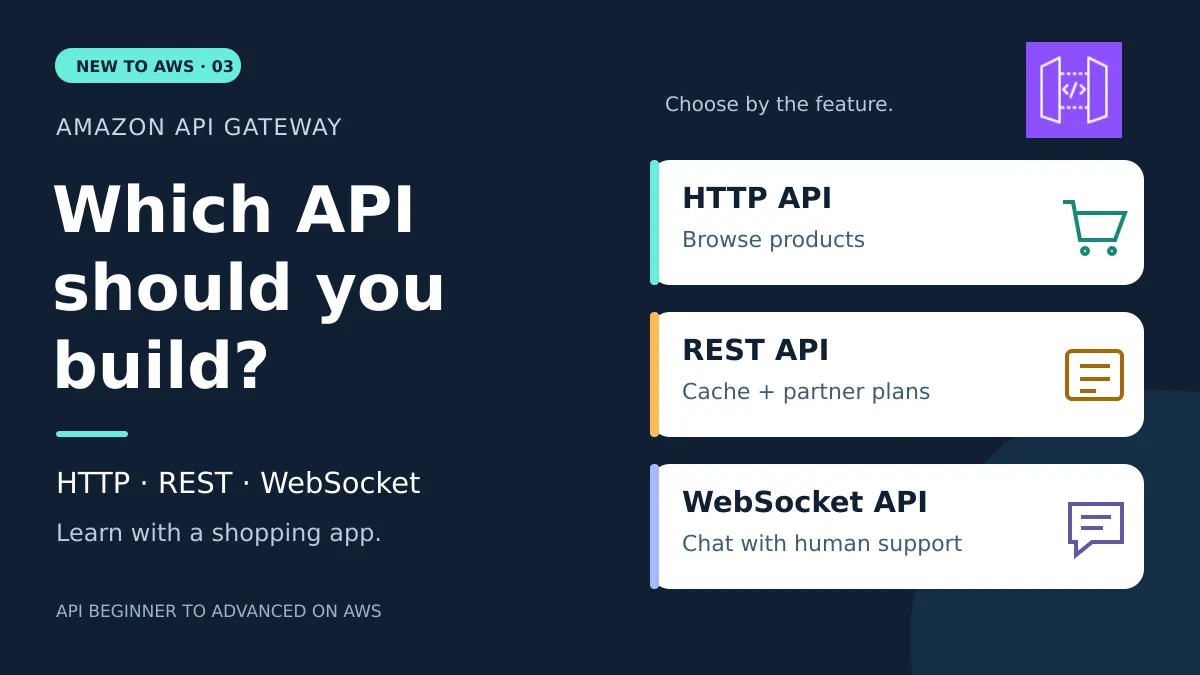
APIs Beginner to Advanced - HTTP API vs REST API vs WebSocket API in Amazon API Gateway
Pick the right Amazon API Gateway type with a shopping app: HTTP API for browsing, REST API for caching and usage plans, WebSocket API for live chat.
Series: New To AWS Beginners Guide (9 articles)
- …
- 8APIs Beginner to Advanced - HTTP API vs REST API vs WebSocket API in Amazon API Gateway This article

New to AWS: APIs Beginner to Advanced, Part 3
Quick answer: use an HTTP API for request-response traffic when its features cover what you need. Use a REST API when you need extra gateway features such as response caching, per-client usage plans, request validation, or direct AWS WAF integration. Use a WebSocket API when both sides need to keep sending messages over an open connection, like a shopper chatting with a human support agent.
One question decides it: what does this feature of my app need the gateway to do? The number of apps calling your API doesn't decide it, and neither does traffic.
In part one, you followed a single request and response. In part two, you connected routes to backend code and met the gateway. This time you'll pick an API type for three features in the same fictional shopping app. The examples describe our own design, not how Amazon.com works.
Is HTTP API for one app and REST API for many apps?
No. Both can serve one app or a hundred, and both run in production. A retailer's app can call an HTTP API the same way your own storefront does.
The naming doesn't help. AWS named two products after words that sound like protocols, and plenty of beginners trip over it. HTTP API and REST API are Amazon API Gateway product names. Both handle HTTP requests and responses, and you can build a RESTful API with either one. REST is a design style and HTTP is the protocol underneath, so they were never rivals.
You choose based on the features you want the gateway to provide. One app that needs built-in caching might pick REST API. Ten apps that only need standard request-response calls might pick HTTP API.

When should you use an HTTP API?
Use an HTTP API when you need request-response operations and its gateway features cover your requirements.
A shopper searches for headphones, then opens one product:
1
2
GET /products?q=headphones
GET /products/1738
The first request asks for a filtered list. The second asks for product
1738. Our product handler, the code that processes the request, looks up the details. The response comes back with status 200 OK and a JSON body:1
2
3
4
5
6
{
"productId": "1738",
"name": "Everyday Headphones",
"price": 79.99,
"currency": "USD"
}JSON is a text format for structured data. The frontend turns those names and values into the product title and price you see on screen.
On AWS, an HTTP API can route the request to AWS Lambda, which runs our handler, and then return the result to the caller. The gateway can also handle access checks, traffic throttling, and access logs. Your app getting popular isn't, on its own, a reason to move to REST API.
HTTP APIs cost less per request than REST APIs, which makes them a good starting point when they fit. Your total bill still includes Lambda and anything else you run.
Our decision: product browsing stays on an HTTP API until we hit a requirement it can't meet.
When should you use a REST API?
Use a REST API when you want extra features built into API Gateway: response caching, usage plans, request validation, or direct AWS WAF integration. AWS WAF is a web application firewall that filters requests using rules you define.
Same app, new requirements. Here are two of them.
Scenario 1: Can API Gateway cache popular product responses?
Thousands of shoppers open the same headphones page. The description almost never changes, yet each request runs the handler again. That's a lot of Lambda invocations to say the same thing.
A cache stores a response for a while so the gateway can reuse it. A cache hit finds a reusable response. A cache miss means the backend has to produce a fresh one.
With a REST API stage cache, we could give public product details a time to live (TTL) of 60 seconds. During that window, a matching request gets the saved response without another Lambda invocation.

The requirement here is specific: we want API Gateway itself to cache responses. REST APIs support that and HTTP APIs don't. An HTTP API setup could still cache elsewhere, such as in the backend or a separate content delivery layer.
A TTL trades freshness for fewer backend calls. A shopper could see a price that's up to a minute old, so checkout code has to calculate and validate the current price on the server.
Our decision: choose REST API if built-in gateway caching is worth that tradeoff and its extra cost. Leave the cache off in your first practice project. API Gateway Caching has its own hourly charge, and the AWS Free Tier doesn't cover it.
Scenario 2: Can different partners get different usage targets?
Two retailers want to show our catalog in their apps. That alone doesn't call for a REST API.
The new requirement does: we want API Gateway to track each partner's usage and give each one a different daily request target.
An API key identifies a client for usage tracking. A usage plan ties keys to deployed API stages and can set throttling and quota targets.
For our small learning example:
| Client | Key | Plan | Daily request target |
|---|---|---|---|
| Retailer A | A separate generated key | Starter | 100 |
| Retailer B | Another generated key | Plus | 1,000 |

We use two plans because the targets differ. If both keys sat in one plan, each key would get that plan's full target on its own. They wouldn't share a pooled allowance.
Treat these numbers as best-effort targets. They aren't guaranteed ceilings or spending caps. An API key also doesn't prove who a user is or whether they can read private data. It isn't an AWS access key, and it doesn't replace authentication.
Our decision: REST API fits because we want native usage plans. An HTTP API could still serve these retailers, but we'd have to build this usage-management piece another way.
When should you use a WebSocket API?
Use a WebSocket API when participants need to send and receive messages over an ongoing connection.
Our shopper opens live support and asks a human agent:
Will these headphones work with my laptop?
The agent replies, and the shopper asks a follow-up. Both people need new messages to show up as they arrive.
Polling means the app keeps asking the server "any new messages?", like a kid in the back seat asking "are we there yet?" every few seconds. A WebSocket connection stays open and carries messages in both directions, so the app doesn't need to send a fresh request for each update.

API Gateway manages the open connections. Your backend still does the matchmaking: it checks conversation membership, finds the intended recipient, and sends the message. API Gateway has no idea which shopper belongs to which support conversation.
An open connection doesn't mean a Lambda function runs for the whole chat. A handler runs when a connection or message event needs processing, then finishes.
Our decision: keep product lookups on the HTTP API and add a WebSocket API for live support. One application can use more than one API type. WebSocket also isn't the only way to deliver live updates. A one-way event stream has different requirements from a two-person conversation.
Which API Gateway type fits each shopping-app feature?
| Shopping-app requirement | Starting choice | Why it fits |
|---|---|---|
| Search products or fetch one product | HTTP API | Standard request-response operations |
| Let several apps read the same catalog | HTTP API can still fit | Client count doesn't determine API type |
| Reuse public product responses inside API Gateway | REST API | Built-in stage caching |
| Give partners different native usage targets | REST API | API keys and usage plans |
| Reject certain malformed requests at the gateway | REST API | Built-in request validation; business validation still belongs in code |
| Attach AWS WAF directly to the API's stage | REST API | Native web application firewall integration |
| Offer a private API endpoint through a VPC interface endpoint | REST API | Private API endpoint support |
| Chat with a human support agent | WebSocket API | Ongoing, two-way messaging |
A VPC is an isolated network in AWS. A private API endpoint and a private backend integration are two different things, and HTTP APIs can also reach supported private backends. Part four covers backend connections.
What do the API Gateway configuration terms mean?
| Term | Plain-English meaning | Shopping-app example |
|---|---|---|
| Endpoint | An address a client calls | The URL for our product lookup |
| Route | A rule matching a request or message to an operation | GET /products/{productId} or sendMessage |
| Path parameter | A variable segment in a URL path | 1738 fills {productId} |
| Query parameter | An extra input after ? in a URL | q=headphones filters the search |
| Integration | The gateway's connection to a backend | The Lambda function handling product lookups |
| Stage | A named environment where an API is available | dev for our learning project |
| Deployment | A version of API configuration made available to a stage | Publishing the product method to dev |
| Authorizer | A configured check before an operation proceeds | Validate a token before reading personal orders |
| Throttling | Controlling the rate of requests | Slow a burst of catalog requests |
| Quota | A usage target over a period | 100 requests per key per day in our sample plan |
| Connection ID | API Gateway's identifier for a WebSocket connection | The current browser connection for one chat participant |
How do you configure each API type in Amazon API Gateway?
These recipes show the settings and the reasoning behind them. Console labels change over time, so focus on the API type, resource, and behavior rather than exact button names.
We use Lambda to keep the examples small, but API Gateway supports other integrations too. The companion project builds the REST API recipe. The HTTP and WebSocket recipes are there for comparison.
HTTP API configuration: product browsing
Create an HTTP API, add a Lambda integration, and connect these routes to the product handler:
| Setting | Example | Why |
|---|---|---|
| Routes | GET /products and GET /products/{productId} | Separate search from a single-product lookup |
| Search input | Query parameter q | Filtering is input to the search route, not a new route for every word |
| Lambda payload format | 2.0 | Selects the event shape the handler expects |
| Stage | dev, with automatic deployment turned on for this lab | Makes route edits easy to try while you're learning |
| Authorization on public catalog routes | None | The routes return only public, fictional product information |
| Access logging | A CloudWatch Logs destination | Inspect the request ID, route, result, and duration |
For a named
dev stage, the request URL looks like this:1
https://YOUR_API_ID.execute-api.YOUR_REGION.amazonaws.com/dev/products/1738In the Lambda event,
pathParameters.productId contains 1738. The integration connects the request to your code, and your handler still does the lookup.For a protected route such as
GET /orders, an HTTP API can use a JWT authorizer. A JSON Web Token (JWT) is a signed token carrying claims, such as identity and permissions. You configure the trusted issuer (the service that created the token) and the expected audience (the intended recipient), then attach the authorizer to the route. Amazon Cognito is one compatible identity provider among several. Your backend still has to enforce which orders the caller can see.If a local frontend runs at
http://localhost:5173, configure Cross-Origin Resource Sharing (CORS) for that origin plus the methods and headers it needs. CORS controls which browser origins can call your API. It isn't a login system, and it doesn't block non-browser clients.REST API configuration: partner catalog access
Create a Regional REST API. "Regional" describes where AWS serves its public endpoint. It's a separate choice from REST versus HTTP.
- Create the resource
/products/{productId}and itsGETmethod. - Add a Lambda proxy integration, which forwards the request details to the handler.
- Set API key required on this method and use the HEADER API key source.
- Deploy the API to a
devstage. - Create the Starter and Plus usage plans. Associate both with this API's
devstage. - Generate two keys. Associate Retailer A's key with Starter and Retailer B's with Plus.
Clients send their key in a header:
1
2
GET /dev/products/1738
x-api-key: YOUR_PARTNER_KEY
API Gateway checks for a key associated with the right plan and stage. That check doesn't sign in a shopper. For private operations, add IAM, a Cognito user-pool authorizer, or a Lambda authorizer, and enforce resource permissions in the backend. Keep partner keys in server-side applications, never in browser code where anyone can read them.
Here are the lab's small example settings:
| Usage-plan setting | Starter | Plus | Meaning |
|---|---|---|---|
| Rate | 2 requests/second | 5 requests/second | Target steady request rate |
| Burst | 5 requests | 10 requests | Short-burst capacity in the throttling model |
| Quota | 100/day | 1,000/day | Target count for each key over the period |
These numbers are for practice. They aren't AWS defaults or production recommendations. Account and stage throttles also apply. A throttled request can get
429 Too Many Requests, and the client should back off before retrying.REST API access logs need a regional API Gateway CloudWatch logging role, so check that role first. The included project leaves gateway access logging opt-in to avoid changing a shared account setting. You still get Lambda's structured logs in the base lab.
Optional REST API configuration: cache the public product lookup
On the REST API's stage, provision a cache and turn on caching for the
GET method. Use a 60-second TTL for this example. Add method.request.path.productId to the integration's cache key parameters so each product ID gets its own entry.The cache key decides which requests can share a response. If language, currency, or another input changes the result, include it too. Start with public product data, never personal orders. Cache personal data with the wrong key and you could hand one shopper's orders to another.
Watch the
CacheHitCount and CacheMissCount metrics in CloudWatch. A cache hit should skip the backend call. When you finish the experiment, turn off and remove the cache to stop the hourly charge. The packaged lab doesn't create one.WebSocket API configuration: live support chat
Create a WebSocket API with this route selection expression:
1
$request.body.action
The expression tells API Gateway to read the
action value in each incoming JSON message. This message selects a custom route named sendMessage:1
2
3
4
5
{
"action": "sendMessage",
"conversationId": "support-42",
"text": "Will these headphones work with my laptop?"
}| Route or setting | Example behavior | Why |
|---|---|---|
$connect | Use a Lambda authorizer; record the approved identity and connection ID | Know who connected before accepting their messages |
sendMessage | Validate the message and conversation membership; find the recipient | Stop a caller from sending into someone else's conversation |
$default | Handle unsupported actions with a useful error | Avoid silently ignoring a misspelled action |
$disconnect | Remove the connection record when notified | Reduce stale recipients; AWS delivers this event on a best-effort basis |
| Connection storage | DynamoDB records mapping identity and conversation to connection IDs | Find the right recipient who's connected right now |
| Stage | Deploy to dev | Give the client its wss:// connection URL |
The chat handler sends to the recipient through API Gateway's
@connections management API. In this design, returning from the Lambda handler doesn't deliver the chat message. The handler has to make that callback itself, and its IAM role needs permission to manage connections for the intended API and stage. A connection ID is a delivery address. It doesn't prove the sender is allowed to contact that person.API Gateway authorizes the caller at connection time. The message handler still checks the operation and conversation membership on each message, and it handles stale connections and reconnects. An open connection doesn't guarantee delivery to someone who has dropped off. Message history and delivery acknowledgments are features you build in the application.
Interview questions: can you explain your API Gateway choice?
1. Is a REST API always better than an HTTP API?
No. More built-in features only help if you need them. For ordinary product lookups, an HTTP API may meet the requirements at a lower price per request.
2. Can five retailers use an HTTP API?
Yes. The number of client apps, or who owns them, doesn't force a REST API. Needing native per-client usage plans would.
3. Can an HTTP API follow REST principles?
Yes. In this comparison, "HTTP API" and "REST API" are AWS product names. You can build a RESTful design on an HTTP API.
4. What happens when a cached product price changes?
The cached response can stay stale until it expires or someone invalidates it. Checkout has to use current server-side pricing instead of trusting the displayed price.
5. Does an API key authenticate a shopper?
No. In this example, the key supports client usage tracking and plan enforcement. Signing users in and deciding which records they can access need separate controls.
6. Is a 100-request daily quota a guaranteed cutoff?
No. Usage-plan quotas and throttling are best effort. Don't use them as exact billing controls or security boundaries.
7. Does a WebSocket API send chat messages to the right person on its own?
No. Your backend checks membership, finds the recipient's active connection, and sends the message through the management API.
8. Can one shopping app use multiple API types?
Yes. An HTTP API can handle product browsing while a WebSocket API handles support chat. Pick each one where its behavior helps.
Build it: give two retailers different catalog usage targets
Your challenge solves one concrete problem: two retailers need the same catalog, but their usage targets differ.
Build a small REST API with
GET /products/{productId}, one Lambda handler, two generated API keys, and two usage plans. Return fictional product 1738, and return 404 for a product that doesn't exist. Keep the catalog inside the handler for this exercise so the gateway choice stays the focus.
Grab the code from the starter repo on GitHub . Clone it and you can run the offline tests on your laptop before you touch an AWS account.
| File | What you get |
|---|---|
| Project instructions | Prerequisites, deployment, testing, and cleanup steps |
| AWS SAM template | The REST API, method, API keys, usage plans, Lambda function, and log groups |
| Python handler | The product lookup for 1738 and the 404 for unknown products |
| Offline tests | Handler checks you can run without deploying |
| Sample event | A test request for product 1738 |
AWS SAM lets you describe a serverless application as code. Deploying the template creates a CloudFormation stack, which is a group of resources AWS manages together. The local tests exercise the handler, but they can't prove AWS deployed your usage plans the way you intended.
Start in the new AWS experience
The list of services supported in the new signup experience includes API Gateway, Lambda, CloudFormation, CloudWatch, and DynamoDB in its Free Tier section. Use your project's assigned Region, and check your account's permissions and plan before you deploy. A supported service doesn't make every feature or resource free, and this exercise doesn't come with a credit reward.
To get set up, use my guide to the new AWS experience and my Agent Toolkit for AWS setup guide for Kiro, Codex, Claude Code, and Cursor .
Agent Toolkit for AWS lets your coding assistant check AWS documentation and work with AWS using the access you've granted. It helps you during development. Shopper requests never pass through it.
Give your coding assistant this prompt
Open the cloned
api-types-project folder in your AI coding assistant, then paste this prompt. It asks the assistant to read the template and handler first, show you the plan before deploying anything, and explain each result as you test.1
2
3
4
5
6
7
8
9
10
11
12
13
14
15
16
17
18
19
20
21
22
23
24
25
26
27
28
29
30
31
32
33
34
Help me build ShopRequestLab Part 3, and teach me as we go.
Use Agent Toolkit for AWS to verify current documentation, my project's
assigned Region, supported services, and available permissions.
Goal: let two fictional retailers read the same product catalog with
different native usage targets. Explain why a REST API fits this
requirement and why an HTTP API could still serve multiple retailers.
Review this repo's template.yaml, src/app.py, and README.md first.
Create a Regional REST API with a dev stage and GET /products/{productId}.
Use Lambda and fictional product 1738, Everyday Headphones, USD 79.99.
Return 200 with JSON for that product and 404 for an unknown product.
Require a generated API key on this method, using the HEADER source.
Create two keys and two usage plans, both associated with the dev stage:
Starter: 100 requests/day, rate 2 requests/second, burst 5.
Plus: 1,000 requests/day, rate 5 requests/second, burst 10.
Explain that these are best-effort targets, not auth or spending caps.
Show resources, IAM permissions, estimated charges, and the proposed
changes before deployment. Stay on my current plan and assigned Region.
Use public fake data only. Leave caching, custom domains, and WAF off.
Do not place API key values in source control, screenshots, or logs.
Use temporary authorized credentials; do not request root credentials.
Keep the base lab's Lambda logs. Inspect the existing regional API Gateway
logging role before proposing optional gateway access logging. Do not
overwrite a shared account setting. Use request IDs and API key IDs,
not key values, to investigate usage.
Run the local tests, then guide me through a small number of live calls:
valid product with each key, unknown product, and missing key.
Show plan associations and per-key usage in the console. Do not run a
load test or try to exhaust quotas to prove an exact cutoff.
Explain each result and provide a complete resource cleanup checklist.What should you check after you build it?
| Try this | Look for | What it teaches |
|---|---|---|
Call /products/1738 with Retailer A's key | 200 and the product JSON | The method, integration, and handler work together |
| Call the same path with Retailer B's key | The same product response | Different usage plans don't need different business logic |
Call /products/9999 with a valid key | 404 from the handler | A valid key doesn't make a product exist |
| Leave the key off the required method | 403 Forbidden in this lab | The gateway rejects the request before the handler runs |
| Open each usage plan | Its associated dev stage and key | Plans must connect to the deployed API |
| Check per-key usage after your calls | Usage recorded against each key | Usage tracking is separate from product data, and reports can lag |
| Read the Lambda logs | Request ID, operation, result | You can trace a backend invocation without logging key values |
A newly associated key can take a few minutes to start working. If a call you expect to succeed fails, check the deployed stage, the required-key setting, the key value, and the usage-plan association before you touch your handler.
When you're done, delete the learning stack using the project's cleanup instructions. Include the generated keys, plans, log groups, and any optional resources you added. If you turned on a cache, remove it so the hourly charges stop.
Then ask yourself one more question: if these partners no longer needed native usage plans, would an HTTP API cover the remaining requirements? If you can explain your answer, you've got the point of this exercise.
In part four, you'll connect API Gateway to different backends and see what changes when your code runs in Lambda or on EC2.
Series: New To AWS Beginners Guide (9 articles)
- …
- 8APIs Beginner to Advanced - HTTP API vs REST API vs WebSocket API in Amazon API Gateway This article
Enjoyed reading this content? Let the author know!
Your likes, comments, shares, and saves help creators reach more builders.

Loading recommendations
Loading article