
Week 4 of My AWS Cloud Foundations Journey Module 4: AWS Cloud Security
Modules 1 to 3 covered what the cloud is, what it costs, and where it physically runs. This module covers who is responsible for securing it, and the answer is not simply "AWS".
Series: My AWS Cloud Foundations Journey (5 articles)
- …
- 4Week 4 of My AWS Cloud Foundations Journey Module 4: AWS Cloud Security This article


KEY CONCEPTS
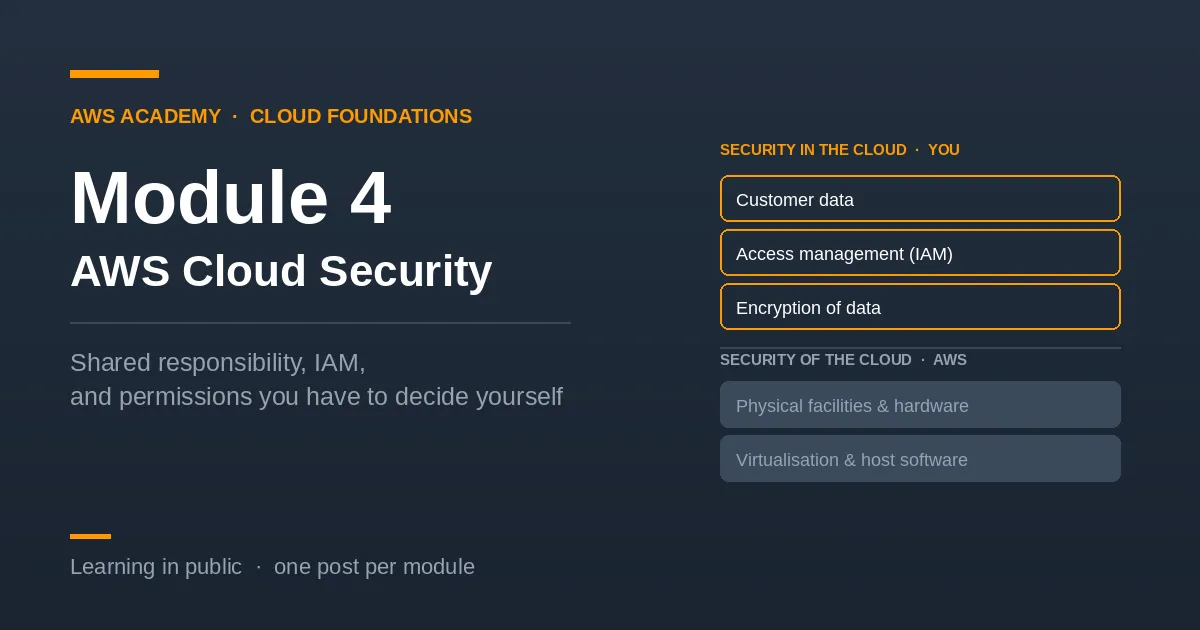
The shared responsibility model — AWS secures the cloud. You secure what you put in it.
AWS is responsible for the infrastructure: the physical data centers, the hardware, the software that runs virtualization, and the networking between Regions and Availability Zones. You never patch their hypervisors or guard their buildings.
You are responsible for everything you configure. Your data, who can access it, how your operating system is patched, how your firewall rules are written, and whether anything is encrypted. AWS gives you the tools. Using them correctly is your job.
The line moves depending on the service. On EC2 you manage the operating system yourself, so more falls to you. On a managed service like Lambda, AWS handles more of the stack. The more managed the service, the less of the responsibility is yours, which is the same scale as the IaaS to SaaS one from Module 1, viewed from a security angle.
AWS Identity and Access Management (IAM) — The service that controls who can do what in your account. Four pieces:
- Users — an identity for a person or an application, with long-term credentials.
- Groups — a collection of users. Permissions attached to the group apply to every member, so you define them once instead of per person.
- Policies — JSON documents stating which actions are allowed or denied on which resources. This is where permissions actually live.
- Roles — a set of permissions that can be assumed temporarily. No long-term credentials attached. Users, applications, and AWS services can all assume a role and receive short-lived credentials that expire on their own.
The root user — The identity created when you open the account, holding complete and unrestricted access. It cannot be limited by any policy, which is exactly why it should be used as little as possible.
The recommended setup on a new account is specific: create an IAM user for yourself, create an admin group with the Administrator-Access policy, add your user to that group, delete any root access keys, and enable multi-factor authentication on root. Then leave root alone. It is still needed for a handful of account-level tasks such as closing the account or changing the support plan, but nothing else. Save the details somewhere.
Securing a new account — Beyond the root user steps: enable MFA on privileged users, use strong password policies, and give each identity only the permissions it needs - Principle of least privilege.
Encryption — Data at rest means data sitting in storage, such as files in S3 or a database volume. Data in transit means data moving across a network. AWS provides encryption for both, through services such as AWS KMS for managing keys. Enabling it is a configuration decision, which puts it on your side of the responsibility line.
Compliance — AWS Artifact gives you on-demand access to AWS's compliance reports and certifications, which matters when your organisation has to prove something to an auditor.
WHAT CLICKED FOR ME ?
I went into this module assuming the warnings about the root user were partly about cost. They are not. Launching a server as root costs exactly what launching it as any other identity costs. AWS bills the account for resources, and it does not care who created them.
The reason is that the root user cannot be restricted. There is no policy you can attach to limit it, and no permission you can take away. It can delete everything and close the account. So the only protection available is not using it, which is why the advice is a sequence of steps rather than a setting you switch on.
The second thing that caught me was realising that least privilege is not automatic. AWS does give you a sensible default: a new IAM user starts with no permissions at all and canNOT do ANYthing until you grant something. But the moment you attach a policy, the scope is your decision. The standard setup attaches Administrator-Access to your own admin group, which is convenient and is deliberately not least privilege.
That reframed the whole module for me. The shared responsibility model is not a diagram to memorise. It is a statement that AWS has handed you a set of controls and will not use them on your behalf. Every secure default I assumed existed is actually a decision somebody has to make.
Connecting it
Module 1 placed services on the IaaS to SaaS scale. Module 2 added what drives their cost. Module 3 added where they physically run. This module adds the question that applies to all of them: where does AWS's responsibility end and mine begin, because that line moves with every service I choose.
Part of my AWS Academy Cloud Foundations learning series.
Series: My AWS Cloud Foundations Journey (5 articles)
- …
- 4Week 4 of My AWS Cloud Foundations Journey Module 4: AWS Cloud Security This article
Enjoyed reading this content? Let the author know!
Your likes, comments, shares, and saves help creators reach more builders.

Loading recommendations
Loading article