
Learning AWS CloudTrail: Understanding API Activity in My AWS Account
While learning AWS security, I wanted to understand how activity inside an AWS account can be recorded and investigated. This article explores CloudTrail, CloudTrail events, and how logs can help during security investigations.
Series: AWS Cybersecurity Learning Series (5 articles)
- 2Learning AWS CloudTrail: Understanding API Activity in My AWS Account This article
Learning AWS CloudTrail: Understanding API Activity in My AWS Account
While learning AWS security, I wanted to understand something fundamental to cybersecurity: how do we know what happened inside an environment?
In traditional cybersecurity, logs are an important source of information when investigating an incident. When moving into AWS, I found that many actions performed against cloud resources are also recorded as events.
This led me to AWS CloudTrail.
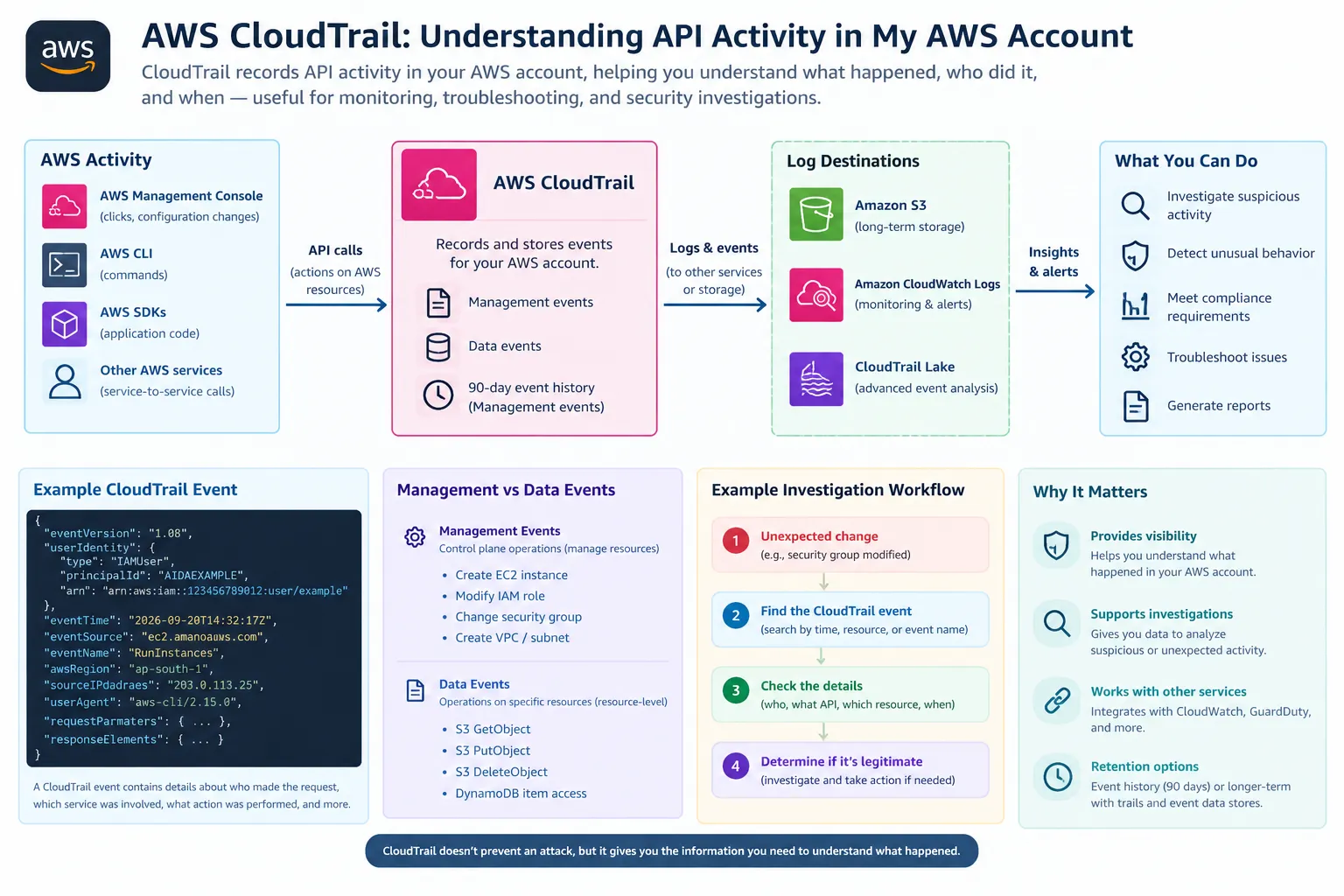
CloudTrail provides a history of activity in an AWS account, including actions performed through the AWS Management Console, AWS Command Line Interface (CLI), AWS SDKs, and other AWS services. These events can provide useful information about the identity involved, the action performed, the resource affected, and other details about the request.
What Is an AWS CloudTrail Event?
A CloudTrail event is essentially a record of an activity that occurred in an AWS account.
For example, an administrator might create an IAM role, launch an EC2 instance, modify a security group, or change an AWS configuration.
Instead of simply knowing that "something changed," CloudTrail can provide information that helps answer questions such as:
- Who or what made the request?
- Which AWS service was involved?
- What API operation was performed?
- When did the activity occur?
- What resources were involved?
- Where did the request originate?
This information can become particularly useful when investigating unexpected activity.
Exploring Event History
One of the easiest ways to start learning CloudTrail is through the Event history page in the AWS Management Console.
AWS provides Event history automatically for an account, and it provides a searchable and downloadable record of the previous 90 days of management events in an AWS Region.
For example, I can search for an event such as:
1
ConsoleLogin
This can help me examine login activity and see the details associated with the event.
I can also investigate actions performed by other AWS services.
The important thing I learned here is that CloudTrail is not simply a list of errors. It records activity that can later be examined to understand how an AWS environment was being used.
Management Events and Data Events
One distinction that I found important while learning CloudTrail is the difference between management events and data events.
Management events describe management operations, sometimes referred to as control plane operations.
Examples include:
- Creating an EC2 instance
- Creating or modifying IAM resources
- Creating a VPC or subnet
- Changing security configuration
Data events are different because they provide information about operations performed on or within specific resources. For example, S3 object-level operations such as
GetObject, PutObject, and DeleteObject can be recorded as data events.This distinction helped me understand that knowing someone accessed an AWS service and knowing exactly what they did with data inside a resource can require different types of logging.
Why Isn't Event History Enough for Everything?
The 90-day Event history is useful for getting started, but it has limitations.
It primarily provides access to recent management events. It does not provide the same coverage as an ongoing logging setup.
For longer-term collection, AWS provides CloudTrail trails and CloudTrail Lake event data stores. A trail can deliver CloudTrail events to an S3 bucket and can also integrate with services such as CloudWatch Logs.
This creates a much more useful setup for security monitoring because activity can be retained beyond the Event history period.
A Simple Security Investigation Example
Consider a situation where an EC2 security group was unexpectedly modified.
From a cybersecurity perspective, simply knowing that the configuration changed would not be enough.
I would want to investigate:
1
2
3
4
5
6
7
8
9
10
11
12
13
Unexpected security group change
            ↓
      CloudTrail event
            ↓
      Who made the request?
            ↓
       What API call?
            ↓
     Which resource?
            ↓
       When did it occur?
            ↓
   Was the activity legitimate?
The CloudTrail event can provide information that helps answer these questions.
For example, the event could show the identity that made the request, the API operation that was performed, and information about the request itself.
This doesn't automatically tell me that an event was malicious. Instead, it gives me evidence that I can use as part of an investigation.
That distinction is important.
Logging records activity; investigation determines what that activity means.
Connecting CloudTrail With Other Security Services
Another thing I find interesting about CloudTrail is that it does not have to operate in isolation.
CloudTrail logs can be integrated with other AWS services.
For example:
1
2
3
4
5
6
7
AWS Activity
     ↓
CloudTrail
     ↓
CloudWatch Logs
     ↓
Monitoring / Alerts
CloudTrail can send log events to Amazon CloudWatch Logs, where they can be monitored, searched, and used as part of an alerting workflow.
CloudTrail can also provide activity information that is useful alongside AWS security services such as Amazon GuardDuty.
This starts to resemble the security monitoring workflows I am familiar with from cybersecurity, but applied to cloud infrastructure.
What I Want to Try Practically
Rather than only reading about CloudTrail, I want to experiment with it in a small AWS environment.
For example, I could perform a few controlled actions:
- Create an IAM resource.
- Launch or modify an EC2 resource.
- Change a security group.
- Log in through the AWS Console.
- Examine the resulting CloudTrail events.
I could then compare the actions I performed with the events that were recorded.
This would help me understand the relationship between an actual AWS operation and the event that represents it in CloudTrail.
What I Learned
The main lesson I took from exploring CloudTrail is that visibility is an important part of security.
Security controls such as IAM permissions can help prevent unauthorized actions, but when something unexpected happens, we also need information that allows us to investigate it.
CloudTrail provides that visibility by recording AWS activity in a structured format.
I also learned that CloudTrail is more than simply opening the console and looking at recent events. Understanding management events, data events, trails, event data stores, and integrations with other AWS services is important when designing a more complete logging strategy.
Conclusion
I am still early in my AWS learning journey, but CloudTrail has helped me understand how some of the cybersecurity concepts I already know translate into an AWS environment.
The most useful way I currently think about CloudTrail is:
IAM helps control what an identity can do, while CloudTrail helps provide visibility into what happened.
Neither one replaces the other. Access control can reduce unnecessary permissions, while logging provides valuable evidence when we need to understand activity within the environment.
As I continue this AWS cybersecurity learning series, I want to explore what happens after an interesting event is detected—particularly how services such as Amazon GuardDuty can help identify potentially suspicious activity.
Series: AWS Cybersecurity Learning Series (5 articles)
- 2Learning AWS CloudTrail: Understanding API Activity in My AWS Account This article
Enjoyed reading this content? Let the author know!
Your likes, comments, shares, and saves help creators reach more builders.

Loading recommendations
Loading article