
Learning Least Privilege in AWS: Building a Restricted IAM Role for S3
While learning AWS security, I explored how the principle of least privilege can be applied using IAM roles and S3. This article walks through a simple example and what I learned from it.
Series: AWS Cybersecurity Learning Series (5 articles)
- 1Learning Least Privilege in AWS: Building a Restricted IAM Role for S3 This article

Learning Least Privilege in AWS: Building a Restricted IAM Role for S3
Coming from a cybersecurity background, the principle of least privilege was not a completely new concept to me. However, while beginning to learn AWS, I wanted to understand how the same principle is actually implemented in a cloud environment.
This led me to AWS Identity and Access Management (IAM) and, specifically, how IAM roles can be used to give applications only the permissions they require.
In this article, I will use a simple EC2 and S3 example to explore the concept and explain what I learned from it.
What Is Least Privilege?
The principle of least privilege means providing an identity with only the permissions necessary to perform its intended tasks.
For example, suppose an application running on an EC2 instance needs to read files from an S3 bucket.
The application does not necessarily need permission to:
- Delete objects
- Upload new objects
- Access unrelated S3 buckets
- Modify IAM permissions
- Perform administrative actions
Giving it all of these permissions simply because it needs to read a file would create unnecessary access.
Instead, we can create an IAM role that provides only the permissions required by the application.
The Example
For this example, imagine an S3 bucket named:
1
my-learning-bucket
Our application needs to:
- List the contents of this bucket.
- Read objects from the bucket.
It does not need to modify or delete the objects.
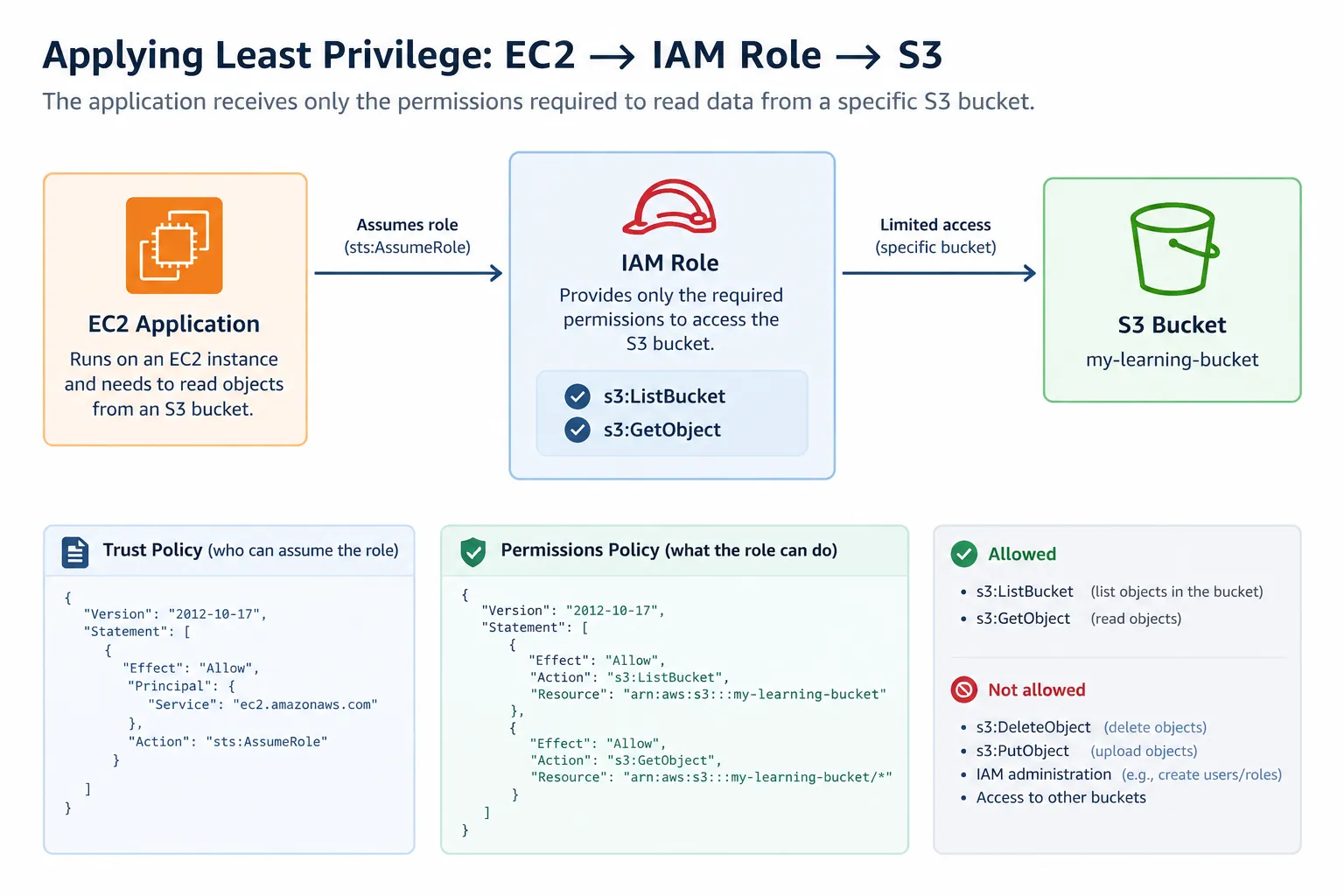
The architecture can therefore be represented as:
1
2
3
4
5
6
7
EC2 Application
      │
      ▼
   IAM Role
      │
      ▼
 S3 Bucket
The IAM role acts as the permission layer between the application and the S3 resources.
Creating the IAM Role
An EC2 application can use an IAM role rather than having long-term AWS access keys stored inside the application.
The role has a trust policy that defines who is allowed to assume it. For an EC2 workload, the trusted principal can be the EC2 service.
A simplified trust policy looks like this:
1
2
3
4
5
6
7
8
9
10
11
12
{
  "Version": "2012-10-17",
  "Statement": [
    {
      "Effect": "Allow",
      "Principal": {
        "Service": "ec2.amazonaws.com"
      },
      "Action": "sts:AssumeRole"
    }
  ]
}
This policy answers:
Who can assume this role?
It does not define what the application can do after assuming the role. That is handled by the permissions policy.
Giving the Role Only the Required Permissions
We can attach a permissions policy that allows the application to list the bucket and read objects:
1
2
3
4
5
6
7
8
9
10
11
12
13
14
15
{
  "Version": "2012-10-17",
  "Statement": [
    {
      "Effect": "Allow",
      "Action": "s3:ListBucket",
      "Resource": "arn:aws:s3:::my-learning-bucket"
    },
    {
      "Effect": "Allow",
      "Action": "s3:GetObject",
      "Resource": "arn:aws:s3:::my-learning-bucket/*"
    }
  ]
}
One detail that initially confused me was why the bucket appears in two different forms.
1
arn:aws:s3:::my-learning-bucket
refers to the bucket itself.
Meanwhile:
1
arn:aws:s3:::my-learning-bucket/*
refers to the objects contained within that bucket.
This distinction matters because different S3 API operations require permissions on different resource types.
For example,
s3:ListBucket operates on the bucket, while s3:GetObject operates on objects inside the bucket.What Can the Application Do?
With this policy, the application should be able to:
1
2
3
List the bucket
      ↓
Read an object
However, the policy does not grant permissions such as:
1
2
3
4
5
Delete an object
Upload an object
Modify bucket permissions
Access another S3 bucket
Change IAM permissions
This is where the principle of least privilege becomes more concrete for me.
Instead of simply asking whether an application should have access to S3, we can ask:
Which S3 actions does the application actually need, and which resources should those actions apply to?
Why Does This Matter for Security?
While learning cybersecurity, I had already encountered the idea that excessive permissions can increase the impact of a compromised account.
AWS makes this particularly important because identities can interact with many different cloud resources through APIs.
Imagine that the credentials or execution environment of an application were compromised.
If the application's identity had broad administrative permissions, an attacker could potentially perform many actions across the AWS environment.
If the identity only had permission to read objects from one particular S3 bucket, the available permissions would be much more limited.
Least privilege therefore does not prevent a compromise by itself. Instead, it can help reduce the potential impact of a compromised identity by limiting what that identity is authorized to do.
What I Learned From This Example
The biggest thing I took away from this exercise is that least privilege is more specific than simply saying "give users less access."
It requires understanding:
- Who or what needs access
- Which actions are required
- Which resources those actions apply to
- Which permissions are unnecessary
I also found the distinction between an IAM role's trust policy and permissions policy particularly useful.
The trust policy determines who can assume the role, while the permissions policy determines what the role is allowed to do.
Understanding this separation makes IAM policies much easier to reason about.
Where I Want to Go Next
This is a relatively simple example, but it gives me a foundation for exploring more advanced AWS security concepts.
Some areas I want to explore next include:
- IAM policy conditions
- Temporary credentials
- S3 bucket policies
- IAM Access Analyzer
- CloudTrail
- Amazon GuardDuty
- AWS Security Hub
- Cross-account access
I also want to recreate this example as a small hands-on lab and test both successful and denied operations rather than only reading about IAM policies.
Conclusion
I'm still early in my AWS learning journey, but exploring IAM has helped me connect a cybersecurity principle I already knew with a practical cloud implementation.
The main lesson I took from this example is that secure access is not simply about allowing or denying access. It is about defining what an identity needs to accomplish and granting the permissions necessary to accomplish that task—without unnecessarily expanding its access.
For me, this is one of the areas where learning AWS is helping me build on my existing cybersecurity knowledge while developing a better understanding of how security works in cloud environments.
# aws-iam-identity-center# aws-identity-and-access-management# cloud-security# amazon-ec2# cybersecurity
Series: AWS Cybersecurity Learning Series (5 articles)
- 1Learning Least Privilege in AWS: Building a Restricted IAM Role for S3 This article
Enjoyed reading this content? Let the author know!
Your likes, comments, shares, and saves help creators reach more builders.

Loading recommendations
Loading article