
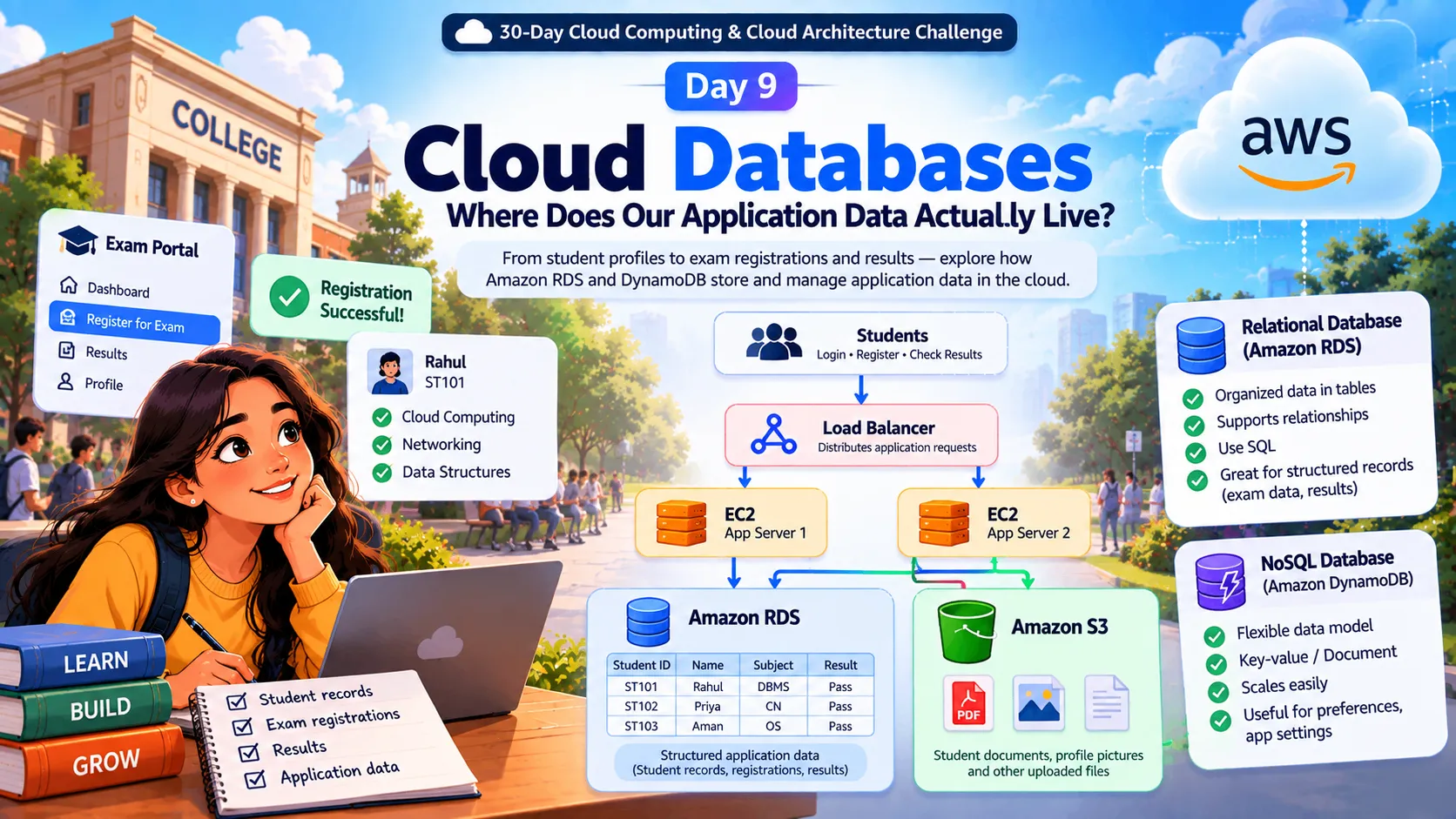
☁️ Day 9: Cloud Databases — Where Does Our Application Data Actually Live?
🗄️ Explore Amazon RDS and DynamoDB through our college portal story. 🚀 Discover how cloud databases manage student records, exam registrations, and application data.
Series: Cloud Computing (24 articles)
- …
- 10☁️ Day 9: Cloud Databases — Where Does Our Application Data Actually Live? This article

☁️ Day 9/30: Cloud Databases — Where Does Our Application Data Actually Live? 🗄️
🚀 From storing files to managing the data that powers our application!
Welcome back to the 30-Day Cloud Computing & Cloud Architecture Challenge! 🎯
In Day 8, we solved an important problem in our college examination portal: Where should our application store its files?
We explored Amazon S3 for student documents, Amazon EBS for EC2 storage, and Amazon EFS for shared files.
But today, our college portal faces a new challenge! 👀
📢 BREAKING NEWS FROM OUR COLLEGE!
“Semester examination registration is now OPEN!”
Within minutes, thousands of students rush to the portal.
Rahul logs in, selects his subjects, clicks Register, and expects to see:
✅ Registration Successful!
But here's the big question…
🤔 Where does our application remember that Rahul registered for his examinations?
Our EC2 instances run the application. Amazon S3 stores our documents.
But where do we store student profiles, selected subjects, registration status, payment records, and examination results?
Welcome to the world of Cloud Databases! 🗄️
🎬 1. Our Application Needs a Memory!
Imagine our college portal is a digital college office.
🏫 Every day, thousands of students interact with it. The portal must remember who they are, what subjects they selected, and whether their registrations were successful.
For example:
👨🎓 Student: Rahul
🆔 Student ID: ST101
📚 Selected Subject: Cloud Computing
📝 Registration Status: Confirmed
🆔 Student ID: ST101
📚 Selected Subject: Cloud Computing
📝 Registration Status: Confirmed
Tomorrow, Rahul logs in again.
The application must retrieve the correct information instead of asking him to register all over again!
This is where a database becomes essential.
💡 Think of a database as the organized memory of our application.
It allows applications to create, retrieve, update, and manage information in a structured way.
And because the data is stored separately from the application process, restarting an EC2 application server doesn't automatically erase the database records.
🧩 2. Are All Databases the Same?
Not quite, bro! 😎
Imagine our college needs to manage two different kinds of information.
📋 Requirement A: Official examination records
- Student profiles
- Subject details
- Examination registrations
- Marks and results
These records are related to one another. A student can register for multiple subjects, and a subject can have many students.
⚡ Requirement B: Flexible application information
- Student dashboard preferences
- Saved application settings
- Information retrieved using a known identifier
Depending on how the application accesses this information, a different database model may be suitable.
This brings us to two important categories.
📊 Relational Databases — SQL
Relational databases organize information into tables containing rows and columns. Different tables can be connected through common fields.
AWS example: Amazon RDS.
Useful when our application needs structured records, relationships, and relational queries.
⚡ NoSQL Databases
NoSQL databases support other data models, including key-value and document models, depending on the service.
AWS example: Amazon DynamoDB.
Useful when the data model and access patterns fit the application's requirements.
Remember: neither type is automatically better. The right choice depends on the data, relationships, queries, and workload.
Let's explore how these options fit our college portal! 👇
📊 3. Relational Databases — The Digital College Register
Imagine our college maintains two registers.
📘 Register 1: Students
| Student ID | Name | Course |
|---|---|---|
| ST101 | Rahul | BCA |
| ST102 | Priya | B.Tech |
| ST103 | Aman | BCA |
📗 Register 2: Exam Registrations
| Student ID | Subject |
|---|---|
| ST101 | Cloud Computing |
| ST101 | Networking |
| ST102 | Databases |
Notice something interesting? 👀
The same student ID connects a student with their examination registrations.
Instead of repeating every student's information for every subject, the application can use related tables.
Relational databases commonly use SQL (Structured Query Language) to retrieve and update information.
For example, the application might ask:
“Find the student whose ID is ST101.”
The database returns the matching student record.
Simple, right? That's the idea behind a database query!
☁️ Meet Amazon RDS
Amazon Relational Database Service (Amazon RDS) helps us set up, operate, and scale relational databases in AWS.
It supports database engines such as PostgreSQL, MySQL, MariaDB, Oracle, and Microsoft SQL Server.
Instead of managing every infrastructure task ourselves, we can use RDS to handle many routine operational activities.
For our college portal, Amazon RDS could manage:
- 👨🎓 Student records
- 📝 Examination registrations
- 📚 Subject information
- 📊 Examination results
💡 Real-world connection: When an application needs structured records and relationships between them, a relational database may be a suitable choice.
⚡ 4. NoSQL — When Data Needs a Different Shape
Now let's look at another feature of our college portal.
Students can personalize their dashboards.
Rahul prefers English. Priya prefers Hindi. Another student may have additional settings.
Depending on how the application uses this information, a key-value or document-oriented database model might fit.
For example, a student preference record could conceptually contain:
- Student ID: ST101
- Preferred Language: English
- Dashboard Theme: Dark
The application can retrieve this information using an appropriate key or query designed for the selected database.
☁️ Meet Amazon DynamoDB
Amazon DynamoDB is a fully managed, serverless NoSQL database service that supports key-value and document data models.
AWS manages much of the underlying infrastructure, so developers don't have to administer database servers directly.
DynamoDB can be suitable for applications that need efficient access to data using well-designed keys and access patterns.
For our portal, we might consider it for student preferences or other key-based workloads.
⚠️ Important: Don't choose NoSQL just because it sounds modern. Choose it when its data model and capabilities fit your actual requirements.
🏗️ 5. Let's Upgrade Our College Portal Architecture!
Remember the architecture we've been building throughout this challenge?
Students access our application through a load balancer. EC2 instances run the application, and Amazon S3 stores files.
Today, we're adding a database to manage structured application records.
☁️ Our Updated Cloud Architecture
1
2
3
4
5
6
7
8
9
10
11
12
13
14
15
16
17
18
19
20
👨🎓 STUDENTS
|
v
⚖️ LOAD BALANCER
|
+------+------+
| |
v v
🖥️ EC2 App 🖥️ EC2 App
Server 1 Server 2
| |
+------+------+
|
+-------+-------+
| |
v v
🗄️ AMAZON RDS 📦 AMAZON S3
Student Records Student Documents
Exam Registrations Profile Pictures
Results Uploaded Files
Look at what's happening! 🚀
- 🖥️ EC2: Runs our application code.
- 🗄️ Amazon RDS: Stores and manages structured application records.
- 📦 Amazon S3: Stores files and documents.
When Rahul requests his examination details, the application can query the database. When he uploads a document, the application can use S3 to store the file.
Each component has its own responsibility, but together they deliver one application experience.
That's the foundation of a cloud architecture that can evolve as our application grows!
🔗 6. How Do Databases and File Storage Work Together?
Let's follow Rahul through two actions.
🖼️ Action 1: Rahul uploads his profile picture
The actual image file can be stored in Amazon S3.
📝 Action 2: Rahul registers for an examination
The application stores his registration information in the database.
The database may also contain a reference to the image stored in S3.
Here's how the pieces work together:
1
2
3
4
5
6
7
8
9
10
11
12
👨🎓 RAHUL
|
v
🖥️ EC2 APP
|
+-------+-------+
| |
v v
🗄️ AMAZON RDS 📦 AMAZON S3
Student Record Profile Picture
Exam Registration Uploaded Documents
Registration Data Actual File Content
The database stores the structured information, while S3 stores the file itself.
When Rahul opens his profile, the application can retrieve his student record and use the relevant object reference to locate his image.
🔑 Key takeaway: The file and the information describing that file don't have to live in the same place.
This separation allows each service to handle the type of data it is designed for.
🚨 7. What Happens If the Database Becomes Unavailable?
It's registration day. Thousands of students are using the portal.
Suddenly, the database experiences a failure.
😨 Both EC2 application servers are still running, but the application cannot retrieve or save registration information.
Will the portal work perfectly?
Not necessarily!
Even a healthy application server depends on the availability of the services it needs.
This is why our database must be designed carefully.
🛡️ How can we improve database reliability?
- 🔄 High availability: Amazon RDS Multi-AZ deployments can provide a standby database and automatic failover for supported configurations.
- 💾 Backups: Help us recover data after certain failures or accidental changes.
- 📈 Monitoring: Helps identify performance issues and resource pressure.
- 🔐 Access controls: Limit access to authorized applications and users.
- ⚙️ Performance planning: Helps the database handle expected traffic and queries efficiently.
Remember our Day 6 lesson about high availability?
That principle applies to databases too!
⚠️ High availability and backups solve different problems. A standby database is not a replacement for a tested backup and recovery strategy.
🎯 8. Quick Challenge — Can You Choose the Right Service?
Bro, now you're the cloud architect for our college portal! 😎
Choose the AWS service that best fits each requirement.
📋 Challenge 1
You need to store student records and examination registrations in related tables.
A) Amazon S3
B) Amazon RDS
C) Amazon EFS
B) Amazon RDS
C) Amazon EFS
🖼️ Challenge 2
Students upload profile pictures and examination documents. Where should these files go?
A) Amazon DynamoDB
B) Amazon S3
C) Amazon EC2
B) Amazon S3
C) Amazon EC2
⚡ Challenge 3
You need a NoSQL database for student preferences retrieved using a key.
A) Amazon DynamoDB
B) Amazon EBS
C) Amazon EFS
B) Amazon EBS
C) Amazon EFS
✅ Check Your Answers
- Challenge 1: B — Amazon RDS. A relational database may suit structured records and relationships.
- Challenge 2: B — Amazon S3. S3 is object storage suitable for documents and images.
- Challenge 3: A — Amazon DynamoDB. DynamoDB supports key-value and document data models when they fit the workload.
💡 Architect's lesson: Start with the problem, understand the data, and then choose the service. Don't choose a service simply because it's popular!
🧠 9. Look How Far Our Architecture Has Come!
Let's connect the journey so far.
| Day | What we explored |
|---|---|
| Day 5 | 🌍 Where our cloud application lives |
| Day 6 | 🛡️ How to design for failures |
| Day 7 | 🖥️ What runs our application |
| Day 8 | 📦 Where application files live |
| Day 9 | 🗄️ Where structured application data lives |
Our college portal now has compute, file storage, and a database working together.
But one major question remains.
When Rahul clicks Register for Examination, how does the request travel from his browser to our application?
How do the application servers communicate with the database? How can we control which components are allowed to communicate?
🌐 It's time to understand the network connecting our architecture!
🚀 Coming Up — Day 10/30
🌐 Cloud Networking — How Does Data Travel Through the Cloud?
In Day 10, we'll explore how networking connects our growing cloud architecture and how we control communication between its components.
💬 Question for you: If both EC2 servers are running perfectly, but the database is unreachable, will Rahul's exam registration still work?
Share your answer in the comments! 👇
Keep learning. Keep building. And remember — great cloud architecture isn't just about choosing services; it's about understanding how they work together. ☁️🔥
Series: Cloud Computing (24 articles)
- …
- 10☁️ Day 9: Cloud Databases — Where Does Our Application Data Actually Live? This article
Enjoyed reading this content? Let the author know!
Your likes, comments, shares, and saves help creators reach more builders.

Loading recommendations
Loading article