
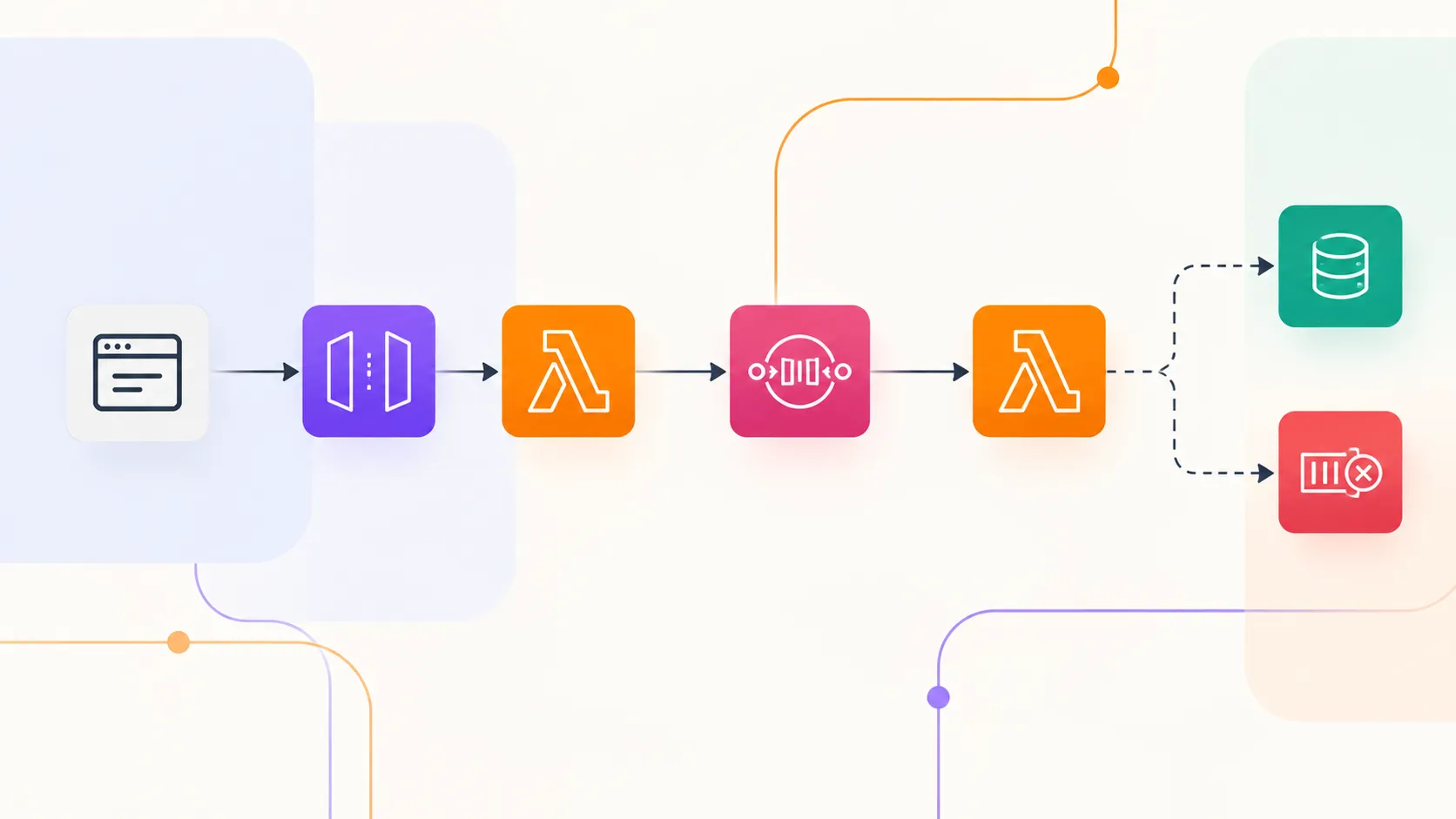
Putting SQS Between API Gateway and Lambda
I moved a synchronous API workflow to an asynchronous architecture by putting Amazon SQS between API Gateway and AWS Lambda. I compared the two approaches to understand how queuing changes latency, throughput, failure handling, retries, and overall architecture.
Series: Serverless in Practice (3 articles)
- 2Putting SQS Between API Gateway and Lambda This article

In my previous experiment, I Tested AWS Lambda at 128 MB, 256 MB, 512 MB, and 1 GB: Here's What Happened , I tested how Lambda's memory configuration affects execution time and cost.
This time, instead of changing Lambda itself, I wanted to change how work reaches Lambda.
So I put Amazon SQS between my API and the worker Lambda.
The architecture went from:
1
2
3
4
5
API Gateway
     ↓
   Lambda
     ↓
 Processing
to:
1
2
3
4
5
6
7
8
9
API Gateway
     ↓
Producer Lambda
     ↓
   Amazon SQS
     ↓
Worker Lambda
     ↓
 Processing
And then I started testing what actually changed.
The Question
The question I wanted to answer was:
What happens when a synchronous Lambda workflow becomes asynchronous by putting Amazon SQS between the API and the worker?
I wasn't interested in simply proving that SQS can trigger Lambda. That's already well documented. I wanted to understand the practical differences.
Would the API become faster? What happens during traffic spikes?
What happens when the worker fails? How does the queue behave? And what do we gain by introducing another service into the architecture?
The Starting Point
I started with a simple synchronous workflow.
1
2
3
4
5
6
7
8
9
Client
  ↓
API Gateway
  ↓
Lambda
  ↓
Processing
  ↓
Response
The Lambda function receives the request, performs the work, and returns the result. For a simple operation, this is great.
There are fewer moving parts, the request lifecycle is easy to understand, and the client gets the result immediately. But there is also a tight relationship between the API request and the processing workload.
If the processing takes longer, the request takes longer. If the processing fails, the request fails. If the application suddenly receives a large amount of work, the processing layer has to deal with that workload immediately.
So I wanted to introduce a buffer.
Introducing SQS
The new architecture looked like this:
1
2
3
4
5
6
7
8
9
10
11
Client
  ↓
API Gateway
  ↓
Producer Lambda
  ↓
Amazon SQS
  ↓
Worker Lambda
  ↓
Processing
The producer Lambda doesn't perform the actual work anymore.
Its job is to:
- Receive the request
- Validate it
- Create a message
- Send the message to SQS
- Return a response
The worker Lambda is then responsible for processing messages from the queue.
This creates a very different relationship between the API and the processing layer.
The API is now responsible for accepting work, the worker is responsible for performing work and SQS sits between them.
The Practical Setup
For the experiment, I kept the workload intentionally simple. The application submits a job through API Gateway. The producer Lambda creates an SQS message containing the job information.
For example:
1
2
3
4
5
6
7
{
  "jobId": "job-12345",
  "operation": "process",
  "payload": {
    "resourceId": "resource-987"
  }
}
SQS stores the message.
The worker Lambda is triggered from the queue and processes it. The important thing here is that the client doesn't wait for the worker to finish.
The request lifecycle now looks more like:
1
2
3
4
5
6
7
8
9
Request
   ↓
API Gateway
   ↓
Producer Lambda
   ↓
SQS
   ↓
Response
while the actual processing happens separately:
1
2
3
4
5
SQS
 ↓
Worker Lambda
 ↓
Processing
That separation is the entire point of the experiment.
Test 1: Synchronous vs Asynchronous
I first wanted to compare the two basic architectures.
Architecture A
1
2
3
4
5
6
7
8
9
Client
  ↓
API Gateway
  ↓
Lambda
  ↓
Processing
  ↓
Response
Architecture B
1
2
3
4
5
6
7
8
9
10
11
12
13
14
15
Client
  ↓
API Gateway
  ↓
Producer Lambda
  ↓
SQS
  ↓
Response

SQS
 ↓
Worker Lambda
 ↓
Processing
The biggest difference wasn't necessarily raw processing speed.
It was when the client received a response.
With the synchronous architecture, the client waits for the processing operation. With the SQS architecture, the client only needs the request to be accepted and queued. That means we're now dealing with two different kinds of latency.
Request latency
How long it takes for the API to accept the request.
1
Client → API → SQS → Response
Processing latency
How long it takes for the actual job to finish.
1
Message → Worker Lambda → Processing complete
These two numbers can now be completely different. And that's a very important architectural distinction.
Test 2: What Happens During a Traffic Spike?
This is where the queue became much more interesting. Imagine sending a large number of requests to the API in a short period.
With the synchronous architecture:
1
2
3
4
5
Requests
   ↓
Lambda
   ↓
Processing
The processing workload is directly connected to incoming traffic.
With SQS:
1
2
3
4
5
6
7
8
9
10
11
12
13
14
15
Requests
   ↓
Producer Lambda
   ↓
┌───────────────────┐
│       SQS         │
│                   │
│  Message          │
│  Message          │
│  Message          │
│  Message          │
│  Message          │
└─────────┬─────────┘
          ↓
      Worker Lambda
The queue becomes a buffer. The producer can add messages while the worker side processes them.
This doesn't make the work disappear, it simply changes where the work waits.
That's an important distinction. SQS isn't making the application magically process everything faster.
It's decoupling the rate at which work is accepted from the rate at which work is processed.
Watching the Queue
One of the things I found useful during the experiment was watching the queue itself.
Instead of looking only at Lambda execution time, I could now observe another part of the system.
Things like:
- Number of messages available
- Number of messages being processed
- Number of messages waiting
- Message age
- Lambda concurrency
- Processing rate
This gives us a new operational signal: queue depth.
If messages keep accumulating, the producer is generating work faster than the workers are processing it.
Conceptually:
1
2
3
4
5
6
7
Incoming work
      ↓
   Producer
      ↓
     SQS
      ↓
   Workers
If:
1
Incoming rate > Processing rate
the queue grows.
If:
1
Incoming rate < Processing rate
the queue drains.
That makes SQS useful not only as a messaging system, but also as a visible buffer between two parts of the architecture.
Test 3: Failure
Next, I intentionally made the worker fail.
This is where the architecture started behaving very differently from the synchronous version.
In the original architecture:
1
2
3
4
5
6
7
API
 ↓
Lambda
 ↓
Failure
 ↓
Request fails
The failure is directly connected to the request.
With SQS:
1
2
3
4
5
SQS
 ↓
Worker Lambda
 ↓
Failure
The message can be retried according to the queue and event source configuration.
The producer doesn't need to know that the worker failed. that's a major difference.
The API successfully submitted the work. the worker failed while processing the work.
Those are now separate events.
What Happens to the Message?
This is where SQS visibility timeout becomes important.
When a worker receives a message, that message isn't immediately deleted from the queue.
It becomes temporarily invisible to other consumers, if processing succeeds, the message can be deleted. If processing fails and isn't successfully completed, the message can become available again after the visibility timeout.
Conceptually:
1
2
3
4
5
6
7
8
9
10
11
12
13
Message
   ↓
Worker receives it
   ↓
Message becomes invisible
   ↓
Worker succeeds?
   │
   ├── Yes → Message deleted
   │
   └── No  → Message becomes visible again
                    ↓
                  Retry
This gives the system a built-in mechanism for retrying failed work.
Test 4: Dead-Letter Queue
Of course, retrying something forever isn't useful, so I also looked at the dead-letter queue.
The flow becomes:
1
2
3
4
5
6
7
8
9
10
11
12
13
14
15
16
17
18
              ┌──────────────┐
              │     SQS      │
              └──────┬───────┘
                     ↓
               Worker Lambda
                     │
              ┌──────┴──────┐
              │             │
           Success        Failure
              │             │
              ↓             ↓
            Done          Retry
                            │
                            ↓
                      Retry limit
                            │
                            ↓
                           DLQ
The DLQ gives repeatedly failing messages somewhere to go instead of allowing them to continually cycle through the worker.
This is particularly useful because it turns an invisible failure into something that can be inspected.
A message in the DLQ tells me:
Something went wrong with this particular piece of work.
That makes troubleshooting considerably easier.
What About Duplicate Processing?
There is one more behavior worth understanding when working with SQS: a message can potentially be processed more than once.
For example, a worker might successfully complete the operation but fail before the message is deleted. The message can then become visible again and be delivered to the worker another time.
That means the application shouldn't assume that every message will be processed exactly once.
This is where idempotency becomes important.
I covered this problem in detail in my previous article, Idempotency: The Bug You Don't Notice Until Production .
For this experiment, I'm keeping the focus on the architecture and behavior of SQS rather than going deep into idempotency. But for production workloads, duplicate processing is something the consumer needs to account for.
The important takeaway here is that adding a queue changes the failure model of the application. The worker needs to be designed around the possibility that a piece of work may be delivered again.
A Different Kind of Reliability
One thing became clear during this experiment. SQS doesn't make the worker itself more reliable.
Instead, it makes the system more tolerant of temporary failures.
Without a queue:
1
API → Worker
The two components are tightly connected.
With a queue:
1
API → SQS → Worker
The queue creates a boundary.
The producer can finish its part even if the worker is temporarily unavailable.
The message can wait.
The worker can recover and continue processing.
This is one of the core ideas behind asynchronous architectures.
But There's a Cost
The architecture is not free from complexity.
I now have more things to configure and monitor.
For example:
- SQS queue
- Event source mapping
- Visibility timeout
- Message retention
- Retry behavior
- DLQ
- Lambda concurrency
- Queue depth
- Message age
- Worker failures
The original architecture was easier to understand.
1
API → Lambda
The new architecture is more distributed.
1
API → Lambda → SQS → Lambda
So the question isn't:
"Is SQS better?"
It's:
"Does this workload justify the additional complexity?"
What About Performance?
This is where I had to be careful with the measurements.
It would be misleading to say:
"SQS made Lambda faster."
It didn't.
The worker still has to perform the same work.
What changed was the request path.
The synchronous architecture makes the client wait for:
1
2
3
4
5
Request
 ↓
Processing
 ↓
Response
The asynchronous architecture makes the client wait for:
1
2
3
4
5
Request
 ↓
Message accepted
 ↓
Response
while processing happens separately.
So the useful comparison isn't simply:
1
Lambda duration vs Lambda duration
It is:
1
2
3
4
5
6
7
8
9
                    Synchronous      SQS Architecture

API response            X ms             Y ms

Processing time         X ms             Y ms

Queue wait time          N/A              Z ms

End-to-end job time      X ms          Y + Z + processing
That distinction matters when evaluating asynchronous systems.
The Architecture I Ended Up With
After the experiment, the final architecture looked like this:
1
2
3
4
5
6
7
8
9
10
11
12
13
14
15
16
17
18
19
20
21
22
23
24
25
26
27
28
29
30
31
32
33
34
35
36
                         ┌──────────────┐
                         │    Client    │
                         └──────┬───────┘
                                │
                                ▼
                       ┌─────────────────┐
                       │   API Gateway   │
                       └────────┬────────┘
                                │
                                ▼
                       ┌─────────────────┐
                       │ Producer Lambda │
                       └────────┬────────┘
                                │
                                ▼
                       ┌─────────────────┐
                       │   Amazon SQS    │
                       └────────┬────────┘
                                │
                                ▼
                       ┌─────────────────┐
                       │  Worker Lambda  │
                       └────────┬────────┘
                                │
                                ▼
                           Processing
                                │
                         ┌──────┴──────┐
                         │             │
                      Success       Failure
                         │             │
                         ▼             ▼
                       Done          Retry
                                       │
                                       ▼
                                      DLQ
Compared with the original architecture, there are more components.
But there is also a much clearer separation of responsibilities.
1
2
3
4
5
6
7
8
9
10
11
Producer Lambda
      ↓
Accept work

SQS
      ↓
Hold work

Worker Lambda
      ↓
Process work
What Changed?
After putting SQS between API Gateway and Lambda, I would summarize the changes like this:
| Area | Before | After |
|---|---|---|
| Processing model | Synchronous | Asynchronous |
| API waits for processing | Yes | No |
| Traffic buffering | Limited | Queue-based |
| Failure isolation | Lower | Higher |
| Retries | Application-dependent | Queue-based |
| DLQ | Not inherent | Supported |
| Queue monitoring | Not applicable | Available |
| Architecture complexity | Lower | Higher |
| Job state | Usually immediate | Often asynchronous |
The biggest change wasn't performance.
It was decoupling.
When Would I Actually Use This?
I wouldn't put SQS between every API and Lambda just because I can.
For something like:
1
GET /users/123
where the user expects an immediate response, adding SQS would probably make the architecture unnecessarily complicated.
But consider:
1
POST /reports
where generating the report might take a while.
Or:
1
POST /images/process
where an uploaded image needs several processing steps.
Or:
1
POST /notifications
where sending the notification doesn't need to block the API request.
These workloads can naturally fit an asynchronous model.
The API can respond:
1
2
3
4
{
  "status": "accepted",
  "jobId": "job-12345"
}
and the processing can happen independently.
The Part I Didn't Expect
The most interesting part of the experiment wasn't actually SQS itself.
It was realizing that adding a queue changes the contract of the API.
Before:
1
Request → Result
After:
1
Request → Accepted → Processing → Result
The application now has another state between the request and the result.
That means a production application may need things like:
1
2
3
4
5
6
7
POST /jobs
       ↓
    jobId
       ↓
GET /jobs/{jobId}
       ↓
   job status
Or some other mechanism for notifying the client when processing is complete.
So asynchronous architecture doesn't simply make an API faster.
It changes how the application communicates with its users.
Final Takeaway
Putting SQS between API Gateway and Lambda didn't make my Lambda function magically faster.
It changed the architecture around it.
The queue gave me:
- A buffer for incoming work
- Separation between producers and consumers
- Independent processing
- Retry behavior
- Failure isolation
- Dead-letter handling
- Better control over asynchronous workloads
But it also introduced:
- More infrastructure
- More operational metrics
- Eventual processing
- Additional configuration
- More complicated application behavior
The lesson I took away is simple:
Use SQS when you need to separate accepting work from processing work, not simply because your application uses Lambda.
This experiment builds on my previous Lambda performance experiment, where I looked at how memory configuration changes Lambda's execution characteristics. This time, the focus was the architecture around Lambda rather than Lambda's compute configuration.
Series: Serverless in Practice (3 articles)
- 2Putting SQS Between API Gateway and Lambda This article
Enjoyed reading this content? Let the author know!
Your likes, comments, shares, and saves help creators reach more builders.

Loading recommendations
Loading article