
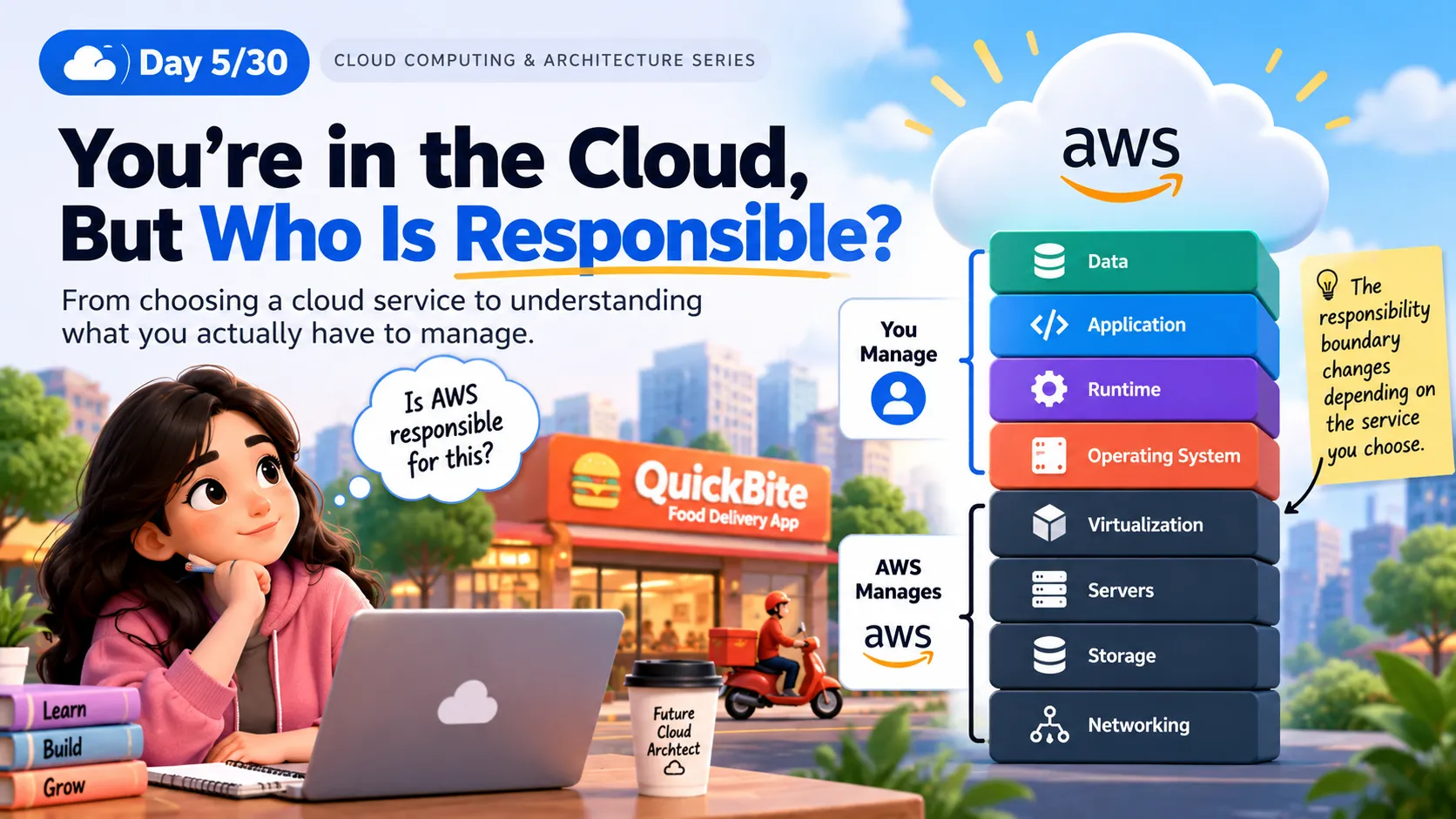
☁️ You’re in the Cloud, But Who Is Responsible?
Cloud computing doesn’t mean the provider manages everything for you. Learn how responsibility is shared between you and the cloud provider—and how your service choice changes that responsibility.
Series: Cloud Computing (24 articles)
- …
- 5☁️ You’re in the Cloud, But Who Is Responsible? This article

Day 5/30 ☁️ You’re in the Cloud, But Who Is Responsible?
From choosing a cloud service to understanding what you actually have to manage
Yesterday, our fictional startup QuickBite made an important decision.
They didn't just ask:
“Should we use IaaS, PaaS, or SaaS?”
They asked a more useful question:
“How much of the technology stack do we actually want to manage ourselves?”
But there's another question hiding behind that decision:
🔐 Who is responsible when something goes wrong?
Imagine QuickBite's application is running in the cloud.
It's 2 AM.
🚨 A security vulnerability is discovered.
The team immediately asks:
“Is the cloud provider responsible for fixing it?”
The answer is:
It depends on the service you're using.
And this is where the Shared Responsibility Model becomes important.
Cloud security is not completely the provider's responsibility, and it is not completely the customer's responsibility either.
It is shared.
🏢 Think of Cloud Like Renting a Building
Imagine you rent a building for your business.
The building owner takes care of things like:
🏢 The building structure
⚡ Main infrastructure
🔧 Building-level maintenance
⚡ Main infrastructure
🔧 Building-level maintenance
But your business is responsible for:
🔐 Who enters your office
📦 What you keep inside
👥 Your employees
🗄️ Your documents
📦 What you keep inside
👥 Your employees
🗄️ Your documents
Cloud computing works in a similar way.
The cloud provider manages part of the environment.
You manage the part that remains your responsibility.
The exact boundary changes depending on the cloud service you choose.
🧱 The Responsibility Stack
Instead of memorizing another definition, let's look at the layers of a typical application.
1
2
3
4
5
6
7
8
9
10
11
12
13
14
15
16
17
18
19
20
21
22
23
24
              YOUR RESPONSIBILITY
                     ↓

              ┌─────────────┐
              │    DATA     │
              ├─────────────┤
              │ APPLICATION │
              ├─────────────┤
              │   RUNTIME   │
              ├─────────────┤
              │     OS      │
              ├─────────────┤
              │ VIRTUALIZATION│
              ├─────────────┤
              │   SERVERS   │
              ├─────────────┤
              │   STORAGE   │
              ├─────────────┤
              │  NETWORKING │
              └─────────────┘

                     ↓

             CLOUD PROVIDER
The interesting part isn't simply where the line is.
The important question is:
The service you choose determines where that responsibility line moves.
With infrastructure services such as virtual machines, customers manage more of the software stack.
With more managed services, the provider manages more of the underlying infrastructure.
But the customer still has responsibilities such as protecting data, configuring access and managing the application.
🖥️ Scenario 1: QuickBite Uses a Virtual Machine
Suppose QuickBite runs its backend on a virtual machine.
The architecture looks something like this:
1
2
3
4
5
6
7
8
9
10
11
12
13
14
15
16
17
18
19
👤 USERS
    │
    ↓
🌐 INTERNET
    │
    ↓
☁️ CLOUD
    │
    ↓
🖥️ VIRTUAL MACHINE
    │
    ↓
🐧 OPERATING SYSTEM
    │
    ↓
⚙️ APPLICATION
    │
    ↓
🗄️ DATA
The cloud provider manages the underlying physical infrastructure.
But QuickBite still has responsibilities such as:
- Operating system updates
- Application security
- Network/security configuration
- User permissions
- Application data
So remember:
Moving to the cloud does not mean handing over every responsibility to the cloud provider.
🧩 Scenario 2: QuickBite Uses a Managed Service
Now imagine QuickBite chooses a managed service instead of managing the underlying server themselves.
The architecture becomes conceptually simpler:
1
2
3
4
5
6
7
8
9
10
👨💻 DEVELOPER
│
↓
⚙️ APPLICATION
│
↓
☁️ MANAGED CLOUD SERVICE
│
↓
🏢 CLOUD INFRASTRUCTURE
The provider takes care of more of the underlying infrastructure.
The development team can therefore spend more time thinking about:
“How should our application work?”
instead of:
“How do we patch and maintain this server?”
This is one of the major benefits of managed cloud services.
⚖️ More Control = More Responsibility
Now we can see the bigger picture.
1
2
3
4
5
6
7
8
9
10
11
12
13
          MORE CONTROL
               ↑
               │
             IaaS
               │
               │
             PaaS
               │
               │
             SaaS
               │
               ↓
        LESS MANAGEMENT
But don't interpret this as:
IaaS = bad
SaaS = good
That's not the point.
Different applications have different requirements.
Sometimes you need control.
Sometimes you want simplicity.
The architectural decision is about finding the right balance.
🍔 Let's Return to QuickBite
QuickBite has three different requirements.
Requirement A
“Our backend needs custom operating-system configuration.”
The team wants more control.
Possible choice: IaaS
Requirement B
“Our developers want to deploy applications without spending most of their time managing servers.”
The team wants to focus more on application development.
Possible choice: PaaS
Requirement C
“We need business email, but we don't want to build and maintain an email platform.”
The team simply wants to use the application.
Possible choice: SaaS
🤔 Interactive Challenge — You're the Cloud Architect
Let's see if you can make the decision.
Situation 1
Your application requires complete control over the operating system.
What would you consider?
🅰️ IaaS
🅱️ PaaS
🅲 SaaS
🅱️ PaaS
🅲 SaaS
IaaS
Because you generally get greater control over the infrastructure and operating environment.
Situation 2
Your developers want to deploy code without spending their time managing servers.
What would you consider?
🅰️ IaaS
🅱️ PaaS
🅲 SaaS
🅱️ PaaS
🅲 SaaS
PaaS
A platform service can abstract more infrastructure management so developers can focus more on their application.
Situation 3
Your company needs business email but doesn't want to build an email platform.
What would you consider?
🅰️ IaaS
🅱️ PaaS
🅲 SaaS
🅱️ PaaS
🅲 SaaS
SaaS
You are consuming a complete application rather than building and managing the underlying platform yourself.
🧠 Think Like a Cloud Architect
Here's the question I want you to remember:
Don't ask only, “Which cloud service should I use?”Ask:“Which responsibilities do I want my team to own?”
Before choosing a service, think about:
| Question | Why does it matter? |
|---|---|
| Who manages the OS? | Maintenance and patching |
| Who manages the application? | Application security |
| Who controls access? | Identity and permissions |
| Who protects the data? | Data security |
| Who manages physical infrastructure? | Provider responsibility |
| How much configuration do we control? | Flexibility |
The exact responsibilities depend on the service and its configuration.
🖼️ Visual Concept for This Article
The Cloud Responsibility Line
Create a clean architecture-style illustration with two sides:
1
2
3
4
5
6
7
8
9
10
11
12
13
14
15
16
17
18
              CUSTOMER
        ┌──────────────────┐
        │      DATA        │
        │   APPLICATION    │
        │    CONFIGURATION │
        │      ACCESS      │
        └──────────────────┘
                 ↕
        RESPONSIBILITY LINE
                 ↕
        ┌──────────────────┐
        │ CLOUD PLATFORM   │
        │     COMPUTE      │
        │     STORAGE      │
        │    NETWORKING    │
        │   PHYSICAL HW    │
        └──────────────────┘
              PROVIDER
Add a small note:
The responsibility boundary changes depending on the cloud service you choose.
The purpose of this visual is to make the concept understandable in a few seconds.
🧪 Day 5 Mini Challenge
Imagine you're building a college learning platform.
It has:
👨🎓 20,000 students
🔐 Student login
📚 Course content
🎥 Video lectures
📝 Online exams
🗄️ Student records
🔐 Student login
📚 Course content
🎥 Video lectures
📝 Online exams
🗄️ Student records
Now think like a cloud architect.
Question 1
Which components would you prefer to use as managed cloud services?
Question 2
Which components might require more control?
Question 3
For every component, ask:
“Who is responsible for securing this?”
Don't worry if you don't get everything right.
The goal is to start thinking like an architect.
🔗 What's Next?
So far, our journey looks like this:
Day 1 → What is Cloud Computing?
↓
Day 2 → Why do we need the Cloud?
↓
Day 3 → Cloud Architecture Building Blocks
↓
Day 4 → Cloud Service Models
↓
Day 5 → Who Is Responsible for What?
↓
Day 2 → Why do we need the Cloud?
↓
Day 3 → Cloud Architecture Building Blocks
↓
Day 4 → Cloud Service Models
↓
Day 5 → Who Is Responsible for What?
But there's still one major question.
We've designed our application...
We've chosen our cloud services...
We've understood responsibility...
But where does our application actually live?
What happens if the physical location hosting our application experiences a major failure?
That's where we need to understand:
🌍 Day 6 — Regions, Availability Zones & High Availability
Because a cloud architect doesn't only ask, “Where should I deploy my application?”
They also ask:
“What happens if that location goes down?”
☁️ Day 5/30 — Cloud Computing & Architecture Challenge
Today I learned: Cloud computing is not simply about moving servers to the cloud. Every service creates a different balance between control, convenience, and responsibility.
Architect's mindset:
The best cloud architecture isn't the one with the most control. It's the one where the right responsibilities are owned by the right party.
Series: Cloud Computing (24 articles)
- …
- 5☁️ You’re in the Cloud, But Who Is Responsible? This article
Enjoyed reading this content? Let the author know!
Your likes, comments, shares, and saves help creators reach more builders.

Loading recommendations
Loading article