
Five Essential Skills Every AI Engineer Needs to Work Effectively with Coding Agents
Coding agents are transforming software development by taking on tasks such as code generation, debugging, testing, and repository exploration. But getting reliable results requires more than simply giving an agent a prompt. This article explores five essential skills for working effectively with coding agents: directing development workflows, calibrating agent autonomy, verifying generated work, customizing the agent's environment, and understanding the foundations behind agentic coding systems.
Series: Lets go with AI and AWS (4 articles)
- 2Five Essential Skills Every AI Engineer Needs to Work Effectively with Coding Agents This article

Five Essential Skills for Engineering with Coding Agents
Coding agents are rapidly changing how software is developed. They can explore repositories, understand existing code, implement features, fix bugs, execute tests, and work through multi-step engineering tasks.
This increase in implementation speed changes the role of the engineer.
The challenge is no longer only "How quickly can I write this code?" It is also:
- How should the task be defined?
- How much autonomy should the agent have?
- How do I verify that the generated solution is correct?
- What context and tools should the agent have?
- How do I diagnose failures when the agent goes in the wrong direction?
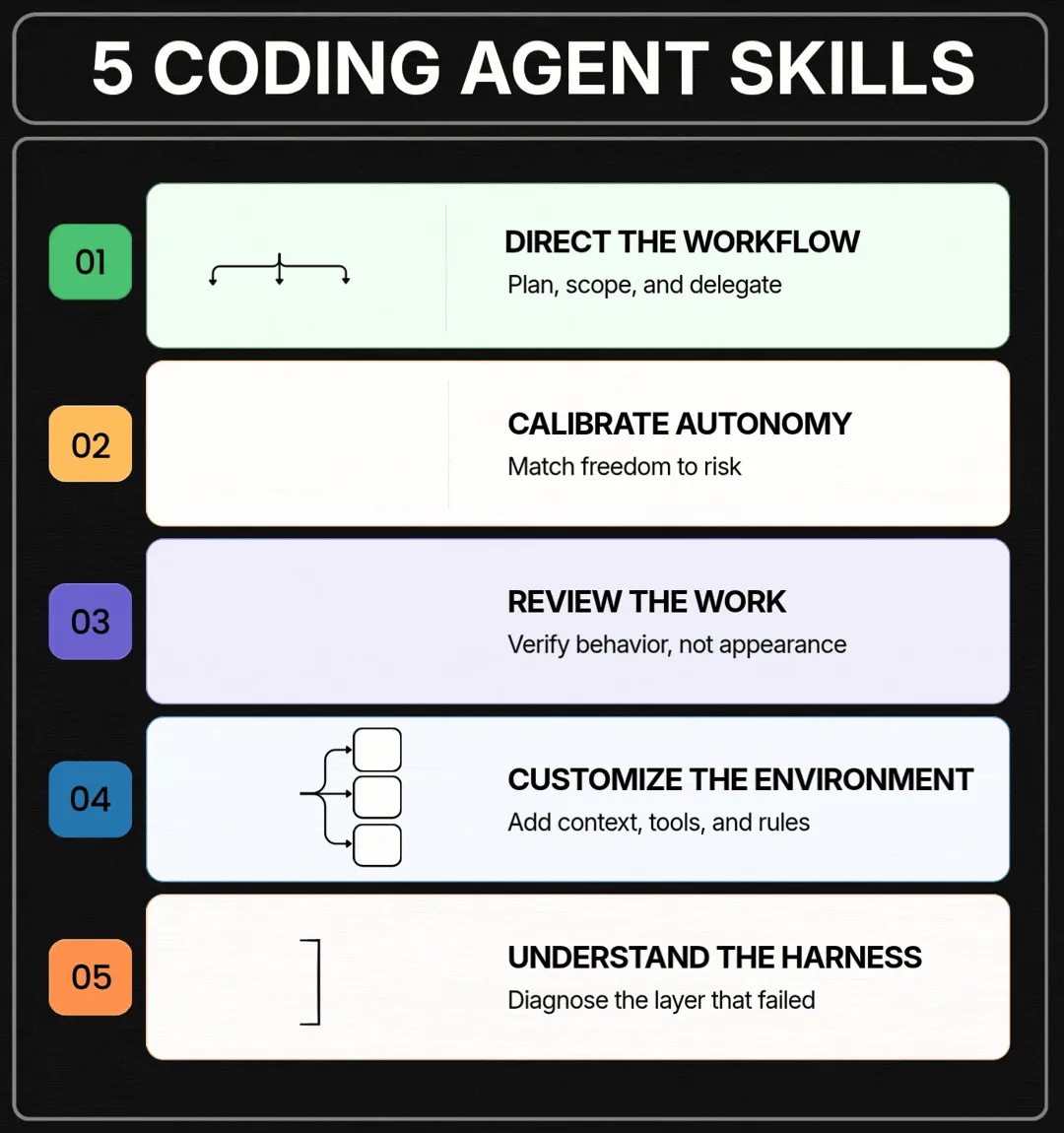
These questions lead to five important skills for engineers working with coding agents:
- Direct the development workflow
- Calibrate agent autonomy
- Design strong verification
- Customize the agent environment
- Understand coding-agent foundations
Together, these skills provide a practical framework for using coding agents effectively while keeping engineering decisions and quality controls in human hands.

1. Direct the Development Workflow
Coding agents do not eliminate the software development lifecycle. Planning, implementation, testing, deployment, and monitoring are still necessary.
What changes is how the work is distributed between the engineer and the agent.
For example, an engineer can ask an agent to:
- Explore an unfamiliar repository
- Identify relevant files
- Analyze existing implementation patterns
- Propose an implementation plan
- Write the required changes
- Run automated tests
The engineer can remain responsible for architecture decisions, requirements, security considerations, and final acceptance.
Finding the right level of direction
The amount of direction required depends on the nature of the task.
Four factors are particularly useful:
Speed: How quickly does the task need to be completed?
Cost: How many agent runs, tool calls, and review cycles are reasonable?
Risk: What happens if the implementation is incorrect?
Human expertise: Which decisions require domain knowledge or business context?
A small prototype may only require a short, well-defined prompt.
A production change may require a detailed specification, constraints, acceptance criteria, and an implementation plan before the agent begins making changes.
The important skill is not creating the longest possible prompt. It is providing the right amount of direction for the complexity and risk of the task.
Too little direction can cause the agent to make incorrect assumptions. Too much unnecessary detail can slow down the workflow and consume useful context.

2. Calibrate Agent Autonomy
Giving an agent more freedom does not automatically produce better results.
The appropriate level of autonomy depends on the task, available tools, permissions, and verification mechanisms.
Consider two examples.
A simple refactoring task supported by comprehensive automated tests may require very little human intervention.
A production database migration is different. An agent might prepare the migration, validate it in a test environment, and then stop for human approval before any destructive production operation.
This creates the need for explicit autonomy boundaries.
Questions to define before starting
An engineer should consider:
- Which requirements must remain available throughout the task?
- Which tools and files can the agent access?
- Which operations require human approval?
- At what points should the agent stop and request input?
- Can multiple agents work on separate parts of the task?
- How should their results be reviewed and integrated?
Three concepts provide a useful way to think about autonomy:
Permissions define what the agent is allowed to do.
Context defines what the agent needs to know.
Verification defines whether the work can be considered complete.
A reliable agent workflow balances all three.
3. Design Strong Verification
One of the most important principles of agent-assisted development is simple:
Code that runs successfully is not necessarily code that is correct.
An agent can generate clean, well-structured code that compiles and still implements the wrong behavior.
Verification should therefore begin with the expected outcome rather than the appearance of the generated code.
Verification for different applications
For a backend service, verification could include:
- Unit tests
- Integration tests
- API contract validation
- Database checks
- Error-handling tests
- Security validation
For a frontend application, verification could include:
- Running the application
- Testing critical user journeys
- Validating responsive behavior
- Checking screenshots against expected results
- Testing edge cases
For AI applications, verification may require:
- Evaluation datasets
- Structured test cases
- Output-quality checks
- LLM-based evaluation
- Human evaluation for high-impact scenarios
Don't forget to verify the tests
There is another important consideration: the tests themselves need to be trustworthy.
An agent can create tests that validate its implementation without adequately representing the original requirement.
For example, if the requirement is:
"Users should not be able to access another user's account data."
A weak test might verify only that an authenticated request returns data. A stronger test would verify that one authenticated user cannot retrieve another user's data.
This is why engineers still need to review the acceptance criteria and verification strategy.
The stronger the verification system, the more implementation work can be safely delegated to an agent.

4. Customize the Agent Environment
A coding agent starts with limited knowledge about the conventions and architecture of a particular project.
Without project-specific context, the agent may repeatedly need to discover:
- How the application is built
- Which commands should be executed
- Where important components are located
- How tests are run
- Which coding conventions are followed
- Which architectural patterns are preferred
Providing persistent project instructions can significantly reduce this repeated discovery.
Files such as
AGENTS.md or CLAUDE.md, depending on the coding-agent environment, can contain project-specific instructions, commands, conventions, and constraints.Extending the environment
Modern coding-agent workflows can also be extended with additional capabilities:
Skills can provide reusable procedures for recurring tasks.
Plugins can package tools and integrations for particular workflows.
MCP servers can connect agents to external tools, services, and data.
Hooks can automatically execute checks or actions at defined points in the workflow.
However, customization is not simply about adding more capabilities.
Removing unnecessary instructions and tools is equally important.
An outdated instruction can cause an agent to follow an unnecessary workaround. A large collection of tools can also make tool selection more difficult and consume valuable context.
A well-designed agent environment should provide the right information and capabilities without unnecessary complexity.

5. Understand Coding-Agent Foundations
You do not need to build a coding agent from scratch to use one effectively.
However, understanding what happens behind the scenes makes troubleshooting much easier.
A coding agent typically operates within a surrounding system or agent harness that manages several components, including:
- Repository and file search
- Context management
- Tool access
- Permissions
- Code execution
- Subagents
- Task state
- Verification
Each layer can introduce different failure modes.
For example:
The agent cannot find the required code
The problem may be related to repository search or retrieval.
The agent forgets an important requirement
The issue may be related to context management.
The agent cannot perform an operation
The required permission or tool may be missing.
The agent stops before completing the task
The completion criteria or task state may not be defined clearly enough.
The agent implements unnecessary functionality
The scope of the task may not have been constrained sufficiently.
These problems require different solutions.
Increasing the prompt length will not necessarily fix weak tests.
Adding another agent will not solve a missing permission.
Increasing the context window will not solve poor file retrieval.
Understanding the underlying architecture allows an engineer to identify which layer failed and what needs to change.

Putting the Five Skills Together
These five skills are most useful when treated as parts of one workflow rather than isolated concepts.
A practical agent-assisted development cycle can look like this:
Define → Plan → Configure → Delegate → Verify → Review → Iterate
1. Define
Clearly describe the problem, requirements, constraints, and expected outcome.
2. Plan
Determine which parts should be handled by the engineer and which can be delegated to the agent.
3. Configure
Provide the agent with the appropriate context, tools, permissions, and project instructions.
4. Delegate
Allow the agent to perform implementation work within the defined boundaries.
5. Verify
Run automated tests and other validation mechanisms against the expected behavior.
6. Review
Inspect the result, especially areas involving architecture, security, data, or high-impact functionality.
7. Iterate
Provide feedback, correct the workflow when necessary, and allow the agent to continue.
This approach keeps the engineer involved at the points where human judgment provides the most value.
A Practical Example
Consider a developer who needs to add a new authentication feature to an existing web application.
Instead of simply asking:
"Add authentication to the application."
The engineer can structure the workflow more carefully.
Step 1: Define the requirements
Specify:
- Supported authentication method
- User roles
- Session behavior
- Error handling
- Security requirements
- Acceptance criteria
Step 2: Explore
Ask the agent to inspect the repository and identify:
- Existing user models
- API endpoints
- Database structure
- Frontend authentication flow
- Existing tests
Step 3: Plan
Ask the agent to propose the changes before implementing them.
The engineer reviews the plan and adjusts it if necessary.
Step 4: Implement
Allow the agent to make the required changes within the defined scope.
Step 5: Verify
Run:
- Unit tests
- Integration tests
- Authentication tests
- Authorization tests
- Negative test cases
Step 6: Review
The engineer checks whether the implementation satisfies the security requirements and acceptance criteria.
This workflow is more reliable than simply increasing the amount of code the agent is asked to generate.

What Changes for AI Engineers?
Coding agents reduce the amount of manual effort required to produce software.
As implementation becomes faster, other engineering activities become increasingly important.
The engineer needs to become better at:
Specification : clearly defining what needs to be built.
Delegation : deciding what the agent should handle.
Control : setting appropriate permissions and autonomy.
Verification : determining whether the result is actually correct.
Debugging : identifying why an agent failed and correcting the appropriate layer.
This represents a shift from simply writing code toward engineering the development process itself.
before my final thoughts, I would ask you to go through this : Andrew NG : The most important skill
Final Thoughts
Coding agents are becoming an important part of modern software development. Their ability to explore codebases, generate implementations, execute tools, and iterate on solutions can significantly accelerate development.
But speed alone does not guarantee quality.
The engineers who can effectively work with coding agents will need to understand how to direct the workflow, establish appropriate autonomy, build strong verification systems, configure useful environments, and troubleshoot the underlying agent system.
The goal is not to make the agent completely independent.
The goal is to create a reliable human-agent collaboration in which the agent handles appropriate implementation work while the engineer remains responsible for requirements, constraints, verification, and engineering decisions.
As coding agents become more capable, these skills will become increasingly important for anyone building software with AI.
Series: Lets go with AI and AWS (4 articles)
- 2Five Essential Skills Every AI Engineer Needs to Work Effectively with Coding Agents This article
Enjoyed reading this content? Let the author know!
Your likes, comments, shares, and saves help creators reach more builders.

Loading recommendations
Loading article