
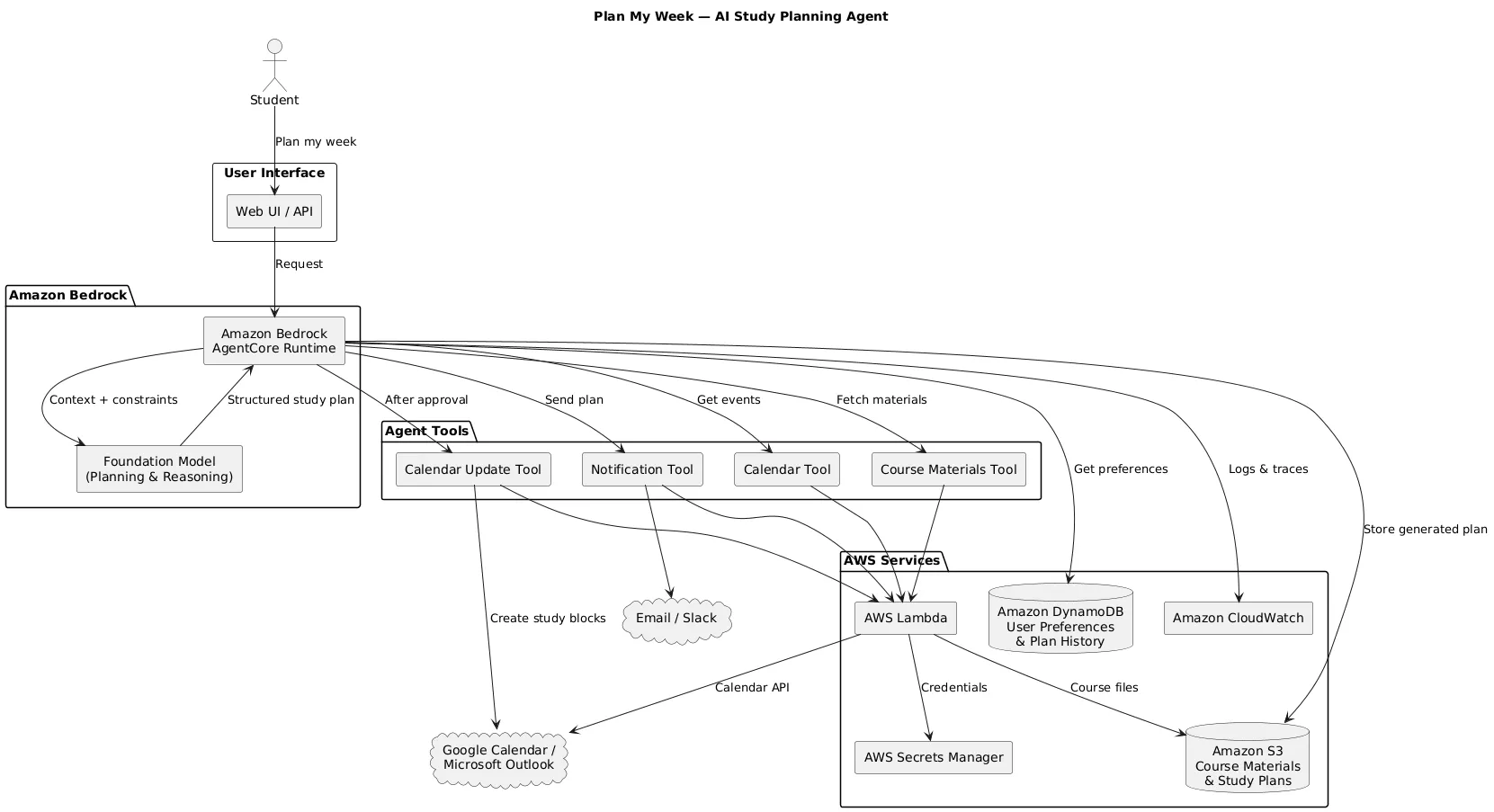
Build “Plan My Week”: A Multi-Step AI Workflow Agent with Amazon Bedrock AgentCore
Learn how to build a practical AI study-planning agent on AWS using Amazon Bedrock AgentCore, AWS Lambda, Amazon S3, DynamoDB, and Amazon SES. The agent combines calendar events, course materials, deadlines, and user preferences to generate a realistic weekly study plan and deliver it through email or Slack. This hands-on project teaches students how to move beyond simple LLM chatbots and build tool-using, multi-step AI workflows with real AWS services.
Series: Lets go with AI and AWS (4 articles)
- 1Build “Plan My Week”: A Multi-Step AI Workflow Agent with Amazon Bedrock AgentCore This article

A few weeks ago I got tired of watching students (myself included, a while back) build the same first AI project over and over: send a prompt to a model, print the response, call it a portfolio piece. It's a fine starting point, but it doesn't look anything like the AI systems companies are actually shipping. Real applications pull in data from multiple places, call tools, reason over messy inputs, and sometimes take action on your behalf.
So here's a project that tries to close that gap: an agent that plans your week for you.
You tell it:
"Plan my next week."
And it looks at your calendar, checks what's due in your classes, pulls in relevant course material, considers when you actually like to study, and hands back a schedule you can use not a vague suggestion, an actual plan with times and tasks attached.
That's what we're building: Plan My Week, a multi-step agent built on Amazon Bedrock AgentCore.
What we're actually building
The agent pulls context from a handful of sources:
- Google Calendar or Outlook, for existing commitments
- Course syllabi and notes, stored in S3
- Deadlines, whether from a syllabus or an LMS export
- User preferences when you like to study, how long your sessions should be
- Amazon Bedrock, to reason over all of it and produce a plan
The key difference between this and a typical chatbot project is the shape of the workflow. A chatbot looks like:
User → LLM → ResponseThis agent looks more like:
User → retrieve context → call tools → reason → generate a structured plan → notify → (optionally) actThat extra structure is the whole point of the exercise. It's where most of the useful learning happens.
Architecture at a glance
| Component | What it does |
|---|---|
| Amazon Bedrock AgentCore | Runs the agent itself |
| Amazon Bedrock | Provides the LLM reasoning |
| AWS Lambda | Implements each external tool |
| Amazon S3 | Stores course materials and generated plans |
| DynamoDB | Stores preferences and plan history |
| Secrets Manager | Holds API credentials |
| Amazon SES / Slack | Delivers the plan to the user |
| Google Calendar / Outlook | Supplies calendar data |
| CloudWatch | Logging and observability |
Step 1: Set up storage
Start with an S3 bucket to separate the material the agent reads from the material it generates:
1
2
3
4
5
6
7
8
9
10
11
12
13
s3://plan-my-week/
├── courses/
│   ├── CS301/
│   │   ├── syllabus.pdf
│   │   ├── chapter-1.pdf
│   │   └── chapter-2.pdf
│   └── CS302/
│       ├── syllabus.pdf
│       └── notes.pdf
└── plans/
    └── user123/
        ├── 2026-09-07.json
        └── 2026-09-14.json
courses/ is input, plans/ is output. Simple, but it keeps things clean as you add more logic later.Step 2: Store user preferences
Not everyone studies the same way. One person wants mornings free for gym and prefers afternoons; another refuses to touch coursework after 9pm. DynamoDB is a natural fit for this kind of per-user, semi-structured data:
1
2
3
4
5
6
7
8
{
  "user_id": "user123",
  "study_start": "08:00",
  "study_end": "21:00",
  "preferred_session_length": 90,
  "preferred_days": ["Monday", "Tuesday", "Thursday", "Saturday"],
  "break_duration": 15
}
This is what turns a generic schedule into a personal one the agent now has real constraints to work within instead of guessing.
Step 3: The calendar tool
The first tool the agent needs is
get_calendar_events(). Its job is narrow: fetch the user's upcoming events and hand them back in a consistent format.1
2
3
4
5
def get_calendar_events(start_date, end_date):
# authenticate with the calendar provider
# fetch events in the given range
# normalize into a standard structure
return events
Implement it as a Lambda function. The important design decision here is that the agent should never need to know how Google Calendar or Outlook's APIs work it just calls
get_calendar_events() and gets structured data back. All the provider-specific mess stays inside the tool.Step 4: The course materials tool
Next,
fetch_course_materials(), which pulls relevant files or metadata out of S3 for a given course:1
2
3
4
5
6
7
{
"course": "CS301",
"materials": [
{ "name": "Chapter 3", "topic": "Database Normalization" },
{ "name": "Assignment 2", "topic": "Normalization and SQL" }
]
}
You can eventually layer in embeddings and semantic search here, but resist the urge to start there. Get the basic version returning something usable first you can always make retrieval smarter later.
Step 5: Let Bedrock generate the plan
By this point the agent has calendar events, course materials, deadlines, and preferences in hand. Now it hands all of that to Bedrock and asks it to reason over the constraints.
A simplified version of the prompt:
1
2
3
4
5
6
7
8
9
10
11
12
13
14
15
16
17
18
You are a study planning assistant.

Create a realistic weekly study plan using:
1. Upcoming calendar events
2. Course deadlines
3. Available study materials
4. User study preferences

Rules:
- Never schedule study sessions over existing calendar events.
- Prioritize approaching deadlines.
- Respect the user's preferred study hours.
- Include breaks between long sessions.
- Avoid unrealistic workloads.
- Break large assignments into smaller tasks.

Return the plan as structured JSON.
And the output should come back as something a downstream system can actually consume, not just a paragraph of prose:
1
2
3
4
5
6
7
8
9
10
{
  "days": [
    {
      "date": "2026-09-10",
      "blocks": [
        { "time": "08:30-10:00", "course": "CS301", "task": "Read Chapter 3", "priority": "high" }
      ]
    }
  ]
}
Structured output matters here it's what lets you render the plan in a UI, write it to a calendar, or hand it to another process without any brittle text parsing.
Step 6: Wire it together with AgentCore
This is where the individual pieces become an agent rather than a pile of scripts. AgentCore decides, based on the user's request, which tools it needs and in what order:
1
2
3
4
5
6
User: "Plan my next week."
  → agent decides it needs calendar data → calls get_calendar_events()
  → agent decides it needs course context → calls fetch_course_materials()
  → agent has enough context → calls Bedrock to reason
  → returns a structured weekly plan
That dynamic tool selection the agent deciding what it needs rather than following a fixed script is the core idea behind a tool-using agent, and it's the part that's genuinely different from a traditional pipeline.
Step 7: Deliver the plan
Once the plan exists, send it somewhere useful Amazon SES for email, or Slack if that fits your audience better:
1
2
3
4
5
6
7
8
9
Your Study Plan — September 10–16

Monday
08:30–10:00  CS301: Read Chapter 3
14:00–15:00  CS302: Review lecture notes

Tuesday
09:00–10:30  CS301: Solve Q1–Q5
18:00–19:00  CS302: Assignment prep
At this point the agent has gone from raw, scattered data to something a person can actually act on.
Step 8 (optional): Write back to the calendar
You could stop at "email the plan," but it's more interesting to close the loop. Ask the user:
"Want me to add these study blocks to your calendar?"
If they say yes, a separate tool
create_calendar_events() handles the write. This is a good place to slow down and think about the distinction between an AI suggesting an action and an AI performing one. Writing to someone's calendar is an external side effect, and it deserves explicit approval rather than happening automatically:1
Generate plan → show user → user approves → create calendar events
This is the human-in-the-loop pattern in practice: the model does the reasoning, but a person stays in control of anything consequential.
An alternative: AWS Step Functions
Everything above assumes the agent decides its own workflow dynamically. You could instead hard-code the sequence with Step Functions:
1
GetCalendar → FetchMaterials → GeneratePlan → SendNotification → CreateEvents
This trades flexibility for predictability useful when you want a workflow that's deterministic, easy to audit, and easy to visualize in the console.
| AgentCore | Step Functions | |
|---|---|---|
| Behavior | Dynamic | Deterministic |
| Tool calling | Natural fit | Explicit states |
| Conversational interaction | Strong | Limited |
| Workflow visibility | Depends on the agent | Excellent |
| Human approval | Possible | Excellent |
| Best for | AI agents | Business workflows |
I'd build the core project on AgentCore and treat Step Functions as a worthwhile extension once the basics work, it's a good way to compare the two approaches directly instead of just reading about the trade-offs.
Plan for things to fail
Google Calendar's API will go down at some point, or rate-limit you, or just time out. When that happens, the agent shouldn't crash, it should degrade gracefully:
1
2
3
Calendar API fails → retry → still failing?
  → tell the user: "Couldn't reach your calendar. Here's a plan
    based on what I could find."
The same goes for S3 outages, failed email delivery, malformed JSON from the model, or rate-limited external APIs. Build in retries, timeouts, validation, and a sane fallback path. None of this is AI-specific, it's just what separates a demo from something you'd trust to run unattended.
A word on cost
This project scales down nicely. At, say, 100 users generating one plan a week, roughly 400 plans a month your dominant cost is LLM inference; Lambda, S3, DynamoDB, and Step Functions stay cheap at that volume. Rather than trying to pin down an exact monthly number for a portfolio project, focus on showing you understand what drives the cost:
- pick a Bedrock model sized for the task, not the biggest one available
- keep prompts lean : send relevant snippets, not entire documents
- cache anything that doesn't change often
- avoid regenerating a whole plan when only one input changed
- keep CloudWatch logs useful, not bloated
What you'll actually learn
- Agent architecture : the real difference between a chatbot, a tool-using agent, and a deterministic workflow
- Amazon Bedrock : using a foundation model for reasoning, not just Q&A
- AgentCore : designing around tools, sessions, and runtime execution
- Lambda : exposing capabilities as independent, composable functions
- S3 : organizing unstructured source material alongside generated output
- DynamoDB : using NoSQL for preferences and state
- API integration : working with real external services like Google Calendar
- Structured output : getting the model to return JSON you can actually use downstream, instead of prose you'd have to parse
- Human-in-the-loop design : knowing which actions need explicit approval
- Reliability : logging, retries, and validation matter as much as the prompt
Taking it further
Once the basic loop works, there's a lot of room to grow it:
Beginner: just
Calendar → Bedrock → Plan.Intermediate: add S3 course materials, DynamoDB preferences, and SES notifications.
Advanced: add deadline extraction, real document retrieval, calendar write-back, approval flows, and plan history.
If you want a real challenge: support something like "I only have two hours free Thursday, move my database session." That means the agent has to pull up the existing plan, understand the requested change, re-check the calendar, find a new slot, update the plan, get approval, and push the change back to the calendar. At that point you're not building a demo anymore, you're building a system with real state, constraints, and consequences.
While you're testing, try feeding it awkward inputs on purpose: conflicting events, five deadlines in the same week, an empty syllabus, a missed session that needs rescheduling. Watching how the agent handles the edge cases is usually more instructive than watching it handle the happy path.
Mistakes worth avoiding
Building everything at once. It's tempting to sketch out an architecture with RAG, multi-agent coordination, a vector database, Slack, calendar write-back, and a full frontend before you've written a single Lambda function. Build the smallest working loop first, then expand it.
Letting the LLM decide everything. Not every question needs a model. "Does this time slot overlap an existing event?" is a plain conditional, write it in code. Save the LLM for the parts that genuinely need reasoning or language understanding.
Giving the agent more permission than it needs. Scope tool access tightly, and require approval before anything with a real-world side effect, like writing to a calendar.
Trusting model output blindly. LLMs occasionally return malformed JSON. Validate before you use it, and have a retry or repair path ready for when it fails.
What I'd change next time
If I rebuilt this from scratch, I'd spend more time on deadline extraction, smarter document retrieval, and better calendar-conflict detection. I'd also want some way to evaluate plan quality over time, a feedback loop from actual usage, and cost tracking broken out by workflow step rather than lumped together. None of that makes the agent more complicated for the sake of it - it makes it more useful, which is the actual goal.
Suggested repo layout
1
2
3
4
5
6
7
8
9
10
11
12
13
14
15
16
17
18
19
20
21
plan-my-week/
├── agent/
│   ├── agent.py
│   ├── prompts/
│   │   └── study_planner.txt
│   └── tools/
│       ├── calendar.py
│       ├── materials.py
│       ├── notification.py
│       └── calendar_writer.py
├── infrastructure/
│   ├── s3/
│   ├── dynamodb/
│   ├── lambda/
│   └── agentcore/
├── tests/
├── docs/
│   ├── architecture.md
│   └── architecture.png
├── requirements.txt
└── README.md
Your README should cover the problem statement, the architecture, the AWS services involved, setup steps, a sample input and generated plan, screenshots, cost notes, and what you learned along the way ; that last part is often what makes a portfolio project actually memorable to a reviewer.
Where to start
If you want to build this, start small: Lambda, S3, DynamoDB, Bedrock, AgentCore, in roughly that order, one piece at a time. Your first version doesn't need to be production-ready it just needs to work end to end. Then break it on purpose: conflicting events, an empty syllabus, five deadlines crammed into one week. Fixing what breaks is where you actually learn the material.
There's a real difference between knowing what AWS services exist and knowing how to put them together into something that works. This project is a reasonable-sized bridge between the two useful for internship applications, hackathons, or just a portfolio piece that isn't another wrapper around a single prompt.
Architecture diagram (PlantUML)
For a cover image, a UML component diagram communicates the system better than a generic flowchart:
1
2
3
4
5
6
7
8
9
10
11
12
13
14
15
16
17
18
19
20
21
22
23
24
25
26
27
28
29
30
31
32
33
34
35
36
37
38
39
40
41
42
43
44
45
46
47
48
49
50
51
52
53
54
55
56
57
58
59
60
61
62
63
64
65
@startuml
title Plan My Week — AI Study Planning Agent

skinparam componentStyle rectangle
skinparam shadowing false
skinparam defaultTextAlignment center

actor Student

rectangle "User Interface" {
    component "Web UI / API" as UI
}

package "Amazon Bedrock" {
    component "Amazon Bedrock\nAgentCore Runtime" as Agent
    component "Foundation Model\n(Planning & Reasoning)" as LLM
}

package "Agent Tools" {
    component "Calendar Tool" as CalendarTool
    component "Course Materials Tool" as MaterialTool
    component "Notification Tool" as NotifyTool
    component "Calendar Update Tool" as CalendarWrite
}

package "AWS Services" {
    database "Amazon S3\nCourse Materials\n& Study Plans" as S3
    database "Amazon DynamoDB\nUser Preferences\n& Plan History" as DDB
    component "AWS Lambda" as Lambda
    component "AWS Secrets Manager" as Secrets
    component "Amazon CloudWatch" as CW
}

cloud "Google Calendar /\nMicrosoft Outlook" as Calendar
cloud "Email / Slack" as Notification

Student --> UI : "Plan my week"
UI --> Agent : Request

Agent --> CalendarTool : Get events
Agent --> MaterialTool : Fetch materials
Agent --> DDB : Get preferences

CalendarTool --> Lambda
MaterialTool --> Lambda
NotifyTool --> Lambda
CalendarWrite --> Lambda

Lambda --> Calendar : Calendar API
Lambda --> S3 : Course files
Lambda --> Secrets : Credentials

Agent --> LLM : Context + constraints
LLM --> Agent : Structured study plan

Agent --> NotifyTool : Send plan
NotifyTool --> Notification

Agent --> CalendarWrite : After approval
CalendarWrite --> Calendar : Create study blocks

Agent --> S3 : Store generated plan
Agent --> CW : Logs & traces

@enduml
#AWS #Amazon Bedrock #Amazon Bedrock #AgentCore #Generative AI #AI Agents #Agentic AI #AWS Lambda #Amazon S3 #Amazon DynamoDB #AWS Step Functions #Cloud Computing #Serverless #Student Projects #AI Projects #Machine Learning #AWS Builder Center
Series: Lets go with AI and AWS (4 articles)
- 1Build “Plan My Week”: A Multi-Step AI Workflow Agent with Amazon Bedrock AgentCore This article
Enjoyed reading this content? Let the author know!
Your likes, comments, shares, and saves help creators reach more builders.

Loading recommendations
Loading article