
Stop Paying Hourly for Idle SFTP Servers: Switch to S3 Pre-Signed URLs and Save 99% with Terraform💸(10-Minute Setup)
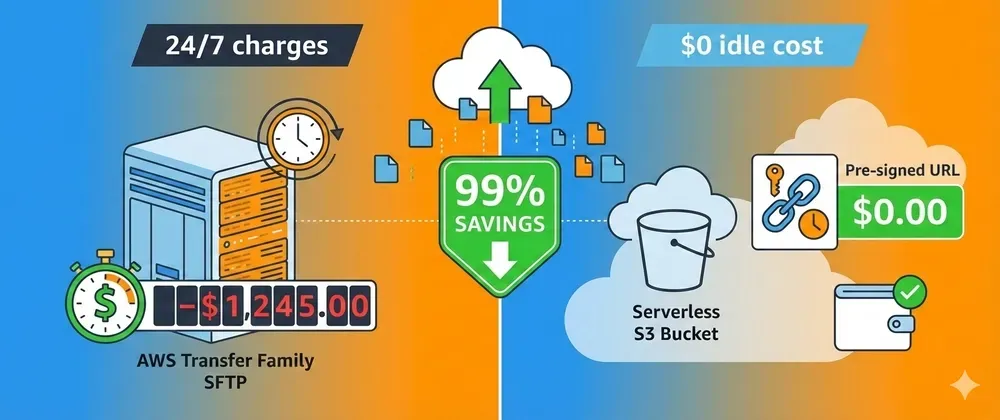
AWS Transfer Family charges hourly even when idle. Here's how to replace it with S3 pre-signed URLs and Lambda using Terraform - same functionality, 95% cheaper.
Series: Save on AWS with Terraform (21 articles)
- …
- 8Stop Paying Hourly for Idle SFTP Servers: Switch to S3 Pre-Signed URLs and Save 99% with Terraform💸(10-Minute Setup) This article

AWS Transfer Family charges hourly even when idle. Here's how to replace it with S3 pre-signed URLs and Lambda using Terraform—same functionality, 95% cheaper.
Question: What AWS service costs you money 24/7 even when nobody's using it?
Answer: AWS Transfer Family (SFTP/FTPS/FTP servers).
Here's the brutal math:
1
2
3
4
5
6
AWS Transfer Family SFTP server:
  - $0.30/hour whether you use it or not
  - $216/month
  - $2,592/year

For what? So partners can upload files via SFTP.
You know what else can receive file uploads? S3 with pre-signed URLs.
Cost: $0/month (plus trivial S3 storage). 🎉
Let me show you how to replace Transfer Family with a serverless solution that costs 95% less and works better.
💸 The Transfer Family Tax
AWS Transfer Family pricing:
- SFTP endpoint: $0.30/hour = $216/month
- Data transfer: $0.04/GB uploaded
- Total for 100GB/month: $220/month minimum
That's $2,640/year just to keep an SFTP server running.
Most companies use it for:
- Partner file drops
- Legacy systems that "need" SFTP
- Batch data imports
- ETL file ingestion
Reality check: These files could just go straight to S3.
🎯 The S3 Pre-Signed URL Solution
Instead of paying for an always-on SFTP server, use:
- S3 pre-signed URLs - Temporary upload links (free)
- API Gateway + Lambda - Generate URLs on demand (pennies)
- S3 Event Notifications - Trigger processing (free)
Total cost for 100GB/month:
- S3 storage: 100GB × $0.023 = $2.30
- Lambda executions: 1,000 × $0.0000002 = $0.20
- API Gateway: 1,000 requests × $0.0000035 = $0.0035
- Total: ~$3/month
Savings: $217/month = $2,604/year (99% reduction!) 💰
🛠️ Terraform Implementation
Complete Serverless File Upload Solution
1
2
3
4
5
6
7
8
9
10
11
12
13
14
15
16
17
18
19
20
21
22
23
24
25
26
27
28
29
30
31
32
33
34
35
36
37
38
39
40
41
42
43
44
45
46
47
48
49
50
51
52
53
54
55
56
57
58
59
60
61
62
63
64
65
66
67
68
69
70
71
72
73
74
75
76
77
78
79
80
81
82
83
84
85
86
87
88
89
90
91
92
93
94
95
96
97
98
99
100
101
102
103
104
105
106
107
108
109
110
111
112
113
114
115
116
117
118
119
120
121
122
123
124
125
126
127
128
129
130
131
132
133
134
135
136
137
138
139
140
141
142
143
144
145
146
147
148
149
150
151
152
153
154
155
156
157
158
159
160
161
162
163
164
165
166
167
168
169
170
171
172
173
174
175
176
177
178
179
180
181
182
183
184
185
186
187
188
189
190
191
192
193
194
195
196
197
198
199
200
201
202
203
204
205
206
207
208
209
210
211
212
213
214
215
216
217
218
219
220
221
222
223
224
225
226
227
228
229
230
231
232
233
234
235
236
237
238
239
240
241
242
243
244
245
246
247
248
249
250
251
252
253
254
255
256
257
258
259
260
261
262
263
264
265
266
267
268
269
270
271
272
273
274
275
276
277
278
279
280
281
282
283
284
285
286
287
288
289
290
291
292
293
294
295
296
297
298
299
300
301
302
303
304
305
306
307
308
309
310
311
312
313
314
315
316
317
318
319
320
321
322
323
324
325
326
# modules/s3-file-upload/main.tf

# S3 bucket for file uploads
resource "aws_s3_bucket" "uploads" {
  bucket = "partner-file-uploads"

  tags = {
    Name = "partner-uploads"
  }
}

# Block public access (security first!)
resource "aws_s3_bucket_public_access_block" "uploads" {
  bucket = aws_s3_bucket.uploads.id

  block_public_acls       = true
  block_public_policy     = true
  ignore_public_acls      = true
  restrict_public_buckets = true
}

# Lifecycle rule to move old files to cheaper storage
resource "aws_s3_bucket_lifecycle_configuration" "uploads" {
  bucket = aws_s3_bucket.uploads.id

  rule {
    id     = "archive-old-uploads"
    status = "Enabled"

    transition {
      days          = 30
      storage_class = "INTELLIGENT_TIERING"
    }

    transition {
      days          = 90
      storage_class = "GLACIER"
    }
  }
}

# Lambda function to generate pre-signed URLs
resource "aws_lambda_function" "generate_upload_url" {
  filename         = data.archive_file.lambda.output_path
  function_name    = "generate-upload-url"
  role            = aws_iam_role.lambda.arn
  handler         = "index.handler"
  runtime         = "python3.11"
  timeout         = 10
  source_code_hash = data.archive_file.lambda.output_base64sha256

  environment {
    variables = {
      BUCKET_NAME = aws_s3_bucket.uploads.id
    }
  }
}

# Lambda code
data "archive_file" "lambda" {
  type        = "zip"
  output_path = "${path.module}/lambda.zip"

  source {
    content  = <<-EOF
import json
import boto3
import os
from datetime import timedelta

s3_client = boto3.client('s3')
BUCKET_NAME = os.environ['BUCKET_NAME']

def handler(event, context):
    """Generate pre-signed URL for file upload"""

    try:
        # Get filename from request
        body = json.loads(event.get('body', '{}'))
        filename = body.get('filename')
        partner_id = body.get('partner_id')

        if not filename or not partner_id:
            return {
                'statusCode': 400,
                'body': json.dumps({'error': 'filename and partner_id required'})
            }

        # Create S3 key with partner prefix
        s3_key = f"{partner_id}/{filename}"

        # Generate pre-signed URL (valid for 1 hour)
        presigned_url = s3_client.generate_presigned_url(
            'put_object',
            Params={
                'Bucket': BUCKET_NAME,
                'Key': s3_key,
                'ContentType': body.get('content_type', 'application/octet-stream')
            },
            ExpiresIn=3600  # 1 hour
        )

        return {
            'statusCode': 200,
            'headers': {
                'Content-Type': 'application/json',
                'Access-Control-Allow-Origin': '*'
            },
            'body': json.dumps({
                'upload_url': presigned_url,
                's3_key': s3_key,
                'expires_in': 3600
            })
        }

    except Exception as e:
        print(f"Error: {str(e)}")
        return {
            'statusCode': 500,
            'body': json.dumps({'error': str(e)})
        }
EOF
    filename = "index.py"
  }
}

# IAM role for Lambda
resource "aws_iam_role" "lambda" {
  name = "upload-url-generator-role"

  assume_role_policy = jsonencode({
    Version = "2012-10-17"
    Statement = [{
      Action = "sts:AssumeRole"
      Effect = "Allow"
      Principal = {
        Service = "lambda.amazonaws.com"
      }
    }]
  })
}

# Lambda permissions
resource "aws_iam_role_policy" "lambda_s3" {
  role = aws_iam_role.lambda.id

  policy = jsonencode({
    Version = "2012-10-17"
    Statement = [
      {
        Effect = "Allow"
        Action = [
          "s3:PutObject",
          "s3:PutObjectAcl"
        ]
        Resource = "${aws_s3_bucket.uploads.arn}/*"
      },
      {
        Effect = "Allow"
        Action = [
          "logs:CreateLogGroup",
          "logs:CreateLogStream",
          "logs:PutLogEvents"
        ]
        Resource = "arn:aws:logs:*:*:*"
      }
    ]
  })
}

# API Gateway REST API
resource "aws_api_gateway_rest_api" "upload" {
  name        = "file-upload-api"
  description = "API for generating S3 upload URLs"
}

resource "aws_api_gateway_resource" "upload" {
  rest_api_id = aws_api_gateway_rest_api.upload.id
  parent_id   = aws_api_gateway_rest_api.upload.root_resource_id
  path_part   = "upload"
}

resource "aws_api_gateway_method" "post" {
  rest_api_id   = aws_api_gateway_rest_api.upload.id
  resource_id   = aws_api_gateway_resource.upload.id
  http_method   = "POST"
  authorization = "AWS_IAM"  # Use IAM auth or API keys
}

resource "aws_api_gateway_integration" "lambda" {
  rest_api_id = aws_api_gateway_rest_api.upload.id
  resource_id = aws_api_gateway_resource.upload.id
  http_method = aws_api_gateway_method.post.http_method

  integration_http_method = "POST"
  type                    = "AWS_PROXY"
  uri                     = aws_lambda_function.generate_upload_url.invoke_arn
}

resource "aws_api_gateway_deployment" "upload" {
  rest_api_id = aws_api_gateway_rest_api.upload.id

  depends_on = [
    aws_api_gateway_integration.lambda
  ]

  lifecycle {
    create_before_destroy = true
  }
}

resource "aws_api_gateway_stage" "prod" {
  deployment_id = aws_api_gateway_deployment.upload.id
  rest_api_id   = aws_api_gateway_rest_api.upload.id
  stage_name    = "prod"
}

# Allow API Gateway to invoke Lambda
resource "aws_lambda_permission" "api_gateway" {
  statement_id  = "AllowAPIGatewayInvoke"
  action        = "lambda:InvokeFunction"
  function_name = aws_lambda_function.generate_upload_url.function_name
  principal     = "apigateway.amazonaws.com"
  source_arn    = "${aws_api_gateway_rest_api.upload.execution_arn}/*/*"
}

# S3 event notification to trigger processing
resource "aws_lambda_function" "process_upload" {
  filename         = data.archive_file.processor.output_path
  function_name    = "process-uploaded-file"
  role            = aws_iam_role.processor.arn
  handler         = "index.handler"
  runtime         = "python3.11"
  timeout         = 60
  source_code_hash = data.archive_file.processor.output_base64sha256
}

data "archive_file" "processor" {
  type        = "zip"
  output_path = "${path.module}/processor.zip"

  source {
    content  = <<-EOF
import json

def handler(event, context):
    """Process uploaded file"""

    for record in event['Records']:
        bucket = record['s3']['bucket']['name']
        key = record['s3']['object']['key']

        print(f"New file uploaded: s3://{bucket}/{key}")

        # Add your processing logic here:
        # - Parse CSV/JSON
        # - Trigger ETL pipeline
        # - Send notification
        # - Validate file format

    return {'statusCode': 200}
EOF
    filename = "index.py"
  }
}

resource "aws_iam_role" "processor" {
  name = "upload-processor-role"

  assume_role_policy = jsonencode({
    Version = "2012-10-17"
    Statement = [{
      Action = "sts:AssumeRole"
      Effect = "Allow"
      Principal = {
        Service = "lambda.amazonaws.com"
      }
    }]
  })
}

resource "aws_iam_role_policy" "processor_s3" {
  role = aws_iam_role.processor.id

  policy = jsonencode({
    Version = "2012-10-17"
    Statement = [{
      Effect = "Allow"
      Action = [
        "s3:GetObject",
        "logs:CreateLogGroup",
        "logs:CreateLogStream",
        "logs:PutLogEvents"
      ]
      Resource = "*"
    }]
  })
}

resource "aws_s3_bucket_notification" "upload_trigger" {
  bucket = aws_s3_bucket.uploads.id

  lambda_function {
    lambda_function_arn = aws_lambda_function.process_upload.arn
    events              = ["s3:ObjectCreated:*"]
  }

  depends_on = [aws_lambda_permission.s3]
}

resource "aws_lambda_permission" "s3" {
  statement_id  = "AllowS3Invoke"
  action        = "lambda:InvokeFunction"
  function_name = aws_lambda_function.process_upload.function_name
  principal     = "s3.amazonaws.com"
  source_arn    = aws_s3_bucket.uploads.arn
}

# Outputs
output "api_endpoint" {
  value = "${aws_api_gateway_stage.prod.invoke_url}/upload"
}

output "bucket_name" {
  value = aws_s3_bucket.uploads.id
}
📝 How to Use It
1. Deploy with Terraform
1
2
3
4
5
terraform init
terraform apply

# Output:
# api_endpoint = "https://abc123.execute-api.us-east-1.amazonaws.com/prod/upload"
2. Request an Upload URL
1
2
3
4
5
6
7
8
9
10
11
12
13
14
curl -X POST https://your-api.amazonaws.com/prod/upload \
  -H "Content-Type: application/json" \
  -d '{
    "filename": "data.csv",
    "partner_id": "acme-corp",
    "content_type": "text/csv"
  }'

# Response:
{
  "upload_url": "https://s3.amazonaws.com/bucket/...",
  "s3_key": "acme-corp/data.csv",
  "expires_in": 3600
}
3. Upload File to S3
1
2
3
4
# Your partner/system uses the pre-signed URL
curl -X PUT "https://s3.amazonaws.com/bucket/..." \
  --upload-file data.csv \
  -H "Content-Type: text/csv"
4. File Automatically Processed
When the file hits S3, Lambda automatically triggers and processes it. No polling, no waiting!
🎓 Migration from Transfer Family
Step 1: Document Current Usage
1
2
3
4
5
6
7
8
9
10
11
12
# Find your Transfer Family server
aws transfer list-servers

# Check how much you're using it
aws cloudwatch get-metric-statistics \
  --namespace AWS/Transfer \
  --metric-name BytesIn \
  --dimensions Name=ServerId,Value=s-xxxxx \
  --start-time 2024-01-01T00:00:00Z \
  --end-time 2024-01-31T23:59:59Z \
  --period 86400 \
  --statistics Sum
Step 2: Deploy S3 Solution
1
terraform apply
Step 3: Update Partner Integration
Send partners the new API endpoint:
1
2
Old: sftp://s-xxxxx.server.transfer.us-east-1.amazonaws.com
New: POST https://your-api.execute-api.us-east-1.amazonaws.com/prod/upload
Most modern systems can do HTTP uploads. If they're stuck on SFTP, consider if that partnership is worth $216/month.
Step 4: Test Thoroughly
1
2
3
4
# Test upload URL generation
# Test actual file upload
# Verify processing Lambda triggers
# Check S3 lifecycle rules
Step 5: Decommission Transfer Family
1
2
3
4
5
6
7
# Stop the server (wait 30 days to ensure it's not used)
aws transfer stop-server --server-id s-xxxxx

# Delete it after verification
aws transfer delete-server --server-id s-xxxxx

# Watch your AWS bill drop next month 🎉
💡 Pro Tips
1. Add Authentication
Use API Gateway API keys for simple auth:
1
2
3
4
5
6
7
8
9
10
11
12
13
14
15
16
17
18
resource "aws_api_gateway_api_key" "partner" {
  name = "partner-api-key"
}

resource "aws_api_gateway_usage_plan" "upload" {
  name = "upload-usage-plan"

  api_stages {
    api_id = aws_api_gateway_rest_api.upload.id
    stage  = aws_api_gateway_stage.prod.stage_name
  }
}

resource "aws_api_gateway_usage_plan_key" "main" {
  key_id        = aws_api_gateway_api_key.partner.id
  key_type      = "API_KEY"
  usage_plan_id = aws_api_gateway_usage_plan.upload.id
}
2. Set Upload Size Limits
1
2
3
4
5
6
7
8
9
10
11
12
# In Lambda function
MAX_FILE_SIZE = 100 * 1024 * 1024  # 100MB

presigned_url = s3_client.generate_presigned_url(
    'put_object',
    Params={
        'Bucket': BUCKET_NAME,
        'Key': s3_key,
        'ContentLength': MAX_FILE_SIZE  # Enforce limit
    },
    ExpiresIn=3600
)
3. Add Virus Scanning
Integrate with AWS S3 antivirus solutions:
1
2
3
4
5
6
7
8
9
# Trigger antivirus scan on upload
resource "aws_s3_bucket_notification" "antivirus" {
  bucket = aws_s3_bucket.uploads.id

  lambda_function {
    lambda_function_arn = var.antivirus_lambda_arn
    events              = ["s3:ObjectCreated:*"]
  }
}
4. Monitor Upload Activity
1
2
3
4
5
6
7
8
9
10
11
12
13
14
15
resource "aws_cloudwatch_metric_alarm" "upload_failures" {
  alarm_name          = "high-upload-failures"
  comparison_operator = "GreaterThanThreshold"
  evaluation_periods  = 2
  metric_name         = "4XXError"
  namespace           = "AWS/ApiGateway"
  period              = 300
  statistic           = "Sum"
  threshold           = 10
  alarm_description   = "Too many failed upload requests"

  dimensions = {
    ApiName = aws_api_gateway_rest_api.upload.name
  }
}
📊 Cost Comparison Table
| Factor | Transfer Family | S3 Pre-Signed URLs |
|---|---|---|
| Monthly base cost | $216 | $0 |
| Data transfer (100GB) | $4 | $0 |
| Total (100GB/month) | $220 | ~$3 |
| Annual cost | $2,640 | ~$36 |
| Savings | - | $2,604/year (99%) |
| Setup time | 10 minutes | 10 minutes |
| Idle cost | Full price | $0 |
| Scaling | Manual | Automatic |
⚠️ When to Keep Transfer Family
There are a few cases where Transfer Family might be justified:
- Regulatory compliance requires SFTP specifically
- Legacy systems that absolutely can't be changed
- High security requirements where HTTP uploads aren't allowed
- Someone else pays the AWS bill 😄
For 95% of use cases, S3 pre-signed URLs are the better choice.
🎯 Summary
Transfer Family costs:
- $216/month base + data transfer fees
- Charges hourly whether you use it or not
- Total: ~$2,640/year minimum
S3 Pre-Signed URL solution costs:
- $0 base cost
- Pay only for actual storage and API calls
- Total: ~$36/year for typical usage
Implementation:
- 10 minutes to deploy with Terraform
- Drop-in replacement for most use cases
- Better scalability and automation
Stop paying $216/month for an idle SFTP server. Use S3 pre-signed URLs and save 99%. 🚀
Replaced Transfer Family with S3? How much are you saving? Share in the comments! 💬
Follow for more AWS cost optimization with Terraform! ⚡
Series: Save on AWS with Terraform (21 articles)
- …
- 8Stop Paying Hourly for Idle SFTP Servers: Switch to S3 Pre-Signed URLs and Save 99% with Terraform💸(10-Minute Setup) This article
Enjoyed reading this content? Let the author know!
Your likes, comments, shares, and saves help creators reach more builders.

Loading recommendations
Loading article