
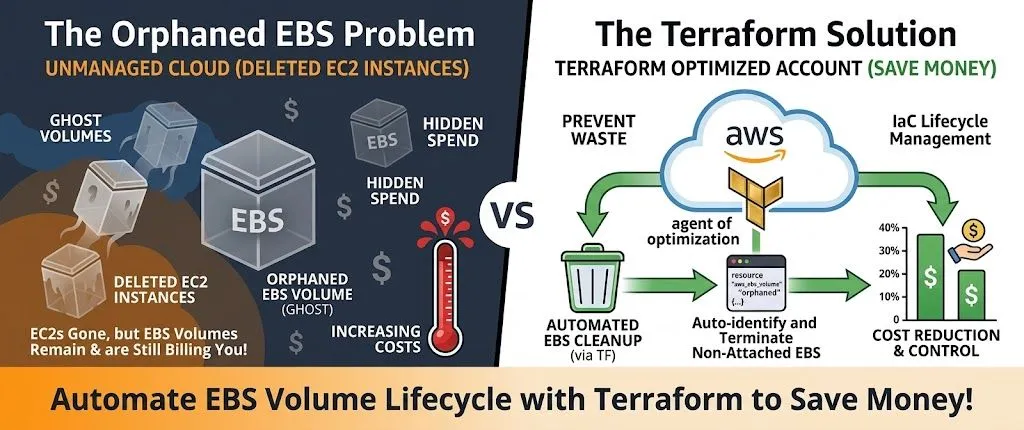
Save Money by Cleaning Up Orphaned EBS Volumes from Deleted EC2 Instances Using Terraform 💸
Terminated EC2 instances often leave EBS volumes attached, billing you forever. Here's how to auto-detect and clean them up with Terraform and Lambda.
Series: Save on AWS with Terraform (21 articles)
- …
- 9Save Money by Cleaning Up Orphaned EBS Volumes from Deleted EC2 Instances Using Terraform 💸 This article

Terminated EC2 instances often leave EBS volumes attached, billing you forever. Here's how to auto-detect and clean them up with Terraform and Lambda.
tags: aws, terraform, lambda, devops
Pop quiz: When you terminate an EC2 instance, what happens to its EBS volumes?
If you answered "they get deleted automatically," you're partially wrong.
The truth:
- Root volumes usually get deleted (if
DeleteOnTermination = true) - Additional volumes? They stick around. Forever.
- Billing you $0.08/GB-month until you manually delete them
Here's what happens at most companies:
- Dev spins up EC2 instance for testing
- Attaches 500GB EBS volume for data
- Test completes, terminates instance
- Forgets about the EBS volume
- Volume bills $40/month forever 💰
Multiply this by dozens of developers over months, and you've got hundreds of dollars in orphaned storage just sitting there.
Let me show you how to automatically detect and clean up these ghosts with Terraform.
💸 The Hidden Cost of Orphaned Volumes
EBS pricing: $0.08/GB-month (gp3)
Typical orphaned volume scenario:
1
2
3
4
5
6
Project: "POC for new feature"
Created: 6 months ago
Status: EC2 terminated, volume still exists
Size: 200GB
Monthly cost: $16
Total wasted: $96 (and counting)
Across an organization with 20 developers:
- Average: 5 orphaned volumes per person
- Average size: 100GB each
- Total: 100 volumes × 100GB = 10TB orphaned
- Monthly waste: 10,000GB × $0.08 = $800/month
- Annual waste: $9,600
And that's conservative. I've seen accounts with 50TB+ of orphaned volumes.
🔍 Find Your Orphaned Volumes
First, let's see how bad the problem is:
1
2
3
4
5
6
7
8
9
10
11
12
13
14
15
16
# List all unattached volumes
aws ec2 describe-volumes \
  --filters Name=status,Values=available \
  --query 'Volumes[*].[VolumeId,Size,CreateTime]' \
  --output table

# Count them
aws ec2 describe-volumes \
  --filters Name=status,Values=available \
  --query 'length(Volumes)'

# Calculate total cost
aws ec2 describe-volumes \
  --filters Name=status,Values=available \
  --query 'sum(Volumes[*].Size)' \
  --output text | awk '{print $1 * 0.08 " per month"}'
Brace yourself. The numbers are usually shocking. 😱
🛠️ Terraform Implementation: Automated Cleanup
Complete Orphaned Volume Detection & Cleanup
1
2
3
4
5
6
7
8
9
10
11
12
13
14
15
16
17
18
19
20
21
22
23
24
25
26
27
28
29
30
31
32
33
34
35
36
37
38
39
40
41
42
43
44
45
46
47
48
49
50
51
52
53
54
55
56
57
58
59
60
61
62
63
64
65
66
67
68
69
70
71
72
73
74
75
76
77
78
79
80
81
82
83
84
85
86
87
88
89
90
91
92
93
94
95
96
97
98
99
100
101
102
103
104
105
106
107
108
109
110
111
112
113
114
115
116
117
118
119
120
121
122
123
124
125
126
127
128
129
130
131
132
133
134
135
136
137
138
139
140
141
142
143
144
145
146
147
148
149
150
151
152
153
154
155
156
157
158
159
160
161
162
163
164
165
166
167
168
169
170
171
172
173
174
175
176
177
178
179
180
181
182
183
184
185
186
187
188
189
190
191
192
193
194
195
196
197
198
199
200
201
202
203
204
205
206
207
208
209
210
211
212
213
214
215
216
217
218
219
220
221
222
223
224
225
226
227
228
229
230
231
232
233
234
235
236
237
238
239
240
241
242
243
244
245
246
247
248
249
250
251
252
253
254
255
256
257
258
259
# modules/ebs-cleanup/main.tf
# Lambda function to detect and tag orphaned volumes
resource "aws_lambda_function" "ebs_cleanup" {
filename = data.archive_file.lambda.output_path
function_name = "ebs-orphan-cleanup"
role = aws_iam_role.lambda.arn
handler = "index.handler"
runtime = "python3.11"
timeout = 300
source_code_hash = data.archive_file.lambda.output_base64sha256
environment {
variables = {
GRACE_PERIOD_DAYS = var.grace_period_days
DRY_RUN = var.dry_run
SNS_TOPIC_ARN = aws_sns_topic.cleanup_alerts.arn
}
}
}
# Lambda code
data "archive_file" "lambda" {
type = "zip"
output_path = "${path.module}/lambda.zip"
source {
content = <<-EOF
import boto3
import os
from datetime import datetime, timedelta, timezone
ec2 = boto3.client('ec2')
sns = boto3.client('sns')
GRACE_PERIOD_DAYS = int(os.environ.get('GRACE_PERIOD_DAYS', 7))
DRY_RUN = os.environ.get('DRY_RUN', 'true').lower() == 'true'
SNS_TOPIC_ARN = os.environ.get('SNS_TOPIC_ARN')
def handler(event, context):
"""Detect and optionally delete orphaned EBS volumes"""
# Find all available (unattached) volumes
response = ec2.describe_volumes(
Filters=[{'Name': 'status', 'Values': ['available']}]
)
volumes_to_delete = []
volumes_to_tag = []
total_size = 0
total_cost = 0
for volume in response['Volumes']:
volume_id = volume['VolumeId']
size = volume['Size']
create_time = volume['CreateTime']
# Check if volume has deletion marker tag
tags = {tag['Key']: tag['Value'] for tag in volume.get('Tags', [])}
marked_for_deletion = tags.get('OrphanedVolume') == 'true'
deletion_date = tags.get('DeletionDate')
# Calculate age
age_days = (datetime.now(timezone.utc) - create_time).days
if marked_for_deletion and deletion_date:
# Check if grace period has passed
deletion_datetime = datetime.fromisoformat(deletion_date.replace('Z', '+00:00'))
if datetime.now(timezone.utc) >= deletion_datetime:
volumes_to_delete.append({
'id': volume_id,
'size': size,
'age_days': age_days
})
total_size += size
total_cost += size * 0.08
else:
# First time seeing this orphan - tag it
volumes_to_tag.append({
'id': volume_id,
'size': size,
'age_days': age_days
})
# Tag volumes for deletion
if volumes_to_tag:
deletion_date = (datetime.now(timezone.utc) + timedelta(days=GRACE_PERIOD_DAYS)).isoformat()
for vol in volumes_to_tag:
print(f"Tagging volume {vol['id']} for deletion on {deletion_date}")
ec2.create_tags(
Resources=[vol['id']],
Tags=[
{'Key': 'OrphanedVolume', 'Value': 'true'},
{'Key': 'DeletionDate', 'Value': deletion_date},
{'Key': 'DetectedDate', 'Value': datetime.now(timezone.utc).isoformat()}
]
)
# Delete volumes (if not dry run)
deleted_count = 0
if volumes_to_delete and not DRY_RUN:
for vol in volumes_to_delete:
try:
print(f"Deleting volume {vol['id']} ({vol['size']}GB, {vol['age_days']} days old)")
ec2.delete_volume(VolumeId=vol['id'])
deleted_count += 1
except Exception as e:
print(f"Failed to delete {vol['id']}: {str(e)}")
# Send notification
message = f"""
EBS Orphan Cleanup Report
========================
Volumes Tagged for Deletion ({GRACE_PERIOD_DAYS} day grace period):
- Count: {len(volumes_to_tag)}
- Total Size: {sum(v['size'] for v in volumes_to_tag)}GB
- Monthly Cost: ${ * 0.08:.2f}
Volumes Deleted (grace period expired):
- Count: {deleted_count if not DRY_RUN else 0}
- Total Size: {total_size}GB
- Monthly Savings: ${total_cost:.2f}
Mode: {'DRY RUN (no deletions)' if DRY_RUN else 'ACTIVE (deleting volumes)'}
Tagged volumes will be deleted in {GRACE_PERIOD_DAYS} days if not reattached.
"""
if SNS_TOPIC_ARN and (volumes_to_tag or volumes_to_delete):
sns.publish(
TopicArn=SNS_TOPIC_ARN,
Subject='EBS Orphan Cleanup Report',
Message=message
)
print(message)
return {
'tagged': len(volumes_to_tag),
'deleted': deleted_count,
'dry_run': DRY_RUN
}
EOF
filename = "index.py"
}
}
# IAM role for Lambda
resource "aws_iam_role" "lambda" {
name = "ebs-cleanup-lambda-role"
assume_role_policy = jsonencode({
Version = "2012-10-17"
Statement = [{
Action = "sts:AssumeRole"
Effect = "Allow"
Principal = {
Service = "lambda.amazonaws.com"
}
}]
})
}
# Lambda permissions
resource "aws_iam_role_policy" "lambda_ebs" {
role = aws_iam_role.lambda.id
policy = jsonencode({
Version = "2012-10-17"
Statement = [
{
Effect = "Allow"
Action = [
"ec2:DescribeVolumes",
"ec2:DeleteVolume",
"ec2:CreateTags"
]
Resource = "*"
},
{
Effect = "Allow"
Action = [
"sns:Publish"
]
Resource = aws_sns_topic.cleanup_alerts.arn
},
{
Effect = "Allow"
Action = [
"logs:CreateLogGroup",
"logs:CreateLogStream",
"logs:PutLogEvents"
]
Resource = "arn:aws:logs:*:*:*"
}
]
})
}
# EventBridge rule - run daily
resource "aws_cloudwatch_event_rule" "daily_cleanup" {
name = "ebs-daily-cleanup"
description = "Run EBS orphan cleanup daily"
schedule_expression = "cron(0 2 * * ? *)" # 2 AM UTC daily
}
resource "aws_cloudwatch_event_target" "lambda" {
rule = aws_cloudwatch_event_rule.daily_cleanup.name
target_id = "lambda"
arn = aws_lambda_function.ebs_cleanup.arn
}
resource "aws_lambda_permission" "allow_eventbridge" {
statement_id = "AllowExecutionFromEventBridge"
action = "lambda:InvokeFunction"
function_name = aws_lambda_function.ebs_cleanup.function_name
principal = "events.amazonaws.com"
source_arn = aws_cloudwatch_event_rule.daily_cleanup.arn
}
# SNS topic for alerts
resource "aws_sns_topic" "cleanup_alerts" {
name = "ebs-cleanup-alerts"
}
resource "aws_sns_topic_subscription" "email" {
topic_arn = aws_sns_topic.cleanup_alerts.arn
protocol = "email"
endpoint = var.alert_email
}
# Variables
variable "grace_period_days" {
description = "Days to wait before deleting orphaned volumes"
type = number
default = 7
}
variable "dry_run" {
description = "If true, only tag volumes, don't delete"
type = bool
default = true
}
variable "alert_email" {
description = "Email for cleanup notifications"
type = string
}
# Outputs
output "lambda_function_name" {
value = aws_lambda_function.ebs_cleanup.function_name
}
output "sns_topic_arn" {
value = aws_sns_topic.cleanup_alerts.arn
}Usage
1
2
3
4
5
6
7
8
9
# main.tf

module "ebs_cleanup" {
  source = "./modules/ebs-cleanup"

  grace_period_days = 7
  dry_run          = true  # Start with dry run!
  alert_email      = "devops@yourcompany.com"
}
🎯 How It Works
Day 1: Detection & Tagging
1
2
3
4
5
6
Lambda runs → Finds unattached volumes → Tags them:
  - OrphanedVolume: true
  - DeletionDate: 2024-02-13T00:00:00Z
  - DetectedDate: 2024-02-06T00:00:00Z

Email alert: "Found 15 orphaned volumes (500GB total, $40/month)"
Days 2-6: Grace Period
1
2
3
Volume stays tagged
Developers can reattach if needed
Alerts continue daily
Day 7: Deletion
1
2
Lambda runs → Checks DeletionDate → Deletes volume
Email alert: "Deleted 15 volumes, saving $40/month"
💡 Pro Tips
1. Start with Dry Run
1
2
3
4
5
6
7
8
9
# Deploy in dry run mode first
terraform apply

# Check what would be deleted
aws logs tail /aws/lambda/ebs-orphan-cleanup --follow

# After validation, disable dry run
# Update: dry_run = false
terraform apply
2. Exclude Important Volumes
Tag volumes you want to keep:
1
2
3
aws ec2 create-tags \
  --resources vol-xxxxx \
  --tags Key=DoNotDelete,Value=true
Update Lambda to check for this tag:
1
2
3
tags = {tag['Key']: tag['Value'] for tag in volume.get('Tags', [])}
if tags.get('DoNotDelete') == 'true':
    continue  # Skip this volume
3. Adjust Grace Period by Environment
1
2
3
4
5
6
7
8
9
10
11
module "ebs_cleanup_prod" {
  source            = "./modules/ebs-cleanup"
  grace_period_days = 30  # Longer for production
  alert_email       = "prod-alerts@company.com"
}

module "ebs_cleanup_dev" {
  source            = "./modules/ebs-cleanup"
  grace_period_days = 3   # Shorter for dev
  alert_email       = "dev-alerts@company.com"
}
4. Create a Dashboard
1
2
3
4
5
6
7
8
9
10
11
12
13
14
15
16
17
resource "aws_cloudwatch_dashboard" "ebs_orphans" {
  dashboard_name = "ebs-orphaned-volumes"

  dashboard_body = jsonencode({
    widgets = [{
      type = "metric"
      properties = {
        metrics = [
          ["AWS/EBS", "VolumeIdleTime", { stat = "Maximum" }]
        ]
        period = 86400
        region = var.region
        title  = "Orphaned EBS Volumes (Idle Time)"
      }
    }]
  })
}
📊 Before/After Example
Before Automation
1
2
3
4
5
6
Account audit shows:
- 87 unattached volumes
- Total size: 4,300GB
- Monthly cost: $344
- Oldest volume: 18 months old
- Total wasted: $6,192 over 18 months 😱
After 1 Month of Automation
1
2
3
4
5
6
Cleanup results:
- 82 volumes deleted (5 were reattached)
- Recovered: 4,150GB
- Monthly savings: $332
- Annual savings: $3,984
- Setup time: 15 minutes
⚠️ Safety Features
The implementation includes multiple safeguards:
✅ Grace period - 7 days default before deletion
✅ Tagging system - Clear visual markers in console
✅ Email alerts - Daily notifications of actions
✅ Dry run mode - Test without deleting
✅ Logs - Full CloudWatch logging
✅ Exclude tags - Protect specific volumes
✅ Tagging system - Clear visual markers in console
✅ Email alerts - Daily notifications of actions
✅ Dry run mode - Test without deleting
✅ Logs - Full CloudWatch logging
✅ Exclude tags - Protect specific volumes
🚀 Quick Start
1
2
3
4
5
6
7
8
9
10
11
12
13
14
15
16
# 1. Deploy in dry run mode
terraform init
terraform apply

# 2. Check your email for the first report
# Review what would be deleted

# 3. Verify in AWS Console
# Look for volumes tagged "OrphanedVolume: true"

# 4. After validation, go live
# Set dry_run = false in your terraform.tfvars
terraform apply

# 5. Monitor
aws logs tail /aws/lambda/ebs-orphan-cleanup --follow
🎓 Common Scenarios
Scenario 1: Development Volumes
Problem: Devs create volumes for testing, forget to delete
Solution: 3-day grace period in dev account
Solution: 3-day grace period in dev account
Scenario 2: Database Backups
Problem: Snapshot volumes from backups left behind
Solution: Tag backup volumes with
Solution: Tag backup volumes with
DoNotDelete or BackupVolumeScenario 3: Terminated ASG Instances
Problem: Auto Scaling terminates instances, leaves volumes
Solution: Set
Solution: Set
DeleteOnTermination = true in launch templatesScenario 4: Failed Deployments
Problem: Terraform fails mid-apply, orphans volumes
Solution: Grace period allows recovery before deletion
Solution: Grace period allows recovery before deletion
📈 Expected Savings
Typical organization (50 developers):
- Orphaned volumes: ~100
- Average size: 100GB each
- Total: 10TB
- Monthly cost: $800
- Annual waste: $9,600
After automation:
- Cleanup: 90% of orphaned volumes
- Monthly savings: $720
- Annual savings: $8,640
- Setup time: 15 minutes
- Maintenance: Zero (fully automated)
🎯 Summary
The Problem:
- EC2 termination doesn't always delete attached volumes
- Orphaned volumes bill forever at $0.08/GB-month
- Typical waste: $300-1,000/month per account
The Solution:
- Automated detection with Lambda
- 7-day grace period before deletion
- Email alerts for visibility
- Fully automated with Terraform
The Result:
- 90%+ cleanup rate
- Zero ongoing effort
- Typical savings: $8,000+/year
Stop paying for ghost storage. Deploy this automation and never worry about orphaned volumes again. 🚀
Implemented EBS cleanup automation? How many orphaned volumes did you find? Share in the comments! 💬
Follow for more AWS cost optimization with Terraform! ⚡
Series: Save on AWS with Terraform (21 articles)
- …
- 9Save Money by Cleaning Up Orphaned EBS Volumes from Deleted EC2 Instances Using Terraform 💸 This article
Enjoyed reading this content? Let the author know!
Your likes, comments, shares, and saves help creators reach more builders.

Loading recommendations
Loading article