
Stop Paying Hourly for Idle SFTP Servers: Switch to S3 Pre-Signed URLs and Save 99% with Terraform💸(10-Minute Setup)
AWS Transfer Family charges hourly even when idle. Here's how to replace it with S3 pre-signed URLs and Lambda using Terraform - same functionality, 95% cheaper.
Series: Save on AWS with Terraform (21 articles)
- …
- 8Stop Paying Hourly for Idle SFTP Servers: Switch to S3 Pre-Signed URLs and Save 99% with Terraform💸(10-Minute Setup) This article

AWS Transfer Family charges hourly even when idle. Here's how to replace it with S3 pre-signed URLs and Lambda using Terraform—same functionality, 95% cheaper.
Question: What AWS service costs you money 24/7 even when nobody's using it?
Answer: AWS Transfer Family (SFTP/FTPS/FTP servers).
Here's the brutal math:
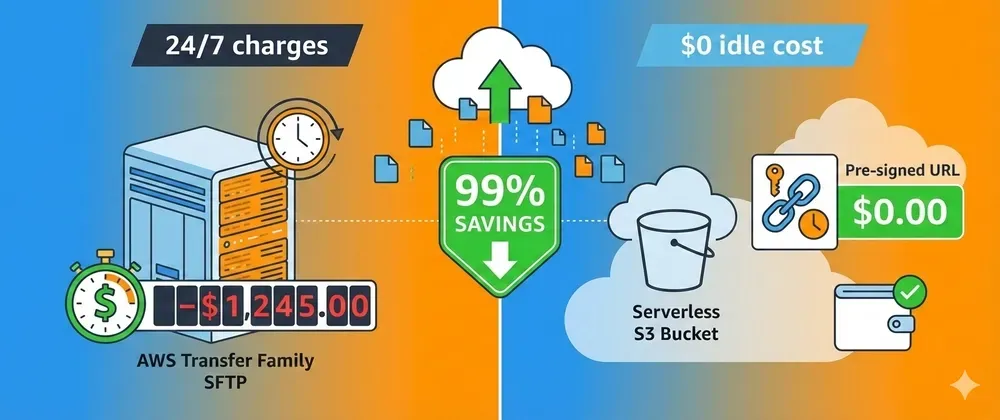
AWS Transfer Family SFTP server:  - $0.30/hour whether you use it or not  - $216/month  - $2,592/year
For what? So partners can upload files via SFTP.
You know what else can receive file uploads? S3 with pre-signed URLs.
Cost: $0/month (plus trivial S3 storage). 🎉
Let me show you how to replace Transfer Family with a serverless solution that costs 95% less and works better.
💸 The Transfer Family Tax
AWS Transfer Family pricing:
- SFTP endpoint: $0.30/hour = $216/month
- Data transfer: $0.04/GB uploaded
- Total for 100GB/month: $220/month minimum
That's $2,640/year just to keep an SFTP server running.
Most companies use it for:
- Partner file drops
- Legacy systems that "need" SFTP
- Batch data imports
- ETL file ingestion
Reality check: These files could just go straight to S3.
🎯 The S3 Pre-Signed URL Solution
Instead of paying for an always-on SFTP server, use:
- S3 pre-signed URLs - Temporary upload links (free)
- API Gateway + Lambda - Generate URLs on demand (pennies)
- S3 Event Notifications - Trigger processing (free)
Total cost for 100GB/month:
- S3 storage: 100GB × $0.023 = $2.30
- Lambda executions: 1,000 × $0.0000002 = $0.20
- API Gateway: 1,000 requests × $0.0000035 = $0.0035
- Total: ~$3/month
Savings: $217/month = $2,604/year (99% reduction!) 💰
🛠️ Terraform Implementation
Complete Serverless File Upload Solution
# modules/s3-file-upload/main.tf
# S3 bucket for file uploadsresource "aws_s3_bucket" "uploads" {  bucket = "partner-file-uploads"
  tags = {    Name = "partner-uploads"  }}
# Block public access (security first!)resource "aws_s3_bucket_public_access_block" "uploads" {  bucket = aws_s3_bucket.uploads.id
  block_public_acls       = true  block_public_policy     = true  ignore_public_acls      = true  restrict_public_buckets = true}
# Lifecycle rule to move old files to cheaper storageresource "aws_s3_bucket_lifecycle_configuration" "uploads" {  bucket = aws_s3_bucket.uploads.id
  rule {    id     = "archive-old-uploads"    status = "Enabled"
    transition {      days          = 30      storage_class = "INTELLIGENT_TIERING"    }
    transition {      days          = 90      storage_class = "GLACIER"    }  }}
# Lambda function to generate pre-signed URLsresource "aws_lambda_function" "generate_upload_url" {  filename         = data.archive_file.lambda.output_path  function_name    = "generate-upload-url"  role            = aws_iam_role.lambda.arn  handler         = "index.handler"  runtime         = "python3.11"  timeout         = 10  source_code_hash = data.archive_file.lambda.output_base64sha256
  environment {    variables = {      BUCKET_NAME = aws_s3_bucket.uploads.id    }  }}
# Lambda codedata "archive_file" "lambda" {  type        = "zip"  output_path = "${path.module}/lambda.zip"
  source {    content  = <<-EOFimport jsonimport boto3import osfrom datetime import timedelta
s3_client = boto3.client('s3')BUCKET_NAME = os.environ['BUCKET_NAME']
def handler(event, context):    """Generate pre-signed URL for file upload"""        try:        # Get filename from request        body = json.loads(event.get('body', '{}'))        filename = body.get('filename')        partner_id = body.get('partner_id')                if not filename or not partner_id:            return {                'statusCode': 400,                'body': json.dumps({'error': 'filename and partner_id required'})            }                # Create S3 key with partner prefix        s3_key = f"{partner_id}/{filename}"                # Generate pre-signed URL (valid for 1 hour)        presigned_url = s3_client.generate_presigned_url(            'put_object',            Params={                'Bucket': BUCKET_NAME,                'Key': s3_key,                'ContentType': body.get('content_type', 'application/octet-stream')            },            ExpiresIn=3600  # 1 hour        )                return {            'statusCode': 200,            'headers': {                'Content-Type': 'application/json',                'Access-Control-Allow-Origin': '*'            },            'body': json.dumps({                'upload_url': presigned_url,                's3_key': s3_key,                'expires_in': 3600            })        }            except Exception as e:        print(f"Error: {str(e)}")        return {            'statusCode': 500,            'body': json.dumps({'error': str(e)})        }EOF    filename = "index.py"  }}
# IAM role for Lambdaresource "aws_iam_role" "lambda" {  name = "upload-url-generator-role"
  assume_role_policy = jsonencode({    Version = "2012-10-17"    Statement = [{      Action = "sts:AssumeRole"      Effect = "Allow"      Principal = {        Service = "lambda.amazonaws.com"      }    }]  })}
# Lambda permissionsresource "aws_iam_role_policy" "lambda_s3" {  role = aws_iam_role.lambda.id
  policy = jsonencode({    Version = "2012-10-17"    Statement = [      {        Effect = "Allow"        Action = [          "s3:PutObject",          "s3:PutObjectAcl"        ]        Resource = "${aws_s3_bucket.uploads.arn}/*"      },      {        Effect = "Allow"        Action = [          "logs:CreateLogGroup",          "logs:CreateLogStream",          "logs:PutLogEvents"        ]        Resource = "arn:aws:logs:*:*:*"      }    ]  })}
# API Gateway REST APIresource "aws_api_gateway_rest_api" "upload" {  name        = "file-upload-api"  description = "API for generating S3 upload URLs"}
resource "aws_api_gateway_resource" "upload" {  rest_api_id = aws_api_gateway_rest_api.upload.id  parent_id   = aws_api_gateway_rest_api.upload.root_resource_id  path_part   = "upload"}
resource "aws_api_gateway_method" "post" {  rest_api_id   = aws_api_gateway_rest_api.upload.id  resource_id   = aws_api_gateway_resource.upload.id  http_method   = "POST"  authorization = "AWS_IAM"  # Use IAM auth or API keys}
resource "aws_api_gateway_integration" "lambda" {  rest_api_id = aws_api_gateway_rest_api.upload.id  resource_id = aws_api_gateway_resource.upload.id  http_method = aws_api_gateway_method.post.http_method
  integration_http_method = "POST"  type                    = "AWS_PROXY"  uri                     = aws_lambda_function.generate_upload_url.invoke_arn}
resource "aws_api_gateway_deployment" "upload" {  rest_api_id = aws_api_gateway_rest_api.upload.id
  depends_on = [    aws_api_gateway_integration.lambda  ]
  lifecycle {    create_before_destroy = true  }}
resource "aws_api_gateway_stage" "prod" {  deployment_id = aws_api_gateway_deployment.upload.id  rest_api_id   = aws_api_gateway_rest_api.upload.id  stage_name    = "prod"}
# Allow API Gateway to invoke Lambdaresource "aws_lambda_permission" "api_gateway" {  statement_id  = "AllowAPIGatewayInvoke"  action        = "lambda:InvokeFunction"  function_name = aws_lambda_function.generate_upload_url.function_name  principal     = "apigateway.amazonaws.com"  source_arn    = "${aws_api_gateway_rest_api.upload.execution_arn}/*/*"}
# S3 event notification to trigger processingresource "aws_lambda_function" "process_upload" {  filename         = data.archive_file.processor.output_path  function_name    = "process-uploaded-file"  role            = aws_iam_role.processor.arn  handler         = "index.handler"  runtime         = "python3.11"  timeout         = 60  source_code_hash = data.archive_file.processor.output_base64sha256}
data "archive_file" "processor" {  type        = "zip"  output_path = "${path.module}/processor.zip"
  source {    content  = <<-EOFimport json
def handler(event, context):    """Process uploaded file"""        for record in event['Records']:        bucket = record['s3']['bucket']['name']        key = record['s3']['object']['key']                print(f"New file uploaded: s3://{bucket}/{key}")                # Add your processing logic here:        # - Parse CSV/JSON        # - Trigger ETL pipeline        # - Send notification        # - Validate file format            return {'statusCode': 200}EOF    filename = "index.py"  }}
resource "aws_iam_role" "processor" {  name = "upload-processor-role"
  assume_role_policy = jsonencode({    Version = "2012-10-17"    Statement = [{      Action = "sts:AssumeRole"      Effect = "Allow"      Principal = {        Service = "lambda.amazonaws.com"      }    }]  })}
resource "aws_iam_role_policy" "processor_s3" {  role = aws_iam_role.processor.id
  policy = jsonencode({    Version = "2012-10-17"    Statement = [{      Effect = "Allow"      Action = [        "s3:GetObject",        "logs:CreateLogGroup",        "logs:CreateLogStream",        "logs:PutLogEvents"      ]      Resource = "*"    }]  })}
resource "aws_s3_bucket_notification" "upload_trigger" {  bucket = aws_s3_bucket.uploads.id
  lambda_function {    lambda_function_arn = aws_lambda_function.process_upload.arn    events              = ["s3:ObjectCreated:*"]  }
  depends_on = [aws_lambda_permission.s3]}
resource "aws_lambda_permission" "s3" {  statement_id  = "AllowS3Invoke"  action        = "lambda:InvokeFunction"  function_name = aws_lambda_function.process_upload.function_name  principal     = "s3.amazonaws.com"  source_arn    = aws_s3_bucket.uploads.arn}
# Outputsoutput "api_endpoint" {  value = "${aws_api_gateway_stage.prod.invoke_url}/upload"}
output "bucket_name" {  value = aws_s3_bucket.uploads.id}
📝 How to Use It
1. Deploy with Terraform
terraform initterraform apply
# Output:# api_endpoint = "https://abc123.execute-api.us-east-1.amazonaws.com/prod/upload"
2. Request an Upload URL
curl -X POST https://your-api.amazonaws.com/prod/upload \  -H "Content-Type: application/json" \  -d '{    "filename": "data.csv",    "partner_id": "acme-corp",    "content_type": "text/csv"  }'
# Response:{  "upload_url": "https://s3.amazonaws.com/bucket/...",  "s3_key": "acme-corp/data.csv",  "expires_in": 3600}
3. Upload File to S3
# Your partner/system uses the pre-signed URLcurl -X PUT "https://s3.amazonaws.com/bucket/..." \ --upload-file data.csv \ -H "Content-Type: text/csv"4. File Automatically Processed
When the file hits S3, Lambda automatically triggers and processes it. No polling, no waiting!
🎓 Migration from Transfer Family
Step 1: Document Current Usage
# Find your Transfer Family serveraws transfer list-servers
# Check how much you're using itaws cloudwatch get-metric-statistics \  --namespace AWS/Transfer \  --metric-name BytesIn \  --dimensions Name=ServerId,Value=s-xxxxx \  --start-time 2024-01-01T00:00:00Z \  --end-time 2024-01-31T23:59:59Z \  --period 86400 \  --statistics Sum
Step 2: Deploy S3 Solution
terraform applyStep 3: Update Partner Integration
Send partners the new API endpoint:
Old: sftp://s-xxxxx.server.transfer.us-east-1.amazonaws.comNew: POST https://your-api.execute-api.us-east-1.amazonaws.com/prod/uploadMost modern systems can do HTTP uploads. If they're stuck on SFTP, consider if that partnership is worth $216/month.
Step 4: Test Thoroughly
# Test upload URL generation# Test actual file upload# Verify processing Lambda triggers# Check S3 lifecycle rulesStep 5: Decommission Transfer Family
# Stop the server (wait 30 days to ensure it's not used)aws transfer stop-server --server-id s-xxxxx
# Delete it after verificationaws transfer delete-server --server-id s-xxxxx
# Watch your AWS bill drop next month 🎉
💡 Pro Tips
1. Add Authentication
Use API Gateway API keys for simple auth:
resource "aws_api_gateway_api_key" "partner" {  name = "partner-api-key"}
resource "aws_api_gateway_usage_plan" "upload" {  name = "upload-usage-plan"
  api_stages {    api_id = aws_api_gateway_rest_api.upload.id    stage  = aws_api_gateway_stage.prod.stage_name  }}
resource "aws_api_gateway_usage_plan_key" "main" {  key_id        = aws_api_gateway_api_key.partner.id  key_type      = "API_KEY"  usage_plan_id = aws_api_gateway_usage_plan.upload.id}
2. Set Upload Size Limits
# In Lambda functionMAX_FILE_SIZE = 100 * 1024 * 1024  # 100MB
presigned_url = s3_client.generate_presigned_url(    'put_object',    Params={        'Bucket': BUCKET_NAME,        'Key': s3_key,        'ContentLength': MAX_FILE_SIZE  # Enforce limit    },    ExpiresIn=3600)
3. Add Virus Scanning
Integrate with AWS S3 antivirus solutions:
# Trigger antivirus scan on uploadresource "aws_s3_bucket_notification" "antivirus" {  bucket = aws_s3_bucket.uploads.id
  lambda_function {    lambda_function_arn = var.antivirus_lambda_arn    events              = ["s3:ObjectCreated:*"]  }}
4. Monitor Upload Activity
resource "aws_cloudwatch_metric_alarm" "upload_failures" {  alarm_name          = "high-upload-failures"  comparison_operator = "GreaterThanThreshold"  evaluation_periods  = 2  metric_name         = "4XXError"  namespace           = "AWS/ApiGateway"  period              = 300  statistic           = "Sum"  threshold           = 10  alarm_description   = "Too many failed upload requests"
  dimensions = {    ApiName = aws_api_gateway_rest_api.upload.name  }}
📊 Cost Comparison Table
Factor | Transfer Family | S3 Pre-Signed URLs |
|---|---|---|
Monthly base cost | $216 | $0 |
Data transfer (100GB) | $4 | $0 |
Total (100GB/month) | $220 | ~$3 |
Annual cost | $2,640 | ~$36 |
Savings | - | $2,604/year (99%) |
Setup time | 10 minutes | 10 minutes |
Idle cost | Full price | $0 |
Scaling | Manual | Automatic |
⚠️ When to Keep Transfer Family
There are a few cases where Transfer Family might be justified:
- Regulatory compliance requires SFTP specifically
- Legacy systems that absolutely can't be changed
- High security requirements where HTTP uploads aren't allowed
- Someone else pays the AWS bill 😄
For 95% of use cases, S3 pre-signed URLs are the better choice.
🎯 Summary
Transfer Family costs:
- $216/month base + data transfer fees
- Charges hourly whether you use it or not
- Total: ~$2,640/year minimum
S3 Pre-Signed URL solution costs:
- $0 base cost
- Pay only for actual storage and API calls
- Total: ~$36/year for typical usage
Implementation:
- 10 minutes to deploy with Terraform
- Drop-in replacement for most use cases
- Better scalability and automation
Stop paying $216/month for an idle SFTP server. Use S3 pre-signed URLs and save 99%. 🚀
Replaced Transfer Family with S3? How much are you saving? Share in the comments! 💬
Follow for more AWS cost optimization with Terraform! ⚡
Series: Save on AWS with Terraform (21 articles)
- …
- 8Stop Paying Hourly for Idle SFTP Servers: Switch to S3 Pre-Signed URLs and Save 99% with Terraform💸(10-Minute Setup) This article
Enjoyed reading this content? Let the author know!
Your likes, comments, shares, and saves help creators reach more builders.

Loading recommendations
Loading article