
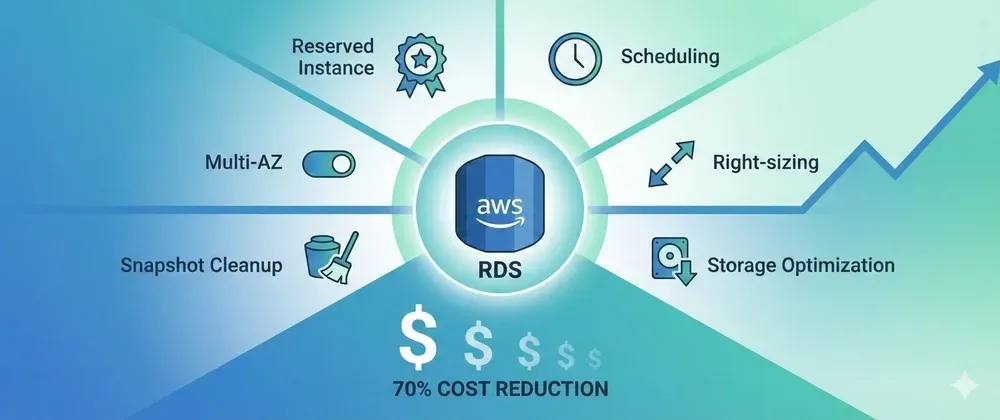
Cut Your AWS RDS Bill by 70%: The Complete Cost Optimization Playbook 💰
Reduce Your AWS RDS Bill and Cost Optimization Playbook using Terraform
Series: Save on AWS with Terraform (21 articles)
- …
- 5Cut Your AWS RDS Bill by 70%: The Complete Cost Optimization Playbook 💰 This article

From automated dev/test auto-resize to right-sizing and storage optimization—here's how to slash RDS costs with Terraform without sacrificing performance.
Your RDS database is probably your second-highest AWS cost after EC2. And if you're like most teams, you're overpaying by 50-70%.
Here's why:
- Dev/test databases running at full capacity 24/7 (you only need full power during business hours)
- Production instances sized for peak load that happens 1% of the time
- Multi-AZ enabled everywhere "just in case"
- gp2 storage when gp3 is 20% cheaper
- Snapshots piling up from instances deleted 2 years ago
Sound familiar? Let's fix all of this with Terraform automation.
💸 The RDS Cost Breakdown
A typical $5,000/month RDS bill looks like:
1
2
3
4
5
Instance hours:    $3,200 (64%)  ← Biggest target
Storage:           $1,000 (20%)  ← Easy wins
Backups/snapshots:   $400 (8%)   ← Often wasted
Data transfer:       $300 (6%)   ← Sneaky costs
Multi-AZ premium:    $100 (2%)   ← Necessary evil?
Our strategy: Attack each of these systematically with Terraform.
🎯 Strategy #1: Dev/Test Auto-Resize (45% Savings)
Automatically downsize instances during nights and weekends. Keeps databases available 24/7 but at significantly lower cost.
The Math:
- Dev database at db.t3.large 24/7: $200/month
- Auto-resize: db.t3.large (50 hrs/wk) + db.t3.small (118 hrs/wk): $110/month
- Savings: 45% 🎉
Implementation
1
2
3
4
5
6
7
8
9
10
11
12
13
14
15
16
17
18
19
20
21
22
23
24
25
26
27
28
29
30
31
32
33
34
35
36
37
38
39
40
41
42
43
44
45
46
47
48
49
50
51
52
53
54
55
56
57
58
59
60
61
62
63
64
65
66
67
68
69
70
71
72
73
74
75
76
77
78
79
80
81
82
83
84
85
86
87
88
89
90
91
92
93
94
95
96
97
98
99
100
101
102
103
104
105
106
107
108
109
110
111
112
113
114
115
116
117
118
119
120
121
122
123
124
# modules/rds-auto-resize/main.tf

variable "rds_instances" {
  type = map(object({
    identifier           = string
    business_hours_class = string  # e.g., "db.t3.large"
    off_hours_class     = string  # e.g., "db.t3.small"
    scale_up_cron       = string
    scale_down_cron     = string
  }))
}

resource "aws_lambda_function" "rds_resizer" {
  filename         = data.archive_file.lambda.output_path
  function_name    = "rds-auto-resizer"
  role            = aws_iam_role.lambda.arn
  handler         = "index.handler"
  runtime         = "python3.11"
  timeout         = 600
  source_code_hash = data.archive_file.lambda.output_base64sha256
}

data "archive_file" "lambda" {
  type        = "zip"
  output_path = "${path.module}/lambda.zip"
  source {
    content  = <<-EOF
import boto3
import json

rds = boto3.client('rds')

def handler(event, context):
    db_identifier = event['db_identifier']
    target_class = event['target_instance_class']

    try:
        response = rds.describe_db_instances(DBInstanceIdentifier=db_identifier)
        current_class = response['DBInstances'][0]['DBInstanceClass']

        if current_class == target_class:
            return {'statusCode': 200, 'body': 'Already at target size'}

        rds.modify_db_instance(
            DBInstanceIdentifier=db_identifier,
            DBInstanceClass=target_class,
            ApplyImmediately=True
        )

        return {'statusCode': 200, 'body': f'Resized to {target_class}'}
    except Exception as e:
        return {'statusCode': 500, 'body': str(e)}
EOF
    filename = "index.py"
  }
}

resource "aws_iam_role" "lambda" {
  name = "rds-resizer-lambda"
  assume_role_policy = jsonencode({
    Version = "2012-10-17"
    Statement = [{
      Action = "sts:AssumeRole"
      Effect = "Allow"
      Principal = { Service = "lambda.amazonaws.com" }
    }]
  })
}

resource "aws_iam_role_policy" "lambda_rds" {
  role = aws_iam_role.lambda.id
  policy = jsonencode({
    Version = "2012-10-17"
    Statement = [{
      Effect = "Allow"
      Action = ["rds:ModifyDBInstance", "rds:DescribeDBInstances", "logs:CreateLogGroup", "logs:CreateLogStream", "logs:PutLogEvents"]
      Resource = "*"
    }]
  })
}

resource "aws_cloudwatch_event_rule" "scale_down" {
  for_each            = var.rds_instances
  name                = "rds-scale-down-${each.key}"
  schedule_expression = "cron(${each.value.scale_down_cron})"
}

resource "aws_cloudwatch_event_rule" "scale_up" {
  for_each            = var.rds_instances
  name                = "rds-scale-up-${each.key}"
  schedule_expression = "cron(${each.value.scale_up_cron})"
}

resource "aws_cloudwatch_event_target" "scale_down" {
  for_each = var.rds_instances
  rule     = aws_cloudwatch_event_rule.scale_down[each.key].name
  arn      = aws_lambda_function.rds_resizer.arn
  input = jsonencode({
    db_identifier         = each.value.identifier
    target_instance_class = each.value.off_hours_class
  })
}

resource "aws_cloudwatch_event_target" "scale_up" {
  for_each = var.rds_instances
  rule     = aws_cloudwatch_event_rule.scale_up[each.key].name
  arn      = aws_lambda_function.rds_resizer.arn
  input = jsonencode({
    db_identifier         = each.value.identifier
    target_instance_class = each.value.business_hours_class
  })
}

resource "aws_lambda_permission" "allow_eventbridge" {
  for_each      = merge(
    { for k, v in var.rds_instances : "down-${k}" => aws_cloudwatch_event_rule.scale_down[k].arn },
    { for k, v in var.rds_instances : "up-${k}" => aws_cloudwatch_event_rule.scale_up[k].arn }
  )
  statement_id  = "AllowEventBridge-${each.key}"
  action        = "lambda:InvokeFunction"
  function_name = aws_lambda_function.rds_resizer.function_name
  principal     = "events.amazonaws.com"
  source_arn    = each.value
}
Usage
1
2
3
4
5
6
7
8
9
10
11
12
13
14
15
16
17
18
19
20
module "rds_auto_resize" {
  source = "./modules/rds-auto-resize"

  rds_instances = {
    dev = {
      identifier           = "myapp-dev"
      business_hours_class = "db.t3.large"
      off_hours_class     = "db.t3.small"
      scale_up_cron       = "0 8 ? * MON-FRI *"   # 8 AM weekdays
      scale_down_cron     = "0 18 ? * MON-FRI *"  # 6 PM weekdays
    }
    staging = {
      identifier           = "myapp-staging"
      business_hours_class = "db.t3.xlarge"
      off_hours_class     = "db.t3.medium"
      scale_up_cron       = "0 7 ? * MON-FRI *"
      scale_down_cron     = "0 20 ? * MON-FRI *"
    }
  }
}
Note: Resizing causes a brief 1-2 minute connection interruption. Most apps with connection pooling handle this automatically.
🎯 Strategy #2: Right-Sizing Instances (30-40% Savings)
Most RDS instances are sized for peak load. Downsize to match actual usage.
Find Oversized Instances
1
2
3
4
5
6
7
8
9
10
11
12
13
14
15
16
17
18
data "aws_cloudwatch_metric_statistics" "cpu" {
for_each = toset(["myapp-prod", "myapp-staging"])
namespace = "AWS/RDS"
metric_name = "CPUUtilization"
period = 86400
stat = "Average"
start_time = timeadd(timestamp(), "-30d")
end_time = timestamp()
dimensions = { DBInstanceIdentifier = each.key }
}
output "rightsizing_candidates" {
value = {
for id, stats in data.aws_cloudwatch_metric_statistics.cpu :
id => "Avg CPU: ${}%"
if mean(stats.datapoints[*].average) < 40
}
}Rule of thumb: If average CPU < 40%, downsize one tier (e.g., db.r6g.xlarge → db.r6g.large).
Use Burstable Instances for Dev/Test
1
2
3
4
5
6
7
8
9
10
11
12
resource "aws_db_instance" "dev" {
  identifier     = "myapp-dev"
  instance_class = "db.t3.medium"  # Burstable, much cheaper
  engine         = "postgres"

  allocated_storage = 100
  storage_type      = "gp3"
  multi_az          = false

  backup_retention_period = 7
  skip_final_snapshot     = true
}
🎯 Strategy #3: Storage Optimization (20% Savings)
Migrate gp2 → gp3
1
2
3
4
5
6
7
8
resource "aws_db_instance" "optimized" {
  identifier    = "myapp-prod"
  storage_type  = "gp3"  # 20% cheaper than gp2
  iops          = 3000   # Baseline included (free)
  throughput    = 125    # MB/s baseline included (free)

  allocated_storage = 500
}
Instant savings: 20% on storage costs with better performance. gp3 baseline (3,000 IOPS, 125 MB/s) is included at no extra cost.
🎯 Strategy #4: Snapshot Cleanup (30-50% Savings)
Old snapshots cost $0.095/GB-month and pile up quickly.
Automated Retention
1
2
3
4
5
6
7
resource "aws_db_instance" "prod" {
  identifier              = "myapp-prod"
  backup_retention_period = 30  # Keep 30 days only
  backup_window          = "03:00-04:00"

  skip_final_snapshot = var.environment != "production"
}
Manual Cleanup Script
1
2
3
4
# Delete snapshots older than 35 days
aws rds describe-db-snapshots --snapshot-type manual \
  --query "DBSnapshots[?SnapshotCreateTime<='$(date -d '35 days ago' -Iso)'].DBSnapshotIdentifier" \
  --output text | xargs -n1 aws rds delete-db-snapshot --db-snapshot-identifier
🎯 Strategy #5: Multi-AZ Optimization (50% Savings)
Multi-AZ doubles your instance cost. Only use for critical production databases.
1
2
3
4
5
6
7
8
9
10
11
12
13
14
15
16
17
locals {
  multi_az_config = {
    production = true   # Critical, customer-facing
    staging    = false  # Can tolerate brief downtime
    dev        = false  # Definitely not needed
  }
}

resource "aws_db_instance" "db" {
  for_each = local.multi_az_config

  identifier     = "myapp-${each.key}"
  instance_class = each.key == "production" ? "db.r6g.large" : "db.t3.medium"
  multi_az       = each.value

  backup_retention_period = each.value ? 30 : 7
}
Savings: $200/month per non-production database by removing unnecessary Multi-AZ.
🎯 Strategy #6: Reserved Instances (40-60% Savings)
For stable production workloads, purchase RIs:
1
2
3
4
5
6
7
8
# Find your stable instances
aws rds describe-db-instances \
  --query 'DBInstances[?DBInstanceStatus==`available`].[DBInstanceIdentifier,DBInstanceClass]' \
  --output table

# Purchase via AWS Console: RDS → Reserved Instances → Purchase
# - 1-year RI: 40% savings
# - 3-year RI: 60% savings (all-upfront for max discount)
Pro tip: Start with 1-year RIs, upgrade to 3-year once workload is proven stable.
📊 Real-World Example: Complete Optimization
Before (Typical startup with 10 RDS instances):
1
2
3
4
5
3 Production (Multi-AZ, r6g.xlarge, gp2):   $2,400/month
3 Staging (Multi-AZ, r6g.large, gp2):       $1,200/month
4 Dev (t3.large, gp2, 24/7 full size):      $800/month
Snapshots (500 GB):                          $48/month
Total:                                       $4,448/month
After (Optimized with Terraform):
1
2
3
4
5
3 Production (Multi-AZ, r6g.large, gp3, RI): $960/month  (RI discount + right-sized + gp3)
3 Staging (Single-AZ, t3.large, gp3):        $450/month  (removed Multi-AZ + gp3)
4 Dev (auto-resize t3.medium/small, gp3):    $280/month  (auto-resize + gp3)
Snapshots (200 GB with lifecycle):            $19/month  (automated cleanup)
Total:                                        $1,709/month
Annual savings: $32,868 💰
⚡ Quick Implementation Checklist
Week 1: Quick wins (Low effort, high impact)
- ✅ Enable dev/test auto-resize module (45% savings immediately)
- ✅ Migrate gp2 → gp3 storage (20% storage savings, zero downtime)
- ✅ Run snapshot cleanup script (30-50% backup savings)
Week 2: Right-sizing (Requires analysis)
- ✅ Query CloudWatch metrics for CPU utilization
- ✅ Identify oversized instances (avg CPU < 40%)
- ✅ Downsize dev/test to burstable instances
- ✅ Test smaller instance classes in staging
Week 3: Architectural changes
- ✅ Remove unnecessary Multi-AZ from non-production
- ✅ Set up automated snapshot lifecycle policies
- ✅ Verify backups are working correctly
Week 4: Long-term commitments
- ✅ Analyze stable production workloads
- ✅ Purchase 1-year Reserved Instances
- ✅ Document RI strategy for future purchases
- ✅ Set up monthly cost review process
🎯 Summary: Savings by Strategy
| Strategy | Effort | Savings | Risk | Priority |
|---|---|---|---|---|
| Dev/test auto-resize | Low | 45% | Low | 🔥 Do first |
| gp2 → gp3 migration | Low | 20% | None | 🔥 Do first |
| Snapshot cleanup | Low | 30-50% | Low | High |
| Right-sizing | Medium | 30-40% | Medium | High |
| Remove unnecessary Multi-AZ | Low | 50% | Medium | Medium |
| Reserved Instances | Low | 40-60% | Low | Medium |
Expected total: 50-70% of RDS costs
For a $5,000/month RDS bill, that's $2,500-$3,500/month saved = $30,000-$42,000/year 🚀
💡 Pro Tips
- Start with dev/test auto-resize - Easiest win, 45% savings, minimal risk
- Use Cost Explorer tags - Tag instances with
Environment,Team,CostCenterfor tracking - Test resizing manually first - Verify your app handles brief connection interruptions
- Don't over-optimize production - Saving $100/month isn't worth a 3 AM outage
- Review quarterly - Workloads change, revisit right-sizing every 3 months
What's your biggest RDS cost pain point? Share in the comments! 💬
Follow for more AWS cost optimization strategies! ⚡
Series: Save on AWS with Terraform (21 articles)
- …
- 5Cut Your AWS RDS Bill by 70%: The Complete Cost Optimization Playbook 💰 This article
Enjoyed reading this content? Let the author know!
Your likes, comments, shares, and saves help creators reach more builders.

Loading recommendations
Loading article