
Save 80% with VPC Endpoints (Terraform Guide) 💰
Stop paying for S3 and DynamoDB traffic through NAT Gateway. VPC Endpoints are FREE and cut data transfer costs by 80%
Series: Save on AWS with Terraform (21 articles)
- …
- 6Save 80% with VPC Endpoints (Terraform Guide) 💰 This article

Stop paying $0.09/GB for S3 and DynamoDB traffic through NAT Gateway. VPC Endpoints are FREE and cut data transfer costs by 80%. Here's the Terraform setup.
Here's a question that might surprise you: How much are you paying to access S3 from your private subnets?
If you're routing through a NAT Gateway (most teams are), you're paying:
- $0.045/GB for NAT Gateway data processing
- $0.09/GB for data transfer out to internet
- Total: $0.135/GB 😱
For 1TB of S3 traffic per month, that's $135 just to access your own data.
VPC Endpoints are FREE and eliminate these costs entirely. Let me show you how.
💸 The Hidden Cost of NAT Gateway Data Transfer
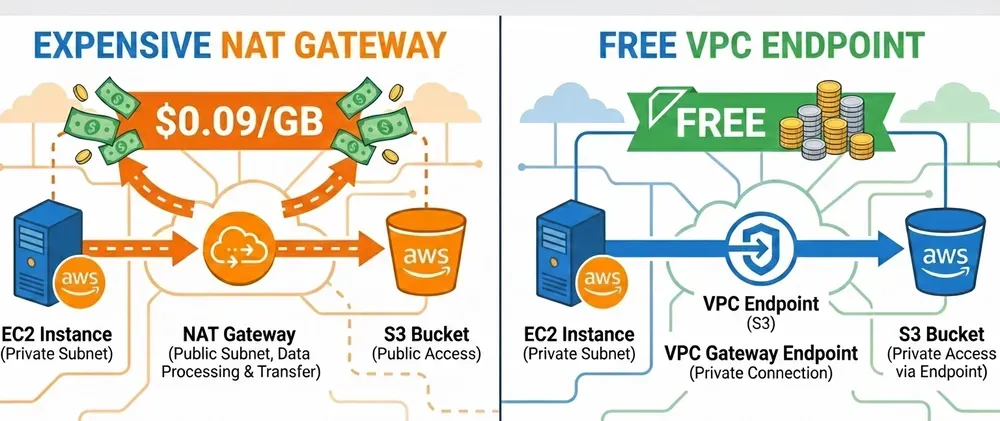
Most developers don't realize their architecture looks like this:
1
2
3
4
5
6
EC2 (private subnet)
  → NAT Gateway ($0.045/GB)
  → Internet Gateway ($0.09/GB)
  → S3 (public endpoint)

Cost for 1TB: $135/month
Even though S3 is in the same AWS region! You're paying internet rates to access your own storage.
🎯 The Solution: VPC Endpoints
VPC Endpoints create a direct private connection from your VPC to AWS services:
1
2
3
4
5
EC2 (private subnet)
  → VPC Endpoint (FREE!)
  → S3

Cost for 1TB: $0/month 🎉
Savings: 100% of data transfer costs
📊 Cost Comparison
Without VPC Endpoints (Through NAT Gateway)
1
2
3
4
5
6
7
Monthly S3 traffic: 1TB

NAT Gateway processing: 1,000 GB × $0.045 = $45
Data transfer out:      1,000 GB × $0.09  = $90
Total monthly cost:                         $135

Annual cost: $1,620
With VPC Endpoints
1
2
3
4
5
6
7
Monthly S3 traffic: 1TB

VPC Endpoint cost:                           $0
Data transfer (in-region):                   $0
Total monthly cost:                          $0

Annual savings: $1,620 💰
🛠️ Terraform Implementation
Gateway Endpoints (FREE - S3 & DynamoDB)
S3 and DynamoDB endpoints are Gateway Endpoints - completely free, no hourly charges.
1
2
3
4
5
6
7
8
9
10
11
12
13
14
15
16
17
18
19
20
21
22
23
24
25
26
27
28
29
30
31
32
33
34
35
36
37
38
39
40
41
42
43
44
45
46
47
48
49
50
51
52
53
54
55
56
57
58
59
60
61
# vpc-endpoints.tf

# S3 Gateway Endpoint (FREE!)
resource "aws_vpc_endpoint" "s3" {
  vpc_id       = aws_vpc.main.id
  service_name = "com.amazonaws.${var.region}.s3"

  vpc_endpoint_type = "Gateway"

  route_table_ids = [
    aws_route_table.private_a.id,
    aws_route_table.private_b.id,
    aws_route_table.private_c.id,
  ]

  tags = {
    Name = "s3-vpc-endpoint"
  }
}

# DynamoDB Gateway Endpoint (FREE!)
resource "aws_vpc_endpoint" "dynamodb" {
  vpc_id       = aws_vpc.main.id
  service_name = "com.amazonaws.${var.region}.dynamodb"

  vpc_endpoint_type = "Gateway"

  route_table_ids = [
    aws_route_table.private_a.id,
    aws_route_table.private_b.id,
    aws_route_table.private_c.id,
  ]

  tags = {
    Name = "dynamodb-vpc-endpoint"
  }
}

# Optional: Endpoint policy to restrict access
resource "aws_vpc_endpoint_policy" "s3" {
  vpc_endpoint_id = aws_vpc_endpoint.s3.id

  policy = jsonencode({
    Version = "2012-10-17"
    Statement = [
      {
        Effect = "Allow"
        Principal = "*"
        Action = [
          "s3:GetObject",
          "s3:PutObject",
          "s3:ListBucket"
        ]
        Resource = [
          "arn:aws:s3:::my-app-bucket/*",
          "arn:aws:s3:::my-app-bucket"
        ]
      }
    ]
  })
}
Deploy it:
1
2
3
terraform apply
# Cost: $0/month
# Instant savings on all S3 & DynamoDB traffic! 🎉
Interface Endpoints (Paid - Other AWS Services)
For other services like ECR, Secrets Manager, SSM, etc., use Interface Endpoints:
1
2
3
4
5
6
7
8
9
10
11
12
13
14
15
16
17
18
19
20
21
22
23
24
25
26
27
28
29
30
31
32
33
34
35
36
37
38
39
40
41
42
43
44
45
46
47
48
49
50
51
52
53
54
55
56
57
58
59
60
61
62
63
64
65
66
67
68
69
70
71
72
73
74
75
76
77
78
79
80
81
82
83
84
85
86
87
88
89
90
91
92
93
94
95
# interface-endpoints.tf

# Security group for interface endpoints
resource "aws_security_group" "vpc_endpoints" {
  name_prefix = "vpc-endpoints-"
  vpc_id      = aws_vpc.main.id

  ingress {
    from_port   = 443
    to_port     = 443
    protocol    = "tcp"
    cidr_blocks = [var.vpc_cidr]
  }

  egress {
    from_port   = 0
    to_port     = 0
    protocol    = "-1"
    cidr_blocks = ["0.0.0.0/0"]
  }

  tags = {
    Name = "vpc-endpoints-sg"
  }
}

# ECR API Endpoint (for Docker pulls)
resource "aws_vpc_endpoint" "ecr_api" {
  vpc_id              = aws_vpc.main.id
  service_name        = "com.amazonaws.${var.region}.ecr.api"
  vpc_endpoint_type   = "Interface"
  subnet_ids          = var.private_subnet_ids
  security_group_ids  = [aws_security_group.vpc_endpoints.id]
  private_dns_enabled = true

  tags = {
    Name = "ecr-api-endpoint"
  }
}

# ECR DKR Endpoint (for Docker image layers)
resource "aws_vpc_endpoint" "ecr_dkr" {
  vpc_id              = aws_vpc.main.id
  service_name        = "com.amazonaws.${var.region}.ecr.dkr"
  vpc_endpoint_type   = "Interface"
  subnet_ids          = var.private_subnet_ids
  security_group_ids  = [aws_security_group.vpc_endpoints.id]
  private_dns_enabled = true

  tags = {
    Name = "ecr-dkr-endpoint"
  }
}

# Secrets Manager Endpoint
resource "aws_vpc_endpoint" "secrets_manager" {
  vpc_id              = aws_vpc.main.id
  service_name        = "com.amazonaws.${var.region}.secretsmanager"
  vpc_endpoint_type   = "Interface"
  subnet_ids          = var.private_subnet_ids
  security_group_ids  = [aws_security_group.vpc_endpoints.id]
  private_dns_enabled = true

  tags = {
    Name = "secretsmanager-endpoint"
  }
}

# SSM Endpoint (for Session Manager, Parameter Store)
resource "aws_vpc_endpoint" "ssm" {
  vpc_id              = aws_vpc.main.id
  service_name        = "com.amazonaws.${var.region}.ssm"
  vpc_endpoint_type   = "Interface"
  subnet_ids          = var.private_subnet_ids
  security_group_ids  = [aws_security_group.vpc_endpoints.id]
  private_dns_enabled = true

  tags = {
    Name = "ssm-endpoint"
  }
}

# CloudWatch Logs Endpoint
resource "aws_vpc_endpoint" "logs" {
  vpc_id              = aws_vpc.main.id
  service_name        = "com.amazonaws.${var.region}.logs"
  vpc_endpoint_type   = "Interface"
  subnet_ids          = var.private_subnet_ids
  security_group_ids  = [aws_security_group.vpc_endpoints.id]
  private_dns_enabled = true

  tags = {
    Name = "logs-endpoint"
  }
}
Interface endpoint costs:
- $0.01/hour per endpoint = $7.30/month each
- $0.01/GB data processed (vs $0.045 through NAT Gateway)
Still 78% cheaper than NAT Gateway for data transfer!
💰 Complete Cost Analysis
Scenario: Microservices app with heavy AWS service usage
Monthly traffic:
- S3: 500 GB
- DynamoDB: 200 GB
- ECR (Docker pulls): 300 GB
- Secrets Manager: 50 GB
- CloudWatch Logs: 100 GB
Total: 1,150 GB/month
Without VPC Endpoints (NAT Gateway routing)
1
2
3
4
5
NAT Gateway processing: 1,150 GB × $0.045 = $51.75
Data transfer out:      1,150 GB × $0.09  = $103.50
Total:                                      $155.25/month

Annual cost: $1,863
With VPC Endpoints
1
2
3
4
5
6
7
8
9
10
11
S3 Gateway Endpoint:              $0 (500 GB free)
DynamoDB Gateway Endpoint:        $0 (200 GB free)

ECR Interface Endpoint:           $7.30/month + (300 GB × $0.01) = $10.30
Secrets Manager Endpoint:         $7.30/month + (50 GB × $0.01)  = $7.80
CloudWatch Logs Endpoint:         $7.30/month + (100 GB × $0.01) = $8.30

Total:                            $33.70/month

Annual cost: $404.40
Savings: $1,458.60/year (78% reduction!) 🎉
🎓 Which Endpoints Should You Create?
Always Create (FREE):
✅ S3 - If you use S3 at all (everyone does)
✅ DynamoDB - If you use DynamoDB
✅ DynamoDB - If you use DynamoDB
Create if You Use Them (Paid but worthwhile):
✅ ECR - If pulling Docker images from private subnets
✅ Secrets Manager - If reading secrets from apps
✅ SSM - If using Parameter Store or Session Manager
✅ CloudWatch Logs - If sending logs from private instances
✅ SQS - If processing queues
✅ SNS - If publishing to topics
✅ Secrets Manager - If reading secrets from apps
✅ SSM - If using Parameter Store or Session Manager
✅ CloudWatch Logs - If sending logs from private instances
✅ SQS - If processing queues
✅ SNS - If publishing to topics
Complete Module for Common Endpoints
1
2
3
4
5
6
7
8
9
10
11
12
13
14
15
16
17
18
19
20
21
22
23
24
25
26
27
28
29
30
31
32
33
34
35
36
37
38
39
40
41
42
43
44
45
46
47
48
49
50
51
52
53
54
55
56
57
58
59
60
61
62
63
64
65
66
67
68
69
70
71
72
73
74
75
76
77
78
79
80
81
82
83
84
85
86
87
88
89
90
91
92
# modules/vpc-endpoints/main.tf

variable "vpc_id" {
  description = "VPC ID"
  type        = string
}

variable "region" {
  description = "AWS region"
  type        = string
}

variable "private_route_table_ids" {
  description = "List of private route table IDs"
  type        = list(string)
}

variable "private_subnet_ids" {
  description = "List of private subnet IDs for interface endpoints"
  type        = list(string)
}

variable "vpc_cidr" {
  description = "VPC CIDR block"
  type        = string
}

# Gateway Endpoints (FREE)
resource "aws_vpc_endpoint" "s3" {
  vpc_id            = var.vpc_id
  service_name      = "com.amazonaws.${var.region}.s3"
  vpc_endpoint_type = "Gateway"
  route_table_ids   = var.private_route_table_ids

  tags = { Name = "s3-gateway-endpoint" }
}

resource "aws_vpc_endpoint" "dynamodb" {
  vpc_id            = var.vpc_id
  service_name      = "com.amazonaws.${var.region}.dynamodb"
  vpc_endpoint_type = "Gateway"
  route_table_ids   = var.private_route_table_ids

  tags = { Name = "dynamodb-gateway-endpoint" }
}

# Security group for interface endpoints
resource "aws_security_group" "endpoints" {
  name_prefix = "vpc-endpoints-"
  vpc_id      = var.vpc_id

  ingress {
    from_port   = 443
    to_port     = 443
    protocol    = "tcp"
    cidr_blocks = [var.vpc_cidr]
  }

  tags = { Name = "vpc-endpoints-sg" }
}

# Interface Endpoints (Paid)
locals {
  interface_endpoints = {
    ecr_api = "ecr.api"
    ecr_dkr = "ecr.dkr"
    logs    = "logs"
    ssm     = "ssm"
    secretsmanager = "secretsmanager"
  }
}

resource "aws_vpc_endpoint" "interface" {
  for_each = local.interface_endpoints

  vpc_id              = var.vpc_id
  service_name        = "com.amazonaws.${var.region}.${each.value}"
  vpc_endpoint_type   = "Interface"
  subnet_ids          = var.private_subnet_ids
  security_group_ids  = [aws_security_group.endpoints.id]
  private_dns_enabled = true

  tags = { Name = "${each.key}-endpoint" }
}

output "endpoint_ids" {
  value = merge(
    { s3 = aws_vpc_endpoint.s3.id },
    { dynamodb = aws_vpc_endpoint.dynamodb.id },
    { for k, v in aws_vpc_endpoint.interface : k => v.id }
  )
}
Usage
1
2
3
4
5
6
7
8
9
10
11
12
13
14
15
16
17
18
19
module "vpc_endpoints" {
  source = "./modules/vpc-endpoints"

  vpc_id     = aws_vpc.main.id
  region     = "us-east-1"
  vpc_cidr   = "10.0.0.0/16"

  private_route_table_ids = [
    aws_route_table.private_a.id,
    aws_route_table.private_b.id,
    aws_route_table.private_c.id,
  ]

  private_subnet_ids = [
    aws_subnet.private_a.id,
    aws_subnet.private_b.id,
    aws_subnet.private_c.id,
  ]
}
🔍 How to Verify It's Working
After deploying, test that traffic routes through endpoints:
1
2
3
4
5
6
7
8
9
10
11
12
# From an EC2 instance in private subnet

# Test S3 endpoint
aws s3 ls --region us-east-1 --debug 2>&1 | grep -i endpoint
# Should show: vpce-xxx.s3.us-east-1.vpce.amazonaws.com

# Test DynamoDB endpoint
aws dynamodb list-tables --region us-east-1 --debug 2>&1 | grep -i endpoint
# Should show: vpce-xxx.dynamodb.us-east-1.vpce.amazonaws.com

# Verify no NAT Gateway traffic
# Check NAT Gateway CloudWatch metrics - BytesOutToDestination should drop
⚡ Quick Wins Checklist
5-Minute Setup (FREE endpoints):
- ✅ Add S3 gateway endpoint
- ✅ Add DynamoDB gateway endpoint (if used)
- ✅ Deploy with
terraform apply - ✅ Watch NAT Gateway traffic drop immediately
15-Minute Setup (Interface endpoints):
- ✅ Identify which AWS services your apps use
- ✅ Create security group for endpoints
- ✅ Add relevant interface endpoints
- ✅ Enable private DNS
- ✅ Test connectivity
💡 Pro Tips
1. Start with Gateway Endpoints (S3 & DynamoDB)
They're free and take 2 minutes to set up. Instant ROI.
They're free and take 2 minutes to set up. Instant ROI.
2. Monitor NAT Gateway metrics
Before/after comparison proves the savings:
Before/after comparison proves the savings:
1
2
3
4
5
6
7
8
9
10
11
12
13
14
15
16
17
resource "aws_cloudwatch_dashboard" "nat_savings" {
  dashboard_name = "nat-gateway-savings"

  dashboard_body = jsonencode({
    widgets = [{
      type = "metric"
      properties = {
        metrics = [
          ["AWS/NATGateway", "BytesOutToDestination", { stat = "Sum" }]
        ]
        period = 86400
        region = var.region
        title  = "NAT Gateway Traffic (Should Decrease After VPC Endpoints)"
      }
    }]
  })
}
3. Use endpoint policies for security
Lock down which resources can be accessed:
Lock down which resources can be accessed:
1
2
3
4
5
6
7
8
policy = jsonencode({
  Statement = [{
    Effect = "Allow"
    Principal = "*"
    Action = "s3:*"
    Resource = "arn:aws:s3:::my-allowed-bucket/*"
  }]
})
4. Don't create endpoints you don't need
Each interface endpoint costs $7.30/month. Only create them for services you actively use.
Each interface endpoint costs $7.30/month. Only create them for services you actively use.
⚠️ Common Gotchas
1. Route table association
Gateway endpoints MUST be associated with route tables. Don't forget:
Gateway endpoints MUST be associated with route tables. Don't forget:
1
route_table_ids = [all_your_private_route_tables]
2. Security group for interface endpoints
Must allow inbound 443 from your VPC CIDR.
Must allow inbound 443 from your VPC CIDR.
3. Private DNS
Set
Set
private_dns_enabled = true or your apps won't automatically use the endpoint.4. Cross-region doesn't work
VPC Endpoints only work for same-region traffic. Cross-region still goes through internet.
VPC Endpoints only work for same-region traffic. Cross-region still goes through internet.
📈 Real-World Example
Before VPC Endpoints:
- NAT Gateway processing 2TB/month AWS service traffic
- Cost: $90 (processing) + $180 (data transfer) = $270/month
After VPC Endpoints:
- S3 (1TB): FREE via gateway endpoint
- DynamoDB (500GB): FREE via gateway endpoint
- ECR (300GB): $7.30 + $3 = $10.30
- Other services (200GB): 3 endpoints × $7.30 + $2 = $23.90
- Total: $34.20/month
Annual savings: $2,829 💰
🎯 Summary
| Service | Without Endpoint | With Endpoint | Savings |
|---|---|---|---|
| S3 (1TB) | $135/month | $0 | 100% |
| DynamoDB (500GB) | $67.50/month | $0 | 100% |
| ECR (300GB) | $40.50/month | $10.30/month | 75% |
| Other (per service) | Varies | ~$7-10/month | 70-80% |
Key takeaway: VPC Endpoints are the easiest AWS cost optimization you'll ever do. Gateway endpoints (S3, DynamoDB) are literally free money.
Stop routing your internal AWS traffic through NAT Gateway. Your wallet will thank you. 🚀
Implemented VPC Endpoints? How much are you saving? Share in the comments! 💬
Follow for more AWS cost optimization with Terraform! ⚡
Series: Save on AWS with Terraform (21 articles)
- …
- 6Save 80% with VPC Endpoints (Terraform Guide) 💰 This article
Enjoyed reading this content? Let the author know!
Your likes, comments, shares, and saves help creators reach more builders.

Loading recommendations
Loading article