
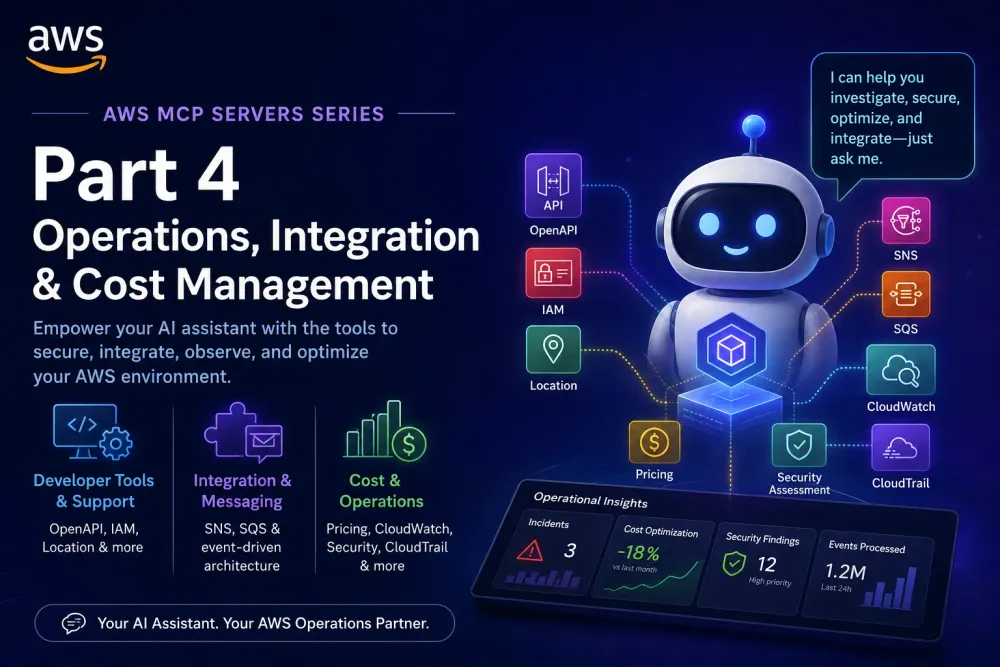
AWS MCP Servers Part 4: The Operator's Toolkit
Where development meets operations — the MCP servers that secure, integrate, monitor, and optimize your AWS workloads.

Introduction
Welcome to Part 4 of our AWS MCP Servers series. So far we've covered foundational servers , infrastructure and deployment , and AI/ML and data analytics . Now we step into the operational side of AWS — the servers that give your AI assistant the keys to security, integration, observability, and cost management.
This post covers three categories that every production team relies on:
- Developer Tools & Support — OpenAPI integration, IAM management, location services, and more
- Integration & Messaging — SNS/SQS event-driven architecture
- Cost & Operations — Pricing, CloudWatch, security assessment, and CloudTrail
These are the servers that turn your AI assistant from a code generator into a true operations partner — one that can investigate incidents, audit security, optimize costs, and integrate disparate systems through natural conversation.
The Shift: From Reactive Operations to Conversational Operations
Traditional ops workflow:
1
Alert fires → Open 5 consoles → Correlate logs → Search docs → Fix → Document
AI-assisted ops workflow with MCP:
1
Alert fires → Ask AI → AI correlates logs/metrics/traces → Suggests fix → Verifies
The unlock here isn't speed alone — it's cognitive load reduction. Your operators stop context-switching between consoles and start having focused conversations about the problem.
🛠️ Developer Tools & Support MCP Servers
1. AWS Labs OpenAPI MCP Server
Turn any OpenAPI spec into MCP tools, automatically
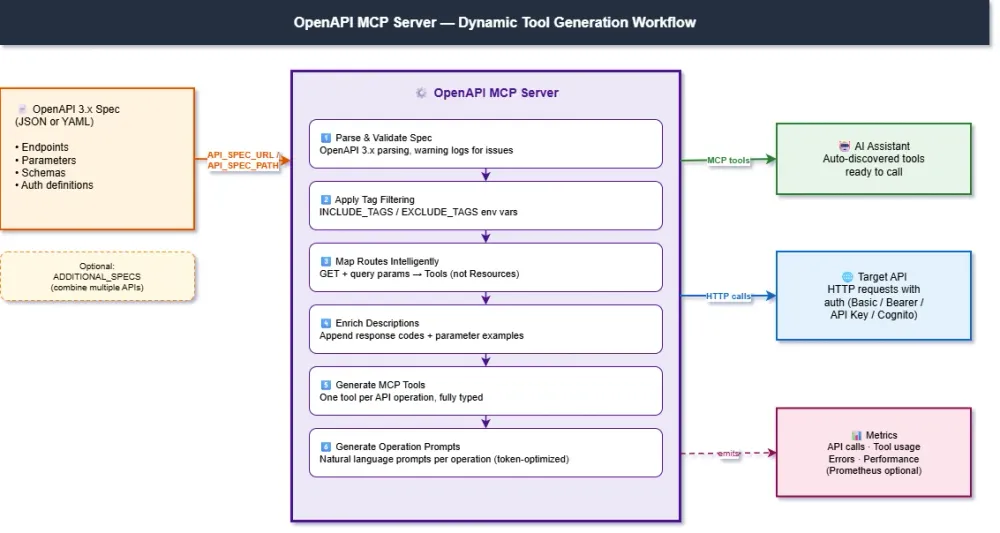
The OpenAPI MCP Server is one of the most versatile servers in the AWS Labs ecosystem. Point it at an OpenAPI 3.x specification — yours or a third party's — and it dynamically generates MCP tools for every endpoint. No manual tool definitions, no glue code, no SDK wrappers. Your AI assistant can now interact with any REST API that has an OpenAPI spec.
Why This Matters
Every modern API ships with an OpenAPI specification. With this MCP server, that specification becomes a live capability for your AI assistant — overnight.
Key Features
| Feature | Description |
|---|---|
| Dynamic Tool Generation | Auto-creates MCP tools from OpenAPI endpoints |
| Intelligent Route Mapping | Maps GET ops with query params to TOOLS (not RESOURCES) for better LLM usability |
| Tag-based Filtering | Include or exclude operations by tag (pet,store vs admin,internal) |
| Enriched Tool Descriptions | Auto-appends response codes and parameter examples for better LLM tool selection |
| Multi-spec Composition | Combine multiple OpenAPI specs into a single MCP server |
| Output Validation Toggle | Disable response schema validation for APIs with loose specs |
| Operation-Specific Prompts | Generates natural language prompts for each API operation |
| Auth Support | Basic, Bearer Token, API Key, and Cognito authentication |
| OpenAPI 3.x | Works with both JSON and YAML specifications |
| Metrics Collection | Tracks API calls, tool usage, errors, and performance |
How Tool Generation Works
Given an OpenAPI spec like this:
1
2
3
4
5
6
7
8
9
10
11
12
13
14
paths:
  /pets/{petId}:
    get:
      summary: Find pet by ID
      operationId: getPetById
      parameters:
        - name: petId
          in: path
          required: true
          schema:
            type: integer
      responses:
        '200':
          description: successful operation
The server generates an MCP tool that your AI assistant can call:
1
2
3
4
Tool: getPetById
Description: Find pet by ID
  Parameters: petId (integer, required, path parameter)
  Response codes: 200 (success), 400, 404
Configuration
1
2
3
4
5
6
7
8
9
10
11
12
13
14
15
{
  "mcpServers": {
    "awslabs.openapi-mcp-server": {
      "command": "uvx",
      "args": ["awslabs.openapi-mcp-server@latest"],
      "env": {
        "API_NAME": "petstore",
        "API_BASE_URL": "https://petstore3.swagger.io/api/v3",
        "API_SPEC_URL": "https://petstore3.swagger.io/api/v3/openapi.json",
        "LOG_LEVEL": "ERROR",
        "ENABLE_OPERATION_PROMPTS": "true"
      }
    }
  }
}
Authentication Options
The server supports four auth methods, configurable via CLI flags or environment variables:
1
2
3
4
5
6
7
8
# Basic Auth
--auth-type basic --auth-username USER --auth-password PASS

# Bearer Token
--auth-type bearer --auth-token TOKEN

# API Key (header / query / cookie)
--auth-type api_key --auth-api-key KEY --auth-api-key-name X-API-Key --auth-api-key-in header
Real-World Scenario: Internal API Integration
The Problem: Your company has 12 internal microservices, each with its own OpenAPI spec. You want your AI assistant to query them all without writing custom tools for each one.
Traditional Approach:
- Write 12 separate MCP server implementations
- Maintain each one as APIs evolve
- Handle auth and error patterns 12 times
With OpenAPI MCP Server:
1
2
3
4
5
6
{
  "API_NAME": "user-service",
  "API_BASE_URL": "https://users.internal.company.com",
  "API_SPEC_URL": "https://users.internal.company.com/openapi.json",
  "ADDITIONAL_SPECS": "[{\"name\":\"orders\",\"spec_url\":\"https://orders.internal.company.com/openapi.json\",\"base_url\":\"https://orders.internal.company.com\"},{\"name\":\"payments\",\"spec_url\":\"https://payments.internal.company.com/openapi.json\",\"base_url\":\"https://payments.internal.company.com\"}]"
}
One server, all 12 services. As specs update, tools update. Zero maintenance.
Real-World Scenario: Third-Party API Without an SDK
The Problem: Your team needs to integrate with a vendor API that doesn't have a Python SDK, but does publish an OpenAPI spec.
With OpenAPI MCP Server:
1
2
"Use the vendor API to fetch all active subscriptions for customer ID 12345
and check if any are due for renewal in the next 30 days."
The server reads the OpenAPI spec, generates the right tool calls, handles the bearer token auth, and returns structured results — all without you writing a single API client method.
2. AWS IAM MCP Server
Comprehensive IAM management with security-first defaults
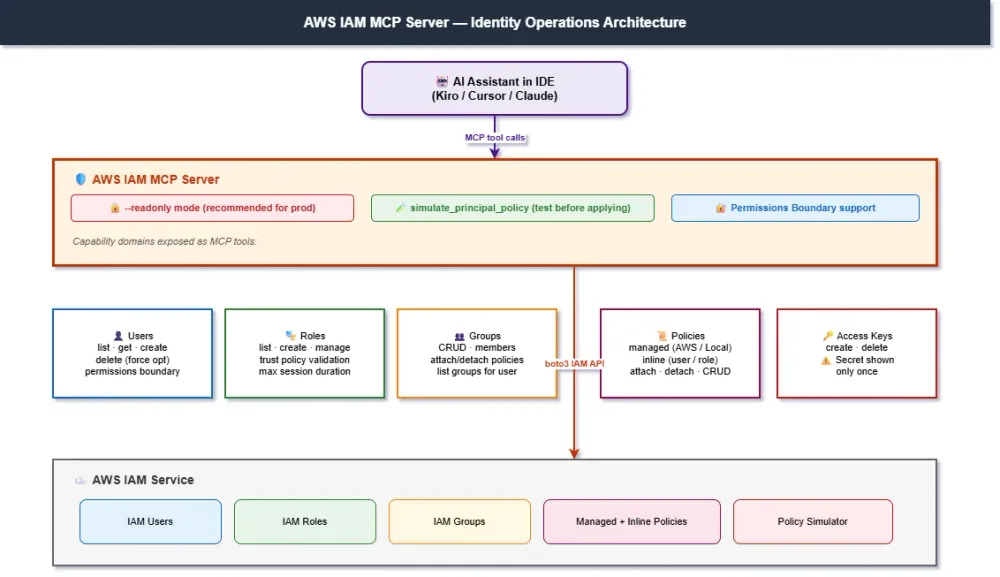
IAM is arguably the most consequential service in AWS. A misconfigured policy can expose data; an over-privileged role can become an attacker's entry point. The AWS IAM MCP Server gives your AI assistant the ability to manage users, roles, groups, policies, and access keys — with built-in safeguards like read-only mode and policy simulation.
Capability Categories
| Category | What It Covers |
|---|---|
| User Management | Create, list, get, delete IAM users (with force cleanup) |
| Role Management | Create, list, manage roles with trust policies |
| Group Management | Full CRUD plus member management and group policies |
| Policy Management | List managed policies, attach/detach to users and roles |
| Inline Policies | Full CRUD for both user and role inline policies |
| Access Keys | Create and delete access keys (with single-use secret warning) |
| Permission Boundaries | Set max-permission boundaries for enhanced security |
| Policy Simulation | Test permissions before applying them |
Available Tools (selected highlights)
1
2
3
4
5
6
7
8
9
10
11
12
13
14
15
16
17
18
19
20
21
22
23
24
25
26
27
28
29
30
31
32
33
34
35
36
37
38
39
40
41
42
43
44
45
# User Management
list_users(path_prefix, max_items)
get_user(user_name)               # Returns groups, attached policies, access keys
create_user(user_name, path, permissions_boundary)
delete_user(user_name, force=False)  # force=True cleans up policies, keys, groups

# Role Management
list_roles(path_prefix, max_items)
create_role(
    role_name,
    assume_role_policy_document,  # Trust policy JSON
    description,
    max_session_duration=3600,
    permissions_boundary
)

# Group Management
create_group(group_name, path)
add_user_to_group(group_name, user_name)
attach_group_policy(group_name, policy_arn)
get_group(group_name)             # Returns members + all policies

# Policy Operations
list_policies(scope="Local", only_attached=False)  # Local=customer, AWS=managed, All=both
attach_user_policy(user_name, policy_arn)
attach_role_policy(role_name, policy_arn)

# Inline Policies
put_user_policy(user_name, policy_name, policy_document)
get_user_policy(user_name, policy_name)
list_user_policies(user_name)
delete_user_policy(user_name, policy_name)
# Same set exists for roles: put_role_policy, get_role_policy, etc.

# Access Keys
create_access_key(user_name)      # ⚠️ Secret returned only once
delete_access_key(user_name, access_key_id)

# Security Analysis
simulate_principal_policy(
    policy_source_arn,
    action_names,
    resource_arns,
    context_entries
)
Read-Only Mode (Critical for Production)
Add
--readonly to disable all mutating operations:1
2
3
{
"args": ["awslabs.iam-mcp-server@latest", "--readonly"]
}
In read-only mode, these operations are blocked:
create_user,delete_usercreate_role,attach_user_policy,detach_user_policycreate_access_key,delete_access_key
But these still work for safe exploration:
list_users,get_user,list_roles,list_policiessimulate_principal_policy(test permissions without changes)
Configuration
1
2
3
4
5
6
7
8
9
10
11
12
13
{
  "mcpServers": {
    "awslabs.iam-mcp-server": {
      "command": "uvx",
      "args": ["awslabs.iam-mcp-server@latest", "--readonly"],
      "env": {
        "AWS_PROFILE": "your-aws-profile",
        "AWS_REGION": "us-east-1",
        "FASTMCP_LOG_LEVEL": "ERROR"
      }
    }
  }
}
Real-World Scenario: Permission Audit Before a Deployment
The Problem: You're about to deploy a new Lambda function that needs to read from S3 and write to DynamoDB. You want to verify the Lambda execution role has exactly the right permissions — no more, no less.
With IAM MCP Server:
1
2
3
4
5
"Simulate the permissions for role 'lambda-order-processor-role'.
Test if it can:
- s3:GetObject on arn:aws:s3:::orders-bucket/*
- dynamodb:PutItem on arn:aws:dynamodb:us-east-1:123456789012:table/orders
- ec2:TerminateInstances on *  (this should DENY)"
The server uses
simulate_principal_policy to test each action against the role's actual policies and returns explicit allow/deny decisions — letting you catch over-privileged or under-privileged roles before they reach production.Real-World Scenario: Onboarding a New Developer
The Problem: A new team member joins. You need to create their IAM user, add them to the right groups, and provision an access key — securely.
With IAM MCP Server:
1
2
3
"Create a new IAM user named 'jane.smith' in path '/developers/'.
Add her to the 'Developers' and 'ReadOnlyAuditors' groups.
Generate an access key and tell me the credentials so I can share them securely."
The server walks through each step, creates the user, attaches group memberships, generates the access key (with the prominent reminder that the secret is shown only once), and returns the result for your secure handoff.
High-Level Overview: Other Developer Tools & Support Servers
Amazon Location Service MCP Server Provides natural-language access to Amazon Location Service capabilities for geocoding, reverse geocoding, place search, nearby search with auto-radius expansion, route calculation across travel modes (Car, Truck, Walking, Bicycle), and multi-stop waypoint optimization. Ideal for teams building logistics, delivery, or location-aware applications without managing third-party mapping APIs.
Prometheus MCP Server Provides a robust interface for interacting with AWS Managed Prometheus, enabling PromQL query execution, metric listing, and server information retrieval with AWS SigV4 authentication. Ideal for teams running Prometheus-based observability on AWS.
Amazon Kendra Index MCP Server Enables enterprise search and RAG enhancement by exposing Amazon Kendra index search capabilities. Useful when you have content indexed in Kendra and want your AI assistant to use that index for grounded responses.
📡 Integration & Messaging MCP Servers
3. Amazon SNS / SQS MCP Server
Event-driven architecture management with built-in security
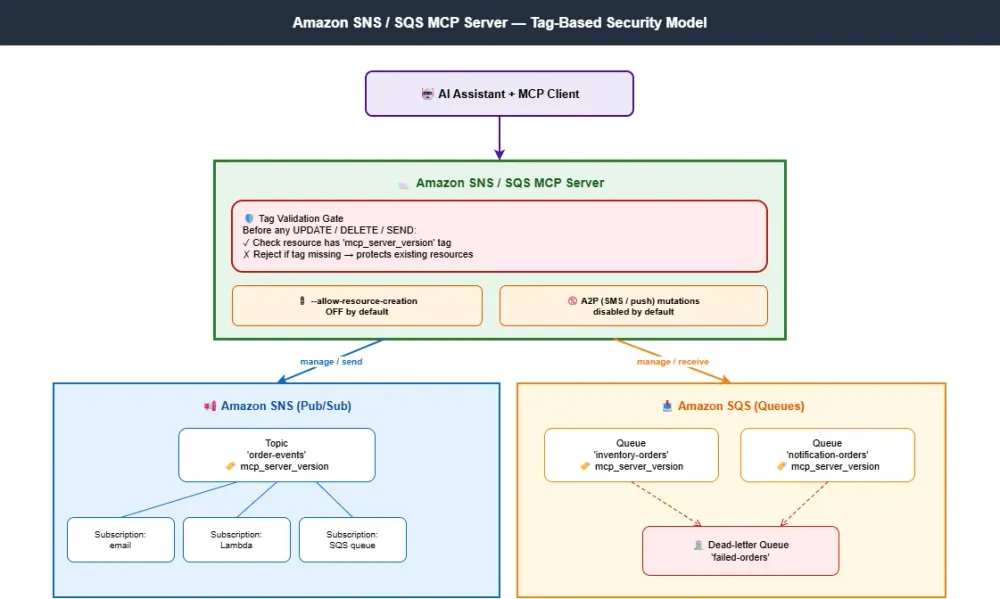
Asynchronous messaging is the backbone of most modern AWS architectures. SNS handles pub/sub fan-out; SQS handles work queues. The Amazon SNS / SQS MCP Server gives your AI assistant the ability to create, configure, and manage both — with a security model that prevents it from accidentally modifying resources it didn't create.
The Tag-Based Security Model
This is the most distinctive feature of the SNS/SQS MCP Server. Every resource it creates gets automatically tagged with
mcp_server_version. Before any mutating operation (update, delete, send), the server validates this tag. If the tag isn't present, the operation is rejected.This means:
- The MCP server can only modify resources it created. Existing production topics and queues are protected from accidental changes.
- No reliance on IAM alone for blast-radius control. Even with broad IAM permissions, the server still respects the tag check.
- Application-to-Person (A2P) messaging mutations are disabled by default. SMS, voice, and push notification operations require explicit opt-in for safety.
Key Capabilities
| Capability | Description |
|---|---|
| SNS Topic Management | Create, list, update, and delete SNS topics |
| SNS Subscription Management | Manage subscriptions across SNS topics |
| SQS Queue Management | Create, list, update, and delete SQS queues |
| Message Operations | Send and receive messages via SNS and SQS |
| Tag-Based Protection | Mutations restricted to resources with mcp_server_version tag |
| Resource Creation Toggle | Resource creation disabled by default — opt-in via --allow-resource-creation |
| A2P Safety | Application-to-Person messaging mutations disabled by default |
Configuration
1
2
3
4
5
6
7
8
9
10
11
12
{
  "mcpServers": {
    "awslabs.amazon-sns-sqs-mcp-server": {
      "command": "uvx",
      "args": ["awslabs.amazon-sns-sqs-mcp-server@latest"],
      "env": {
        "AWS_PROFILE": "your-aws-profile",
        "AWS_REGION": "us-east-1"
      }
    }
  }
}
To enable resource creation:
1
2
3
{
  "args": ["awslabs.amazon-sns-sqs-mcp-server@latest", "--allow-resource-creation"]
}
IAM Setup Recommendation
Per the official docs, the recommended approach is to:
- Create a new IAM role with
AmazonSQSReadOnlyAccessandAmazonSNSReadOnlyAccessfor safe exploration - Add
AmazonSNSFullAccessandAmazonSQSFullAccessonly when you need mutation capabilities - Configure an AWS profile that assumes this role
Real-World Scenario: Setting Up a New Event-Driven Pipeline
The Problem: You're building an order processing pipeline that needs:
- An SNS topic for
OrderPlacedevents - An SQS queue subscribed to that topic for the inventory service
- Another SQS queue for the email notification service
- A dead-letter queue for failed messages
With SNS / SQS MCP Server (with
--allow-resource-creation):1
2
3
4
5
"Create an order processing pipeline:
- SNS topic 'order-placed-events'
- SQS queue 'inventory-orders' subscribed to that topic
- SQS queue 'notification-orders' also subscribed
- Dead-letter queue 'failed-orders' attached to both processing queues"
The server creates each resource, automatically tags them with
mcp_server_version, wires up the subscriptions, and configures the DLQs. Every resource is now under the MCP server's "ownership," so future modifications are safe.Real-World Scenario: Investigating a Stuck Queue
The Problem: Your monitoring shows messages piling up in an SQS queue. You need to investigate without leaving your IDE.
With SNS / SQS MCP Server:
1
2
3
"Show me the configuration and current message count for the
'inventory-orders' queue. If there are stuck messages, peek at the first
3 messages so we can see why they're failing."
The server retrieves the queue attributes, reports the visible/in-flight message counts, and can receive messages for inspection — without disrupting the production consumers.
High-Level Overview: Other Integration & Messaging Servers
Amazon MQ MCP Server Provides message broker management for RabbitMQ and ActiveMQ on Amazon MQ. Useful for teams running traditional JMS or AMQP messaging that need to lift-and-shift to AWS managed brokers without rewriting their messaging layer.
💰 Cost & Operations MCP Servers
4. AWS Pricing MCP Server
Real-time AWS pricing without leaving your IDE
Estimating AWS costs has historically been painful — between the AWS Pricing Calculator, simple monthly calculator, and per-service pricing pages, getting an accurate estimate can take hours. The AWS Pricing MCP Server brings the AWS Pricing API directly into your AI assistant, with the added ability to scan CDK and Terraform projects to identify cost-driving resources automatically.
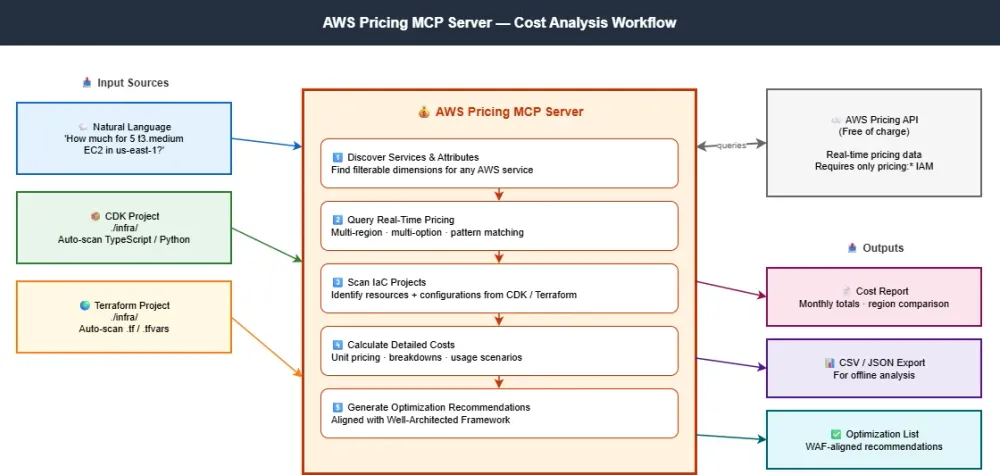
Key Capabilities
| Capability | Description |
|---|---|
| Service Catalog Exploration | Discover all AWS services with pricing data |
| Pricing Attribute Discovery | Identify filterable dimensions (instance types, regions, storage classes) |
| Real-Time Pricing Queries | Current pricing with multi-option comparisons and pattern matching |
| Multi-Region Comparisons | Compare pricing across regions in a single query |
| Bulk Pricing Data | Download complete datasets in CSV/JSON for offline analysis |
| Cost Report Generation | Detailed reports with unit pricing, calculation breakdowns, scenarios |
| IaC Project Analysis | Scan CDK and Terraform projects to identify AWS services automatically |
| Architecture Pattern Guidance | Cost considerations for patterns (especially Bedrock services) |
| Well-Architected Optimization | Cost optimization aligned with Well-Architected Framework |
Important: The official docs note that the server provides real-time pricing data from the AWS Pricing API, but cannot guarantee that AI assistants will always construct filters correctly or identify the absolute cheapest options. All pricing API calls are free of charge.
Required IAM Permission
Just one:
pricing:* — that's it. The server only accesses generally-available AWS pricing information; it doesn't read any user-specific data.Configuration
1
2
3
4
5
6
7
8
9
10
11
12
13
{
  "mcpServers": {
    "awslabs.aws-pricing-mcp-server": {
      "command": "uvx",
      "args": ["awslabs.aws-pricing-mcp-server@latest"],
      "env": {
        "FASTMCP_LOG_LEVEL": "ERROR",
        "AWS_PROFILE": "default",
        "AWS_REGION": "us-east-1"
      }
    }
  }
}
Real-World Scenario: Cost Estimate Before Deployment
The Problem: Your team is about to deploy a new architecture: 3 ALBs, 6 Fargate tasks, an Aurora PostgreSQL cluster (2 instances), an ElastiCache Redis cluster, and a CloudFront distribution. You need a cost estimate before the architecture review meeting tomorrow.
Traditional Approach:
- Open AWS Pricing Calculator
- Manually configure each service
- Spend 90 minutes getting numbers
- Pray the regional pricing differences are right
With AWS Pricing MCP Server:
1
2
3
4
5
6
7
8
"Estimate the monthly cost in us-east-1 for:
- 3 Application Load Balancers (medium traffic, ~10M requests/month each)
- 6 Fargate tasks running 24/7 (1 vCPU, 2GB RAM)
- Aurora PostgreSQL: 2 db.r6g.large instances + 100GB storage + 50M IOs/month
- ElastiCache Redis: 2 cache.m6g.large nodes
- CloudFront: 5TB outbound data transfer

Compare with us-west-2 and eu-west-1 to see if there's a cheaper region."
The server queries the Pricing API for each resource type, computes monthly totals, and returns a comparison across regions.
Real-World Scenario: Pre-Deployment IaC Cost Scan
The Problem: Your developer just submitted a 400-line Terraform PR. Reviewing it for cost impact takes hours.
With AWS Pricing MCP Server:
1
2
3
"Scan this Terraform project at ./infra/ and tell me the estimated monthly cost.
Highlight any expensive resources (>$500/month) and suggest cheaper alternatives
based on the Well-Architected Framework."
The server parses the Terraform files, identifies AWS resources with their configurations, queries pricing for each, and returns a structured cost report with optimization suggestions.
5. CloudWatch MCP Server
AI-powered observability and root cause analysis
CloudWatch is the centerpiece of AWS observability — metrics, logs, alarms, and now PromQL support. The CloudWatch MCP Server consolidates all of these capabilities behind task-oriented tools designed for troubleshooting workflows. The goal isn't just to expose APIs; it's to let your AI agent perform AI-powered root cause analysis with minimal context-switching.

Tool Categories
The CloudWatch MCP Server organizes its tools into four categories:
Metrics Tools:
1
2
3
4
get_metric_data(namespace, metric_name, dimensions, period, statistic, ...)
get_metric_metadata(namespace, metric_name)
get_recommended_metric_alarms(namespace, metric_name)
analyze_metric(namespace, metric_name)  # Trend, seasonality, statistics
The
get_metric_data tool optionally accepts a queries parameter for advanced use cases:- Percentile statistics (p50, p90, p99) for latency analysis
- Math expressions for derived metrics (e.g., error rate = errors/invocations × 100)
- Multi-metric batching — fetch multiple metrics in one API call
PromQL Tools (available in us-east-1, us-west-2, eu-west-1, ap-southeast-1, ap-southeast-2):
1
2
3
4
5
execute_promql_query(query)         # Instant query
execute_promql_range_query(query, start, end, step)
get_promql_label_values(label)      # E.g., __name__ for metric names
get_promql_series(matchers)         # Find series matching label selectors
get_promql_labels()                 # List all available label names
Alarm Tools:
1
2
get_active_alarms()                 # All currently triggered alarms
get_alarm_history(alarm_name)       # Historical state changes
Log Tools:
1
2
3
4
5
6
7
8
9
10
11
12
13
14
15
describe_log_groups()
analyze_log_group(log_group, start, end)  # Anomalies, patterns, errors
execute_log_insights_query(log_groups, query, start, end)
get_logs_insight_query_results(query_id)
cancel_logs_insight_query(query_id)

# Powerful batch tool for multi-region/multi-account
execute_cwl_insights_batch(
    log_group_names,    # Names or ARNs (ARNs for cross-account)
    regions,            # Multiple regions
    start_time, end_time,
    query_string,
    account_label=None,
    profile_name=None
)
The
execute_cwl_insights_batch tool is particularly powerful: it auto-chunks log groups (max 50 per query), throttles concurrency (max 7 per region), polls for completion, retries failures, and splits time ranges when hitting the 10,000-record limit.Required IAM Permissions
1
2
3
4
5
6
7
8
9
10
11
12
13
14
15
{
  "Action": [
    "cloudwatch:DescribeAlarms",
    "cloudwatch:DescribeAlarmHistory",
    "cloudwatch:GetMetricData",
    "cloudwatch:ListMetrics",
    "logs:DescribeLogGroups",
    "logs:DescribeQueryDefinitions",
    "logs:ListLogAnomalyDetectors",
    "logs:ListAnomalies",
    "logs:StartQuery",
    "logs:GetQueryResults",
    "logs:StopQuery"
  ]
}
Configuration
1
2
3
4
5
6
7
8
9
10
11
12
{
  "mcpServers": {
    "awslabs.cloudwatch-mcp-server": {
      "command": "uvx",
      "args": ["awslabs.cloudwatch-mcp-server@latest"],
      "env": {
        "AWS_PROFILE": "your-aws-profile",
        "FASTMCP_LOG_LEVEL": "ERROR"
      }
    }
  }
}
Real-World Scenario: Late-Night Incident Investigation
The Problem: At 2 AM, an alarm fires for "high error rate" in your payment service. You need to find the root cause fast.
Traditional Approach:
- Open the CloudWatch console
- Find the alarm, check its history
- Switch to logs, run an Insights query
- Switch to metrics, correlate timestamps
- Switch to traces (X-Ray)
- Repeat across regions
With CloudWatch MCP Server:
1
2
3
4
"The 'payment-service-high-errors' alarm just triggered.
Get the alarm history, pull error logs from the payment-service log group
for the last 30 minutes, correlate with metrics for that period,
and tell me the most likely root cause."
The server orchestrates multiple tool calls:
get_alarm_history— sees the alarm has been flapping for 15 minutesanalyze_log_group— identifies a spike inConnectionTimeoutExceptionget_metric_data— correlates with a database connection pool spike- Returns a synthesized analysis pointing at DB connection exhaustion
What used to be a 30-minute investigation becomes a 2-minute conversation.
Real-World Scenario: Cross-Region Log Search
The Problem: A customer reports an issue, but you don't know which region their request hit. You need to search logs across all 5 regions where your service runs.
With CloudWatch MCP Server:
1
2
3
"Search the 'api-gateway-access-logs' log group across us-east-1, us-west-2,
eu-west-1, ap-southeast-1, and ap-northeast-1 for the last hour.
Filter for requestId 'abc-123-def-456' and return any matches."
The
execute_cwl_insights_batch tool runs the query in parallel across all 5 regions, automatically handles throttling, and returns a single merged result set annotated with the region where each match was found.High-Level Overview: Other Cost & Operations Servers
AWS Well-Architected Security Assessment Tool MCP Server A read-only operations server that evaluates AWS environments against the Well-Architected Framework Security Pillar. Monitors the operational status of GuardDuty, Security Hub, Inspector, and IAM Access Analyzer, retrieves and prioritizes findings, tracks resource compliance, and analyzes overall security posture. Ideal for SOC teams, compliance reporting, and continuous security monitoring without the risk of accidental remediation.
AWS CloudTrail MCP Server Enables AI-driven security investigations and audit workflows through two query surfaces: classic Event History lookup for the last 90 days of management events, and CloudTrail Lake for advanced Trino-compatible SQL analytics over long-retention event data stores. Ideal for incident forensics, compliance audits, and tracking user or API activity patterns across your AWS account.
🎯 Production Scenarios: Putting It All Together
Scenario 1: 2 AM Production Incident Response
Challenge: An alarm fires for elevated 5xx errors on the payment API. You need to identify root cause and fix it fast.
MCP Servers Used:
- CloudWatch MCP Server (alarm + log + metric correlation)
- CloudTrail MCP Server (recent infrastructure changes)
- IAM MCP Server (verify role permissions)
Conversation Flow:
1
2
3
4
5
6
7
8
9
10
11
12
13
14
15
16
17
18
You: "Payment API alarm just fired. Investigate."

AI: [Uses CloudWatch MCP get_alarm_history → alarm started 8 minutes ago]
    [Uses CloudWatch MCP analyze_log_group on payment-api logs →
     spike of 'ConnectionRefused' to internal-billing-service]
    [Uses CloudTrail MCP lookup_events for recent changes →
     a security group rule was modified 12 minutes ago]
    [Uses IAM MCP simulate_principal_policy → confirms the deploying
     role had over-broad EC2 permissions]

    "Root cause: A security group rule was removed 12 minutes ago by
    user 'platform-deploy-role', removing payment-api's outbound access
    to internal-billing-service on port 443. The deploying role has
    overly broad ec2:* permissions which allowed this change.

    Immediate fix: Restore the security group rule.
    Follow-up: Tighten platform-deploy-role permissions to scope
    security group changes to specific resources."
Scenario 2: Pre-Deployment Cost & Security Review
Challenge: A developer has submitted a Terraform PR adding new infrastructure. Before approving, you want to know cost impact and security posture.
MCP Servers Used:
- AWS Pricing MCP Server (cost analysis)
- Well-Architected Security MCP Server (security review)
- IAM MCP Server (role permission analysis)
Conversation Flow:
1
2
3
4
5
6
7
8
9
10
11
12
13
14
15
16
17
18
19
20
21
You: "Review the Terraform changes in ./infra/payments-v2/.
     Tell me cost impact and security risks."

AI: [Uses Pricing MCP to scan Terraform → identifies 4 new RDS instances,
     2 new ALBs, 1 ElastiCache cluster]
    [Calculates monthly cost across us-east-1 and us-west-2]
    [Uses Well-Architected Security MCP to review IAM roles being created]
    [Uses IAM MCP simulate_principal_policy on new role definitions]

    "Cost impact: ~$3,400/month additional in us-east-1
    (~$3,600/month in us-west-2 — current region is cheaper).

    Security findings:
    ✗ RDS instances missing encryption-at-rest configuration
    ✗ New IAM role 'payments-v2-task-role' has dynamodb:* on '*'
      (should be scoped to specific tables)
    ✓ ALBs configured with HTTPS-only listeners
    ✓ Security groups properly scoped

    Recommend: Add encryption to RDS, scope DynamoDB permissions,
    then approve."
Scenario 3: Building an Internal Developer Portal
Challenge: Build an internal developer portal that exposes 8 internal microservices through a single AI-powered interface, with proper access logging.
MCP Servers Used:
- OpenAPI MCP Server (multi-spec composition for all 8 services)
- IAM MCP Server (manage developer access)
- CloudTrail MCP Server (audit access patterns)
- SNS / SQS MCP Server (event-driven notifications)
Conversation Flow:
1
2
3
4
5
6
7
8
9
10
11
12
13
14
15
16
17
You: "Set up our internal developer portal:
     - Expose 8 microservices via their OpenAPI specs
     - Create an IAM group 'portal-developers' with appropriate access
     - Set up an SNS topic for portal usage events
     - Use CloudTrail to audit who's accessing what"

AI: [Configures OpenAPI MCP with multi-spec composition for all 8 services]
    [Uses IAM MCP to create the 'portal-developers' group with
     simulated permission checks]
    [Uses SNS/SQS MCP to create the audit topic with proper tags]
    [Sets up CloudTrail Lake query templates for usage analysis]

    "Portal foundation ready. All 8 services exposed through one OpenAPI MCP.
    portal-developers group created with read access to all services
    plus write access to dev/test only. Audit pipeline ready:
    SNS topic 'portal-usage-events' will trigger for every developer action,
    and CloudTrail Lake queries can show usage patterns."
📊 Quick Reference: Which Server to Use?
| Use Case | Recommended Server |
|---|---|
| Integrate any REST API into your AI assistant | OpenAPI MCP Server |
| IAM user/role/policy management | AWS IAM MCP Server |
| Geocoding, route optimization, place search | Amazon Location Service MCP Server |
| Pub/sub and queue infrastructure | Amazon SNS / SQS MCP Server |
| AWS cost estimation and IaC scanning | AWS Pricing MCP Server |
| Metric/log/alarm troubleshooting | CloudWatch MCP Server |
| Security posture monitoring | Well-Architected Security MCP Server |
| Audit log queries and investigations | AWS CloudTrail MCP Server |
| APM and distributed service health | CloudWatch Application Signals MCP Server |
| Historical cost analysis | AWS Cost Explorer MCP Server |
| Billing details and budgets | AWS Billing and Cost Management MCP Server |
🔧 Recommended Configuration for Operations Teams
A balanced configuration for SRE, DevOps, and platform engineering teams:
1
2
3
4
5
6
7
8
9
10
11
12
13
14
15
16
17
18
19
20
21
22
23
24
25
26
27
28
29
30
31
32
33
34
35
36
37
38
39
40
41
42
43
44
45
46
47
48
49
50
51
52
53
54
55
56
57
58
59
{
  "mcpServers": {
    "awslabs.iam-mcp-server": {
      "command": "uvx",
      "args": ["awslabs.iam-mcp-server@latest", "--readonly"],
      "env": {
        "AWS_PROFILE": "your-profile",
        "AWS_REGION": "us-east-1",
        "FASTMCP_LOG_LEVEL": "ERROR"
      }
    },
    "awslabs.cloudwatch-mcp-server": {
      "command": "uvx",
      "args": ["awslabs.cloudwatch-mcp-server@latest"],
      "env": {
        "AWS_PROFILE": "your-profile",
        "FASTMCP_LOG_LEVEL": "ERROR"
      }
    },
    "awslabs.cloudtrail-mcp-server": {
      "command": "uvx",
      "args": ["awslabs.cloudtrail-mcp-server@latest"],
      "env": {
        "AWS_PROFILE": "your-profile",
        "FASTMCP_LOG_LEVEL": "ERROR"
      }
    },
    "awslabs.aws-pricing-mcp-server": {
      "command": "uvx",
      "args": ["awslabs.aws-pricing-mcp-server@latest"],
      "env": {
        "AWS_PROFILE": "your-profile",
        "AWS_REGION": "us-east-1",
        "FASTMCP_LOG_LEVEL": "ERROR"
      }
    },
    "well-architected-security-mcp-server": {
      "command": "uvx",
      "args": [
        "--from",
        "awslabs.well-architected-security-mcp-server",
        "well-architected-security-mcp-server"
      ],
      "env": {
        "AWS_PROFILE": "your-profile",
        "AWS_REGION": "us-east-1",
        "FASTMCP_LOG_LEVEL": "ERROR"
      }
    },
    "awslabs.amazon-sns-sqs-mcp-server": {
      "command": "uvx",
      "args": ["awslabs.amazon-sns-sqs-mcp-server@latest"],
      "env": {
        "AWS_PROFILE": "your-profile",
        "AWS_REGION": "us-east-1"
      }
    }
  }
}
Production note: The IAM MCP Server is configured with--readonlyhere. Enable write mode only for specific provisioning workflows, and use a separate AWS profile with elevated permissions for those tasks.
Summary
In this fourth part of the AWS MCP Servers series, we covered the operational backbone of AI-assisted AWS workflows:
| Category | Servers Covered (Deep Dive) | Key Capability |
|---|---|---|
| Developer Tools & Support | OpenAPI, IAM, Location Service | Dynamic API integration, identity management, geo services |
| Integration & Messaging | SNS / SQS | Event-driven architecture with tag-based safety |
| Cost & Operations | Pricing, CloudWatch, Well-Architected Security, CloudTrail | Cost estimation, observability, security posture, audit forensics |
A few patterns are worth highlighting:
- Tag-based safety models (SNS/SQS) and read-only modes (IAM) show how AWS Labs is taking blast-radius control seriously.
- Task-oriented tools (CloudWatch's troubleshooting workflow, Well-Architected's posture analysis) are more useful than thin API wrappers.
- Auditability is built in — CloudTrail integration and security context retrieval make these servers compatible with enterprise governance.
These servers don't replace your operations team. They give them a force multiplier — collapsing the time between question and answer, between alert and action.
🎉 That's a Wrap on the Series!
And with that — we've reached the end of our AWS MCP Servers journey.
Across four parts, we've covered the full landscape that keep production running.
If you've followed along all four parts, you now have a working mental model for an entire ecosystem that's quietly reshaping how teams build on AWS. That's not a small thing.
A few parting thoughts:
- Start small. You don't need 20 MCP servers configured on day one. Pick the two or three that solve your most painful daily friction and build from there.
- Trust the safety nets. Read-only modes, tag-based protections, and policy simulation aren't just features — they're the difference between AI-assisted operations being a liability and being a superpower.
- Stay curious. The MCP ecosystem is moving fast. New servers, deeper capabilities, and emerging patterns are landing every month. Keep an eye on awslabs.github.io/mcp .
Thank you — sincerely — for reading along. Whether you read every line or skimmed the parts that mattered to you, your time and attention mean a lot. This series was written for builders like you: people who care enough about their craft to learn the new tools that are reshaping it.
Now go build something great. Happy developing! 🚀
Resources
- GitHub Repository: github.com/awslabs/mcp
- Documentation Site: awslabs.github.io/mcp
- AWS IAM Best Practices: docs.aws.amazon.com/iam
- CloudWatch Logs Insights Syntax: docs.aws.amazon.com/AmazonCloudWatch/latest/logs/CWL_QuerySyntax.html
- CloudTrail Lake: docs.aws.amazon.com/awscloudtrail/latest/userguide/cloudtrail-lake.html
- AWS Well-Architected Security Pillar: docs.aws.amazon.com/wellarchitected/latest/security-pillar/
- Model Context Protocol: modelcontextprotocol.io
Enjoyed reading this content? Let the author know!
Your likes, comments, shares, and saves help creators reach more builders.

Loading recommendations
Loading article