
AWS MCP Servers (Part-1): Your AI Assistant's Gateway to Real-Time AWS Knowledge
Bridge the gap between AI model knowledge cutoffs and current AWS services using MCP servers. This comprehensive guide walks you through setting up AWS Knowledge, Documentation, API, and Core MCP servers to enhance your AI coding assistant with accurate, real-time AWS information.

Welcome to the first installment of our comprehensive blog series on AWS MCP Servers! In this series, we'll explore how AWS has built an extensive collection of Model Context Protocol (MCP) servers that transform how developers interact with AWS services through AI-powered coding assistants.
Whether you're using Amazon Kiro, Amazon Q Developer, Cursor, Cline, Claude Code,Github Copilot or any other MCP-compatible assistant, these servers unlock powerful capabilities that make cloud development faster, more accurate, and more efficient.
What is the Model Context Protocol (MCP)?
The Model Context Protocol (MCP) is an open protocol developed by Anthropic that enables seamless integration between Large Language Model (LLM) applications and external data sources and tools. Think of it as a universal adapter that allows AI assistants to:
- Access real-time documentation and knowledge bases
- Execute commands and interact with external services
- Retrieve contextual information to improve response quality
- Perform specialized tasks through standardized tool interfaces
How MCP Works (High Level Architecture Diagram) :
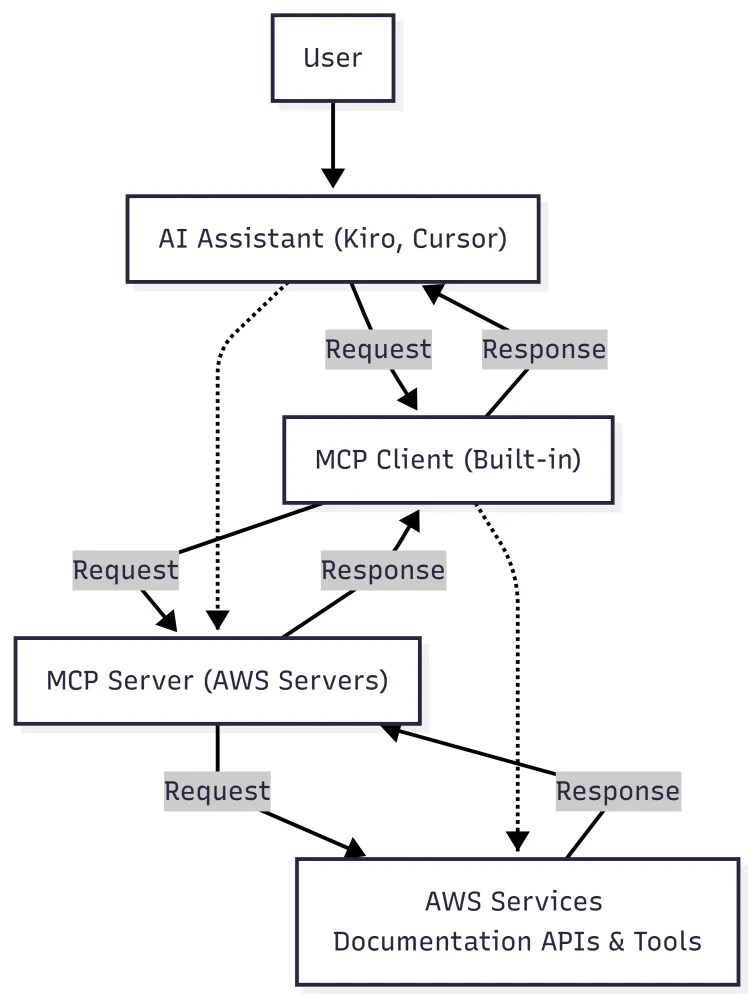
MCP servers are lightweight programs that expose specific capabilities through the standardized protocol. Your AI coding assistant acts as the MCP client, maintaining connections to one or more MCP servers that provide additional context and tools.
Why AWS MCP Servers?
AWS MCP Servers solve several critical challenges when working with AI assistants for cloud development:
1. Improved Output Quality
By providing relevant, up-to-date information directly in the model's context, MCP servers significantly improve responses for AWS-related tasks:
- Reduces hallucinations - No more made-up API parameters or non-existent services
- Accurate technical details - Correct syntax, proper configurations
- Best practices alignment - Recommendations follow current AWS guidelines
2. Access to Latest Information
AI models have knowledge cutoff dates, but AWS releases new services and features constantly. MCP servers bridge this gap by providing:
- Latest API documentation
- New service announcements
- Updated SDK references
- Recent best practices
3. Workflow Automation
MCP servers convert complex AWS workflows into tools that AI assistants can use directly:
- Infrastructure as Code generation
- Resource management
- Cost analysis
- Security assessments
Getting Started Category Servers
Let's dive deep into the four essential MCP servers that form the foundation of our AWS AI-assisted development experience.

1. AWS MCP Server (Managed)
The all-in-one solution for AWS interactions
The AWS MCP Server is a remote, fully-managed MCP server hosted by AWS that combines comprehensive AWS API support with access to the latest documentation. This is the recommended starting point for most users.
Key Features
| Feature | Description |
|---|---|
| Comprehensive AWS API Support | Access to all AWS services through natural language |
| Command Validation | Ensures safety by validating commands before execution |
| Security Controls | Built-in security mechanisms to prevent harmful operations |
| Agent SOPs | Standard Operating Procedures help agents complete tasks accurately |
| Latest Documentation | Real-time access to current AWS documentation |
Configuration (Amazon Kiro CLI)
1
2
3
4
5
6
7
8
9
10
11
12
13
14
{

  "mcpServers": {

    "aws-mcp": {

      "command": "uvx",

      "timeout": 100000,

      "transport": "stdio",

      "args": [

        "mcp-proxy-for-aws@latest",

        "https://aws-mcp.us-east-1.api.aws/mcp",

        "--metadata", "AWS_REGION=us-west-2"

      ]

    }

  }

}
Use Cases
- Infrastructure Management: "List all my EC2 instances in us-west-2"
- Resource Exploration: "Show me the configuration of my production RDS database"
- Service Discovery: "What S3 buckets do I have and their storage classes?"
- Troubleshooting: "Why is my Lambda function timing out?"
2. AWS Knowledge MCP Server
Your gateway to comprehensive AWS knowledge
The AWS Knowledge MCP Server is a fully-managed remote MCP server that provides structured access to the complete AWS knowledge ecosystem - far beyond just documentation.
Knowledge Sources
The server indexes and provides access to:
| Source | Description |
|---|---|
| AWS Documentation | Complete service documentation |
| API References | Detailed API specifications |
| What's New Posts | Latest service announcements |
| Getting Started Guides | Quick-start tutorials |
| Builder Center | Developer resources and patterns |
| Blog Posts | Technical deep-dives and tutorials |
| Architectural References | Reference architectures |
| Well-Architected Guidance | Best practices across pillars |
| Troubleshooting Guides | Error solutions and debugging |
| AWS Amplify Documentation | Full-stack development guidance |
| CDK/CloudFormation Docs | Infrastructure as Code resources |
Available Tools
1. search_documentation
Search across all AWS documentation with optional topic-based filtering.
1
Example: "Search for S3 bucket lifecycle policies"
2. read_documentation
Retrieve and convert AWS documentation pages to markdown format.
1
Example: "Read the documentation for Lambda concurrency limits"
3. recommend
Get content recommendations for AWS documentation pages.
1
Example: "Recommend related content for EC2 Auto Scaling"
4. list_regions
Retrieve a list of all AWS regions with identifiers and names.
1
Example: "List all available AWS regions"
5. get_regional_availability
Check regional availability for services, features, SDK APIs, and CloudFormation resources.
1
Example: "Is Amazon Bedrock available in eu-west-1?"
Configuration
1
2
3
4
5
6
7
8
9
{

  "mcpServers": {

    "aws-knowledge-mcp-server": {

      "url": "https://knowledge-mcp.global.api.aws",

      "type": "http",

      "disabled": false

    }

  }

}
For clients that don't support HTTP transport, use the fastmcp proxy:
1
2
3
4
5
6
7
8
{

  "mcpServers": {

    "aws-knowledge-mcp-server": {

      "command": "uvx",

      "args": ["fastmcp", "run", "https://knowledge-mcp.global.api.aws"]

    }

  }

}
Key Benefits
- No AWS Account Required: Get started immediately without credentials
- No Authentication: Subject to rate limits but freely accessible
- Always Current: Continuously updated with latest AWS information
- Comprehensive Coverage: Goes beyond docs to include blogs, architectures, and more
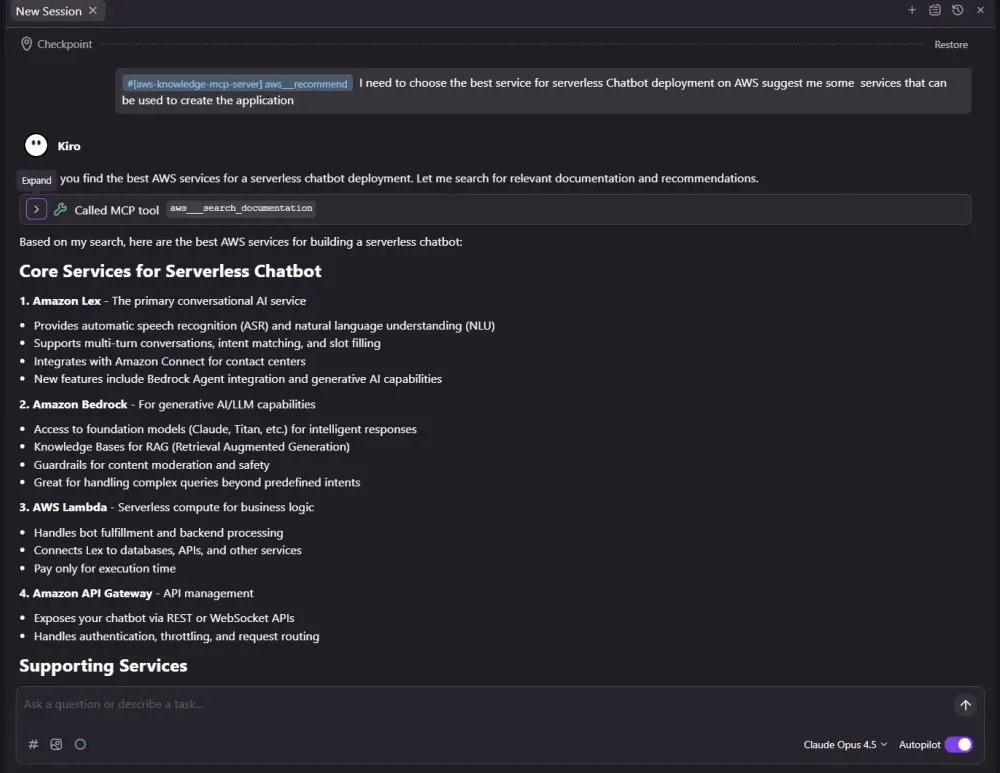
Examples:


3. AWS Documentation MCP Server
Local server for AWS documentation access
The AWS Documentation MCP Server is a locally-hosted MCP server that provides direct access to AWS documentation. It's ideal for users who prefer local execution or need offline-capable documentation access.
Features
| Feature | Description |
|---|---|
| Read Documentation | Fetch and convert AWS docs to markdown |
| Search Documentation | Search using official AWS Search API |
| Recommendations | Get related content suggestions |
| China Region Support | Access AWS China documentation |
| Corporate Network Support | Custom User-Agent for proxy environments |
Available Tools
1. read_documentation
Fetches an AWS documentation page and converts it to markdown format.
1
read_documentation(url: str) -> str
Example Usage:
1
"Look up documentation on S3 bucket naming rules. Cite your sources."
2. search_documentation
Searches AWS documentation using the official AWS Documentation Search API.
1
2
3
4
5
6
7
search_documentation(

    ctx: Context,

    search_phrase: str,

    limit: int,

    product_types: Optional[List[str]],

    guide_types: Optional[List[str]]

) -> SearchResponse
Example Usage:
1
"Search for Lambda cold start optimization techniques"
3. recommend
Gets content recommendations for an AWS documentation page.
1
recommend(url: str) -> list[dict]
Example Usage:
1
"Recommend content for page https://docs.aws.amazon.com/AmazonS3/latest/userguide/bucketnamingrules.html"
4. get_available_services (China only)
Gets a list of available AWS services in China regions.
Configuration
Standard Configuration (Linux/macOS):
1
2
3
4
5
6
7
8
9
10
11
12
13
14
{

  "mcpServers": {

    "awslabs.aws-documentation-mcp-server": {

      "command": "uvx",

      "args": ["awslabs.aws-documentation-mcp-server@latest"],

      "env": {

        "FASTMCP_LOG_LEVEL": "ERROR",

        "AWS_DOCUMENTATION_PARTITION": "aws"

      },

      "disabled": false,

      "autoApprove": []

    }

  }

}
Windows Configuration:
1
2
3
4
5
6
7
8
9
10
11
12
13
14
15
16
17
18
19
20
21
{

  "mcpServers": {

    "awslabs.aws-documentation-mcp-server": {

      "disabled": false,

      "timeout": 60,

      "type": "stdio",

      "command": "uv",

      "args": [

        "tool",

        "run",

        "--from",

        "awslabs.aws-documentation-mcp-server@latest",

        "awslabs.aws-documentation-mcp-server.exe"

      ],

      "env": {

        "FASTMCP_LOG_LEVEL": "ERROR",

        "AWS_DOCUMENTATION_PARTITION": "aws"

      }

    }

  }

}
Environment Variables
| Variable | Description | Default |
|---|---|---|
FASTMCP_LOG_LEVEL | Logging level (DEBUG, INFO, WARNING, ERROR, CRITICAL) | WARNING |
AWS_DOCUMENTATION_PARTITION | AWS partition (aws or aws-cn for China) | aws |
MCP_USER_AGENT | Custom User-Agent for corporate proxies | Chrome-based default |
When to Use Local vs Remote
| Use Case | Recommended Server |
|---|---|
| Quick start, no setup | AWS Knowledge MCP Server (Remote) |
| Corporate network restrictions | AWS Documentation MCP Server (Local) |
| China region documentation | AWS Documentation MCP Server (Local) |
| Offline capability needed | AWS Documentation MCP Server (Local) |
| Comprehensive knowledge access | AWS Knowledge MCP Server (Remote) |
Examples:


4. Core MCP Server
Intelligent orchestration and planning for AWS development
The Core MCP Server is a meta-server that provides intelligent planning capabilities and can dynamically proxy other MCP servers based on role-based configurations. It's the command center for complex AWS development workflows.
Key Features
Planning and Orchestration
Provides tools for prompt understanding and translation to AWS services, helping AI assistants create better execution plans.
Dynamic Proxy Server Strategy
The Core MCP Server can automatically import and proxy other MCP servers based on role-based environment variables, creating tailored configurations for specific use cases.
Role-Based Server Configuration
Enable specific roles by setting environment variables. Each role corresponds to a logical grouping of MCP servers:
| Role | Description | Included Servers |
|---|---|---|
aws-foundation | AWS knowledge and API servers | aws-knowledge-server, aws-api-server |
dev-tools | Development tools | git-repo-research-server, code-doc-gen-server, aws-knowledge-server |
ci-cd-devops | CI/CD and DevOps | cdk-server, cfn-server |
container-orchestration | Container management | eks-server, ecs-server, finch-server |
serverless-architecture | Serverless development | serverless-server, lambda-tool-server, stepfunctions-tool-server, sns-sqs-server |
analytics-warehouse | Data analytics | redshift-server, timestream-for-influxdb-server, dataprocessing-server, syntheticdata-server |
data-platform-eng | Data platform engineering | dynamodb-server, s3-tables-server, dataprocessing-server |
frontend-dev | Frontend development | frontend-server, nova-canvas-server |
solutions-architect | Solution architecture | diagram-server, pricing-server, cost-explorer-server, syntheticdata-server, aws-knowledge-server |
finops | Financial operations | cost-explorer-server, pricing-server, cloudwatch-server, billing-cost-management-server |
monitoring-observability | Monitoring | cloudwatch-server, cloudwatch-appsignals-server, prometheus-server, cloudtrail-server |
caching-performance | Caching | elasticache-server, memcached-server |
security-identity | Security and identity | iam-server, support-server, well-architected-security-server |
sql-db-specialist | SQL databases | postgres-server, mysql-server, aurora-dsql-server, redshift-server |
nosql-db-specialist | NoSQL databases | dynamodb-server, documentdb-server, keyspaces-server, neptune-server |
timeseries-db-specialist | Time series databases | timestream-for-influxdb-server, prometheus-server, cloudwatch-server |
messaging-events | Messaging | sns-sqs-server, mq-server |
healthcare-lifesci | Healthcare and life sciences | healthomics-server |
Available Tools
prompt_understanding
Helps provide guidance and planning support when building AWS Solutions for a given prompt.
Configuration
1
2
3
4
5
6
7
8
9
10
11
12
13
14
15
{

  "mcpServers": {

    "awslabs.core-mcp-server": {

      "command": "uvx",

      "args": ["awslabs.core-mcp-server@latest"],

      "env": {

        "FASTMCP_LOG_LEVEL": "ERROR",

        "aws-foundation": "true",

        "solutions-architect": "true"

      },

      "autoApprove": [],

      "disabled": false

    }

  }

}
Windows Configuration:
1
2
3
4
5
6
7
8
9
10
11
12
13
14
15
16
17
18
19
20
21
22
23
24
{

  "mcpServers": {

    "awslabs.core-mcp-server": {

      "disabled": false,

      "timeout": 60,

      "type": "stdio",

      "command": "uv",

      "args": [

        "tool",

        "run",

        "--from",

        "awslabs.core-mcp-server@latest",

        "awslabs.core-mcp-server.exe"

      ],

      "env": {

        "FASTMCP_LOG_LEVEL": "ERROR",

        "AWS_PROFILE": "your-aws-profile",

        "AWS_REGION": "us-east-1",

        "aws-foundation": "true",

        "solutions-architect": "true"

      }

    }

  }

}
Benefits of the Proxy Server Strategy
- Simplified Configuration: Enable multiple servers with a single environment variable
- Reduced Duplication: Servers are imported only once, even if needed by multiple roles
- Tailored Experience: Create custom server configurations for specific use cases
- Flexible Deployment: Easily switch between different server configurations
5. AWS API MCP Server
Direct AWS CLI access through your AI assistant
The AWS API MCP Server enables AI assistants to interact with AWS services through AWS CLI commands, providing programmatic access to manage your AWS infrastructure.
Key Features
| Feature | Description |
|---|---|
| Comprehensive AWS CLI Support | All commands from the latest AWS CLI version |
| Command Selection Help | Assists in selecting appropriate CLI commands |
| Command Validation | Validates commands before execution |
| Hallucination Protection | Only executes valid AWS CLI commands |
| Security-First Design | Multiple layers of protection |
| Read-Only Mode | Optional restriction to read-only operations |
Available Tools
1. call_aws
Executes AWS CLI commands with validation and proper error handling.
1
Example: "aws ec2 describe-instances --region us-west-2"
2. suggest_aws_commands
Suggests AWS CLI commands based on natural language queries. Provides the 5 most likely CLI commands with complete parameter descriptions.
1
Example: "How do I list all S3 buckets with their sizes?"
3. get_execution_plan (Experimental)
Provides structured, step-by-step guidance for complex AWS tasks through agent scripts.
Configuration
Linux/macOS:
1
2
3
4
5
6
7
8
9
10
11
12
13
{

  "mcpServers": {

    "awslabs.aws-api-mcp-server": {

      "command": "uvx",

      "args": ["awslabs.aws-api-mcp-server@latest"],

      "env": {

        "AWS_REGION": "us-east-1"

      },

      "disabled": false,

      "autoApprove": []

    }

  }

}
Windows:
1
2
3
4
5
6
7
8
9
10
11
12
13
14
15
16
17
{

  "mcpServers": {

    "awslabs.aws-api-mcp-server": {

      "command": "uvx",

      "args": [

        "--from",

        "awslabs.aws-api-mcp-server@latest",

        "awslabs.aws-api-mcp-server.exe"

      ],

      "env": {

        "AWS_REGION": "us-east-1"

      },

      "disabled": false,

      "autoApprove": []

    }

  }

}
Environment Variables
| Variable | Description | Default |
|---|---|---|
AWS_REGION | Default AWS region | us-east-1 |
AWS_API_MCP_PROFILE_NAME | AWS Profile for credentials | default |
READ_OPERATIONS_ONLY | Restrict to read-only operations | false |
REQUIRE_MUTATION_CONSENT | Ask consent before write operations | false |
AWS_API_MCP_WORKING_DIR | Working directory for operations | Platform temp dir |
Security Considerations
- Single User Only: Not designed for multi-tenant environments
- IAM-Based Access Control: Use appropriate IAM roles (ReadOnlyAccess for exploration, AdministratorAccess for full control)
- Read-Only Mode: Set
READ_OPERATIONS_ONLY=truefor safe exploration - Mutation Consent: Set
REQUIRE_MUTATION_CONSENT=truefor explicit approval of write operations
Examples :


Practical Example: Building a Cost-Optimized Architecture
Let's walk through a real-world example of how these MCP servers work together to help you design and implement a cost-optimized AWS architecture.
Scenario
You're tasked with designing a serverless API backend for a new application. You want to ensure it follows AWS best practices and is cost-effective.
Step 1: Research Best Practices (AWS Knowledge MCP Server)
Prompt:
1
2
"What are the best practices for building serverless APIs on AWS?

Include information about API Gateway, Lambda, and DynamoDB."
The AWS Knowledge MCP Server searches across documentation, blogs, and Well-Architected guidance to provide comprehensive recommendations.


Step 2: Check Regional Availability (AWS Knowledge MCP Server)
Prompt:
1
"Check if Lambda SnapStart and API Gateway HTTP APIs are available in eu-central-1"
The server uses
get_regional_availability to confirm service availability in your target region.Step 3: Get Specific Documentation (AWS Documentation MCP Server)
Prompt:
1
"Read the documentation for Lambda provisioned concurrency and when to use it vs SnapStart"
The local documentation server fetches and formats the specific documentation you need.
Step 4: Plan the Architecture (Core MCP Server)
Prompt:
1
2
"Help me plan a serverless architecture with API Gateway, Lambda, and DynamoDB

for a REST API handling 1000 requests per second"
The Core MCP Server's
prompt_understanding tool helps translate your requirements into specific AWS services and configurations.Step 5: Explore Existing Resources (AWS API MCP Server)
Prompt:
1
"List my existing Lambda functions and their configurations in eu-central-1"
The API server executes the appropriate AWS CLI commands to show your current infrastructure.
Step 6: Estimate Costs (Using Cost MCP Servers - covered in Part 5)
Prompt:
1
"Estimate the monthly cost for this architecture with 1000 RPS average load"
Installation Quick Reference
Prerequisites
- Install uv (Python package manager):### macOS/Linux
1
curl -LsSf https://astral.sh/uv/install.sh | sh
Windows (PowerShell)
1
powershell -c "irm https://astral.sh/uv/install.ps1 | iex"
Install Python 3.10+:
1
uv python install 3.10
Recommended Starter Configuration
For most users, start with this configuration combining the essential servers:
1
2
3
4
5
6
7
8
9
10
11
12
13
14
15
16
17
18
19
20
21
22
23
24
25
26
{

  "mcpServers": {

    "aws-knowledge-mcp-server": {

      "url": "https://knowledge-mcp.global.api.aws",

      "type": "http",

      "disabled": false

    },

    "awslabs.aws-api-mcp-server": {

      "command": "uvx",

      "args": ["awslabs.aws-api-mcp-server@latest"],

      "env": {

        "AWS_REGION": "us-east-1",

        "READ_OPERATIONS_ONLY": "true"

      },

      "disabled": false

    },

    "awslabs.aws-documentation-mcp-server": {

      "command": "uvx",

      "args": ["awslabs.aws-documentation-mcp-server@latest"],

      "env": {

        "FASTMCP_LOG_LEVEL": "ERROR"

      },

      "disabled": false

    }

  }

}
Configuration File Locations
| IDE/Tool | Configuration Path |
|---|---|
| Kiro (Global) | ~/.kiro/settings/mcp.json |
| Kiro (Project) | .kiro/settings/mcp.json |
| Cursor | .cursor/mcp.json |
| VS Code | .vscode/mcp.json |
| Claude Code | .mcp.json |
| Windsurf | ~/.codeium/windsurf/mcp_config.json |
Summary
In this first part of our AWS MCP Servers series, we've covered the foundational servers that every AWS developer should know:
| Server | Type | Best For |
|---|---|---|
| AWS MCP Server | Remote/Managed | All-in-one AWS interactions |
| AWS Knowledge MCP Server | Remote/Managed | Comprehensive AWS knowledge access |
| AWS Documentation MCP Server | Local | Direct documentation access, corporate networks |
| Core MCP Server | Local | Orchestration and role-based server management |
| AWS API MCP Server | Local | Direct AWS CLI command execution |
These servers form the foundation for AI-assisted AWS development, providing your coding assistant with the knowledge and capabilities it needs to help you build better cloud applications.
What's Next?
In Part 2: Infrastructure & Deployment, we'll explore the MCP servers that help you build and manage AWS infrastructure:
- AWS IaC MCP Server
- AWS CloudFormation MCP Server
- AWS Terraform MCP Server
- Amazon EKS MCP Server
- Amazon ECS MCP Server
- AWS Serverless MCP Server
- And more!
Resources
- GitHub Repository: github.com/awslabs/mcp
- Documentation Site: awslabs.github.io/mcp
- Model Context Protocol: modelcontextprotocol.io
- AWS Blog: aws.amazon.com/blogs
Thank you for reading Part 1 of the AWS MCP Servers Blog Series! I hope this guide helps you get started with enhancing your AI coding assistant with real-time AWS knowledge and capabilities.
If you found this helpful, please share it with your team and fellow developers. I'd love to hear about your experiences using AWS MCP Servers—feel free to reach out with questions, feedback, or success stories.
Stay tuned for Part 2, where we'll dive into Infrastructure & Deployment servers!
Enjoyed reading this content? Let the author know!
Your likes, comments, shares, and saves help creators reach more builders.

Loading recommendations
Loading article