
Visualizing AWS Lambda Durable Function Workflows with durable-viz
Turn your durable function handlers into flowcharts without deploying. durable-viz uses static analysis to extract workflow structure from TypeScript, Python, and Java (preview) source files. Run it as a CLI, a VS Code extension, or pipe the output into your docs.

If you're new to durable functions, start with the durable functions post for the core concepts. The short version: your handler re-runs from the beginning on every resume, but completed steps return cached results instantly instead of re-executing. The SDK handles this checkpointing and replay transparently.
Durable functions encourage you to write sequential code. But the execution flow isn't always sequential. You have parallel branches that fan out and converge. Conditionals that route to callbacks or skip to the end. Invocations that call other Lambda functions. The more primitives you use, the harder it gets to see the full picture just by reading the handler.
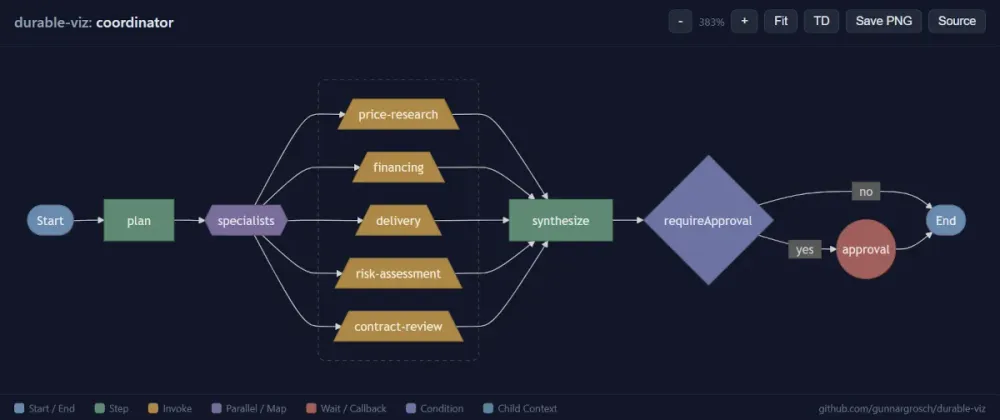
I hit this when building the purchasing coordinator . Five specialist agents dispatched in parallel, a conditional approval callback, plan and synthesis steps on either side. The code reads top to bottom, but the workflow branches and converges in ways that aren't obvious from the source. Two primitives in particular:
context.invoke() calls another Lambda function with automatic checkpointing (unlike the AWS SDK's lambda.invoke() , the result is cached so the target function isn't called again on replay), and waitForCallback suspends the workflow until an external signal arrives. This is how the purchasing coordinator pauses for human approval.So I built durable-viz : a static analysis tool that turns durable function handlers into flowcharts. No deployment, no execution, no AWS credentials. Point it at a source file and it extracts the workflow structure from the code.
It supports TypeScript, Python, and Java. You can run it as a CLI (Mermaid output, browser, or JSON), or as a VS Code extension with a live diagram panel next to your code.
What It Does
Run
durable-viz against any file containing a durable function handler:Bash
npx durable-viz handler.ts --open
It parses the file, extracts the durable primitives (
step , parallel , invoke , waitForCallback , conditionals), builds a directed graph, and renders it as a Mermaid flowchart. The --open flag generates an interactive HTML page with zoom, pan, and PNG export.Bash
npx durable-viz src/handlers/coordinator.ts

The four-phase flow is immediately visible: plan, five specialists fanning out from a parallel node, synthesize, and the conditional approval callback gated by a diamond. The "no" branch skips straight to End. Each node shape encodes the primitive type (the
--open browser view and VS Code extension add color coding). These primitives ( step , parallel , invoke , waitForCallback ) are the SDK methods that automatically checkpoint their results. On replay, completed primitives return cached results without re-executing. That's what makes them "durable."The tool didn't execute the code or read a deployment. It parsed the TypeScript AST, found
withDurableExecution() , walked the handler body, and extracted every durable primitive with its name and structure. The five specialist branches came from resolving the SPECIALISTS registry object at module scope.CLI
The default output is Mermaid flowchart syntax printed to stdout. Paste it into GitHub Markdown, Notion, Confluence, or any Mermaid-compatible renderer.
Bash
npx durable-viz handler.ts
You can change the graph direction from top-down to left-right:
Bash
npx durable-viz handler.ts --direction LR
The
--open flag generates a self-contained HTML page and opens it in your browser. Dark theme, scroll-to-zoom, click-drag panning, and fit-to-view. You can save the diagram as a high-resolution PNG for documentation, pull requests, or presentations.Bash
npx durable-viz handler.ts --open
For custom tooling,
--json outputs the raw workflow graph (nodes, edges, source line numbers):Bash
npx durable-viz handler.ts --json
VS Code Extension
The extension renders the diagram in a side panel next to your code. Install from the VS Code Marketplace , then open a durable function handler and run Durable Viz: Open Lambda Durable Function Workflow from the command palette.
Feature | Description |
|---|---|
Click-to-navigate | Click any node to jump to that line in the source file |
Auto-refresh | Diagram updates on file save |
Save PNG | Export the diagram as a high-resolution transparent PNG |
Source view | View the raw Mermaid syntax or JSON graph |
The extension supports zoom, pan, direction toggle, and fit-to-view. See the Marketplace listing for the full feature list.
Multi-Language Support
The tool supports TypeScript/JavaScript, Python, and Java. Each language has its own parser, but the graph model, edge builder, and renderers are shared.
TypeScript / JavaScript
Uses ts-morph for full AST parsing. This is the most capable parser with two features the others don't have:
- Function-reference following. If your handler calls a helper function that accepts
DurableContext, the parser resolves the call and inlines the helper's durable primitives at the call site. Only works for functions defined in the same file.
- Registry key resolution. For
context.parallel()calls that use.map()over a module-scope registry object, the parser enumerates the registry keys to show all possible parallel branches. This is how the purchasing coordinator's five specialists appear in the diagram even though the code dispatches them dynamically.
Python
Bash
npx durable-viz examples/order_processor.py --direction LR

Finds
@durable_execution decorated handlers and extracts context.<method>() calls. Uses indentation to determine block boundaries.Java (preview)
Bash
npx durable-viz Handler.java --open
Finds classes extending
DurableHandler and extracts ctx.<method>() calls from the handleRequest method. Some primitives ( parallel , waitForCallback , waitForCondition ) are still in development in the Java durable execution SDK.Both the Python and Java parsers use regex rather than full AST parsing. This keeps the tool as a single Node.js package without requiring Python or Java parser dependencies. The trade-off: standard single-line call patterns work well, but method calls split across many lines or unusual argument formatting may not be detected. For most idiomatic durable function code, it works without issues.
Supported Primitives
Primitive | TypeScript | Python | Java (preview) |
|---|---|---|---|
Step | context.step() | context.step() | ctx.step() |
Invoke | context.invoke() | context.invoke() | ctx.invoke() |
Parallel | context.parallel() | context.parallel() | in development |
Map | context.map() | context.map() | in development |
Wait | context.wait() | context.wait() | ctx.wait() |
Wait for Callback | context.waitForCallback() | context.wait_for_callback() | in development |
Create Callback | context.createCallback() | context.create_callback() | ctx.createCallback() |
Wait for Condition | context.waitForCondition() | context.wait_for_condition() | in development |
Child Context | context.runInChildContext() | context.run_in_child_context() | ctx.runInChildContext() |
TypeScript also detects
context.promise.all() , context.promise.any() , context.promise.race() , and context.promise.allSettled() .Visual encoding
Each primitive type has a distinct shape and color:
Node | Shape | Color |
|---|---|---|
Start / End | Stadium | Blue |
Step | Rectangle | Green |
Invoke | Trapezoid | Amber |
Parallel / Map | Hexagon | Purple |
Wait / Callback | Circle | Red |
Condition | Diamond | Indigo |
Child Context | Subroutine | Teal |
How It Works
The tool performs static analysis on your source file. It never imports, executes, or deploys your code.
The architecture is a three-stage pipeline:
text
[source file] → Parser → WorkflowGraph → Renderer → [output]│ │TypeScript / Python / Java Mermaid / JSON
The parser interface
Adding a new language means implementing two methods:
TypeScript
export interface Parser {extensions: string[]parseFile(filePath: string, options?: ParseOptions): WorkflowGraph}
extensions declares which file types the parser handles. parseFile takes a file path and returns a WorkflowGraph with nodes, edges, and source line numbers. The dispatcher selects the right parser by file extension.The graph model
The parser produces a
WorkflowGraph : an ordered list of nodes with branches (for parallel blocks) and metadata (for conditionals). Here's a simplified view of what each node looks like:TypeScript
interface WorkflowNode {id: stringkind: 'start' | 'end' | 'step' | 'invoke' | 'parallel' | 'map'| 'wait' | 'waitForCallback' | 'condition' | /* ... */ // maps to the primitives table abovelabel: stringbranches?: WorkflowBranch[] // for parallel/map nodesthenCount?: number // for conditions: nodes in the then-branchthenReturns?: boolean // for conditions: does then-branch return?sourceLine?: number // 1-based line number for click-to-navigate}
The edge builder constructs edges from the node list, handling sequential flow, parallel fan-out/fan-in, and conditional routing.
For conditionals, the parser tracks whether the
if block ends with a return . If it does, the "yes" branch connects to End instead of falling through. The "no" branch skips the conditional block and continues to the next node.Registry key resolution in practice
Here's a pattern from the purchasing coordinator. Don't worry about the specifics of the durable function code. The key thing is that the parallel branches are built dynamically at runtime from a registry object:
TypeScript
const SPECIALISTS: Record<string, { functionName: string; display: string }> = {'price-research': { functionName: process.env.PRICE_RESEARCH_FUNCTION!, display: 'Price Research' },'financing': { functionName: process.env.FINANCING_FUNCTION!, display: 'Financing' },// ... 3 more}const results = await context.parallel('specialists',plan.specialists.map((spec) => ({name: spec.name,func: async (ctx) => {const result = await ctx.invoke(spec.name, specialist.functionName, { prompt: spec.prompt })return { name: spec.name, response: result.response }},})))
The
.map() call means the parallel branches are determined at runtime. The parser can't execute the code, but it can look at the SPECIALISTS object and enumerate its keys. It finds five keys, creates five invoke branches, and labels them with the key names. This is how the diagram shows all five specialists even though the code builds the branch list dynamically.If the parser can't resolve the registry (the object is imported from another file, or the pattern doesn't match), it falls back to showing a single representative branch.
If you point the tool at a file that isn't a durable function handler, or a file with syntax errors, it exits with a clear error message. The VS Code extension shows the error in the webview panel instead of a diagram.
Design Decisions
Static analysis over runtime tracing
The main design choice: parse the code, don't execute it. Runtime tracing would give you the actual execution path for a specific input, but it requires deployment, credentials, and a real invocation. Static analysis gives you all possible paths from the source alone. You see every parallel branch, every conditional route, every callback. The trade-off is that dynamic branches (like the specialist
.map() ) require heuristics to resolve.For documentation and code review, seeing all possible paths is usually more useful than seeing one specific execution. For debugging a specific run, the durable execution history API (
get-durable-execution ) is the right tool.Language-agnostic graph model
The parsers are language-specific. The graph model, edge builder, and renderers are not. Adding a new language means writing a parser that produces
WorkflowGraph nodes. Everything downstream is shared. The TypeScript parser uses ts-morph for full AST analysis. The Python and Java parsers use regex, which handles standard patterns well but can miss unusual formatting. The regex approach was a deliberate trade-off: full AST parsing for Python would require a Python parser dependency, and Java would need a Java parser. Regex keeps the tool as a single Node.js package.Visual encoding for primitive types
Each primitive type gets a unique shape and color combination so you can identify the primitive at a glance without reading labels. Steps are green rectangles (the most common node). Invocations are amber trapezoids (they call out to external functions). Parallel blocks are purple hexagons (they branch). Callbacks are red circles (they suspend execution). Conditionals are indigo diamonds (standard flowchart convention). The color palette is optimized for dark backgrounds since most developer tools use dark themes.
Try It Out
You'll need:
- Node.js 20+
Run against the examples
Clone the repo and run against the included examples:
Bash
git clone https://github.com/gunnargrosch/durable-viz.gitcd durable-viz# TypeScript order workflownpx durable-viz examples/order-workflow.ts --open# Python order processornpx durable-viz examples/order_processor.py --open# Java order processornpx durable-viz examples/OrderProcessor.java --open
Run against the purchasing coordinator
Bash
cd durable-multi-agent-purchasingnpx durable-viz src/handlers/coordinator.ts --open
Run against your own handler
For your own durable function handlers,
npx downloads and runs the tool directly. No cloning needed:Bash
npx durable-viz path/to/your-handler.ts --open
Install the VS Code extension
Search "Durable Viz" in the Extensions panel, or run:
Bash
ext install gunnargrosch.durable-viz
Open a durable function handler, open the command palette, and run Durable Viz: Open Lambda Durable Function Workflow.
Additional Resources
- Multi-Agent Systems on AWS Lambda with Durable Functions : The purchasing coordinator used as the primary example
- AWS Lambda Durable Functions: Building Long-Running Workflows in Code : Durable execution primitives and the support triage demo
Run
npx durable-viz against your handler and share the diagram. I'd love to see what your workflows look like!Enjoyed reading this content? Let the author know!
Your likes, comments, shares, and saves help creators reach more builders.

Loading recommendations
Loading article