
AWS Lambda Durable Functions: Building Long-Running Workflows in Code
AWS Lambda Durable Functions let you write long-running workflows as sequential code. This post walks through checkpoint/replay, waitForCallback, parallel execution, and a complete AI-powered support ticket triage workflow in TypeScript.

Developer Advocate at Sinch | ex-AWS | AWS Serverless Hero
If you've built anything non-trivial on AWS Lambda, you've hit the wall. The function runs for 15 minutes and it's stateless. Any multi-step workflow requires stitching together Step Functions, SQS queues, DynamoDB tables for state, and a whole lot of glue. It works, but it's a lot of infrastructure for what should be straightforward sequential logic.
AWS Lambda Durable Functions, launched at re:Invent 2025 , change that. You write sequential code in a single Lambda function. The SDK handles checkpointing, failure recovery, and suspension. Your function can run for up to a year, and you only pay for active compute time. During waits (human approvals, timers, external callbacks), the function suspends and compute charges stop.
In this post, I'll walk through what problem durable functions solve, how the checkpoint/replay model works, and then dig into a complete AI-powered support ticket workflow in TypeScript that demonstrates every primitive in action.
What Problem This Solves
Here's a scenario most teams deal with: a support ticket arrives, someone needs to triage it, figure out who should handle it, wait for them to respond, and then close the loop with the customer. Before durable functions, you had a few options:
Step Functions: Define an ASL state machine with states for each step, configure IAM for each integration, manage the state machine as a separate resource. Great for cross-service orchestration, but heavyweight for application logic that naturally reads as sequential code.
SQS + multiple Lambda functions: Break the workflow into separate functions connected by queues. Now you're managing message formats, dead-letter queues, idempotency, and correlating state across function boundaries.
Polling loop with DynamoDB: One function writes state to DynamoDB, another polls for changes. Works, but you're paying for polling compute and managing your own state machine.
All three approaches take what should be straightforward sequential logic and spread it across multiple services, IAM policies, and configuration files.
With durable functions, that same workflow looks like this:
TypeScript
const handler = async (event: TicketEvent, context: DurableContext) => {const analysis = await context.step("analyze", async () => analyzeTicket(event));const response = await context.waitForCallback("agent-review",async (callbackId) => notifyAgent(callbackId, analysis));if (analysis.needsEscalation) {await context.waitForCallback("specialist-review",async (callbackId) => notifySpecialist(callbackId, analysis));}await context.parallel("close-ticket", [{ name: "reply", func: async (ctx) => ctx.step("send-reply", async () => sendReply(response)) },{ name: "survey", func: async (ctx) => ctx.step("send-survey", async () => sendSurvey(event)) },]);return { status: "resolved", ticketId: event.ticketId };};
One function. Sequential code. The SDK handles checkpointing each step, suspending during the human review waits, and resuming when the callbacks arrive.
How Checkpoint/Replay Works
This is the part that makes everything else make sense. Durable functions use a checkpoint and replay model. Here's how it works:
- First invocation: Your handler runs from the beginning. Each
context.step()executes your code and checkpoints the result.
- Suspension: When
context.wait()(fixed-duration pause) orcontext.waitForCallback()(external signal) is called, the function terminates. Compute charges stop.
- Resumption: When the wait completes or a callback arrives, Lambda invokes your handler again from the beginning. But this time, completed steps return their cached results instantly without re-executing. Execution picks up from the first non-checkpointed operation.
text
First invocation:analyze -> [executes Bedrock call, checkpoints result]agent-review -> [creates callback, function suspends]Second invocation (agent responds):analyze -> [returns cached result, skips Bedrock call]agent-review -> [returns callback result]close-ticket -> [sends reply + survey in parallel]
There's one critical rule that falls out of this: code outside steps re-executes on every replay and must be deterministic. If you use
Date.now() , Math.random() , or crypto.randomUUID() outside a step, you'll get different values on each replay. Wrap non-deterministic operations in steps.TypeScript
// Wrong: different value on each replayconst id = crypto.randomUUID();// Right: checkpointed, same value on every replayconst id = await context.step("gen-id", async () => crypto.randomUUID());
What You'll Build
A support ticket triage workflow where AI handles the first pass and humans make the final call. This is the pattern that makes durable functions click: the AI analysis takes seconds, but the human reviews take hours or days. Without durable functions, you'd need to persist state somewhere and wire up resumption logic. With them, you just write
await context.waitForCallback() and the function suspends until the human responds.Primitive | What It Does | Where You'll See It |
|---|---|---|
step() | Execute and checkpoint an atomic operation | AI ticket analysis with Bedrock |
waitForCallback() | Suspend until an external system responds | Agent review, specialist escalation |
parallel() | Run multiple branches concurrently | Customer reply + satisfaction survey |
Retry strategies | Automatic retry with exponential backoff | Bedrock API calls |
context.logger | Replay-aware structured logging (suppresses duplicate output during replay) | Throughout |
The complete source code is on GitHub: github.com/gunnargrosch/durable-support-triage . Clone the repo and run
npm run demo to try the full workflow locally with mocked Bedrock responses, or deploy to AWS and run it with real Bedrock.Getting Started
You'll need:
- An AWS account with credentials configured
- AWS SAM CLI 1.153.1 or later (minimum version with
DurableConfigsupport)
- Node.js 24 or later
- Access to Amazon Bedrock with Claude Haiku 4.5 enabled in your region
Clone and install
Bash
git clone https://github.com/gunnargrosch/durable-support-triage.gitcd durable-support-triagenpm install
The SAM Template
Here's the
template.yaml :YAML
AWSTemplateFormatVersion: "2010-09-09"Transform: AWS::Serverless-2016-10-31Description: AI-powered support ticket triage with durable functionsParameters:BedrockModelId:Type: StringDefault: anthropic.claude-haiku-4-5-20251001-v1:0Description: Bedrock foundation model ID (uses global inference profile prefix automatically)Globals:Function:Timeout: 120MemorySize: 256Runtime: nodejs24.xResources:SupportTriageFunction:Type: AWS::Serverless::FunctionProperties:FunctionName: durable-support-triageHandler: index.handlerCodeUri: src/DurableConfig:ExecutionTimeout: 604800RetentionPeriodInDays: 14Policies:- arn:aws:iam::aws:policy/service-role/AWSLambdaBasicDurableExecutionRolePolicy- Version: "2012-10-17"Statement:- Effect: AllowAction:- bedrock:InvokeModelResource:- !Sub "arn:aws:bedrock:*::foundation-model/${BedrockModelId}"- !Sub "arn:aws:bedrock:${AWS::Region}:${AWS::AccountId}:inference-profile/global.${BedrockModelId}"AutoPublishAlias: liveEnvironment:Variables:BEDROCK_MODEL_ID: !Sub "global.${BedrockModelId}"Metadata:BuildMethod: esbuildBuildProperties:Minify: falseTarget: es2022EntryPoints:- index.tsOutputs:FunctionArn:Value: !GetAtt SupportTriageFunction.ArnAliasArn:Value: !Ref SupportTriageFunctionAliaslive
A few things to note about this template:
-
Globals.Timeout: 120is the standard Lambda invocation timeout. It applies to each individual invocation (each replay round), not the overall workflow. Two minutes is plenty for each replay round.ExecutionTimeoutinDurableConfigis the total wall-clock time for the entire durable execution.
-
DurableConfigis the only new property compared to a standard Lambda function.ExecutionTimeoutis in seconds (604,800 = 7 days). The individual callback timeouts handle the per-step boundaries, but the execution timeout is your outer safety net. A ticket that needs specialist review might sit over a weekend, so 7 days gives headroom.RetentionPeriodInDayscontrols how long execution history is kept (1 to 90 days).
-
AutoPublishAlias: liveautomatically creates a Lambda version and alias on each deploy. This is important for two reasons: durable functions require a qualified ARN (with version or alias) for invocation, and Lambda pins each execution to the version that started it. If you deploy new code while an execution is suspended, replay still uses the original version. This prevents inconsistencies from code changes mid-workflow.
-
AWSLambdaBasicDurableExecutionRolePolicyis an AWS managed policy that grants the checkpoint and state permissions your function needs (lambda:CheckpointDurableExecutions,lambda:GetDurableExecutionState) plus the standard CloudWatch Logs permissions.
- Bedrock IAM uses a cross-region inference profile (
global.prefix on the model ID) so that Bedrock routes requests to whichever region has capacity. The policy needs two resource ARNs: the foundation model (wildcard region, no account ID) and the inference profile (your region and account). TheBedrockModelIdparameter defaults to Claude Haiku 4.5 but you can override it at deploy time with--parameter-overrides BedrockModelId=<model-id>. Check Bedrock model availability for what's enabled in your region.
The RISEN Prompt
The AI triage uses Amazon Bedrock with Claude Haiku 4.5 to analyze incoming tickets. I'm using the RISEN framework for the system prompt. RISEN structures prompts into five components: Role, Instructions, Steps, Expectation, and Narrowing. Each component serves a specific purpose, and together they produce consistent, structured output that your code can reliably parse.
Here's the system prompt for the triage agent:
TypeScript
const TRIAGE_SYSTEM_PROMPT = `# RoleYou are a senior technical support analyst with 10 years of experiencetriaging customer support tickets for a SaaS platform. You specialize incategorizing issues by severity, identifying root causes, and draftingprofessional responses.# InstructionsAnalyze the incoming support ticket and produce a structured triageassessment with category, priority, sentiment, a suggested response,and an escalation recommendation.# Steps1. Read the ticket subject and body to identify the core issue.2. Categorize the issue (billing, technical, account, feature-request, other).3. Assess priority based on business impact and urgency (critical, high, medium, low).4. Evaluate customer sentiment (frustrated, neutral, positive).5. Draft a suggested response that acknowledges the issue and outlines next steps.6. Determine whether the ticket needs specialist escalation.# ExpectationReturn a JSON object with this exact structure:{"category": "billing" | "technical" | "account" | "feature-request" | "other","priority": "critical" | "high" | "medium" | "low","sentiment": "frustrated" | "neutral" | "positive","suggestedResponse": "string","needsEscalation": boolean,"escalationReason": "string or null","summary": "One-sentence summary of the issue"}# Narrowing- Return only raw JSON. Do not wrap it in markdown code fences, backticks,or any other formatting. No explanation, no preamble, no commentary.- Do not fabricate account details or order numbers not present in the ticket.- Do not promise refunds, credits, or policy exceptions in the suggested response.- needsEscalation MUST be false unless one of these exact conditions is met:1. The ticket describes confirmed or suspected data loss.2. The ticket describes a security breach, unauthorized access, or credential compromise.3. The ticket involves a legal or compliance issue.4. The customer tier is "enterprise".For all other tickets (billing issues, bugs, feature requests, general questions),needsEscalation MUST be false regardless of priority or sentiment.- Keep the suggested response under 200 words.`;
The Narrowing section does the heavy lifting for reliability. The explicit numbered escalation conditions prevent the model from over-escalating standard tickets (without these, Haiku flagged a routine CSV bug for specialist review). The constraint against promising refunds keeps the AI from making commitments that only a human should make. The pipe syntax in the Expectation section (
"billing" | "technical" | ... ) is instructional for the model, not literal JSON. It tells the model which values are valid without requiring a separate schema document. Note that "return only raw JSON" doesn't guarantee it: some models still wrap output in markdown code fences despite the instruction. The handler strips them defensively before parsing.The Handler
Here's the handler from
src/index.ts , trimmed to show the durable execution primitives. The full source (input validation, response parsing, integration stubs) is in the repo . Types are defined in src/types.ts . The TRIAGE_SYSTEM_PROMPT shown in the RISEN section above is defined at module scope.TypeScript
import {withDurableExecution, DurableContext,createRetryStrategy, JitterStrategy, defaultSerdes,} from "@aws/durable-execution-sdk-js";import { BedrockRuntimeClient, InvokeModelCommand } from "@aws-sdk/client-bedrock-runtime";import type { TicketEvent, TriageResult, AgentReview, SpecialistReview, TicketResolution } from "./types";const bedrock = new BedrockRuntimeClient();async function closeTicket(context: DurableContext,name: string,email: string,ticketId: string,response: string): Promise<void> {await context.parallel(name, [{name: "send-reply",func: async (ctx) =>ctx.step("reply", async () => {await sendCustomerReply(email, ticketId, response);}),},{name: "send-survey",func: async (ctx) =>ctx.step("survey", async () => {await sendSatisfactionSurvey(email, ticketId);}),},]);}export const handler = withDurableExecution(async (event: TicketEvent, context: DurableContext): Promise<TicketResolution> => {validateEvent(event);context.logger.info("Ticket received", {ticketId: event.ticketId,customerTier: event.customerTier,});// Step 1: AI analyzes the ticket using Bedrockconst analysis = await context.step("analyze-ticket",async () => {const response = await bedrock.send(new InvokeModelCommand({modelId: process.env.BEDROCK_MODEL_ID,contentType: "application/json",accept: "application/json",body: JSON.stringify({anthropic_version: "bedrock-2023-05-31",max_tokens: 1024,system: TRIAGE_SYSTEM_PROMPT,messages: [{role: "user",content: `Ticket ID: ${event.ticketId}\nCustomer Tier: ${event.customerTier}\nSubject: ${event.subject}\n\n${event.body}`,},],}),}));return parseBedrockResponse(response.body as Uint8Array);},{retryStrategy: createRetryStrategy({maxAttempts: 3,initialDelay: { seconds: 2 },maxDelay: { seconds: 30 },backoffRate: 2.0,jitter: JitterStrategy.FULL,}),});// Step 2: Support agent reviews AI suggestionconst agentReview = await context.waitForCallback<AgentReview>("agent-review",async (callbackId) => {await notifyAgent({ callbackId, ticketId: event.ticketId, analysis, customerTier: event.customerTier });},{ timeout: { hours: 8 }, serdes: defaultSerdes });const finalResponse = agentReview.editedResponse || analysis.suggestedResponse;if (!agentReview.approved) {return { status: "rejected", ticketId: event.ticketId, category: analysis.category, priority: analysis.priority, finalResponse: "" };}// Step 3: If escalation needed, wait for specialistif (analysis.needsEscalation) {const specialistResponse = await context.waitForCallback<SpecialistReview>("specialist-review",async (callbackId) => {await notifySpecialist({ callbackId, ticketId: event.ticketId, analysis, agentNotes: agentReview.agentNotes });},{ timeout: { days: 3 }, serdes: defaultSerdes });const resolvedResponse = specialistResponse.response || finalResponse;await closeTicket(context, "close-escalated-ticket", event.contactEmail, event.ticketId, resolvedResponse);return { status: "escalated", ticketId: event.ticketId, category: analysis.category, priority: analysis.priority, finalResponse: resolvedResponse };}// Step 4: Send reply and survey in parallelawait closeTicket(context, "close-ticket", event.contactEmail, event.ticketId, finalResponse);return { status: "resolved", ticketId: event.ticketId, category: analysis.category, priority: analysis.priority, finalResponse };});
Let's walk through what's happening:
withDurableExecution wraps your async function and returns a standard Lambda handler. The runtime calls it like any other handler; the SDK intercepts the execution to manage checkpoints. The BedrockRuntimeClient is instantiated at module scope, which is standard Lambda practice for connection reuse across warm-start invocations. Each replay is a new Lambda invocation, but it may reuse a warm container just like any regular invocation.validateEvent runs before the first context.step() . This is intentional: if the payload is malformed, the execution fails immediately instead of after the Bedrock step has already been checkpointed. Durable executions that fail after partial checkpointing are harder to reason about than ones that fail fast. Validation is deterministic and cheap, so re-running it on every replay is harmless.context.step("analyze-ticket", ...) calls Amazon Bedrock with the RISEN prompt and checkpoints the result. The retry strategy handles transient Bedrock API errors (throttling, temporary unavailability) with exponential backoff. parseBedrockResponse handles the response parsing separately: it strips markdown code fences (some models wrap JSON output despite the prompt instruction), validates the response structure, and gives clear error messages on parse failures. If the function replays later, this step returns the cached analysis without calling Bedrock again. That matters for both cost and consistency: you don't want the AI to produce a different triage on replay.context.waitForCallback("agent-review", ...) is where the function suspends. The SDK creates a callback ID and passes it to your submitter function (which sends it to Slack, email, or your ticketing UI). The submitter runs exactly once, on the invocation that creates the callback. On replay, the SDK skips the submitter entirely and returns the callback result directly. This is important: even though the submitter isn't wrapped in a context.step() , it won't re-execute on replay. The SDK then terminates the Lambda function. Compute charges stop. The agent might respond in minutes or hours. When they do, an external system calls SendDurableExecutionCallbackSuccess with their review. Lambda resumes the function from where it left off. The serdes: defaultSerdes option is required for typed callbacks. Without it, the SDK uses passthrough serialization (not JSON.parse ) and agentReview.approved would be undefined at runtime even though TypeScript thinks it's a boolean. This isn't documented yet: step() defaults to JSON serdes, but waitForCallback defaults to passthrough. The SDK exports defaultSerdes for this purpose. If the callback times out (8 hours for the agent, 3 days for the specialist), the SDK throws a CallbackTimeoutError . In production, wrap the callback in a try/catch to handle the timeout (re-queue the ticket, notify a manager, or auto-escalate).If the agent rejects the AI suggestion (
approved: false ), the workflow returns early with a rejected status without sending a customer reply. Your ticketing system handles the next step (re-queue, reassign, or manual response).The escalation path adds a second
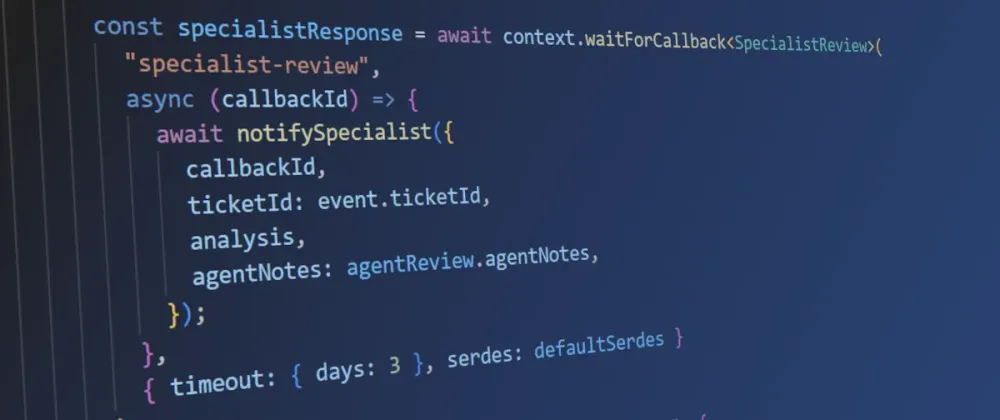
waitForCallback . If the AI flagged the ticket for escalation (security concern, data loss, enterprise customer), the function suspends again waiting for a specialist. The specialist sends back a SpecialistReview with a response and notes. This callback has a 3-day timeout because specialist reviews can take time. Without durable functions, you'd need a separate state machine or database to track which tickets are waiting for specialists.context.logger replaces console.log . During replay, completed steps don't re-execute, but code outside steps does. context.logger suppresses duplicate log output during replay so your CloudWatch Logs stay clean. With console.log , you'd see the same log lines repeated on every replay invocation.closeTicket extracts the parallel close-out into a helper. Both the escalation and standard paths send a customer reply and satisfaction survey concurrently using context.parallel . Each branch gets its own child context with isolated state tracking. The helper takes a dynamic context name so the escalated and standard close-out steps are distinguishable in the execution history.Testing Locally
The testing SDK (
@aws/durable-execution-sdk-js-testing ) lets you run durable functions locally without deploying. Here's the key pattern from src/index.test.ts , showing how to drive a callback-based workflow in a test:TypeScript
import { LocalDurableTestRunner } from "@aws/durable-execution-sdk-js-testing";// jest.mock replaces BedrockRuntimeClient so analyze-ticket returns controlled results// (see full mock setup in the repo)import { handler } from "./index";describe("Support Triage", () => {let runner: LocalDurableTestRunner;beforeAll(async () => {await LocalDurableTestRunner.setupTestEnvironment({ skipTime: true });});afterAll(async () => {await LocalDurableTestRunner.teardownTestEnvironment();});beforeEach(() => {runner = new LocalDurableTestRunner({ handlerFunction: handler });});afterEach(async () => {await runner.reset();});it("should resolve a standard ticket after agent review", async () => {const result = runner.run({payload: {ticketId: "TKT-001",customerId: "CUST-123",customerTier: "pro",subject: "Cannot export CSV reports",body: "When I click the export button, nothing happens.",contactEmail: "customer@example.com",},});// The handler suspends at waitForCallback("agent-review").// getOperation blocks until the callback is created.const agentCallback = await runner.getOperation("agent-review");const agentDetails = await agentCallback.waitForData();await agentDetails.sendCallbackSuccess(JSON.stringify({approved: true,editedResponse: "We have identified the CSV export issue and a fix is rolling out today.",agentNotes: "Known bug, fix in deploy pipeline",}));const output = await result;expect(output.getStatus()).toBe("SUCCEEDED");expect(output.getResult()).toMatchObject({ status: "resolved", ticketId: "TKT-001" });});// Additional tests in the repo: escalation flow, agent rejection, callback failure});
setupTestEnvironment and teardownTestEnvironment are static methods that start and stop the local checkpoint server. They run once per test file in beforeAll / afterAll . The runner instance is created per test in beforeEach and reset in afterEach . The skipTime: true option fast-forwards any context.wait() calls so tests run instantly.The interesting part is the callback interaction:
runner.getOperation("agent-review") blocks until the handler reaches waitForCallback("agent-review") and creates the callback. Then sendCallbackSuccess simulates the external system responding. This lets you test the full suspend/resume lifecycle without deploying. The repo includes tests for all three paths: standard resolution, escalation with specialist review, and agent rejection. There's also a test that uses sendCallbackFailure to verify error handling when an external system reports a failure.Run the tests with
npm test , or use the run-durable CLI to run the handler directly with a payload:Bash
npx run-durable --skip-time --verbose --event '{"ticketId":"TKT-001","subject":"Test ticket"}' src/index.ts
Try the Demo
The repo includes an interactive demo that runs the entire workflow in your terminal, showing each stage: AI analysis, human review prompts, checkpoint history, and final resolution.
Run
npm run demo to open the interactive menu, or skip it with a direct command:Local mode (no AWS credentials needed)
Bash
npm run demo:local -- --ticket=standard
Local mode uses mocked Bedrock responses so you can see the full workflow without calling AWS. Here's what the first few steps look like:
text
──────────────────────────────────────────────Ticket TKT-001Customer: CUST-123 (pro)Subject: Cannot export CSV reports──────────────────────────────────────────────▶ step: analyze-ticket✓ Checkpointed analyze-ticket (1204ms)──────────────────────────────────────────────AI Triage ResultCategory: technicalPriority: highSentiment: frustratedEscalation: No──────────────────────────────────────────────⏸ waitForCallback: agent-reviewFunction suspended. Compute charges stopped.
The demo pauses at each callback and prompts you to respond as the agent or specialist. It walks through three ticket scenarios:
- Standard ticket (pro tier, CSV export bug): AI analyzes, agent approves with edits, reply sent.
- Enterprise escalation (security concern): AI flags for escalation, agent approves, specialist reviews, reply sent.
- Agent rejection (feature request): AI suggests a response, agent rejects, ticket returned for manual handling.
At each human review step, the demo pauses and lets you play the role of the support agent or specialist. You approve, reject, or edit the AI's suggestion. The demo shows the execution history after each step so you can see the checkpoint/replay model in action.
Cloud mode (real Bedrock responses)
Bash
npm run demo:cloud -- --ticket=standard --region=us-east-2
Cloud mode invokes the deployed Lambda function with real Bedrock calls. You'll see actual AI-generated triage analysis and can watch the durable execution checkpoints in the Lambda console. Add
--profile=<name> if you're not using the default AWS profile.Deploying and Invoking
Build and deploy:
Bash
sam buildsam deploy --guided
Once deployed, invoke the function asynchronously with a qualified ARN. The
AutoPublishAlias in the template created a live alias:Bash
aws lambda invoke \--function-name durable-support-triage:live \--invocation-type Event \--durable-execution-name "ticket-TKT-001" \--cli-binary-format raw-in-base64-out \--payload '{"ticketId": "TKT-001","customerId": "CUST-123","customerTier": "pro","subject": "Cannot export CSV reports","body": "When I click the export button, nothing happens.","contactEmail": "customer@example.com"}' \response.json
A few things to note:
-
--invocation-type Eventis required for long-running workflows. Synchronous invocation (RequestResponse) times out after 15 minutes.
-
--durable-execution-nameprovides built-in idempotency. If you invoke the function twice with the same execution name, the second invocation returns the existing execution instead of creating a duplicate. Using the ticket ID as the execution name is a natural fit. Note: execution names must be alphanumeric, hyphens, or underscores. If your ticket IDs contain dots, slashes, or other special characters, sanitize them first.
-
:liveon the function name is the alias qualifier. Without it, you'll getInvalidParameterValueException: Durable execution requires qualified function identifier.
Monitoring execution progress
Check execution status in the Lambda console under the Durable executions tab. You'll see each step's status and timing, including when the function suspended waiting for the agent callback.
You can also check programmatically:
Bash
aws lambda get-durable-execution \--durable-execution-arn "arn:aws:lambda:us-east-2:123456789012:function:durable-support-triage:live/durable-execution/ticket-TKT-001/<run-id>"
Replace
<run-id> with the run ID returned in the initial invoke response. You can also find it in the Lambda console under the Durable executions tab.Completing the callbacks
When the support agent finishes their review, send the callback from your ticketing system:
Bash
aws lambda send-durable-execution-callback-success \--callback-id "your-callback-id-here" \--cli-binary-format raw-in-base64-out \--result '{"approved": true,"editedResponse": "Hi, thanks for reporting this. We have identified the issue and a fix is rolling out today.","agentNotes": "Known bug in CSV export module"}'
The
--result value is a JSON string. The CLI handles serialization, so you pass the JSON object directly (unlike the test SDK, where you explicitly call JSON.stringify() ).The function resumes, checks for escalation, and continues. If a specialist callback is pending, the same pattern applies: the specialist's system calls
send-durable-execution-callback-success when their review is complete. There's also send-durable-execution-callback-failure for when an external system needs to report an error (e.g., agent rejects the ticket, or an integration fails).You can also react to execution state changes via EventBridge. Lambda emits events to the default event bus when executions start, succeed, fail, or time out. Create an EventBridge rule with this event pattern:
JSON
{"source": ["aws.lambda"],"detail-type": ["Durable Execution Status Change"]}
Gotchas and Hard-Won Lessons
Determinism is not optional
This is the rule that trips people up. Code outside steps re-executes on every replay. If it produces different results each time, your workflow breaks in subtle ways.
TypeScript
// This generates a different ID on each replayconst requestId = crypto.randomUUID();await context.step("use-id", async () => saveToDb(requestId));// This generates one ID, checkpoints it, and returns the same value on replayconst requestId = await context.step("gen-id", async () => crypto.randomUUID());await context.step("use-id", async () => saveToDb(requestId));
The same applies to
Date.now() , Math.random() , API calls, and database queries. If it can return different values, wrap it in a step.The ESLint plugin (
@aws/durable-execution-sdk-js-eslint-plugin ) catches common violations. Set it up early.Closure mutations are lost on replay
Variables you modify inside a step are not preserved across replays:
TypeScript
let total = 0;await context.step("calculate", async () => {total = 42; // This mutation is lost on replay});console.log(total); // Always 0 on replay// Instead, return values from stepstotal = await context.step("calculate", async () => 42);console.log(total); // Always 42
This is because the step function doesn't re-execute on replay. It returns the cached result. But the closure variable was modified by the function body, which never ran. Return values from steps instead of modifying outer variables.
The qualified ARN requirement is easy to miss
Durable functions require a qualified function identifier: a version number, alias, or
$LATEST . Using an unqualified ARN silently fails or throws InvalidParameterValueException .The
AutoPublishAlias SAM property solves this. It creates a new version and updates the alias on every deploy. If you're using EventBridge Scheduler or other services to invoke your function, make sure they target the alias ARN, not the unqualified ARN.More steps means slower replay
Every time your function resumes, the SDK replays from the beginning, returning cached results for completed steps. The more steps you have, the more replay overhead per resumption.
This is a trade-off. More granular steps give you better debuggability and more precise retry boundaries. Fewer steps give you faster replay. In practice, group related operations into a single step unless you need separate retry behavior or checkpoint boundaries.
context.wait() is the simplest superpower
The "How Checkpoint/Replay Works" section mentions
context.wait() for fixed-duration pauses, but the handler only uses waitForCallback() . In practice, context.wait() is one of the most useful primitives. Need a 24-hour cooling-off period before sending a follow-up? One line:TypeScript
await context.wait("cooling-off", { hours: 24 });
The function suspends, compute charges stop, and Lambda resumes it 24 hours later. No cron jobs, no EventBridge Scheduler, no polling.
You can't enable durable execution on existing functions
DurableConfig can only be set when creating a function. You can't toggle it on an existing function. If you need to migrate, you'll need to create a new function. Plan for this.Changing
DurableConfig in CloudFormation also requires resource replacement, not an in-place update.Checkpoint payloads have a 256KB limit
Each step result is serialized and stored as a checkpoint. If a step returns an object larger than 256KB, you'll get a
CheckpointUnrecoverableExecutionError .The workaround: store large data in S3 or DynamoDB and return a reference from the step.
TypeScript
const dataRef = await context.step("store-large-data", async () => {const key = `tickets/${ticketId}/attachments.json`;await s3.putObject({ Bucket: bucket, Key: key, Body: JSON.stringify(largeData) });return { bucket, key };});
Know your failure modes
If a step throws an unrecoverable error (after all retries are exhausted), the execution moves to a
FAILED state. You can inspect the error in the Lambda console or via the get-durable-execution API. For cases where you want to fail immediately without retries, throw an UnrecoverableInvocationError :TypeScript
import { UnrecoverableInvocationError } from "@aws/durable-execution-sdk-js";throw new UnrecoverableInvocationError("Customer account not found");
Failed executions can't be resumed. You'd need to start a new execution. Design your workflows so that steps are idempotent in case you need to re-run from scratch.
Use Lambda versions for deploy safety
If you update your function code while an execution is suspended, replay uses the version that started the execution. This prevents inconsistencies from code changes mid-workflow.
AutoPublishAlias handles this, but it's worth understanding why: if your new code changes a step's return shape or removes a step, replay on the old version still works because Lambda pins executions to their starting version.Version pinning protects your function code, but it doesn't protect external schemas. If an execution suspends on Monday waiting for a callback, and on Wednesday your ticketing system starts sending a different JSON structure in the callback payload, the Monday execution will fail when it resumes. Keep callback payloads backwards compatible for as long as executions can be in flight.
Plan your observability early
For production workflows that can run for days, go beyond basic CloudWatch Logs. Set up CloudWatch alarms on stuck executions (no state change within expected timeframes), use the EventBridge integration to track execution lifecycle events, and consider CloudWatch Logs Insights queries for filtering by execution name across replays.
When to Use What
Durable functions and Step Functions are not competing. They solve different problems.
| Durable Functions | Step Functions |
|---|---|---|
Workflow definition | Sequential code in your language | Amazon States Language (JSON/YAML) |
Best for | Application logic, tightly coupled workflows | Cross-service orchestration |
Service integrations | Via SDK in your code | 220+ native integrations |
Debugging | CloudWatch Logs, execution history | Visual console, step-by-step |
Infrastructure | Single Lambda function | State machine + Lambda functions |
Scaling | Lambda concurrency limits | Distributed Map for large-scale parallel processing |
Mental model | Write code | Design state machines |
On cost: durable functions use standard Lambda pricing for active compute time. During waits, compute charges stop. Step Functions charges per state transition, which adds up for high-volume workflows. See Lambda pricing and Step Functions pricing for current details.
Use durable functions when your workflow is application logic that reads naturally as sequential code. Support ticket triage, approval workflows, AI agent loops, saga patterns.
Use Step Functions when you're orchestrating across multiple AWS services, need visual debugging, or need the 220+ native integrations. ETL pipelines, media processing, infrastructure provisioning.
Use both together when you have a high-level orchestration (Step Functions) that delegates to individual workflows (durable functions) for complex application logic.
What's Next
This post covered the fundamentals: what durable functions are, how checkpoint/replay works, and how to build and test a complete AI-powered workflow with human-in-the-loop callbacks. In the next post, I'll use durable functions to build a multi-agent orchestration workflow where multiple AI agents collaborate on complex tasks with checkpointed reasoning.
Additional Resources
What workflows are you thinking about building with durable functions? Let me know in the comments!
Enjoyed reading this content? Let the author know!
Your likes, comments, shares, and saves help creators reach more builders.

Loading recommendations
Loading article