

Claude Code on Bedrock — Part 2: Scaling with Budgets and Self Service
Give every developer their own API key, set team-level budgets, and finally answer "who spent what on AI last month", all by putting a LiteLLM Gateway between Claude Code and Bedrock. This post covers gateway deployment options, virtual key management, budget enforcement, and client-side configuration.

Claude Code on Bedrock — Part 2: Scaling with Budgets and Self Service
This is Part 2 of a 4-part series on running Claude Code on AWS Bedrock. By the end of this post, you'll be able to attribute and budget AI spend per team and per developer.
1. The Problem
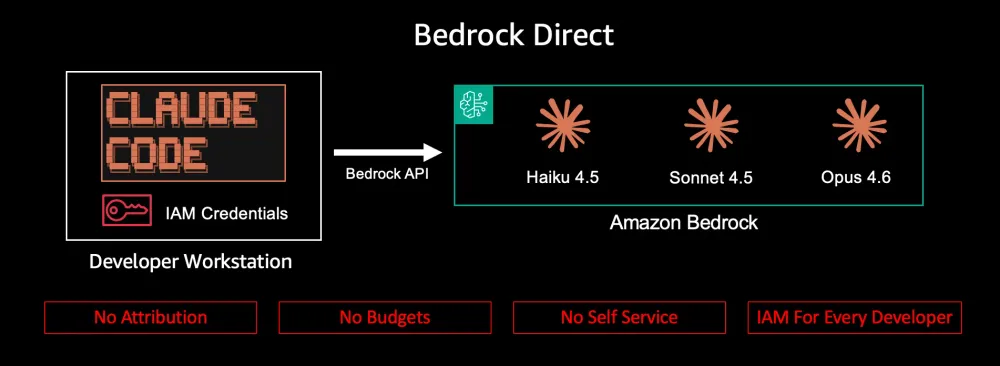
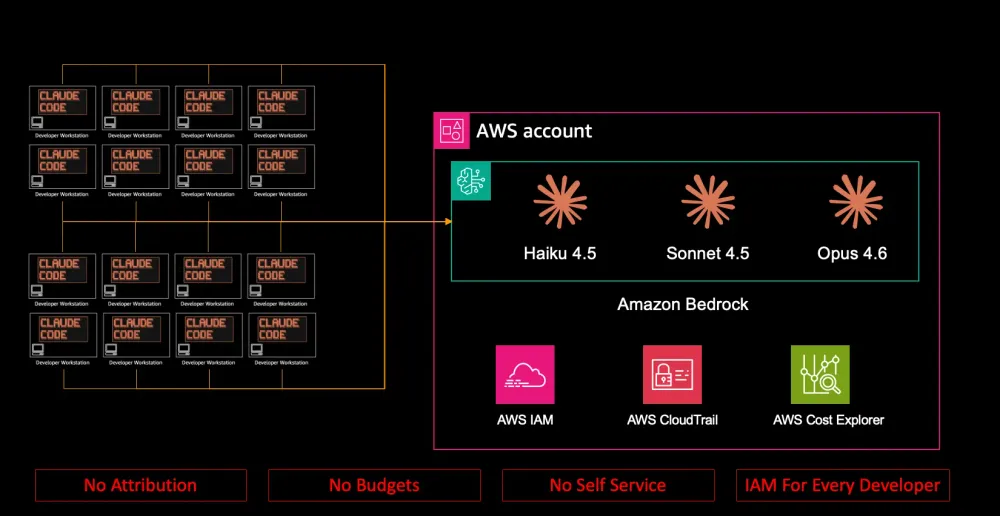
In Part 1 , we configured Claude Code to talk directly to Bedrock. It works — but as your team grows, you'll hit three pain points:
No Cost Attribution
When you look at your AWS bill, you see a single line item: Bedrock usage. You can't answer basic questions:
- How much did the platform team spend on Claude Code last month?
- Which developer is consuming the most tokens?
- Are we staying within our $2,000/month AI budget per team?
- Is anyone running Opus when Sonnet would do?
Bedrock doesn't offer per-key or per-user cost attribution. IAM controls whether someone can call Bedrock, not how much they can spend. There's no built-in mechanism for team budgets, spending alerts, or usage dashboards.
IAM Configuration Overhead
Each developer needs:
- AWS credentials configured locally
- IAM permissions for
bedrock:InvokeModelandbedrock:InvokeModelWithResponseStream
- Access to the correct AWS region(s)
When a new developer joins, the platform team manually provisions IAM users or roles, attaches policies, and distributes credentials. When someone leaves, you revoke IAM access. When a contractor needs temporary access for a 3-month engagement, you're creating and cleaning up IAM entities.
No Self-Service
Developers can't help themselves. They can't:
- Get access without opening a ticket with the platform team
- Check their own usage or budget status
- Switch to a different model without IAM policy changes
The platform team becomes a bottleneck. Every access request, every permission change, every budget question flows through them.
If you have 5 developers, this is manageable. If you have 50, it's a governance gap.
2. Architecture Overview
The solution is an AI gateway — a lightweight proxy that sits between Claude Code and Bedrock. The gateway speaks the Anthropic API on the frontend and translates to Bedrock API calls on the backend. Claude Code doesn't know or care that there's a proxy in the middle.
This architecture shift solves all three problems:
- Cost attribution: The gateway logs every request with key, team, model, and cost
- IAM simplification: The gateway uses a single IAM role for Bedrock — developers just need an API key
- Self-service: Developers create their own API keys through the Admin UI. No IAM changes needed. Team management remains admin-controlled. The gateway can integrate with your existing identity providers (Okta, Azure AD, Auth0) for authentication and provisioning (note: SSO integration requires LiteLLM Enterprise as of February 2026).
We use LiteLLM — an open-source proxy that translates between different LLM provider APIs.
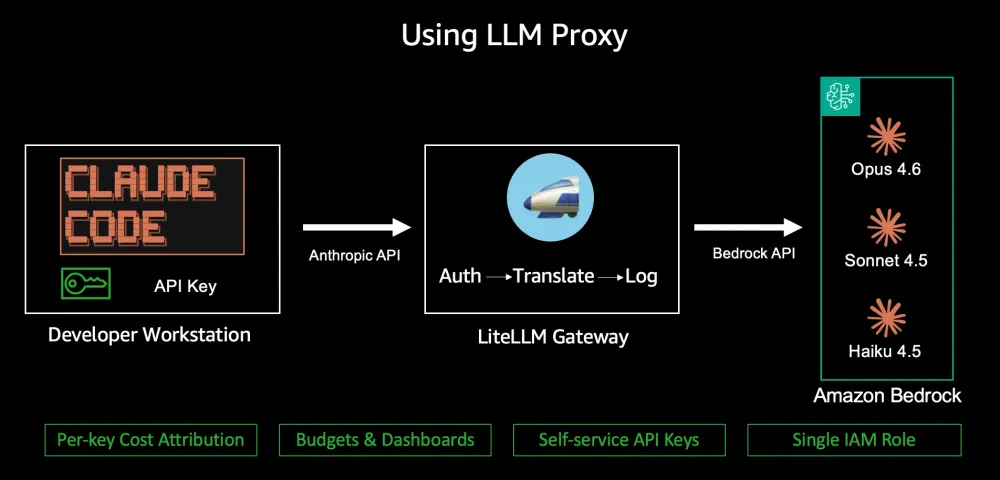
Every request flows through the gateway, which:
- Authenticates the developer with a virtual API key
- Translates the model name (e.g.,
claude-sonnet-4.5→ Bedrock model ID)
- Forwards the request to Bedrock using the gateway's IAM role
- Logs the request with key ID, team, model, token count, and cost
The key insight: LiteLLM speaks the Anthropic Messages API natively. Claude Code connects to it exactly as it would connect to Anthropic's API, same endpoints, same request format, same streaming protocol. The only difference is the base URL and the API key. The translation layer is invisible to the developer.
3. How to Deploy
You have two deployment options: use the AWS-provided turnkey solution, or deploy LiteLLM yourself.
Option 1: AWS Multi-Provider Generative AI Gateway Solution

AWS provides a production-ready solution that deploys LiteLLM on AWS infrastructure with everything pre-configured:
This solution includes:
- EC2 or ECS compute options
- RDS PostgreSQL for state and usage data
- Security groups and IAM roles pre-configured
- Bedrock integration ready to use
Follow the repository's README for deployment instructions. This is the fastest path to production.
Option 2: Deploy LiteLLM Directly
LiteLLM can be deployed in various environments. See the LiteLLM deployment documentation for instructions on:
- Docker / Docker Compose — Run locally or on any container platform
- Kubernetes / Helm — Deploy to EKS or self-managed clusters
- AWS ECS/Fargate — Deploy directly without using the AWS solution
For Bedrock integration, you'll need to configure AWS credentials and the model mappings shown in the next section.
Additional reading: For a detailed walkthrough of deploying LiteLLM on ECS with Terraform, including team configuration and rate limiting setup, see Zhiying Lee's post: Scale Claude Code to hundreds of developers using Amazon Bedrock with self-managed usage limits .
The rest of this post assumes you have a running gateway and focuses on configuration, team setup, and cost visibility.
4. Gateway Configuration for Bedrock
The gateway needs a model mapping: friendly names that developers use, translated to Bedrock model IDs that AWS understands.
Here's the gateway configuration (
litellm_config.yaml ):model_list: # Primary model — Claude Sonnet 4.5 via global inference profile - model_name: claude-sonnet-4.5 litellm_params: model: bedrock/global.anthropic.claude-sonnet-4-5-20250929-v1:0 aws_region_name: us-east-1
# Fast model — Claude Haiku 4.5 for quick operations - model_name: claude-haiku-4.5 litellm_params: model: bedrock/global.anthropic.claude-haiku-4-5-20251001-v1:0 aws_region_name: us-east-1
# Premium model — Claude Opus 4.6 for complex tasks - model_name: claude-opus-4.6 litellm_params: model: bedrock/global.anthropic.claude-opus-4-6-v1 aws_region_name: us-east-1
litellm_settings: drop_params: true set_verbose: false
general_settings: master_key: sk-your-master-key database_url: postgresql://user:pass@host:5432/litellm database_connection_pool_limit: 10 database_connection_timeout: 60Developers never see Bedrock model IDs. They use simple names like
claude-sonnet-4.5 and the gateway handles the translation.The
bedrock/ prefix tells LiteLLM to use the Bedrock provider. The global. prefix on the model ID enables cross-region inference (see Part 4 for details).5. Client-Side Configuration
Here's what the configuration change looks like on each developer's machine. Note: This is a sample configuration. Developers will need to obtain their own virtual API key from the LiteLLM gateway (see Section 6 for key generation).
Before (direct Bedrock — from Part 1):
{ "env": { "CLAUDE_CODE_USE_BEDROCK": "1", "ANTHROPIC_MODEL": "sonnet", "ANTHROPIC_DEFAULT_SONNET_MODEL": "global.anthropic.claude-sonnet-4-5-20250929-v1:0", "ANTHROPIC_DEFAULT_HAIKU_MODEL": "global.anthropic.claude-haiku-4-5-20251001-v1:0", "ANTHROPIC_DEFAULT_OPUS_MODEL": "global.anthropic.claude-opus-4-6-v1", "DISABLE_PROMPT_CACHING": "0" }}After (through the gateway):
{ "env": { "ANTHROPIC_BASE_URL": "https://your-gateway-endpoint/v1", "ANTHROPIC_API_KEY": "sk-team-platform-abc123", "ANTHROPIC_MODEL": "sonnet", "ANTHROPIC_DEFAULT_SONNET_MODEL": "claude-sonnet-4.5", "ANTHROPIC_DEFAULT_HAIKU_MODEL": "claude-haiku-4.5", "ANTHROPIC_DEFAULT_OPUS_MODEL": "claude-opus-4.6", "DISABLE_PROMPT_CACHING": "0" }}The
ANTHROPIC_API_KEY value shown is a placeholder: developers obtain their actual key from the gateway (instructions in Section 6).The
ANTHROPIC_BASE_URL is your gateway's endpoint — this could be an ALB DNS name for public access, or an internal DNS name via VPN for private access. The gateway supports both public and private access patterns depending on your security requirements (covered in Part 3).What changed:
Setting | Before | After |
|---|---|---|
CLAUDE_CODE_USE_BEDROCK | 1 | Removed — the gateway handles Bedrock |
ANTHROPIC_BASE_URL | Not set (uses Anthropic default) | Your gateway endpoint |
ANTHROPIC_API_KEY | Not set (uses AWS creds) | Virtual key from the gateway |
ANTHROPIC_DEFAULT_SONNET_MODEL | Bedrock model ID | Gateway model name |
ANTHROPIC_DEFAULT_HAIKU_MODEL | Bedrock model ID | Gateway model name |
ANTHROPIC_DEFAULT_OPUS_MODEL | Bedrock model ID | Gateway model name |
This is the key simplification: Developers no longer need AWS credentials, IAM policies, or permission configuration. They just need a virtual API key. The gateway handles all Bedrock authentication using its own IAM role. When a new developer joins, it generate a key via the UI, no IAM provisioning, no ticket to the platform team. This is self-service access with a cleaner security boundary.
6. Creating Teams and Virtual Keys
This is where cost attribution happens. The gateway's admin API lets you create teams, generate scoped keys, and set budgets. You'll use the gateway's Admin UI or API (with your master key) to set this up.
Step 1: Create Teams
Using the gateway's Admin UI or the
/team/new API endpoint, create teams that match your organizational structure. For each team, specify:- Team name — A human-readable alias like "platform-team" or "data-engineering"
- Monthly budget — Maximum spend for the entire team (e.g., $2,000/month)
- Budget duration — How often budgets reset (typically "30d" for a 30-day rolling window)
- Model access — Which models this team can use (e.g., all three: Sonnet, Haiku, Opus)

Step 2: Generate Keys for Developers
Keys can be created in two ways:
- Self-service — Developers create their own keys through the Admin UI
- Admin-generated — An admin creates keys using the
/key/generateAPI endpoint or the Admin UI

What Happens Now
Every request the developer makes is:
- Authenticated against their key
- Attributed to them personally and to their team
- Budget-checked against both their individual limit and the team's limit
The platform team can repeat this pattern for each developer or developers can create their own keys through the Admin UI. Either way, no IAM provisioning or credential distribution needed.
7. Budget Enforcement
When a budget is exceeded, the gateway rejects requests with an HTTP 401 error:
"Budget has been exceeded: User alice has exceeded their budget. Current spend: 501.32; Max Budget: 500" . Claude Code handles this gracefully — the developer sees a message that their budget has been reached.Budget Hierarchy

Budgets are enforced at two levels:
- Key-level budget — per-developer limit (e.g., Alice's $500/month)
- Team-level budget — aggregate limit for the team (e.g., platform team's $2,000/month)
Both must have remaining budget for a request to succeed. If Alice has budget left but the team is at $2,000, the request fails.
Rolling vs Fixed Budgets
The
budget_duration field controls how budgets reset:Duration | Behavior |
|---|---|
30d | Resets every 30 days from key creation |
7d | Weekly rolling budget |
1d | Daily rolling budget |
1h | Hourly rolling budget |
For most teams,
30d (30-day rolling window) is the right choice, it provides monthly budget cycles that align with your finance team's reporting periods.Checking Budget Status
Budget status is currently available via the API:
# Check key budget statuscurl -s http://your-gateway-endpoint/key/info \ -H "Authorization: Bearer sk-your-key" \ | jq '{spend: .info.spend, max_budget: .info.max_budget, budget_reset_at: .info.budget_reset_at}'UI-based budget visibility is per key only.

The same information is available via the
/key/info API endpoint for programmatic monitoring.8. Visualizing Spend
The gateway includes an Admin UI that gives you real-time spending dashboards. Access it at
https://your-gateway-endpoint/ui with your master key.Usage Dashboard
The main dashboard shows spend over time, broken down by team. You can see at a glance which teams are the heaviest consumers and whether anyone is approaching their budget.

Key Management
The key management page shows all active keys, their team assignments, budget allocations, and current spend. This is where you monitor individual developer usage.

Model Usage Breakdown
The model usage view shows which models are being called, how many tokens each consumes, and the cost per model. This helps you spot optimization opportunities — if most spend is on Opus but Sonnet would suffice, you know where to focus.

Programmatic Access for FinOps
The Admin UI covers day-to-day monitoring. For integration with your existing FinOps tooling, the same data is available via the gateway's API using your master key:
-
/team/info— Get spend and budget status for a specific team
-
/key/list— List all keys with current spend data
-
/spend/logs— Query detailed request logs with filters
All usage data is stored in PostgreSQL, so you can also query the database directly for custom chargeback reports, Slack budget alerts, or anomaly detection. The LiteLLM documentation has complete API reference for all endpoints.
9. What's Next
You now have per-developer cost attribution, team budgets, and spending visibility. The next question your CISO will ask: "Who can access which models? Where are the audit logs? How do we handle contractor access?"
That's Part 3.
This is Part 2 of 4 in the "Claude Code on Bedrock" series.
Enjoyed reading this content? Let the author know!
Your likes, comments, shares, and saves help creators reach more builders.

Loading recommendations
Loading article