
Claude Code on Bedrock — Part 1: Getting Started
Configure Claude Code to run on AWS Bedrock, keeping your code and prompts in your own AWS account with existing security controls and consolidated billing. By the end, you'll have Claude Code making requests to Bedrock instead of Anthropic's API.

Claude Code on Bedrock — Part 1: Getting Started
This is Part 1 of a 4-part series on running Claude Code on AWS Bedrock. By the end of this post, you'll have Claude Code talking to Bedrock in your own AWS account.
1. Claude Code
Claude Code is an agentic coding tool from Anthropic. It doesn't just autocomplete lines — it reads your codebase, reasons about architecture, runs commands, edits files across your project, and iterates on its own work. Think of it as an engineer sitting next to you in the terminal, not a tab-completion engine.
That capability comes with a new set of requirements: the model needs context about your code, your infrastructure, your conventions. It sends and receives a lot of data. And when your team adopts it, you need to think about where that data goes, who's paying for it, and how you govern it.
That's where Bedrock comes in.
2. Why Bedrock
AWS Bedrock provides access to Claude models through your own AWS account, with all AWS security and privacy controls.
Running Claude Code through Bedrock gives you:
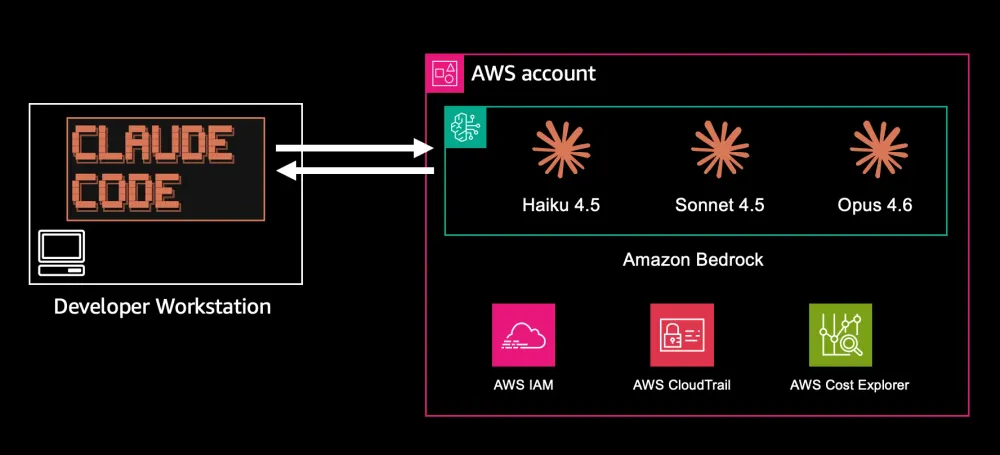
Data residency - Your prompts and code context never leave your AWS account. There's no data flowing to a third-party API endpoint. For companies with data classification policies or regulatory requirements, this is often the deciding factor.
Existing governance - Bedrock sits inside your AWS account, which means it inherits your existing IAM policies, VPC configurations, CloudTrail logging, and SCPs. You don't need to build a new governance framework — you extend the one you already have.
Consolidated billing - Bedrock usage shows up on your AWS bill alongside the rest of your infrastructure. No separate vendor contract, no separate procurement process, no credit card on file with another provider.
Potential cost advantages - If your organization has an AWS Enterprise Discount Program (EDP) commitment, Bedrock spend potentially counts toward that commitment. That's a potential saving you don't get with a direct Anthropic API contract.
3. Before You Start
Make sure you have:
- AWS account with Bedrock access - Claude models must be explicitly enabled in the Bedrock console.
- AWS CLI configured on your laptop. You need local AWS credentials to access Bedrock from your machine. You can follow this guide .
- Claude Code installed. Follow the official installation guide .
Verifying Bedrock Access
Confirm your credentials work and models are available:
# Verify AWS credentialsaws sts get-caller-identity
# List available inference profiles (including global cross-region profiles)aws bedrock list-inference-profiles \  --region us-east-1 \  --query 'inferenceProfileSummaries[?contains(inferenceProfileId, `anthropic`)].inferenceProfileId' \  --output table
You should see inference profile IDs like
global.anthropic.claude-sonnet-4-5-20250929-v1:0 in the output.4. Configuring Claude Code for Bedrock
This guide uses user-level settings in
~/.claude/settings.json which applies to all your projects. If you have project-level ( .claude/settings.json ), local ( .claude/settings.local.json ), or environment variable configurations, make sure to update those as well. Learn more about settings scopes .To point Claude Code at Bedrock, set these environment variables in
~/.claude/settings.json :{ "env": { "CLAUDE_CODE_USE_BEDROCK": "1", "ANTHROPIC_MODEL": "sonnet", "ANTHROPIC_DEFAULT_SONNET_MODEL": "global.anthropic.claude-sonnet-4-5-20250929-v1:0", "ANTHROPIC_DEFAULT_HAIKU_MODEL": "global.anthropic.claude-haiku-4-5-20251001-v1:0", "ANTHROPIC_DEFAULT_OPUS_MODEL": "global.anthropic.claude-opus-4-6-v1", "DISABLE_PROMPT_CACHING": "0" }}Here's what each variable does:
Variable | Purpose |
|---|---|
CLAUDE_CODE_USE_BEDROCK | Tells Claude Code to use the Bedrock API instead of the Anthropic API |
ANTHROPIC_MODEL | Sets the default model to use at startup (use alias like sonnet , opus , or haiku ) |
ANTHROPIC_DEFAULT_SONNET_MODEL | The Bedrock model ID for the sonnet alias — used for daily coding tasks (architecture, multi-file edits, bug fixes) |
ANTHROPIC_DEFAULT_HAIKU_MODEL | The Bedrock model ID for the haiku alias — used for fast operations (file summaries, tool selection, background tasks) |
ANTHROPIC_DEFAULT_OPUS_MODEL | The Bedrock model ID for the opus alias — used for complex reasoning when you need maximum capability |
DISABLE_PROMPT_CACHING | Recommended to keep off ( 0 ) for coding use cases — prompt caching reduces costs on repeated context across requests. |
Understanding Bedrock Model IDs
The model IDs follow the pattern:
global.anthropic.claude-{model}-{version}:0 - The
global.prefix enables cross-region inference profiles (CRIS) — Bedrock automatically routes requests across regions for better availability
- You can also use
us.to restrict to US regions only
- You can create custom inference profiles with your own naming for better cost tracking and organization
Cost tracking benefit: Custom inference profiles are designed to track usage and costs when invoking a model. Create a custom inference profile called "claude-code-sonnet-45" and you can track Claude Code spend separately from your production application spend — even without a gateway. You can also use AWS cost allocation tags on inference profiles for further cost organization.
Query token usage per inference profile with a single CloudWatch command:
INFERENCE_PROFILE="global.anthropic.claude-opus-4-6-v1"
aws cloudwatch get-metric-data \  --metric-data-queries '[    {"Id":"input","MetricStat":{"Metric":{"Namespace":"AWS/Bedrock","MetricName":"InputTokenCount","Dimensions":[{"Name":"ModelId","Value":"'$INFERENCE_PROFILE'"}]},"Period":2592000,"Stat":"Sum"}},    {"Id":"output","MetricStat":{"Metric":{"Namespace":"AWS/Bedrock","MetricName":"OutputTokenCount","Dimensions":[{"Name":"ModelId","Value":"'$INFERENCE_PROFILE'"}]},"Period":2592000,"Stat":"Sum"}}  ]' \  --start-time $(date -u -v-30d '+%Y-%m-%dT%H:%M:%SZ') \  --end-time $(date -u '+%Y-%m-%dT%H:%M:%SZ') \  --region us-east-1 \  --output table
Replace the
INFERENCE_PROFILE value with your custom inference profile ID to track Claude Code usage separately.Optional: Create a custom inference profile for CloudWatch metrics
If you want detailed CloudWatch metrics (request counts, latency, errors) specific to Claude Code, create a custom inference profile:
# First, get the ARN for the global Sonnet 4.5 profilePROFILE_ARN=$(aws bedrock list-inference-profiles \  --region us-east-1 \  --query 'inferenceProfileSummaries[?inferenceProfileId==`global.anthropic.claude-sonnet-4-5-20250929-v1:0`].inferenceProfileArn' \  --output text)
# Create your custom inference profileaws bedrock create-inference-profile \  --inference-profile-name "claude-code-sonnet-45" \  --description "Custom inference profile for Claude Code with Sonnet 4.5" \  --model-source "{\"copyFrom\": \"$PROFILE_ARN\"}" \  --region us-east-1
This gives you a dedicated inference profile ARN that you can use in your
settings.json instead of the global. prefix. CloudWatch will then track metrics separately for this profile, making it easy to monitor Claude Code usage patterns, set up alarms, or create dashboards.To see available inference profiles in your account:
aws bedrock list-inference-profiles \ --region us-east-1 \ --query 'inferenceProfileSummaries[?contains(inferenceProfileId, `anthropic`)].inferenceProfileId' \ --output tableSave this file at
~/.claude/settings.json and restart Claude Code. That's it — you're running on Bedrock.Note: This configuration relies on AWS CLI credentials for authentication. For an alternative approach using long-term API keys and bearer tokens, see Roy Osherove's blog on getting Claude Code running with AWS Bedrock .
5. Verifying the Setup
After saving your
settings.json , verify everything works:# Start Claude Codeclaude
# Check which model is configured> /model
# Run a simple test> Hi, whats upThe
/model command shows which model is currently active. Claude Code should respond and identify itself as running on Bedrock. The experience is identical to using the Anthropic API — same interface, same capabilities. The only difference is under the hood: requests go to Bedrock in your AWS account instead of Anthropic's API.6. Choosing Your Models
Now that you have a working setup, let's talk about model selection.
Claude Code uses model aliases to make it easy to switch between models. You've configured three aliases:
sonnet — Your primary model for daily coding: architecture decisions, multi-file edits, bug fixes, and code review. Sonnet 4.5 gives you the best balance of capability and cost.haiku — Used automatically for fast operations: file summaries, tool selection, and background tasks. Haiku is purpose-built for this — fast and cheap.opus — Available when you need maximum reasoning depth for complex system design, security audits, or large-scale refactors. Use /model opus to switch mid-session.Switching Models
You can change models anytime:
# Switch to Opus for a complex task/model opus
# Switch back to Sonnet/model sonnet
# Check current model/status
Model ID Reference
Alias | Bedrock Global CRIS ID | Best For |
|---|---|---|
sonnet | global.anthropic.claude-sonnet-4-5-20250929-v1:0 | Daily coding — best balance of speed and capability |
haiku | global.anthropic.claude-haiku-4-5-20251001-v1:0 | Background tasks — quick operations, tool selection |
opus | global.anthropic.claude-opus-4-6-v1 | Complex architecture, deep reasoning tasks |
Note on model ID format: Theglobal.prefix enables cross-region inference profiles (CRIS), which automatically routes requests across regions for better availability. You can also useus.to restrict to US regions, or omit the prefix to pin to a specific region.
7. What's Next
You now have Claude Code running on Bedrock with data staying in your AWS account, existing IAM governance, and consolidated billing. The setup is straightforward, but when your team grows, you'll need answers to questions like: "How much did the platform team spend last month?" or "Can we set a $500 budget per developer?"
In Part 2, we add cost attribution and budget controls using an AI gateway.
This is Part 1 of 4 in the "Claude Code on Bedrock" series.
Enjoyed reading this content? Let the author know!
Your likes, comments, shares, and saves help creators reach more builders.

Loading recommendations
Loading article