
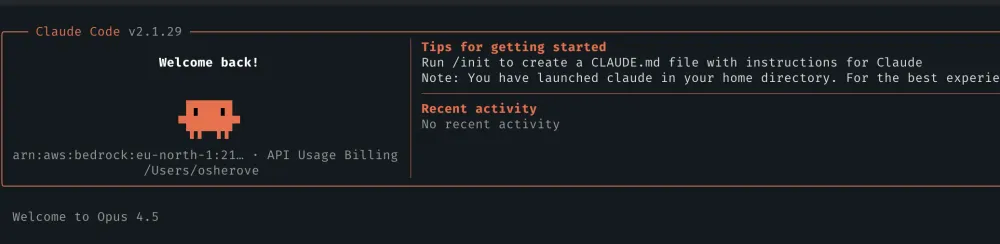
Getting Claude Code Running with AWS Bedrock using Long Term API Keys
Skip the AWS CLI and IAM complexity—set up Claude Code with Amazon Bedrock using long-term API keys and environment variables in minutes. A beginner-friendly guide to running Anthropic's AI coding assistant on your own AWS infrastructure.

Sr. Solutions Architect @ AWS
- This article is based on the original post in Roy's blog .
- For a more enterprise-grade setup with LiteLLM, see Scale Claude Code to Hundreds of Developers Using Amazon Bedrock .
- For another blog post that details claude with bedrock options, see here .
You want to use Claude Code with Amazon Bedrock's Claude Opus 4.5 model. You've heard it's powerful. But then you look at the setup guides: AWS CLI installation, IAM roles, IAM users, permission policies, credential configurations...
For many developers, this creates unnecessary friction. You just want to use Claude Code with Bedrock's models, not become an AWS IAM expert.
Here's a relatively simple way to get started instead.
What makes this guide different from other guides?
This article shows a lesser-known approach (which I think shoudl be more widespread for solo/small teams): using Bedrock's **long-term API keys: a straightforward method that lets you skip all the IAM complexity and get running in minutes.
Prerequisites
- Access to the AWS Console with permissions to use Amazon Bedrock
- Claude Code installed on your machine
- A shell profile file (
.bashrc,.zshrc, or equivalent)
Simplest Solution: Environment Variables Only
Amazon Bedrock supports long-term API keys that work directly with Claude Code through simple environment variables. No AWS CLI. No IAM roles or users. Just three things:
- Your AWS region
- A long-term API key (Bearer token)
- The model's inference profile ARN
Once configured, you can start using Claude Code with Bedrock in minutes.
Step-by-Step Implementation
Step 1: Set Up Your Environment Variables
Add these environment variables to your shell profile (
.bashrc , .zshrc , or equivalent):export CLAUDE_CODE_USE_BEDROCK=1export AWS_REGION="us-east-1"export AWS_BEARER_TOKEN_BEDROCK="ABS..."export ANTHROPIC_MODEL="arn:aws:bedrock:us-east-1:123456789:inference-profile/us.anthropic.claude-opus-4-5-20251101-v1:0"export CLAUDE_CODE_MAX_OUTPUT_TOKENS=64000export MAX_THINKING_TOKENS=1024Or update
.claude/settings.json :{ "env": { "CLAUDE_CODE_USE_BEDROCK": "1", "CLAUDE_CODE_DISABLE_NONESSENTIAL_TRAFFIC": "1", "AWS_BEARER_TOKEN_BEDROCK": "KEY-GOES-HERE" }, "model": "us.anthropic.claude-opus-4-5-20251101-v1:0"}Let's break down what each variable does:
Variable | Purpose |
|---|---|
CLAUDE_CODE_USE_BEDROCK | Tells Claude Code to use Bedrock instead of Anthropic's API |
AWS_REGION | Your Bedrock service region |
AWS_BEARER_TOKEN_BEDROCK | Your long-term API key for authentication |
ANTHROPIC_MODEL | The full ARN of the inference profile |
CLAUDE_CODE_MAX_OUTPUT_TOKENS | Maximum tokens in responses |
MAX_THINKING_TOKENS | Tokens allocated for extended thinking |
Step 2: Get Your AWS Region
- Open the AWS Console
- Navigate to Amazon Bedrock
- Note the region shown in the top navigation bar (e.g.,
us-east-1)
Use this value for
AWS_REGION .Step 3: Generate a Long-Term API Key
This is where the magic happens—no IAM setup required.
- In the Bedrock console, select API Keys from the left navigation
- Click Long Term API Keys
- Click Generate Long Term API Key
- Set your preferred expiration (or no expiration for development)
- Copy the generated key
Use this value for
AWS_BEARER_TOKEN_BEDROCK .Important: Store this key securely. Treat it like a password.
Step 4: Get the Model Inference Profile ARN
- In the Bedrock console, go to Model Catalog
- Find and select Claude Opus 4.5 (or your preferred Claude model)
- Click Open in Playground
- Click the menu (three dots) near "Compare mode"
- Select View API Request
- Copy the ARN value after
--model-id
The ARN looks like this:
arn:aws:bedrock:us-east-1:123456789:inference-profile/us.anthropic.claude-opus-4-5-20251101-v1:0Use this value for
ANTHROPIC_MODEL .Step 5: Reload and Verify
Reload your shell configuration:
source ~/.zshrc # or ~/.bashrcVerify the variables are set:
echo $CLAUDE_CODE_USE_BEDROCKecho $AWS_REGIONStep 6: Launch Claude Code
Start Claude Code as normal:
claudeClaude Code will automatically use your Bedrock configuration.
When to Use This Approach
This setup is ideal for:
- Personal development - Quick setup for individual use
- Experimentation - Testing Claude Code with Bedrock models
- Small teams - One API key per developer (keys are free to create, so avoid sharing to reduce attack surface)
- CI/CD pipelines - Simple secret injection
When to Consider IAM Instead
For production environments, consider traditional IAM when:
- You need fine-grained permission controls
- Multiple applications share Bedrock access
- You require audit trails via IAM
- Your organization mandates IAM for all AWS access
Need an Enterprise-Grade Setup?
If you're scaling Claude Code to many developers and need self-managed usage limits, check out Scale Claude Code to Hundreds of Developers Using Amazon Bedrock with Self-Managed Usage Limits . This guide covers a more comprehensive setup using LiteLLM—more complex to configure, but better suited for enterprise deployments.
Best Practices
1. Secure Your API Key
- Never commit the key to version control
- Use environment variables, not hardcoded values
- Consider using a secrets manager for team environments
2. Monitor Usage
To track your Bedrock usage:
- AWS Cost Explorer - View Bedrock spending over time, filter by service
- AWS Budgets - Set spending thresholds and get alerts when you approach limits
- CloudTrail - All API calls are logged for audit purposes (note: API keys themselves are not logged)
To set up a budget alert:
- Go to AWS Budgets in the AWS Console
- Create a new budget filtered to Amazon Bedrock
- Set your threshold and notification preferences
3. Set Appropriate Token Limits
export CLAUDE_CODE_MAX_OUTPUT_TOKENS=64000 # Adjust based on your needsexport MAX_THINKING_TOKENS=1024 # For extended thinking featuresGetting 429 (throttling) errors? This is common with Claude 4 models due to the 5x output token burndown rate . High
max_tokens values reserve most of your quota for a single request:- Default max_tokens: ~32,000
- Quota reserved: 32,000 × 5 = 160,000 tokens
- With 200k TPM limit: 80% of your quota locked for ONE request
Since Claude Code's average output is only ~300 tokens for typical tasks, you can set much lower limits without truncation:
export CLAUDE_CODE_MAX_OUTPUT_TOKENS=4096 # Conservative: 13x average usage, keeps 90% quota availableexport MAX_THINKING_TOKENS=1024 # Limits extended thinking token consumptionStart conservative and increase only if you see truncated responses.
For more details on throttling issues and token management, see Claude Code on Amazon Bedrock: Quick Setup Guide .
4. Use Region-Appropriate Models
Ensure your
AWS_REGION matches the region in your model ARN:# These should match:export AWS_REGION="us-east-1"export ANTHROPIC_MODEL="arn:aws:bedrock:us-east-1:..."# ^^^^^^^^^Troubleshooting
"Model not found" Error
- Verify the model is available in your region and that you have the correct region set in yoru environment variables (common!)
- Check that you've enabled model access in Bedrock console
- Confirm the ARN is copied correctly (no extra spaces)
"Authentication failed" Error
- Regenerate your API key
- Ensure
AWS_BEARER_TOKEN_BEDROCKhas no quotes around the value in your shell
- Check that the key hasn't expired
"Region mismatch" Error
- Ensure
AWS_REGIONmatches the region in your model ARN
- Some models are only available in specific regions
Conclusion
Setting up Claude Code with Amazon Bedrock doesn't require deep AWS expertise. With just environment variables and a long-term API key, you can:
- Skip AWS CLI installation entirely
- Avoid creating IAM roles or users
- Get started in minutes, not hours
- Maintain simple, portable configuration
- Monitor usage directly through Bedrock console
This approach trades some enterprise features (fine-grained IAM controls) for simplicity and speed—a worthwhile tradeoff for many development scenarios.
Get Started Now
Ready to try it out? Here's your starting point:
Generate your first long-term API key, grab your model ARN from the playground, and you'll be using Claude Code with Bedrock in minutes.
Have questions or run into issues? Drop a comment below—I'd love to hear about your setup and help troubleshoot.
Any opinions in this article are those of the individual author and may not reflect the opinions of AWS.
Tags: #amazon-bedrock #claude #ai-coding #developer-tools #getting-started
Enjoyed reading this content? Let the author know!
Your likes, comments, shares, and saves help creators reach more builders.

Loading recommendations
Loading article