

Stop using aws configure. Just use aws login.
You’ve been using aws configure with long-term access keys, but it can feel risky and fragile. aws login is now generally available, giving you temporary, auto-refreshing credentials through your browser. Here’s how it works, why it’s secure, and why you might never go back to aws configure!

I’ve been putting off setting up a new work laptop. Not because of the OS, or the editor, or the fonts, or because I don’t want to move my laptop stickers, but because of this:
1
aws configure
Like a lot of things with AWS, there’s the “way you’re supposed to do it” and then there’s the “way you do it even though you know it’s not best practice but you are too lazy to manage things correctly because this is just a quick demo anyway” (is this just me?)
So instead, I’ve been doing the dance of opening my password manager, finding my IAM user, copying my acess key I made 2 years ago and forgot to rotate, then paste it in, hope nothing goes wrong. No matter how careful I am, it still feels a bit gross - I’m one bad demo recording away from a bad day. But - what if there was a feature to save me from myself?
aws login is what happens when the CLI grows up
It was one of the hidden pre:Invent announcements, but you can now run:
1
aws login
And your browser will open to the AWS sign in page - the same one you use for the console. The CLI gets temporary credentials, and you’re done! There’s no keys, there’s no
~/.aws/credentials sitting on your disk, and no rotation scripts.Instead, it uses OAuth 2.0 with PKCE (Proof Key for Code Exchange) which is a secure flow that means:
- Your password never touches the CLI
- Your authorization code can’t be stolen
- You get real STS credentials, valid up to your IAM session limit (max of 12 hours)
- They refresh automatically every 15 minutes.
This is not a preview - it’s live in AWS CLI 2.32.0+ and you can use it today!
It even remembers who you are
If you use SSO, federated login, or you just have access to a million accounts (hello consultants working at AWS Partners! I see you! ), you’ll see your active sessions:
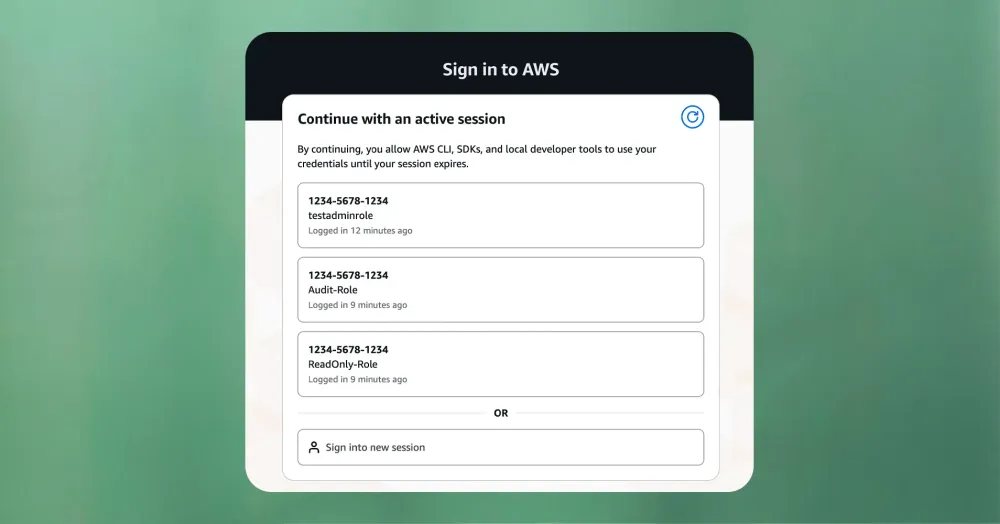
Just click one, and you’re done! If you want to switch later, just run
aws login again, then refresh the page, pick a different role, and you’re good to go. It’s the same flow as the console.Then, if you have lots of profiles, eg:
1
2
3
4
5
[]
region = us-west-2
[]
region = us-east-1You can use the profile parameter to authenticate with a specific profile:
1
2
aws login --profile dev
aws login --profile prod-admin
And then, just use them like normal:
1
aws sts get-caller-identity --profile dev
The CLI will now quietly manage the credentials for you, and save you from yourself.
How you can try it out today
First, check your version:
1
aws --version
Then, log in:
1
aws login
After this, you can see who you are with:
1
aws sts get-caller-identity
Pre:Invent season is tricky because there are so many launches to keep track of (if you need help with this, see my other blog called ‘You Should Just Use the Docs MCP to Keep Up with Launches During re:Invent Because Everything Else Is Too Annoying ’) so this has gone a bit under the radar, but it’s so handy I needed to give it a bit of a spotlight!
aws login is now available in AWS CLI v2.32.0+ and you can see the official launch blog here and the docs here .
Happy Building!
Enjoyed reading this content? Let the author know!
Your likes, comments, shares, and saves help creators reach more builders.

Loading recommendations
Loading article