

You Should Just Use the Docs MCP to Keep Up with Launches During re:Invent Because Everything Else Is Too Annoying
re:Invent launches mean juggling what's new posts, launch blogs, product pages, and docs across too many tabs. Here's how to use the AWS Documentation MCP with Kiro to get official docs right in your IDE instead. I'll show you a real migration example and how to set it up before re:Invent.

The best thing about re:Invent is that it's a fever dream of launches, but this is also the worst thing about re:Invent. There's so much new information about so many new things, and this gets spread out across launch blogs, what's new posts, product pages, social media and documentation.
Trying to keep up - even when I work at AWS and part of my job is about making launch content - is really hard, but I have a tip for making it much easier this year.
Just use the AWS Documentation MCP with Kiro !
Let me show you what I mean.

Tired: Scavenger Hunt
Roll the clocks back to last year when S3 Tables got announced at re:Invent 2024. Here's what you had to work with:
- The What's New Post - A couple of paragraphs with some nice clear overview information and lots of links. This is my first place to start with all launches, because it gives you the language you need to learn to know what to google next, but it doesn't actually give you code examples or API details.
- The Launch Blog - Jeff's walkthrough with CLI examples. This is one level deeper into technical information, and Jeff is the best technical blog post writer I've ever met, but it still means you have to flip windows between this blog and your IDE to match things up.
- The Product Page - This is very much a marketing page, not a technical documentation page. It has its place, but it's not going to help us to update our code to make the most of the launch, or figure out how this works for specific technical scenarios in a repo.
- The Documentation - This is the real meat of the information you need, but it can be kind of hard to find if you're just searching. Normally, my tip for this is to go through one of the blogs and look for links, because search engines take time to index new content, so it might not show up right away if you're searching on launch day. Once you navigate the IA to find the page, you still have to figure out which page has the API(s) you need and you still have to flip windows between your browser and IDE.
On a good day, I can get this process done in 15ish minutes, but 15 minutes during re:Invent is a really long time, and there's always something more exciting I could be doing.
For the record - these are useful resources! They're just not in my IDE, and I'm so tired during re:Invent I don't have the concentration power to flip through that many tabs.
Wired: Just ask Kiro
To show you what this is like in practice, I built a quick demo analytics pipeline. It has events in S3, queried with Athena, with the classic pain point: manual partition management. Every day you have to run commands like this or your queries won't see the new data:
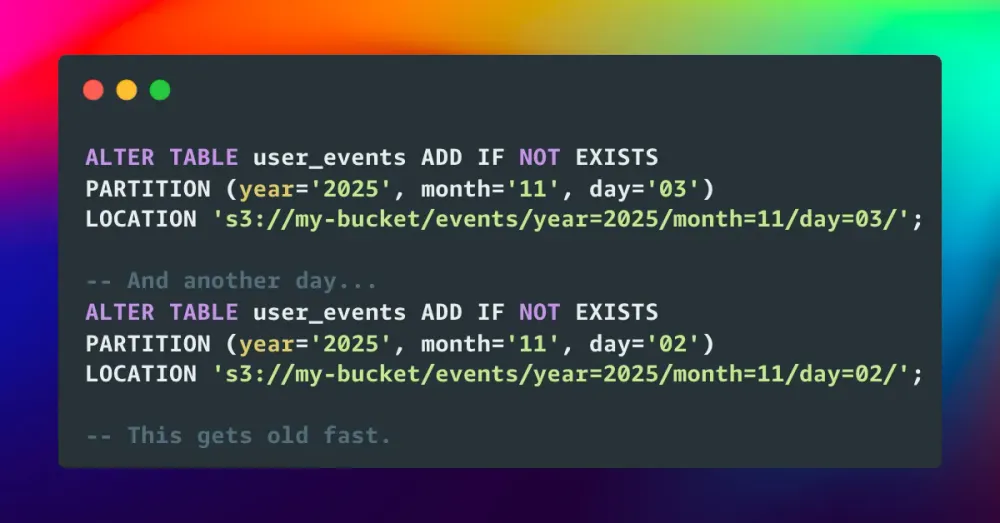
If you miss it once, queries don't see the data. It's tedious and error prone and I hate it.
But - dream with me. Let's pretend it's December 2024 for a minute and the S3 Tables announcement drops at re:Invent. While you're watching the keynote on stage, you want to know if it solves this problem in your codebase.
So, open Kiro and ask:
"S3 Tables just got announced. Can you please use the docs mcp to check what they are and how they can help my project?"

Here's what happened:
- Kiro invoked the AWS Documentation MCP
- Searched AWS docs for "S3 Tables"
- Read the actual documentation pages
- Analyzed my existing code
- Gave me a clear explanation
Time: 37 seconds.
The explanation told me S3 Tables uses Apache Iceberg format with automatic partition management (no more ALTER TABLE), automatic file compaction (which solves my small files problem), better query performance (3x faster), and schema evolution without breaking queries.
Thank you Kiro!
So then I said:
"Let's do the migration"

Kiro read more docs to understand and double check the APIs, then generated:
- Setup script using the S3 Tables API
- New data writer with PySpark and Iceberg
- Migration guide with before/after comparison
- Example queries including time travel
Time: 1 minute 43 seconds, while I played Candy Crush.
I didn't have to get lost in too many tabs trying to piece together information, and I didn't need an extra wide external monitor to have all of my windows open - it just happened right in my IDE.
How to Set This Up
If you want to try this yourself, it will only take you a couple of mins:
The lazy way (how I actually do it):
- Go to the AWS Documentation MCP docs page
- Copy all the text on the page (yes, just go for it - including the JSON config)
- Open a new vibe chat in Kiro
- Paste it and say "set up this mcp"
- Kiro does it for you
The official way:
- Click the Kiro icon on the left side of your IDE
- Go to "MCP Servers"
- Click to edit the JSON config
- Add this from the AWS Documentation MCP docs page :
1
2
3
4
5
6
7
8
9
10
11
12
13
14
15
{
  "mcpServers": {
    "awslabs.aws-documentation-mcp-server": {
      "command": "uvx",
      "args": ["awslabs.aws-documentation-mcp-server@latest"],
      "env": {
        "FASTMCP_LOG_LEVEL": "ERROR",
        "AWS_DOCUMENTATION_PARTITION": "aws",
        "MCP_USER_AGENT": "Mozilla/5.0 (Windows NT 10.0; Win64; x64) AppleWebKit/537.36 (KHTML, like Gecko) Chrome/131.0.0.0 Safari/537.36"
      },
      "disabled": false,
      "autoApprove": []
    }
  }
}
Then, just save and restart Kiro, and you're good to go.
Why This Is Good And You Should Do It
The AWS Documentation MCP pulls from the same source that generates docs.aws.amazon.com . It's often faster than the public website updates, and it's definitely faster than my scavenger hunt attempts. When you ask Kiro a question, it fetches the official documentation and presents it in context with your code.
It's helpful if you're writing any code, but it's especially helpful when things are new or have changed. It's nice to have a really solid source of truth while everything is taking time to sync up/be indexed.
Here's a hot take: if you have time to read 50 launch blogs during re:Invent week, you're not having enough fun, and you're not meeting enough developers. Prioritize your in-person collaboration and learning time! You can't make up for later.
So - set yourself up for success and get this MCP ready in Kiro ahead of time. Then, I'll see you at re:Invent!
Enjoyed reading this content? Let the author know!
Your likes, comments, shares, and saves help creators reach more builders.

Loading recommendations
Loading article