
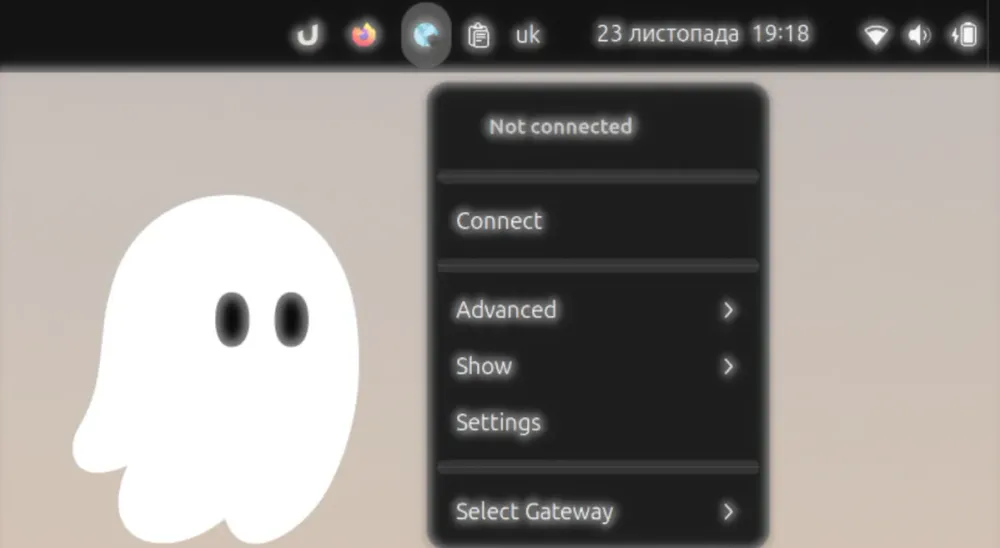
Developing a Gnome Extension for Palo Alto GlobalProtect with Kiro.dev: Lifehacks, Costs, and Pitfalls
What lifehacks can you recommend for development? What is the difference between Vibe Coding and Spec-Driven Coding? What are the specific features and advantages of Kiro? And the most obvious question: What exactly are these "credits" measured in? I still don't have a precise theoretical answer, but I can demonstrate it in practice. This time, we will be developing a Gnome Extension to work with the official GlobalProtect VPN CLI.

This is another article on how to build a fully ready-to-use solution using the Kiro.dev IDE. During previous sessions featuring live demos of Kiro, viewers had several questions: What lifehacks can you recommend for development? What is the difference between Vibe Coding and Spec-Driven Coding? What are the specific features and advantages of Kiro? And the most obvious question: What exactly are these "credits" measured in? I still don't have a precise theoretical answer, but I can demonstrate it in practice.
This time, we will be developing a Gnome Extension to work with the official GlobalProtect VPN CLI.
The Problem: Why Not Use the Official UI?
The CLI version of GlobalProtect works significantly better than the official UI provided by Palo Alto. Although you can download both solutions from the official website, the problem is that the UI version is outdated, lacks proper Wayland support, and suffers from screen placement issues, among other issues. Palo Alto's official bug tracking leaves much to be desired.
This situation leads to the emergence of paid GUI alternatives for Linux based on OpenConnect. However, we are talking about a corporate control and security tool, so there isn't much choice, and we cannot simply replace it.
In contrast to the UI, the CLI works almost perfectly. I used the CLI via my own scripts for a long time, but I decided to add visualization. As a result, the extension's functionality was much richer than even the official UI version.
Kiro.dev: Toolkit and Development Approaches
Let's start development. We clone our own repository from GitHub via Kiro and immediately answer a few architectural questions.
1. Publication and Guidelines
We want to publish the extension on the official Gnome Extensions portal, so we strictly adhere to the rules (review guidelines).
Since we are writing an extension for the proprietary GlobalProtect product, we must add disclaimers everywhere. For the new code, we are choosing the GPL license.
2. Autopilot: When to Use It?
Kiro now features Autopilot.
Autopilot can execute terminal commands for you and automatically switch between models, reducing costs and enabling Amazon to allocate resources more effectively.
My Experience: Using Autopilot during specification (specs) creation can create a mess that is hard to sort out later. However, relying on Autopilot during debugging is an excellent idea.
3. Steering: Bug Resolution and Context Management
We face certain limitations with the GlobalProtect CLI. There is a known bug: when a connection is already active, the CLI might return an error stating that another session has already established a connection (“Unable to establish a new GlobalProtect connection as a GlobalProtect connection is already established from this Linux system by the same user or another user”). The Steering tool is ideal for automatically handling such nuances.
You can either generate it automatically from existing code or write it before creating the code. Kiro helps with this immensely. Steering is critical because it saves credits by passing only the necessary context and prevents context from being forgotten during long sessions.
4. Vibe Coding vs. Spec-Driven Development
We have a choice between Vibe Coding (stream-of-consciousness development in chat) and Spec-Driven (development based on specifications).
- Spec-Driven: Specifications cost significantly more. However, if you compare this approach (which Kiro provides "out of the box") with any other AI-powered IDE (like Cursor, VS Code, etc.), you win in the long run.
- Vibe Coding: You can create code through a simple dialogue. This is more economical if the task is simple.
My Approach:
Start with specs, especially if you cannot consolidate the entire project in your head at once.
Specs are very convenient for bug fixing. Having generated the Steering and ready code, instead of writing "fix this or that" in Vibe mode, you formulate a straightforward approach that breaks the solution down into tasks.
And only then, pure Vibe. There is a nuance here: Steering helps save a lot on new sessions (instead of 10-15 credits per fix, you can fit within 1.5), but do not forget about the importance of context. Opening new sessions for every prompt wastes credits. Your credits are your responsibility.
5. MVP and Testing
Kiro has introduced an MVP (Minimum Viable Product) approach, where you no longer perform mandatory tasks such as testing at every stage. Let's be realistic: in most cases, TDD (Test Driven Development) in its pure form doesn't work here. Writing tests before completing the final functionality is not always a good idea. I approach testing as a second stage, once the basic functionality is working.
The money question is a higher priority, and debugging something you didn't expect or that isn't exactly what you want can be a problem. That brings us to checkpoints.
6. Checkpoints (Killer Feature)
Another cool feature that isn't talked about enough is Checkpoints.
Even though I have always used Git as a considerable advantage (the ability to roll back code), it works differently when working with LLMs. LLMs generate words. If you missed something in Steering or Specs, files can start "breaking" in unexpected ways.
Kiro automatically creates checkpoints with every file change or command execution. This allows you to verify the result step by step, like in video games (quick save/quick load). This is extremely useful.
Implementing the GlobalProtect Extension
Preparation and Audit
First, I studied the full functionality of the official client. There are two installations: with a GUI and without. The GUI version is very intrusive and "unresponsive," so we discard it and install the lighter package (CLI only).
I audited the commands and, instead of executing them through Kiro, I described the desired functionality to it.
Technical Challenges and Solutions
- Gateway Caching: When connecting via CLI, you can only get a list of available gateways (via globalprotect show --manual-gateway) after connecting. It works like an indicator.
Solution: Implemented caching. We "describe" available gateways after connection, save them to cache, and do not clear it even after disconnection. The cache is updated on a new connection. - Host Information (HIP) and Logs: GlobalProtect is not just a VPN; it's an agent that collects machine information (Host Information Profile) and sends it to Palo Alto. This functionality often "breaks" in the official client (you don't see the status).
Solution: The CLI ideally generates logs and HIP. Implementing this via UI was simple.
Logs: We open the logs directory using the default file manager.
Host Info: A separate window with a Copy button, Refresh button, and Update Host Information button. This is convenient when, for example, your software (like Cursor) is installed from outside the repository and is outdated -you can immediately see why the VPN is blocking access. - Status and Notifications: Separate windows were added for error and message reporting. Default Kiro implemented this via native system notifications, but they are inconvenient to work with (they disappear quickly), so I moved this into the UI. A significant change is the status indicator, which updates every 5 seconds (configurable in settings).

Gnome-Specific Nuances
- File Picker: In Gnome Extensions, it is impossible (due to security restrictions) to implement file selection using standard methods. One GP option is to specify the path to a client certificate. I implemented this via manual path entry with file existence validation.
- Review Process: Extension.js was not located in the default directory, and there were issues with menu placement. Kiro helped fix this, but one must carefully watch for compliance with GJS guidelines.

Development Costs (Credits) and Time
This is a question that many worry about.
- Time: The entire development process took me 2-3 evenings.
- Total Cost (from zero to current state): 238 credits.
I am attaching the credit usage graph below.

- Why so much? I experimented, made mistakes, studied CLI functionality with Kiro's help, and asked about optimization. I used Kiro as a Copilot/Tutor, not just as an executor. This adds a "5x" multiplier to the cost compared to if I already knew everything.
- Why so low? Because I manually handled the building, installing, and committing. If you don't know your way around Git and the system, expect to add 10+ credits. That's the minimum, by the way. (You also risk failing completely if you don't know what you're doing).
- Estimated "Clean" Work: If you clearly understand what you are doing and have good specifications, a ready-made extension would cost approximately 50 credits (as I showed in the previous article ).

This is similar to the situation with AWS Cloud Quest:
- Doing a lab with instructions manually: ~10 minutes.
- Doing it using Kiro (analysis, generation): ~40 minutes or more.
My Advice: If you don't have a paid plan but want to experiment, approach the issue like a programmer (even if you aren't one). Formulate Specs, write Steering (this saves credits on context insanely well), and only then launch generation.
Result
Testing was conducted with GlobalProtect v6.2.9 (version 6.3 for Linux does not yet exist) as the backend; the extension works great. I submitted it to Gnome Extensions and am waiting for review. I hope everything goes well.
Use it, test it, and feedback is appreciated! After passing the review, I will add a link to the official extension catalog.

Conclusions
Kiro does not solve development problems, nor does it do the development for you; you are still needed as a developer. However, it automates everything you previously used as patterns. You don't need to remember "how to do it best," which lets you keep your focus on what you are doing. Without such a tool, you would be losing time. As a qualified developer, this is key. For a beginner, it replaces a mentor: you'd spend a lot of time, but now you don't. Most likely, everyone benefits now.
Enjoyed reading this content? Let the author know!
Your likes, comments, shares, and saves help creators reach more builders.

Loading recommendations
Loading article