
Manage Karpenter using AWS EKS Blueprint addons
In this article I am sharing benefits of node scaling, benefits of Karpenter, and its implementation using Terraform in EKS.
Series: AWS Platform Engineering (6 articles)
- 1Manage Karpenter using AWS EKS Blueprint addons This article

Hello ALL ...Friends today I want to share about auto scaling in Kubernetes. Auto scaling is a feature in which Kubernetes adjusts its pods and their resources according to workload of the application.
However, if there are not sufficient resources for Kubernetes it cannot scale up properly. This will result in intermittent availability issues for our application and customers utilizing it. To rectify the availability issues, generally we manually scale up the worker nodes (increases EC2 instances for the cluster). This can be handled by adopting automation of node scaling in Kubernetes.
- Common question is, can replica set help us?No! Replica set can help us scale up the pods however it may not help if there is no sufficient compute resource. In this scenario we need to scale up Kubernetes worker nodes as well (node scaling). This cannot be handled by replica set.
- How can we do it for AWS EKS Clusters?There are multiple options to automate node scaling in Kubernetes. We have achieved it using Karpenter implementation and found it seamless using AWS EKS Blueprints addons. Node Scaling helps the Kubernetes Cluster to create a new node (new EC2 instance) to manage cluster workloads.
- As part of our standard Kubernetes maintenance, we are upgrading our AWS EKS clusters to 1.34 version. AWS EKS version upgrade is a zero-downtime upgrade using karpenter, we can read more in this article Zero Downtime during AWS EKS Version upgrade | AWS Builder Center .
- We have covered the benefits of upgrade in this article AWS Kubernetes - FinOps with Upgrade | AWS Builder Center and Benefits of Regular AWS EKS Version Upgrades | AWS Builder Center
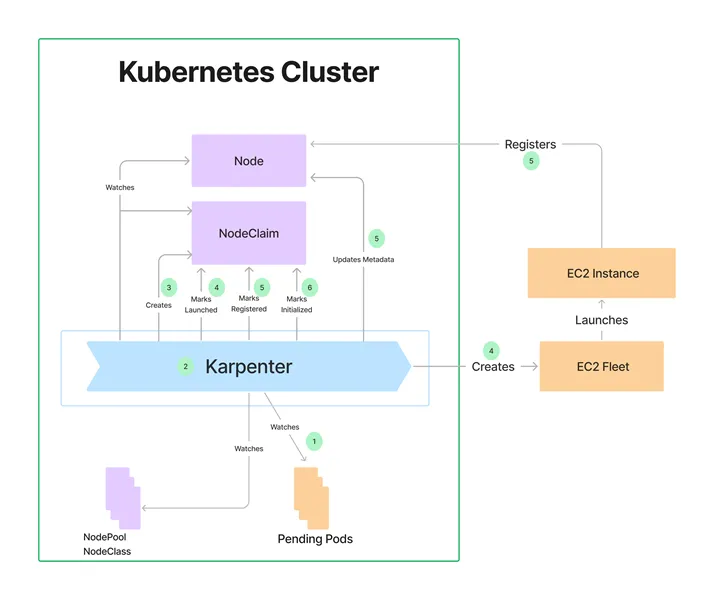
Karpenter is an open-source tool used to provide horizontal node scaling in Kubernetes. Based on cluster workload, Karpenter scales up an EC2 instance as a new node.
We used eks-blueprints-addons to setup Karpenter for AWS EKS Elastic Kubernetes cluster. We have got terraform code from aws-ia/eks-blueprints-addons/aws | Terraform Registry and GitHub - aws-ia/terraform-aws-eks-blueprints-addons: Terraform module which provisions addons on Amazon EKS clusters · GitHub
1
2
3
4
5
6
7
8
9
10
11
12
13
14
15
16
17
18
19
20
21
22
23
24
25
26
27
28
29
30
31
32
33
34
35
36
37
38
module "eks_blueprints_addons" {

  source = "aws-ia/eks-blueprints-addons/aws"

  version = "1.21.1"


  cluster_name      = module.eks.cluster_name

  cluster_endpoint  = module.eks.cluster_endpoint

  cluster_version   = module.eks.cluster_version

  oidc_provider_arn = module.eks.oidc_provider_arn


  eks_addons = {

    aws-ebs-csi-driver = {

      most_recent = true

    }

    coredns = {

      most_recent = true

    }

    vpc-cni = {

      most_recent = true

    }

    kube-proxy = {

      most_recent = true

    }

  }


  enable_aws_load_balancer_controller    = true

  enable_cluster_proportional_autoscaler = true

  enable_karpenter                       = true

  enable_kube_prometheus_stack           = true

  enable_metrics_server                  = true

  enable_external_dns                    = true

  enable_cert_manager                    = true

  cert_manager_route53_hosted_zone_arns  = ["arn:aws:route53:::hostedzone/XXXXXXXXXXXXX"]


  tags = {

    Environment = "dev"

  }

}
We used karpenter version 0.37.0 and it is compatible with AWS EKS version 1.31, 1.32, 1.33 and 1.34 as well.
We can check the nodes in a cluster using command after the deployment.
1
kubectl get nodes
We can check if there is any issue in nodeclaim in Karpenter using command
1
kubectl get nodeclaim
During the installations we got below errors, we fixed them following instructions in Troubleshooting | Karpenter :
Error 1: ec2 api connectivity check failed
Solution: The issue is fixed by setting karpenter dnspolicy as Default. Pods came and running now successfully. Root cause of the issue: AWS Blueprint is setting dnspolicy as clusterfirst by default which is not applicable to us. we need to modify the setting to dnsPolicy as default.
1
2
3
4
kubectl patch deployment karpenter \

  -n karpenter \

  --type='json' \

  -p='[{"op": "add", "path": "/spec/template/spec/dnsPolicy", "value": "Default"}]'
Error 2: launching nodeclaim, resolving ec2nodeclass, object is awaiting reconciliation
Solution: It was fixed by following karpenter manual to update karpenter-crd
1
kubectl label crd ec2nodeclasses.karpenter.k8s.aws nodepools.karpenter.sh nodeclaims.karpenter.sh app.kubernetes.io/managed-by=Helm --overwrite
Error 3: In the case of
annotation validation error: missing key "meta.helm.sh/release-namespace": must be set to "karpenter" run:1
2
3
KARPENTER_NAMESPACE=kube-system
kubectl annotate crd ec2nodeclasses.karpenter.k8s.aws nodepools.karpenter.sh nodeclaims.karpenter.sh meta.helm.sh/release-name=karpenter-crd --overwrite
kubectl annotate crd ec2nodeclasses.karpenter.k8s.aws nodepools.karpenter.sh nodeclaims.karpenter.sh meta.helm.sh/release-namespace="${KARPENTER_NAMESPACE}" --overwrite
Error 4 Still if there is error persisting - launching nodeclaim, resolving ec2nodeclass, object is awaiting reconciliation
solution: upgrade karpenter-crd using below command
1
2
KARPENTER_NAMESPACE=kube-system
helm upgrade --install karpenter-crd oci://public.ecr.aws/karpenter/karpenter-crd --version 0.37.0 --namespace "${KARPENTER_NAMESPACE}" --create-namespace
With these updates we are able to manage karpenter using terraform scripts.
photo credit: NodeClaims | Karpenter
Series: AWS Platform Engineering (6 articles)
- 1Manage Karpenter using AWS EKS Blueprint addons This article
Enjoyed reading this content? Let the author know!
Your likes, comments, shares, and saves help creators reach more builders.

Loading recommendations
Loading article