
Deploying Serverless Embedding App with AWS CDK, Lambda and Amazon Aurora PostgreSQL
Build a serverless multimodal search engine understanding text and images. Develop AWS Lambda functions, deploy with CDK, and integrate S3 and Aurora Serveless PostgreSQL. Enhance your app's search capabilities and unlock new RAG possibilities.
Series: From Notebook to Serverless: Creating a Multimodal Search Engine with Amazon Bedrock and PostreSQL (3 articles)
- 3Deploying Serverless Embedding App with AWS CDK, Lambda and Amazon Aurora PostgreSQL This article

Welcome to Part 2 of our two-part blog series!
In this post, I'll elevate the concepts explored in Part 1 to create a scalable, production-ready solution. Using AWS Lambda functions and AWS CDK, you'll transform our notebook-based prototype into a robust, serverless architecture.
Together, we'll develop AWS Lambda functions for embedding generation and retrieval, leverage AWS CDK for infrastructure-as-code deployment, and integrate with Amazon S3 and Amazon Aurora PostgreSQL for efficient data storage and retrieval. By the end of this tutorial, you'll have a fully functional, serverless multimodal search engine capable of understanding and retrieving both textual and visual content.
✅ AWS Level: Advanced - 300
Prerequisites:
- Enable model Access for the following models:
- Amazon Titan Embeddings V2
- Anthropic Claude 3 models (Haiku or Sonnet).
💰 Cost to complete:
In the second part, you'll construct a Serverless Embedding App utilizing the AWS Cloud Development Kit (CDK) to create four Lambda Functions.
AWS Lambda Functions for Generating Embeddings for Text and Image Files:
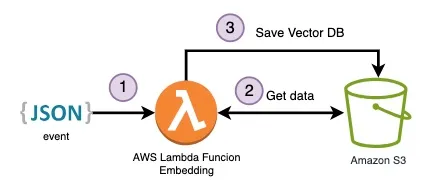
To handle the embedding process, there is a dedicated Lambda Function for each file type:
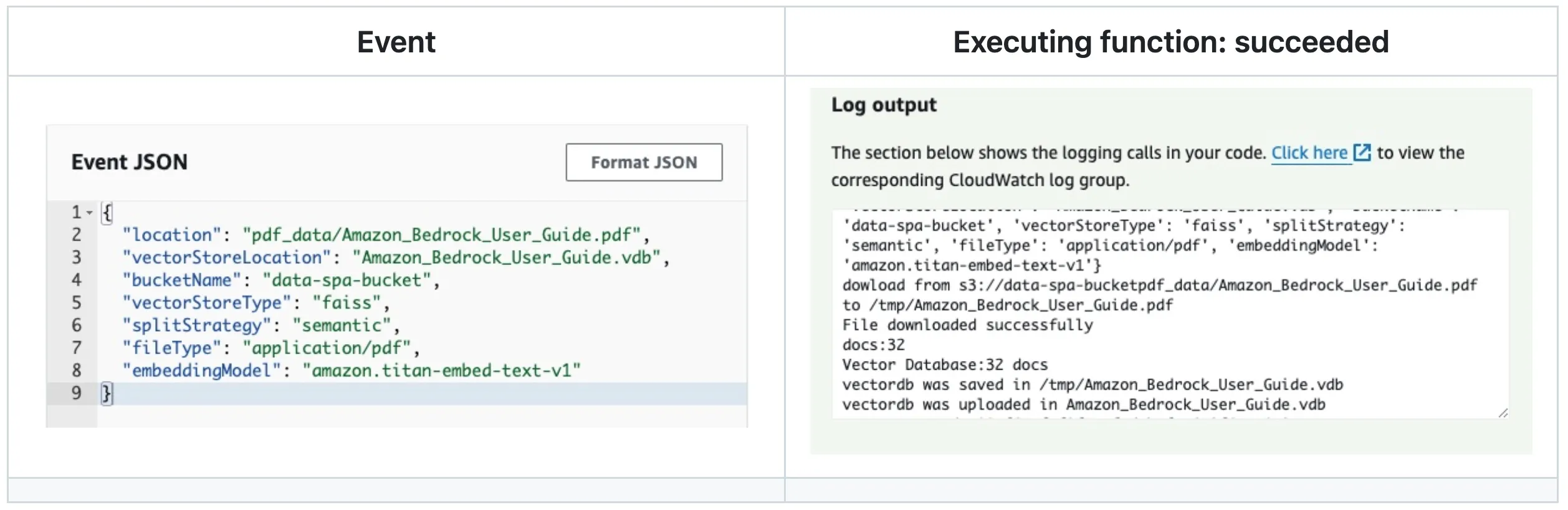
To generate embeddings for the text content of PDF files with FAISS .
Event to trigger:
JSON
{"location": "REPLACE-YOU-KEY","vectorStoreLocation": "REPALCE-NAME.vdb","bucketName": "REPLACE-YOU-BUCKET","vectorStoreType": "faiss","splitStrategy": "semantic","fileType": "application/pdf","embeddingModel": "amazon.titan-embed-text-v1"}
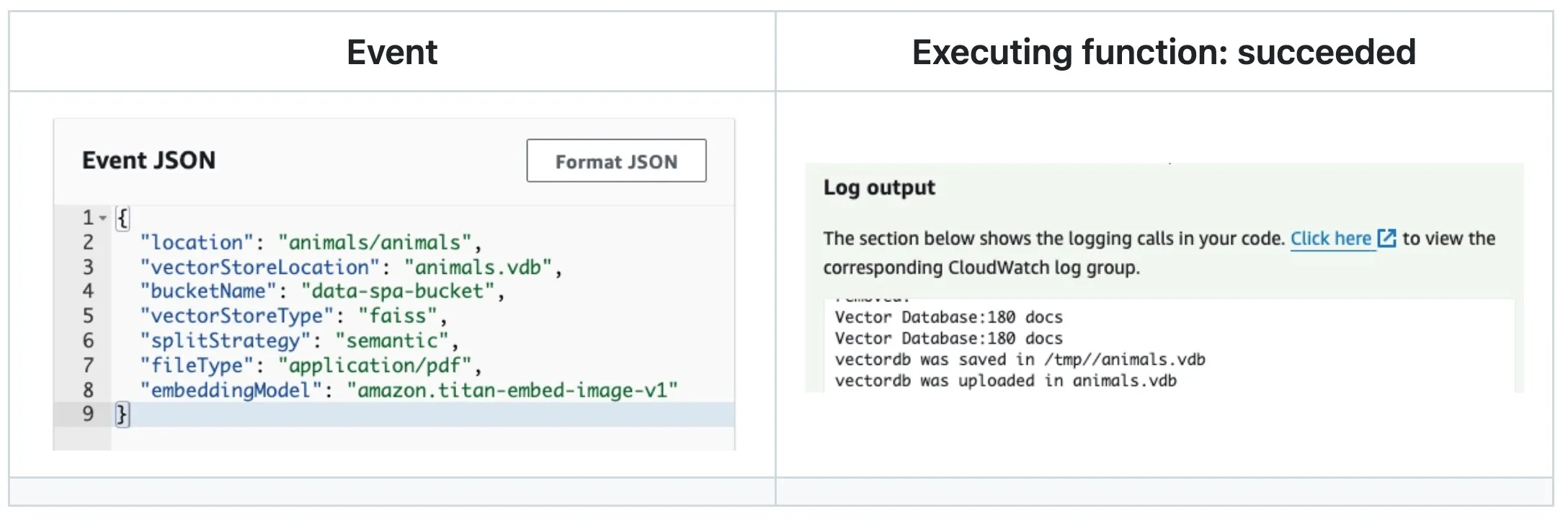
To generate embeddings for images with FAISS .
Event to trigger:
JSON
{"location": "REPLACE-YOU-KEY-FOLDER","vectorStoreLocation": "REPLACE-NAME.vdb","bucketName": "REPLACE-YOU-BUCKET","vectorStoreType": "faiss","splitStrategy": "semantic","embeddingModel": "amazon.titan-embed-image-v1"}
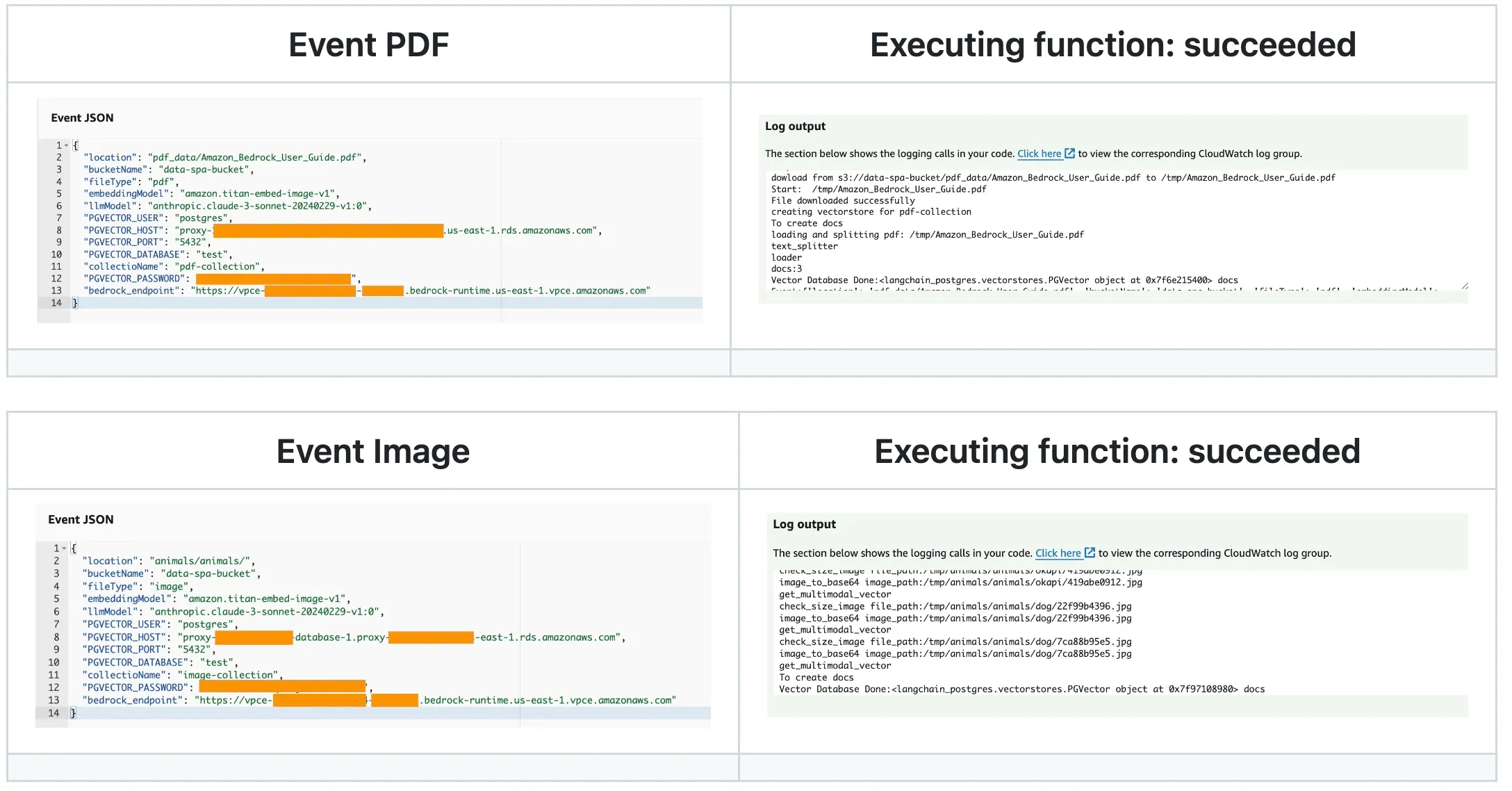
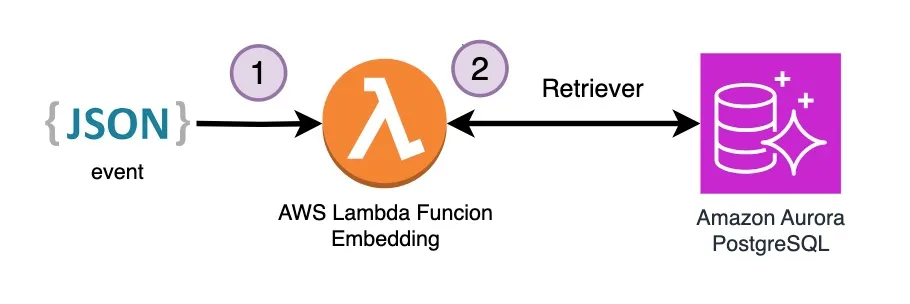
To generate embeddings for image/pdf with pgvector and Amazon Aurora .
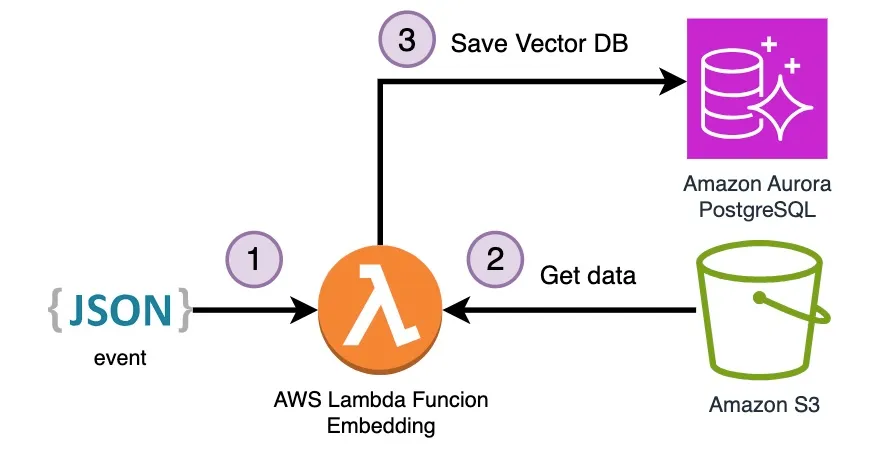
💡 Before testing this Lambda Function keep in mind that it must be in the same VPC and be able to access the Amazon Aurora PostreSQL DB, for that check Automatically connecting a Lambda function and an Aurora DB cluster , Using Amazon RDS Proxy for Aurora and Use interface VPC endpoints (AWS PrivateLink) for Amazon Bedrock VPC endpoint.
Event to trigger:
JSON
{"location": "YOU-KEY","bucketName": "YOU-BUCKET-NAME","fileType": "pdf or image","embeddingModel": "amazon.titan-embed-text-v1","PGVECTOR_USER":"YOU-RDS-USER","PGVECTOR_PASSWORD":"YOU-RDS-PASSWORD","PGVECTOR_HOST":"YOU-RDS-ENDPOINT-PROXY","PGVECTOR_DATABASE":"YOU-RDS-DATABASE","PGVECTOR_PORT":"5432","collectioName": "YOU-collectioName","bedrock_endpoint": "https://vpce-...-.....bedrock-runtime.YOU-REGION.vpce.amazonaws.com"}
AWS Lambda Funtions to Query for Text and Image Files in a Vector DB:
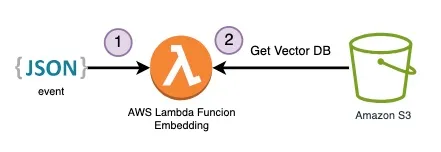
To handle the embedding process, there is a dedicated Lambda Function for each file type:
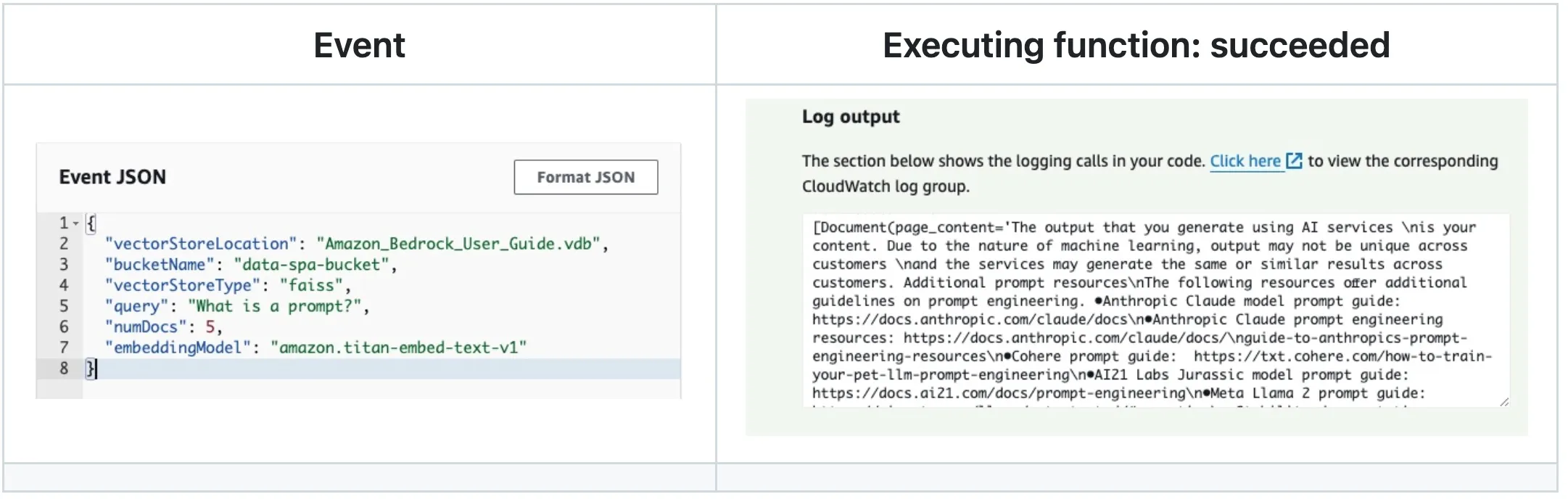
To retrieval text content from a vector DB
Event to trigger:
JSON
{"vectorStoreLocation": "REPLACE-NAME.vdb","bucketName": "REPLACE-YOU-BUCKET","vectorStoreType": "faiss","query": "YOU-QUERY","numDocs": 5,"embeddingModel": "amazon.titan-embed-text-v1"}
To retrieval image location from a vector DB
You can search by text or by image
- Text event to trigger
JSON
{"vectorStoreLocation": "REPLACE-NAME.vdb","bucketName": "REPLACE-YOU-BUCKET","vectorStoreType": "faiss","InputType": "text","query":"TEXT-QUERY","embeddingModel": "amazon.titan-embed-text-v1"}
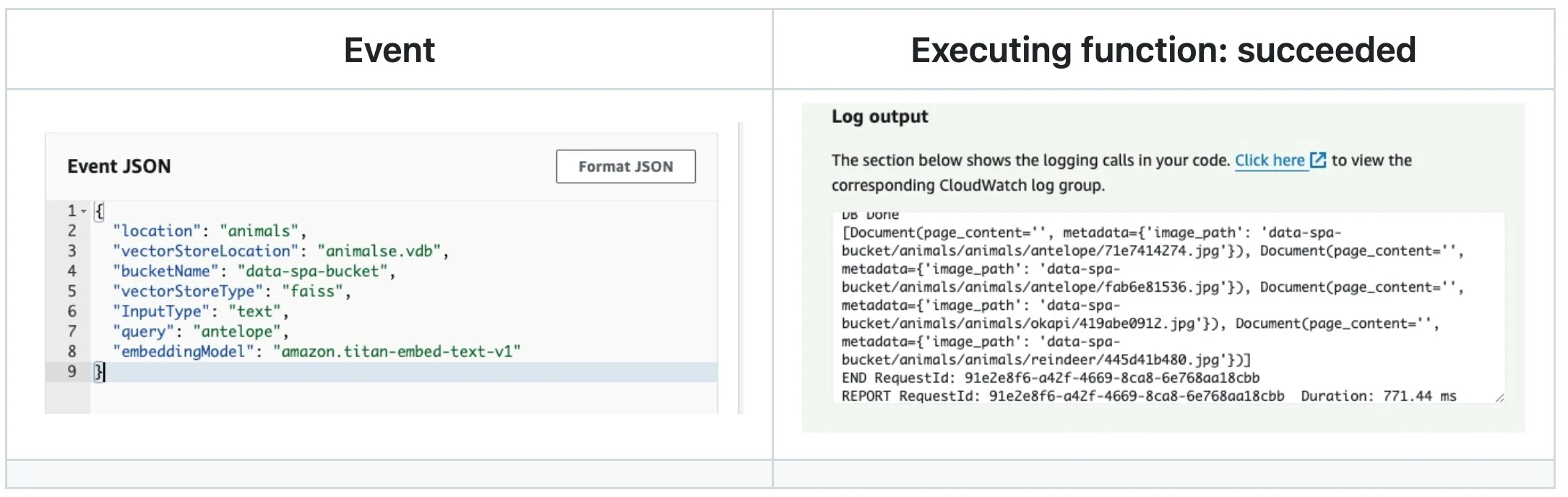
Image event to trigger
JSON
{"vectorStoreLocation": "REPLACE-NAME.vdb","bucketName": "REPLACE-YOU-BUCKET","vectorStoreType": "faiss","InputType": "image","query":"IMAGE-BUCKET-LOCATION-QUERY","embeddingModel": "amazon.titan-embed-text-v1"}
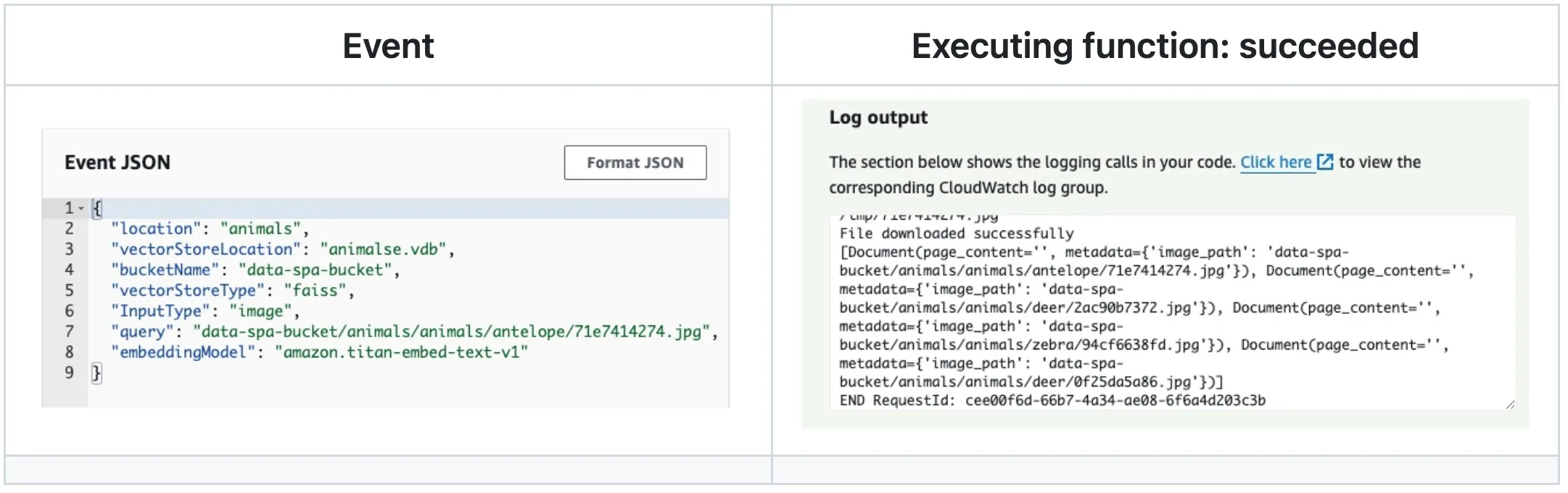
💡 The next step is to take theimage_pathvalue and download the file from Amazon S3 bucket with a download_file boto3 method.
To generate embeddings for image/pdf with pgvector and Amazon Aurora .
JSON
{"location": "YOU-KEY","bucketName": "YOU-BUCKET-NAME","fileType": "pdf or image","embeddingModel": "amazon.titan-embed-text-v1","PGVECTOR_USER":"YOU-RDS-USER","PGVECTOR_PASSWORD":"YOU-RDS-PASSWORD","PGVECTOR_HOST":"YOU-RDS-ENDPOINT-PROXY","PGVECTOR_DATABASE":"YOU-RDS-DATABASE","PGVECTOR_PORT":"5432","collectioName": "YOU-collectioName","bedrock_endpoint": "https://vpce-...-.....bedrock-runtime.YOU-REGION.vpce.amazonaws.com","QUERY": "YOU-TEXT-QUESTION"}
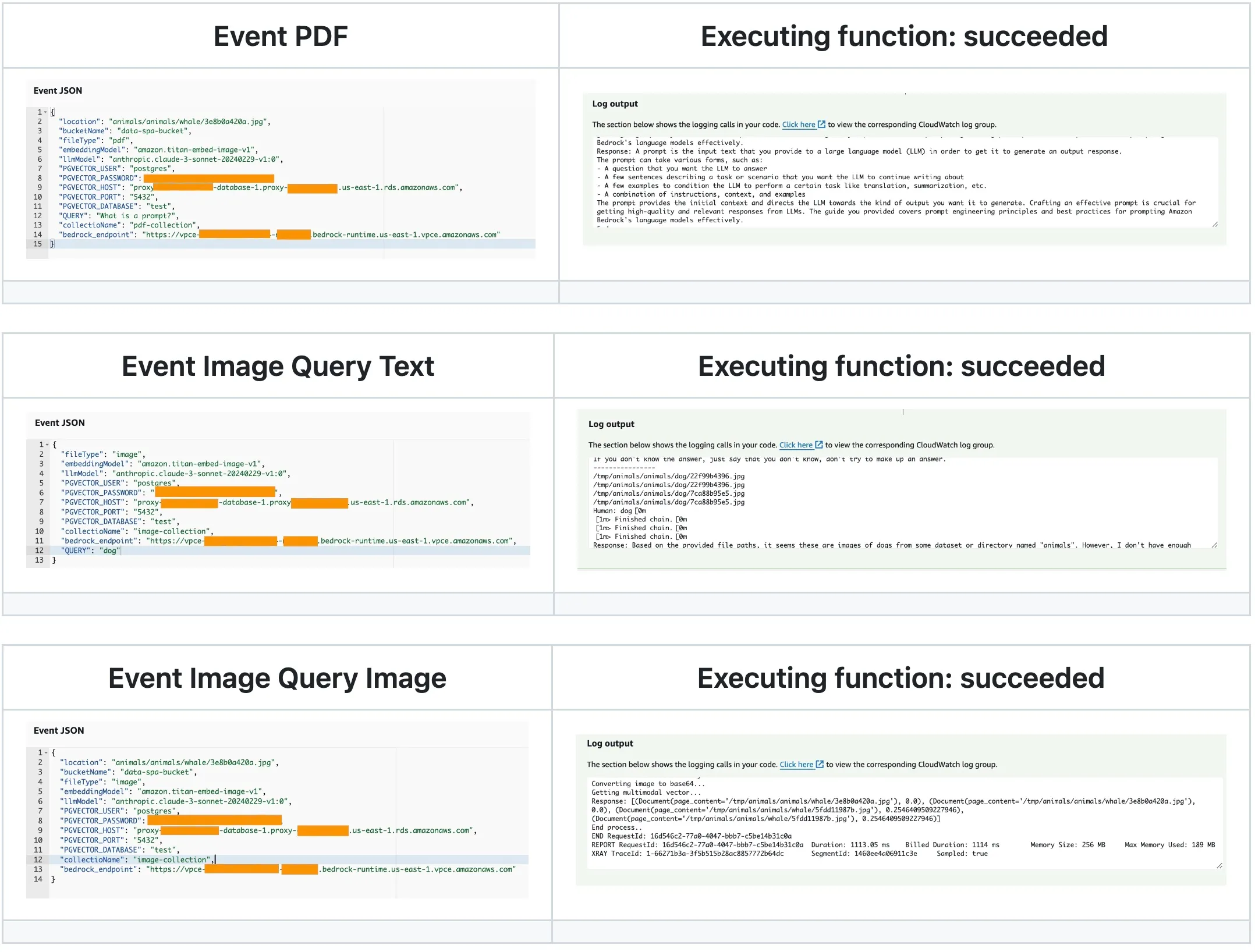
💡 UselocationandbucketNameto deliver image location to make a query.
🚀 Let's build!
The Amazon Lambdas that you build in this deployment are created with a container images , you must have Docker Desktop installed and active in your computer.
Step 1: APP Set Up
✅ Clone the repo
Bash
git clone https://github.com/build-on-aws/langchain-embeddings
✅ Go to:
Bash
cd serveless-embeddings
- Configure the AWS Command Line Interface
- Deploy architecture with CDK Follow steps:
Step 2: Deploy architecture with CDK.
Bash
python3 -m venv .venvsource .venv/bin/activate
for windows:
Bash
.venv\Scripts\activate.bat
✅ Install The Requirements:
Bash
pip install -r requirements.txt
✅ Synthesize The Cloudformation Template With The Following Command:
Bash
cdk synth
✅🚀 The Deployment:
Bash
cdk deploy
🧹 Clean the house!:
If you finish testing and want to clean the application, you just have to follow these two steps:
- Delete the files from the Amazon S3 bucket created in the deployment.
- Run this command in your terminal:
Bash
cdk destroy
Conclusion
In this post, you've demonstrated how to transform a notebook-based multimodal search solution into a scalable, serverless architecture using AWS services. You've walked through the process of developing Lambda functions for embedding tasks, utilizing AWS CDK for infrastructure deployment, and integrating with S3 and Aurora PostgreSQL for efficient data management.
By leveraging these serverless technologies, you can now deploy a robust, production-ready multimodal search engine capable of handling both textual and visual content. This approach not only enhances scalability but also reduces operational overhead, allowing you to focus on improving your search capabilities and user experience.
I encourage you to build upon this foundation, experiment with different embedding models, and explore additional AWS services to further enhance your multimodal search engine. Don't hesitate to share your experiences or ask questions in the comments below. Happy building!
Series: From Notebook to Serverless: Creating a Multimodal Search Engine with Amazon Bedrock and PostreSQL (3 articles)
- 3Deploying Serverless Embedding App with AWS CDK, Lambda and Amazon Aurora PostgreSQL This article
Enjoyed reading this content? Let the author know!
Your likes, comments, shares, and saves help creators reach more builders.

Loading recommendations
Loading article