
Build a UGC Live Streaming App with Amazon IVS: Broadcast Low-Latency with Multi-Hosts (Lesson 4.4)
Welcome to Lesson 4.3 in this series where we're looking at building a web based user-generated content live streaming application with Amazon IVS. This entire series is available in video format on the AWS Developers YouTube channel and all of the code related to the sample application used in this series can be viewed on GitHub. Refer to the links at the end of the post for more information.
Series: Build a UGC Live Streaming App with Amazon IVS (30 articles)
- …
- 18Build a UGC Live Streaming App with Amazon IVS: Broadcast Low-Latency with Multi-Hosts (Lesson 4.4) This article

Intro
In this lesson, we'll see how to broadcast a real-time stream with multiple hosts to an Amazon IVS low-latency channel. As we've covered in previous lessons, real-time streaming with Amazon IVS gives a host the ability to interact with other remote hosts, but sometimes that real-time latency is not necessary for the viewers. The Amazon IVS Web Broadcast SDK makes streaming a real-time conversation to a low-latency channel very easy, so we can add low-latency to a real-time stream with very minimal code and effort.
Broadcasting a Real-Time Stream in Low-Latency
As we saw earlier in this course, there are times when your application requires real-time video to enable multiple hosts to broadcast together, but low-latency (2-5 seconds) is acceptable (or desired) for viewers. In lesson 4.3, we saw how StreamCat enables real-time streams. In this short lesson, we'll see how to take the composite view that we created in that lesson and broadcast it to a low-latency channel.
Retrieve Channel Information
If you recall, each user has a
Channel that stores information about their Amazon IVS channel. This object stores the ingestEndpoint and streamKey. 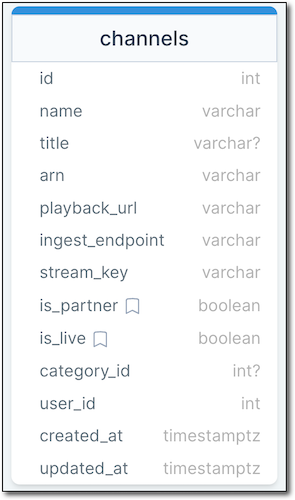
Channel Schema
Broadcasting
To broadcast a real-time stream, StreamCat retrieves the user's channel, and calls
startBroadcast() on the broadcastClient, passing it the channel's streamKey and ingestEndpoint.1
broadcastClient.startBroadcast(this.channel.streamKey, this.channel.ingestEndpoint);And that is it. That's all that has to be added to our real-time broadcasting view to send the composite view to the user's Amazon IVS low-latency channel.
Summary
In this lesson, we learned how to broadcast a real-time stream to an Amazon IVS low-latency channel. This concludes lesson 4. In lesson 5, we'll look at creating public "channel" pages for live stream playback.
PostScript
❗️Note: Since this course was published, a new feature called Server Side Composition was released for Amazon IVS. This feature provides an additional option for broadcasting a real-time stream to a low latency channel. Refer to the user guide for more information about Server Side Composition.
Links
Series: Build a UGC Live Streaming App with Amazon IVS (30 articles)
- …
- 18Build a UGC Live Streaming App with Amazon IVS: Broadcast Low-Latency with Multi-Hosts (Lesson 4.4) This article
Enjoyed reading this content? Let the author know!
Your likes, comments, shares, and saves help creators reach more builders.

Loading recommendations
Loading article