

Messaging vs. Streaming on AWS
How to choose between the two for your application needs, grounded in real software engineering experience.

Intro
In one of my first tasks as a software engineer, I wrote code to integrate two parts of an app with a messaging service. A few months later, I used the same messaging service again to process a continuous flow of data, because it was what I knew and felt that it would solve the problem best.
Looking back, streaming would have fit our needs better. I knew how to use the tool, but not when to choose it.
Messaging and streaming help parts of an application share information. Knowing the difference helps you choose how to distribute work, share updates, and keep history. AWS offers services for both. Let's look at when each fits.
What is messaging?
With messaging, one part of an app can send information without waiting for another to finish processing it.
A producer sends the information; a consumer receives and processes it.
Messages can do things like request receipt generation or announce an order to shipping, billing, and notification services.

A work queue holds tasks for your code to process. With Amazon Simple Queue Service (Amazon SQS) , the sender queues messages instead of assigning each task to a specific program. Your code requests a message, completes the task, and deletes the message after success.
Publish/subscribe (pub/sub), shares updates with subscribed services and applications. Amazon Simple Notification Service (Amazon SNS) can send the same message to several subscriptions, with optional filtering.
Applications sharing a queue divide the work; subscribed applications can each act on the same update. Both use messaging.
What is streaming?
Streaming lets applications process updates as they arrive, such as real-time analytics, application logs, or website activity.
A retained stream stores updates as records. Producers add records, and each application tracks its own reading position.
Reading doesn't delete records. Applications read or reread them independently while the stream retains them.
Applications can use the same website activity to count visitors, detect unusual traffic, or see which pages lead to purchases.
Messaging can reach several consumers too. A retained stream provides shared history for independent reading. Consumer count alone doesn't settle the choice.
Amazon Kinesis Data Streams supports this model, as does Apache Kafka through Amazon Managed Streaming for Apache Kafka (Amazon MSK) . MSK's retention guidance explains why reading doesn't remove Kafka records.
A queue hands off a receipt task; a retained stream keeps website activity for independent readers. Generating the receipt completes the task. Reading the stream leaves the updates for other applications.

How do I choose the right AWS service?
Generating receipts, sharing order updates, and analyzing website activity lead to different AWS choices. I'd start with those needs rather than choose a service and work backward.
🙋 I need to distribute background tasks
Start with SQS to hold tasks until your code can process them. A function can generate receipts in the background while checkout responds to the customer.
SQS hides a received message for the visibility timeout . If your code doesn't delete it before the timeout expires, SQS makes it available for another attempt. Duplicates can still occur. Use idempotency so processing a request again doesn't repeat its effect, like charging a customer twice.
AWS Lambda can process SQS messages without servers for you to manage. Lambda polls the queue, passes messages to your function in batches, and deletes them after success. By default, a batch failure makes all its messages available again after the visibility timeout. Configure partial batch responses to retry the messages your function reports as unsuccessful instead of the whole batch. SQS holds the work; your function handles it.
🙋 I need several services to respond to an event
Start with SNS when several services need the same update. Consider Amazon EventBridge to route different events to different services or functions. "Payment received" can trigger a receipt; "payment failed" can prompt the customer to try again. SNS can filter deliveries too, so compare event sources, destinations, and the AWS or third-party integrations you need.
An EventBridge event bus receives and routes events. AWS recommends its Custom Event Bus for new applications. It retains events for subscribers to reread and can order each subscriber's deliveries with the same group identifier. The default and Classic buses instead use rules to match events to destinations, with optional archives for replay .
🙋 I need to keep compatible messaging interfaces
Consider Amazon MQ to keep your application's ActiveMQ Classic or RabbitMQ interfaces while AWS operates the message brokers.
🙋 I need applications to read a shared history
Consider Kinesis Data Streams for a streaming application on AWS. Applications read independently, and on-demand capacity adjusts as traffic changes.
Consider MSK for Kafka's APIs, applications, or tools. AWS operates the Kafka brokers. Choose provisioned clusters to configure capacity yourself or serverless clusters to have AWS manage it. MSK can support new applications; you can adapt existing ones to Kinesis.
Independent Kafka applications typically use separate consumer groups to track reading progress. Consumers within a group share the work without deleting the history. Monitor how far each group is behind to spot slow consumers.
🙋 I need to deliver or process data
Consider Amazon Data Firehose to deliver incoming data to storage or analytics destinations. It buffers data and can transform it before delivery. For example, it can send logs directly to Amazon S3 without a separate Kinesis stream. Use a retained stream when other applications need to read the incoming history independently.
Amazon Managed Service for Apache Flink runs your Flink code while AWS manages the infrastructure. Your code could calculate average order value over the last few minutes. Delivery, retained history, and processing aren't the same job.
The service map summarizes these eight choices:

What else affects your choice?
Next, check how your service handles processing, ordering, and history.
Ask yourself what you want to do with the information.
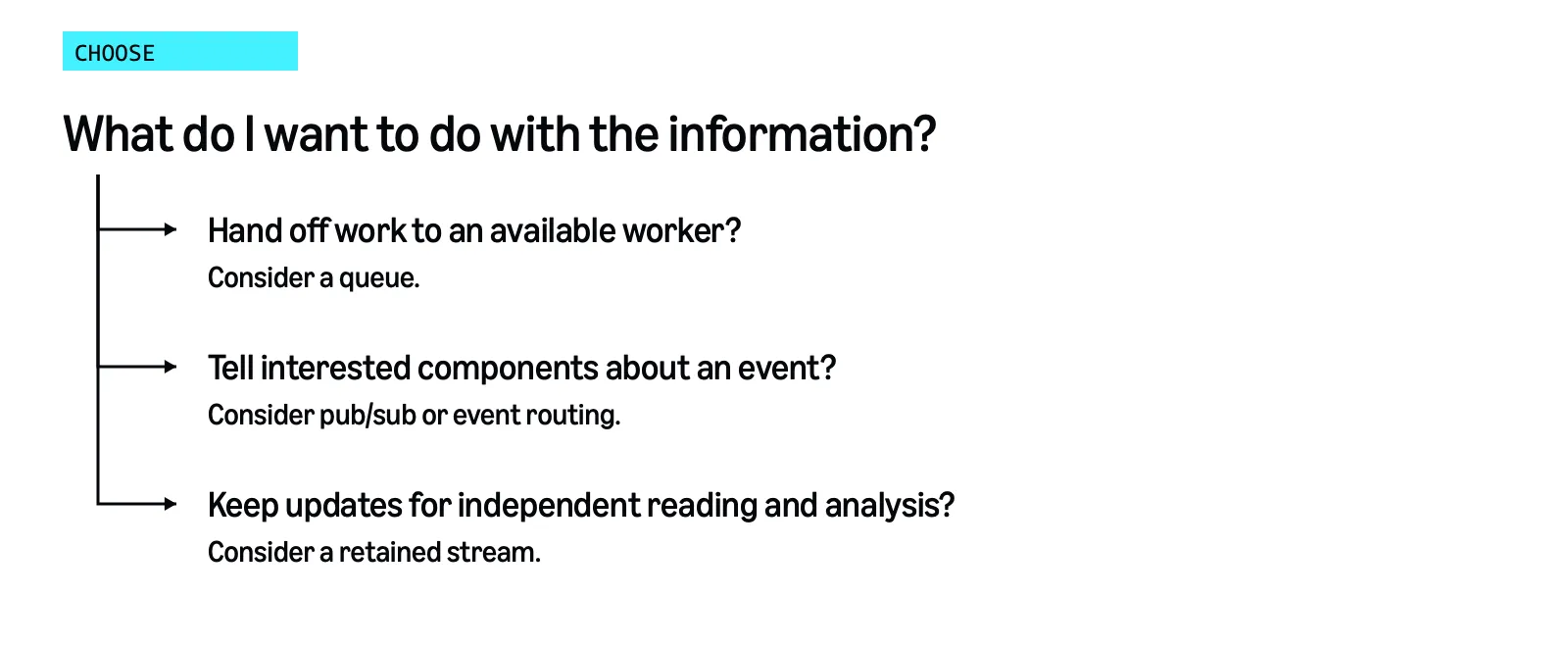
Does completing the task finish the work, or will another application need the history tomorrow?
This comparison covers messaging and retained-stream patterns, not every streaming service.
Consider | Messaging | Retained stream |
|---|---|---|
Typical purpose | Hand off tasks or share event notifications. | Process updates and revisit available history. |
Consumers | Programs share tasks, or subscribed applications each receive updates. | Applications track their own progress through shared records. |
After processing | Your code deletes queue messages after success; messages also expire. Pub/sub has its own delivery lifecycle. | Reading leaves records intact. Retention and cleanup settings control their removal. |
Ordering | Depends on the service and configuration. SQS first-in, first-out (FIFO) queues order messages within a group. | Ordering usually applies to groups of records, not the whole stream or when events happened. |
Replay | Some services retain events or offer archives. | Applications reread records that remain available. |
SQS FIFO orders messages with the same group identifier. SNS FIFO topics do too, but a subscribing SQS standard queue doesn't preserve that guarantee.
Don't assume a stream preserves application-wide order or the order events happened. How you send updates matters too. Kinesis
PutRecords doesn't guarantee write ordering.Messaging can keep history too. SNS FIFO topics can archive and replay messages , and EventBridge offers retention and replay options.
Both patterns can handle traffic spikes or a steady flow. Compare volume, delivery delay, message size, retention, compatibility, and cost rather than choose by traffic shape alone.
Can you use both messaging and streaming in the same solution?
Yes. Choose for each communication need, not the whole application.
For example, EventBridge can route a paid-order event to SQS for receipts and Kinesis Data Streams for analysis. Your code generates receipts while an analytics application reads order history.
Or, an application can detect a problem in a stream and send a task to SQS. The stream keeps the updates; the queue distributes the resulting work.
Messaging services work together too. SNS can send an event to separate SQS queues so each application processes its messages when ready.
EventBridge Pipes can connect a supported source to a target with optional filtering, transformation, or added information from another service. This can reduce your integration code.
How do you get started?
The Agent Toolkit for AWS adds AWS skills and tools to your coding agent. Use its
aws-messaging-and-streaming skill to compare services for your app. But, know that the Toolkit isn't an agent itself.aws configure agent-toolkitThen, rather than just giving an AWS service name, describe the outcome and constraints.
"I need to distribute tasks and keep history for independent analysis. Use current AWS documentation to compare retries, ordering, retention, scaling, and cost. I want minimal infrastructure to manage. Explain your recommendation, and don't deploy anything until I approve."
Your agent cannot read your mind. Review its plan before approving it. It can then help build and connect the infrastructure using your AWS permissions.
Start with one part of your application, understand what the information needs to do, and build from there.
If you're working through a similar choice, I'd love to hear what you're building and what helped it click for you 👉 reach out on LinkedIn !
Chase Grainger
Developer Experience Engineer, Amazon Web Services (AWS)
The opinions in this article are my own.
Enjoyed reading this content? Let the author know!
Your likes, comments, shares, and saves help creators reach more builders.

Loading recommendations
Loading article