

Enhancing AWS Glue Data Quality Pipelines with Context-Aware Rule Discovery for Great Expectations
Use the DataBuck SDK to discover data quality rules, optionally review them, and run them as Great Expectations validations in an AWS Glue job.


AWS Glue gives data teams a solid base for data quality. Glue Data Quality lets you write rules in the Data Quality Definition Language (DQDL), and evaluate them in ETL jobs or on Data Catalog tables. Many teams also run Great Expectations (GX) in Glue for its Expectation library and reporting. Both approaches share one bottleneck: someone has to decide what "valid" means for every dataset.
A data profile shows what the data looks like, not what the business requires, such as a field a policy makes mandatory. That knowledge lives in policy documents. This article shows a pattern for bringing it into the pipeline. The DataBuck SDK reads the dataset and your policy PDFs and proposes candidate rules. You can review them and remove the ones you do not want. DataBuck then converts the rules into GX Expectations and runs them.
In one run on a 10,000-row transactions dataset, a single
DataBuck.discover call produced 96 rules. The Glue job converted them to Great Expectations and ran them: 74 passed, 22 failed and six breached the quality gate.The example reads its data from Amazon S3, but the DataBuck SDK discovers rules from a Spark DataFrame, so the same approach applies to any source Glue can load. By the end you will have a working Glue job that reads data and policy documents from Amazon S3, writes the discovered rules to S3 for review, and writes a per-rule validation report back to S3.
How the pattern works
The job runs five steps, in one go or in two runs with a review in between.
- Read the dataset from S3 into a Spark DataFrame.
- Discover. Call
DataBuck.discoverwith a context (domain, policy PDFs, LLM API key). The rules are written to S3 as JSON.
- Review (optional). Keep, edit or remove rules, or skip this step.
- Convert and run. DataBuck converts the rules to GX Expectations and runs them.
- Report. The per-rule results are written to S3.
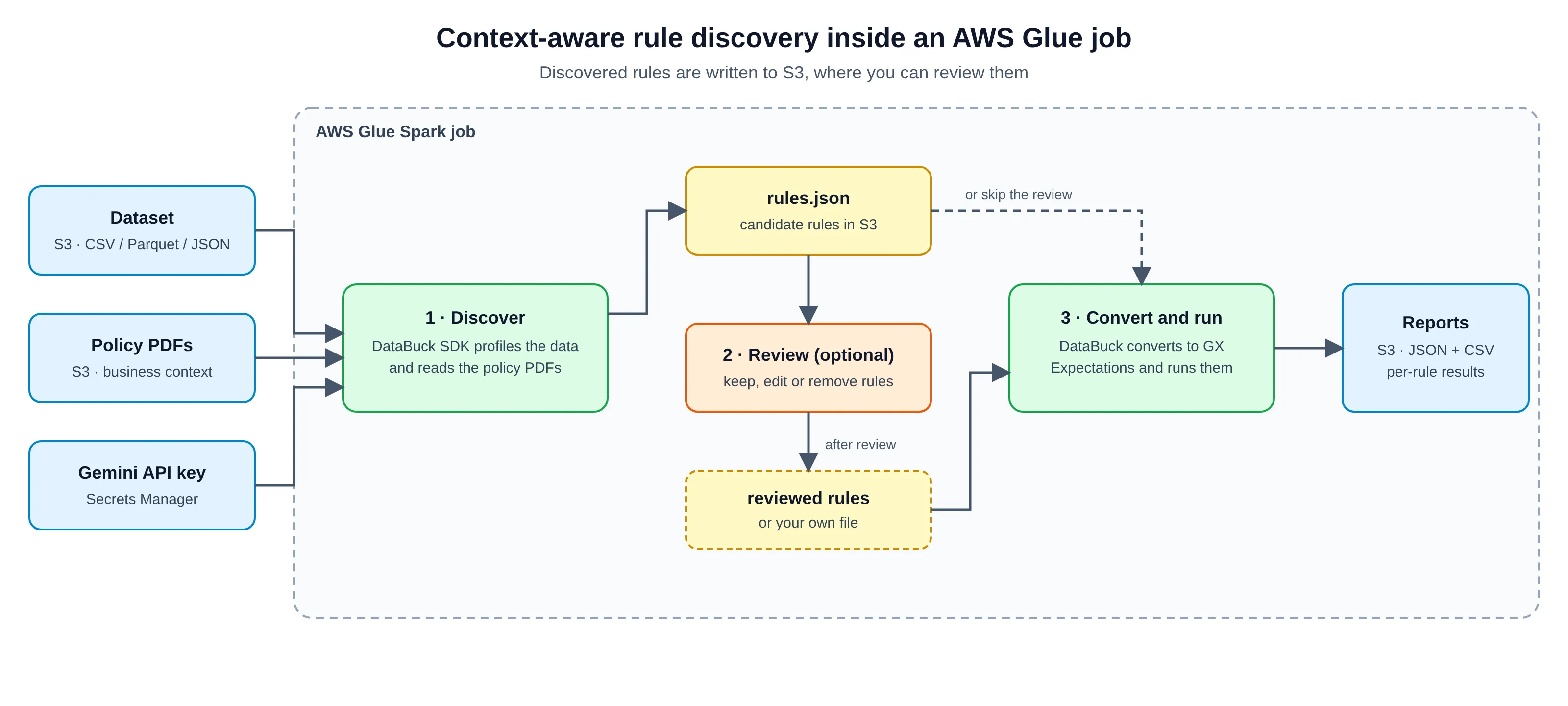
Figure 1. Discovered rules are written to S3, where you can review them before they run.
What the DataBuck SDK does for you
- Discovers rules. It profiles the dataset and proposes rules in one call, from column checks to cross-field business rules.
- Uses your context. It takes a domain name and your policy PDFs, so rules can reflect what the business requires.
- Prepares rules for use. It groups rules by severity (
fail,warnordrop) and saves them as a portable JSON file.
- Converts and runs them. It turns the rules into GX Expectations, runs them, applies a quality gate and reports what each rule became.
The rules file
DataBuck saves rules as JSON. Each rule is a named SQL condition that is true when a row is valid. Rules are grouped by what happens when they fail:
fail , warn or drop . Checks that need the whole dataset sit under dataset_checks , and carry a description and the context they came from. A row violates a rule when its condition is false or NULL. The excerpt below is abridged from the discovery run on a banking transactions dataset that the results below come from; the expressions are verbatim.{ "fail": { "BuckGPT_Rule_038": "NOT COALESCE((sanctions_match_ind = 'Y' AND customer_risk_rating IS NOT NULL AND customer_risk_rating <> 'HIGH'), FALSE)" }, "drop": { "BuckGPT_Rule_031": "NOT COALESCE((transaction_direction = 'CREDIT' AND opening_balance_usd IS NOT NULL AND transaction_amount_usd IS NOT NULL AND transaction_fee_usd IS NOT NULL AND closing_balance_usd IS NOT NULL AND closing_balance_usd <> opening_balance_usd + transaction_amount_usd - transaction_fee_usd), FALSE)" }, "dataset_checks": [{ "name": "BuckGPT_Rule_003", "description": "Ensures that each transaction has a unique identifier.", "reference_context": "... The transaction_id is the primary key for the transaction record and must be unique to correctly identify each transaction.", "columns": ["transaction_id"], "sql": "SELECT `transaction_id`, COUNT(*) AS duplicate_count FROM {{DATAFRAME}} WHERE `transaction_id` IS NOT NULL GROUP BY `transaction_id` HAVING COUNT(*) > 1" }]}Prerequisites
- An AWS account with permission to create S3 buckets, IAM roles, Secrets Manager secrets and Glue jobs.
- The DataBuck SDK: the Python package
databuck-spark-sdk(version 0.5.44) and its jar,databuck-spark-sdk.jar.
- Great Expectations 1.x, which the converter targets.
- An LLM API key. This setup uses a Gemini key for the policy-document step of discovery.
Step 1: Set up AWS
Create the S3 layout
One bucket with five prefixes is enough.
Prefix | Contents |
|---|---|
data/ | The dataset to validate (CSV, Parquet or JSON) |
policies/ | Policy PDFs passed to rule discovery |
libs/ | The DataBuck SDK jar and the helper library databuck_gx_lib.py |
rules/ | The rules JSON, written by discovery or supplied by you |
results/ | Validation reports, one folder per run |
Create the IAM role
The job runs as an IAM role that Glue assumes (trust principal
glue.amazonaws.com ). Attach the AWS-managed AWSGlueServiceRole policy. Add read access to data/ , policies/ , libs/ and rules/ , write access to rules/ and results/ , and secretsmanager:GetSecretValue on the secret below.Store the API key in Secrets Manager
Save the key as a JSON secret with the field
gemini_api_key . The job reads it at run time, so the key never appears in the script, the job parameters or the logs.Discovery needs outbound internet for PyPI and the LLM API. A Glue job with no VPC connection has it by default; a VPC connection without a NAT gateway removes it.
Step 2: Attach the dependencies
A Glue script job has no cluster to install libraries on. You attach them with job parameters, and Glue installs them each time the job starts.
Job parameter | Value | What it brings in |
|---|---|---|
--additional-python-modules | great-expectations==<version>,pyyaml,databuck-spark-sdk==0.5.44 | GX, YAML parsing and the SDK, from PyPI |
--extra-py-files | s3://<bucket>/libs/databuck_gx_lib.py | The converter and validator library |
--extra-jars | s3://<bucket>/libs/databuck-spark-sdk.jar | The SDK jar on the Spark classpath |
--sdk_jar_s3_path | the same jar path | A local copy that the SDK finds through its environment variable |
Two details are easy to miss. Glue splits
--additional-python-modules at commas, so a version range such as >=1.0,<2.0 breaks the install; pin one exact GX version. And do not install pyspark , because Glue already provides it.Step 3: Discover rules with business context
DataBuck.discover takes a Spark DataFrame, an output path for the rules file and a context. The context carries the domain name, the policy PDFs and the API key.from databuck import DataBuck
context = { "gemini_api_key": get_gemini_key("databuck/gemini"), # Secrets Manager "domain_name": "banking", "pdf_paths": local_pdf_paths, # downloaded from S3}DataBuck.discover(df, "/tmp/databuck/aml_rules.json", context=context)On Glue, the job prepares three things around that call:
- Policy PDFs. The SDK takes local paths, so the job downloads the PDFs from
policies/to the driver.
- The jar. The SDK finds its jar through
DATABUCK_SPARK_SDK_JAR. The job downloads the jar and sets the variable before importingdatabuck.
- The output file. Discovery writes locally; the job uploads it to
--rules_pathand reads it back, so S3 holds exactly what GX runs.
Discovery triggers many Spark actions, so the job caches the DataFrame once first and sets
spark.sql.ansi.enabled to false .What discovery returns
On the banking transactions dataset, discovery produced 95 row rules (26 in
fail , 62 in drop , 7 in warn ) and one dataset check. Most are column checks such as not-null, pattern and allowed values. The more useful ones encode how the business works, by relating columns to each other. The last column is how many of the 10,000 rows each rule flagged (see Step 7):Rule | What it enforces | Invalid rows |
|---|---|---|
BuckGPT_Rule_038 ( fail ) | An account with a sanctions match must have a HIGH customer risk rating | 19 |
BuckGPT_Rule_030 ( fail ) | The SAR-filed flag and the SAR reference number must agree | 25 |
BuckGPT_Rule_031 ( drop ) | For a credit, closing balance equals opening balance plus amount minus fee | 1,470 |
BuckGPT_Rule_032 ( drop ) | For a debit, closing balance equals opening balance minus amount minus fee | 852 |
BuckGPT_Rule_001 ( warn ) | A customer must not be under 18 | 25 |
Step 4: Review the rules (optional)
Discovery produces candidate rules. A review is optional, but it is the quickest way to remove rules you do not need. Without it, the job runs the discovered rules straight away. For a review, use the discovery-only mode.
- Run the job with
--rules_source sdkand--discover_only true. It writes the rules to--rules_pathand ends without running them.
- Open the rules file in S3. Keep the rules that match your intent, correct expressions or thresholds that are off, and delete the rules you do not want. Move a rule to another group (
fail,warnordrop) if its severity is wrong. A rule can be well formed and still wrong for your policy:BuckGPT_Rule_002flags any customer outside the US, which a lender with international customers would remove. Severity matters too: the balance rules (031 and 032) failed on 14.7% and 8.5% of rows but sit indrop, so they do not block the run.
- Save the reviewed file, for example under
rules/reviewed/. It is plain JSON, so you can keep it in version control and review changes to it like code.
Then run the job again with
--rules_source s3 and --rules_path pointing at the reviewed file. That run needs no SDK jar and no API key, and every rule it runs is one you have kept.Step 5: Convert the rules and run them in GX
One class,
DataBuckGXValidator , converts the rules into GX Expectations and runs them on the DataFrame.validator = DataBuckGXValidator(rules=rules_doc, config=GateConfig())report = validator.run(df, engine="builtin")Choose an engine
Select the engine with the
--engine job parameter.Engine | How the rules run | Choose it when |
|---|---|---|
builtin | Native GX Expectations where the translation is exact, custom SQL otherwise | You want readable, reusable suites and familiar GX reporting |
boolean_columns | Spark evaluates each rule into a cached boolean column, and GX checks that each column is all True; dataset checks run in Spark and merge into the same report | You have many complex SQL rules and efficient execution matters most |
With
builtin , a rule becomes a native Expectation only when the translation is provably identical to running its SQL; IS NOT NULL , for example, becomes ExpectColumnValuesToNotBeNull . A NULL result is a violation in DataBuck but GX column checks ignore NULLs, so other translated rules get a not-null companion Expectation. Everything else, including all dataset checks, runs as a GX UnexpectedRowsExpectation with the rule's SQL, and the report says why.Severity and the quality gate
Severity maps from DataBuck to GX as
fail to critical, warn to warning and drop to info. The quality gate blocks by default when a fail rule has any failing row, when a dataset check fails, or when a fail rule cannot be evaluated. warn and drop rules never block.Step 6: Create and run the Glue job
In the Glue console, create a Spark script job, paste in the job script and use these settings.
Setting | Value |
|---|---|
Glue version | 5.0 (Spark 3.5, Python 3.11) |
Worker type and count | G.1X; start with 2 to 5 workers and scale with the size of your data |
Timeout | 30 minutes or more; discovery with an LLM is the slow step |
The script reads its configuration from these job parameters, in addition to the library parameters in Step 2.
Parameter | Example value |
|---|---|
--source_path | s3://<bucket>/data/aml.csv |
--output_path | s3://<bucket>/results |
--rules_source | sdk to discover rules, s3 to use an existing file |
--rules_path | s3://<bucket>/rules/aml_rules.json |
--discover_only | true to stop after discovery for review (default false ) |
--domain_name , --pdf_s3_prefix | banking , s3://<bucket>/policies/ |
--gemini_secret_id | databuck/gemini |
--engine , --fail_on_breach | builtin ; true fails the run on a breach (default false ) |
Start the job with Run in the console, or with
aws glue start-job-run --job-name <your job name> . For a first test, run with --rules_source s3 and a small rules file to check S3 access and the GX install before you add discovery.Step 7: Read the results
Each run writes
dq_report_<run id>.json , the same report as .csv , and run_summary.json to results/<dataset>/<timestamp>/ . The report has one row per rule.In a run on 10,000 transaction rows with 96 rules (95 row rules and one dataset check), 74 rules passed, 22 failed and none errored. Of the 95 row rules, 35 became native
ExpectColumnValuesToNotBeNull Expectations and 60 ran as custom SQL, with the reason recorded for each. Six rules breached the quality gate: five fail rules and the duplicate-transaction dataset check. drop failures are reported without blocking.rule | sdk_severity | status | invalid_rows | gate_breach | gx_expectation |
|---|---|---|---|---|---|
BuckGPT_Rule_030 | fail | FAIL | 25 (0.25%) | true | UnexpectedRows |
BuckGPT_Rule_003 | dataset_check | FAIL | 25 | true | UnexpectedRows |
BuckGPT_Rule_031 | drop | FAIL | 1,470 (14.7%) | false | UnexpectedRows |
not_null_currency_code | fail | PASS | 0 | false | NotBeNull |
Rows from the run report; Expectation names are shortened here.
Troubleshooting
Symptom | Likely cause | Fix |
|---|---|---|
Install fails with a version error | A version range with a comma in --additional-python-modules | Pin one exact version |
Java class or jar errors | The jar is not on the classpath, or the variable is not set | Pass the jar in --extra-jars and --sdk_jar_s3_path ; if classes conflict, add --user-jars-first true |
Where this fits alongside AWS Glue Data Quality
This pattern complements Glue Data Quality; it does not replace it. Glue Data Quality is serverless, built on the open-source Deequ library, integrates natively with the Data Catalog, and can recommend rules for Catalog tables. If DQDL rulesets already cover your needs, keep them.
This pattern fits when your team has standardized on GX, or you need rules that reflect your policy documents as well as the data, with the option to review every rule before it runs.
Conclusion
Writing rules by hand is the slow part of data quality, and statistics alone leave out what the business requires. The DataBuck SDK discovers candidate rules from your data and your policy documents, you can review them, and DataBuck converts them into GX Expectations and runs them. On AWS Glue, all of it fits in one Spark job that keeps its files in S3, its key in Secrets Manager and its libraries in job parameters. The job script,
run_gx_validation.py , and the library it imports, databuck_gx_lib.py , accompany this article.A discovered rule is still a candidate. The review step is where your domain knowledge decides what goes into production. To try it, run the discovery-only job on one dataset and read the rules it proposes.
Frequently asked questions
Does this replace AWS Glue Data Quality?
No. Glue Data Quality and DQDL remain a good fit for rulesets you write or recommend inside Glue. This pattern adds context-aware discovery with an optional review step, and runs the rules through GX.
Is the human review step required?
Not enforced, but recommended. Run with
--discover_only true , review the file in S3, then run again with --rules_source s3 .Which data formats can the job read?
CSV, Parquet and JSON from S3. Use
--source_format to override the format inferred from the extension.How do I stop a pipeline when data quality fails?
Set
--fail_on_breach true . The Glue run then fails on any quality-gate breach; warn and drop rules never block.About the author
Sri Harsha Tanamala is a Data Engineer Consultant at FirstEigen, based in Chicago, with more than five years of experience in data engineering. He implements the DataBuck data quality platform in client environments, validates client data and migrations.
About DataBuck
DataBuck is the data quality platform from FirstEigen. The DataBuck SDK, used in this article, brings its automated rule discovery to Spark workloads such as AWS Glue jobs. Learn more at firsteigen.com .
Disclosure: FirstEigen develops DataBuck. This article describes a proof of concept built by the author.
Enjoyed reading this content? Let the author know!
Your likes, comments, shares, and saves help creators reach more builders.

Loading recommendations
Loading article