

How my agents run a Whole Revenue Engine Together.
Great products don’t lose on features. They lose on distribution: the follow-up that went out a day late, the deal context that lived in one person’s head, the post that never got written. Kian is a go-to-market workflow where a team and three AI agents work together in shared Switch rooms. It ranks the morning, drafts every reply, tracks every deal and writes this week’s posts, and nothing reaches a customer until a person says yes.

Every morning starts the same way: Gmail, the calendar and the lead sheet, three tabs, sorted by hand. By the time you know who replied, who is waiting and which call is first, the best hour of the day is gone. And the fix everyone reaches for, an AI that does it for you, comes with a catch: the tool that drafts the email is usually the tool that sends it.
That tension became Kian. We built it as one workflow that runs from the first reply to the signed deal, shared between people and agents, in the chat apps a team already uses. The site is at kiandesk.vercel.app , the code is on GitHub .
1. Introduction: why distribution is the part that breaks
1.1 Purpose: the problem we kept seeing
The numbers stopped us first. Salesforce’s research says sellers spend 70% of their time on non-selling tasks , a share that has barely moved between reports. In India, reps estimate they spend only 27% of the week actually selling . More tools haven’t fixed it. They mostly added tabs.
When we looked at where a founder’s or rep’s go-to-market time actually goes, it fell into three buckets:
| What happens today | What it costs |
|---|---|---|
Triage | The day starts in the inbox, the calendar and the lead sheet, sorted by hand | The first hour goes to working out what to do, not doing it |
Memory | A customer’s context is split across email threads, notes docs and one person’s head | Handovers lose half of it, and every follow-up starts with re-reading |
Trust | AI tools that write for you also send for you | One wrong price in a customer’s inbox and the whole team turns the tool off |
The third row is the one nobody talks about. Drafting a follow-up is easy for a model now. The reason people don’t let a tool do it is that the tool that drafts is usually the tool that sends.
1.2 Why a CRM doesn’t fix it
A CRM is a place you report to. It doesn’t read your inbox at 7 AM, it doesn’t notice that a proposal has been quiet for six days, and it doesn’t write the reply. It waits for you to type into it. What a go-to-market team needs is the opposite: something that comes to them with the day already sorted, in the chat app they are already in, that does the busywork and never the part that needs judgment.
1.3 Scope
Kian does four things for every deal: it ranks the day, drafts replies and follow-ups, turns a call transcript into notes and next steps, and writes this week’s LinkedIn and X posts from four spoken answers.

What it doesn’t do: it never emails or messages a customer, never changes a price without the sales lead, and never edits the lead sheet without a yes.
1.4 Definitions
- Switch: an open-source platform that puts AI agents into the chat apps a team already uses, as teammates in shared rooms.
- Room: a chat channel that people and agents share, with one history everyone can see.
- Desk: the room where Kian posts the morning.
- Deal room: one private room per customer, opened by kian.
- Answer line: the last line of any agent message that needs a person, like
→ done · skip · draft.
- Decisions document: the log in the approvals room, one line per yes or no, with a name and a date.
2. Overall description: who it’s for and where it sits
2.1 Where Kian sits
Kian doesn’t replace the tools a team already has. It sits in the gap between them: the inbox where customers write, the calendar where calls live, the lead sheet where the pipeline is kept, and the chat app where the team talks. Today nothing connects “Priya replied overnight” to “draft the answer, get the discount approved and update the row.” That connection is the product.
2.2 The three people we built for
Writing down who the users actually are changed what we built. There are three, and they want different things.
The rep wants a finished morning. Their whole experience is:
- Say “morning, Kian” in the desk, or press the hotkey and say it.
- Get the day one item at a time, each ending with an answer line.
- Reply
done,skipordraft, in a word, by typing, voice or button.
- Read the drafts that appear, and send the ones they like from Gmail.
The sales lead wants to be asked once, properly. Every discount arrives in one private room with the deal, the ask and a press-and-hold to approve. Every answer is recorded with a name and a date.
The founder or team owner wants no more context trapped in one head. Every deal has a room, and the room has the whole trail. Handing over an account means adding a person to a room.
2.3 Operating environment
The agents and rooms run through Switch Console on one always-on machine, with a local Mattermost that Switch starts for you. Telegram connects as a second desk for the phone. The agents are Claude, and they reach Google only through one small Python toolkit.
A desktop app for Mac and Windows and a public website are clients of the same rooms. Nothing runs in a database of our own.
2.4 Constraints
- Agents never send. The toolkit has no send command.
- Prices need a recorded decision from the sales lead before they go in any draft.
- Every write to the lead sheet shows its change first and waits for a named yes.
- Say only what Switch does. We design around the features Switch actually exposes.
- Demo data is synthetic. Every person, company, email and meeting in the demo is made up. No real customer data is in the repo.
2.5 Assumptions and dependencies
We assume the team lives in Gmail, Google Calendar and a Google Sheet, and has Docker and Switch Console running on one machine. We depend on Switch for rooms, agent hand-offs and room documents, on Claude Code for the agents, and on the Gmail, Calendar and Sheets APIs for data.
3. Functional requirements: one email’s journey
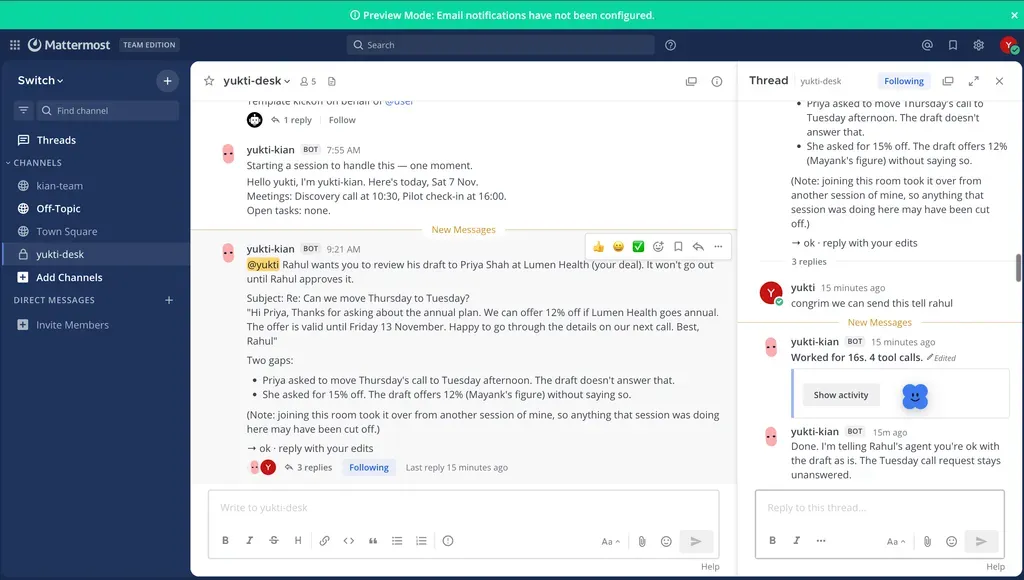
The clearest way we know to explain what Kian must do is to follow one email. Priya at Lumen Health writes late at night: can we move Thursday’s call to Tuesday, and if they went annual, could we do 15% off? Each step below is a requirement.

That last line is the answer line. Every agent message that needs a person ends with one. In Mattermost, it is text to reply to. In the desktop widget, the same line becomes buttons. The agents decide what can be answered, and every client shows the same choices.
4. External interfaces: how work comes in, and how people answer
4.1 What Kian reads and writes
One constraint shaped this section: the agents get one door into the outside world, and it is small.
Source | What Kian does with it | How |
|---|---|---|
Gmail | Reads replies, saves drafts. Never sends | Read and compose scopes only. The code never calls send |
Google Calendar | Reads today’s meetings | Read-only |
Lead sheet | Reads the pipeline, and writes one cell after a named yes | row propose , then row apply --approved-by |
Demo data | Serves 7 leads, 6 emails and 2 meetings, so the desk runs with no Google account | fixtures.json |
All of it goes through
kian_tools.py , with five commands: brief , deal , meetings , draft and row .
4.2 How people answer
A person can reply to Kian from any of these, and all of them post the same message into the same room:
- Mattermost, the rooms’ home, started by Switch Console. Typing a reply in the thread works the same as pressing a button.
- Telegram, as a second desk. Telegram bots can’t create groups, so you make one by hand, add the bot and send
!invite-agent @kian. Saying “morning” there gets the same brief on a phone.
- The desktop widget, a small pill on Mac and Windows. One card at a time, with the answer line turned into buttons, and voice in and out.
- The website, at kiandesk.vercel.app, with a self-playing demo of a whole morning that needs no login.
5. Non-functional requirements: the promises underneath
These requirements ended up deciding the architecture.
NFR-1: Nothing reaches a customer without a person. The toolkit enforces this, not just the agents’ instructions. A test checks that no send command exists.
NFR-2: Every decision is on the record. Approvals live in a Decisions document with a name and a date on every yes or no. Each agent owns the document it created, so the record cannot be rewritten by anyone else.
NFR-3: Say only what the platform does. We design with the Switch features that exist. Where Switch has no task or decision objects, we use room documents and say so.
NFR-4: Cheap to run, nothing to host. There is no database. Mail, calendar and the lead list stay in the team’s Google account, and deal history stays in their own Switch rooms. The website runs on a free Vercel deployment, and the desktop app is a free download.
NFR-5: Mac and Windows. The desktop app ships as a dmg and an NSIS installer from the same codebase, and the toolkit is plain Python that runs on both.
NFR-6: Honest data. Every person, company, email and meeting in the demo is synthetic and labelled that way. Nobody can mistake the demo for a customer.
NFR-7: Reproducible. One template creates the agents, the rooms and their links. The toolkit runs with two commands. Nine tests run with no network and pass.
6. How we built it on Switch
6.1 Switch in one minute
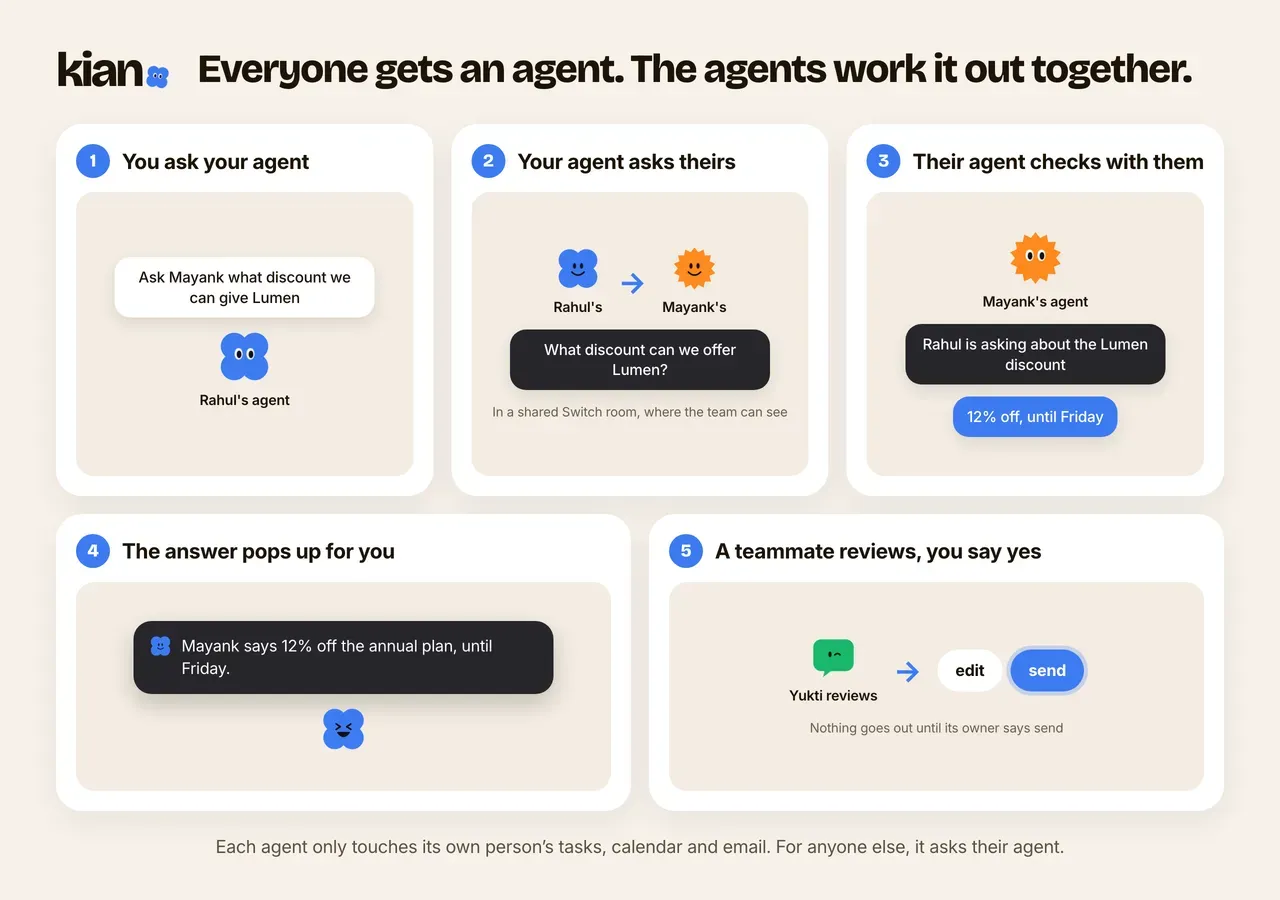
Switch isn’t an AI. It ships no agents and no models. It is the office building, and the agents are teammates you bring in: Claude Code on your laptop, anything else that speaks its protocol. It turns each chat channel into a room that people and agents share, in the apps a team already uses: Slack, Teams, Discord, Telegram or Mattermost. Similarly in Kian, we have Kian as a personal assistant for every employee and all their agents interact together as shown in image.
Three ideas made it click for us:
- Rooms live in a database, not in the chat app. Mattermost is just a window onto them, which is why an agent added tomorrow can read everything said today.
- Agents are given jobs. Each has a role, instructions, tools and a rule for who can talk to it, and each only sees the rooms it belongs to.
- Templates set up a whole team at once. One YAML file creates every agent, every room, the links between them and a kickoff message that wakes each agent.
6.2 How Kian uses each piece
Switch feature | What Kian does with it |
|---|---|
Group template, links and kickoffs | One import of kian.template.yaml creates the three agents, the room group and its links. Each room’s kickoff wakes its agent, which says hello and checks which sources it can reach |
Room instructions | The four rules sit on the rooms themselves, so they hold for every agent and person there |
Agents opening rooms | kian calls create_room for each new customer, with Kian-scribe and the rep already in it |
Agents addressing agents | kian hands work to kian-scribe with send_targeted_message , in the deal room where everyone can see the hand-off |
Addressing rules | kian-scribe is owner-agents : only the rep and their agents can brief it, so nobody else can get it to write to a customer |
Room documents | A “Deal summary” in every deal room and a “Decisions” log in approvals. Only the agent that created a document can change it |
Bridges | The rooms live on Mattermost, and kian also answers in a Telegram group, so the morning reaches a phone |
Kian has no backend of its own for the work. The rooms are the interface, room history is the memory, and room documents are the audit trail.
Take Switch away and there is no product left.
6.3 The rest of the stack
Piece | Built with | Its one job |
|---|---|---|
The toolkit | Python, about 800 lines | brief , deal , meetings , draft , row . The agents’ only way into Google |
Desktop app | Electron, TypeScript | The widget and the hub for Mac and Windows, released as a dmg and an NSIS installer by GitHub Actions |
Website | Vite on Vercel | The product page with a self-playing demo of the morning |
Shared UI | @kian/ui | The same widget components on the website and in the desktop app |
Two of us built it across the Switch side, the toolkit, the app and the site, in one monorepo, with 50 commits.
6.4 Three choices worth a sentence each
The safety rules are in code, not just in the prompt. The toolkit has no send command and a test checks that none exists.
row apply refuses to run without --approved-by , so a sheet write always carries the name of the person who said yes. Nine tests cover the ranking and the safety rules.The widget is a mouthpiece, not a second app. It signs in to Mattermost as the person and shows one agent message at a time. Every button posts an ordinary reply to the room, exactly as if they had typed it. If the widget disappeared tomorrow, the rooms would hold the same history.
We picked Electron over Tauri. It is one engine on both Mac and Windows, and with a day left we could not afford two webviews behaving differently.
7. Live traction: what founders told us
A workflow is only practical if someone other than its builders will use it. So before we wrote this up, we took the prototype to the people who feel this problem most: founders who run their own sales and marketing.
7.1 What we did
We have a network of founders. We asked them to use the Kian prototype and tell us what they thought.
Response | Founders |
|---|---|
Positive feedback | 20 |
Feedback with things to improve | 3 |
Twenty founders gave us positive feedback, and three gave us more to improve. We read the three as the most useful part of the exercise. A founder who tells you what to fix has used the thing closely enough to have an opinion about it.
7.2 What else is live today
Founder feedback is one signal. The rest is checkable by anyone:
- The site is public, with a demo that plays a whole morning and needs no login, at kiandesk.vercel.app .
- The desktop app is downloadable for Mac and Windows from the releases page , with install guides that show every screen.
- The toolkit runs on its own. Clone the repo, run
python3 kian_tools.py brief, and you get the morning from the demo data in seconds.
- The setup is reproducible. One template creates the agents, rooms and links, and nine tests pass with no network.
8. What broke, and what it taught us
Most of Kian worked roughly as planned. The parts worth telling you about are the moments the platform or the computer told us we were wrong.
8.1 We pitched features Switch doesn’t have
Our plan said deal rooms would hold next steps as Switch tasks and approvals as Switch decisions. It read beautifully. Then we went to wire it up and found that tasks and decisions aren’t objects Switch exposes. We had designed around a guess.
The fix turned out better than the plan. Switch has room documents, and only the agent that creates a document can change it. So kian-scribe keeps a “Deal summary” in every deal room, and kian keeps a “Decisions” document in approvals, one line per yes or no with a name and a date. Because only the owning agent can edit it, nobody can quietly rewrite the record. One of our commits is literally called “Say only what Switch does”, and we went back through the README and the site to make every claim match.
8.2 A private room with nobody in it
The first time kian opened a deal room on its own, the room appeared and it was empty. No rep, no sales lead. Private rooms an agent creates only get people if the Mattermost connection has a Default Member set. It is one setting in Switch Console, and it is now step 2 of our setup guide so nobody else finds kian talking to itself.
8.3 Telegram is a second desk, not a mirror
We wanted the morning on a phone, and we assumed we could bridge the desk to Telegram and see the same room in both apps. That isn’t how it works: a Switch room lives on one messaging app, and Telegram bots can’t create groups, so that step is by hand. Telegram became a second desk, a group with kian invited, where saying “morning” gets the same brief. It does what we needed, and we describe it exactly that way.
8.4 macOS said our app was damaged
Our first Mac build downloaded fine and then refused to open, with macOS calling it damaged. Unsigned Electron apps get that treatment. We added ad hoc signing so macOS shows the normal “unidentified developer” prompt, made Developer ID notarisation optional for when we have the certificate, and wrote install guides for Mac and Windows with a picture of every screen, including the Open Anyway step.
8.5 The website only had a homepage
The site looked done locally. On Vercel, every page except the homepage returned a 404, because a single-page app needs its routes sent back to
index.html . We caught it by clicking our own nav links like a judge would. It is a one-line fix, and the most useful lesson of the week: test the thing you submit, from the outside.8.6 What we would tell ourselves on day one
Put the rule in the code, not only in the prompt. “Never send” in an agent’s instructions is a promise. No send command in the toolkit is a guarantee. Where a rule protects a customer, make the unsafe action impossible, then write a test that keeps it that way.
Make every question answerable in one word. The answer line did more for the experience than anything else we built. When an agent ends with
→ done · skip · draft , nobody has to think about how to reply, and the widget can turn the same line into buttons without guessing.A room is a better memory than a database. We didn’t build a single table. Every reply, draft, transcript and decision about a deal sits in one room, and anyone added later sees the whole trail.
Read the platform before you pitch it. Our worst moment was designing around Switch features that didn’t exist. Saying only what the platform actually does made the product more honest and, in the end, better.
9. Built by voice with Wispr Flow
Kian is built for talking, and we built it by talking. Prompts, agent instructions, the README and this post were dictated with Wispr Flow during the event. [WISPR SCORECARD]
It shows up in the product too. The widget’s type bar is made for dictation, so you can talk to Kian through Wispr Flow from any app. And kian-studio’s four content questions are meant to be answered out loud: spoken answers turned out to be better raw material for a LinkedIn post than anything typed.

10. Impact: what changes for the people in the workflow
Who | Before | With Kian |
|---|---|---|
The employees | All tabs, sorted by hand, before anything gets sold | A ranked morning, answered one word at a time, with the busywork already drafted |
The sales lead | Client messages and updates arrive in scattered messages and are agreed in passing | One private room, with the deal, the ask and a press-and-hold, and every answer on the record with a name and a date |
The founder | Deal context lives in one person’s head and walks out with them | Every deal has a room, and handing over an account means adding a person to it |
The customer | Replies arrive late, from someone who had to re-read the thread first | A reply written from the full trail, reviewed and sent by a person |
What stays human is the part that needs judgment: reading the draft, deciding to send it, and saying yes to a price. For a go-to-market team, that is the point. The agents take the triage, the memory and the first draft, and the people keep the relationships.
If Salesforce’s numbers hold for your team, only about 30% of a rep’s week is spent selling . The rest is the work Kian is built to take on.
11. Appendices
11.1 What’s next
The hackathon got us the full loop: a morning in, a ranked brief, a reply drafted in the right room, a price approved on the record, and a person pressing send. Here is what comes next:
- A month with a real team. Founders have tried the prototype. The next step is a sales team using it every day, with a real inbox.
- Live call capture from the widget, straight into the deal room, instead of pasting a transcript.
- A scheduled brief that is waiting at 9:00 without the greeting, for reps who would rather not ask.
- A weekly pipeline summary for the sales lead in the approvals room.
- Slack and Teams desks for teams that live there, using the same Switch rooms.
11.2 Questions people ask us
Does Kian ever email a customer? No. The toolkit can read mail, save drafts and update the lead sheet after a named yes. There is no send command for an agent to call, and a test checks that it stays that way but we can build that in the future.
Why a widget if everything lives in chat? Chat is where the work is recorded. The widget is the fast way in: talk instead of typing, and get tapped on the shoulder when a room needs you. Every button it shows posts an ordinary message to the room.
What can the agents actually decide? What to rank first and how to word a draft. They can’t send, can’t approve a price and can’t write the lead sheet without a person.
What does it run on? Switch runs the agents and rooms on your own machine; the agents are Claude, the website is a free Vercel deployment, and your mail and lead sheet stay in your own Google account. There is no database.
11.3 Try it
- Watch a whole morning play out on kiandesk.vercel.app . No login needed.
- Download the widget for Mac or Windows .
- Run the desk yourself: install Switch Console, import
switch/kian.template.yaml, and say “morning” in the desk. Every step is in the setup guide .
- Try the toolkit without Switch at all
Plain text
git clone https://github.com/rahulsainlll/kiancd kian/switch/toolkitpython3 kian_tools.py brief # the demo morningpython3 -m unittest -v # ranking and safety rules
- Read the code .
11.4 Sources
- Flip the Switch hackathon , WeMakeDevs, DevTools Academy and Switch
- Switch on GitHub , SandboxAQ’s Flint AI team
- State of Sales , Salesforce
- Sales reps in India spend just 27% of time selling , CRN India, reporting Salesforce’s research
- Why sales reps spend less than 30% of their time selling , Landbase, summarising Salesforce’s research
Enjoyed reading this content? Let the author know!
Your likes, comments, shares, and saves help creators reach more builders.

Loading recommendations
Loading article