

When Increasing the Lambda Timeout Isn't the Solution: Designing Asynchronous Architectures on AWS
Increasing the AWS Lambda timeout doesn't always solve long-running API processing issues. Learn how to design asynchronous architectures using Amazon SQS, AWS Lambda, and DynamoDB to process requests without keeping clients waiting.
Series: Cloud Architecture Patterns (1 article)
- 1When Increasing the Lambda Timeout Isn't the Solution: Designing Asynchronous Architectures on AWS This article

Introduction: When an API Starts Taking Too Long
Imagine you're building an API that generates reports using Amazon API Gateway and AWS Lambda.
Initially, everything works fine. Reports take just a few seconds to generate. But as the amount of data grows, some operations start taking 30 seconds, a minute, or even longer.
Eventually, you encounter a timeout error.
Your first instinct might be to increase the Lambda function's timeout. But what if the real problem isn't how long Lambda takes to execute, but the fact that the client must wait for the entire operation to finish?
That's where asynchronous architectures come into play.
In this article, we'll explore how to handle long-running operations using AWS Lambda, Amazon SQS, and DynamoDB, starting with the basics.
1. Understanding Synchronous Processing
In a synchronous architecture, the client sends a request and waits for the result.
Consider this simple serverless flow:
Client → Amazon API Gateway → AWS Lambda → Response
API Gateway receives the HTTP request, invokes Lambda, and waits for the function to return its result.
This works well for operations that complete quickly. However, problems arise when processing takes longer than the API integration can wait.
For example, imagine generating a report takes 60 seconds, but API Gateway has a 30-second integration timeout.
Even if Lambda is configured to run longer, API Gateway may stop waiting and return a timeout error while the function continues processing.
A timeout doesn't always mean Lambda failed. Sometimes, another component simply stopped waiting for the response.
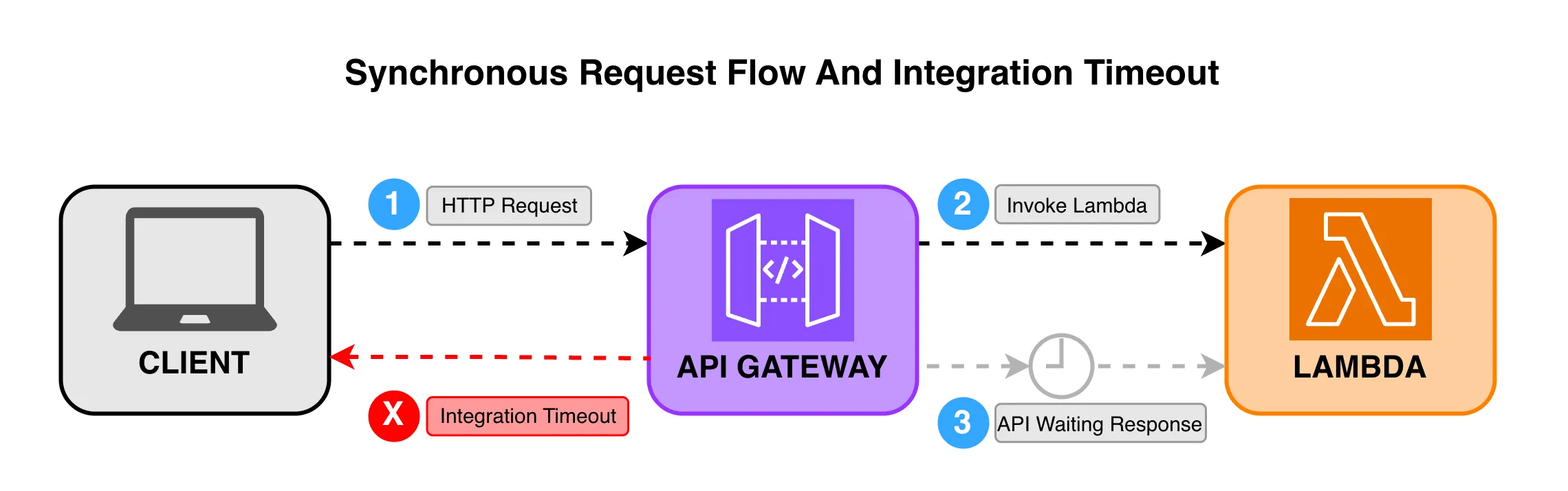
Figure 1. Synchronous request flow: API Gateway may reach its integration timeout before Lambda completes processing.
2. Why Increasing the Timeout Doesn't Always Work
The key is understanding that Lambda's execution timeout and API Gateway's integration timeout are independent settings.
Service | Timeout consideration |
|---|---|
AWS Lambda (standard) | Maximum execution timeout of 900 seconds (15 minutes) |
API Gateway HTTP API | Maximum integration timeout of 30 seconds |
API Gateway Regional or Private REST API | Default integration timeout of 29 seconds, with the possibility of requesting an increase |
HTTP Client | May have its own timeout configuration |
Let's say:
- Lambda needs 60 seconds to generate a report.
- Its execution timeout is configured to 120 seconds.
- API Gateway HTTP API has a maximum integration timeout of 30 seconds.
The result? API Gateway stops waiting before Lambda finishes, and the client receives a timeout error.
Increasing Lambda's timeout won't automatically solve this problem.
Of course, asynchronous processing isn't always necessary. For short operations requiring immediate responses, synchronous communication is often simpler.
But when tasks take several minutes, we should ask:
Does the client really need to maintain an open HTTP connection until processing finishes?
3. What Does Asynchronous Processing Actually Mean?
Asynchronous processing separates two responsibilities:
- Accepting the request: The API validates the request and confirms it has been accepted.
- Processing the request: Another component performs the work independently of the original HTTP connection.
Let's return to our report generation example.
Instead of waiting for the report, the client receives an immediate response containing a unique job identifier:
{ "jobId": "job-001", "status": "PENDING", "statusUrl": "/jobs/job-001"}The API returns HTTP 202 Accepted, indicating that the request has been accepted but processing hasn't finished.
Meanwhile, the report is generated separately, and the client can use the job identifier to check its status.
The report doesn't necessarily get generated faster. The difference is that the client no longer needs to wait for it within the original HTTP request.

Figure 2. Synchronous vs. asynchronous processing: the client receives the final result in the same request or gets a job identifier to retrieve the result later.
This approach is useful for generating reports, processing large files, executing background jobs, and handling operations with unpredictable execution times.
But how does the processing component know there's a new job waiting?
That's where Amazon Simple Queue Service (Amazon SQS) comes in.
4. What Is Amazon SQS and How Does It Work?
Amazon SQS is a fully managed message queuing service that allows application components to communicate without depending on each other's immediate availability.
Think of a restaurant.
When you place an order, the cashier gives you an order number while the kitchen prepares your food. You don't need to stand at the counter until it's ready.
Our application follows a similar approach:
- Client: The customer placing an order.
- Receiving Lambda: The cashier accepting the request.
- Amazon SQS: The queue of pending orders.
- Processing Lambda: The kitchen preparing each order.
- DynamoDB: The system tracking each order's status.
How Does Message Queuing Work?
When the client requests a report, the receiving Lambda sends a message to SQS:
{ "jobId": "job-001", "reportType": "monthly", "requestedBy": "user-123"}This message contains the information needed to identify and process the job, not the report itself.
There are three fundamental components:
- Producer: Sends messages to the queue (Receiving Lambda).
- Queue: Stores messages until they're processed and deleted (Amazon SQS).
- Consumer: Retrieves and processes messages (Processing Lambda).
Producer → Amazon SQS → Consumer
This separation is called decoupling: the producer doesn't need to wait for the consumer to finish its work.

Figure 3. Amazon SQS decouples message producers from consumers, allowing messages to be processed independently of when they are sent.
How Does Lambda Process SQS Messages?
When we connect SQS to Lambda, AWS manages an integration called an event source mapping.
This integration uses polling, meaning it checks the queue for available messages.
The process is straightforward:
- The receiving Lambda publishes a message to SQS.
- The Lambda event source mapping polls the queue.
- When messages are available, it invokes the processing Lambda with a batch of messages.
- Lambda processes the messages.
- When processing succeeds, the integration deletes the successfully processed messages.
While a message is being processed, SQS temporarily hides it from other consumers using a visibility timeout.
If processing fails and the message isn't deleted, it can become visible again for another attempt.
Because SQS Standard queues use at-least-once delivery, messages may be processed more than once. Applications must therefore handle duplicate processing safely, a concept known as idempotency.
The main benefit of SQS is not faster execution, but the ability to buffer requests, decouple components, and process work independently.
5. Designing Our Asynchronous Architecture
Now let's connect everything to solve our original problem: generating reports without keeping the client waiting.
Our architecture uses five main components:
- Amazon API Gateway: Exposes the HTTP endpoints.
- Receiving Lambda: Validates requests and registers jobs.
- Amazon SQS: Stores messages waiting for processing.
- Processing Lambda: Generates reports.
- Amazon DynamoDB: Tracks each job's status.
Why Do We Need DynamoDB?
SQS stores messages, but it isn't designed for clients to query the progress of individual jobs.
DynamoDB provides a place to store each job's status using its unique identifier.
For example, a job starts with
PENDING , changes to PROCESSING , and finally reaches COMPLETED or FAILED .Step 1: Accepting the Request
The client sends:
POST /jobs API Gateway invokes the receiving Lambda, which:
- Validates the request and generates a unique
jobId.
- Creates a DynamoDB record with status
PENDING.
- Publishes a message containing the job information to SQS.
Once these operations succeed, the API returns HTTP 202 Accepted:
{ "jobId": "job-001", "status": "PENDING", "statusUrl": "/jobs/job-001"}The HTTP connection closes without waiting for report generation.
In production, we must handle failures between saving the job in DynamoDB and publishing the message to SQS to avoid leaving jobs permanently pending.
Step 2: Background Processing
The Lambda event source mapping retrieves messages from SQS and invokes our processing Lambda.
The function reads the job identifier, generates the report, and updates the status in DynamoDB:
PENDING → PROCESSING → COMPLETED
If the report generates a file, we could store it in Amazon S3 and save a reference to its location.
Step 3: Retrieving the Result
The client checks the job using:
GET /jobs/{jobId} A separate Lambda retrieves the current status from DynamoDB.
Once processing finishes, the response might look like this:
{ "jobId": "job-001", "status": "COMPLETED", "result": { "reportId": "report-001" }}The client can periodically query this endpoint using client-side polling.
This differs from the polling performed by the Lambda–SQS integration: one checks job status, while the other retrieves messages for processing.
Putting It All Together
Our solution has three flows:
1. Request submission
Client → API Gateway → Receiving Lambda → DynamoDB + SQS
2. Background processing
Amazon SQS → Lambda event source mapping → Processing Lambda → DynamoDB
3. Status retrieval
Client → API Gateway → Receiving Lambda → DynamoDB
The key benefit: the HTTP request lifecycle is no longer tied to the report generation lifecycle.
We can now process long-running tasks without requiring the client to maintain an open connection until they finish.

Figure 4. An asynchronous architecture using API Gateway, AWS Lambda, Amazon SQS, and DynamoDB to accept requests, process jobs, and retrieve results independently.
6. What Happens If Lambda Fails During Processing?
Asynchronous architectures must also handle failures. Fortunately, Amazon SQS and AWS Lambda provide mechanisms to retry failed messages.
When Lambda receives a message, SQS temporarily hides it using a visibility timeout.
- Success: The message is processed and deleted from the queue.
- Failure: The message becomes available again after the visibility timeout expires, allowing another attempt.
Since messages may be processed more than once, our application must support idempotency to avoid unintended duplicate operations.
Dead-Letter Queues (DLQ)
What happens if a message keeps failing?
We can configure a Dead-Letter Queue (DLQ) to isolate messages that exceed a defined number of receives.
However, moving a message to a DLQ doesn't automatically update its status in DynamoDB. Our application needs a mechanism to mark the corresponding job as
FAILED .Monitoring
Using Amazon CloudWatch, we can monitor Lambda errors, SQS queue activity, and failed messages. A shared
jobId also helps trace each operation across the architecture.The goal isn't to eliminate every failure, but to make failures recoverable, observable, and easier to manage.
7. When Should You Use This Architecture?
Asynchronous processing isn't always the best solution. It introduces additional components, costs, and operational complexity.
However, it's particularly useful when:
- Long-running tasks: Processing exceeds reasonable HTTP response times.
- Unpredictable workloads: Execution times vary significantly.
- Traffic spikes: SQS buffers incoming requests while consumers process them.
- Decoupling: Components need to operate independently.
For simple operations requiring immediate responses, synchronous processing may still be the better choice. For complex, multi-step workflows, AWS Step Functions may be worth considering.
Conclusion
When an API experiences timeout errors, increasing Lambda's timeout might seem like the obvious fix. But sometimes, the real challenge lies in how the system is designed.
By combining API Gateway, Lambda, SQS, and DynamoDB, we can separate request handling from background processing while tracking each operation's status.
The goal isn't to make every task run faster. It's to design systems that don't depend on every task finishing immediately.
Because good cloud architecture isn't about using more AWS services. It's about choosing the right approach for the problem you're solving.
References
- AWS Lambda — Configure function timeout https://docs.aws.amazon.com/lambda/latest/dg/configuration-timeout.html
- Amazon API Gateway — HTTP API quotas https://docs.aws.amazon.com/apigateway/latest/developerguide/http-api-quotas.html
- AWS Lambda — Using Lambda with Amazon SQS https://docs.aws.amazon.com/lambda/latest/dg/with-sqs.html
- AWS Lambda — Configuring SQS event source mappings https://docs.aws.amazon.com/lambda/latest/dg/services-sqs-configure.html
- Amazon SQS — Using dead-letter queues https://docs.aws.amazon.com/AWSSimpleQueueService/latest/SQSDeveloperGuide/sqs-dead-letter-queues.html
Series: Cloud Architecture Patterns (1 article)
- 1When Increasing the Lambda Timeout Isn't the Solution: Designing Asynchronous Architectures on AWS This article
Enjoyed reading this content? Let the author know!
Your likes, comments, shares, and saves help creators reach more builders.

Loading recommendations
Loading article