

AWS IAM Explained: A Beginner's Guide to Cloud Security and Least Privilege
Discover how AWS Identity and Access Management (IAM) helps secure cloud resources. Learn about IAM users, groups, roles, policies, and the principle of least privilege, with practical examples and essential security best practices.

AWS IAM Explained: A Beginner's Guide to Cloud Security and Least Privilege
Cloud computing has transformed the way we build applications, manage infrastructure, and store data. With services such as Amazon EC2, Amazon S3, and AWS Lambda, organizations can develop scalable solutions without managing traditional physical infrastructure.
However, as cloud environments grow, one important question becomes increasingly critical:
How do we ensure that the right people and applications have access to the right resources — without exposing everything?
Imagine an office building where every employee has a master key to every room. While this may seem convenient, it introduces unnecessary security risks.
The same concept applies to cloud computing.
This is where AWS Identity and Access Management (IAM) comes in.
In this beginner-friendly guide, we'll explore how AWS IAM works, understand its core components, and discover how the principle of least privilege helps create a more secure cloud environment.
1. What Is AWS IAM?
AWS Identity and Access Management (IAM) is an AWS service that helps securely control access to AWS services and resources.
IAM allows administrators to define:
- Who can access AWS resources.
- What actions they can perform.
- Which resources they can access.
- Under what conditions access is permitted.
For example, a developer might need permission to retrieve files from an Amazon S3 bucket without being allowed to delete them.
With IAM, administrators can define policies that grant the required access without unnecessarily exposing other resources.
Why Does IAM Matter?
Without appropriate identity and access controls, organizations may experience:
- Unauthorized access to sensitive information.
- Accidental modification or deletion of resources.
- Excessive permissions granted to users and applications.
- Greater security risks if credentials become compromised.
IAM helps reduce these risks through centralized permission management and fine-grained access control.
2. Understanding the Four Core Components of IAM
AWS IAM includes several important components that work together to manage access.
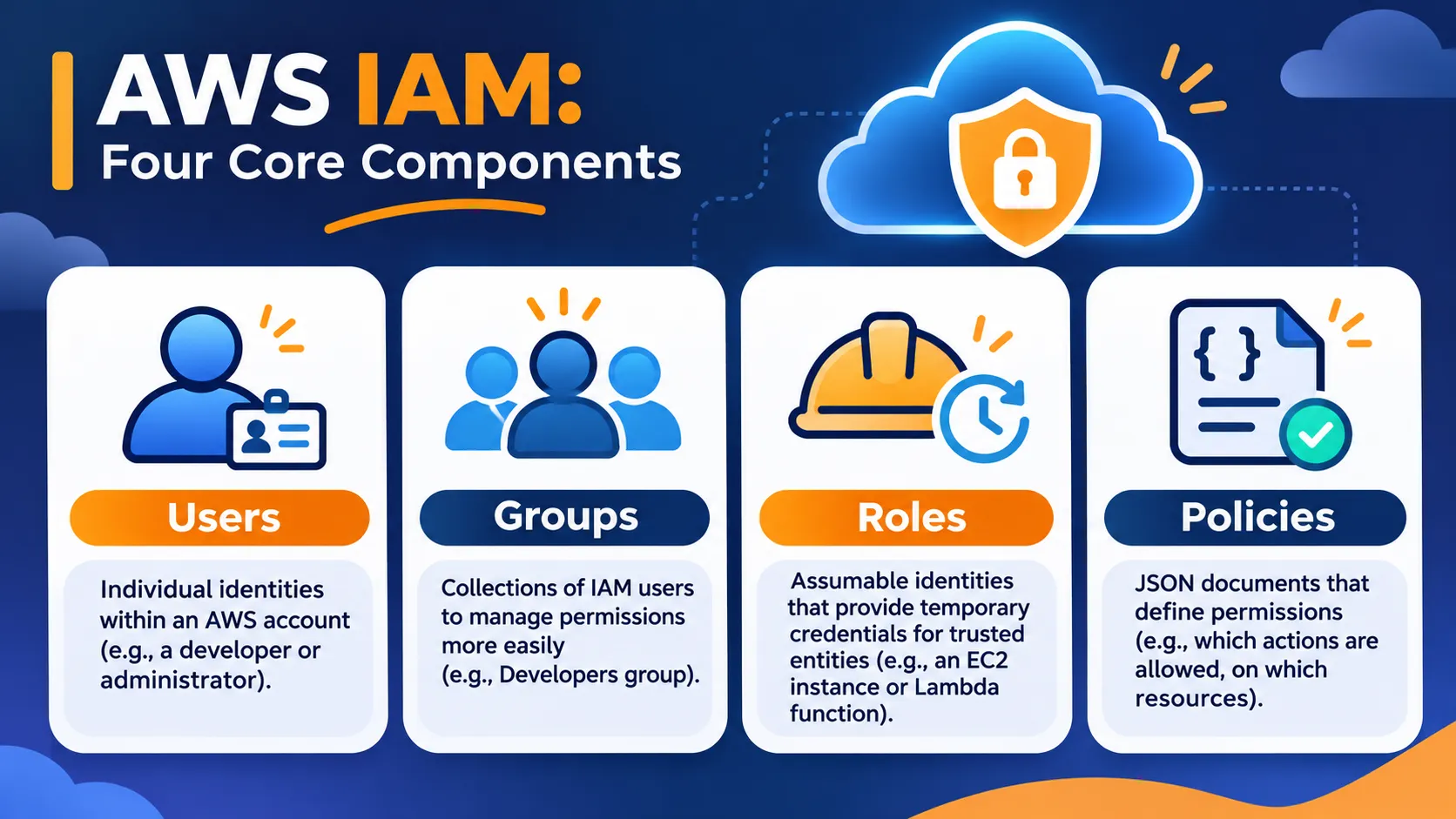
Figure 1: The four core components of AWS IAM — Users, Groups, Roles, and Policies.
2.1 IAM Users
An IAM user is an identity within an AWS account.
IAM users can be configured with credentials for accessing AWS resources.
However, AWS recommends that human workforce users generally access AWS through federation and temporary credentials, such as those provided through IAM Identity Center.
2.2 IAM Groups
An IAM group is a collection of IAM users.
Groups make permission management easier because administrators can assign policies to a group rather than individually configuring each user.
Example: A
Developers group might receive permissions to work with selected development resources.2.3 IAM Roles
An IAM role is an AWS identity that trusted principals can assume to obtain temporary credentials.
Roles are commonly used when:
- An EC2 instance needs to access an S3 bucket.
- A Lambda function needs permission to write logs.
- An application needs access to resources in another AWS account.
2.4 IAM Policies
IAM policies are JSON documents that define permissions.
They specify which actions are allowed or denied, which resources are affected, and any conditions that must be satisfied.
Key takeaway: Users and roles represent identities, groups organize IAM users, and policies define permissions.
3. The Principle of Least Privilege
One of the most important security concepts in AWS is the principle of least privilege.
It means granting an identity only the permissions necessary to complete its intended tasks.
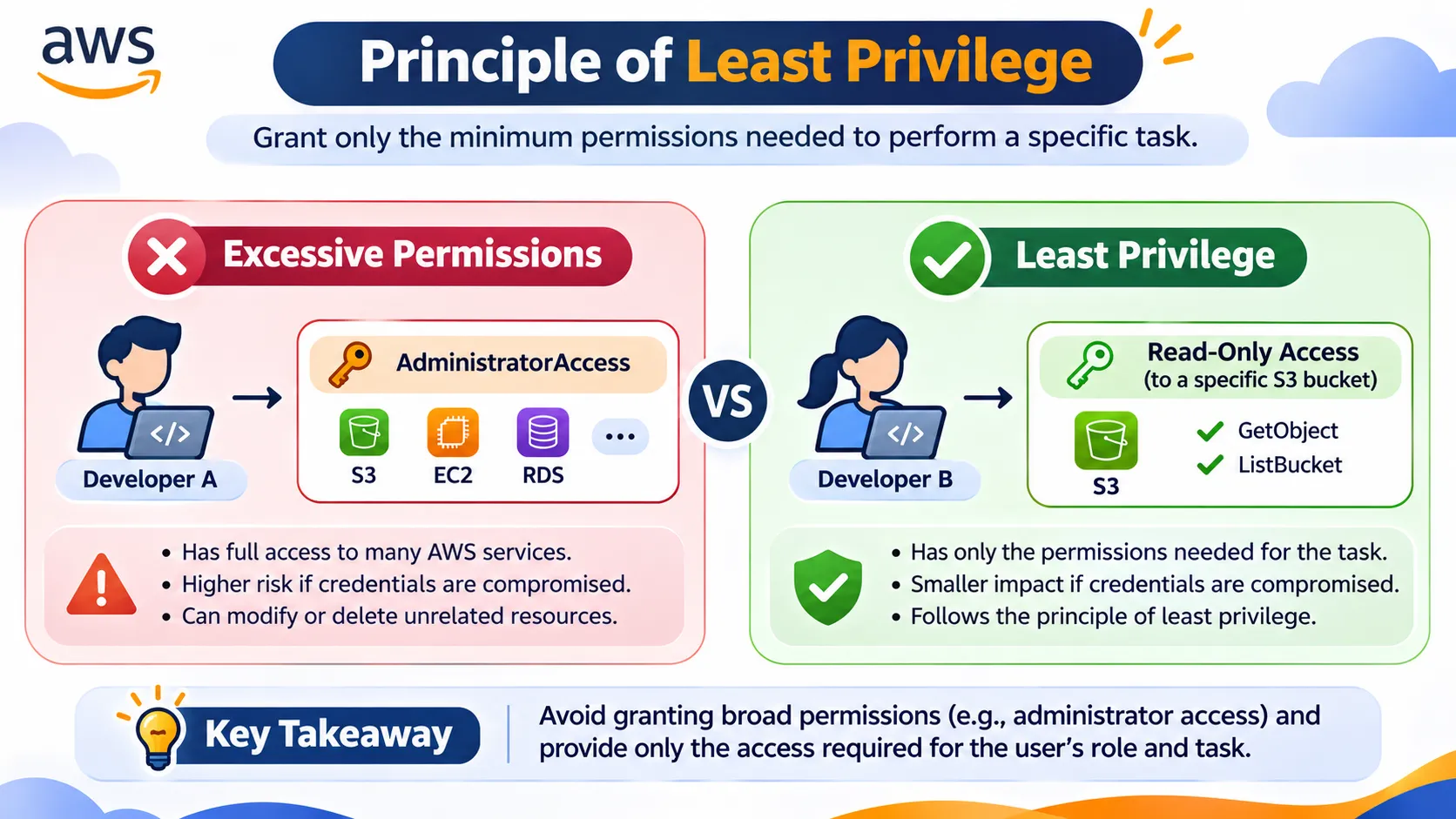
Figure 2: Comparing overly permissive access with the principle of least privilege.
A Simple Example
Imagine two developers working on the same project.
Developer A — Excessive Permissions
- Has administrator-level access.
- Can modify or delete unrelated resources.
- Creates a larger potential impact if credentials are compromised.
Developer B — Least Privilege
- Can read objects from one specific S3 bucket.
- Cannot perform unnecessary administrative actions.
- Has a smaller permission scope aligned with the task.
If both developers only need to retrieve project files, Developer B follows the principle of least privilege.
Example: A Read-Only S3 IAM Policy
Consider the following IAM policy:
Plain text
{"Version": "2012-10-17","Statement": [{"Effect": "Allow","Action": "s3:GetObject","Resource": "arn:aws:s3:::example-project-bucket/*"}]}
Understanding the Policy
Element | Purpose |
|---|---|
Effect | Determines whether the statement allows or denies access |
Action | Specifies the AWS operation being controlled |
Resource | Identifies the resources covered by the policy |
This example grants permission to retrieve objects from the specified S3 bucket.
It does not independently grant permissions to upload, delete, or list objects.
Note: Effective AWS permissions depend on the combined evaluation of applicable identity policies, resource policies, and other access controls.
Security lesson: Grant only the permissions needed for the task, and regularly review whether those permissions remain necessary.
4. IAM Roles vs. IAM Users: What's the Difference?
IAM users and IAM roles both represent AWS identities, but they work differently.
Feature | IAM User | IAM Role |
|---|---|---|
Identity | Persistent identity | Assumable identity |
Credentials | May use long-term credentials | Uses temporary credentials |
Common use | Specific account identities | AWS services, applications, federated access |
Permissions | Directly assigned or inherited through groups | Available during assumed-role sessions |
Real-World Example: EC2 Accessing Amazon S3
Imagine a web application hosted on Amazon EC2 that needs to retrieve images stored in an S3 bucket.
One possible approach is to place AWS access keys directly in the application's source code.
However, this creates security risks because long-term credentials may be accidentally exposed.
A more secure approach is to use an IAM role attached to the EC2 instance through an instance profile.
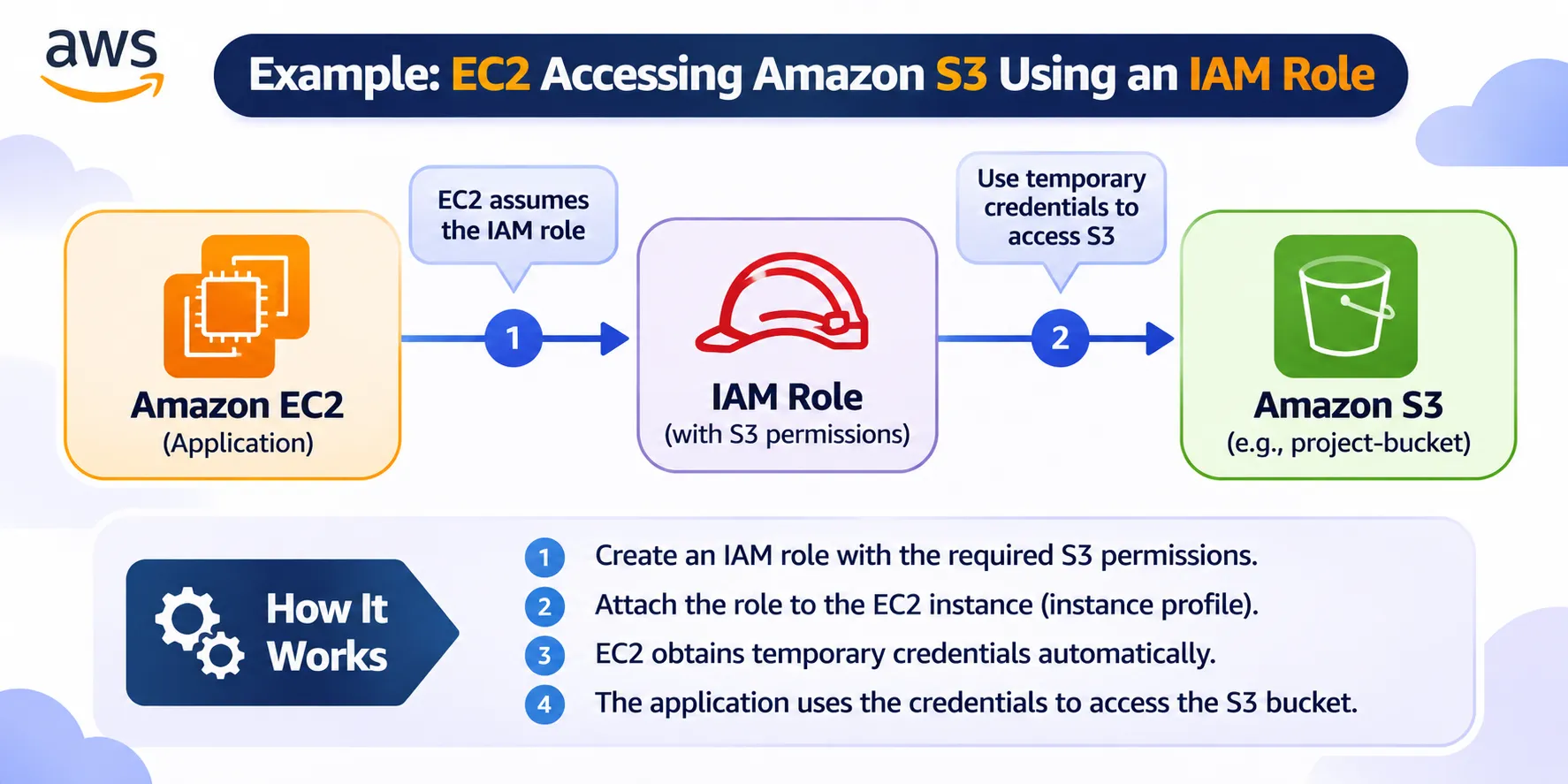
Figure 3: An EC2 application using an IAM role and temporary credentials to access Amazon S3.
How It Works
- An IAM role is created with the required S3 permissions.
- The role is associated with the EC2 instance through an instance profile.
- The application obtains temporary credentials from the EC2 instance metadata service.
- The application uses those credentials to request access to the S3 bucket.
- AWS evaluates the applicable permissions before allowing or denying the request.
This approach reduces the need to store long-term AWS access keys directly in application code.
Key takeaway: Whenever practical, use IAM roles and temporary credentials rather than hardcoded long-term credentials.
5. Five AWS IAM Security Best Practices
Understanding IAM is only the first step. Applying secure access management practices is equally important.

Figure 4: Five recommended practices for strengthening AWS IAM security.
1. Enable Multi-Factor Authentication (MFA)
MFA adds an additional verification factor beyond a password.
It is especially important for protecting the AWS account root user and privileged access.
2. Apply Least Privilege
Avoid granting unnecessary permissions.
For example, instead of giving an application full access to Amazon S3, grant access only to the required bucket and operations.
3. Prefer Temporary Credentials
Use IAM roles and federation whenever possible.
Temporary credentials reduce the need to manage persistent access keys.
4. Review Permissions Regularly
Access requirements change as projects and responsibilities evolve.
Use tools such as IAM Access Analyzer to help identify and refine access permissions.
5. Protect the AWS Root User
The root user has extensive privileges within an AWS account.
Protect root credentials with MFA and avoid using the root user for routine administrative tasks.
Remember: Strong cloud security comes from combining appropriate permissions, credential protection, and continuous access reviews.
6. Common IAM Security Mistakes to Avoid
Even experienced cloud users can make mistakes when configuring permissions.
Here are five common problems worth avoiding.
Common Mistake | Potential Risk |
|---|---|
Excessive permissions | Unnecessary access to sensitive resources |
Hardcoded access keys | Credentials may be exposed in source code |
Unused permissions | Former access requirements remain active |
Missing MFA | Greater exposure to credential-based attacks |
Overly broad role trust policies | Unintended principals may assume sensitive roles |
How Can We Reduce These Risks?
- Review IAM permissions regularly.
- Remove unnecessary permissions and credentials.
- Use temporary credentials wherever practical.
- Protect privileged access with MFA.
- Carefully configure role trust policies.
A secure cloud environment requires more than creating IAM policies once. Access controls should be reviewed and maintained as systems evolve.
7. IAM and the AWS Shared Responsibility Model
AWS operates under a shared responsibility model.
This model separates security responsibilities between AWS and its customers.
AWS: Security of the Cloud
AWS is responsible for protecting the infrastructure that runs AWS services, including underlying hardware, software, networking, and facilities.
Customer: Security in the Cloud
Customers are responsible for configuring and securing their workloads according to the AWS services they use.
This includes responsibilities such as:
- Managing identities and permissions.
- Protecting credentials.
- Configuring access controls.
- Securing applications and data.
IAM is an important part of the customer's security responsibilities.
AWS provides identity and access management capabilities, but customers must configure them appropriately.
Important lesson: Cloud security depends not only on the technology available, but also on how that technology is configured and maintained.
8. Final Thoughts
AWS Identity and Access Management is one of the most important foundations of cloud security.
By understanding IAM users, groups, roles, and policies, beginners can start building AWS environments with more effective access controls.
The principle of least privilege provides a simple but powerful security mindset:
Give the right identity the right permissions to the right resources — and nothing more.
Whether you're exploring AWS for the first time, preparing for an AWS certification, or building cloud-based applications, IAM is a valuable concept to understand.
Continue Learning
For additional information, explore the official AWS documentation:
💬 Let's Discuss!
Which AWS IAM security practice do you think is most important for beginners?
Is it enabling MFA, applying least privilege, or using temporary credentials?
I'd love to hear your thoughts in the comments!
If you found this guide useful, consider giving it a like and sharing it with someone who is learning AWS.
Happy learning and keep building securely! ☁️🔐
Enjoyed reading this content? Let the author know!
Your likes, comments, shares, and saves help creators reach more builders.

Loading recommendations
Loading article