

Designing Resilient Workforce Access with IAM Identity Center Multi-Region
Why your identity layer deserves a multi-Region design, how the architecture works, and the decisions and practices that make it hold up during an incident.

The front door problem
For many organizations, IAM Identity Center is the only way into their AWS accounts. Engineers, operators and analysts all go through the same AWS access portal, the same sessions and the same permission sets.
That makes identity a dependency of everything else. You can spread your workloads across three Regions, but if workforce access lives in a single Region, your continuity plan has a single point of failure at the front door.
Why multi-Region: the three goals
The official documentation describes three benefits. Each one is a different reason to adopt it.
1. Resilient access to AWS accounts. If IAM Identity Center experiences a disruption in its primary Region, your workforce can keep accessing their AWS accounts through an additional Region. AWS states it plainly in the launch announcement:
"If IAM Identity Center is affected by a disruption in the primary Region, IAM Identity Center users continue to have access to their AWS accounts using the already provisioned entitlements in the additional Regions."
2. Flexibility to deploy AWS managed applications where you need them. You can deploy AWS managed applications in the Regions that fit your data residency requirements or sit closer to your users. Applications in additional Regions access the replicated workforce identities locally.
3. Cross-Region trusted identity propagation. AWS services in one Region can verify user identity with IAM Identity Center in another Region and authorize access based on user attributes. In the documentation's words, this lets you "build distributed architectures where compute and data reside in different Regions while maintaining fine-grained, identity-based access control."
The first goal is about availability. The second and third are about architecture: identity stops being the reason your applications and data have to live in one Region.
How it works: one place to manage, many places to sign in
The console describes the model in one sentence: you manage most IAM Identity Center resources from your primary Region, and the additional Regions are available for accessing AWS accounts and applications, and for deploying applications.
That gives you a useful mental model:
- The primary Region is where administration happens. Users, groups, memberships, permission sets and assignments are created there and replicated outward.
- Additional Regions are where access happens. Each one has its own AWS access portal endpoint, can authenticate users and can issue sessions.
- The KMS key sits on the critical path. Identity Center data is encrypted at rest with a multi-Region customer managed key, and a Region only becomes available for replication once the key has a replica there.
This official reference architecture shows those pieces: Identity Center in
us-east-1 replicating to us-west-2 , with the multi-Region KMS key and its replica in the additional Region.
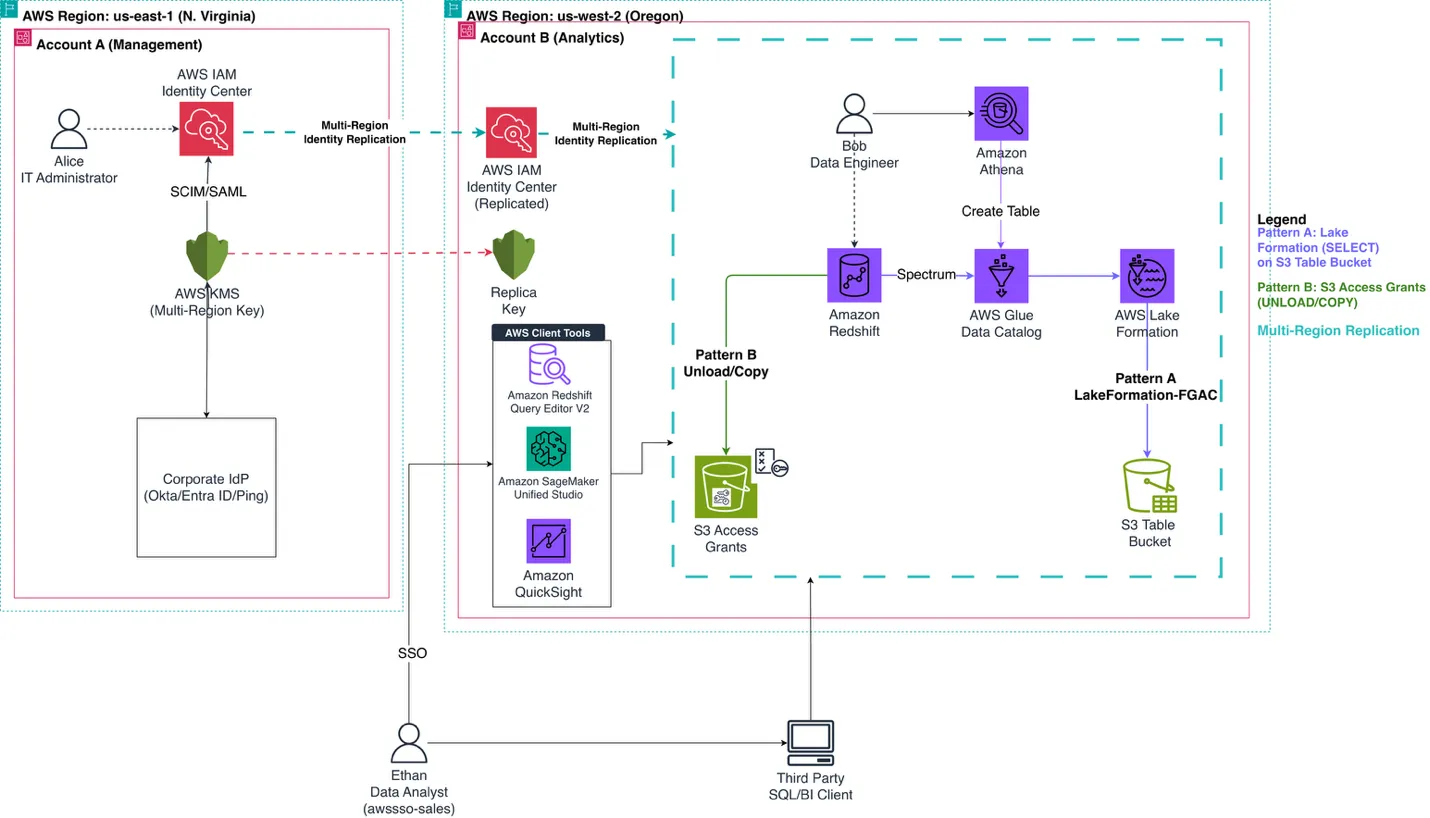
The next official diagram shows the third goal in practice: one primary Region (
us-east-1 ), two replicas ( ap-southeast-2 and sa-east-1 ), and an analyst in São Paulo querying data governed in Sydney.
What gets replicated
Data | Direction |
|---|---|
Users, groups and group memberships | Primary → additional Regions |
Permission sets and their assignments | Primary → additional Regions |
Configuration | Primary → additional Regions |
Trusted token issuers | Primary → additional Regions |
Application metadata and assignments | Application's connected Region → other enabled Regions |
Sessions | Originating Region → other enabled Regions |
Replication is asynchronous with eventual consistency. The initial replication depends on the size of your instance, and incremental changes are replicated within seconds in most cases. Resources keep the same identifiers in every enabled Region, and the IAM roles already provisioned in your accounts don't change.
Just as important is what is not replicated: data stored inside AWS managed applications. Replicating Identity Center also doesn't move an application to another Region.
The design decisions that matter
1. Which additional Region
The documentation lists four criteria. Which one wins depends on the goal you are designing for.
Goal | Criterion |
|---|---|
Access resiliency | Choose a Region geographically distant from the primary |
Compliance | Choose the Region where the datasets your applications need reside |
Performance | If residency isn't a factor, choose the Region closest to your users |
Application support | Confirm the AWS applications you need are available there |
If you need both resiliency and data residency, you may need more than one additional Region. The default quota is 6 Regions per instance, and it can be increased. Confirm that both your primary and additional Regions are supported in AWS Capabilities by Region .
2. The primary Region is permanent
You cannot promote an additional Region to primary or demote the primary Region. The only way to remove the primary Region is to delete the entire instance. Additional Regions, on the other hand, can be added and removed at any time.
So the real decision is not "which Region do I replicate to" but "is my current primary Region the right long-term home for identity administration". It is worth having that conversation before you build more on top of it.
3. Identity source
| Identity Center directory | External IdP |
|---|---|---|
Multi-Region support | Yes | Yes |
Requires multiple ACS URLs in the IdP | No | Yes, to fully use multi-Region |
Continuity depends on | IAM Identity Center | IAM Identity Center and the health of the IdP |
With the Identity Center directory, the path is shorter: there is no SAML configuration to update per Region. With an external IdP, the IdP has to support multiple Assertion Consumer Service (ACS) URLs, a SAML feature that the documentation lists as supported by Okta, Microsoft Entra ID, PingFederate, PingOne and JumpCloud, and not by Google Workspace.
Active Directory as an identity source is not supported for multi-Region.
4. The KMS key becomes identity infrastructure
Multi-Region requires a multi-Region customer managed KMS key in the same account as Identity Center. Treat it with the same care as the identity system itself:
- It has to be multi-Region from day one. A single-Region key cannot be converted into a multi-Region key.
- Key policies are not synchronized across replicas. AWS recommends using the same policy on every replica for consistent authorization, so every change has to be applied in each Region.
- The key can lock everyone out. If it is deleted, disabled or made inaccessible by an incorrect key policy, neither workforce users nor administrators can use IAM Identity Center. The loss can be temporary (a policy can be fixed) or permanent (a deleted key cannot be restored).
5. Application compatibility
There are two separate requirements. Every AWS managed application your organization uses must support Identity Center configured with a customer managed key, and the applications you want to deploy in additional Regions must support that type of deployment. Check the official compatibility table before switching the key.
Best practices
These practices come straight from the documented behavior. Most of them have to be done before the incident, because that is when they are still possible.
Prepare access paths ahead of time
- Share the AWS access portal URL of each additional Region with your workforce as soon as replication is complete. The classic
awsapps.comendpoint and custom aliases are not available in additional Regions, so the regional URL looks different.
- Have users create AWS CLI profiles for each additional Region, mirroring their primary profiles. CLI authorizations are not replicated across Regions.
- Update domain allow-lists in firewalls and secure web gateways so users can reach the regional portal.
Provision before you need it
- Continuity depends on permission set assignments and group memberships being provisioned and replicated before a disruption. In additional Regions the Identity Store API is read-only, the SCIM API supports no operations, and the Identity Center API only allows application-related writes. An incident is not the moment to grant new access.
Protect the key
- Restrict who can disable or schedule deletion of the KMS key.
- Keep the key policy identical across replicas, and update every Region when it changes.
Keep a last line of defense
- Set up break-glass access for a small group of privileged users. Multi-Region protects against a disruption of Identity Center in one Region; it does not cover a disruption of your identity source or an inaccessible KMS key.
Know what you can still do during an incident
- Administrators can revoke user sessions from an additional Region, and the revocation is replicated.
What multi-Region does not solve
- It is not a failover of administration. The primary Region remains the only place where identities and permissions are managed.
- There is no automatic switch for users. They move to the regional portal URL or their regional CLI profile.
- It does not replicate application data or change where applications are deployed.
- It does not replace break-glass access.
Closing thought
Multi-Region for IAM Identity Center turns identity from a single-Region dependency into a distributed access layer with a single administrative home. The feature does the replication for you. The resilience comes from the decisions around it: a primary Region you are happy to keep, a KMS key you protect like identity itself, access paths your team already knows, and permissions that are in place before anything goes wrong.
Sources
I also cover this topic in Spanish: a full walkthrough with console screenshots on Medium , and short videos on YouTube , TikTok and Instagram .
━━━━━━━━━━━━━━━━━━━━
🟧 dev.luchops
Cloud & DevOps, explicado sin vueltas.
▸ Medium → medium.com/@lucianonicolasloyola
▸ YouTube → youtube.com/@dev.luchops
▸ TikTok / Instagram → @dev.luchops
━━━━━━━━━━━━━━━━━━━━
Enjoyed reading this content? Let the author know!
Your likes, comments, shares, and saves help creators reach more builders.

Loading recommendations
Loading article