
How I Used Kiro Spec-Driven Development to Build a PoC for Governing MCP Access
Per-team MCP tool access for AI coding assistants with AgentCore Gateway and Cedar default-deny policies, built by iterating on a Kiro spec instead of code.


How I Used Kiro Spec-Driven Development to Build a PoC for Governing MCP Access
Developers are connecting AI coding assistants to internal systems through the Model Context Protocol (MCP). The assistant calls tools on the developer's behalf: it queries databases, creates resources and changes configurations. Once several teams do this, some questions come up quickly:
- Who approved the tools this assistant can use?
- Does a frontend developer need access to the orders database?
- Is there an audit trail of what the assistant did?
- Who manages the list of approved MCP servers?
I wanted to know whether I could answer these with a working proof of concept, and build it with Kiro ( https://kiro.dev ) spec-driven development: describe the problem and requirements in a spec, then let Kiro turn that spec into a design, a task list and working code.
This post covers how I did it.
The problem statement
When several teams use AI coding assistants with MCP tools, four problems surface:
1. No central catalog. Developers do not know which MCP servers are approved.
2. No per-team access control. Anyone with the URL can call any tool.
3. No audit trail. You cannot answer "which agent called what, when, and for whom?"
4. No isolation. The frontend team's assistant can see the platform team's infrastructure tools.
By default, every developer can reach every tool. That was the problem I gave Kiro.
Step 1: Write the spec
In spec-driven development, you describe what you need, and Kiro works out the how with you. I started with the problem, the requirements, a target architecture and a demo scenario that would prove it worked:
Problem
AI coding assistants connect to internal systems via MCP.
No governance exists for:
- Which teams can access which tools
- Central discovery of approved MCP servers
- Audit trail of agent-to-tool interactions
- Per-team isolation
Requirements
1. A registry endpoint that serves the catalog of approved MCP servers
2. A gateway that all traffic flows through (single enforcement point)
3. Per-team RBAC (Cedar default-deny, explicit permits)
4. Native IDE OAuth (no proxies, no AWS keys per developer)
5. Audit logging of every tool call with identity context
Architecture
- Registry: API Gateway + Lambda serving GET /v0.1/servers
- Gateway: Amazon Bedrock AgentCore Gateway (CUSTOM_JWT)
- Policies: Cedar (default-deny, per-team permits)
- Identity: Amazon Cognito (JWT with team claim)
Demo scenario
- Two MCP servers: products-mcp, orders-mcp
- Two teams: frontend (gets products), platform (gets orders)
- Cross-team access automatically denied
The demo scenario is the most useful part. It gave Kiro, and me, a concrete definition of done: frontend can reach products, platform can reach orders, and nothing else is reachable.
Step 2: Let Kiro turn the spec into requirements, a design and tasks
Kiro's spec workflow has three phases: it turns the spec into a requirements.md (user stories with acceptance criteria), then a design.md, then a tasks.md (an ordered, checkable implementation plan). You review and approve each phase before the next one starts.
A requirement from requirements.md:
Requirement 3: Per-team tool access (RBAC)
User story: As a platform engineer, I want each team to reach only its owntools, so that one team's assistant cannot call another team's.
Acceptance criteria
1. WHEN a caller presents a JWT whose `team` claim is `frontend`, THE SYSTEM SHALL allow `products-mcp` tools and deny `orders-mcp` tools.2. WHEN a caller presents a JWT whose `team` claim is `platform`, THE SYSTEM SHALL allow `orders-mcp` tools and deny `products-mcp` tools.3. WHEN no policy explicitly permits the requested tool, THE SYSTEM SHALL deny the call (default-deny).4. WHEN a tool is denied, THE SYSTEM SHALL omit it from the tool list returned to the agent, so the assistant never sees it.5. THE SYSTEM SHALL express each team-to-tool grant as its own single-action Cedar permit.
The matching slice of tasks.md:
3. Enforce per-team access with Cedar
3.1 Write one single-action permit per team per tool (req 3.1, 3.2, 3.5)3.2 Bind the policy engine to the gateway in `LOG_ONLY` (req 3.3)3.3 Add tests for allow, cross-team deny, and default deny (req 3.1-3.3, 6.3-6.5)3.4 Confirm denied tools are omitted from the returned tool list (req 3.4)3.5 Switch the policy engine to `ENFORCED` (req 3.3, 3.4)Each task cites the requirement it satisfies, so the plan stays traceable back to the spec. I spent most of my time in these two files, because changing a requirement here costs less than fixing generated code later.
Step 3: Kiro builds, I iterate on the spec
Working through the tasks, Kiro generated:
1. A Lambda function serving the MCP registry catalog (GET /v0.1/servers).
2. A Cognito setup with a Pre-Token-Generation Lambda that injects a team claim into the JWT. (Adding custom claims to access tokens requires the Cognito Essentials or Plus feature plan.)
3. Cedar policies, one permit per team per tool.
4. Test scripts that validate the access matrix against the live gateway.
5. The IDE MCP configuration that points the client at the gateway.
I didn't hand-patch generated code when something was wrong. I changed the spec and let Kiro regenerate the affected tasks. The clearest example was the Cedar policy. My first version of requirement 3.5 asked for one permit per team covering several tools at once:
requirements.md (before) 5. THE SYSTEM SHALL express each team's grants as a single multi-action Cedar permit. Kiro generated a multi-action permit for that:
Generated from the "before" requirement. It did not behave as expected in my PoC.
permit(principal,action in [AgentCore::Action::"products-mcp___list_products",AgentCore::Action::"products-mcp___search_products"],resource == AgentCore::Gateway::"<GATEWAY_ARN>") when {principal.hasTag("team") && principal.getTag("team") == "frontend"};That permit didn't produce the decisions I expected on the gateway. Instead of debugging the generated Cedar, I rewrote the requirement:
requirements.md (after)
5. THE SYSTEM SHALL express each team-to-tool grant as its own single-action Cedar permit. I re-ran only task 3.1, the one task that cites requirement 3.5, and Kiro regenerated one permit per tool. Tasks 3.2 to 3.5 didn't need to change:
Regenerated from the "after" requirement: one permit per tool
permit(principal,action == AgentCore::Action::"products-mcp___list_products",resource == AgentCore::Gateway::"<GATEWAY_ARN>") when {principal.hasTag("team") && principal.getTag("team") == "frontend"};Changing one line of the requirement and re-running one task was faster than editing the policy by hand. The PoC took a few days. Writing code was never the hard part; getting the access model right in the spec was.
A note on the two tools in play
Two different tools appear in this project, and it's worth keeping them separate:
- Kiro is the tool I used to build the PoC: the spec, design, tasks and code.
- The MCP client under test is what a developer would use day to day against the gateway. I tested the governed gateway from both VS Code and Kiro as MCP clients. The screenshot below is the VS Code configuration.

The MCP client's mcp.json points at the gateway URL. Native IDE OAuth issues a Cognito JWT carrying the team claim, so there are no AWS keys in the config: auth happens through the browser sign-in and enforcement happens server-side at the gateway.
Registry vs. gateway: two different URLs
These are easy to confuse, so to be precise about what my PoC did and didn't wire up:
- The gateway URL is what the MCP client connects to for every tool call. That is the URL in the mcp.json above, and it is where OAuth and Cedar enforcement happen.
- The registry endpoint (GET /v0.1/servers) serves the catalog of approved servers. In my PoC I built the registry Lambda but configured the client's mcp.json by hand against the gateway URL. I did not wire the registry into automatic IDE discovery.
For automatic discovery, VS Code reads an MCP registry through its MCP server gallery (in preview), not through the gateway URL. GitHub Copilot Business and Enterprise admins can also set an organization MCP registry URL, which is in public preview. Treat registry-driven auto-discovery in this post as the intended direction, not something the PoC demonstrated end to end.
What Kiro built: how the PoC works
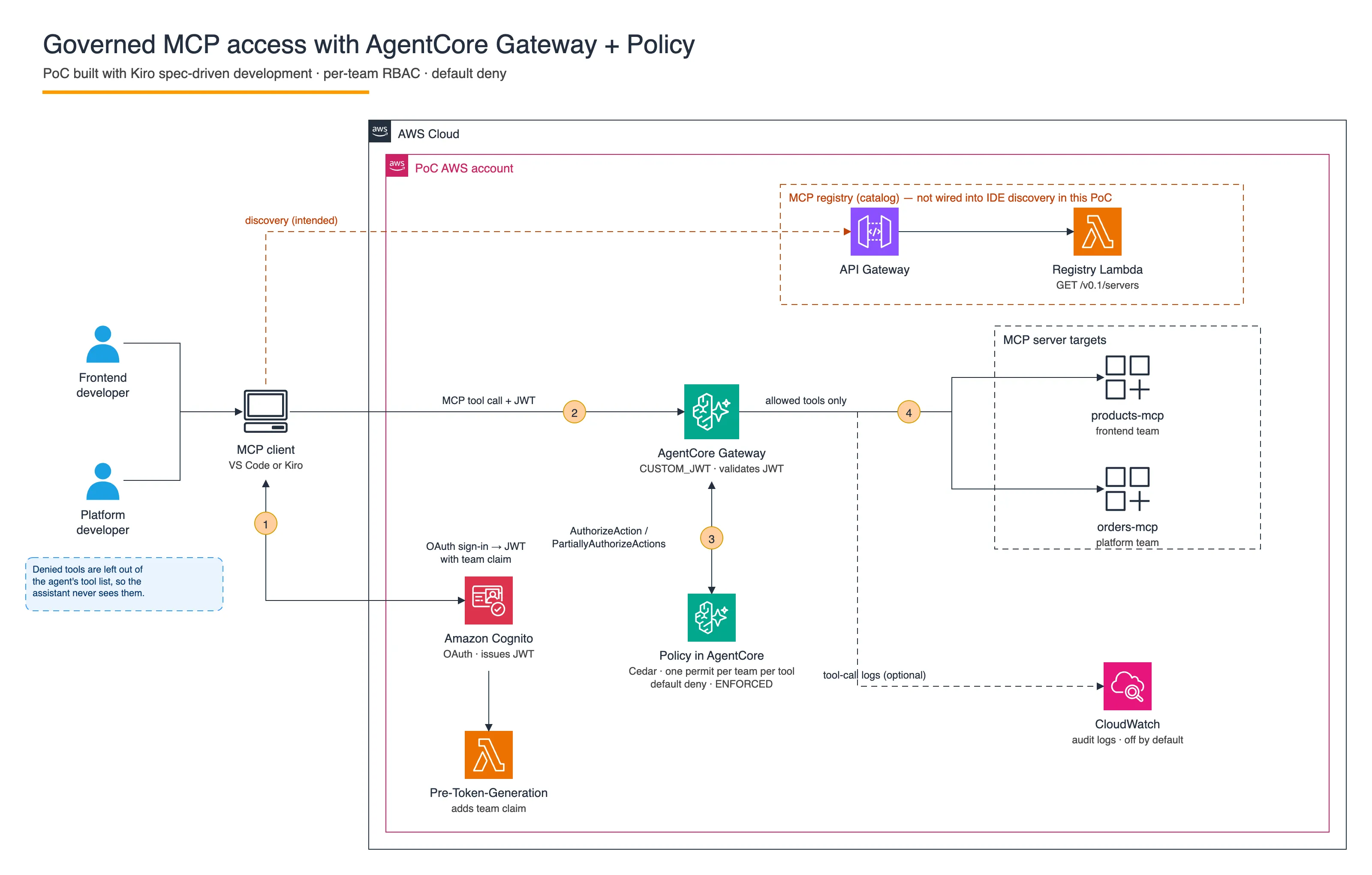
Architecture of the PoC. (1) The developer signs in through the MCP client with native IDE OAuth; Cognito issues a JWT, and a Pre-Token-Generation Lambda adds the team claim. (2) Every tool call goes to the AgentCore Gateway with that JWT. (3) The gateway asks Policy in AgentCore to evaluate the Cedar policies. (4) Only allowed tools are listed and executed; everything else is denied by default. The registry and CloudWatch logging are shown dashed because the PoC did not wire them in end to end.
Developer → MCP client (VS Code or Kiro) → OAuth login → JWT with team claim↓AgentCore Gateway → validates JWT → evaluates Cedar policies↓Cedar: is there a permit for this team and this tool?↓ALLOW → tool executes, response flows backDENY → tool never appears in the agent's toolset
(Separately: an MCP registry serves GET /v0.1/servers as the catalog of approved servers. In this PoC the client was pointed at the gateway by hand.)
The Cedar policies
Frontend team can list products
permit(principal,action == AgentCore::Action::"products-mcp___list_products",resource == AgentCore::Gateway::"<GATEWAY_ARN>") when {principal.hasTag("team") && principal.getTag("team") == "frontend"};
Platform team can list orders
permit(principal,action == AgentCore::Action::"orders-mcp___list_orders",resource == AgentCore::Gateway::"<GATEWAY_ARN>") when {principal.hasTag("team") && principal.getTag("team") == "platform"};No explicit deny is needed. Cedar denies any request that no policy permits. With an OAuth gateway, the JWT claims become tags on the principal, so principal.getTag("team") reads the team claim.

The per-team, per-tool policies bound to the gateway in ENFORCED mode. Each policy is scoped to one team and one tool; everything else is denied by default.
The results
Tool Call | Frontend Team | Platform Team |
|---|---|---|
products-mcp___list_products | ✅ ALLOWED | ❌ DENIED |
products-mcp___search_products | ✅ ALLOWED | ❌ DENIED |
orders-mcp___list_orders | ❌ DENIED | ✅ ALLOWED |
orders-mcp___get_order_by_id | ❌ DENIED | ✅ ALLOWED |
Key result: when a tool is denied, the coding assistant never sees it. The frontend developer's agent responds, "I don't have an orders tool available in my current toolset."
The assistant doesn't hallucinate the tool or try to call it anyway, because the tool doesn't exist in that session. This works because the gateway asks Policy in AgentCore for the caller's authorized tool list (via the PartiallyAuthorizeActions API) and returns only those tools to the agent.
How the PoC answers the problem statement
Problem | What the PoC does |
|---|---|
No central catalog | MCP Registry Lambda serving GET /v0.1/servers (catalog built; not wired into IDE auto-discovery in this PoC) |
No per-team access control | Cedar per-team permits, everything else denied by default |
No audit trail | The gateway can log tool calls through CloudWatch and AgentCore observability, with the JWT identifying the caller. Observability is off by default and must be enabled; I did not exercise logging in this PoC |
No isolation | Each team only sees the tools its policy allows |
Lessons learned
1. Put most of your effort into the spec
The demo scenario in the spec defined done, and every fix went through the spec, so the code stayed consistent with the requirements. Changing a requirement and letting Kiro regenerate was faster than debugging generated code by hand.
2. Everything used here is already available
AgentCore Gateway is generally available. Policy in Amazon Bedrock AgentCore, the Cedar-based authorization layer, became generally available on March 3, 2026. Amazon Cognito is generally available. You can build the same PoC today without waiting for a launch.
3. Test multi-action permits before you enforce them
The AgentCore documentation shows multi-action permits using action in [...], so the pattern is supported. In my PoC, my multi-action permit did not produce the decisions I expected, and I did not investigate the cause. One permit per tool worked. If you use multi-action permits, test them in LOG_ONLY mode before you enforce them.
4. Two prerequisites are easy to miss
- The policy engine must be bound to the gateway in ENFORCED mode. Creating policies alone does nothing.
- The gateway execution role needs three Policy in AgentCore permissions: bedrock-agentcore:AuthorizeAction, bedrock-agentcore:PartiallyAuthorizeActions, and bedrock-agentcore:GetPolicyEngine. Without them, the gateway denies every call, even when permit policies exist, and attaching a policy engine can fail with InternalServerException. PartiallyAuthorizeActions returns the authorized tool list, so it's the permission that hides denied tools from the agent. Test in LOG_ONLY mode first, then switch to ENFORCED.
5. The registry is discovery, not security
The registry's job is to list the approved servers. In this PoC it served the catalog, but I didn't connect it to IDE auto-discovery. Enforcement lives in the gateway and Cedar. Even if a developer edits their local MCP config to bypass the registry, they still cannot call a tool without a valid JWT carrying the right team claim
Closing
I started with a problem statement, not code. Kiro's spec-driven development turned that statement into requirements, a design, tasks and a working PoC in a few days. When something broke, I changed the spec rather than patching the code. If your teams are connecting coding assistants to internal tools, try writing the governance you need as a spec and having Kiro build it.
References
Enjoyed reading this content? Let the author know!
Your likes, comments, shares, and saves help creators reach more builders.

Loading recommendations
Loading article