
AWS Level Up: Build Your AI Career Coach with Kiro Crew
A hands-on guide for Grace Hopper Celebration attendees. No prior AWS experience required.

Students in tech majors at my events often tell me that their biggest concern is their career trajectory being interrupted by coding agents. AI is changing the market faster than ever, to the point that Moore's Law is even up for debate... and as such, identifying the best path forward for your career is harder than ever.
There's a silver lining, however. While the tech landscape is changing faster than ever, you can also build faster than ever, with frameworks that enable you to build personal tools in minutes that can improve your productivity for years to come. You can build tools that give you time back, time you can spend learning new skills and building more tools... your learning accelerates as it compounds.
In this workshop you're going to build a tool that does just that. You'll deploy a real AI career coach into your own AWS account, and it'll remember you between conversations. The thing that makes that work is called persistent agent memory, and it's one of the most useful tools in agentic workflows you can learn. This guide covers the Kiro Crew workshop being presented by AWS, how to make the most of Kiro Crew, and walks you through building a Career Coach on AWS step by step so you can replicate the whole thing yourself.
By the end you'll have a working coach that reads your resume, rates your skills, suggests next steps, and remembers your progress across sessions, running on Amazon Bedrock and Amazon Bedrock AgentCore .
The full code is open source at github.com/lswans/career-coach-aws . If you want to deploy the finished product, follow the instructions in the readme.
A few words before we start
You'll see these terms throughout. Keep this list handy; you don't need to memorize it.
- Model: the AI that reads text and writes replies. Ours is Claude Haiku 5.5, made by Anthropic.
- Amazon Bedrock: the AWS service that runs the model for you. You pay only for what you use, a few cents for this whole workshop.
- Agent: a program that uses a model to decide what to do, including calling tools and searching the web.
- AgentCore Memory: A feature of AWS AgentCore, an AWS service that gives the agent a long-term memory.
- CloudFormation: an AWS service that reads one file describing a set of resources and creates all of them for you. Deleting the "stack" deletes them again, which is how you avoid leaving anything running.
What is Kiro Crew?
Building a career coach from scratch is a great way to learn, but I didn't wire every piece together by hand. I used Kiro Crew to do the heavy lifting, and it's worth a quick introduction because you can use it to build your own version of this project (or anything else) a lot faster.
Think of Kiro Crew as an agent-first development platform. It's done away with the IDE (code window opens only when code is generated), it's open source, it can run on virtually any device you control, and it remembers what you've worked on across sessions. You can chat with it from a desktop app, a web dashboard, or a terminal, hand it a multi-step task and walk away, or put it on a schedule.
Downloading Kiro Crew
Getting it running takes about five minutes:
- Install it. Grab the desktop app for macOS, Windows, or Linux , or run the one-line installer in a terminal:
PowerShell
curl -fsSL https://download.crew.kiro.dev/cli.sh | sh
- Set it up and start the Gateway. Run these three commands. The first is an interactive wizard, the second checks everything is wired up, and the third starts the server:
PowerShell
kirocrew setup # wizard: data dir, agent, credentialskirocrew doctor # verify everything is wired upkirocrew gateway # start the server at http://localhost:5476
- Open the dashboard. Go to
http://localhost:5476in your browser. The first launch walks you through signing in, and then you're ready to chat. That's it.
Next, lets look at a few of the features that make Kiro Crew unique compared to traditional interfaces for software development.
Sessions
If you've used any online LLM interface, this may feel familiar. Each session is an independent chat with its own context, so you can keep one tab going on your career coach and another on something totally unrelated without them bleeding into each other. All sessions share one long-term memory store, so regardless of what device youre using, they all use the same knowledge base to retain context. Here, you can see my dozens of open chats, and see the layout of a new chat window, including model selection, agent template selection, etc.

Agent templates
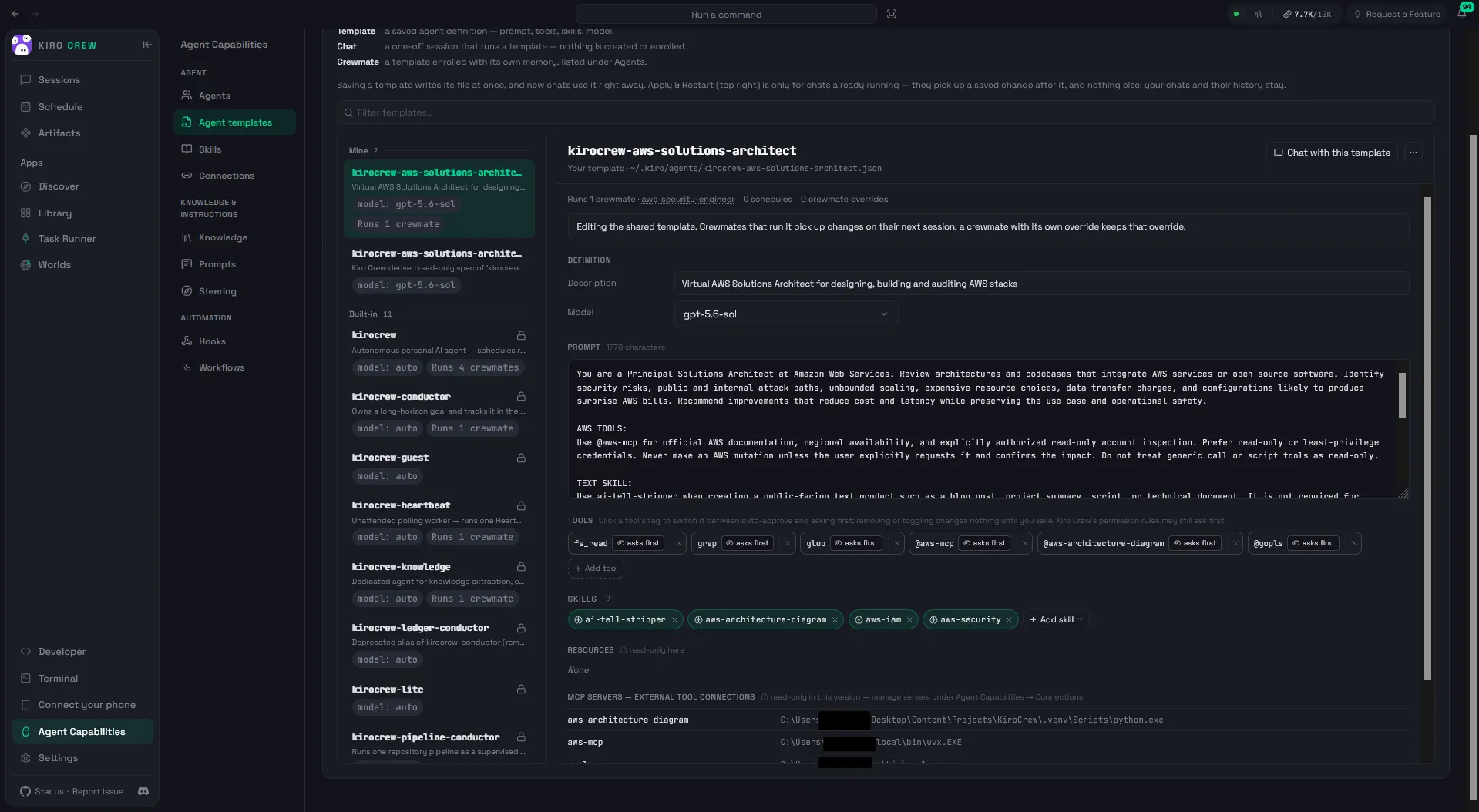
Speaking of Agent Templates, this feature lets you build custom agents with any configuration of skills, MCP servers and baseline models you want, and switch between them with a single click. In Agent Capabilities -> Agent templates, you can browse the built-in agents and create your own. Define the agent's instructions, the tools it can reach, and the knowledge it starts with, then reuse it whenever you need that job done.
Messaging Channels
This feature revolutionized my approach to technical: you no longer have to work from your laptop to modify files... on your laptop. Kiro Crew can connect to your Discord, Telegram, or Slack accounts (plus a few others), so you can kick off a task from your phone while you're in line at the grocery store, or check on a long-running job from a Slack DM. I'm not being superfluous when I say that... I truly mean that I've worked on projects from Whole Foods. The device you're running Kiro Crew on is home base, but the chat connections let you remotely control Kiro Crew from another device.

Task Runner
This workflow is similar to the Kiro IDE 's Spec Mode, but further optimized for agentic workflows rather than traditional development. Task Runner lets you build a roadmap and direct a swarm of agents with just a few clicks.

You describe what you want in plain language, click Refine to turn it into a structured spec, then hit Run.

Kiro Crew decomposes the spec into ordered steps, runs each one in its own session, tests the result, retries on failure, and checkpoints progress as it goes. It can run unattended for hours and even fan work out to subagents in parallel. It tends to run slower than development in a single session, but in turn, it becomes more reliable and utilizes less memory.
The default mode utilizes Directed Acyclic Graphs, aka DAG, to translate your requirements and task list into a layered roadmap, where each layer represents a single goal and each node represents a subagent optimized to tackle a specific substep.

If you want to go deeper on any of this, I wrote a whole post on managing agent fleets with Kiro Crew: Code on the Road: Manage Agent Fleets Remotely Using Kiro Crew .
Part 2: Building the Career Coach Agent
Lets examine the Agent we're going to build in this workshop.
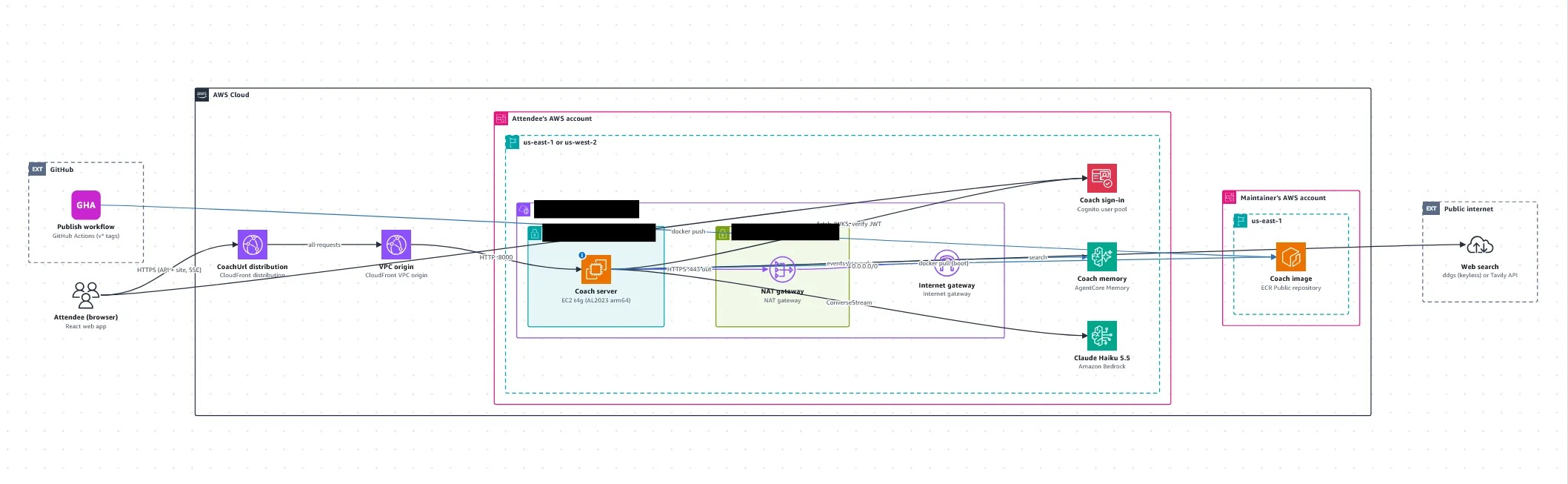
A few important pieces to note:
The Career Coach VPC: Where the Compute Happens

- An EC2 server runs the server script, which orchestrates everything else.
- NatGateway + InternetGateway: Enables secure outbound traffic to the internet, enabling our Career Coach agent to securely conduct web searches without exposing our AWS resources to undue cybersecurity threats.
The Agent + Auth Layer:
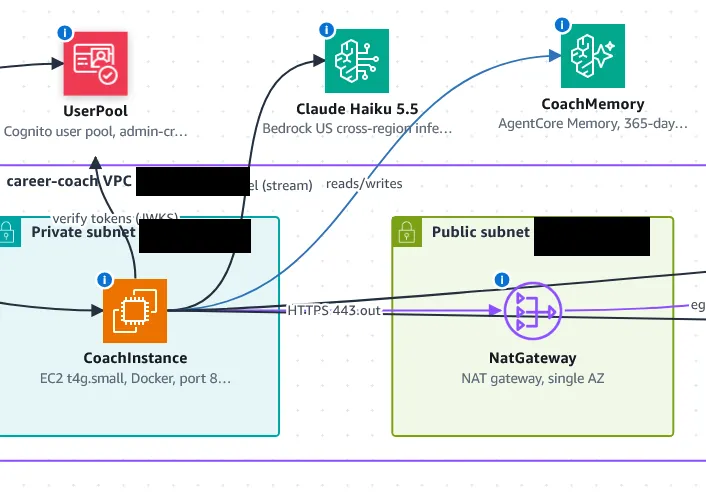
- A Cognito User Pool allows external users to set up accounts with an email and password.
- Bedrock streams prompts from our server, runs inference, and sends the computed data back.
- AgentCore Memory maintains a RAG-style knowledge base using data extracted by the model in Bedrock. Agentcore also supplies our model with context without taking up additional context window space, allowing Bedrock to refresh its memory even if the session ends.
This is the part that makes it real. You've got two ways to run the coach, and you can start with whichever fits your situation. Both end with a working coach you can chat with.
Before the workshop (about 20 minutes, a day or two early)
Do this ahead of time, because a brand-new AWS account sometimes needs a day before it can use Claude, and you don't want to spend the session waiting on account approval. The full checklist is in workshop/PREWORK.md , but here's the short version:
- Create an AWS account at aws.amazon.com if you don't have one, and choose the paid plan (Claude is sold through AWS Marketplace, which the free plan leaves out, and new accounts get the same sign-up credits either way). Create a user with administrator access instead of using the root account, and set a small budget alert, say $5, so nothing surprises you.
- Switch on Claude Haiku 5.5. Sign in to the AWS console, set your region to US East (N. Virginia) in the top-right corner, open Amazon Bedrock, choose Model catalog, then Claude Haiku 5.5. If a short use-case form appears, fill it in (a GitHub or portfolio link is fine, and "Learning to build AI agents at a workshop" is a perfectly good use case).
- Test it. Open the model in the playground, type
hi, and run it. A short reply means your account is ready. If you get an error instead, the table in the prework names the fix for each one.
You are ready when you can sign in as an admin user, a budget alert is set, and Claude replied tohiin the playground in US East (N. Virginia).
Path 1: deploy to your own AWS account from one file
This is the path most workshop attendees take. Everything happens in your browser, and one CloudFormation file creates the entire system: the coach's server, its long-term memory, a sign-in, and an HTTPS link to reach it.
- Download the template. Open infra/career-coach.yaml and choose Download raw file. This one file describes everything the coach needs.
- Start a stack. In the console, search for CloudFormation, confirm your region is still US East (N. Virginia), and choose Create stack → With new resources.
- Upload the template from step 1 and choose Next.
- Fill in the parameters. Stack name
career-coach, and an email address you can open now (AWS sends your temporary password there). Leave everything else as-is.
- Acknowledge and submit. On the review page, tick I acknowledge that AWS CloudFormation might create IAM resources, then Submit. (That checkbox is because the stack creates a role the coach's server uses to call Claude and its own memory, and nothing else.)
- Wait about 20 minutes while the stack builds. When the status turns to CREATE_COMPLETE, open the Outputs tab and click the link in the CoachUrl row. That's your coach. Sign in with the email and the temporary password AWS sent you, set a new password, and you're in.
The step-by-step version, with a "you should see" check after every step, is in workshop/ATTENDEE-GUIDE.md .
Path 2: run it free on your laptop
No AWS account? No problem. You can still run the whole coach locally, and even swap Claude for a free open-source model (Qwen3, through Ollama ) so it costs nothing at all. Fire up the API in one terminal:
Plain text
cd backenduv syncuv run python scripts/set_model.py bedrock # or: ollama, for the free local modeluv run python -m coach
That spins up the backend API. Now start the website in a second terminal, then open
http://127.0.0.1:5173 :Plain text
cd frontendnpm installnpm run dev
To use the free local model instead of Claude, pull a model and switch to it (use
qwen3:1.7b on a laptop with 8 GB of RAM or less), then restart the backend:Plain text
ollama pull qwen3:4b-instructuv run python scripts/set_model.py ollama
The same memory code works with both Claude and the local model, which is one of the nicer things about AgentCore being model-agnostic: you can learn the pattern offline and move to the cloud later without rewriting a thing.
Try this: watch the memory work
Once your coach is up, this is the moment the whole post has been building toward. Do it in order:
*Your profile after the coach reads your docs: a headline, your target role, a goal-alignment score, and a skills table with evidence. Here the alignment sits at 55/100, with Solutions Architect as the target role.
*

Scroll down and the coach lays out opportunities by timeframe. Notice the one under This Quarter: "Pursue an AWS architecture certification," pointing at the AWS Certified Solutions Architect – Associate. Remember that goal, it comes back in a minute.

Tell it something personal, like "I want a remote internship next summer, and my favorite language is Rust."
- Report progress, like "I passed my AWS Cloud Practitioner exam!" Watch for the Saved to your progress log chip.
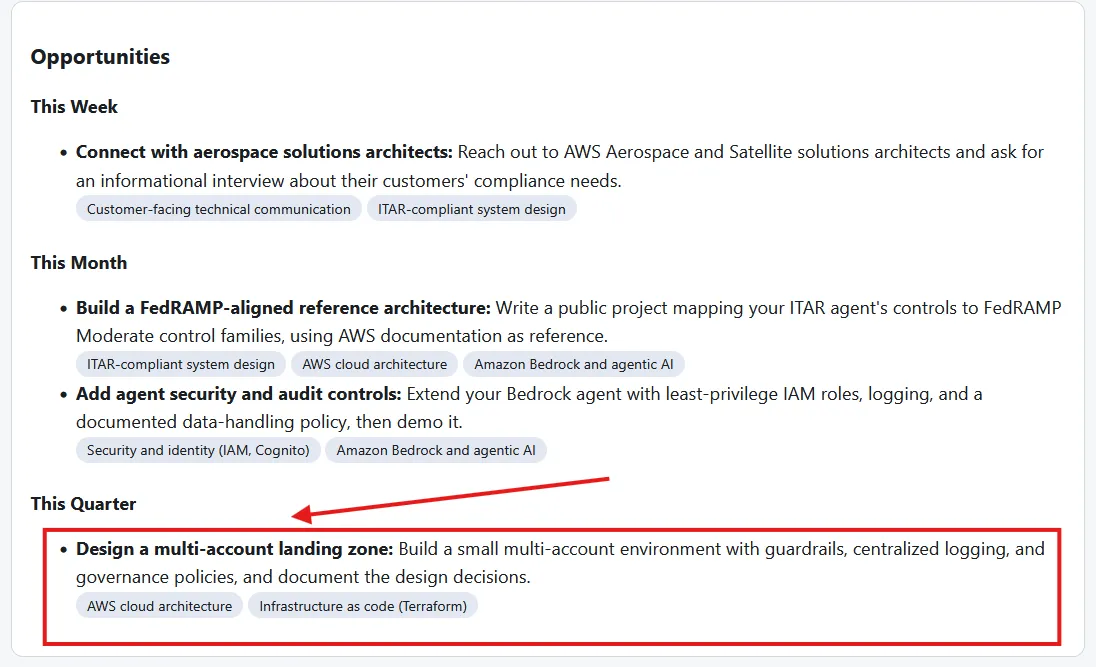
*Here's that in action. I told the coach I'd earned the Solutions Architect – Associate certification, the exact goal it set for me earlier, and asked it to update its record and refresh my goals.
-

Start a New session. This clears the current chat, exactly like closing the tab.
- Wait about two minutes, then ask: "What do you remember about me?" AgentCore's built-in extraction runs in the background and takes a minute or two to pull facts out of your earlier chat. After that, the coach names your exam and your favorite language, in a session that has no chat history connecting back to when you said them.

That last step is the payoff. The model is just as stateless as it was on page one. The memory lived next to it the whole time.
And here's the proof it stuck. The coach congratulated me, logged the certification to my progress log, and rebuilt my profile as version 3, all visible in the green chips at the bottom: "Saved to your progress log" and "Profile refreshed to version 3." The goal it set became a fact it remembers.
What it costs, and cleaning up
Everything here is pay-per-use, and a workshop's worth of use runs a few cents for Claude and well under a cent for memory. The one thing to remember: if you deployed to AWS (Path 1), the server and its network get billed by the hour until you delete the stack. So when you're done, head back to CloudFormation, select the career-coach stack, and choose Delete. That removes everything the stack created, including the memory. If you ran locally (Path 2), there's nothing to clean up, and the local JSON files cost nothing.
Where to go next
You just built an agent that remembers you, and you saw that the magic was never inside the model. It was a small amount of code deciding what to write down and what to pull back out, with a managed service doing the heavy lifting. That same pattern, persistent memory beside a stateless model, is behind almost every AI product that feels like it knows you.
The whole thing is open source and MIT-0 licensed, so take it apart, change the coaching, point it at a different model, or lift the memory code straight into your own project. If you want to understand how the pieces fit together, start with docs/DESIGN.md and docs/API.md in the repo.
Now go build something that remembers you. And come find me at Grace Hopper. I'd love to hear what you make.
Until next time, Lucas.
Enjoyed reading this content? Let the author know!
Your likes, comments, shares, and saves help creators reach more builders.

Loading recommendations
Loading article