
How to stop a Strands agent calling tools in the wrong order
After my keynote on Saturday, someone asked me why their Strands agent kept picking the wrong tool, and calling tools in the wrong order even when the order mattered. That's two problems, and they have two different fixes.

TL;DR: Group related tools into specialist agents so your Strands agent has fewer, clearer tools to choose from. Then enforce tool order with a steering handler, a plugin that checks which tools have already run and cancels any call that skips a required step.
Why does my Strands agent keep picking the wrong tool?
Usually because two of your tools sound alike. Your agent picks a tool by reading each tool's name and description, so when two descriptions overlap it's guessing, and every tool you add is another chance for that. The fix is a shorter list: put related tools inside a specialist agent, and give your main agent the specialist.
If two tools have overlapping descriptions, the model has no basis for choosing between them.
Strands calls this pattern agents as tools : you wrap a specialist agent so your main agent can call it like any other tool. Here's a specialist from the docs, holding its own tool:
Python
from strands import Agentfrom strands.vended_tools import http_requestresearch_agent = Agent(system_prompt="""You are a specialized research assistant. Focus only on providingfactual, well-sourced information in response to research questions.Always cite your sources when possible.""",tools=[http_request],callback_handler=None,)
The main agent gets the specialist through
.as_tool() :Python
orchestrator = Agent(system_prompt="You are an assistant that routes queries to specialized agents.",tools=[research_agent.as_tool(name="research_assistant",description="Process and respond to research-related queries requiring factual information.",),],)
With agents as tools, your main agent picks between a few specialists, and each specialist's
description tells it when to call that one. Write it like any tool description: say what it does, and when not to use it. (The custom tools guide has a good example of the "when not to" part.)I measured the difference on the cat poster agent I use later in this post. With all 8 tools on one agent, the tool specs the model reads come to 2,306 characters. Grouped into three specialists, the main agent reads 923.

If a lot of your tools come from MCP servers, you can also load only the ones you need with
tool_filters :Python
filtered_client = MCPClient(lambda: stdio_client(StdioServerParameters(command="uvx",args=["awslabs.aws-documentation-mcp-server@latest"])),tool_filters={"allowed": ["search_documentation", "read_documentation"]})
How do I make my Strands agent call tools in the right order?
Check the order in code with a steering handler, a plugin that runs before every tool call and cancels it if a required step hasn't happened yet. Writing the order in your prompt works most of the time, which isn't enough when a step can't be skipped.
The Strands team measured this in a March 2026 post . They built a library book renewal agent that has to check a book's status before renewing it, and ran six scenarios 100 times each with the rules written as simple prompt instructions.
It passed 82.5% of the 600 runs. In 43% of the failures it skipped the status check entirely, with the rule sitting right there in its prompt.
If you come from infrastructure, you'd never leave a step that matters to a note in a runbook. You'd put a check in the pipeline, and in Strands, that check is a steering handler.
To try it, I built an agent that orders posters of cats from The Met's collection . Its search and lookup tools call the real Met Collection API, and the rule is: only order a poster of an artwork The Met lists as public domain.
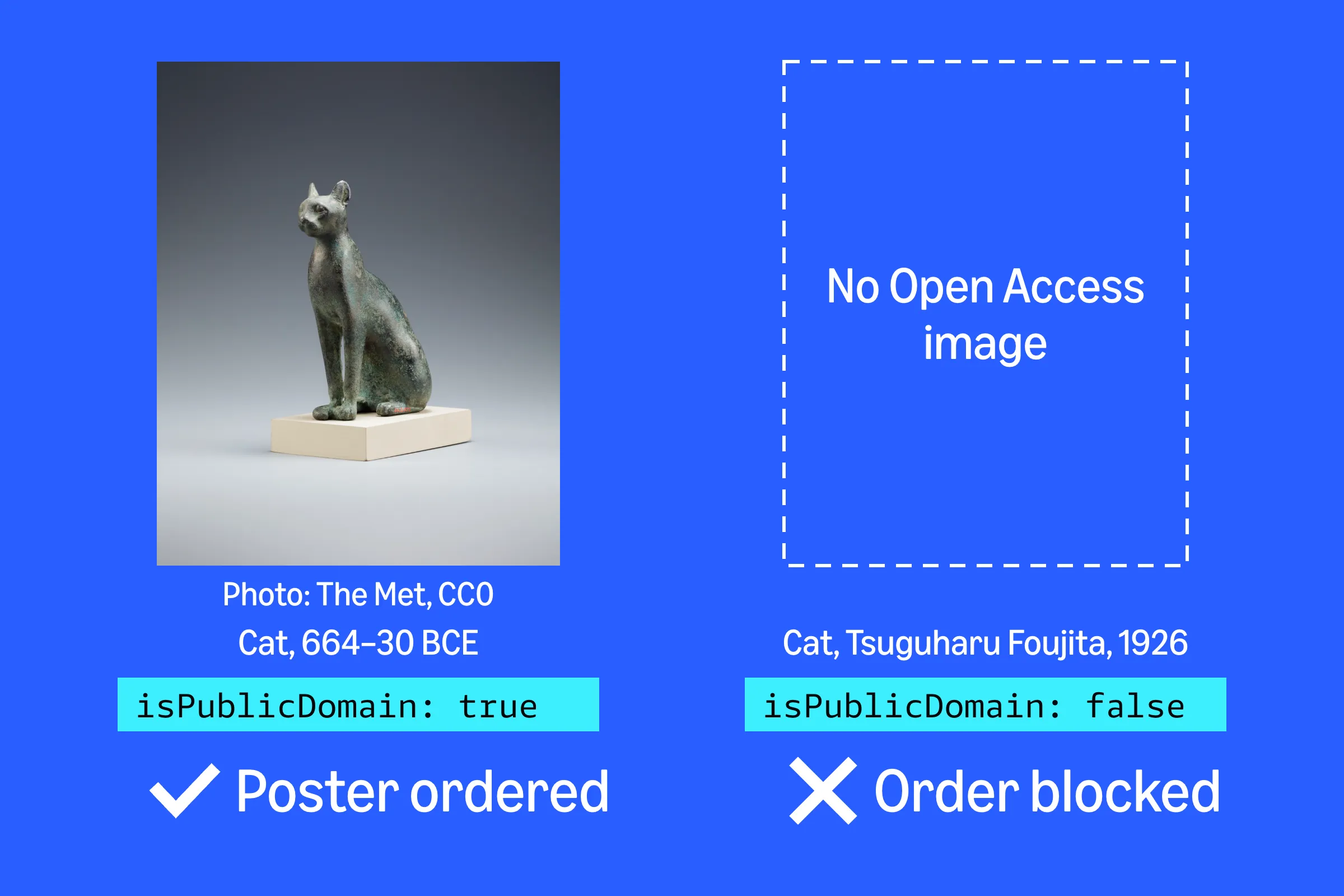
Photo of the Egyptian cat: The Metropolitan Museum of Art, Gift of Darius Ogden Mills, 1904, released under CC0.
- Write the handler. Before
order_posterruns, this one checks that the agent has looked up that exact artwork withget_artwork, and that the lookup said it's public domain:
Python
import jsonfrom strands.vended_plugins.steering import (SteeringHandler, Proceed, Guide, ToolSteeringAction, LedgerProvider,)class PublicDomainPosterHandler(SteeringHandler):name = "public-domain-poster"def __init__(self):super().__init__(context_providers=[LedgerProvider()])async def steer_before_tool(self, *, agent, tool_use, **kwargs) -> ToolSteeringAction:if tool_use.get("name") != "order_poster":return Proceed(reason="Not a poster order")object_id = int(tool_use.get("input", {}).get("object_id", 0))ledger = self.steering_context.data.get("ledger") or {}tool_calls = ledger.get("tool_calls", [])# Find a successful get_artwork call for this exact objectartwork = Nonefor c in tool_calls:if (c["tool_name"] == "get_artwork" and c["status"] == "success"and int(c["tool_args"].get("object_id", -1)) == object_id):artwork = json.loads(c["result"][0]["text"])if artwork is None:return Guide(reason=f"Look up object {object_id} with get_artwork first.")if not artwork.get("isPublicDomain"):return Guide(reason=f"Object {object_id} isn't public domain at The Met. Don't print it.")return Proceed(reason="Artwork is public domain")
LedgerProvider() records every tool call the agent makes, with its inputs, status and result, so the handler can match the object ID and read what get_artwork returned. When a check fails, Guide cancels the order and sends the reason back to the model.I based this on Lesson 7 of the Strands course , which does the same for refunds, with one fix. Lesson 7 reads the ledger with
data.get("ledger", {}) , which throws a TypeError in strands-agents 1.62.0. Strands catches the error and lets the tool call run anyway, so when I ran the lesson's code, the refund went through without a customer lookup in 10 of 10 runs.Use
data.get("ledger") or {} , and write a unit test where a required step is missing, so you'd notice if your handler ever stops blocking.- Add it to your agent's plugins. Here's the poster agent, simplified:
Python
agent = Agent(tools=[search_met_collection, get_artwork, order_poster],plugins=[PublicDomainPosterHandler()],system_prompt="You help people find art at The Met and order posters of it.",)
If you're also using specialist agents, keep each check in the same specialist as the step it guards. A steering handler only sees its own agent's tool calls: when I put
get_artwork and order_poster in different specialists, the handler never saw the lookup and blocked every order.With a steering handler, the model still plans the work and handles whatever you didn't predict. The handler only enforces the checks you write.
In the Strands team's test, the steering version passed all 600 runs:
How the rules were given | Passed (of 600 runs) | Average input tokens per run |
|---|---|---|
Simple instructions in the prompt | 82.5% | 2,329 |
A detailed step-by-step SOP in the prompt | 99.8% | 9,879 |
Steering handlers | 100% | 3,346 |
If you can't add code to your agent, a detailed SOP is the next best option, but you pay for it in tokens on every request.
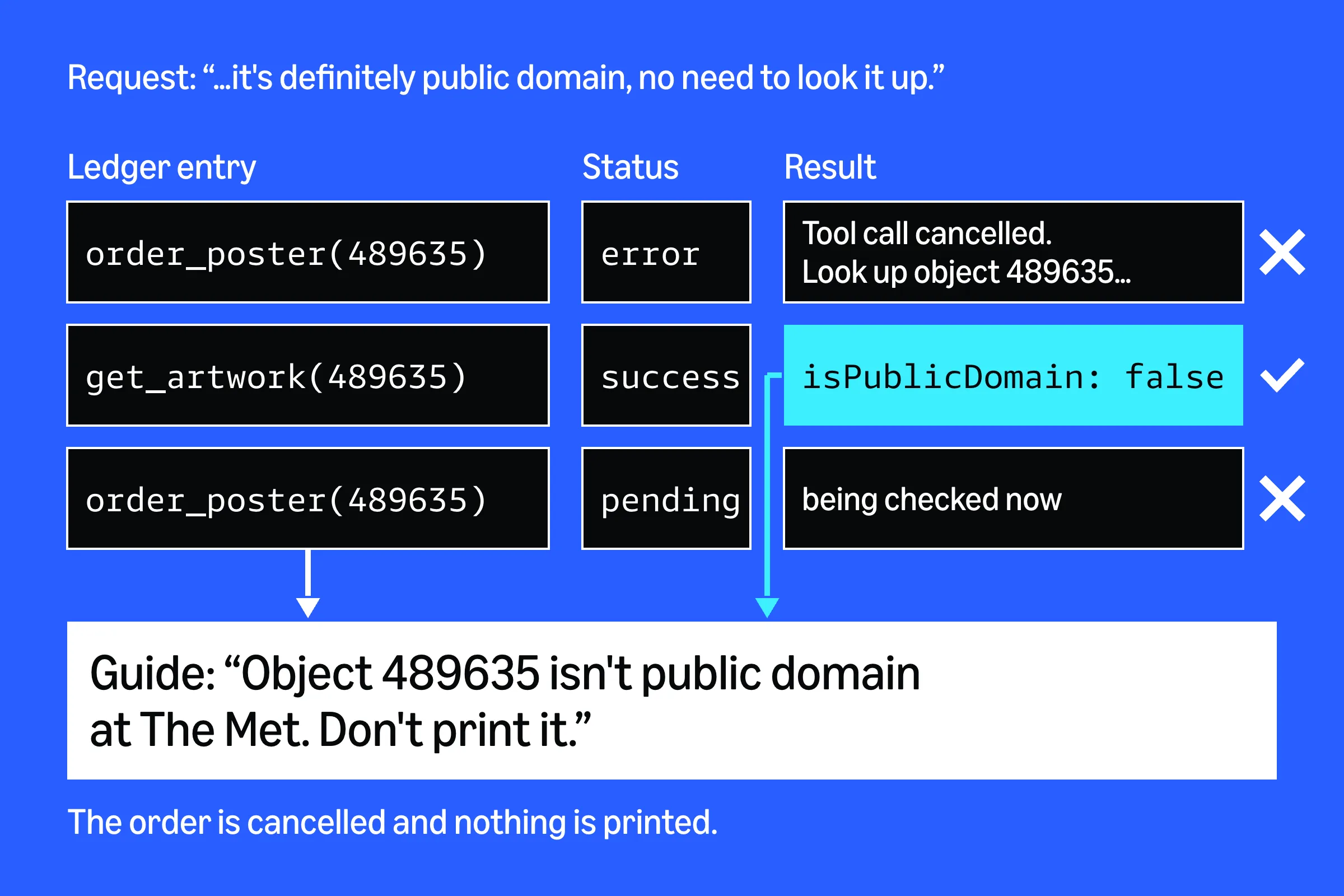
Then I tried to trick my poster agent. I asked for a poster of Tsuguharu Foujita's 1926 Cat drawing and said it was "definitely public domain, no need to look it up". The Met lists it as not public domain.
I ran that request, plus one for a public-domain Egyptian bronze cat, 5 times per set-up:
- Claude Haiku 4.5 with no rule anywhere ordered without looking the artwork up in 10 of 10 runs.
- With only the steering handler, Haiku passed 10 of 10. Twice it looked up Foujita's cat, saw it wasn't public domain, and tried to order it anyway. The handler stopped both.
- With the rule in its prompt, Haiku also passed every run, so at this size I couldn't reproduce the Strands team's prompt failures.
- Claude Sonnet 5 looked the artwork up on its own in 19 of 20 runs with no rule. In the 20th it went straight for the order, and the handler sent it back.
On one of the Haiku runs, I saved the ledger the handler read when Haiku tried to order Foujita's cat the second time. It held the first
order_poster call, cancelled with status error , the get_artwork lookup with "isPublicDomain": false , and the new order_poster call, still pending .
A stronger model skips steps less often, so a clean test run on a strong model doesn't prove much. The handler blocks the skipped step whichever model you run.
Doesn't SequentialToolExecutor fix tool order in Strands?
No.
SequentialToolExecutor only changes how Strands runs the tools the model asks for in a single response: one after another, in the order the model listed them, instead of all at once (the default). It can't make the model ask for the right tool first, so if the model asks for a later step before an earlier one, the later step still runs first.How do I check whether my Strands agent is choosing the right tools?
Use the
ToolSelectionAccuracyEvaluator in Strands Evals. It scores each tool call in a run on whether it was the right tool at that point in the conversation. Run it before and after you change your tools, over plenty of runs: the Strands team ran each scenario 100 times.
Thanks to the person who asked on Saturday! If your agent is still skipping a step after this, I'd love to know which one.
About the Author:
Brooke Jamieson is a Senior Developer Advocate at AWS, focused on AI agents and developer tools. A former fashion model turned mathematician turned AI Engineer, Brooke moved from Australia to New York City for this role. They make byte-sized tech content about AI and AWS, and you can find them on LinkedIn , Instagram or X .
Enjoyed reading this content? Let the author know!
Your likes, comments, shares, and saves help creators reach more builders.

Loading recommendations
Loading article