
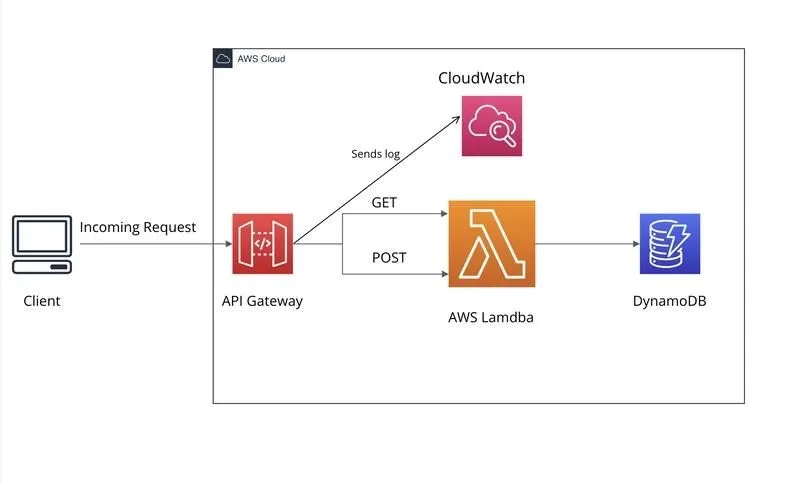
Your AWS Lambda Works. But Is It Production-Ready? 7 Things Every Developer Should Know
Your Lambda returns 200 OK, but what happens when something fails? Explore seven practical AWS Lambda practices covering error handling, security, performance, logging, monitoring, and reliability, with a hands-on TypeScript example.

Full Stack Developer | Backend & AWS Specialist | Node.js | TypeScript | Serverless | REST APIs
You've built an AWS Lambda function, connected it to API Gateway, tested it in Postman, and received a
200 OK response.Great! Your API works.
But here's a question worth asking: What happens when something goes wrong?
What if an external API stops responding? What if your Lambda times out? Or what if a user reports an error and you can't figure out which request failed?
These are the situations where production readiness really matters.
When building serverless applications with Node.js, TypeScript, and AWS, I've found that getting a Lambda function running is only the first step.
Here are seven practical things every developer should understand before deploying Lambda functions to production.
1. Handle Errors Properly
Imagine your Lambda calls an external API to fetch data.
Everything works during testing, but one day that API becomes unavailable.
Your Lambda should handle the failure gracefully, log useful information, and return a meaningful response without exposing internal details.
Let's look at a simple example using TypeScript and Node.js.
Plain text
import type { Context } from "aws-lambda";export const handler = async (_event: unknown,context: Context) => {const requestId = context.awsRequestId;try {const response = await fetch("https://httpbin.org/status/200",{signal: AbortSignal.timeout(3000)});if (!response.ok) {console.error(JSON.stringify({requestId,message: "External API returned an error",status: response.status}));return {statusCode: 502,body: JSON.stringify({message: "External service error"})};}console.log(JSON.stringify({requestId,message: "External API responded successfully"}));return {statusCode: 200,body: JSON.stringify({message: "API is healthy"})};} catch (error) {console.error(JSON.stringify({requestId,message: "External API request failed",error: error instanceof Error? error.message: "Unknown error"}));return {statusCode: 502,body: JSON.stringify({message: "External service unavailable"})};}};
Try it yourself
- Create a Lambda function using a supported Node.js runtime and deploy the compiled TypeScript code. You'll need the
@types/aws-lambdapackage during TypeScript development.
- Invoke the function using the AWS Lambda console's Test feature.
- Open CloudWatch Logs and check the request details.
- Change
/status/200to/status/500and invoke the function again.
For the second test, the function should return a
502 response because the external API returned an error.The example uses a public testing endpoint, so the Lambda needs outbound internet access. A network or DNS failure will also produce a
502 response through the catch block.One important detail: returning an HTTP error response doesn't necessarily mean the Lambda invocation itself failed. With API Gateway proxy integration, the returned status code is passed to the client.
What matters: Your function should handle expected failures predictably and provide enough information to investigate unexpected ones.
2. Keep IAM Permissions Limited
Let's say your Lambda only needs to read data from a DynamoDB table.
Does it need permission to delete tables or access every DynamoDB resource in your AWS account?
Of course not.
This is where the principle of least privilege comes in.
Give each Lambda function only the permissions required to perform its job.
For example, if a function only uses DynamoDB
GetItem , grant that action on the required table instead of giving it unrestricted DynamoDB access.You can manage these permissions using IAM policies, AWS CDK, or CloudFormation.
Try this: Open your Lambda function in the AWS Console, go to Configuration → Permissions, and review its execution role.
Check whether the function has permissions it doesn't actually need.
A small IAM review can make a meaningful difference to your application's security.
3. Set Realistic Timeouts and Memory
Imagine your Lambda calls an external API that normally responds in 200 milliseconds.
Now suppose the same API suddenly takes 15 seconds.
Without proper timeout handling, your function may spend most of its execution time waiting for a response.
In our earlier TypeScript example, we used:
AbortSignal.timeout(3000) This gives the external HTTP request a three-second deadline.
But remember, the HTTP request timeout and Lambda execution timeout are different things.
You also need to configure the Lambda function's overall timeout and memory.
For example, you could begin testing with:
- Lambda timeout: 10 seconds
- Memory: 256 MB
- External API timeout: 3 seconds
These are starting values for testing, not recommended settings for every production workload.
AWS Lambda also allocates CPU in proportion to configured memory. Sometimes increasing memory can reduce execution duration.
Try this: Open your Lambda's CloudWatch logs and inspect the REPORT entries. Compare Duration and Max Memory Used across different test invocations.
Use those measurements to guide your configuration instead of guessing.
4. Make CloudWatch Logs Useful
When something breaks in production, logs are often the first place developers look.
But logs are only useful when they contain enough context.
Imagine a user reports an API failure. You open CloudWatch and find hundreds of log entries.
How do you identify the relevant request?
This is why structured logging matters.
In our TypeScript example, we included a
requestId along with the message and error details.You can use CloudWatch Logs Insights to find entries for a particular request:
Plain text
fields @timestamp, message, requestId| filter requestId = "YOUR_REQUEST_ID"| sort @timestamp desc
Replace
YOUR_REQUEST_ID with an actual request ID from your Lambda logs. This query works when CloudWatch has discovered the JSON fields from your structured log messages.Try this: Invoke your Lambda, copy the request ID from the logs, and search for it using Logs Insights.
You should be able to identify the log entries associated with that invocation.
One important rule: never log passwords, access tokens, API keys, or sensitive customer information.
Good logging should make debugging easier without introducing security risks.
5. Monitor Errors Before They Become Bigger Problems
Logging helps you investigate what happened.
Monitoring helps you notice when something starts going wrong.
Amazon CloudWatch provides several useful Lambda metrics:
- Errors: Invocations that fail during execution.
- Duration: How long your Lambda takes to execute.
- Throttles: Invocation requests rejected because of concurrency limits.
- Invocations: How frequently your Lambda is invoked.
You can configure CloudWatch alarms to detect unusual behavior and connect them to Amazon SNS for notifications.
Here's an important detail that developers sometimes miss.
If your Lambda catches an error and returns an HTTP
500 or 502 response, the invocation may still count as successful in Lambda metrics.That's why monitoring only the Lambda Errors metric isn't enough for an HTTP API.
You should also monitor API Gateway 5XX responses.
Try this: Open CloudWatch Metrics and inspect your Lambda's Errors, Duration, and Throttles metrics.
For an API Gateway integration, also review the API's 5XX metrics.
The goal is to identify failures before they affect more users.
6. Prepare for Retries and Duplicate Events
Let's imagine you're building an order-processing system.
A payment provider sends a webhook to your application, and your Lambda updates an order.
What happens if the same event arrives twice?
Without proper handling, your application could process the same operation multiple times.
This is where idempotency becomes important.
Idempotency means processing the same event more than once should not repeat its business effect.
When working with SQS, EventBridge, or webhooks, consider a few things:
- Does each event have a unique identifier?
- Can the application recognize an already processed event?
- What happens if processing fails halfway through?
- How will retries recover from incomplete operations?
For example, DynamoDB conditional writes can help prevent duplicate event claims.
AWS Lambda Powertools for TypeScript also provides utilities for implementing idempotent operations.
However, simply recording an event ID isn't always enough. You also need to handle cases where processing starts but doesn't finish.
Practical takeaway: Don't assume events will always arrive exactly once. Design your processing logic to handle retries safely.
7. Check Production Readiness Before Deployment
Before deploying a Lambda function, I find it useful to ask a few practical questions.
Security: Does the function have only the permissions it needs? Are secrets stored securely?
Reliability: What happens if an external service becomes unavailable or a request times out?
Observability: Can I identify a failed request using CloudWatch logs and metrics?
Performance: Have I tested execution duration, memory usage, and concurrency requirements?
Deployment: Can I deploy changes safely and roll back if something goes wrong?
Testing: Have I tested failure scenarios, not just successful requests?
You don't need a complicated architecture for every application.
A simple API and a high-traffic payment-processing system will have very different requirements.
The important thing is to understand the risks associated with your workload and prepare for them before deployment.
Conclusion
Getting an AWS Lambda function to return
200 OK is a good start. But a successful response doesn't tell you how the function will behave when a dependency fails, traffic increases, or an unexpected error occurs.That's why production readiness goes beyond writing working code.
Error handling, IAM security, timeout configuration, structured logging, monitoring, and idempotency all help make serverless applications more reliable and maintainable.
Will following these seven practices automatically make every Lambda function production-ready?
Not necessarily.
Production readiness also depends on your application's requirements, testing strategy, expected traffic, authentication, deployment process, and recovery needs.
These seven practices provide a strong foundation, but they aren't a complete production-readiness guarantee.
My suggestion is to start small. Take an existing Lambda function, test what happens when a dependency fails, review its IAM permissions, and check whether its logs give you enough information to investigate a problem.
Then improve the areas that matter most for your application.
The next time your Lambda returns
200 OK , don't just ask whether it works. Ask what happens when it fails.Enjoyed reading this content? Let the author know!
Your likes, comments, shares, and saves help creators reach more builders.

Loading recommendations
Loading article