
AWS DevOps Agent Hands-on: Isolating the Cause of ALB Target 5xx Between ECS and Aurora
I tested how far AWS DevOps Agent can take the investigation of an ALB 5xx alarm, whether the cause is in the ECS backend or in Aurora, with two scenarios on a real environment.

Introduction
A 5xx alarm that goes off in the middle of the night is a good test for AWS DevOps Agent: how much of the work of isolating the cause can it take over? In this hands-on article, I use an ALB
HTTPCode_Target_5XX_Count alarm to find out.The question to isolate is whether the cause is in the backend (the app on ECS) or in the database (Aurora).
Traditionally, the person who receives the alarm moves back and forth between ALB metrics, application logs, and Aurora metrics and Performance Insights to find the cause. I check how much of this work can be handed to AWS DevOps Agent, using two failure scenarios whose causes sit in different layers.
Test Environment and Scenarios
Environment
I assume that an Agent Space for DevOps Agent has already been created. For the steps, see the official documentation Creating an Agent Space .
The settings used in this article are as follows.
- Agent Space Name:
alb-5xx-demo - Agent response language:
English (US) - Configure primary account role:
Auto-create a new DevOps Agent role(DevOpsAgentRole-AgentSpace-*is created) - Enable web app > Configure current account role:
Auto-create a new DevOps Agent role(DevOpsAgentRole-WebappAdmin-*is created) - Everything else: default values
The environment assumes an e-commerce site and is built as follows.
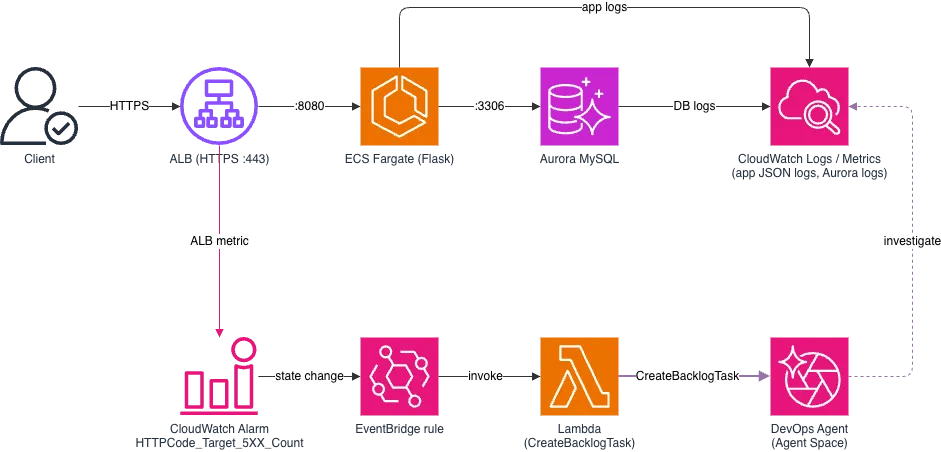
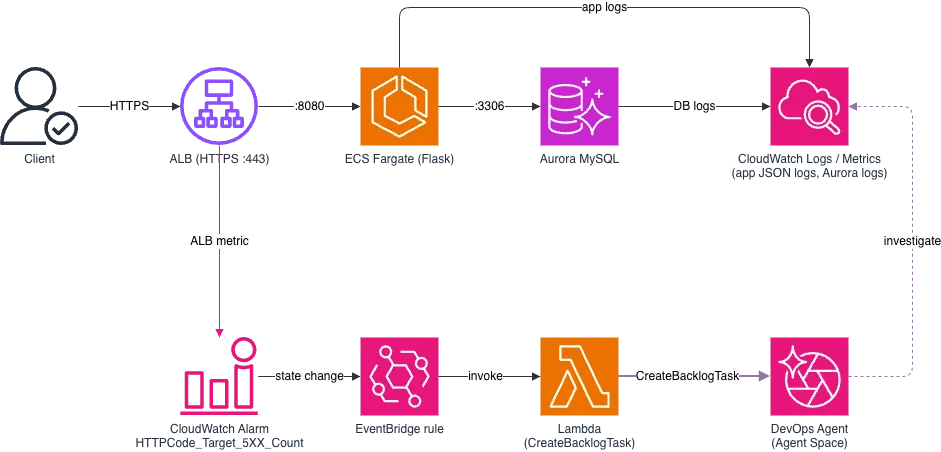
- The ALB forwards requests to a Flask app on ECS Fargate
- The app reads the
productstable (3 million rows) in Aurora MySQL - The ALB health check path
/healthdoes not look at the state of the DB; it returns 200 as long as the app can respond - The app writes JSON logs to CloudWatch Logs. Aurora has Performance Insights enabled and also outputs the slow query log (
long_query_timeset to 2 seconds) - The
HTTPCode_Target_5XX_Countalarm is passed to the DevOps AgentCreateBacklogTaskAPI through EventBridge and Lambda, which starts an investigation automatically
Telling Where a 5xx Comes From
ALB 5xx responses fall into two kinds: those returned by the ALB itself (
HTTPCode_ELB_5XX_Count) and those returned by a target and relayed by the ALB (HTTPCode_Target_5XX_Count). This article covers the latter.The main causes of 5xx responses returned by the ALB itself are summarized in the AWS documentation "Troubleshoot your Application Load Balancers".
https://docs.aws.amazon.com/elasticloadbalancing/latest/application/load-balancer-troubleshooting.html
Scenarios
Scenario A: the cause is in the backend (a latent application bug)
- Root cause: a product with no price (
NULL) is registered, and the function that calculates the sale price (sale_price()) has no guard forNULL, so the price calculation on the top page raises aTypeError - A recent deployment is not the cause
- The conclusions I expect from DevOps Agent are to identify the stack trace and the ID of the product whose price is
NULL(product_id), to find that a recent deployment is not the cause, and to find that the Aurora metrics are normal
Scenario B: the cause is in the DB (a full scan by a search query)
- Root cause: the product search query
LIKE '%keyword%' ORDER BY created_at DESCcannot use an index and scans all 3 million rows, which pins Aurora CPU - The conclusions I expect from DevOps Agent are to confirm the CPU spike, to identify the top SQL, and to point out the missing index
Starting a DevOps Agent Investigation Automatically from an Alarm
When the alarm goes into
ALARM, an EventBridge rule calls Lambda. Lambda then creates an investigation task (INVESTIGATION) through the DevOps Agent CreateBacklogTask API.https://docs.aws.amazon.com/devopsagent/latest/APIReference/API_CreateBacklogTask.html
I chose this approach based on an AWS re:Post article. The reasons are that it authenticates with an IAM role, so no long-lived secret is needed, and that it is simpler than a webhook.
https://repost.aws/articles/ARnrvREIynRsKAdzRwYVF1_A/automating-aws-devops-agent-investigation-from-incident-detection-and-response-alarms
A configuration that uses a webhook (HMAC signature) also exists, and the official AWS blogs introduce it more often. A webhook suits cases where an investigation is started from an external monitoring tool or a system outside AWS.
https://docs.aws.amazon.com/devopsagent/latest/userguide/configuring-integrations-and-knowledge-invoking-devops-agent-through-webhook.html
How to Read Investigation Results
The results of a DevOps Agent investigation are viewed in a dedicated web app. In the
Agent Spaces list, I chose Launch via IAM for the target Agent Space, and the web app opened.
The list of investigations appears under
Incidents in the left navigation of the web app.
When you select an investigation, you can check the results in five tabs:
Summary, Investigation timeline, Root cause, Mitigation plan, and Review.
The tabs show the following.
Summary: a summary of the cause and the mitigationInvestigation timeline: a record of the steps the Agent took in the investigationRoot cause: the impact, the root causes, and the key findingsMitigation plan: the steps of the mitigationReview: a quality evaluation of a completed investigation
When you run
Review with Run review, you get a verdict on whether the investigation was helpful and a result for each criterion. The five criteria are Scope Alignment, Evidence Grounding, Investigation Completeness, Environment Impact, and Investigation Accuracy.Scenario A: A Latent Application Bug
I reproduce a situation where a product is registered without entering its price.
1
2
3
4
# Register a product without a price (simulating a missed input at registration)
curl -s -X POST "$APP/admin/products" \
  -H "X-Admin-Token: $TOKEN" -H "Content-Type: application/json" \
  -d '{"name":"【新作】防水ワイヤレスイヤホン","discount_rate":0.1}'
This product appears in "New arrivals" on the top page, which shows the 10 newest products by
id, so only the top page returns 500. Product detail pages keep returning 200. To simulate user traffic, I sent random requests, about 30% to the top page and about 70% to product detail pages.1
2
3
4
5
6
7
8
9
for i in $(seq 1 300); do
if [ $((RANDOM % 10)) -lt 3 ]; then
path="/"
else
path="/products/$((RANDOM % 1000 + 1))"
fi
curl -s -o /dev/null -w "%{http_code} " "$APP$path"
sleep "0.$((RANDOM % 4 + 1))"
done; echoAfter a while, the 5xx alarm went off and a DevOps Agent investigation started. The investigation finished in about 10 minutes 30 seconds.

Summary
Incident, Cause, and Mitigation are gathered on one screen. None of them appeared to contain errors.Incident: all the 5xx responses came from the backend, and there were zero 5xx responses from the ALB itself. The problem has already subsidedCause: the root cause is the combination of a product whose price isNULL(product_idis 3932101) and the missingNULLguard insale_price(). ECS and Aurora are ruled out as causesMitigation: the immediate action is to fix theNULLprice, and the permanent action is aNULLfix insale_price()plus a check at registration

The scale of the failure is shown with number cards and a graph.
Peak 5xx/min is 89, and Aurora status is available. The graph also shows that 2xx responses were returned at the same time as the 5xx responses.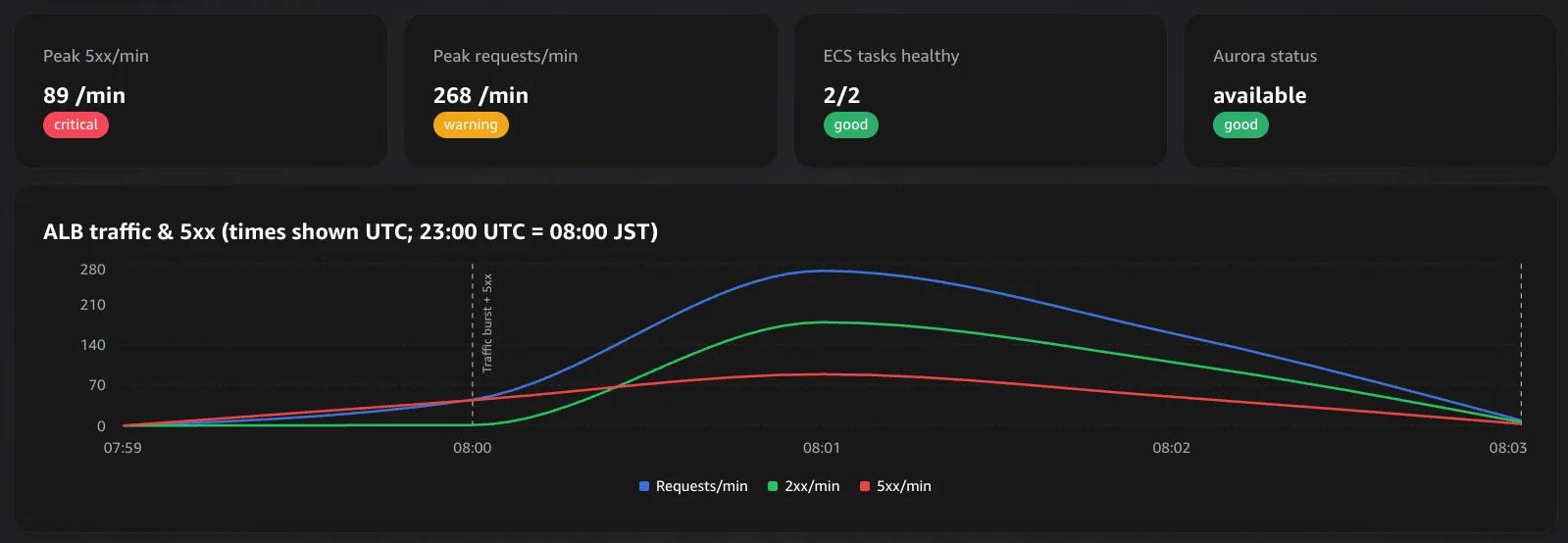
Investigation timeline
You can see DevOps Agent having sub-agents investigate in parallel. They look at the following.
- The application logs
- The Aurora metrics (including Performance Insights), the Aurora error log, and the slow query log
- The ECS task metrics
ECS CPU peaked at about 10% and memory at about 7%, so a lack of ECS resources was ruled out at this point. I found no errors in this part.

Root cause
The
Root cause tab is organized into four parts. The root cause was identified correctly. The explanation of the trigger, however, was inaccurate.Impact: the ALB targets returned 5xx and crossed the alarm thresholdRoot causes: the combination of "a product has aNULLprice (a data defect)" and "sale_price()has noNULLguard (a code defect)"Key findings: Aurora was judged not to be the causeInvestigation gaps: how theNULLprice got in. It could not be traced because no code repository or data pipeline is connected
Across the whole investigation, the Agent went as far as the following.
- From the stack trace in the application log, it identified the
TypeError, product ID3932101,sale_price()at/app/app.py:50, and the top page handler. It also showed that the 5xx count and the application error count match 1:1 minute by minute - It judged that the most recent deployment, which finished about 1.5 hours earlier, was not the trigger of this failure
- It judged that Aurora was not the cause, based on many indicators, including connection count,
db.load.avg, CPU, latency, buffer cache hit ratio, and the error log and slow query log - It also explained why 200 and 500 alternate: requests that do not include product
3932101in the new arrivals return 200
The trigger was explained as "a traffic burst ... exposed the latent defect". The actual trigger was the registration of a product without a price.
Also, there is no sign that DevOps Agent queried the DB directly. The conclusion that "a product has a
NULL price" was an inference from the TypeError message and the logs. The conclusion was correct.
Mitigation plan
The SQL to repair the data and the risk warnings are written in stages (pre-check, apply, post-check, rollback). It proposed repairing the rows with a
NULL price and handling NULL in sale_price(), with an execution plan, and the approach was sound. The column name in the SQL, however, was wrong.The top of the plan has an overview. The approach is to repair the
NULL price and add a NULL guard to sale_price(). It also says that, because the data and code defects remain, the same error will recur in the next burst, and that rollback does not apply because there has been only one deployment.
The apply step (
Step 2: Apply) shows SQL that updates the NULL price inside a transaction. It comes with warnings: do not enter an arbitrary price but use a price confirmed by the product owner, and check that exactly one row is updated before COMMIT.
The column name in the repair SQL was wrong. It said
WHERE product_id = 3932101, but the primary key of the actual table is id. When I actually ran it, it failed with ERROR 1054 (42S22): Unknown column 'product_id' in 'where clause'. In the application log, the product ID is output as a field named product_id. The Agent probably used that field name as the column name as it was. A person needs to check the SQL before running it.
Scenario A Result
All three conclusions I expected (identifying the stack trace and the product ID, finding that a recent deployment is not the cause, and finding that Aurora is normal) were obtained. The errors were in the explanation of the trigger and in the column name of the SQL.
Scenario B: A Full Scan by a Search Query
I put parallel load on product search (
/search) to pin the Aurora CPU. The search uses name LIKE '%keyword%', which starts with a wildcard, so an index cannot be used and it scans all 3 million rows.1
hey -z 5m -c 30 "$APP/search?q=%E3%82%B1%E3%83%BC%E3%82%B9"As in Scenario A, after a while the 5xx alarm went off and a DevOps Agent investigation started. The investigation finished in about 15 minutes 11 seconds.

Summary
Incident, Cause, and Mitigation contain the following. The root cause and the mitigation were correct, but the summary included a misidentification: it treated the Lambda that starts investigations as the source of the load.Incident: it says 5xx bursts repeated on a cycle of about 20 minutes. The peak was about 5,330 per minute, and about 97% of the failures were1040(connection refused) and about 3% were2013(read timeout). Between bursts, the targets recover on their ownCause: the root cause is a full scan of about 3 million rows by aLIKEthat starts with a wildcard. This one statement accounts for 100% of the DB load and causes CPU saturation and connection exhaustion at the same timeMitigation: the permanent fix is to make/searchindex-friendly, a connection pool and a concurrency cap, and a server-side timeout. The stopgap is to add aFULLTEXTindex and scale up
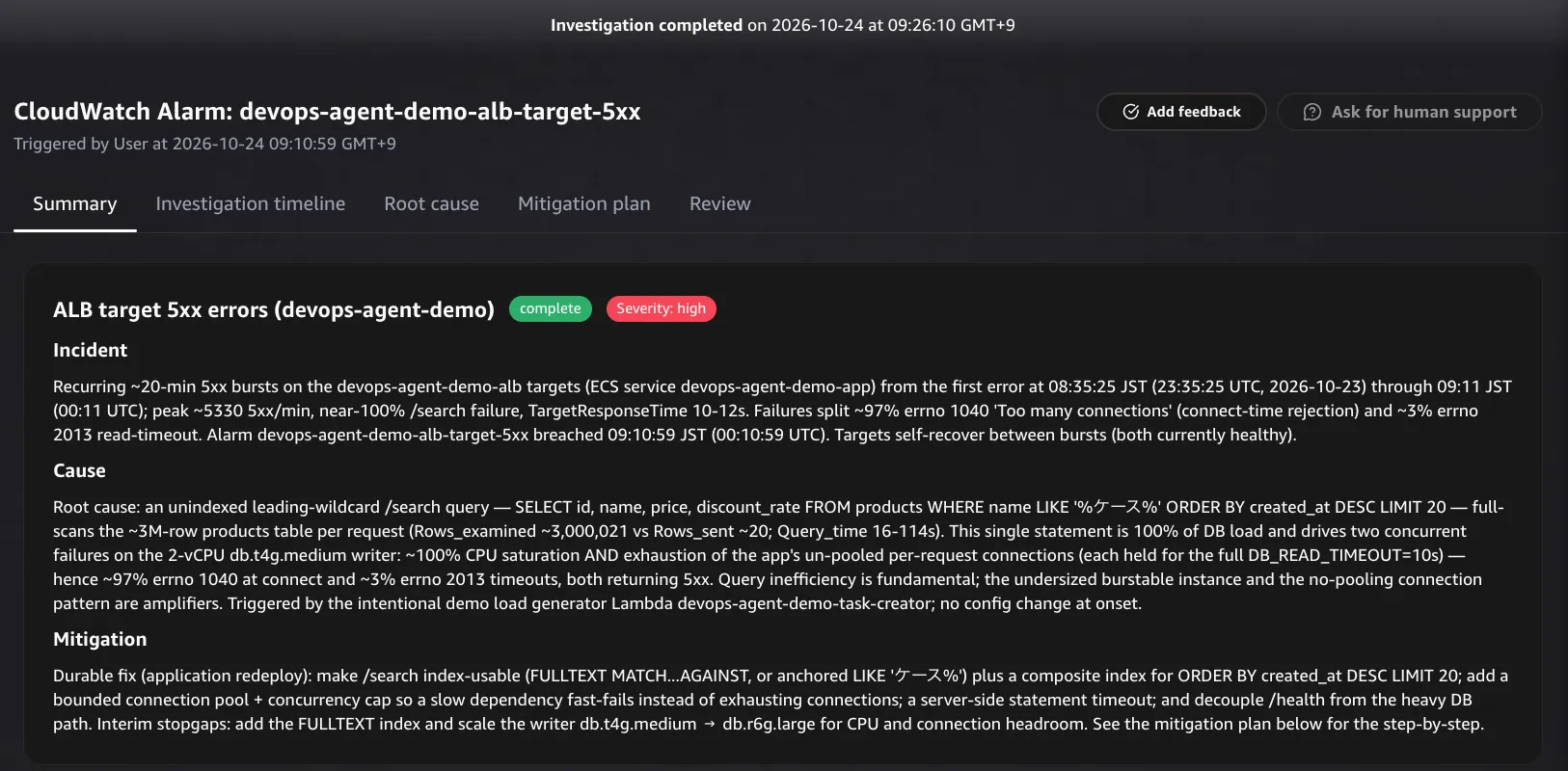
At the end of
Cause, it says that an "intentional demo load generator Lambda" is the source of the load that caused the 5xx. This is wrong.- This Lambda starts investigations and does not generate any load. The actual source was
heyon my own machine - The Agent's role could not read the Lambda's configuration, and it appears to have mistaken the cadence of
CreateBacklogTaskin CloudTrail for the cadence of the load - The "recurring ~20-min bursts" in
Incidentare also, in reality, the result of me runningheyrepeatedly
Investigation timeline
The tab shows, in chronological order, what DevOps Agent checked and in what order. It corrected a wrong early assessment on its own, but the misidentification of the Lambda remains in the final summary.
In the first 4 minutes or so, the Agent verifies the alarm and organizes the situation. It confirmed three things.
- ECS is replacing tasks because of health check failures
RequestCountis almost the same as the 5xx count, and 2xx is almost 0- Aurora CPU reaches 99 to 100% in every burst
It then raises a question: why does Aurora hit 100% CPU at only about 50 to 80 requests per second with fewer than 20 connections? It has three sub-agents investigate in parallel: the application logs (
app-logs), the DB internals (aurora-db-analysis), and infrastructure changes (infra-changes).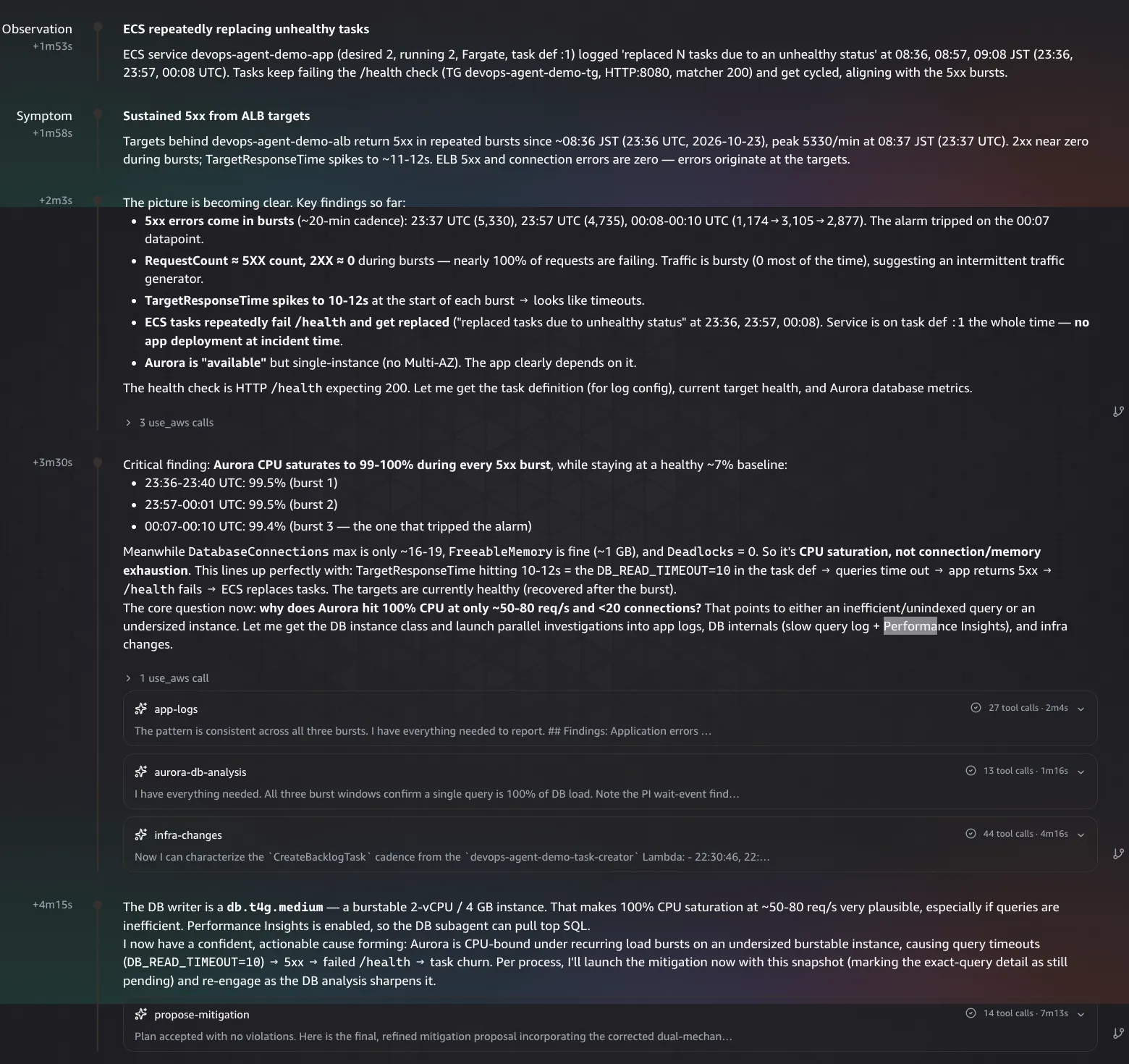
The assessment at this point was "CPU saturation, not connection/memory exhaustion", because the maximum of
DatabaseConnections was only 16 to 19. This assessment is corrected later.At 4 minutes 26 seconds, the Agent is running four jobs in parallel (
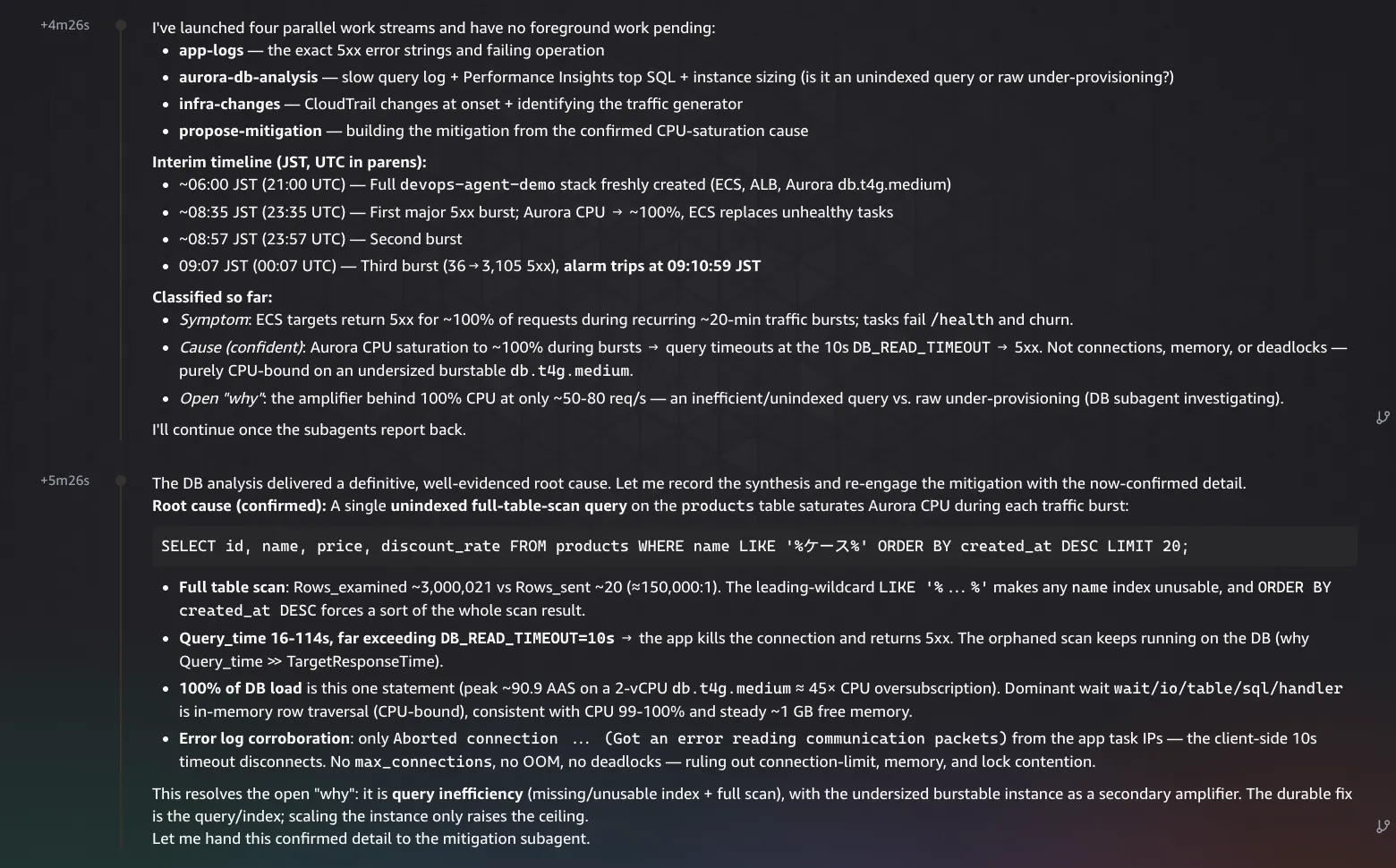
app-logs, aurora-db-analysis, infra-changes, and propose-mitigation).For
aurora-db-analysis, it had the sub-agent look at the slow query log, the Performance Insights top SQL, and the instance size. At 5 minutes 26 seconds, the following results came back.- There is one full-scan query, and the ratio of
Rows_examinedtoRows_sentis extremely large - A single execution takes 16 to 114 seconds
- This one statement accounts for 100% of the DB load (the peak of average active sessions is about 90.9)
- The dominant wait is
wait/io/table/sql/handler, so CPU is the bottleneck because of in-memory row scanning - The error log also supports this cause
Around the 8-minute mark, there is a hypothesis and its reconciliation. The application logs contained a large number of
1040 Too many connections (refused because the connection limit was reached). On the other hand, the DB-side sub-agent had concluded that there was no problem with connections, and the two conclusions conflicted.The Agent formed a hypothesis that
max_connections was low and checked it, but the parameter lookup came back empty, so it recorded the hypothesis as unresolved. It then reconciled the conflict between the two sub-agents on its own. The judgment was as follows.- MySQL doesn't log 1040 rejections, and rejected connections never register in
DatabaseConnections - The DB-side sub-agent's conclusion was based on signals that are blind to this failure mode, and it over-concluded
It also organizes the flow from the full-scan query to the 5xx in four steps.
- The full-scan query accounts for all of the DB load
- As a result, CPU saturation and connection exhaustion happen at the same time
- Requests that were refused a connection (
1040) and requests that timed out after 10 seconds (2013) both become 5xx, and the alarm fires - Because the load arrives intermittently, the bursts repeat. Between bursts, CPU drops and the targets recover on their own

When I actually checked
DatabaseConnections in CloudWatch, the maximum was only about 10 as a 5-minute average. Meanwhile, the application logs contain a large number of 1040 Too many connections. Looking at this metric alone, the connections appear to have plenty of headroom, so the Agent's point was confirmed on screen as well.At about 10 minutes, the final summary appears. The following are gathered in one place.
- The root cause
- The two failure mechanisms that occurred together (CPU saturation and connection exhaustion)
- The causes that were ruled out (deployment or configuration changes, memory, deadlocks, disk I/O)
- An unrelated observation (a remnant of the Scenario A failure)
- What could not be investigated
On the other hand, the
Trigger (Inputs) paragraph also contains the misidentification that treats the Lambda which starts investigations as the source of the load.
From the screen, you can read an approach close to how human SREs handle a failure as a team: dividing roles and investigating in parallel, correcting an early assessment, and reconciling conflicting conclusions from team members.
Root cause
The
Root cause tab is organized into three parts. The root cause was identified correctly, but the judgment about the Lambda in Investigation gaps was wrong.Impact: it says 5xx repeated in bursts on a cycle of about 20 minutesRoot causes: only one full-scan query. The Agent wrote that "This single query is 100% of DB load", that fixing the query "stops recurrence", and that "The undersized burstable instance is a secondary amplifier only"Investigation gaps: it could not read the configuration of the Lambda that starts investigations (the Agent's role lacks thelambda:GetFunctionpermission). Based on the cadence ofCreateBacklogTaskin CloudTrail, it judged that Lambda to be the "scheduled traffic generator". As described above, this judgment is wrong
Across the whole investigation, the Agent went as far as the following.
- It organized the two symptoms, CPU saturation and connection exhaustion, as results of one root cause (the full-scan query)
- Based on the Performance Insights top SQL, it showed that this one statement accounts for 100% of the DB load (the peak of average active sessions is about 90.9)
- It showed that
Rows_examinedis about 3,000,021 against about 20 forRows_sent, and that a single execution takes 16 to 114 seconds - It did not stop at the surface symptom
Too many connections, and explained the causal chain in which the slow query holds each per-request connection for a long time and exhausts the connections

Mitigation plan
The mitigation is written in stages (record the current state, pre-check, apply, post-check, rollback), with commands and risks. The summary at the top separates a stopgap action from a permanent action. The content was mostly sound, but the explanation of the health check proposal was inaccurate.
- Stopgap: add an ngram
FULLTEXTindex onproducts.name. Scale the writer up from db.t4g.medium to db.r6g.large - Permanent (application redeploy): rewrite
/searchinto an index-friendly form (MATCH ... AGAINST, or a prefix match). Add a connection pool and a concurrency cap. Add a composite index that supportsORDER BY created_at DESCand a server-side statement timeout. Decouple the health check from the processing that uses the DB

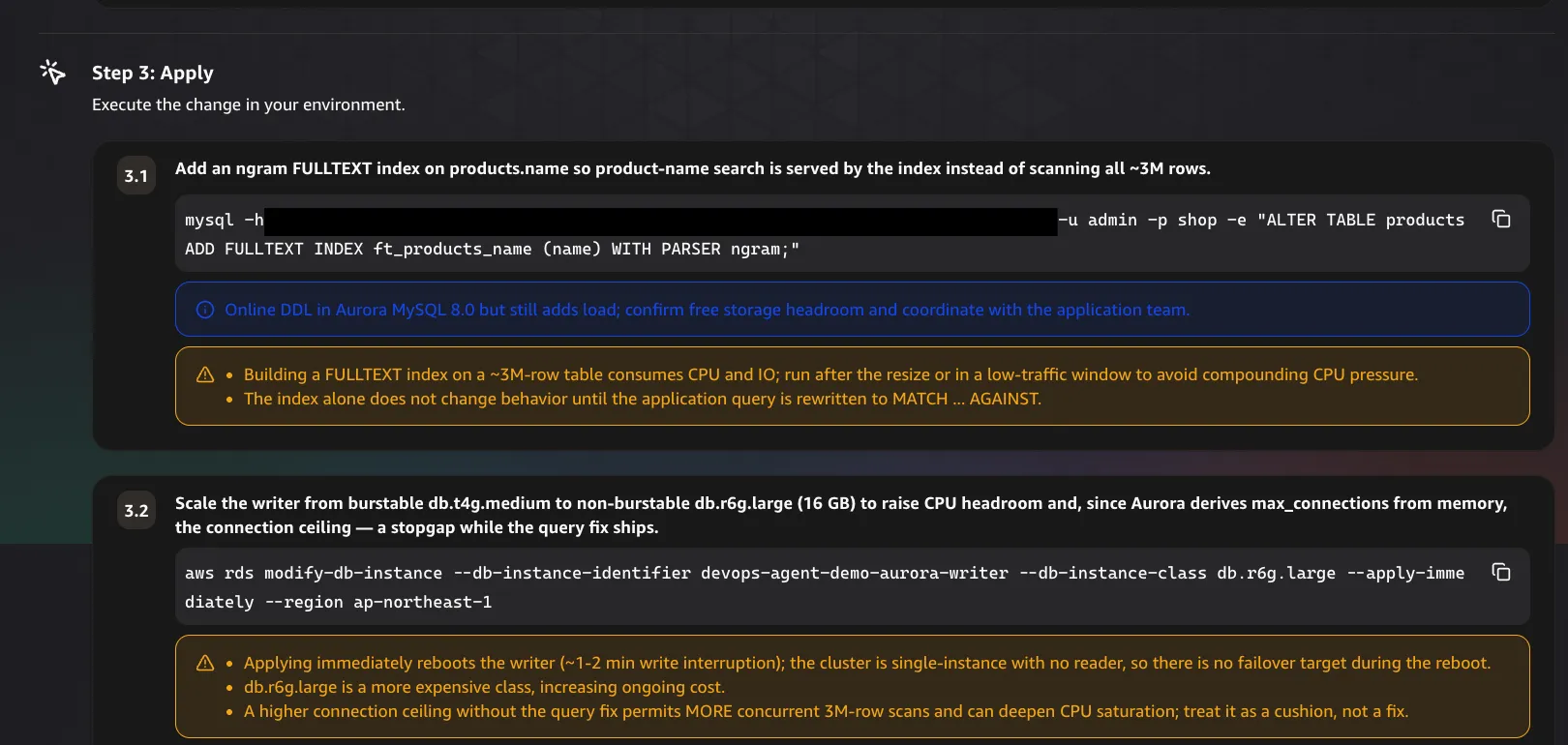
The apply stage (
Step 3: Apply) consists of two commands: ALTER TABLE products ADD FULLTEXT INDEX ft_products_name (name) WITH PARSER ngram; and aws rds modify-db-instance ... --db-instance-class db.r6g.large --apply-immediately. The Agent itself wrote the risks for each.- Creating the
FULLTEXTindex on a table of about 3 million rows consumes CPU and I/O. Run it after the resize or in a low-traffic window. The index alone does not change behavior until the application query is rewritten toMATCH ... AGAINST --apply-immediatelyreboots the writer, and writes stop for about 1 to 2 minutes. The cluster is a single instance with no reader, so there is no failover target. The instance class is more expensive- Even if the connection limit goes up, without fixing the query, more concurrent 3-million-row scans can run and deepen CPU saturation. The Agent wrote that this is "a cushion, not a fix"
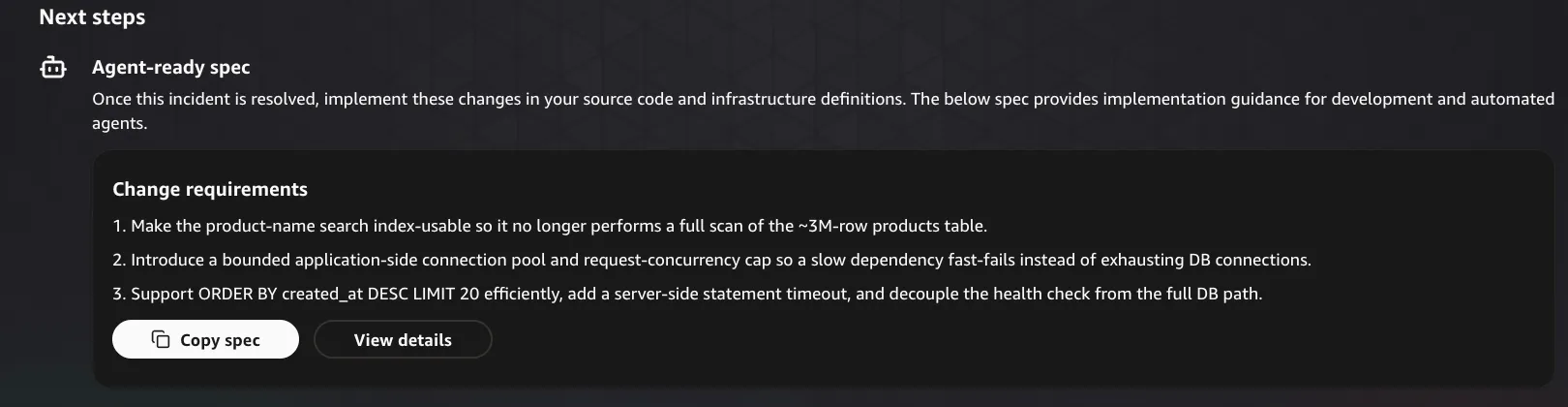
The permanent fix is organized in
Agent-ready spec at the bottom of the screen as Change requirements (three requirements). Each comes with acceptance criteria.- Make the product-name search index-friendly (
EXPLAINno longer showstype=ALLand shows an index being used.Rows_examineddrops from about 3,000,021 to roughly the number of matched rows. InPerformance Insights, the statement no longer dominates DB load. The index is defined in a schema migration or IaC). This is the primary fix, and it says "fast queries release DB connections immediately, which also resolves the errno 1040 pileup" - Introduce a bounded connection pool and a request concurrency cap, so that a slow dependency fails fast instead of exhausting DB connections
- An index that supports
ORDER BY created_at DESC LIMIT 20, a server-side statement timeout (so the DB does not keep running orphaned queries after the client disconnects), and decoupling the health check from the processing that uses the DB
The permanent fix was sound. The stopgap scale-up does not fix the full scan itself, and the Agent itself wrote that "a larger instance alone still saturates at higher traffic". A person still needs to check the plan before running it.
The Agent also proposed decoupling
/health from the processing that uses the DB. In this app, /health does not look at the DB in the code. During the load, however, ECS replaced tasks because of health check failures (replaced ... due to an unhealthy status). The worker threads were probably filled by slow /search requests, so /health could not respond in time. The Agent's wording was inaccurate, but the symptom it pointed to was correct.Scenario B Result
All three conclusions I expected (confirming the CPU spike, identifying the top SQL, and pointing out the missing index) were obtained. The errors were the judgment that the Lambda starting investigations was the source of the load, and the explanation of the
/health proposal.Comparison with Investigating by Hand
Traditionally, the person who received the alarm investigated with the following steps.
- Use ALB metrics to check whether the 5xx comes from the ALB or from the targets
- Check the state of the ECS tasks and the application logs (CloudWatch Logs) for exceptions and connection errors
- Check the Aurora metrics (CPU, connection count) and, if needed, connect to Aurora and look at the running queries
- Check the Performance Insights top SQL and the slow query log
The differences with DevOps Agent are as follows.
- Switching screens: a person moves between ALB, ECS, CloudWatch Logs, Aurora, and Performance Insights. DevOps Agent puts the conclusion, the evidence, and the mitigation in one place in the web app
- How the investigation proceeds: a person investigates alone, one thing at a time. DevOps Agent splits the application logs, the DB internals, and infrastructure changes across sub-agents, investigates in parallel, and reconciles conflicting conclusions
- Speed of start: it took about 2 seconds from the alarm firing to the start of the investigation. Even if the alarm goes off at night, the investigation result and a mitigation proposal are ready by the time a person wakes up
- Duration of an investigation: about 10 minutes for Scenario A and about 15 minutes for Scenario B. The time varies with the complexity of the failure (other investigations varied from about 3 to 18 minutes)
- How evidence is presented: the conclusion comes with numerical evidence (
Rows_examined, average active sessions, the breakdown of errors), the flow of the investigation, and what could not be investigated. This makes it easy for a person to verify afterwards
On the other hand, DevOps Agent is not a replacement for people. Even in this test, there were several places where a person needed to check.
- It misidentified the Lambda that starts investigations as the source of the traffic (Scenario B)
- The column name in the mitigation SQL was wrong (Scenario A)
- The time notation in the summary (UTC) did not match what operations expects by default
I felt that the division of labor is quite realistic: DevOps Agent does the first-pass investigation, and a person verifies the conclusion and the evidence and then carries out the mitigation.
A Refinement: Reporting Investigation Results in Japan Standard Time
DevOps Agent seems to use UTC for times by default. The summary of the first investigation also reported the alarm time in UTC, as
22:19:58 UTC.
The Lambda that starts investigations puts the contents of the alarm into the
description of CreateBacklogTask and passes it to DevOps Agent. The contents are the alarm name, the reason for the state change, the time, and so on. The time in the alarm event arrives in UTC.A Japanese operations team reads times more easily in Japan Standard Time, so I tried the following, in order, on the Lambda side and in the DevOps Agent settings.
- The Lambda put both JST and UTC in the time it writes to
description(Time: 2026-10-24 07:19:58 JST (2026-10-23T22:19:58.489+0000 UTC)) - I removed the UTC and used only JST
- I wrote a rule for reporting times in
Global instructions (AGENTS.md)
The third one worked. From the
Agents tab of the web app, open the details page of any of the Managed agents (the Agent Definition tab), and you will find an input field for Global instructions (AGENTS.md). It is labeled Shared across all agents, so it applies to all Agents. I wrote the following two lines there and pressed Save.1
2
Report all times in Japan Standard Time (JST, UTC+9). When a source returns a UTC timestamp, convert it and show the JST value first, with the UTC value in parentheses.
This instruction takes priority over any built-in formatting or timezone convention, including when they conflict.
When I ran the same test after the change, the summary showed JST first and UTC in parentheses (
2026-10-24 07:40:03 JST (2026-10-23 22:40:03 UTC)).
Summary
In this article, I used an ALB
HTTPCode_Target_5XX_Count alarm as the subject and tested how far AWS DevOps Agent can take the work of isolating the cause (backend or DB).- Scenario A (a latent application bug): it identified why a product with a
NULLprice caused an exception, down to the file, the line, and the product ID, and ruled out Aurora as the cause - Scenario B (a full scan by a search query): based on the Performance Insights top SQL, it identified the query that was the root cause, and organized the causal chain down to connection exhaustion
Investigating a failure sometimes requires knowing both the application and the infrastructure. I do not have much knowledge on the application side, and investigating from the application's point of view was hard for me. DevOps Agent investigates both the application and the infrastructure, so I think it can help reduce the dependence of incident response on specific people.
On the other hand, there were mistakes, such as misidentifying the Lambda that starts investigations as the source of the load. A person needs to check the conclusion and the mitigation before running them.
Thank you for reading this far!
Enjoyed reading this content? Let the author know!
Your likes, comments, shares, and saves help creators reach more builders.

Loading recommendations
Loading article